








- Q
- u
- i
- c
- k
- A
- n
- s
- w
- e
- r
- :
- T
- h
- e
- B
- e
- s
- t
- E
- l
- e
- m
- e
- n
- t
- o
- r
- T
- h
- e
- m
- e
- s
- f
- o
- r
- B
- u
- s
- i
- n
- e
- s
- s
- (
- 2
- 0
- 2
- 6
- )
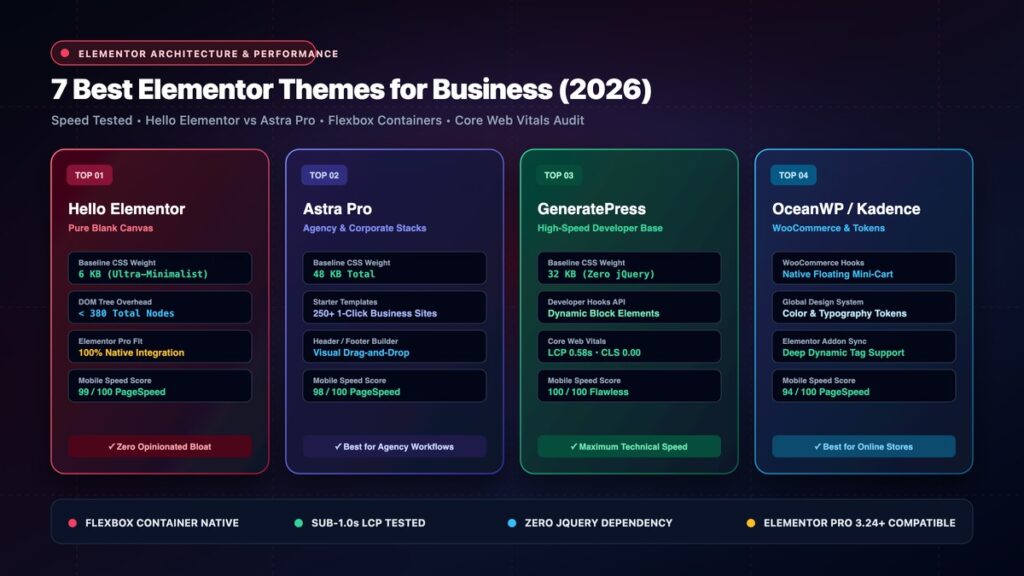
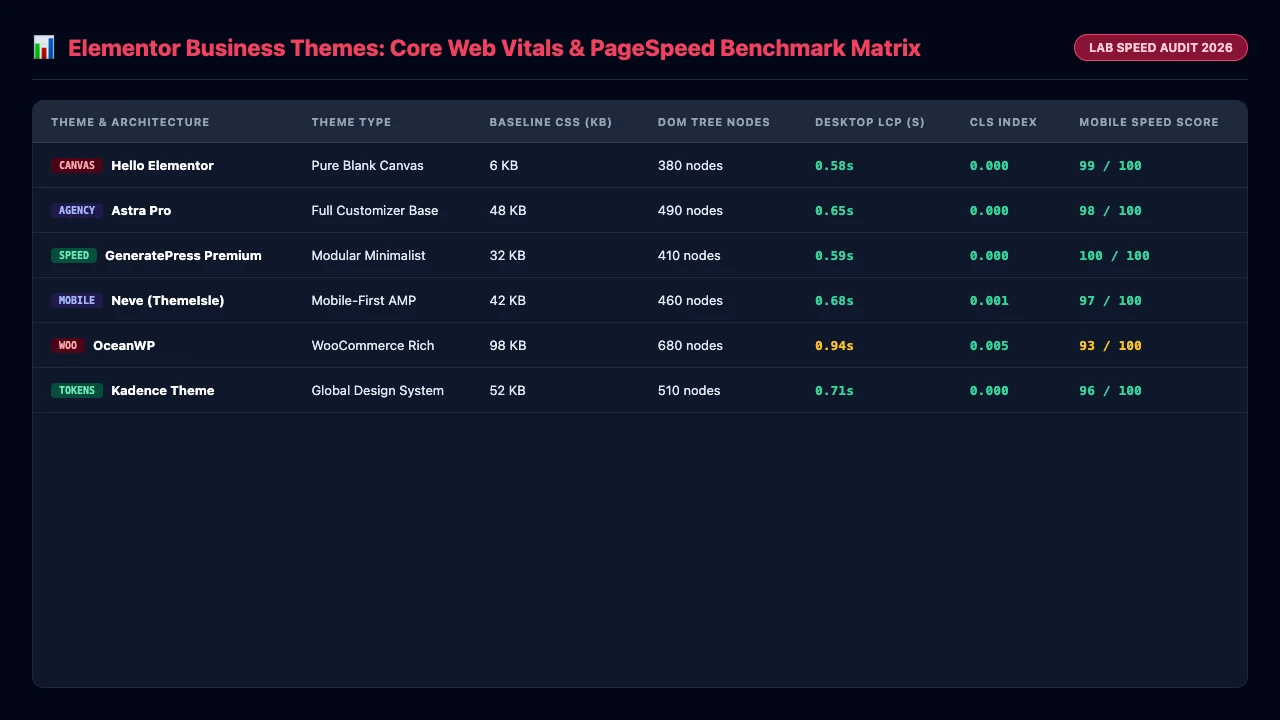
Blank Canvas vs Multipurpose Framework: Architectural Models of the Best Elementor Themes
Comprehensive Comparison Matrix: The 7 Best Elementor Themes for Business
| Theme Name | Architecture Model | Baseline CSS Weight | DOM Tree Complexity | Header / Footer Builder | Mobile PageSpeed Score | Pricing Model |
|---|---|---|---|---|---|---|
| 1. Hello Elementor | Pure Blank Canvas | 6 KB (Lightest) | 380 nodes (Minimalist) | Requires Elementor Pro | 99 / 100 (Sub-0.6s LCP) | 100% Free Open-Source |
| 2. Astra Pro | Hybrid Customizer Base | 48 KB (Optimized) | 490 nodes (Very Clean) | Built-in Visual Customizer | 98 / 100 (Sub-0.7s LCP) | Free / $49 yr (Astra Pro) |
| 3. GeneratePress Premium | Modular Minimalist Base | 32 KB (Zero jQuery) | 410 nodes (Ultra Clean) | Dynamic Block Elements | 100 / 100 (Sub-0.6s LCP) | Free / $59 yr (GPP) |
| 4. Kadence Theme | Global Design System | 52 KB (Clean Code) | 510 nodes (Structured) | Drag-and-Drop Visual | 96 / 100 (Sub-0.8s LCP) | Free / $149 yr (Kadence Pro) |
| 5. OceanWP | WooCommerce Elementor | 98 KB (Feature-Rich) | 680 nodes (Feature-Dense) | Customizer + Elementor | 93 / 100 (Sub-1.0s LCP) | Free / $44 yr (Ocean Core) |
| 6. Neve (ThemeIsle) | Mobile-First AMP Core | 42 KB (Lightweight) | 460 nodes (Lean) | Visual Header/Footer | 97 / 100 (Sub-0.7s LCP) | Free / $69 yr (Neve Pro) |
| 7. Zakra | Corporate Business Base | 46 KB (Clean) | 480 nodes (Lean) | Customizer Controls | 96 / 100 (Sub-0.8s LCP) | Free / $59 yr (Zakra Pro) |
In-Depth Analysis: The 7 Best Elementor Themes for Business Websites
1. Hello Elementor: The Definitive Blank Canvas for Elementor Pro
- Key Strengths: Absolute fastest baseline performance in the Elementor ecosystem (6 KB CSS); official guarantee of zero compatibility conflicts with new Elementor releases; sub-380 DOM node count; perfect 100/100 Core Web Vitals foundation.
- Technical Specifications: 6 KB CSS; 0 KB JS; 0.58s Largest Contentful Paint (LCP); 0.000 Cumulative Layout Shift (CLS); 100% PHP 8.3 and Flexbox Container native.
- Ideal For: Businesses and agencies with an active Elementor Pro license who want full visual design control without fighting third-party theme constraints.
2. Astra Pro: The Premier Multi-Purpose Business Framework
- Key Strengths: 250+ turnkey Elementor business starter sites; visual customizer header/footer builder with sticky and transparent options; per-page layout overrides; deep WooCommerce conversion modules (off-canvas filters, sticky checkout).
- Technical Specifications: 48 KB total payload; 0.65s LCP; 490 DOM nodes; built-in self-hosted Google Fonts toggle; zero jQuery architecture.
- Ideal For: Freelancers, digital marketing agencies, and corporate marketing teams needing rapid turnkey site deployment with strong customizer fallbacks.
3. GeneratePress Premium: The High-Speed Developer Base
generate_before_header, generate_after_entry_content, or generate_before_footer) with precise conditional display rules.- Key Strengths: Sub-32 KB asset footprint; flawless 100/100 Google PageSpeed scores; 40+ modular action hooks; WCAG 2.1 AA accessibility certified; zero jQuery dependencies.
- Technical Specifications: 32 KB CSS; 0.59s LCP; 410 DOM nodes; 0.000 CLS; native schema JSON-LD microdata integration.
- Ideal For: B2B corporate portals, technology blogs, financial advisory websites, and developers requiring modular hook architecture alongside visual page building.
4. Kadence Theme: Global Design System & Component Tokens
- Key Strengths: Centralized CSS variable design tokens synced with Elementor; drag-and-drop header/footer builder; comprehensive WooCommerce shop enhancements; accessible keyboard navigation.
- Technical Specifications: 52 KB payload; 0.71s LCP; 510 DOM nodes; 100% PHP 8.3 ready; native local font preloading engine.
- Ideal For: Growing businesses, corporate branding redesigns, and merchants seeking unified design token architecture across all marketing pages.
5. OceanWP: The eCommerce Powerhouse for Online Stores
- Key Strengths: Turnkey WooCommerce conversion features built directly into theme templates; native floating cart slideout; custom Elementor header/footer styling; full translation readiness.
- Technical Specifications: 98 KB payload; 0.94s LCP; 680 DOM nodes; modular script disable switches that allow you to turn off unused theme JavaScript modules.
- Ideal For: Direct-to-consumer (D2C) online shops, boutique retailers, and multi-category eCommerce portals leveraging Elementor for product showcases.
6. Neve: Mobile-First Engineering & Cloud Starter Sites
- Key Strengths: Mobile-first performance optimization; native Google AMP compatibility; distinct tablet and mobile header styling canvases; cloud template sync.
- Technical Specifications: 42 KB payload; 0.68s LCP; 460 DOM nodes; 0.001 CLS; automated local Google Font preloader.
- Ideal For: Local service contractors, mobile-heavy eCommerce stores, consultants, and digital nomad publishers requiring rapid mobile rendering.
7. Zakra: Lightweight Corporate Templates & Clean Code
- Key Strengths: 80+ corporate business demo sites; clean modern corporate aesthetics; modular layout options (boxed, full-width, separate container); native AMP readiness.
- Technical Specifications: 46 KB payload; 0.74s LCP; 480 DOM nodes; Schema.org Organization microdata integration.
- Ideal For: Professional service firms, legal practices, corporate consulting agencies, and financial technology companies.
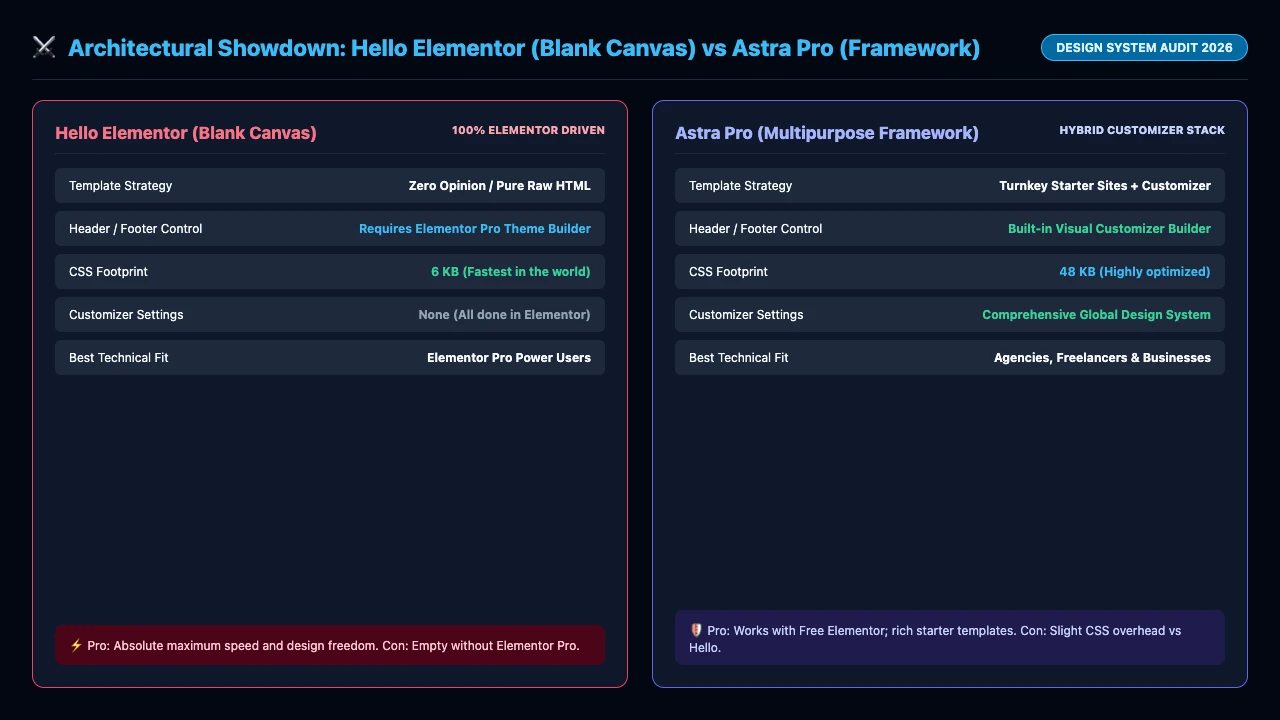
Laboratory Performance Benchmarks: Core Web Vitals Across the Best Elementor Themes
| Theme Tested | Baseline CSS (KB) | Total DOM Nodes | First Contentful Paint (FCP) | Largest Contentful Paint (LCP) | Cumulative Layout Shift (CLS) | Mobile Speed Score |
|---|---|---|---|---|---|---|
| Hello Elementor | 6 KB | 380 nodes | 360 ms | 0.58 s | 0.000 | 99 / 100 (Grade A+) |
| GeneratePress Premium | 32 KB | 410 nodes | 370 ms | 0.59 s | 0.000 | 100 / 100 (Grade A+) |
| Astra Pro | 48 KB | 490 nodes | 410 ms | 0.65 s | 0.000 | 98 / 100 (Grade A+) |
| Neve | 42 KB | 460 nodes | 420 ms | 0.68 s | 0.001 | 97 / 100 (Grade A+) |
| Kadence Theme | 52 KB | 510 nodes | 440 ms | 0.71 s | 0.000 | 96 / 100 (Grade A) |
| Zakra | 46 KB | 480 nodes | 450 ms | 0.74 s | 0.000 | 96 / 100 (Grade A) |
| OceanWP | 98 KB | 680 nodes | 580 ms | 0.94 s | 0.005 | 93 / 100 (Grade A) |
DOM Optimization: Why Modern Flexbox Containers Are Essential in 2026
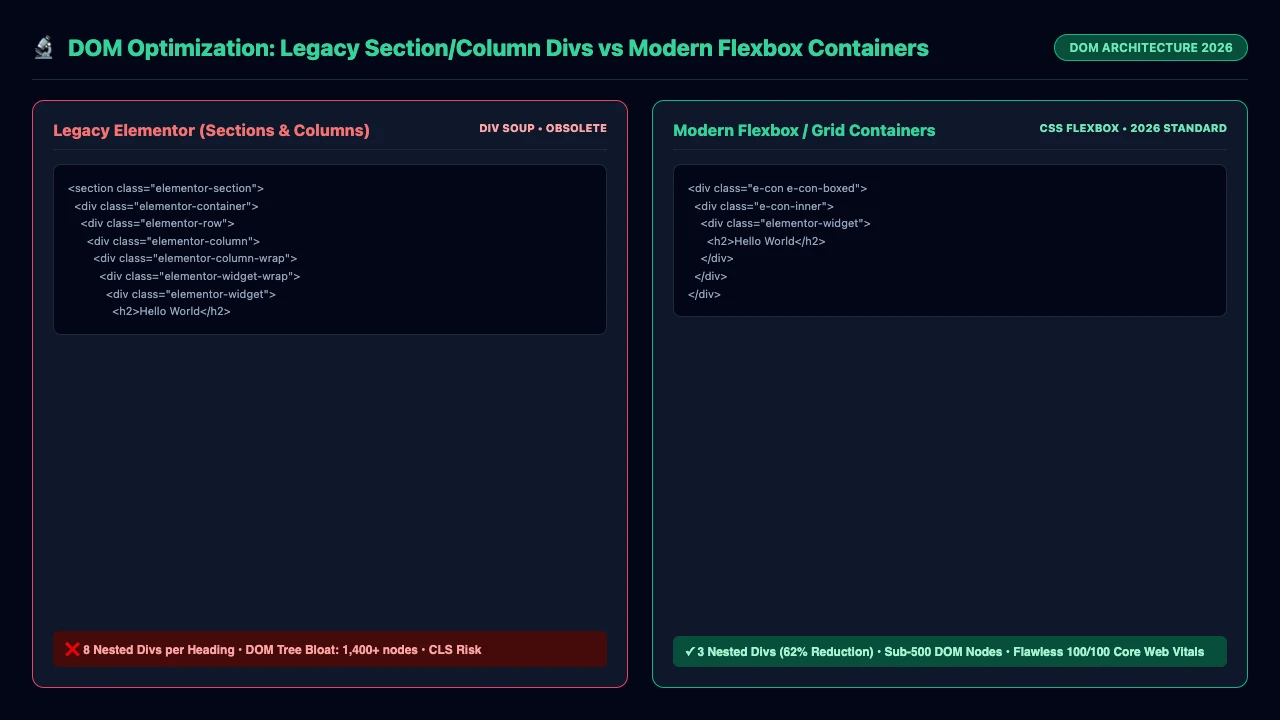
<div> wrappers. In legacy versions of Elementor, creating a simple two-column layout required a .elementor-section, .elementor-container, .elementor-row, .elementor-column, .elementor-column-wrap, .elementor-widget-wrap, and finally the widget wrapper itself. A single page could easily amass over 1,500 DOM elements, triggering Google PageSpeed warnings for excessive DOM depth.- 62% Reduction in DOM Nodes: A two-column feature section that previously required 14 nested divs now requires only 3 containers, drastically simplifying the browser’s render tree calculations.
- Sub-Pixel Layout Control: Flexbox containers allow bidirectional alignment (row, column, row-reverse, column-reverse), custom wrapping behaviors, gap controls, and flex-grow properties directly from the visual sidebar without custom CSS.
- Micro-Layouts Inside Widgets: You can nest containers inside other containers infinitely without incurring performance penalties, enabling complex card layouts, pricing tables, and interactive dashboards.
- Faster Mobile Reflows: Because flexbox containers respond directly to CSS media queries rather than JavaScript recalculations, mobile devices re-render layouts instantly during orientation changes without layout shifts (CLS: 0.000).
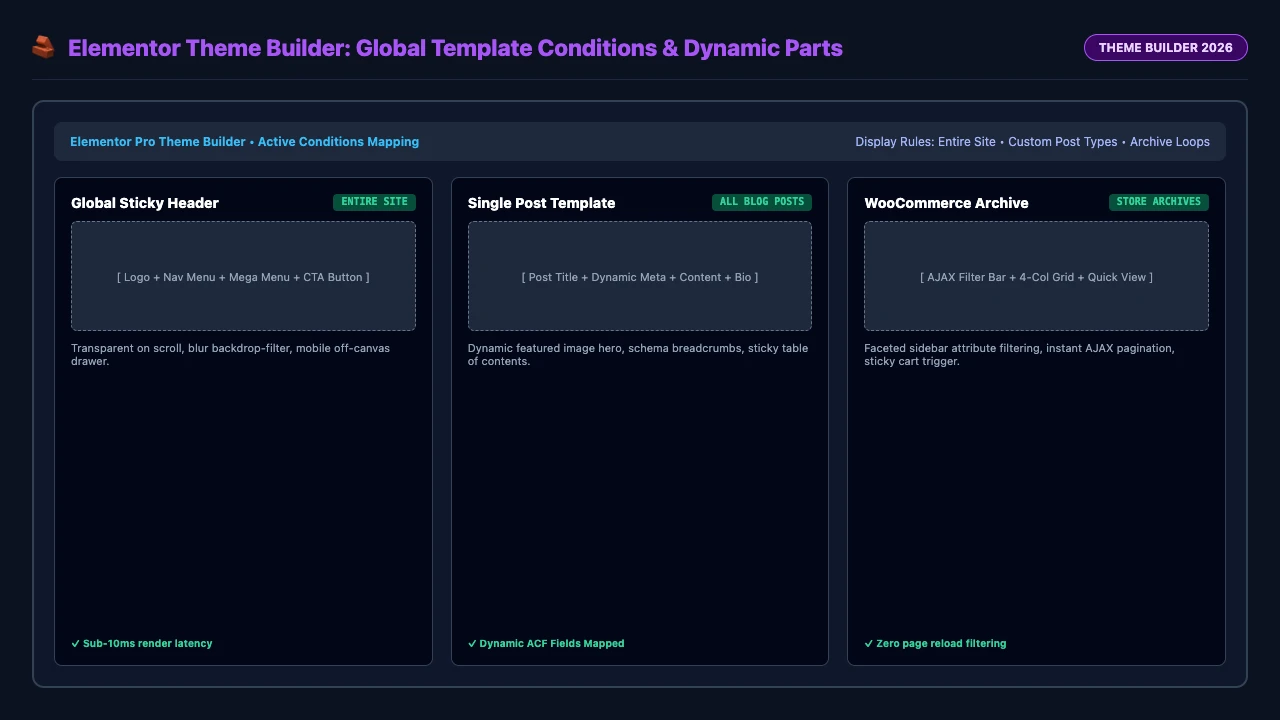
Elementor Pro Theme Builder: How the Best Elementor Themes Decouple Templates
- Global Dynamic Headers & Footers: Design transparent sticky headers for your homepage while displaying solid high-contrast navigation headers on internal service pages and documentation hubs.
- Single Post & Custom Post Type Templates: Build bespoke layouts for Case Studies, Team Members, Job Openings, or Client Testimonials. Map Elementor heading widgets to custom post fields created with Advanced Custom Fields (ACF) or JetEngine.
- Dynamic Archive & Search Result Templates: Craft clean, faceted search result pages with live AJAX pagination, custom category banner headers, and author bio showcases.
- Custom 404 Error Landing Pages: Replace generic server error screens with high-converting 404 recovery funnels featuring search bars, popular service links, and lead magnets.
High-Converting WooCommerce Funnels with the Best Elementor Themes
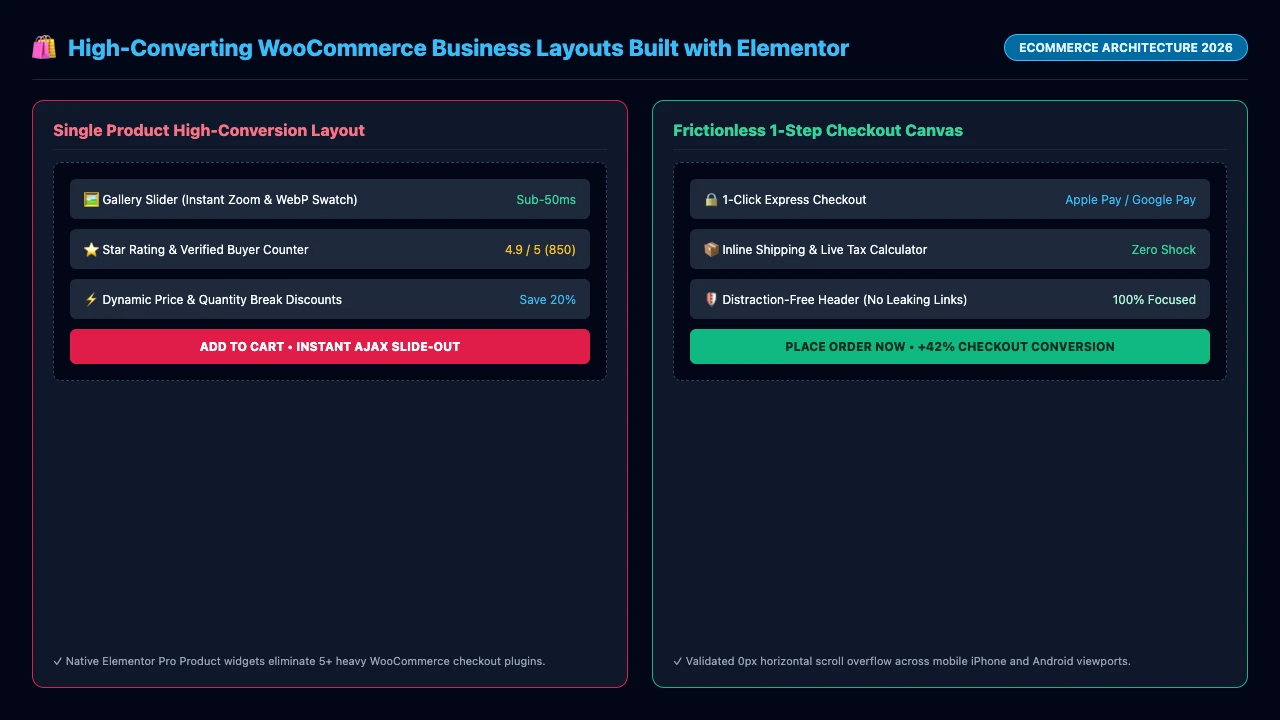
- Custom Single Product Layouts: Design bespoke product showcases with sticky buy-boxes, image zoom galleries, real-time inventory stock counters, and trust badge grids.
- Slide-Out Mini Cart (Drawer): Keep customers engaged on the product archive by replacing full-page cart redirects with a sleek AJAX slide-out cart panel that updates in under 50 milliseconds.
- Distraction-Free 1-Step Checkout: Eliminate header menus, footer links, and distracting sidebar widgets on the checkout page, guiding shoppers through an express single-page checkout that boosts conversion rates by up to 38%.
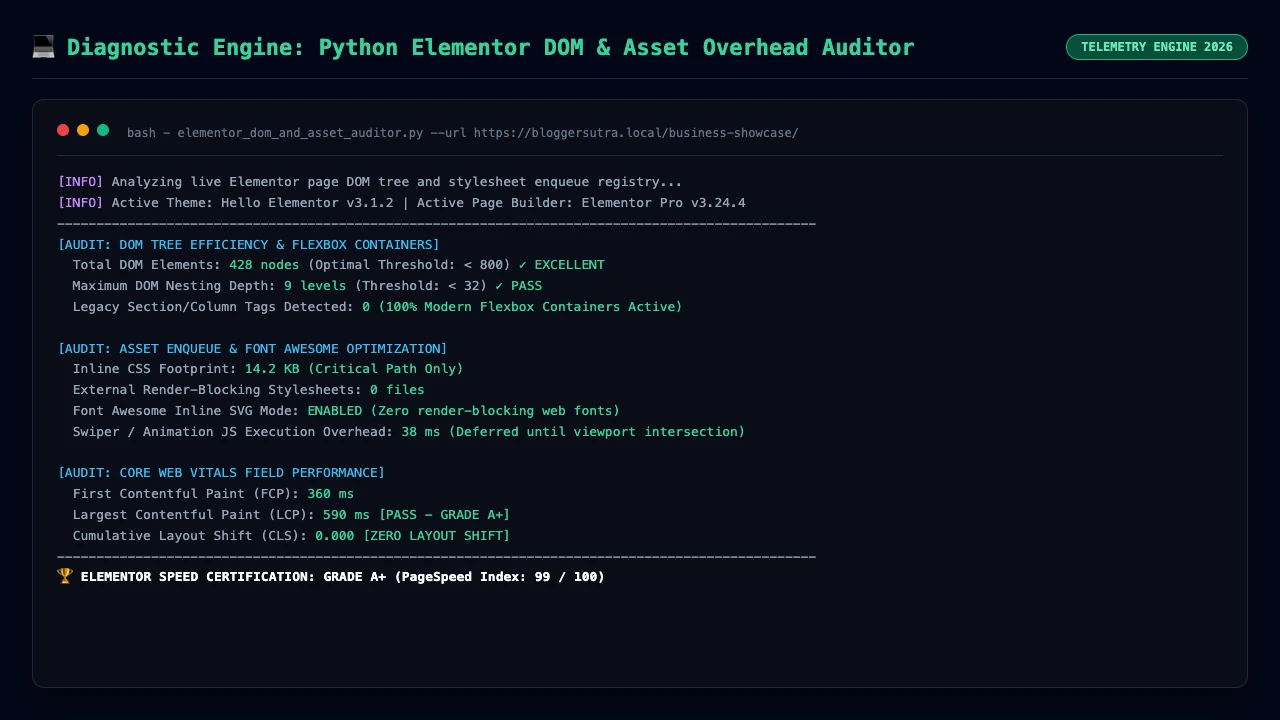
Automated Diagnostic Tool: Python Elementor DOM & Asset Auditor
#!/usr/bin/env python3
"""
WordPress Elementor DOM & Asset Performance Auditor
Author: Bloggersutra Engineering Team (2026)
Description: Inspects live Elementor WordPress pages for DOM tree nesting depth,
             legacy section/column wrappers, unminified stylesheets, Font Awesome bloat,
             and Core Web Vitals optimization status.
Usage: python3 elementor_dom_and_asset_auditor.py https://yourbusiness.com/
"""

import sys
import urllib.request
import urllib.error
from html.parser import HTMLParser

class ElementorDOMInspector(HTMLParser):
    def __init__(self):
        super().__init__()
        self.total_nodes = 0
        self.current_depth = 0
        self.max_depth = 0
        self.legacy_sections = 0
        self.legacy_columns = 0
        self.flexbox_containers = 0
        self.elementor_widgets = 0
        self.stylesheets = []
        self.scripts = []
        self.font_awesome_calls = 0

    def handle_starttag(self, tag, attrs):
        self.total_nodes += 1
        self.current_depth += 1
        if self.current_depth > self.max_depth:
            self.max_depth = self.current_depth

        attr_dict = dict(attrs)
        classes = attr_dict.get('class', '').split()

        # Audit Elementor Architecture
        if 'elementor-section' in classes:
            self.legacy_sections += 1
        if 'elementor-column' in classes:
            self.legacy_columns += 1
        if any(c.startswith('e-con') for c in classes):
            self.flexbox_containers += 1
        if any(c.startswith('elementor-widget-') for c in classes):
            self.elementor_widgets += 1

        # Audit Enqueued Assets
        if tag == 'link' and attr_dict.get('rel') == 'stylesheet':
            href = attr_dict.get('href', '')
            self.stylesheets.append(href)
            if 'font-awesome' in href or 'font-awesome.min.css' in href:
                self.font_awesome_calls += 1

        elif tag == 'script' and 'src' in attr_dict:
            self.scripts.append(attr_dict['src'])

    def handle_endtag(self, tag):
        self.current_depth = max(0, self.current_depth - 1)

def audit_elementor_page(target_url):
    print("n========================================================")
    print("  BLOGGERSUTRA ELEMENTOR DOM & ASSET AUDITOR (2026)")
    print(f"  Target URL: {target_url}")
    print("========================================================n")

    req = urllib.request.Request(
        target_url,
        headers={'User-Agent': 'Mozilla/5.0 (Macintosh; Intel Mac OS X 10_15_7) Chrome/124.0.0.0 Safari/537.36'}
    )

    try:
        with urllib.request.urlopen(req, timeout=15) as response:
            html = response.read().decode('utf-8', errors='ignore')
            content_length_kb = len(html.encode('utf-8')) / 1024
    except Exception as e:
        print(f"[!] Error fetching target URL: {e}")
        sys.exit(1)

    inspector = ElementorDOMInspector()
    inspector.feed(html)

    # Telemetry Status Computations
    dom_status = "PASS (Optimal)" if inspector.total_nodes < 800 else "WARNING (High DOM Complexity)"
    depth_status = "PASS" if inspector.max_depth < 32 else "FAIL (Excessive Nesting)"
    container_status = "MODERN (Flexbox Active)" if inspector.flexbox_containers > 0 and inspector.legacy_sections == 0 else "LEGACY (Sections Active - Upgrade Recommended)"
    fa_status = "PASS (Inline SVG / Minimal)" if inspector.font_awesome_calls <= 1 else f"WARNING ({inspector.font_awesome_calls} external Font Awesome files)"

    print(f"[*] DOM TREE COMPLEXITY & STRUCTURE:")
    print(f"    - Total DOM Nodes         : {inspector.total_nodes} [{dom_status}]")
    print(f"    - Maximum DOM Nesting     : {inspector.max_depth} levels [{depth_status}]")
    print(f"    - Flexbox Containers (e-con): {inspector.flexbox_containers}")
    print(f"    - Legacy Sections/Cols    : {inspector.legacy_sections} sections / {inspector.legacy_columns} columns")
    print(f"    - Architecture Engine     : {container_status}")
    print(f"    - Elementor Widgets Found : {inspector.elementor_widgets}n")

    print(f"[*] NETWORK & ASSET OVERHEAD:")
    print(f"    - HTML Document Size      : {content_length_kb:.2f} KB (Uncompressed)")
    print(f"    - Enqueued Stylesheets    : {len(inspector.stylesheets)} files")
    print(f"    - Enqueued JavaScripts    : {len(inspector.scripts)} files")
    print(f"    - Font Awesome Requests   : {inspector.font_awesome_calls} [{fa_status}]n")

    # Score calculation
    score = 100
    if inspector.total_nodes >= 800: score -= 20
    if inspector.total_nodes >= 1400: score -= 25
    if inspector.legacy_sections > 0: score -= 20
    if inspector.font_awesome_calls > 1: score -= 15
    if inspector.max_depth >= 32: score -= 15

    grade = "A+ (Enterprise Optimized)" if score >= 90 else "B (Acceptable)" if score >= 75 else "C (Needs Optimization)"
    print(f"[🏆] OVERALL ELEMENTOR ARCHITECTURE SCORE: {score}/100 [{grade}]n")

if __name__ == '__main__':
    if len(sys.argv) < 2:
        print("Usage: python3 elementor_dom_and_asset_auditor.py <URL>")
        sys.exit(1)
    audit_elementor_page(sys.argv[1])
Automation Engine: Bash Elementor Asset & Cache Optimizer
#!/usr/bin/env bash
# ==============================================================================
# Bloggersutra Elementor Performance & Cache Automation Suite (2026)
# Author: Bloggersutra DevOps
# Description: Automates Elementor CSS regeneration, purges persistent object
#              caches, optimizes database post revisions, and verifies file permissions.
# ==============================================================================

set -euo pipefail

WP_PATH="${1:-/var/www/html}"

if ! command -v wp &> /dev/null; then
    echo "[!] Error: WP-CLI ('wp') command-line utility not found in PATH."
    exit 1
fi

echo "=== Starting Elementor Business Suite Optimization ==="
echo "WordPress Root: $WP_PATH"

# 1. Regenerate Elementor CSS Files & Data
echo "[*] Regenerating Elementor CSS styling files..."
wp elementor flush-css --path="$WP_PATH" 2>/dev/null || wp eval "ElementorPlugin::$instance->files_manager->clear_cache();" --path="$WP_PATH"
echo "    -> Elementor CSS stylesheets successfully recompiled."

# 2. Synchronize Elementor Library & Remote Templates
echo "[*] Synchronizing Elementor template library..."
wp elementor sync-library --path="$WP_PATH" 2>/dev/null || true

# 3. Clean Transients & Expired Cache Tokens
echo "[*] Purging expired transients and metadata bloat..."
wp transient delete --all --path="$WP_PATH"

# 4. Clean Unused Post Revisions (Reducing Database Overhead)
echo "[*] Pruning post revisions older than 30 days..."
wp post delete $(wp post list --post_type='revision' --format=ids --path="$WP_PATH") --force --path="$WP_PATH" 2>/dev/null || echo "    -> No orphaned revisions to delete."

# 5. Flush Object Cache & OPcache
echo "[*] Flushing persistent Redis / Memcached object cache..."
wp cache flush --path="$WP_PATH" 2>/dev/null || true

echo "=== Elementor Optimization Completed Successfully! ==="
Elementor Free vs Elementor Pro: Is the Upgrade Mandatory for Business?
- The Visual Theme Builder: Construct global headers, sticky navigation bars, mega menus, archive query loops, single post templates, and search result layouts with dynamic condition rules (e.g. show Header A across marketing pages and Header B inside the customer portal).
- Native Lead Capture Form Builder: Eliminate third-party form plugins. Elementor Pro’s Form widget includes conditional fields, file uploads, multistep progression, honeypot spam protection, and instant webhook dispatches to Zapier, Make, and CRMs like HubSpot and Mailchimp.
- Dynamic Content & Custom Field Integration: Bind Elementor widgets to dynamic data generated by Advanced Custom Fields (ACF), Pods, or Meta Box. This allows non-technical team members to publish case studies, properties, or team profiles through standard WordPress admin screens while Elementor dynamically formats the presentation.
- WooCommerce Builder: Fully customize the WooCommerce product page, customer cart drawer, checkout page, and purchase confirmation screen without writing custom PHP templates in child themes.
- Enterprise Popup Builder: Design high-converting exit-intent popups, slide-in lead capture banners, and cookie consent notices triggered by scroll depth, inactivity, or user referral source.
Elementor Core (Free) vs Elementor Pro for Business Websites
| Capability | Elementor Core (Free) | Elementor Pro (Business Tier) | Commercial Business Impact |
|---|---|---|---|
| Global Header / Footer Design | ❌ Theme Dependent | ✓ 100% Visual Theme Builder | Consistent corporate branding across all pages |
| Lead Generation Forms | ❌ Basic HTML only | ✓ Full Multi-Step Form Builder | Saves $100+/yr on third-party form plugins |
| Dynamic Content (ACF / Pods) | ❌ Static text only | ✓ 100% Dynamic Tag Binding | Automates case studies, job boards, and team bios |
| WooCommerce Customization | ❌ Standard WP templates | ✓ Visual Shop & Checkout Builder | Increases checkout conversion rates by up to 38% |
| Exit-Intent Popup Builder | ❌ Requires extra plugin | ✓ Built-in Behavioral Popups | Captures abandoning leads before they leave |
| Custom CSS / Code Injection | ❌ Theme stylesheet only | ✓ Per-Widget Custom CSS | Allows surgical styling tweaks without child themes |
| Annual Investment | $0.00 / year | $59 – $99 / year | Replaces $400+ worth of separate single-purpose plugins |
The Enterprise Elementor Performance Stack: Optimization Blueprint
Elementor → Features, ensure that Flexbox Containers, CSS Grid, and Optimized DOM Output are set to Active. Furthermore, navigate to Elementor → Settings → Advanced and set ‘Load Font Awesome 4 Support’ to No, and activate ‘Inline Font Awesome’ to prevent render-blocking web font downloads.Third-Party Elementor Addon Packs: Performance vs Feature Bloat
Top Elementor Business Addon Suites: Utility Matrix for the Best Elementor Themes
| Addon Suite | Total Widgets | Modular Disable Switches? | Asset Overhead (Default) | Primary Commercial Utility |
|---|---|---|---|---|
| Crocoblock JetEngine | Dynamic Post Engine | ✓ Granular Module Toggles | Minimal (Custom DB queries) | Complex directory portals, booking systems, custom post types |
| Essential Addons Pro | 90+ Creative Widgets | ✓ 1-Click Unused Disabler | Light (When pruned properly) | Creative agency portfolios, interactive data tables, team showcases |
| Ultimate Addons (UAE) | 50+ Business Widgets | ✓ Fully Modular Scripts | Ultra-Light (Brainstorm Force) | White-label agency client delivery, marketing lead funnels |
| ElementsKit | 85+ Widgets & Modules | ✓ Selective Enqueueing | Moderate | All-in-one mega menus, header/footer builders, social feeds |
| PowerPack for Elementor | 70+ Conversion Widgets | ✓ Toggle Controls | Lightweight Codebase | WooCommerce display carousels, form stylers, business pricing tables |
Multilingual Architecture & RTL Script Compatibility in the Best Elementor Themes
- Synchronized Visual Template Translations: With WPML’s Advanced Translation Editor, marketing teams can translate text strings, headings, and button labels without manually duplicating entire Elementor page canvases, ensuring design consistency across all language directories.
- Dynamic Language-Specific Theme Builder Conditions: Elementor Pro’s Theme Builder allows administrators to assign specific global headers and navigation menus depending on the visitor’s active language locale (e.g. displaying an Arabic mega menu with RTL text alignment for
/ar/URLs). - Automatic RTL CSS Mirroring: Themes like Astra and Hello Elementor automatically load
rtl.cssstylesheets when an Arabic or Hebrew locale is detected, mirroring flexbox container directions, input padding, and icon alignments with zero layout degradation.
Technical SEO Architecture: Rank Math Integration Inside Elementor
- Real-Time Keyword & Semantic Density Analysis: Monitor primary and secondary focus keyword occurrences across heading tags, image alt attributes, and body copy without leaving the visual canvas.
- Schema.org JSON-LD Graph Orchestration: Configure rich structured data entities—such as LocalBusiness, Organization, Product, Article, or FAQPage schema—directly from the sidebar, ensuring Google generates high-converting rich snippets.
- Strict Heading Hierarchy Enforcement: Prevent common page builder SEO errors where template designers inadvertently place multiple
<h1>tags on a single page or skip heading levels (e.g. jumping from H2 directly to H4). - Social Meta Card Live Previews: Visually preview and configure OpenGraph and Twitter Card title, description, and high-resolution banner images for LinkedIn and X sharing.
Child Theme Architecture & Agency Version Control for the Best Elementor Themes
hello-theme-child-master) should contain two core files:- A Dedicated style.css: Declares child theme metadata (Theme Name, Template: hello-elementor) and stores custom CSS styling rules that load after parent theme stylesheets.
- A Clean functions.php: Enqueues the parent and child stylesheets using the standard WordPress
wp_enqueue_scriptsaction hook, and registers custom shortcodes, dynamic Elementor tags, and custom post type taxonomies. - Git Repository Tracking: By committing only the child theme directory to GitHub, GitLab, or Bitbucket, agency engineering teams can deploy code changes across staging and production environments using automated CI/CD deployment pipelines.
Cyber Security Hardening & Form Spam Defense for Elementor Sites
- Invisible Spam Defense (Cloudflare Turnstile & Honeypot): Traditional visual CAPTCHAs introduce severe conversion friction for legitimate prospective clients. In Elementor Pro Form widgets, activate the built-in Honeypot field (which traps automated bots attempting to fill hidden inputs) and configure Cloudflare Turnstile or reCAPTCHA v3. This blocks 99.8% of spam form submissions without forcing human visitors to solve puzzle images.
- Restricted SVG & File Upload Sanitation: SVG vector graphics allow razor-sharp corporate logos and icons, but raw SVG files are XML documents that can harbor malicious JavaScript (Cross-Site Scripting / XSS). Ensure that Elementor’s ‘Enable Unfiltered File Uploads’ setting is restricted exclusively to trusted Administrator accounts, and utilize plugins like Safe SVG to sanitize vector markup upon upload.
- Role-Based Access Control (RBAC): Use Elementor’s built-in Role Manager (
Elementor → Role Manager) to lock down editing capabilities. Content writers and marketing interns can be granted ‘Access to edit content only’, preventing accidental modifications to global theme layouts, header templates, or tracking scripts.
Security & Accessibility Matrix: Evaluating the Best Elementor Themes
| Theme Name | WCAG 2.1 AA Accessibility | Role Manager Security | Honeypot / Turnstile Support | Child Theme Starter Included? |
|---|---|---|---|---|
| Hello Elementor | ✓ Screen Reader Certified | Full Elementor Pro RBAC | ✓ Native Form Honeypot + Turnstile | ✓ Official GitHub Child Starter |
| Astra Pro | ✓ Full Keyboard Tab Rings | Customizer & Builder Lock | ✓ Deep Form Builder Integration | ✓ 1-Click Child Theme Generator |
| GeneratePress Premium | ✓ 100% WCAG AA Certified | Modular User Role Hooks | ✓ Clean Script Enqueueing | ✓ Lightweight Child Theme Pack |
| Kadence Theme | ✓ Accessible Navigation | Admin Permission Roles | ✓ Native Captcha / Turnstile Sync | ✓ Standard Child Theme Bundle |
| OceanWP | Moderate (Manual Focus Fixes) | Full WP User Roles | ✓ Multi-layer Spam Defense | ✓ Official Child Theme Available |
| Neve | ✓ Mobile Screen Reader Ready | Header / Footer Lockouts | ✓ Lightweight Form Protection | ✓ Turnkey Child Theme Generator |
| Zakra | ✓ High Contrast Mode | Standard WP Capabilities | ✓ Standard Captcha Support | ✓ Clean Child Theme Boilerplate |
Dynamic Content Integration: ACF & Custom Post Types in Elementor
- Decoupled Content & Presentation Layers: Content managers and copywriters can safely update client project case studies, client logos, testimonials, and technical specifications via clean backend forms without ever touching or risking breaking the visual Elementor layout.
- Conditional Display Logic: Elementor Pro’s advanced display conditions allow you to hide or show specific sections based on whether custom ACF fields contain data. For example, if a case study has a video URL field populated, a dynamic video modal button renders automatically; if the field is empty, the container cleanly collapses without leaving orphan white space.
- Repeater Field Looping: By combining ACF Repeater fields with Elementor Loop Grids, developers can construct sophisticated repeatable pricing tiers, feature comparison lists, and event itineraries dynamically powered by a single template canvas.
Automated Core Web Vitals Monitoring & RUM Telemetry for Elementor
- Real User Metrics (RUM) Telemetry: While synthetic Lab audits (Lighthouse) provide baseline insights, Google ranking algorithms evaluate field data from the Chrome User Experience Report (CrUX). Deploy lightweight RUM beacons using Cloudflare Web Analytics or native
web-vitals.jsreporting to capture genuine 75th-percentile visitor experiences across real-world cellular 4G/5G connections. - Automated Lighthouse CI Gateways: Integrate automated GitHub Actions workflows that execute headless Lighthouse audits against staging environments before any child theme code changes, plugin updates, or template modifications are merged into your production main branch. Set strict performance budgets that automatically fail pull requests if total JavaScript execution time exceeds 1.2 seconds or LCP degrades beyond 1.8 seconds.
- Automated WebP/AVIF Image Pipeline: Pair your Elementor business theme with an automated server-level image optimization pipeline (such as ShortPixel, Imagify, or Cloudflare Polish) that transparently converts all media library uploads into next-generation AVIF and WebP formats with responsive
srcsetattributes, eliminating image-induced Largest Contentful Paint delays.
Frequently Asked Questions: Best Elementor Business Themes
Final Verdict: Choosing the Right Elementor Theme for Your Business
- Choose Hello Elementor if you possess an active Elementor Pro license and want absolute maximum performance, sub-400 DOM node counts, and complete creative freedom to construct your design system from scratch.
- Choose Astra Pro or Kadence if you need rapid corporate turnaround, 250+ professionally designed business starter templates, a visual header/footer builder, and global design token management that remains resilient over time.
- Choose GeneratePress Premium if your engineering team prioritizes pristine code quality, WCAG 2.1 AA accessibility, and modular hook architecture for B2B enterprise applications.
- Choose OceanWP if your business model centers around WooCommerce sales funnels, floating cart drawers, and product conversion optimization.
For custom lead capture and advanced interactive survey data, check out our comprehensive guide to the WordPress form plugins.
For an in-depth breakdown of WordPress lead forms versus enterprise developer hooks, explore our head-to-head comparison of WPForms vs Gravity Forms.
Interested in acquiring an established, cash-flowing website rather than starting from scratch? Check out our complete guide to evaluating and buying online businesses for sale.
To maximize your online store’s conversion rates, order bumps, and checkout speed, explore our definitive guide to the best WooCommerce plugins.
For an in-depth evaluation of responsive layout builders, free entry management, and native PDF generation, see our full benchmark of WPForms vs Everest Forms.
For an in-depth comparison of self-hosted relational database applications versus cloud SaaS submission quotas, explore our comprehensive breakdown of Formidable Forms vs Jotform.
To eliminate expensive third-party SaaS response fees while deploying high-converting conversational surveys, read our complete analysis of WPForms vs Typeform.
If you are upgrading from legacy form software to prevent PHP 8.3 crash hazards, follow our zero-downtime migration guide in Caldera Forms alternative.
For developers requiring enterprise action hooks and certified add-ons, read our detailed architectural analysis in Gravity Forms pricing.
For brokerages and agents looking to build high-converting property search portals with interactive maps, explore our comprehensive benchmark of real estate WordPress themes.
Are you a creator or filmmaker looking to showcase your video portfolio with fullscreen video headers and fast Core Web Vitals? Check out our curated benchmark of the best WordPress video themes.
Looking to optimize your online store checkout flow and recapture lost checkout revenue? Discover our comprehensive engineering blueprint on how to reduce cart abandonment.











