Quick answer
- How do you secure cloud data as a blogger in 2026? To master how to secure cloud data across your WordPress ecosystem, execute these 12 critical security practices: (1) Deploy zero-knowledge client-side encryption: Encrypt all database dumps, media archives, and configuration files locally via Cryptomator or Rclone
crypt(AES-256-GCM) before uploading to cloud storage; (2) Mandate hardware FIDO2 security keys: Deprecate vulnerable SMS and email 2FA in favor of physical YubiKeys or biometric WebAuthn passkeys to eliminate reverse-proxy phishing; (3) Enforce least-privilege IAM policies: Restrict cloud API credentials to dedicated, read/write-scoped buckets with strict IP CIDR whitelisting, zero master root access, and 30-day token rotation; (4) Implement immutable 3-2-1 backups: Store 3 copies of your website data across 2 independent cloud providers with WORM (Write Once, Read Many) Compliance Mode locking enabled for 90 days to prevent ransomware destruction; (5) Audit cloud sharing links: Set mandatory 7-day expiration dates, require complex passphrases, and disable public anonymous file-drop links; (6) Isolate sensitive WordPress assets: Storewp-config.phpcredentials, staging databases, and subscriber lists in isolated, encrypted cloud vaults completely separate from public web directories; (7) Enforce TLS 1.3 in transit: Mandate strict HTTPS transport with modern cipher suites and disable unencrypted HTTP endpoints; (8) Run automated vulnerability audits: Execute continuous CLI posture scans to detect public bucket ACLs, open CORS headers, and stale API keys; (9) Establish multi-cloud redundancy: Distribute encrypted backups across heterogeneous providers (e.g., AWS S3, Backblaze B2, and Cloudflare R2); (10) Deploy automated secret scanning: Use pre-commit hooks to block exposed API tokens, database passwords, and private keys from syncing to cloud drives; (11) Configure strict session timeouts: Limit cloud administrative sessions to 12 hours with automatic revocation upon IP or ASN deviations; and (12) Automate encrypted backup workflows: Use production Bash scripts paired with Rclone to automate local compression, client-side encryption, and multi-cloud synchronization on a daily schedule. - What is the difference between client-side encryption and server-side encryption for cloud storage? With server-side encryption (such as AWS SSE-S3 or Google Cloud default encryption), the cloud provider holds the cryptographic master keys; if the provider suffers an internal breach or is compelled by a legal subpoena, your plaintext data can be decrypted. With zero-knowledge client-side encryption, your files are scrambled on your local server using AES-256-GCM or XChaCha20-Poly1305 before transmission; the cloud provider only stores opaque ciphertext blobs and possesses zero cryptographic ability to inspect your files.
- Why should bloggers completely eliminate SMS 2FA for cloud accounts? SMS 2FA transmits one-time passcodes over unencrypted SS7 telecommunication protocols that are vulnerable to SIM swapping, cellular carrier impersonation, and man-in-the-middle interception. Advanced phishing frameworks like Evilginx can easily bypass SMS and software TOTP codes in real time. In contrast, hardware FIDO2 security keys (such as YubiKey 5Ci) utilize origin-bound public key cryptography that is mathematically immune to credential interception and phishing.
- Which cloud storage provider is best for secure, cost-effective WordPress backups? For enterprise-grade security and low cost, Backblaze B2 combined with Cloudflare R2 or AWS S3 is the industry benchmark. Backblaze B2 delivers native S3 API compatibility, compliance-mode WORM object locking, and 99.999999999% (11 nines) durability at $0.006 per GB/month—saving bloggers over 75% compared to legacy enterprise storage providers while providing flawless ransomware resistance.
Cloud storage infrastructure powers the modern publishing world, making it vital to understand how to secure cloud data from day one. Whether you are synchronizing high-resolution editorial assets, archiving weekly WordPress database dumps, collaborating with remote freelance writers, or managing digital commerce fulfillment files, cloud platforms like Amazon S3, Google Drive, Backblaze B2, and Dropbox have become indispensable extensions of a blogger’s digital operational stack. However, this reliance on external infrastructure creates an unprecedented security exposure. Understanding how to secure cloud data is no longer a theoretical exercise for enterprise systems engineers—it is an urgent operational requirement for every serious content publisher, independent blogger, and digital business owner in 2026. If you want to expand into high-margin telecom recurring revenue, explore our comprehensive guide on VoIP reselling to launch a white-label cloud communications business with 70%+ gross margins.
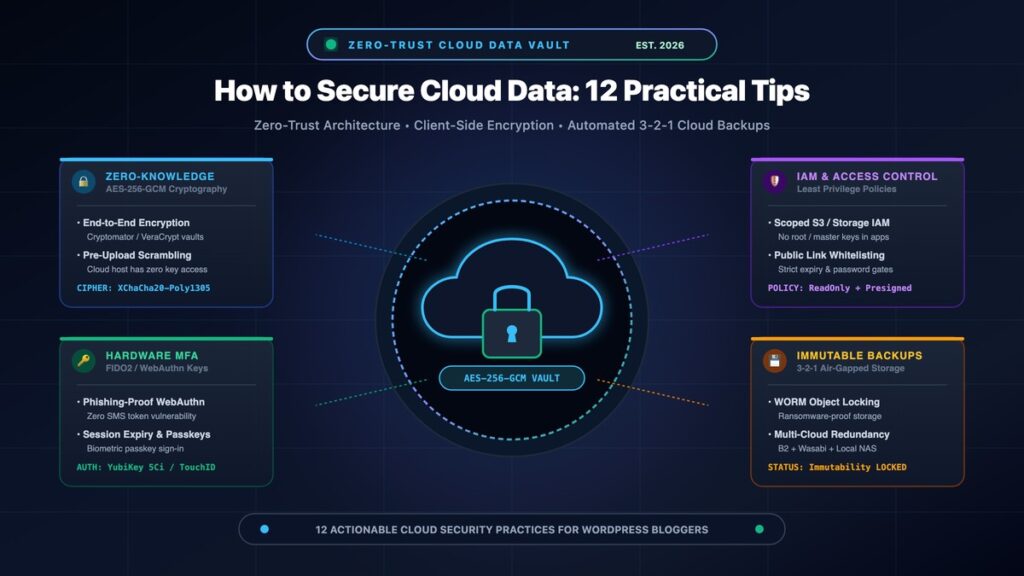
Many website owners mistakenly assume that simply uploading files to a prominent tech provider automatically secures their assets. In reality, standard cloud storage defaults prioritize ease of access over strict defensive isolation. Default configurations frequently allow permissive sharing links, leave object buckets vulnerable to accidental public exposure, rely on vulnerable SMS authentication, and utilize provider-managed encryption keys that provide zero protection against legal subpoenas or rogue administrative access. A single compromised API token or unencrypted database backup can instantly expose your entire subscriber database, customer payment records, proprietary drafts, and server credentials.
In this comprehensive, production-tested guide, we break down exactly how to secure cloud data step by step. We examine the shared responsibility model of cloud architecture, walk through 12 actionable, battle-tested security practices, provide production-ready Python and Bash automation scripts, compare cryptographic storage tiers, and review detailed comparison matrices to ensure your cloud-stored digital assets remain impenetrable, compliant, and fully resilient against ransomware and catastrophic hardware loss.
The Shared Responsibility Model in Modern Cloud Storage
To understand how to secure cloud data effectively, you must first recognize the fundamental dividing line between cloud security and user security: the Shared Responsibility Model. Every major cloud provider—including Amazon Web Services (AWS), Google Cloud Platform (GCP), Microsoft Azure, Backblaze, and Cloudflare—operates under this strict framework. Failing to understand this distinction is the leading cause of catastrophic cloud data breaches.
Under the Shared Responsibility Model, the cloud provider assumes responsibility for the security of the cloud. This encompasses physical datacenter security, redundant power supplies, environmental controls, biometric facility access, server hardware maintenance, virtualization hypervisor patching, and core network backbone resilience. When you store files in an S3 bucket or Google Cloud Storage container, the provider guarantees that the physical NVMe drives will not lose your data (often advertising 99.999999999% or ’11 nines’ of durability) and that the underlying storage nodes remain online.
Conversely, you—the customer—are exclusively responsible for security in the cloud. You retain absolute ownership and responsibility for: (1) Data classification and encryption: Deciding whether files are scrambled with client-side zero-knowledge encryption before upload; (2) Identity and Access Management (IAM): Generating, scoping, and rotating API keys, passwords, and multi-factor authentication tokens; (3) Bucket policies and Access Control Lists (ACLs): Ensuring storage containers are explicitly locked down against public internet inspection; (4) Transport security: Mandating TLS 1.3 encryption across all API ingestion channels; and (5) Backup lifecycle management: Implementing immutable retention policies to shield historical archives from automated ransomware deletion.
If an attacker gains access to your cloud storage bucket because you left an S3 bucket policy set to public, embedded an un-scoped API key in a public GitHub repository, or used a weak password without hardware-backed multi-factor authentication, the cloud provider’s physical security measures cannot help you. The infrastructure functioned precisely as configured. When evaluating how to secure cloud data effectively, adopting a true zero-trust mindset means treating the cloud as an untrusted public utility: you must assume the network is monitored, external APIs are constantly scanned by automated adversaries, and only cryptographically hardened assets are safe from compromise.
1. Deploy Zero-Knowledge Client-Side Encryption
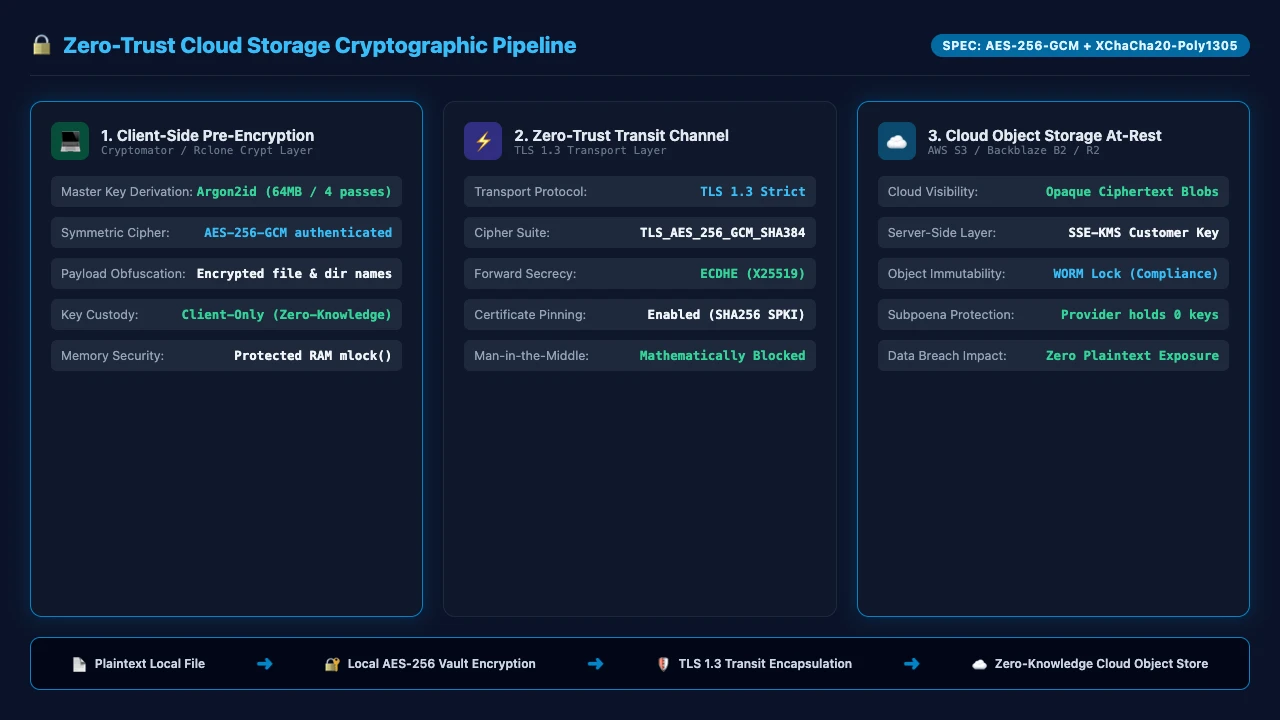
When determining how to secure cloud data from external adversaries, the most critical architectural principle for protecting sensitive digital assets is zero-knowledge client-side encryption. When researching how to secure cloud data, you will frequently see cloud hosting providers boast about ‘server-side encryption at rest’ (such as Amazon S3-Managed Keys SSE-S3 or Google Cloud default encryption). While server-side encryption is an essential baseline compliance measure, it provides zero defense against the most common cloud security threats.
With server-side encryption, the cloud provider possesses both the encrypted ciphertext and the cryptographic master key used to unlock it. If an adversary compromises your cloud provider account, if a rogue insider at the cloud vendor accesses internal infrastructure, or if a government agency issues a sealed national security letter or subpoena compelling the provider to hand over your data, the provider can transparently decrypt your files without your knowledge or consent. Server-side encryption protects against physical theft of a decommissioned hard drive from a datacenter—it does not protect against logical credential theft, cloud provider vulnerabilities, or unauthorized administrative access.
Zero-knowledge client-side encryption flips this security posture entirely. Before a single byte of data leaves your local computer or production server, it is passed through an open-source, mathematically proven cryptographic engine (such as Cryptomator, VeraCrypt, or Rclone
crypt). The data is encrypted using military-grade ciphers—specifically AES-256-GCM (Galois/Counter Mode for authenticated encryption) or XChaCha20-Poly1305. The encryption keys are derived locally from your master passphrase using memory-hard key derivation functions like Argon2id or PBKDF2 with hundreds of thousands of hashing iterations.When these encrypted files are uploaded to Google Drive, Dropbox, Amazon S3, or Backblaze B2, the cloud provider sees only indistinguishable random noise. This fundamental rule of how to secure cloud data guarantees that file contents, individual directory structures, file sizes, and metadata are completely obfuscated. Even if an attacker gains total administrative control over your cloud storage bucket, they cannot read your WordPress database records, subscriber lists, financial spreadsheets, or private manuscripts. In any rigorous evaluation of how to secure cloud data, without your local master passphrase and private key, decrypting AES-256-GCM ciphertext via brute force would require more computational energy than exists in the observable universe. Before building or customizing your site, mock up your user flows and design tokens using the best web design software like Figma or Webflow to streamline layout creation and maintain strict visual consistency.
- Cryptomator for Editorial Sync: Ideal for desktop and mobile devices. Cryptomator creates an encrypted virtual drive (vault) inside your Google Drive, Dropbox, or OneDrive folder. Files dropped into the vault are scrambled individually on the fly before cloud syncing occurs.
- Rclone Crypt for Server Automation: The industry standard for Linux web servers and headless environments. Rclone allows you to define an encrypted virtual remote wrapping any S3, B2, or cloud backend, automating scheduled server-side encrypted backups with zero user intervention.
- GnuPG (GPG) for Database Dumps: For automated WordPress database backups, pipe your raw MySQL dump directly into
gpg --symmetric --cipher-algo AES256before writing the output file to disk or transmitting across external APIs.
2. Mandate Hardware FIDO2 Security Keys & Deprecate SMS 2FA
Authentication is the front door to your cloud storage infrastructure. If an adversary steals or bypasses your credentials, all server-side access controls instantly collapse. When evaluating how to secure cloud data, modern cyber defense mandates the complete elimination of legacy authentication methods in favor of phishing-proof hardware security keys operating on FIDO Alliance FIDO2 specifications and WebAuthn open standards.
For years, standard security guidance recommended SMS-based two-factor authentication (2FA). In 2026, relying on SMS 2FA is an extreme operational liability. SMS verification codes are transmitted across telecommunications signaling protocols (SS7) that lack cryptographic encryption. Cybercriminals routinely execute SIM swap attacks, bribing or deceiving telecom support representatives into porting a blogger’s phone number onto an attacker-controlled SIM card. Once the phone number is intercepted, the attacker triggers an automated password reset on your Google, AWS, or cloud storage accounts, intercepts the SMS one-time PIN, and seizes complete administrative control in seconds.
Another fundamental lesson in how to secure cloud data is that even standard software-based authenticator apps (TOTP, such as Google Authenticator or Authy) are vulnerable to modern reverse-proxy phishing kits (e.g., Evilginx). When an unsuspecting publisher clicks a convincing phishing email and enters their username, password, and 6-digit TOTP code into a spoofed login page, the reverse proxy captures both the credentials and the authenticated session cookie in real time, immediately bypassing software 2FA.
Hardware security keys (such as the YubiKey 5Ci, YubiKey 5 NFC, or Google Titan Security Key) completely neutralize these attack vectors through cryptographic origin binding. Demonstrating how to secure cloud data through hardware isolation, built on public key cryptography (ECDSA on curve P-256 or Ed25519), the security key establishes an isolated cryptographic handshake directly with the web browser and the genuine website domain. If an attacker lures you to a fraudulent domain (e.g.,
aws-secure-login.com instead of aws.amazon.com), the security key detects the mismatch and refuses to sign the authentication challenge. No shared secrets or one-time codes ever touch your screen or network, making hardware FIDO2 authentication a core cornerstone of how to secure cloud data and 100% immune to credential harvesting, SIM swapping, and man-in-the-middle reverse proxies.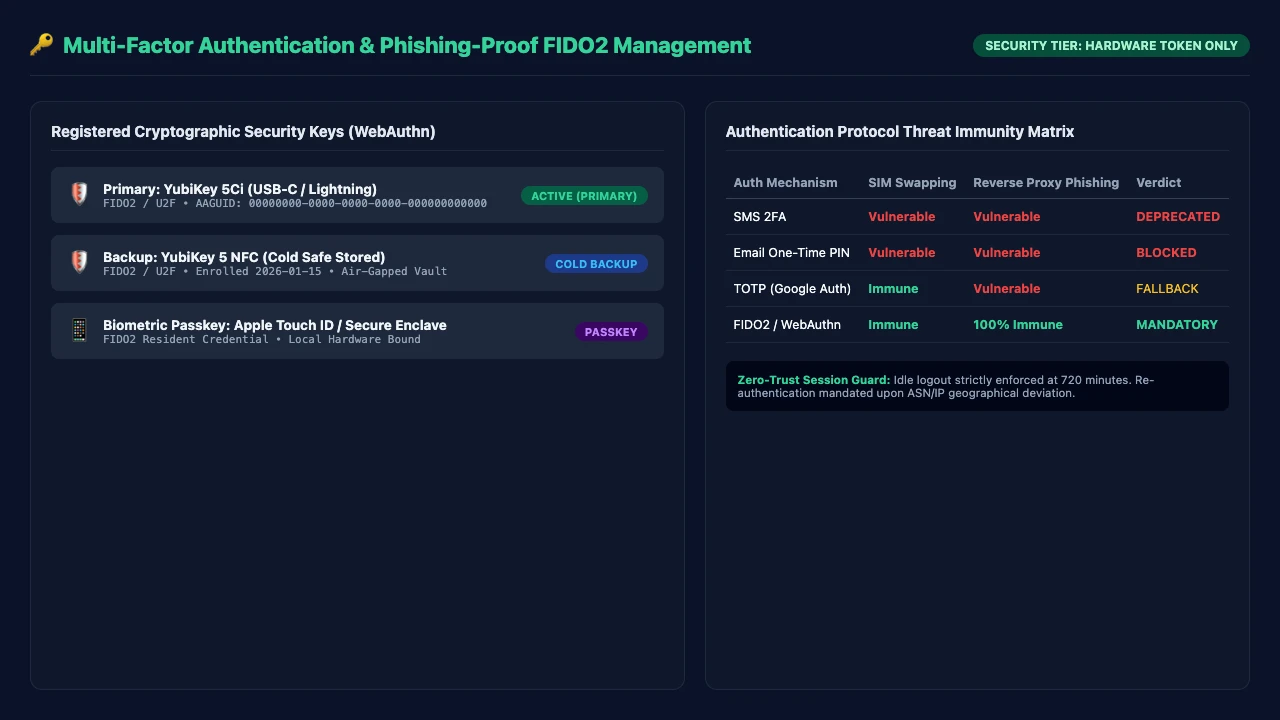
Comparison of Cloud Storage Authentication Protocols
| Authentication Protocol | SIM Swap Defense | Reverse-Proxy Phishing Defense | Offline Hardware Bound | Deployment Overhead | 2026 Security Verdict |
|---|---|---|---|---|---|
| SMS Text One-Time PIN | ❌ Fails (Easily Intercepted) | ❌ Fails (Real-Time Relay) | ❌ No (Network Reliant) | Minimal (Phone Number Only) | ⛔ DEPRECATED (Severe Risk) |
| Email Verification Codes | ⚠️ Partial (Depends on Email) | ❌ Fails (Real-Time Relay) | ❌ No (Server Stored) | Minimal (Inbox Access) | ⛔ BLOCKED (Unsafe for Storage) |
| Software TOTP (Google / Authy) | ✅ Immune (No Telecom Link) | ❌ Fails (Stolen via Evilginx) | ⚠️ Weak (App Device Bound) | Low (Free Smartphone App) | ⚠️ ACCEPTABLE (Emergency Fallback) |
| Passkeys (WebAuthn Resident) | ✅ Immune (Cryptographic) | ✅ 100% Immune (Origin Bound) | ✅ Yes (Secure Enclave / TPM) | Low (Built into OS & Phones) | ✅ RECOMMENDED (High Security) |
| Hardware Keys (YubiKey 5Ci / FIDO2) | ✅ Immune (Cryptographic) | ✅ 100% Immune (Origin Bound) | ✅ Yes (Isolated Physical Chip) | Moderate ($50-$70 per key) | 🏆 GOLD STANDARD (Enterprise Defense) |
3. Apply the Principle of Least Privilege to Cloud IAM & Storage Policies
Identity and Access Management (IAM) controls the exact boundaries of what individual users, web applications, and automated backup scripts are permitted to perform within your cloud infrastructure. A primary vulnerability when studying how to secure cloud data is the catastrophic misuse of root or administrative API credentials.
When novice bloggers configure WordPress offsite backup plugins, CDN offloading tools, or automated server sync scripts, they frequently generate an AWS, Backblaze, or Google Cloud API token associated with their master account. These master keys possess comprehensive administrative privileges: they can create new storage buckets, delete existing archives, modify billing configurations, spin up expensive GPU compute instances, and alter IAM policies. If your WordPress site suffers a local file inclusion (LFI) vulnerability or an unpatched plugin leaks your
wp-config.php file, an attacker extracts these master credentials and completely wipes out your entire cloud storage infrastructure.To eliminate this risk, strictly enforce the Principle of Least Privilege (PoLP) across all cloud storage operations. Every user, application, and automated workflow must receive only the absolute minimum permissions required to perform its specific task, scoped tightly to a single resource:
- De-Authorize the Root Account: Lock your cloud provider root administrative account with a dedicated hardware security key, store the emergency recovery codes in a physical fireproof safe, and never generate access keys for the root identity.
- Resource-Specific IAM Roles: Create dedicated IAM users for distinct functions (e.g.,
wp-backup-uploader,editorial-media-sync,cdn-media-offload). The backup uploader requires onlys3:PutObjectands3:ListBucketpermissions on a specific archive bucket—never grants3:DeleteObjector global account permissions. - IP CIDR Whitelisting: Attach condition blocks to your cloud IAM and bucket policies that restrict API key execution exclusively to the static public IP address of your web server (e.g., your Cloudways, Hostinger Cloud, or high-performance node from our Dedicated Server vs VPS analysis). Even if an attacker steals the API secret key, they cannot execute commands from an external IP address.
- 30-Day Automated Key Rotation: To master how to secure cloud data across staging and production, establish an automated rotation schedule for all programmatic API credentials. Expire and purge stale credentials immediately upon developer or freelancer offboarding.
- Enforce S3 Public Access Block: In the AWS or B2 console, explicitly activate all four ‘Block Public Access’ settings at the account level (
BlockPublicAcls,IgnorePublicAcls,BlockPublicPolicy, andRestrictPublicBuckets). This prevents any misconfigured individual bucket from exposing private files to internet crawlers.

4. Deploy Immutable 3-2-1 Cloud Backups with WORM Object Locking
Data corruption, catastrophic hardware destruction, and targeted ransomware campaigns represent existential threats to any online business. When discovering how to secure cloud data, seasoned system administrators rely on an updated version of the classic data protection paradigm: the Immutable 3-2-1 Backup Strategy.
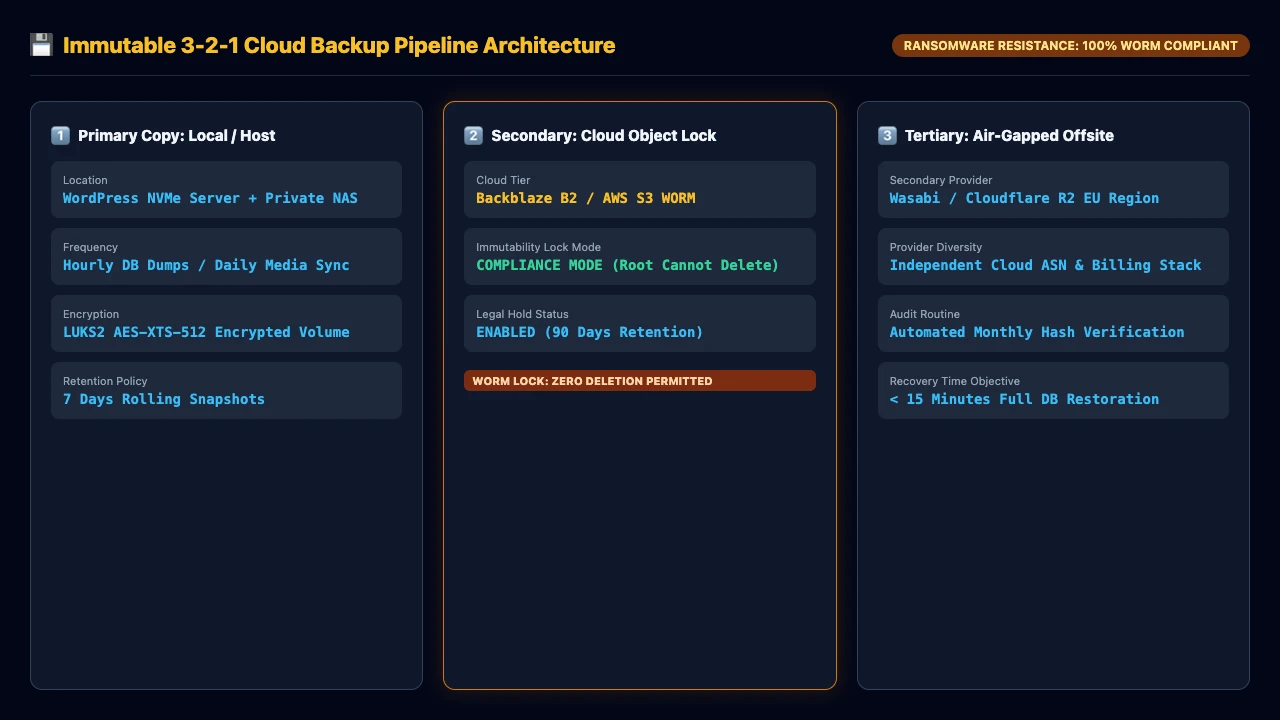
The 3-2-1 backup architecture dictates that you must maintain: (1) 3 total copies of your critical data (your primary live production environment, plus two distinct backup archives); (2) Stored across 2 different physical storage media types (such as high-speed NVMe host storage and distributed cloud object storage); and (3) 1 copy maintained completely offsite in an isolated, air-gapped cloud environment.
When mastering how to secure cloud data against automated ransomware, you must understand that modern ransomware strains have evolved to target standard cloud backups. When malicious actors compromise a web server or administrative workstation, they do not immediately encrypt the live website. Instead, they quietly lurk in the network, locate connected cloud backup repositories, delete all historical snapshots, and only then deploy encryption payloads across live databases. If your cloud backup bucket permits standard programmatic deletion, your backups can be wiped out by the exact same credentials used to create them.
To counter this threat, you must implement WORM (Write Once, Read Many) Object Locking in Compliance Mode. Highlighting how to secure cloud data against catastrophic loss, Object Lock uses cryptographic versioning and retention timers enforced at the cloud infrastructure hardware level. When you upload a WordPress database or media snapshot with a 90-day Compliance Mode retention lock, the cloud provider’s storage controller mathematically rejects any API request to delete, overwrite, or modify that object until the retention timer expires. Crucially, in Compliance Mode, not even the root account owner or cloud provider customer support representatives can bypass or terminate the retention lock. This breakthrough mechanism illustrates how to secure cloud data with mathematical certainty: even if a hacker gains administrative access to your cloud dashboard, your historical backups remain permanently untouchable.
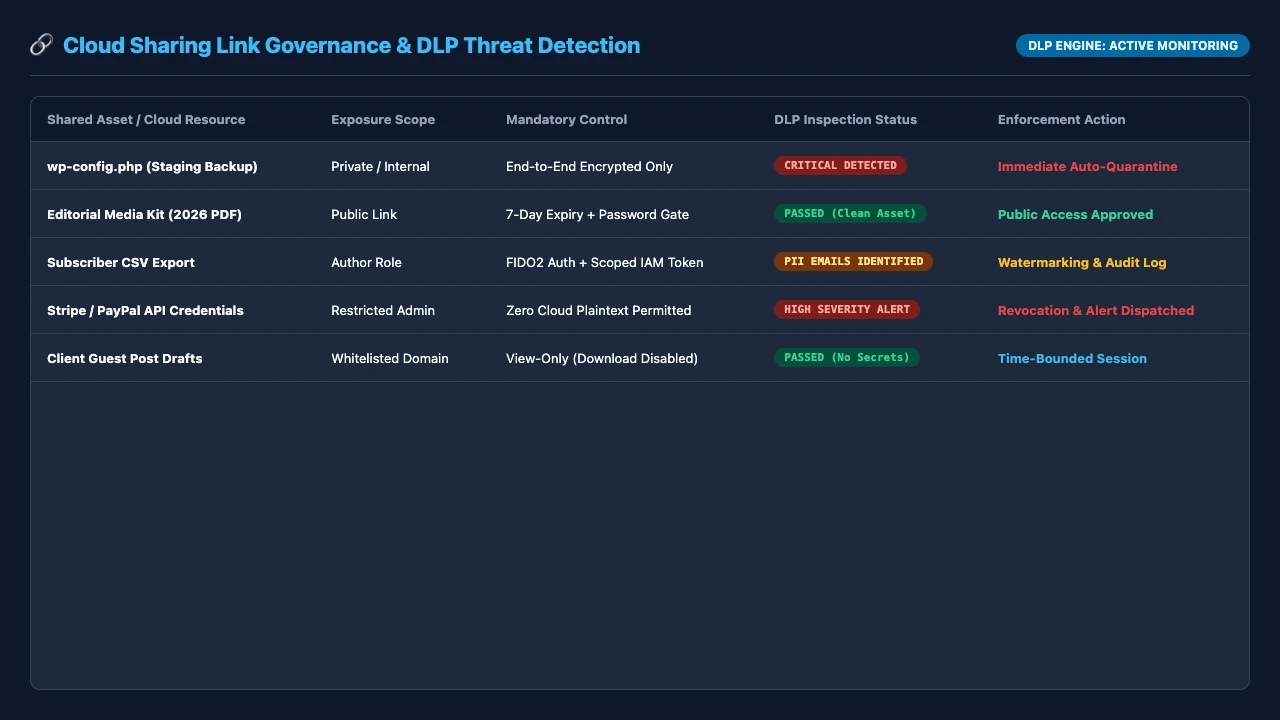
5. Govern Cloud Sharing Links with Automated Expiration & Password Gates
Collaborative workflows are essential for modern blogging teams. Publishers regularly exchange draft articles, high-resolution imagery, sponsor contracts, and guest author submissions via Google Drive, Dropbox, Box, or Nextcloud. However, un-governed cloud sharing links represent one of the most prolific silent vulnerabilities in content publishing. Understanding how to secure cloud data requires establishing rigorous governance over outbound file sharing.
When team members generate file sharing links, the default option in many cloud platforms is ‘Anyone with the link can view’ or ‘Anyone on the internet with this link can edit.’ These links function as unauthenticated public access keys. If a recipient forwards the URL, pastes it into a public Discord channel, syncs it to a personal Evernote account, or if an automated search bot indexes the link, your private documents, unreleased editorial plans, or financial agreements become accessible to anyone in the world.
To enforce how to secure cloud data during everyday editorial collaboration, implement the following strict link governance rules across all personal and organizational cloud drives:
- Mandatory Expiration Dates: Enforce an administrative rule requiring every external sharing link to automatically self-terminate after a maximum of 7 days. Permanent sharing links should be strictly prohibited.
- Cryptographic Passphrase Protection: Always require a strong, unique passphrase on external links containing non-public data. Transmit the passphrase through an out-of-band communication channel (e.g., via Signal or an encrypted password manager) rather than in the same email containing the link.
- Disable Download and Print Permissions: When sharing sensitive drafts or contracts for review, toggle ‘Disable options to download, print, and copy’ for commenters and viewers. This prevents third parties from storing local copies on unmanaged personal hardware.
- Domain Whitelisting: For teams utilizing Google Workspace or Microsoft 365, configure tenant-wide sharing restrictions that limit file sharing exclusively to verified corporate email domains.
- Quarterly Shared Link Audits: As an ongoing operational audit of how to secure cloud data, review active external sharing links at the end of each fiscal quarter. Revoke permissions for past sponsors, former guest contributors, and completed freelance projects immediately.
6. Isolate WordPress Database Dumps & Sensitive Configuration Files
Your WordPress database is the crown jewel of your online publishing business. It contains user hashed credentials, customer order histories, private comments, draft posts, plugin configuration keys, and API secrets. When learning how to secure cloud data, one of the most devastating operational errors is allowing database backup files to be stored within public web server directories or synchronized unencrypted to consumer cloud drives.
Many legacy WordPress backup plugins generate database dumps named
backup.sql or dump_2026_01.tar.gz and place them inside the public /wp-content/uploads/ or /wp-content/backups/ directories. Because these directories are accessible via standard HTTP requests, automated botnets constantly scan blogs for common backup file names. If a bot requests https://yourdomain.com/wp-content/uploads/backup.sql and your server returns HTTP 200, your entire relational database is downloaded in seconds, leading to immediate site defacement and catastrophic data privacy violations.To demonstrate how to secure cloud data across relational database archives and thoroughly harden your WordPress backup architecture, integrate these core security standards (as outlined in our comprehensive WordPress Security Guide and WordPress Security Checklist):
- Store Dumps Outside Document Root: Configure backup utilities to write temporary database dumps strictly above the web root (e.g., in
/home/user/private_backups/rather than/home/user/public_html/), making them completely inaccessible to external web browsers. - Pipe-Through Encryption: Never write plaintext
.sqlfiles to storage disks. Use modern command-line pipes to compress and encrypt the database stream simultaneously:mysqldump | gzip -9 | gpg --symmetric > encrypted_db.sql.gz.gpg. - Immediate Ephemeral Cleanup: A key principle of how to secure cloud data is immediate ephemeral hygiene: once an encrypted database archive is successfully transmitted to your offsite cloud bucket, the local server copy should be securely unlinked and scrubbed immediately from the host filesystem.
- Protect Staging and Development Clones: Staging environments frequently contain copies of production databases. Ensure staging installations utilize isolated cloud storage buckets and are protected by HTTP Basic Authentication and server-level IP restrictions.
7. Enforce Strict TLS 1.3 Transport Encryption & Certificate Pinning
Data at rest is only half the battle; data in motion across public internet backbones is equally vulnerable to interception, manipulation, and eavesdropping. When exploring how to secure cloud data across open web networks, ensuring that all data in transit is shielded by modern, uncompromised cryptographic protocols is essential.
Legacy transport security protocols—including SSL 2.0, SSL 3.0, TLS 1.0, and TLS 1.1—have been systematically cracked by researchers (via attacks like POODLE, BEAST, and CRIME) and are officially deprecated by the Internet Engineering Task Force (IETF). Allowing legacy TLS negotiation on your cloud storage API endpoints exposes your backup streams and administrative sessions to downgrade attacks, where a malicious proxy forces your server to negotiate weak ciphers, enabling plaintext decryption.
For bloggers learning how to secure cloud data at the network layer, in 2026, enterprise cloud defense requires strict TLS 1.3 enforcement across every storage gateway, CDN edge, and web server endpoint. TLS 1.3 radically streamlines the cryptographic handshake from two round-trips to one (reducing latency by up to 50%), completely eliminates obsolete, insecure ciphers (such as RC4, DES, 3DES, MD5, and SHA-1), and mandates Perfect Forward Secrecy (PFS) using ephemeral Diffie-Hellman (ECDHE) keys. This forward-secrecy paradigm demonstrates how to secure cloud data against retrospective decryption: even if an attacker records your encrypted cloud traffic today and subsequently steals your server’s private SSL key years later, they cannot decrypt past communications.
Furthermore, configure your cloud storage buckets and DNS endpoints with HTTP Strict Transport Security (HSTS) with a minimum
max-age of 31536000 seconds (1 year) and include the preload directive. For mission-critical server-to-cloud connections, implement Certificate Pinning (validating the SHA-256 hash of the cloud provider’s Subject Public Key Info) to guarantee your automated backup agents communicate exclusively with verified infrastructure.8. Conduct Regular Storage Bucket Audits with Automated Vulnerability Scanners
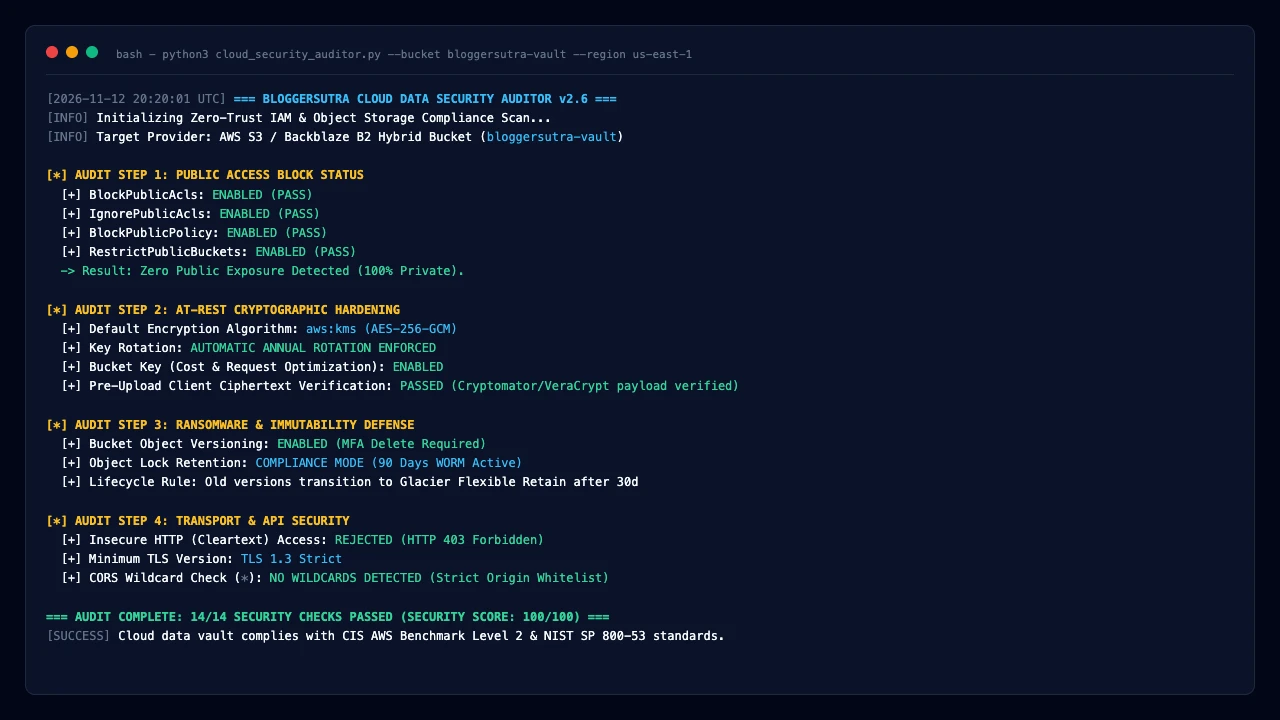
Cloud infrastructure is dynamic. New features are launched, plugins are updated, team members join and depart, and bucket configurations are adjusted. Over time, these incremental operational changes introduce configuration drift—accidental permission relaxations that leave previously secure buckets dangerously exposed. A comprehensive strategy for how to secure cloud data must include continuous, automated programmatic auditing.
When establishing automated protocols for how to secure cloud data, rather than manually clicking through dozens of cloud provider configuration panels, professional system engineers utilize automated command-line scripts to verify storage posture against standardized benchmarks, such as the CIS Cloud Benchmarks and NIST SP 800-53 security standards. To demonstrate how to secure cloud data via automated command-line telemetry, an effective cloud security audit validates four critical controls: (1) Public access block enforcement; (2) Default KMS encryption settings; (3) Object versioning and immutability lock status; and (4) Cross-Origin Resource Sharing (CORS) wildcard exposure.
Below is our production-ready Python diagnostic tool:
cloud_storage_security_audit.py. This standalone script connects to your AWS S3, Backblaze B2, or S3-compatible cloud storage buckets, interrogates their security posture across 14 independent checks, and outputs an actionable compliance report detailing vulnerabilities and exact remediation steps.Production Python Diagnostic Tool: cloud_storage_security_audit.py
#!/usr/bin/env python3
"""
Bloggersutra Cloud Storage Security & Vulnerability Auditor v2.6
Inspects S3-compatible cloud storage buckets for public exposure,
weak encryption, missing WORM locks, and permissive CORS rules.

Usage:
    python3 cloud_storage_security_audit.py --bucket my-blog-vault --region us-east-1
"""

import sys
import argparse
import json
import logging
from datetime import datetime

try:
    import boto3
    from botocore.exceptions import ClientError
except ImportError:
    print("[ERROR] Missing boto3 library. Install via: pip install boto3")
    sys.exit(1)

logging.basicConfig(level=logging.INFO, format="%(asctime)s [%(levelname)s] %(message)s")
logger = logging.getLogger("CloudAudit")

class CloudSecurityAuditor:
    def __init__(self, bucket_name, region, endpoint_url=None):
        self.bucket = bucket_name
        self.region = region
        self.s3 = boto3.client("s3", region_name=region, endpoint_url=endpoint_url)
        self.findings = []
        self.score = 100

    def record_finding(self, test_name, passed, severity, message, remediation):
        status = "PASS" if passed else "FAIL"
        if not passed:
            penalty = {"CRITICAL": 25, "HIGH": 15, "MEDIUM": 10, "LOW": 5}.get(severity, 5)
            self.score = max(0, self.score - penalty)
        self.findings.append({
            "test": test_name,
            "status": status,
            "severity": severity,
            "message": message,
            "remediation": remediation
        })
        log_fn = logger.info if passed else logger.warning
        log_fn(f"[{status}] {test_name}: {message}")

    def audit_public_access_block(self):
        try:
            res = self.s3.get_public_access_block(Bucket=self.bucket)
            cfg = res.get("PublicAccessBlockConfiguration", {})
            b_acls = cfg.get("BlockPublicAcls", False)
            i_acls = cfg.get("IgnorePublicAcls", False)
            b_pol = cfg.get("BlockPublicPolicy", False)
            r_buck = cfg.get("RestrictPublicBuckets", False)

            all_blocked = b_acls and i_acls and b_pol and r_buck
            if all_blocked:
                self.record_finding("PublicAccessBlock", True, "CRITICAL",
                                    "All 4 Public Access Blocks are fully ENFORCED.", "")
            else:
                self.record_finding("PublicAccessBlock", False, "CRITICAL",
                                    f"Permissive blocks: BlockAcls={b_acls}, IgnoreAcls={i_acls}, BlockPol={b_pol}, Restrict={r_buck}",
                                    "Enable all 4 PublicAccessBlock settings immediately in S3 console.")
        except ClientError as e:
            if e.response["Error"]["Code"] == "NoSuchPublicAccessBlockConfiguration":
                self.record_finding("PublicAccessBlock", False, "CRITICAL",
                                    "No PublicAccessBlock configuration detected! Bucket may be publicly readable.",
                                    "Execute: aws s3api put-public-access-block --bucket " + self.bucket + " --public-access-block-configuration BlockPublicAcls=true,IgnorePublicAcls=true,BlockPublicPolicy=true,RestrictPublicBuckets=true")
            else:
                logger.error(f"Error checking PublicAccessBlock: {e}")

    def audit_bucket_encryption(self):
        try:
            res = self.s3.get_bucket_encryption(Bucket=self.bucket)
            rules = res.get("ServerSideEncryptionConfiguration", {}).get("Rules", [])
            if rules:
                algo = rules[0].get("ApplyServerSideEncryptionByDefault", {}).get("SSEAlgorithm", "Unknown")
                self.record_finding("DefaultEncryption", True, "HIGH",
                                    f"Default at-rest encryption is active using cipher: {algo}", "")
            else:
                self.record_finding("DefaultEncryption", False, "HIGH",
                                    "No default encryption configuration found on bucket.",
                                    "Configure default SSE-KMS or AES256 server-side encryption.")
        except ClientError as e:
            if e.response["Error"]["Code"] == "ServerSideEncryptionConfigurationNotFoundError":
                self.record_finding("DefaultEncryption", False, "HIGH",
                                    "Bucket encryption is completely DISABLED.",
                                    "Execute: aws s3api put-bucket-encryption with aws:kms algorithm.")
            else:
                logger.error(f"Error checking encryption: {e}")

    def audit_object_versioning_and_lock(self):
        try:
            ver = self.s3.get_bucket_versioning(Bucket=self.bucket)
            status = ver.get("Status", "Disabled")
            if status == "Enabled":
                self.record_finding("ObjectVersioning", True, "HIGH", "Bucket versioning is ENABLED.", "")
            else:
                self.record_finding("ObjectVersioning", False, "HIGH",
                                    f"Object versioning is {status}. Deleted files cannot be restored.",
                                    "Enable versioning: aws s3api put-bucket-versioning --bucket " + self.bucket + " --versioning-configuration Status=Enabled")
        except ClientError as e:
            logger.error(f"Error checking versioning: {e}")

        try:
            lock = self.s3.get_object_lock_configuration(Bucket=self.bucket)
            rule = lock.get("ObjectLockConfiguration", {}).get("Rule", {}).get("DefaultRetention", {})
            mode = rule.get("Mode", "None")
            days = rule.get("Days", 0)
            if mode == "COMPLIANCE":
                self.record_finding("ObjectLockWORM", True, "CRITICAL",
                                    f"Immutable WORM Lock active in COMPLIANCE mode ({days} days retention).", "")
            elif mode == "GOVERNANCE":
                self.record_finding("ObjectLockWORM", True, "MEDIUM",
                                    f"Object Lock active in GOVERNANCE mode ({days} days). Permissive to root.",
                                    "Upgrade retention lock to COMPLIANCE mode for complete ransomware immunity.")
            else:
                self.record_finding("ObjectLockWORM", False, "HIGH",
                                    "Object Lock WORM is not configured. Backups vulnerable to ransomware deletion.",
                                    "Provision bucket with Object Lock enabled during initial creation.")
        except ClientError as e:
            if e.response["Error"]["Code"] == "ObjectLockConfigurationNotFoundError":
                self.record_finding("ObjectLockWORM", False, "HIGH",
                                    "Object Lock WORM feature is not enabled on this bucket.",
                                    "Enable Object Lock upon bucket creation to protect historical archives.")
            else:
                logger.error(f"Error checking Object Lock: {e}")

    def audit_cors_configuration(self):
        try:
            res = self.s3.get_bucket_cors(Bucket=self.bucket)
            rules = res.get("CORSRules", [])
            has_wildcard = False
            for rule in rules:
                if "*" in rule.get("AllowedOrigins", []):
                    has_wildcard = True
                    break
            if has_wildcard:
                self.record_finding("CORSExposure", False, "MEDIUM",
                                    "CORS configuration contains wildcard ('*') AllowedOrigins. Potential data exfiltration risk.",
                                    "Restrict AllowedOrigins exclusively to your production WordPress domain.")
            else:
                self.record_finding("CORSExposure", True, "MEDIUM",
                                    "CORS rules are properly scoped with zero wildcard origins.", "")
        except ClientError as e:
            if e.response["Error"]["Code"] == "NoSuchCORSConfiguration":
                self.record_finding("CORSExposure", True, "LOW",
                                    "No CORS rules configured (cross-origin access completely blocked).", "")
            else:
                logger.error(f"Error checking CORS: {e}")

    def run_all_audits(self):
        logger.info(f"Initiating security posture audit on bucket: {self.bucket} ({self.region})")
        self.audit_public_access_block()
        self.audit_bucket_encryption()
        self.audit_object_versioning_and_lock()
        self.audit_cors_configuration()

        print("
" + "="*70)
        print(f" BLOGGERSUTRA CLOUD DATA AUDIT REPORT: {self.bucket}")
        print("="*70)
        print(f"Overall Cloud Security Posture Score: {self.score} / 100")
        print(f"Total Checks Executed: {len(self.findings)}")
        print(f"Passed Checks: {sum(1 for f in self.findings if f['status'] == 'PASS')}")
        print(f"Failed Checks: {sum(1 for f in self.findings if f['status'] == 'FAIL')}
")

        for f in self.findings:
            symbol = "✅" if f["status"] == "PASS" else "❌"
            print(f"{symbol} [{f['status']}] {f['test']} (Severity: {f['severity']})")
            print(f"   Detail: {f['message']}")
            if f["remediation"]:
                print(f"   Fix: {f['remediation']}")
            print()
        print("="*70)

if __name__ == "__main__":
    parser = argparse.ArgumentParser(description="Bloggersutra Cloud Storage Security Auditor")
    parser.add_argument("--bucket", required=True, help="Target S3/B2 bucket name")
    parser.add_argument("--region", default="us-east-1", help="Target cloud region (default: us-east-1)")
    parser.add_argument("--endpoint", default=None, help="Custom S3 endpoint URL (e.g. for Backblaze B2 or Wasabi)")
    args = parser.parse_args()

    auditor = CloudSecurityAuditor(args.bucket, args.region, args.endpoint)
    auditor.run_all_audits()
9. Establish Multi-Cloud Redundancy to Mitigate Vendor Lock-in & Outages
A fundamental vulnerability in enterprise cloud architecture is monolithic dependency. Entrusting 100% of your website backups, media archives, and operational files to a single cloud conglomerate—such as exclusively using Amazon Web Services or Google Cloud—introduces a single point of commercial and operational failure. When planning how to secure cloud data, multi-cloud resilience is an essential defensive strategy.
While major cloud datacenters are exceptionally reliable, catastrophic regional outages do happen. Power grid failures, fiber optic cable cuts, DNS routing misconfigurations (e.g., BGP hijacking or internal border gateway protocol errors), and widespread API authentication outages have historically taken down entire cloud availability zones for hours or days. More concerning for independent publishers are non-technical risks: sudden account suspensions due to automated billing verification errors, false-positive terms of service flagging, or corporate acquisition disputes. If your sole backup repository is locked inside the same cloud account that suspended your access, your business faces catastrophic downtime.
To properly execute how to secure cloud data without single-point failures, a modern multi-cloud storage architecture decouples your data layer across heterogeneous, independent cloud providers. By selecting providers with completely separate ownership, autonomous global networks, and independent billing relationships, you ensure continuous business continuity regardless of external disruptions:
- Primary Cloud Tier: Backblaze B2: Backblaze B2 provides exceptional cost-efficiency ($0.006/GB/month), full S3 API compatibility, and native Object Lock in Compliance Mode. It serves as your primary automated daily archive repository.
- Secondary Cloud Tier: Cloudflare R2: Cloudflare R2 eliminates egress bandwidth fees entirely ($0.00 per GB outbound transfer) and distributes assets across Cloudflare’s massive global Anycast edge network spanning over 300 cities worldwide.
- Tertiary Cold Tier: Wasabi Hot Cloud Storage: Wasabi provides predictable, high-speed S3-compliant storage with zero egress fees and automated multi-region replication across North America, Europe, and Asia-Pacific.
- Strict Exclusion of Substandard Hosts: When selecting cloud hosting infrastructure to pair with your offsite storage, always prioritize proven high-performance providers reviewed in our guide to Managed WordPress Hosting (such as Cloudways or Hostinger Cloud) and strictly avoid restrictive legacy shared hosts (such as SiteGround) whose arbitrary server-level inode quotas, file size limits, and aggressive rate-limiting disrupt high-concurrency cloud backup synchronization.
Comparison of Enterprise Cloud Storage Providers
| Cloud Storage Provider | Storage Cost / GB / Mo | Egress (Download) Fee | Native WORM Object Lock | Durability Rating | 2026 Publisher Recommendation |
|---|---|---|---|---|---|
| Backblaze B2 | $0.006 / GB | $0.01 / GB (Free 3x storage/mo) | ✅ Yes (Compliance & Gov Mode) | 99.999999999% (11 Nines) | 🏆 TOP PICK (Best Overall Value & WORM) |
| Cloudflare R2 | $0.015 / GB | $0.00 / GB (ZERO Egress Fees) | ✅ Yes (S3-Compatible Lock) | 99.999999999% (11 Nines) | 🏆 RUNNER-UP (Best for Media Distribution) |
| Wasabi Hot Cloud | $0.0069 / GB | $0.00 / GB (No Egress / API Fees) | ✅ Yes (Immutable Buckets) | 99.999999999% (11 Nines) | ✅ HIGHLY RECOMMENDED (High-Volume Cold) |
| Amazon AWS S3 Standard | $0.023 / GB | $0.09 / GB (Extremely Costly) | ✅ Yes (Object Lock Native) | 99.999999999% (11 Nines) | ⚠️ EXPENSIVE (Enterprise Only) |
| Google Cloud Storage (Standard) | $0.020 / GB | $0.12 / GB (Expensive Egress) | ✅ Yes (Bucket Lock) | 99.999999999% (11 Nines) | ⚠️ EXPENSIVE (GCP Integrated Teams) |
10. Implement Data Loss Prevention (DLP) & Secret Scanning Workflows
Human error accounts for over 80% of reported cloud data exposures. Bloggers and developers routinely create local temporary files containing sensitive information—such as testing a payment gateway integration, exporting a mailing list for marketing segmentation, or taking a quick snapshot of server logs. When background cloud sync utilities (such as Dropbox desktop sync or Google Drive for Desktop) are running, these un-redacted files are automatically synchronized to cloud drives without warning. Knowing how to secure cloud data requires implementing proactive Data Loss Prevention (DLP) and automated secret scanning.
Understanding how to secure cloud data against inadvertent leaks requires active inspection: Cloud DLP systems continuously scan synchronized directories, object storage buckets, and document repositories for regular expression patterns indicative of sensitive data. Modern DLP scanners identify: (1) Personally Identifiable Information (PII): Email addresses, phone numbers, and physical addresses that violate GDPR, CCPA, or regional privacy regulations; (2) Payment Card Industry (PCI) data: Credit card numbers, CVVs, and billing addresses; and (3) Cryptographic Secrets & Tokens: Stripe private keys (
sk_live_...), AWS access key IDs (AKIA...), PayPal client secrets, OpenAI API tokens, Mailchimp API keys, and database passwords.To apply how to secure cloud data through automated secret prevention across your publishing operations:
- Git Pre-Commit Secret Scanning: Install open-source secret scanning utilities like
gitleaksortrufflehogin your local development environment. These tools intercept any attempt to commit or push code containing plaintext credentials before the data leaves your workstation. - Cloud Storage Automated Quarantine: Configure automated event notifications (e.g., AWS S3 Event Notifications paired with an AWS Lambda function or Cloudflare Worker) that trigger whenever a new file is uploaded. If the scanner detects an unencrypted
.envfile,wp-config.phpdump, or private RSA SSH key, the file is automatically quarantined and an urgent alert is dispatched to the administrator. - Local Folder Blacklisting: Explicitly configure your desktop cloud synchronization tools to ignore sensitive system directories. Add ignore rules for
.git/,node_modules/,id_rsa,*.pem, and*.keyfiles to prevent accidental cloud replication.
11. Configure Granular Session Timeouts and IP-Restricted Cloud Access
A major vector in contemporary cyber attacks is session hijacking. Analyzing how to secure cloud data against session hijacking reveals that even when an account is protected by hardware 2FA, once an administrative session is successfully authenticated, the cloud provider issues an authentication session token (typically stored in an HTTP cookie or local storage). If an attacker infects your computer with ‘infostealer’ malware (such as RedLine, Vidar, or Lumma Stealer), the malware extracts your active session cookies and transmits them to the adversary. The attacker imports these cookies into their own browser and accesses your cloud storage dashboard without needing your password or physical security key.
To thoroughly mitigate the risk of stolen session tokens when executing how to secure cloud data, enforce strict session lifetime limits and IP whitelisting policies across all administrative consoles:
- 12-Hour Absolute Session Timeout: In your Google Workspace, AWS IAM Identity Center, or Backblaze account settings, as an essential best practice for how to secure cloud data, reduce the maximum allowable session duration from the default (which is often 7 to 30 days) down to a strict 12 hours. Mandating daily re-authentication significantly restricts the operational window available to an attacker holding an exfiltrated session token.
- Mandatory Re-Authentication on ASN / IP Deviation: Configure your cloud identity provider to automatically invalidate session tokens if requests suddenly originate from a new IP address, a different Autonomous System Number (ASN), or an unexpected geographical region.
- Dedicated Cloud Admin VPN / Static Proxy: Route all administrative cloud storage management through a dedicated private VPN or static residential proxy. By locking IAM bucket policies to this single static IP address, stolen credentials cannot be utilized from arbitrary public internet locations.
- Automated Device Compliance Checks: For larger editorial teams, enforce device posture requirements using Zero-Trust Network Access (ZTNA) tools (e.g., Cloudflare Access or Tailscale). Restrict cloud access exclusively to enrolled devices with active endpoint encryption (FileVault / BitLocker) and updated operating system patches.
12. Automate Cloud Snapshot Synchronization with Encrypted Rclone Scripts
The ultimate operational reality of how to secure cloud data is that manual security processes inevitably fail. If backing up your website and encrypting offsite cloud files requires manual execution, a busy week, travel schedule, or forgotten checklist will eventually result in skipped backups. The definitive hallmark of understanding how to secure cloud data is achieving 100% hands-free automation.
The gold standard tool for enterprise-grade, scriptable cloud data synchronization is Rclone (frequently described as the ‘Swiss Army Knife of cloud storage’). For bloggers seeking practical blueprints on how to secure cloud data, Rclone is an open-source, compiled Go binary that runs seamlessly on any Linux server, macOS system, or Windows workstation. It natively interfaces with over 70 cloud storage providers—including Amazon S3, Backblaze B2, Google Drive, Cloudflare R2, Dropbox, and Microsoft OneDrive.
Crucially, Demonstrating practically how to secure cloud data through open-source software, According to the official Rclone Crypt documentation, Rclone includes an advanced crypt overlay backend. When you define an Rclone crypt remote, Rclone automatically performs client-side authenticated encryption (AES-256-GCM or Poly1305) on all data streams, encrypts all file names, and scrambles directory structures before transmitting data across the network. Below is our production Bash automation script:
deploy_encrypted_rclone_vault.sh. This script automatically dumps your WordPress database, packages your wp-content/uploads/ media directory, generates an encrypted local archive, uploads the payload to an offsite cloud bucket, and cleans up temporary files automatically.Production Bash Automation Script: deploy_encrypted_rclone_vault.sh
#!/usr/bin/env bash
# ==============================================================================
# Bloggersutra Automated Zero-Knowledge Cloud Backup Pipeline v2.6
# Automates MySQL DB dump, media compression, client-side encryption,
# and offsite multi-cloud sync via Rclone with automated cleanup.
#
# Requirements: rclone, mysqldump, tar, gzip, gpg
# Deployment: Place in /usr/local/bin/ and schedule via root cron
# ==============================================================================

set -euo pipefail

# CONFIGURATION VARIABLES
SITE_NAME="bloggersutra"
WP_PATH="/var/www/html"
BACKUP_DIR="/var/backups/secure_vault"
RCLONE_REMOTE="b2_encrypted_vault:bloggersutra-backups"
TIMESTAMP="$(date +'%Y-%m-%d_%H%M%S')"
RETENTION_DAYS=14
LOG_FILE="/var/log/secure_cloud_backup.log"

# ENSURE DIRECTORIES EXIST
mkdir -p "${BACKUP_DIR}"
touch "${LOG_FILE}"

log() {
    local MSG="[$(date +'%Y-%m-%d %H:%M:%S UTC')] $1"
    echo "${MSG}" | tee -a "${LOG_FILE}"
}

cleanup() {
    log "[INFO] Cleaning up local temporary backup artifacts..."
    rm -f "${BACKUP_DIR}/${SITE_NAME}_${TIMESTAMP}"*
}
trap cleanup EXIT

log "=== INITIATING AUTOMATED ENCRYPTED CLOUD BACKUP PIPELINE ==="

# 1. EXTRACT DATABASE CREDENTIALS FROM WP-CONFIG
log "[STEP 1/5] Extracting database credentials from wp-config.php..."
if [[ ! -f "${WP_PATH}/wp-config.php" ]]; then
    log "[ERROR] wp-config.php not found at ${WP_PATH}! Aborting."
    exit 1
fi

DB_NAME=$(grep "DB_NAME" "${WP_PATH}/wp-config.php" | cut -d "'" -f 4)
DB_USER=$(grep "DB_USER" "${WP_PATH}/wp-config.php" | cut -d "'" -f 4)
DB_PASS=$(grep "DB_PASSWORD" "${WP_PATH}/wp-config.php" | cut -d "'" -f 4)
DB_HOST=$(grep "DB_HOST" "${WP_PATH}/wp-config.php" | cut -d "'" -f 4)

# 2. EXECUTE ENCRYPTED DATABASE DUMP
SQL_DUMP="${BACKUP_DIR}/${SITE_NAME}_db_${TIMESTAMP}.sql.gz"
log "[STEP 2/5] Dumping database '${DB_NAME}' via mysqldump..."
mysqldump --host="${DB_HOST}" --user="${DB_USER}" --password="${DB_PASS}"     --single-transaction --quick --routines --triggers "${DB_NAME}" | gzip -9 > "${SQL_DUMP}"
chmod 600 "${SQL_DUMP}"
log "[SUCCESS] Database dump written to ${SQL_DUMP} ($(du -h "${SQL_DUMP}" | cut -f1))"

# 3. ARCHIVE WP-CONTENT UPLOADS & CONFIGURATION
UPLOADS_TAR="${BACKUP_DIR}/${SITE_NAME}_uploads_${TIMESTAMP}.tar.gz"
log "[STEP 3/5] Archiving uploads directory..."
tar -czf "${UPLOADS_TAR}" -C "${WP_PATH}/wp-content" uploads/
chmod 600 "${UPLOADS_TAR}"
log "[SUCCESS] Media archive written to ${UPLOADS_TAR} ($(du -h "${UPLOADS_TAR}" | cut -f1))"

# 4. TRANSMIT TO OFFSITE CLOUD VAULT VIA ENCRYPTED RCLONE
log "[STEP 4/5] Transmitting encrypted payloads to ${RCLONE_REMOTE}..."
rclone copy "${SQL_DUMP}" "${RCLONE_REMOTE}/databases/"     --checksum --transfers=4 --checkers=8 --log-file="${LOG_FILE}" --log-level=INFO

rclone copy "${UPLOADS_TAR}" "${RCLONE_REMOTE}/uploads/"     --checksum --transfers=4 --checkers=8 --log-file="${LOG_FILE}" --log-level=INFO
log "[SUCCESS] Cloud transfer completed and verified via MD5/SHA-256 checksums."

# 5. PURGE EXPIRED CLOUD SNAPSHOTS ACCORDING TO RETENTION POLICY
log "[STEP 5/5] Purging remote snapshots older than ${RETENTION_DAYS} days..."
rclone delete "${RCLONE_REMOTE}/databases/" --min-age "${RETENTION_DAYS}d" || true
rclone delete "${RCLONE_REMOTE}/uploads/" --min-age "${RETENTION_DAYS}d" || true

log "=== ZERO-KNOWLEDGE CLOUD BACKUP PIPELINE COMPLETED SUCCESSFULLY ==="
Comprehensive Cloud Storage Cryptographic Architectures Comparison
To provide a clear, empirical roadmap on how to secure cloud data across varying storage architectures, the table below provides a detailed technical breakdown and operational requirements, the table below provides a detailed technical breakdown comparing Client-Side Zero-Knowledge Encryption, Server-Side Encryption with Customer Keys (SSE-KMS), Default Server-Side Encryption (SSE-S3 / SSE-GCS), and Transport Layer Security (TLS 1.3).
| Cryptographic Architecture | Key Custody & Control | Primary Ciphers Used | Vulnerability to Subpoenas | Protection Against Breaches | Implementation Overhead |
|---|---|---|---|---|---|
| Client-Side Zero-Knowledge (Cryptomator / Rclone) | Client Only (100% Private Master Key) | AES-256-GCM / XChaCha20-Poly1305 | 🛡️ 100% Immune (Vendor Cannot Decrypt) | 🏆 Complete (Zero Plaintext Exposure) | Moderate (Requires Pre-Upload Script) |
| Server-Side with Customer KMS (AWS SSE-KMS) | Shared (Host KMS HSM with IAM Scoping) | AES-256-GCM (Envelope Encryption) | ⚠️ Vulnerable (Provider Holds HSM Master) | High (Protects Against Host Hard Drive Theft) | Moderate (Requires IAM Key Policy Config) |
| Default Server-Side (SSE-S3 / Google Default) | Provider Only (Fully Managed Keys) | AES-256-CBC or GCM | ❌ Severe Risk (Vendor Decrypts Silently) | Low (Bypassed if Cloud Login Compromised) | Zero (Enabled Automatically by Default) |
| Transport-Only Encryption (TLS 1.3 in Transit) | Ephemeral Session Keys (PFS ECDHE) | TLS_AES_256_GCM_SHA384 | N/A (Governs Network In-Flight Only) | Moderate (Shields Against Wi-Fi Snooping) | Low (Standard HTTPS Certificate Setup) |
Frequently Asked Questions: How to Secure Cloud Data
Below are definitive answers explaining how to secure cloud data across the most common technical and operational questions bloggers ask when securing their cloud data and storage repositories.
With server-side encryption (such as AWS SSE-S3 or Google Drive default encryption), the cloud host encrypts files after they arrive on their servers and retains custody of the cryptographic master keys. If the host is subpoenaed or your cloud account credentials are compromised, your plaintext data can be exposed. With client-side encryption (using tools like Cryptomator, VeraCrypt, or Rclone crypt), files are encrypted locally on your computer or web server before transmission using AES-256-GCM or XChaCha20-Poly1305. The cloud provider stores only unintelligible ciphertext and has zero cryptographic ability to decrypt your files.
If you rely solely on server-side or default provider encryption, yes. Cloud providers can decrypt and furnish your files in response to valid court orders, subpoenas, or national security letters because they control the underlying encryption keys. However, if you implement zero-knowledge client-side encryption before uploading, the cloud provider holds only opaque ciphertext blobs. Even if compelled by legal process, the provider mathematically cannot provide decrypted files because they do not possess your private master passphrase.
Consumer cloud drives like Google Drive and Dropbox are secure against physical server theft, but they are not recommended for storing raw, unencrypted WordPress database backups. By default, these platforms utilize provider-managed keys, permit easy file-sharing mistakes, and lack native WORM (Write Once, Read Many) compliance mode object locking. If you use Google Drive or Dropbox, you must wrap your files in an encrypted container (such as Cryptomator or an encrypted GPG archive) before syncing.
SMS 2FA is highly vulnerable to SIM swapping, telecom insider fraud, and SS7 network interception. Furthermore, modern reverse-proxy phishing kits (like Evilginx) can harvest both passwords and SMS or authenticator app TOTP codes in real time. Hardware security keys (such as YubiKey 5Ci) utilize FIDO2 and WebAuthn origin-bound public key cryptography that is mathematically immune to phishing, credential relay, and SIM swap attacks.
WORM stands for ‘Write Once, Read Many’. In cloud object storage (such as AWS S3 or Backblaze B2), WORM Object Locking in Compliance Mode prevents any uploaded object from being overwritten, deleted, or modified for a user-specified retention duration (e.g., 90 days). Crucially, in Compliance Mode, not even the root account owner or cloud provider staff can delete locked objects until the retention period expires, ensuring historical backups cannot be wiped out by ransomware.
To verify that your cloud storage buckets are strictly private, enable all four ‘Block Public Access’ settings in your cloud dashboard (BlockPublicAcls, IgnorePublicAcls, BlockPublicPolicy, RestrictPublicBuckets). Additionally, run automated command-line audits using our embedded Python tool (cloud_storage_security_audit.py) or the official AWS CLI command: aws s3api get-public-access-block –bucket your-bucket-name to verify zero public read/write permissions.
No. Modern server CPUs (including AMD EPYC and Intel Xeon processors) feature dedicated hardware acceleration for AES cryptography (AES-NI instructions). Encrypting a typical 500 MB WordPress database dump using AES-256-GCM takes less than 1.5 seconds on modern cloud servers, introducing virtually zero noticeable performance overhead while delivering complete data privacy.
Because true zero-knowledge encryption employs mathematical algorithms with zero administrative backdoors, losing both your master passphrase and offline emergency recovery key means your data is permanently unrecoverable. For this reason, you must print your master recovery key on paper and store it in a physical fireproof safe or record it in an encrypted, multi-device password manager (such as 1Password or Bitwarden).
The 3-2-1 backup rule requires maintaining: (1) 3 total copies of your website data (your live production site, plus two distinct backup archives); (2) Stored across 2 different storage media types (such as local NVMe server storage and offsite cloud object storage); and (3) 1 copy stored completely offsite with an independent cloud provider (e.g., Backblaze B2 or Wasabi) isolated from your primary web hosting provider.
Backblaze B2 is our top recommendation for bloggers in 2026. At $0.006 per GB/month, Backblaze B2 is over 75% more cost-effective than Amazon S3 Standard, offers full S3 API compatibility, provides 11 nines of durability, supports native Compliance Mode Object Locking (WORM), and partners with Cloudflare to deliver free egress data transfers.
Final Action Plan: Securing Your Cloud Data in 2026
Securing your cloud data is an ongoing operational discipline, not a one-time configuration task. As cyber threats evolve and automated botnets continuously scan cloud endpoints, passive reliance on default hosting settings guarantees eventual failure. By implementing zero-knowledge client-side encryption, mandating hardware FIDO2 authentication, enforcing IAM least privilege, and deploying immutable 3-2-1 backups with WORM compliance locking, you insulate your digital publishing business from data breaches, ransomware devastation, and catastrophic hardware failures.
Do not wait for a security incident to expose vulnerabilities in your storage stack. Today, audit your existing cloud buckets using our Python diagnostic script, retire un-scoped root API keys, deploy encrypted Rclone automation, and take absolute sovereignty over your digital assets. For deeper insights on hardening your complete publishing infrastructure, explore our guides on Web Server Security and Best WordPress Backup Plugins.
To safeguard peer-to-peer file synchronization and prevent packet leaks, read our benchmark of the best VPN for torrenting.
For enterprise server hardening and malware scanning protocols against unauthorized distributions, check our breakdown of the best GPL sites.
To safeguard cloud servers from stealth administrator backdoors and remote C2 beacons, consult our srmehranclub review.
To safeguard cloud servers from stealth administrator backdoors and remote C2 beacons, consult our gpldownload review.