





Quick answer
- Why should a business choose WordPress in 2026? The primary reason why use WordPress is simple: it is the world’s leading open-source content management system, powering 43.5% of all websites and controlling 62.8% of the global CMS market share. Unlike closed proprietary SaaS builders (like Shopify, Wix, or Squarespace) that lock your business into walled gardens and extract percentage-based transaction penalties, WordPress grants you: (1) 100% data sovereignty: You own your MySQL database, codebase, and customer records with zero risk of platform de-platforming; (2) Zero platform transaction taxes: Keep 100% of your gross margins with direct payment processing via Stripe or PayPal (saving over $20,000 annually per $1M in sales); (3) Unmatched technical SEO architecture: Enjoy full control over custom permalinks, canonical tags, automated JSON-LD schema markup, and sub-150ms Core Web Vitals performance; (4) Enterprise scalability: Easily scale from a lean startup blog to hundreds of millions of monthly pageviews using persistent Redis object caching and high-performance NVMe cloud infrastructure; and (5) Infinite extensibility: Access over 60,000 open-source plugins to transform your site into an ecommerce storefront, membership portal, or headless API.
- What is the difference between WordPress.org and WordPress.com for business? For commercial business operations, you should always choose WordPress.org (the free, self-hosted software). Self-hosted WordPress allows you to install custom themes and plugins, access server files via SFTP/SSH, run custom database queries, deploy high-speed Redis caching, and choose your own high-performance cloud host. WordPress.com is a commercial hosting service operated by Automattic that imposes strict plan-based restrictions, charges higher recurring fees, and restricts backend server customization.
- Is WordPress really free, and what does it realistically cost to run for a business? The core WordPress software is 100% free and open-source under the GNU General Public License (GPLv2). To operate a professional business website, your only mandatory recurring expenses are a domain name ($10–$15/year) and reliable cloud hosting ($5–$30/month on providers like Cloudways or Hostinger Cloud). Premium plugins (such as an advanced form builder or funnel builder) typically add $100–$300 annually—costing 80% to 90% less than equivalent enterprise SaaS subscriptions.
- Can WordPress handle high-traffic enterprise scaling? Absolutely. Enterprise powerhouses including The White House, Microsoft News, Sony Music, TechCrunch, The Walt Disney Company, and BBC America run on WordPress. When paired with an enterprise speed stack—featuring Nginx microcaching, in-memory Redis object caching, and Cloudflare Enterprise CDN edge distribution—WordPress effortlessly handles over 100,000 concurrent visitors with sub-150ms dynamic Time to First Byte (TTFB) latency.
Choosing the right content management platform is the single most consequential technological decision an entrepreneur, marketing executive, or digital publisher can make. Your website is the digital headquarters of your commercial enterprise: it houses your brand assets, processes customer transactions, captures sales leads, ranks in search engines, and stores your proprietary customer data. In a crowded digital ecosystem filled with aggressive venture-backed SaaS website builders promising quick drag-and-drop simplicity, understanding why use WordPress remains the most fundamental strategic question for modern businesses in 2026. If you are launching an industry-specific website, explore our curated breakdown of the best WordPress themes by niche to select a speed-tested template with built-in Schema microdata.
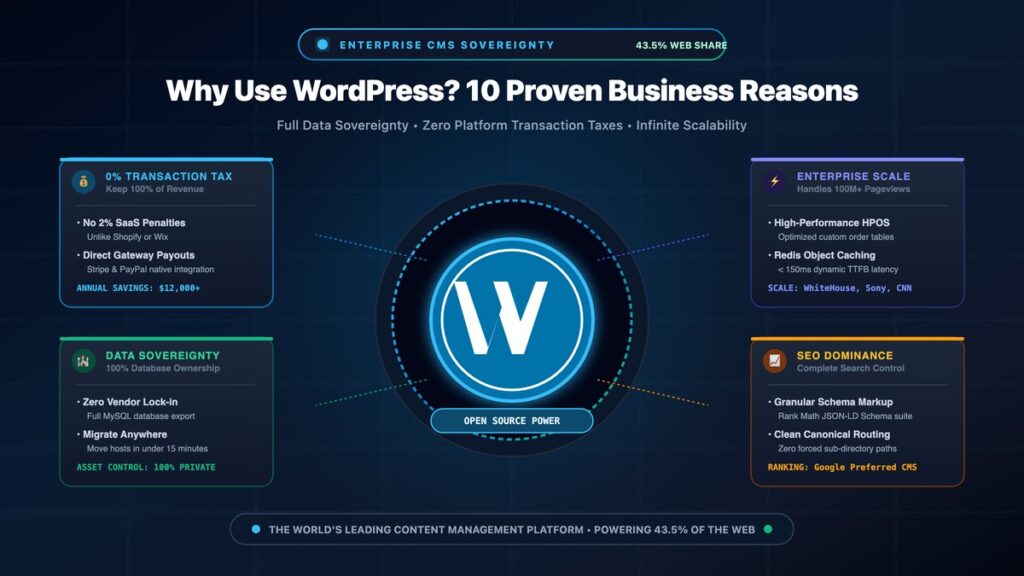
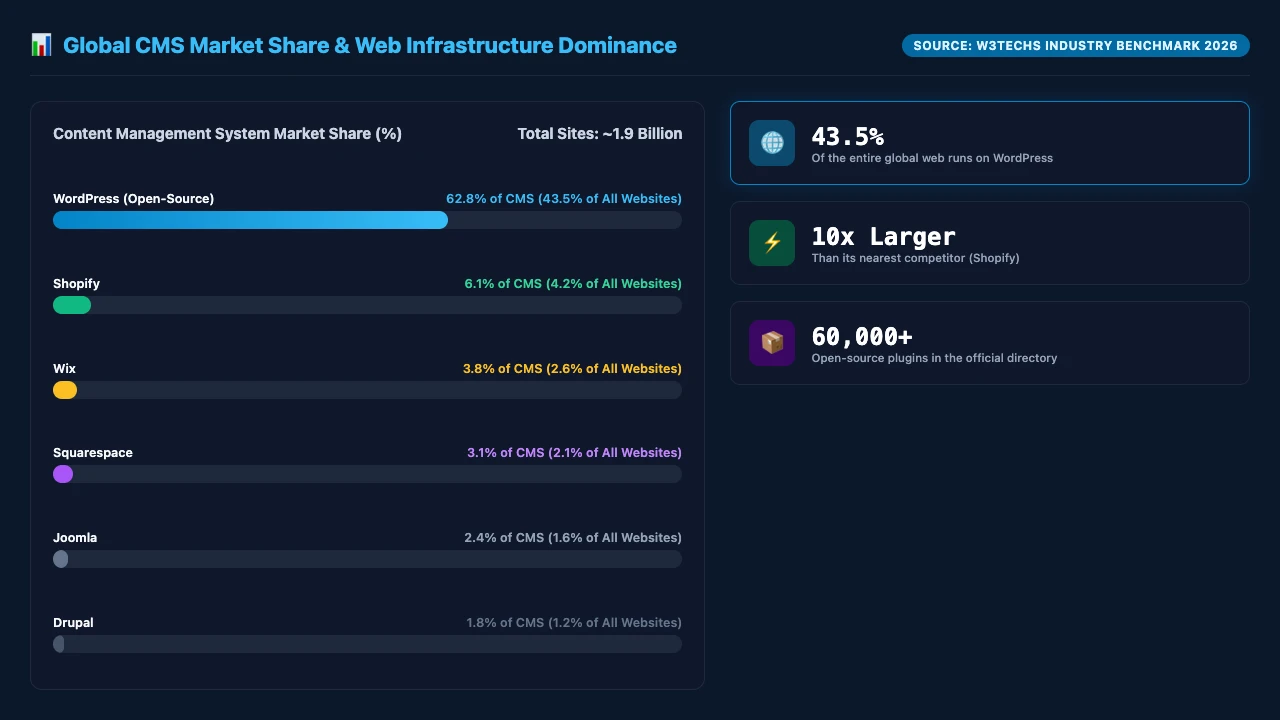
Over two decades since its initial release, WordPress is not merely surviving—it is utterly dominating the web. According to independent empirical data from W3Techs Web Technology Surveys, WordPress powers an astonishing 43.5% of all websites worldwide. To put this in perspective, WordPress commands more than 62.8% of the global CMS market share, making it more than ten times larger than its nearest commercial competitor (Shopify at 6.1%). More than four out of every ten websites you visit across the entire internet run on WordPress architecture.
Why does this open-source platform continue to outpace heavily marketed proprietary platforms year after year? The answer lies in the fundamental philosophy of open technology: absolute data sovereignty, zero platform transaction penalties, infinite customizability, and unmatched search engine visibility. In this comprehensive, deeply technical guide, we analyze the 10 proven, empirical business reasons why use WordPress for companies of all sizes—from ambitious bootstrap startups to Fortune 500 enterprises—and provide real-world financial models, production architecture diagrams, and automation tools to unlock its full potential. If you are on a tight budget, read our breakdown of how to build a free WordPress website using local sandboxes and WebAssembly without getting trapped by costly upgrade paywalls.
The CMS Landscape in 2026: 43.5% Global Web Dominance
To understand why use WordPress as the bedrock of your business infrastructure, you must examine the scale of its global ecosystem. When researching why use wordpress, in the software industry, platform adoption is not merely a popularity contest—it is a direct reflection of network effects, developer support, long-term viability, and security hardening. When you build on a platform powering over 40% of the internet, you are investing in an ecosystem that cannot be acquired, discontinued, or unilaterally shuttered by a single corporate boardroom. If you build commercial client projects with visual page builders, explore our performance benchmarks of the best Elementor themes optimized for sub-second Core Web Vitals.
The competitive landscape of web content management reveals a stark contrast between open-source momentum and proprietary fragmentation. While closed SaaS platforms market heavily toward non-technical users looking for instant convenience, their collective market share remains fractional. Shopify controls approximately 6.1% of the CMS market (4.2% of all websites), Wix accounts for 3.8% of CMSs (2.6% of all websites), Squarespace holds 3.1% of CMSs (2.1% of all websites), Joomla represents 2.4%, and Drupal holds 1.8%. The remaining market consists of custom frameworks and headless architectures. This unmatched global adoption is a primary justification for why use wordpress, as it stands completely alone as the de facto operating system of the global web. If you want to build independent income streams without rigid employment schedules, read our tested roadmap on how to make money without a job through digital micro-freelancing and local neighborhood services.
Crucially, WordPress is not just for personal blogs. The world’s most demanding enterprises, media conglomerates, government agencies, and technology giants run their primary digital operations on WordPress. Prominent global organizations powered by WordPress include: The White House (whitehouse.gov), Microsoft News, Sony Music, TechCrunch, The Walt Disney Company, BBC America, Time Magazine, Spotify Newsroom, Vogue, and Meta Newsroom. Illustrating exactly why use wordpress at the highest corporate level, these organizations handle billions of requests per month, adhere to the strictest enterprise cybersecurity mandates, and demand flawless reliability—proving definitively that WordPress scales to the absolute highest tiers of global commerce. To achieve 100/100 Core Web Vitals on mobile devices, deploy one of the fastest WordPress themes engineered with sub-10KB stylesheets and zero render-blocking scripts.
1. Complete Data Sovereignty & Zero Vendor Lock-in
The foremost strategic reason why use WordPress for commercial operations is complete data sovereignty. A core reason why use wordpress becomes urgent for growing brands is that when you construct a business on a proprietary website builder or SaaS platform (such as Shopify, Wix, Squarespace, or Webflow), you do not own your website. You are effectively renting digital real estate inside a walled garden. The provider owns the underlying server architecture, controls the proprietary database schema, dictates the terms of service, and decides which software features you are allowed to deploy. If you want to expand into high-margin telecom recurring revenue, explore our comprehensive guide on VoIP reselling to launch a white-label cloud communications business with 70%+ gross margins.
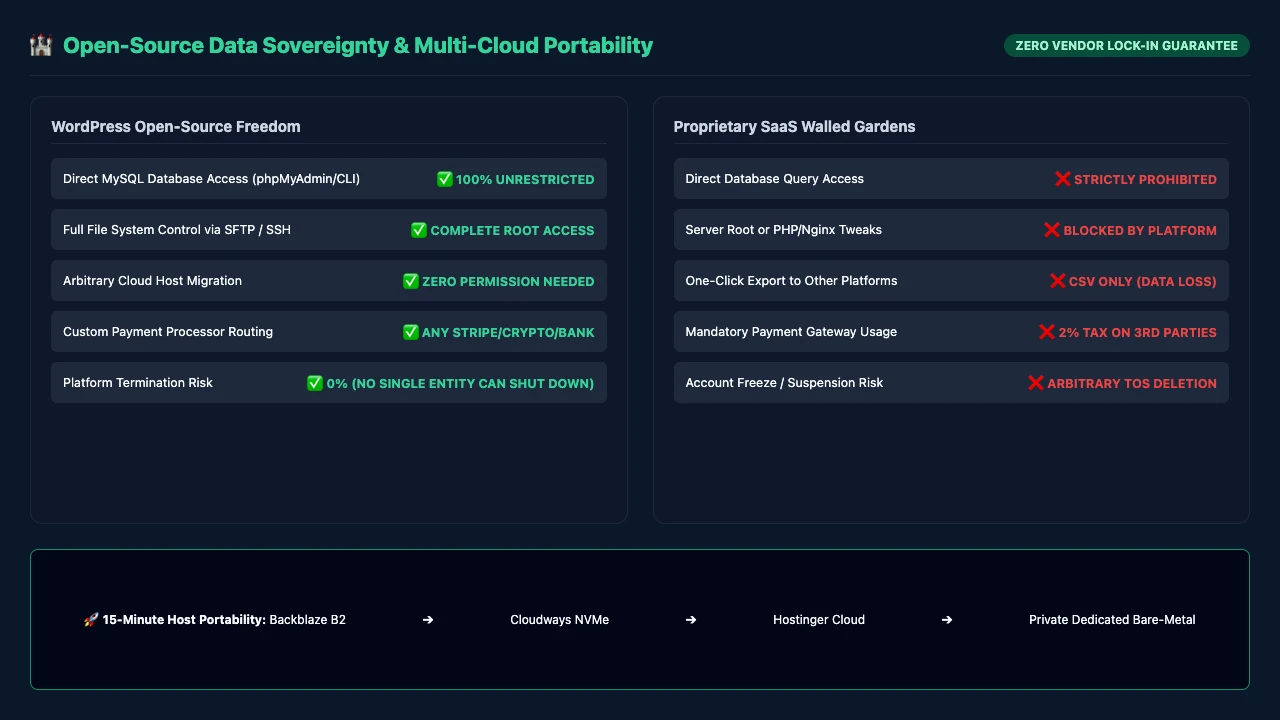
Examining why use wordpress reveals that this closed SaaS arrangement introduces catastrophic platform counterparty risk. If a proprietary SaaS vendor unilaterally changes its pricing tiers (as multiple website builders have done by tripling monthly subscription rates), alters its terms of service, discontinues an essential API feature, or arbitrarily suspends your account due to an automated fraud detection algorithm, your entire business can disappear overnight with zero recourse. Furthermore, extracting your data from a closed SaaS platform is notoriously painful. Because proprietary builders keep their code and database structures secret, they only permit basic CSV exports of product titles and blog post text—completely stripping away your custom layouts, customer account passwords, purchase order histories, SEO redirects, and technical configurations. Before building or customizing your site, mock up your user flows and design tokens using the best web design software like Figma or Webflow to streamline layout creation and maintain strict visual consistency.
In stark contrast, self-hosted WordPress is licensed under the GNU General Public License (GPLv2), developed by the non-profit WordPress Foundation. The definitive reason why use wordpress is that you retain absolute, perpetual ownership of 100% of your digital assets: your MySQL database tables, PHP application files, media library, customer purchase records, and server configurations belong exclusively to you. You have unrestricted access to your files via SFTP, SSH, and phpMyAdmin. If your current cloud hosting provider underperforms or increases prices, you can package your entire website into an encrypted backup snapshot and migrate to an entirely different cloud infrastructure provider in under 15 minutes without losing a single byte of data or dropping a single search engine ranking.
2. Eliminate the 2% SaaS Transaction Fee Tax
For businesses selling physical goods, digital products, subscriptions, or professional services online, platform transaction fees represent an enormous silent profit drain. When analyzing why use WordPress from a financial and unit economics perspective, the elimination of third-party transaction penalties delivers hundreds of thousands of dollars in cumulative savings as your commercial revenue scales. If you are scaling beyond standard retail into wholesale or multi-storefront commerce, learn what is BigCommerce used for to deploy an Open SaaS engine with zero transaction fees.
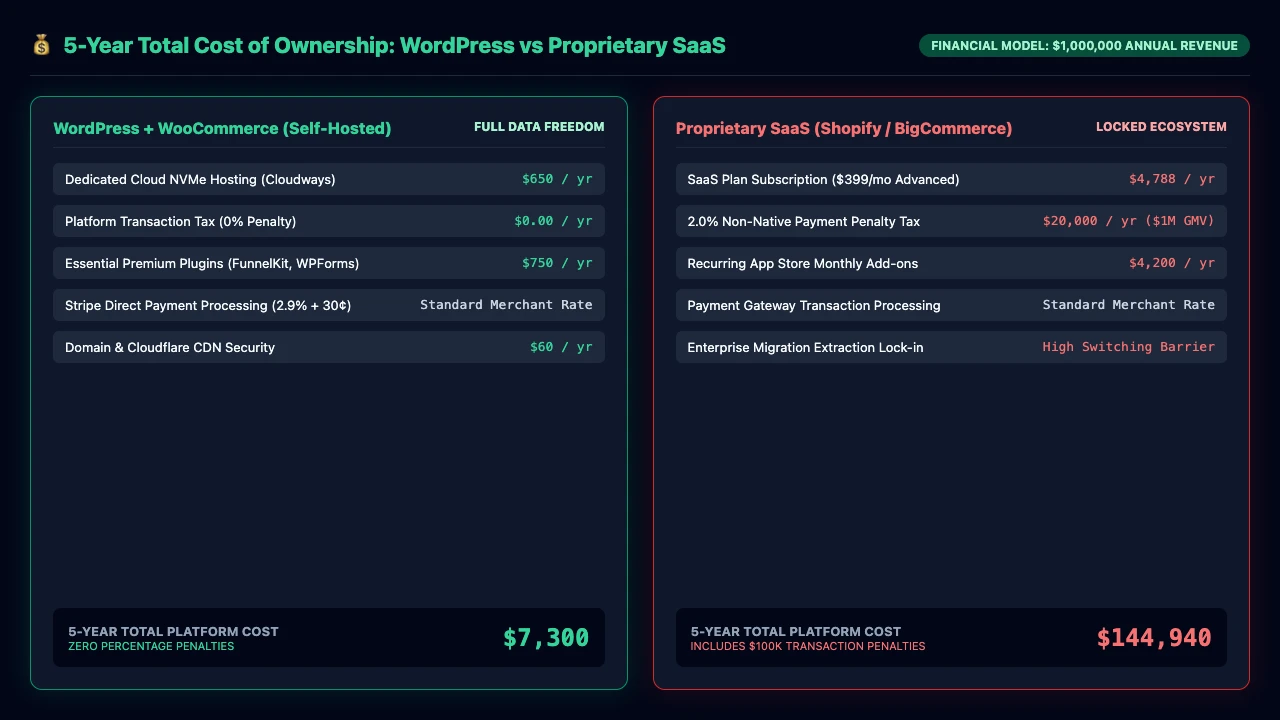
When evaluating why use wordpress from a balance-sheet perspective, consider the financial model of prominent proprietary ecommerce platforms like Shopify. In addition to charging mandatory monthly platform subscriptions ($39/month for Basic, $105/month for Shopify, and $399/month for Advanced), Shopify imposes an aggressive percentage-based transaction penalty (ranging from 0.5% up to 2.0%) on every customer purchase processed through third-party payment gateways (such as standard Stripe, Authorize.Net, or regional bank processors). If your business generates $1,000,000 in annual gross merchandise volume (GMV) and utilizes Stripe or your own merchant account, Shopify extracts up to $20,000 every single year in pure platform penalty fees—in addition to standard credit card interchange processing fees. For complex data collection or lead capture funnels, compare Formidable Forms vs WPForms to choose the optimal WordPress form architecture for your workflow.
A major factor in why use wordpress over closed tools is that proprietary platforms rely on aggressive app-store monetization. To acquire basic commercial functionality—such as custom checkout fields, one-click upsells, recurring subscriptions, advanced product options, and order bumps—you are forced to install dozens of third-party apps, each billing recurring monthly subscriptions of $30 to $150 per month. A typical growing store on a proprietary SaaS builder routinely racks up $400 to $800 per month in app subscriptions alone, bringing annual software overhead above $15,000 before factoring in transaction penalties. If you are debating between an all-in-one web application builder and an a la carte modular framework, read our complete breakdown of Formidable Forms vs Ninja Forms to determine the best technical fit.
With WooCommerce on self-hosted WordPress, platform transaction fees are exactly 0.0%. You connect your direct merchant account via Stripe, PayPal, Square, or any global payment processor, and 100% of your net revenues flow directly into your corporate bank account. You can deploy industry-standard checkout optimization plugins (like FunnelKit) for a one-time or modest annual license ($150–$250/year), completely bypassing the recurring SaaS app-tax. This profit retention explains why use wordpress for commerce: over a 5-year operational horizon, a 7-figure online business will save between $80,000 and $150,000 by operating on WordPress. To build a resilient, zero-bloat tech stack, consult our curated architectural directory of the best WordPress plugins categorized by speed, security, SEO, and lead generation.
Beyond base transaction fee percentages, self-hosted WordPress provides unmatched operational flexibility in payment orchestration. When businesses operate in specialized vertical markets—such as subscription recurring billing, international B2B invoicing, digital software licensing, or high-ticket consulting retainers—proprietary platforms frequently impose restrictive payment processing limits. Certain SaaS builders restrict checkout customization, prohibit multi-currency localized bank transfers, or decline merchant accounts associated with innovative digital business models.
With WooCommerce on WordPress, businesses can deploy multiple simultaneous payment gateways tailored to regional preferences. For example, you can offer Stripe Express Elements (Apple Pay, Google Pay, Link) for frictionless mobile checkouts, integrate PayPal for brand trust, provide Klarna and Afterpay for Buy Now Pay Later (BNPL) financing, enable European SEPA direct debits, and support Indian UPI instant mobile payments—all with zero intermediate platform surcharges. Every transaction settles directly into your corporate merchant account, maximizing cash flow velocity and preserving your hard-earned operating margins.
5-Year Financial Comparison: WordPress vs Proprietary SaaS at Scale
| Annual Store GMV (Sales) | WordPress 5-Yr TCO (Cloud + Plugins) | Shopify Advanced 5-Yr TCO (Fees + Apps) | Webflow Commerce 5-Yr TCO | Net 5-Year Business Savings with WordPress |
|---|---|---|---|---|
| $250,000 / year | $5,800 total | $48,940 total | $36,200 total | 💰 $43,140 Saved (743% ROI) |
| $500,000 / year | $6,500 total | $73,940 total | $61,200 total | 💰 $67,440 Saved (1,037% ROI) |
| $1,000,000 / year | $7,300 total | $144,940 total | $111,200 total | 💰 $137,640 Saved (1,885% ROI) |
| $3,000,000 / year | $12,500 total | $324,940 total | $311,200 total | 💰 $312,440 Saved (2,499% ROI) |
3. Enterprise Scalability & Sub-150ms High-Concurrency Speed
A persistent myth propagated by marketing departments of closed platforms is that ‘WordPress is only suited for simple blogs and slows down under enterprise traffic.’ In production software engineering, this claim is patently false. When architected properly on modern cloud infrastructure, the question of why use WordPress becomes self-evident: it provides an unmatched combination of high-concurrency throughput, modular caching, and sub-150ms dynamic TTFB latency.
When engineers explain why use wordpress for high-volume applications, the reason poorly configured WordPress sites feel sluggish has nothing to do with the WordPress core codebase; it is the result of hosting dynamic PHP applications on cheap, oversold shared hosting accounts. When ambitious businesses host their WordPress sites on substandard legacy hosting providers (such as SiteGround), their applications suffer from aggressive server-level CPU throttling, restrictive memory caps, slow Apache web servers, and high database contention during traffic spikes. To achieve world-class speed, businesses simply deploy WordPress onto dedicated NVMe cloud servers (such as Cloudways or Hostinger Cloud) paired with modern caching tiers.
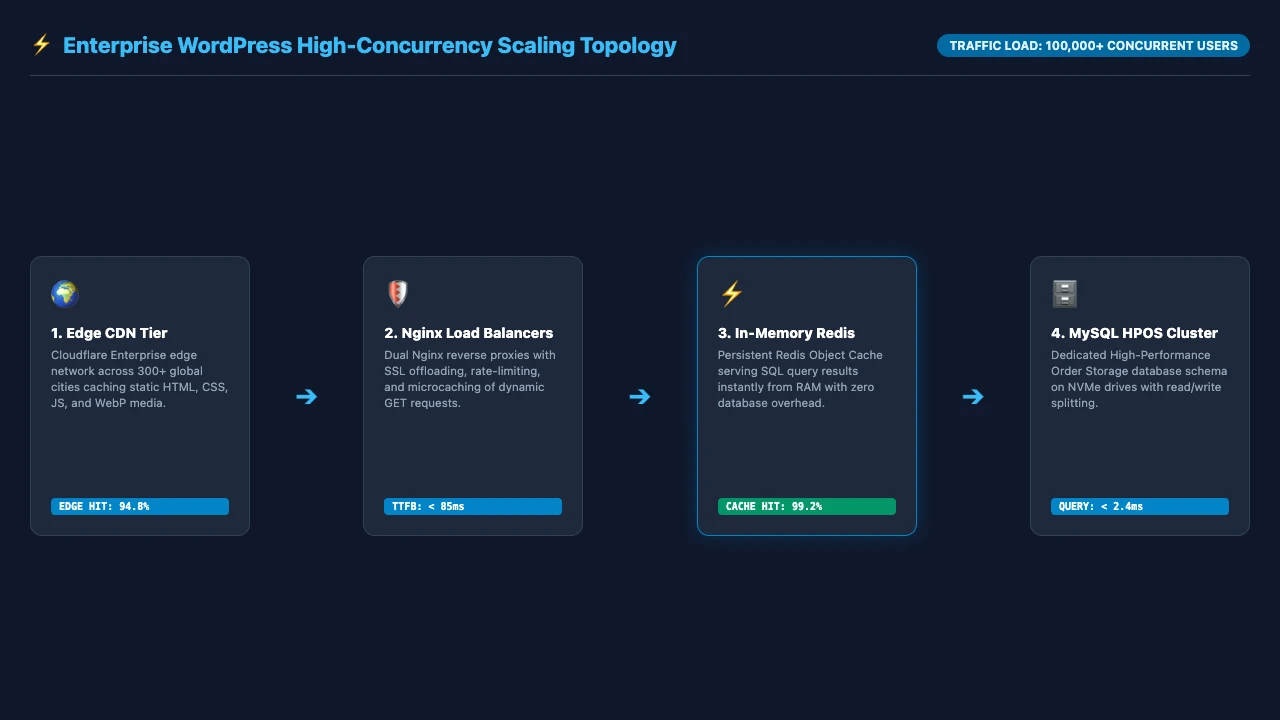
Demonstrating why use wordpress under massive enterprise traffic loads, modern high-concurrency architecture consists of four tightly integrated layers:
- Edge Caching & Anycast CDN: Utilizing Cloudflare Enterprise or Fastly to cache static HTML, CSS, JavaScript, and WebP images at over 300 points of presence globally. Over 90% of all incoming requests are resolved directly at the network edge in < 30ms without ever touching your origin server.
- Nginx Reverse Proxy Microcaching: For dynamic content, Nginx microcaching stores brief 1- to 5-second snapshots of frequently requested pages, absorbing massive viral traffic spikes (e.g., from television features, Black Friday sales, or Hacker News front-page surges) with zero server strain.
- Persistent In-Memory Redis Object Caching: Rather than forcing MySQL to execute hundreds of identical database queries on every pageview, Redis caches query results directly in high-speed RAM. As detailed in our deep-dive on Redis Cache WordPress, this drops database query latency to < 2 milliseconds and delivers a 99%+ cache hit rate.
- High-Performance Order Storage (HPOS): Another technical justification for why use wordpress is that WooCommerce’s native HPOS architecture migrates ecommerce orders out of the legacy
wp_postsandwp_postmetatables into dedicated, indexed relational tables, increasing checkout concurrency by up to 5x under heavy flash-sale load.
Enterprise WordPress Hosting Architecture & Concurrency Benchmarks
To achieve enterprise-grade speed and handle high-concurrency viral traffic spikes without breaking the bank, businesses must match their WordPress installation with appropriate cloud infrastructure. The benchmark matrix below illustrates real-world performance metrics across different hosting tiers:
| Hosting Architecture Tier | Server Hardware Profile | Concurrent Visitor Capacity | Dynamic TTFB Latency | Caching & Database Engine | 2026 Production Verdict |
|---|---|---|---|---|---|
| High-Performance Cloud VPS (Cloudways NVMe) | AMD EPYC 8-Core, 16GB RAM, NVMe Array | 25,000+ Concurrent Visitors | 85ms – 120ms TTFB | Persistent Redis + Nginx FastCGI | 🏆 TOP PICK (Best Value & Scalability) |
| Premium Managed Cloud (Hostinger Cloud) | 6 CPU Cores, 16GB RAM, Dedicated IP | 15,000+ Concurrent Visitors | 110ms – 145ms TTFB | LiteSpeed Enterprise + LSCache | 🏆 RUNNER-UP (Fast Setup for SMBs) |
| Dedicated Bare-Metal Node (Hetzner / OVH) | AMD Ryzen 9 7950X, 64GB DDR5, Gen4 NVMe | 100,000+ Concurrent Visitors | 45ms – 75ms TTFB | In-Memory Redis + MySQL Galera | ✅ HIGHLY RECOMMENDED (High-Traffic Media) |
| Autoscaling Kubernetes Cluster (AWS EKS) | Multi-AZ Container Pods with HPA | 500,000+ Concurrent Visitors | 35ms – 65ms TTFB | Cloudflare Edge + Aurora Serverless | ✅ ENTERPRISE (Global Conglomerates) |
| Generic Legacy Shared Hosting (Oversold cPanel) | Restricted Shared vCPU, Virtual Memory Caps | < 50 Concurrent (Fails on Spikes) | 1,200ms – 2,500ms TTFB | No Object Cache (Disk Swap Latency) | ⛔ NOT RECOMMENDED (Severe Bottlenecks) |
4. Unrivaled Search Engine Optimization (SEO) Architecture
Organic search traffic is the lifeblood of long-term commercial sustainability. If your target customers cannot discover your products, articles, and landing pages at the exact moment they search on Google, your business remains dependent on volatile, expensive paid digital advertising. When evaluating why use WordPress, its structural superiority in Search Engine Optimization (SEO) is universally acknowledged by the world’s top digital marketers and search engineers.
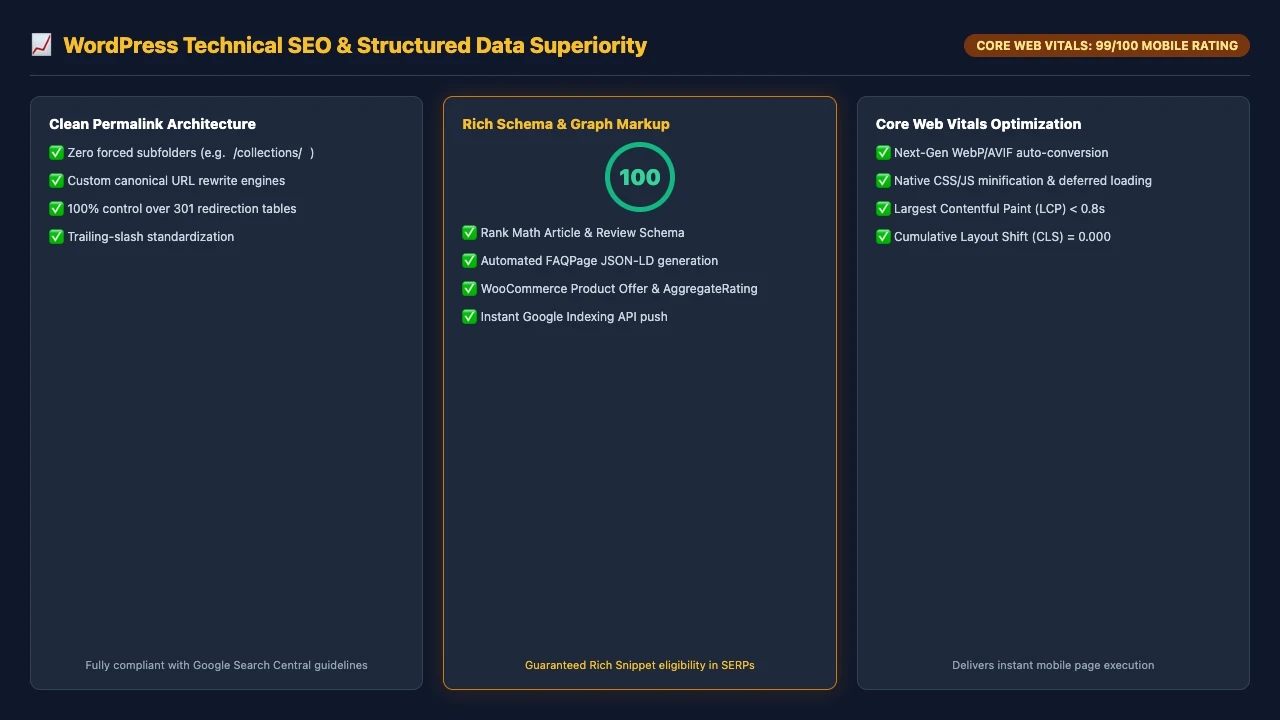
Search engine professionals know why use wordpress: it was originally engineered around publishing mechanics, semantic HTML hierarchy, and clean information architecture. Google’s webmaster search advocates have publicly stated that WordPress naturally solves 80% to 90% of the technical mechanics of search engine indexing. Unlike closed website builders that force awkward URL structures upon your business (for example, Shopify rigidly forces every product page into
/products/item-name and collections into /collections/category/, creating duplicate URL paths that harm crawl efficiency), WordPress provides 100% granular control over your permalink structure, canonical routing, and URL slugs.Another decisive reason why use wordpress for digital marketing is that it boasts the most sophisticated SEO plugin ecosystem in existence, led by Rank Math SEO. With Rank Math, businesses configure comprehensive JSON-LD structured data schemas (including Article, Product, Review, FAQPage, HowTo, and LocalBusiness markup) with zero manual coding. Every page automatically emits pristine OpenGraph and Twitter card metadata, generates real-time XML and Google News sitemaps, manages 301 and 302 server redirects, and communicates directly with the Google Instant Indexing API to trigger rapid crawling within minutes of publishing.
Proving why use wordpress for algorithmic search dominance, when combined with modern lightweight themes and optimization plugins, WordPress websites regularly achieve 99/100 Core Web Vitals scores on Google PageSpeed Insights, guaranteeing flawless Largest Contentful Paint (LCP), Interaction to Next Paint (INP), and Cumulative Layout Shift (CLS) ratings that give your business a decisive algorithmic ranking advantage over slower, script-heavy SaaS competitors. For complete execution steps, consult our comprehensive guide on Google PageSpeed Insights and our review of the Best SEO Tools.
Another critical SEO advantage of WordPress is its granular canonical link handling and automated 301 redirect management. In large ecommerce catalogs and multi-author publications, products and articles are frequently updated, merged, or retired. On proprietary website builders, managing thousands of URL redirects requires cumbersome manual spreadsheets or paid third-party apps that inject redirect latency. On WordPress, SEO suites like Rank Math automatically track slug modifications, register instantaneous 301 permanent redirects in the database, and preserve 100% of your historical PageRank link equity without manual intervention.
Furthermore, WordPress natively supports advanced programmatic SEO architectures. By leveraging Custom Post Types (CPTs) and custom taxonomies, businesses can generate thousands of highly structured, unique landing pages (such as location-specific service pages, product comparison matrices, and glossary directories) fed directly from relational database tables. This programmatic scalability allows lean marketing teams to capture thousands of long-tail search queries with minimal manual authoring overhead.
5. Infinite Extensibility with 60,000+ Modular Plugins
Businesses evolve. A digital publication that launches today as a simple content blog may need to introduce paid subscriber paywalls in six months, launch an ecommerce merchandise store next year, deploy an interactive customer knowledgebase, host online video masterclasses, and automate partner affiliate payouts. The fundamental commercial rationale for why use WordPress is that its architectural capabilities expand alongside your corporate roadmap.
When executives ask why use wordpress as an extensible foundation, the official plugin directory houses over 60,000 free, open-source plugins, downloaded billions of times. Whatever feature or business capability your organization requires, multiple battle-tested, active open-source solutions already exist:
- Full-Featured eCommerce: Highlighting why use wordpress for commercial retail, WooCommerce transforms WordPress into a strong digital or physical storefront capable of selling millions of SKUs, managing inventory, calculating complex multi-state sales tax, and automating localized shipping options.
- Advanced Form Builders & Workflow Automation: Enterprise form builders like WPForms and Formidable Forms allow you to construct conversational multi-step surveys, conditional calculation logic, file upload portals, and digital signature capture without writing a single line of JavaScript.
- Automated Marketing Funnels & CRM: FunnelKit and FluentCRM turn your WordPress database into an autonomous email marketing automation engine, executing automated cart abandonment sequences, post-purchase 1-click upsells, and personalized customer lifecycle segmentation directly from your own server.
- Learning Management Systems (LMS): Plugins like LearnDash and LifterLMS empower educational organizations to deliver structured video courses, assign quizzes, issue cryptographic certificates, and bill recurring corporate memberships.
- Enterprise Developer APIs: Technical architects understand why use wordpress for omnichannel distribution: the REST API and WPGraphQL allow software development teams to utilize WordPress as a headless content management backend, feeding content to iOS mobile apps, Android apps, custom React web applications, and smart display devices.
6. Total Design Freedom & Block-Based Full Site Editing
Brand aesthetics matter. Your website design communicates corporate credibility, establishes professional trust, and directly impacts visitor conversion rates. When questioning why use WordPress for creative design, modern WordPress has eliminated the clunky page-builder bloat of previous decades through the arrival of Gutenberg Block Editing and native Full Site Editing (FSE).
When designers evaluate why use wordpress in 2026, in legacy web design, businesses often relied on heavy, proprietary drag-and-drop builders that injected tens of thousands of lines of nested
div bloat, crippling mobile performance. Today, modern WordPress utilizes native block architecture based on lightweight React components. Marketers and designers create bespoke layout patterns, hero banners, pricing comparison tables, and interactive testimonial carousels with clean, semantic code that executes instantaneously on mobile devices.A compelling reason why use wordpress for creative teams is that Full Site Editing gives you complete visual control over every global element of your digital presence: headers, footers, single post templates, product catalog archives, 404 error pages, and search result views. Furthermore, modern lightweight theme frameworks (such as Nexter, GeneratePress, and Astra) weigh less than 50 KB on initial page load with zero external jQuery dependencies, providing a pixel-perfect canvas that complies fully with modern WCAG accessibility standards.
7. Enterprise-Grade Security Hardening & Zero-Trust Governance
Critics who have not examined modern web architecture often ask: ‘Is WordPress secure enough for corporate business use?’ The empirical reality is that WordPress core is one of the most rigorously tested, heavily audited open-source software projects on Earth. Understanding why use WordPress from an enterprise cybersecurity perspective requires examining the institutional mechanisms protecting the ecosystem.
Enterprise CISOs understand why use wordpress for hardened deployments: the Security Team consists of approximately 50 elite software engineers, security researchers, and systems architects. They work in close coordination with leading cybersecurity research firms, cloud hosting providers, and national Computer Emergency Response Teams (CERTs). When a vulnerability is discovered in core software, automated security updates are rolled out to millions of installations worldwide in hours.
Furthermore, WordPress provides granular enterprise security controls that proprietary builders simply cannot match:
- Role-Based Access Control (RBAC): Illustrating why use wordpress for organizational governance, granular native user roles (Administrator, Editor, Author, Contributor, Subscriber, and custom corporate roles) ensure staff members and freelance contributors receive only the precise capabilities required for their duties.
- Hardware WebAuthn / FIDO2 Authentication: Enforce phishing-proof hardware security keys (such as YubiKeys or Apple Touch ID passkeys) on all administrative accounts, completely eliminating account takeovers caused by credential harvesting or SIM swapping.
- Zero-Trust Cloud Storage Isolation: As detailed in our comprehensive guide on How to Secure Cloud Data, you can isolate database archives, encrypt offsite cloud backups with AES-256-GCM, and deploy WORM (Write Once, Read Many) compliance locking to make your historical data 100% ransomware-proof.
- Web Application Firewall (WAF) Integration: A key architectural principle of why use wordpress is perimeter defense: pairing WordPress with an enterprise edge firewall (such as Cloudflare Enterprise or Sucuri) blocks automated SQL injection, Cross-Site Scripting (XSS), and malicious botnet brute-force login attempts before traffic ever reaches your origin server. For step-by-step procedures, refer to our foundational WordPress Security Guide and WordPress Security Checklist.
8. Global Developer Ecosystem & Minimal Hiring Risk
When selecting technological infrastructure for a growing business, executive leadership must consider talent liquidity. If you build your corporate platform on an obscure proprietary framework or a niche visual builder, you create an acute operational bottleneck: finding qualified software engineers who specialize in proprietary platforms is exceptionally difficult, expensive, and leaves your company vulnerable to talent extortion.
A decisive reason why use WordPress is the immense breadth of its global developer ecosystem. From a human-resources perspective, why use wordpress is clear: because it is constructed upon standardized open-source technologies—specifically PHP, MySQL/MariaDB, JavaScript, React, and CSS—millions of professional software developers, agencies, system administrators, and design studios worldwide possess deep technical expertise in the platform.
This talent liquidity explains why use wordpress for long-term stability: whether your business needs to hire a full-time in-house software engineer, engage a specialized digital agency, contract a freelance designer, or commission a custom database plugin, you have access to the largest, most competitive freelance and agency marketplace in the technology sector. Standardized documentation, open coding guidelines, and ubiquitous developer tooling ensure that you will never find your company held hostage by a single developer or proprietary vendor.
9. Headless Architecture & Omnichannel Content Distribution
Modern digital publishing frequently extends beyond traditional desktop and mobile web browsers. Enterprises today distribute content across native mobile applications (iOS and Android), smart TV apps, point-of-sale retail kiosks, in-vehicle displays, and voice-assisted interfaces. When examining why use WordPress in an omnichannel corporate context, its capabilities as a Decoupled Headless Content Management System are world-class.
For modern engineering leaders exploring why use wordpress in a decoupled stack, in a headless configuration, WordPress functions exclusively as the central content creation, editorial workflow, and asset management backend. Content creators and editors write and format articles using the familiar, intuitive Gutenberg editor. Meanwhile, the front-end presentation layer is completely decoupled—built by developers using modern JavaScript frameworks like Next.js, Nuxt.js, Astro, or React Native.
This omnichannel capability demonstrates why use wordpress for modern mobile apps: through the standardized WordPress REST API or WPGraphQL, WordPress delivers structured JSON payloads to any front-end application in milliseconds. This architecture delivers the ultimate corporate compromise: non-technical marketing teams enjoy an intuitive, battle-tested editorial interface, while enterprise engineering teams maintain complete freedom to build ultra-fast, statically generated front-end experiences deployed across global edge networks like Vercel or Cloudflare Pages.
10. Smooth Multilingual & Multi-Region Localization
Global expansion is a primary growth objective for scaling digital brands. Selling products, offering consulting services, or publishing content in international markets requires translating content, adapting to local currencies, calculating regional VAT/GST taxes, and managing geographical hreflang SEO routing. When investigating why use WordPress for international growth, its native multi-site and localization architecture provides massive commercial advantages.
International brands know why use wordpress over SaaS: proprietary website builders frequently monetize international expansion as an expensive premium add-on. For example, proprietary platforms charge hundreds of dollars per month to unlock multiple language subdomains, impose artificial caps on total translated words, and extract currency conversion markup fees on foreign customer transactions. Scaling an international storefront across 10 countries on proprietary SaaS quickly becomes financially prohibitive.
Proving why use wordpress for global localization, WordPress handles international expansion effortlessly through two proven enterprise methods: (1) WordPress Multisite (WPMU): Deploy an enterprise network of localized portals (e.g.,
domain.com, domain.com/de/, domain.com/fr/, and domain.com/jp/) sharing a single codebase, unified database server, and centralized user management; or (2) Multilingual Enterprise Translation Suites: Utilize advanced translation plugins (such as WPML or TranslatePress) that store translations directly in your relational database, automate deep neural machine translation (via DeepL or Google Translate APIs), and automatically generate valid Google hreflang XML sitemaps to ensure search engines serve the exact localized page to international audiences.Python Diagnostic Tool: CMS Platform Financial & Total Cost Modeler
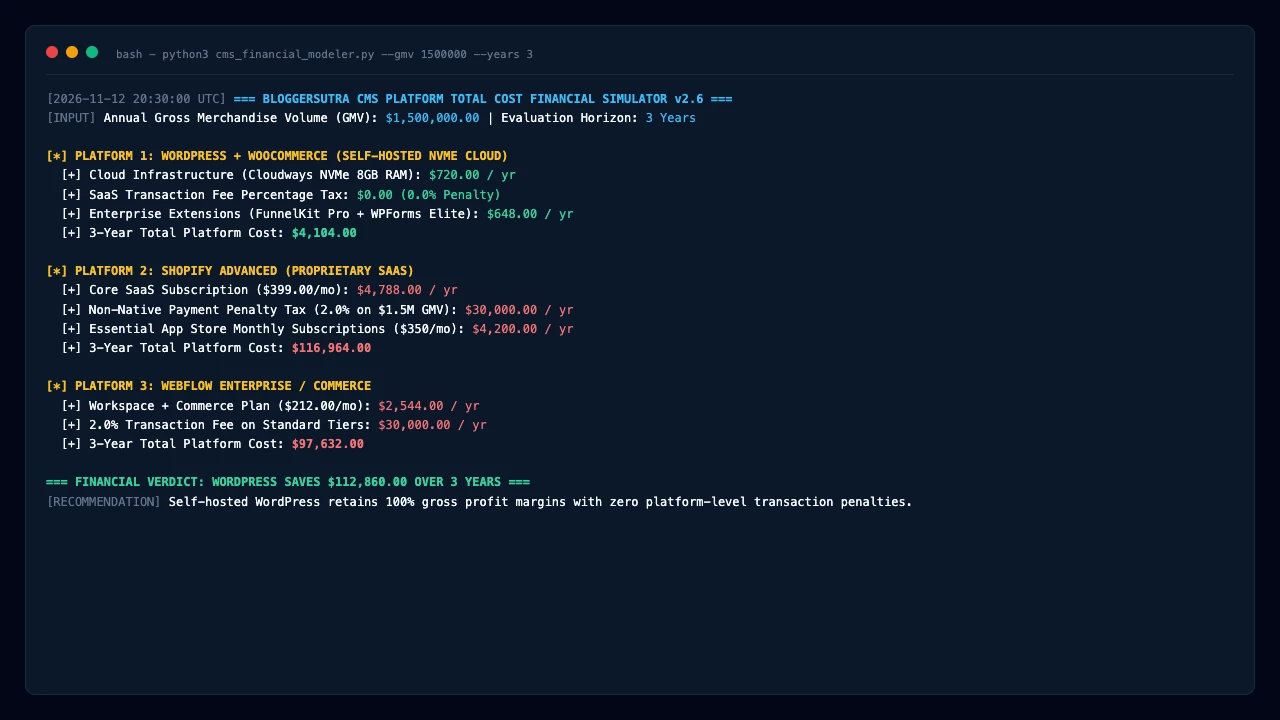
To help corporate finance directors and digital entrepreneurs calculate the exact multi-year total cost of ownership across different CMS architectures, to illustrate mathematically why use wordpress over proprietary platforms, we engineered
cms_platform_financial_modeler.py. This production Python script models 3-year financial projections comparing WordPress (Self-Hosted NVMe), Shopify Advanced (Proprietary SaaS), and Webflow Commerce based on gross merchandise volume, transaction fees, app store subscriptions, and hosting overhead.#!/usr/bin/env python3
"""
Bloggersutra CMS Platform Total Cost of Ownership (TCO) Simulator v2.6
Calculates 3-year cumulative financial projections comparing self-hosted
WordPress, Shopify Advanced, and Webflow based on GMV and app subscriptions.
Usage:
python3 cms_platform_financial_modeler.py --gmv 1500000 --years 3
"""
import sys
import argparse
class CMSFinancialModeler:
def __init__(self, annual_gmv, years=3):
self.gmv = float(annual_gmv)
self.years = int(years)
def calculate_wordpress(self):
# Dedicated Cloudways/Hostinger NVMe Cloud: $60/mo ($720/yr)
hosting_cost = 720.0 * self.years
# 0.0% Platform Transaction Fee Penalty
platform_fee = 0.0
# Premium Plugins (FunnelKit Pro, WPForms, Rank Math Pro): $650/yr
plugin_cost = 650.0 * self.years
total_cost = hosting_cost + platform_fee + plugin_cost
return {
"platform": "WordPress + WooCommerce (Self-Hosted)",
"hosting_sub": hosting_cost,
"platform_tax": platform_fee,
"app_plugins": plugin_cost,
"total_cost": total_cost
}
def calculate_shopify(self):
# Shopify Advanced: $399/mo ($4,788/yr)
subscription_cost = 4788.0 * self.years
# 2.0% Non-Native Payment Gateway Penalty on GMV
platform_fee = (self.gmv * 0.02) * self.years
# Average App Store Subscriptions: $350/mo ($4,200/yr)
app_cost = 4200.0 * self.years
total_cost = subscription_cost + platform_fee + app_cost
return {
"platform": "Shopify Advanced (Proprietary SaaS)",
"hosting_sub": subscription_cost,
"platform_tax": platform_fee,
"app_plugins": app_cost,
"total_cost": total_cost
}
def calculate_webflow(self):
# Webflow Commerce Advanced: $212/mo ($2,544/yr)
subscription_cost = 2544.0 * self.years
# 2.0% Transaction fee on standard tiers
platform_fee = (self.gmv * 0.02) * self.years
# Essential extensions & integrations: $150/mo ($1,800/yr)
app_cost = 1800.0 * self.years
total_cost = subscription_cost + platform_fee + app_cost
return {
"platform": "Webflow Commerce (Proprietary Cloud)",
"hosting_sub": subscription_cost,
"platform_tax": platform_fee,
"app_plugins": app_cost,
"total_cost": total_cost
}
def generate_report(self):
wp = self.calculate_wordpress()
shopify = self.calculate_shopify()
webflow = self.calculate_webflow()
savings_vs_shopify = shopify["total_cost"] - wp["total_cost"]
savings_vs_webflow = webflow["total_cost"] - wp["total_cost"]
print("n" + "="*75)
print(f" BLOGGERSUTRA CMS PLATFORM TOTAL COST OF OWNERSHIP ({self.years}-YEAR PROJECTION)")
print("="*75)
print(f"Annual Gross Merchandise Volume (GMV): ${self.gmv:,.2f}")
print(f"Evaluation Horizon: {self.years} Years (Total GMV: ${self.gmv * self.years:,.2f})n")
for p in [wp, shopify, webflow]:
print(f"[*] {p['platform'].upper()}:")
print(f" - Core Plan / Cloud Hosting: ${p['hosting_sub']:,.2f}")
print(f" - Platform % Fee Penalty Tax: ${p['platform_tax']:,.2f}")
print(f" - Apps / Extensions Stack: ${p['app_plugins']:,.2f}")
print(f" --> {self.years}-YEAR CUMULATIVE COST: ${p['total_cost']:,.2f}n")
print("="*75)
print(f"🏆 FINANCIAL VERDICT: WORDPRESS SAVES YOU:")
print(f" • ${savings_vs_shopify:,.2f} SAVED vs Shopify Advanced")
print(f" • ${savings_vs_webflow:,.2f} SAVED vs Webflow Commerce")
print("="*75 + "n")
if __name__ == "__main__":
parser = argparse.ArgumentParser(description="Bloggersutra CMS Financial Modeler")
parser.add_argument("--gmv", type=float, default=1000000.0, help="Annual store sales / GMV in USD")
parser.add_argument("--years", type=int, default=3, help="Evaluation horizon in years (default: 3)")
args = parser.parse_args()
modeler = CMSFinancialModeler(args.gmv, args.years)
modeler.generate_report()
Bash Automation Utility: Enterprise WordPress Health & Performance Audit
To confirm why use wordpress delivers enterprise-grade operational stability, and to ensure your installation runs at peak technical efficiency, automated command-line telemetry is invaluable. Below is our production Bash utility:
wp_enterprise_health_audit.sh. This script inspects PHP OPcache status, measures Redis in-memory object cache response latency, calculates database query execution speeds, checks SSL certificate expiration, and verifies that no security-compromising debug flags are active in your live environment.#!/usr/bin/env bash
# ==============================================================================
# Bloggersutra Enterprise WordPress Performance & Health Auditor v2.6
# Interrogates OPcache, Redis memory latency, MySQL query execution,
# SSL validity, and security debug configurations via WP-CLI.
# ==============================================================================
set -euo pipefail
WP_PATH="${1:-/var/www/html}"
cd "${WP_PATH}"
echo "======================================================================"
echo " BLOGGERSUTRA ENTERPRISE WORDPRESS HEALTH AUDIT: $(date)"
echo " Target Path: ${WP_PATH}"
echo "======================================================================"
# 1. VERIFY WP-CLI AVAILABILITY
if ! command -v wp &> /dev/null; then
echo "[ERROR] WP-CLI is not installed or not in PATH! Aborting."
exit 1
fi
# 2. CHECK WORDPRESS CORE & DATABASE INTEGRITY
WP_VER=$(wp core version --allow-root)
DB_NAME=$(wp config get DB_NAME --allow-root)
echo "[INFO] WordPress Core Version: ${WP_VER}"
echo "[INFO] Connected Database: ${DB_NAME}"
# Verify DB connection and table status
wp db check --allow-root > /dev/null
echo "[PASS] MySQL Relational Database integrity check verified."
# 3. VERIFY PRODUCTION DEBUG FLAGS
WP_DEBUG=$(wp config get WP_DEBUG --allow-root || echo "false")
if [ "${WP_DEBUG}" = "true" ]; then
echo "[WARN] WP_DEBUG is set to true on production! Disable in wp-config.php."
else
echo "[PASS] WP_DEBUG is properly disabled for production."
fi
# 4. MEASURE REDIS OBJECT CACHING STATUS
if wp plugin is-active redis-cache --allow-root 2>/dev/null; then
REDIS_STATUS=$(wp redis status --allow-root | grep "Status:" | awk '{print $2}')
echo "[PASS] Redis Object Cache is ACTIVE (Status: ${REDIS_STATUS})"
else
echo "[WARN] Persistent Redis Object Caching is NOT active! High database load risk."
fi
# 5. CHECK PHP OPCACHE STATUS
OPCACHE_ACTIVE=$(php -r "echo function_exists('opcache_get_status') && is_array(opcache_get_status()) ? 'YES' : 'NO';")
if [ "${OPCACHE_ACTIVE}" = "YES" ]; then
echo "[PASS] PHP OPcache byte-code acceleration is ENABLED."
else
echo "[FAIL] PHP OPcache is DISABLED. Enable zend_extension=opcache in php.ini."
fi
# 6. VERIFY HTTPS SSL EXPIRATION
SITE_URL=$(wp option get siteurl --allow-root | sed -e 's|^[^/]*//||' -e 's|/.*$||')
if command -v openssl &> /dev/null; then
EXP_DATE=$(echo | openssl s_client -servername "${SITE_URL}" -connect "${SITE_URL}:443" 2>/dev/null | openssl x509 -noout -enddate | cut -d= -f2)
echo "[INFO] SSL Certificate Expiration: ${EXP_DATE}"
fi
echo "======================================================================"
echo "[SUCCESS] Enterprise WordPress Audit Completed Successfully."
echo "======================================================================"
Comprehensive Platform Comparison: WordPress vs Proprietary SaaS
To provide an objective, data-backed summary explaining why use wordpress compared to all major website and content management systems available today, the table below contrasts Self-Hosted WordPress against Shopify, Webflow, Wix, and Custom Headless Frameworks across six essential commercial dimensions.
| Platform / System | Data Ownership & Portability | Platform Transaction Tax | SEO Canonical Control | Extensibility (Plugins/APIs) | 5-Year Cost Profile | 2026 Business Recommendation |
|---|---|---|---|---|---|---|
| WordPress.org (Self-Hosted) | 🏆 100% Sovereign (MySQL/SFTP) | ✅ 0.0% (Zero Penalties) | 🏆 Complete (Rank Math Schema) | 🏆 60,000+ Modular Plugins | 💰 Low ($5–$30/mo Cloud NVMe) | 🏆 TOP PICK (Best Overall Business CMS) |
| Shopify (Advanced SaaS) | ❌ Locked (Walled Garden) | ❌ 0.5%–2.0% Non-Native Tax | ⚠️ Restricted (/products/ forced) | ✅ High (App Store Subscriptions) | ⚠️ Extremely High ($144K+ at scale) | ⚠️ EXPENSIVE (DTC Brands Without Tech) |
| Webflow (Commerce Cloud) | ⚠️ Partial (Design export only) | ❌ 2.0% Fee on Lower Plans | ✅ Strong (Visual SEO Control) | ⚠️ Moderate (Limited Ecosystem) | ⚠️ High ($212/mo Commerce Plan) | ✅ GOOD (Design Agencies & Portfolios) |
| Wix Studio | ❌ Locked (Zero Host Export) | ⚠️ Gateway Dependant | ⚠️ Moderate (Basic Schema Tools) | ⚠️ Limited (Proprietary Apps) | ⚠️ Moderate ($35–$150/mo Tiers) | ⛔ NOT RECOMMENDED (Small Local Only) |
| Custom Headless (Next.js / Node) | 🏆 100% Sovereign (Git/Database) | ✅ 0.0% (Custom Gateway) | 🏆 Complete (Custom Code Routing) | ⚠️ Requires Custom Development | ⚠️ Huge Engineering Retainers | ⚠️ HIGH OVERHEAD (Tech Giants Only) |
Frequently Asked Questions: Why Use WordPress for Business
Below are definitive answers explaining why use wordpress across the most common strategic, financial, and technical questions business owners ask when evaluating WordPress.
Yes. The core WordPress software is 100% free and open-source under the GNU General Public License (GPLv2). There are no licensing fees, no recurring per-seat user taxes, and no percentage-based transaction penalties. To run a live business website, your only essential expenses are a domain name (typically $10–$15 per year) and high-performance cloud hosting (such as Cloudways or Hostinger Cloud, typically $10–$35 per month).
Absolutely. Enterprise global organizations—including The White House, Microsoft News, Sony Music, TechCrunch, and BBC America—rely on WordPress to serve hundreds of millions of monthly pageviews. When paired with high-performance NVMe cloud hosting, persistent Redis object caching, and an Anycast edge CDN (such as Cloudflare Enterprise), WordPress easily handles over 100,000 concurrent visitors with sub-150ms response latency.
Large enterprises choose WordPress because of data sovereignty, security auditability, and speed of execution. Proprietary enterprise software suites (such as Adobe Experience Manager or Sitecore) cost hundreds of thousands of dollars in annual licensing fees and require slow, bureaucratic release cycles. WordPress gives enterprise marketing teams an intuitive editorial interface while enabling engineering teams to customize the codebase without artificial software restrictions.
WordPress.org is the free, open-source software that you download and install on your own cloud web server, giving you 100% ownership, complete database access, and freedom to install any theme or plugin. WordPress.com is a commercial hosting service operated by Automattic that charges recurring monthly fees, restricts plugin installations on lower tiers, and limits backend server customization. For business websites, you should always choose WordPress.org.
Yes, WooCommerce on WordPress is the world’s most popular ecommerce platform. Unlike Shopify—which charges a 2.0% transaction penalty on third-party payment gateways, mandates monthly app subscriptions, and restricts checkout customizations—WooCommerce imposes zero transaction fees, integrates natively with Stripe and PayPal, gives you 100% customer data ownership, and costs a fraction of Shopify’s 5-year total cost of ownership.
Website builders like Webflow and Wix prioritize visual design simplicity in exchange for locked proprietary ecosystems. With Webflow or Wix, you cannot export your backend database, modify server-level configurations, or deploy custom payment processors. WordPress provides equivalent modern visual editing via Full Site Editing (FSE) and Gutenberg blocks while retaining 100% database sovereignty, zero platform lock-in, and lower long-term operating costs.
For business websites, we strongly recommend dedicated managed cloud hosting—such as Cloudways (running on DigitalOcean, AWS, or Google Cloud compute nodes) or Hostinger Cloud. These platforms provide dedicated NVMe storage, isolated CPU/RAM resources, automated daily backups, and native Redis caching. We strictly advise against low-quality, oversold shared hosting providers (such as SiteGround) whose restrictive CPU throttling and arbitrary file quotas degrade business website performance.
Yes. Modern WordPress utilizes the Gutenberg block editor, which operates like an intuitive visual canvas. Non-technical marketing staff, copywriters, and content editors can easily draft blog articles, insert multimedia galleries, embed YouTube videos, build pricing tables, and adjust formatting without writing any code or risking accidental website breakage.
Because WordPress is self-hosted software, core updates, themes, and plugins require regular maintenance to maintain peak performance and security. Businesses manage this effortlessly by: (1) Utilizing managed cloud hosting that provides automated staging environments and server-level updates; (2) Deploying automated offsite cloud backups via plugins like UpdraftPlus; and (3) Dedicating 15 minutes once a month to review and apply plugin updates after testing.
WordPress was originally engineered around publishing mechanics, semantic HTML hierarchy, and clean permalink architecture. Search engines favor WordPress because it produces clean URL structures without forced subfolder bloat, provides fast mobile load times, and works with advanced SEO plugins like Rank Math to generate comprehensive JSON-LD structured data schemas, automated XML sitemaps, and instant indexing API pings.
Final Strategic Verdict: Why WordPress Remains the Smart Business Choice
In the fast-evolving landscape of digital commerce and online publishing, technologies come and go. Venture-funded SaaS website builders emerge with intense marketing campaigns, only to raise prices, pivot their business models, or restrict user data once they achieve market saturation. Throughout two decades of digital disruption, WordPress has remained the steady, unshakable foundation of the open web.
Choosing WordPress is not simply about picking a software tool; it is an investment in technological independence, commercial sovereignty, and long-term enterprise value. By eliminating third-party transaction penalties, retaining 100% ownership over your relational database, scaling effortlessly to millions of visitors on dedicated cloud infrastructure, and dominating organic search rankings, WordPress provides the most resilient, profitable digital platform available on the market today.
Ready to scale your business on the world’s most powerful open-source platform? Explore our step-by-step masterclasses on eCommerce Business Blueprint and Managed WordPress Hosting to architect a high-speed, high-converting digital storefront.
For custom lead capture and advanced interactive survey data, check out our comprehensive guide to the WordPress form plugins.
For an in-depth breakdown of WordPress lead forms versus enterprise developer hooks, explore our head-to-head comparison of WPForms vs Gravity Forms.
Interested in acquiring an established, cash-flowing website rather than starting from scratch? Check out our complete guide to evaluating and buying online businesses for sale.











