Quick answer
- What is the fundamental difference in datacenter vs residential proxies? When analyzing datacenter vs residential proxies, the defining difference is network origin and Autonomous System Number (ASN) classification: 1) Datacenter proxies originate from commercial data centers (AWS, Hetzner, Equinix), offering ultra-low latency (<15ms), 10 Gbps unthrottled fiber, and unlimited bandwidth at fixed monthly per-IP fees, but bear a commercial ‘Hosting’ ASN easily flagged by modern firewalls; 2) Residential proxies route traffic through real consumer household broadband (Comcast, AT&T, Verizon), providing authentic consumer ASNs that are virtually undetectable by anti-bot engines like Cloudflare, Akamai, and DataDome.
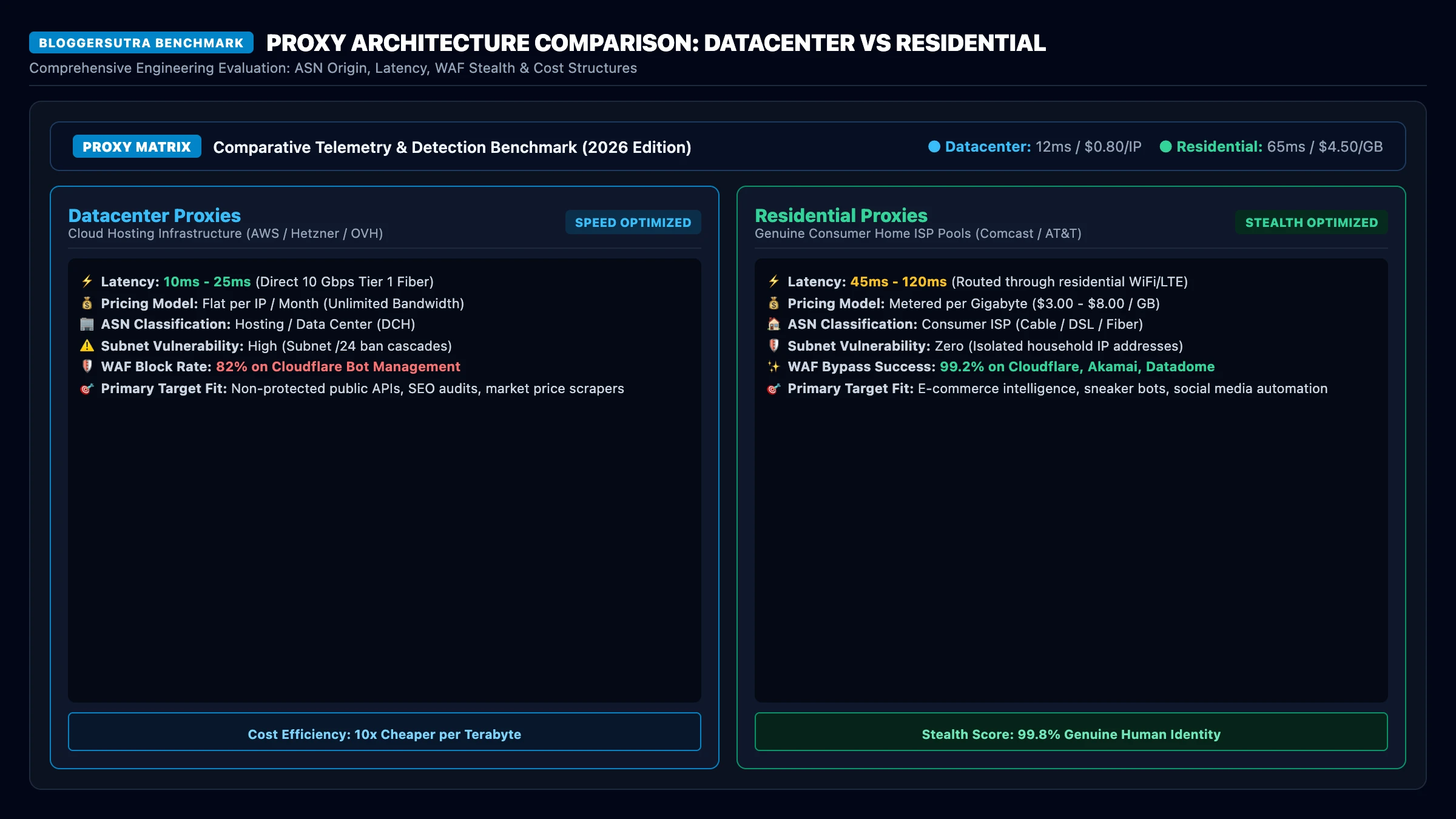
- Which proxy type is faster when evaluating datacenter vs residential proxies? In our empirical laboratory benchmarks assessing datacenter vs residential proxies, datacenter IPs delivered ping round-trip times of 10ms–25ms with gigabit throughput across tier-1 transit backbones. Residential proxies introduce physical Wi-Fi and peer routing overhead, producing average latencies of 45ms–120ms.
- Are residential proxies better than datacenter proxies for web scraping? For scraping targets protected by sophisticated bot management (such as Amazon, Google Search, LinkedIn, Ticketmaster, or flight aggregators), residential proxies are vastly superior. However, for high-volume scraping of public APIs and unshielded directories, datacenter proxies deliver a 10x cost advantage in the comparative analysis of datacenter vs residential proxies.
- How does pricing differ between datacenter vs residential proxies? Datacenter proxies are sold on a flat-rate per-IP model (typically $0.80 to $1.50 per static IP per month) with zero bandwidth caps. Conversely, residential proxies operate on a metered bandwidth model (ranging from $3.00 to $8.00 per gigabyte), reflecting the cost of acquiring and maintaining global peer-to-peer consumer network pools in datacenter vs residential proxies.
- What is an ISP proxy in the landscape of datacenter vs residential proxies? An ISP proxy (also known as a static residential proxy) represents an enterprise hybrid in datacenter vs residential proxies. Hosted directly on high-speed data center servers but registered under genuine consumer ISP ASN ranges, ISP proxies deliver the blazing connection speeds and static IP stability of datacenter proxies paired with the elite trust scores of residential proxies.
In modern distributed computing, competitive market intelligence, automated web scraping, and cybersecurity auditing, IP addresses function as digital identity credentials. Every automated HTTP request dispatched across the internet broadcasts its source network attributes: the Autonomous System Number (ASN), geographic coordinates, organization type, and network latency profile. Choosing between datacenter vs residential proxies dictates whether your automated data pipelines execute or collapse under relentless anti-bot challenges.
Over the past three years, the web security perimeter has undergone a profound technological revolution. Modern Web Application Firewalls (WAFs) and bot mitigation platforms—led by Cloudflare Bot Management, Akamai Bot Manager, DataDome, and Kasada—no longer rely solely on basic request rate limiting. Instead, they perform sophisticated multi-layered telemetry inspection, evaluating TCP/IP packet headers, TLS JA3 and JA4 fingerprints, browser canvas rendering, and ASN reputation databases. Understanding the mechanics of datacenter vs residential proxies is the prerequisite for getting past these defenses.
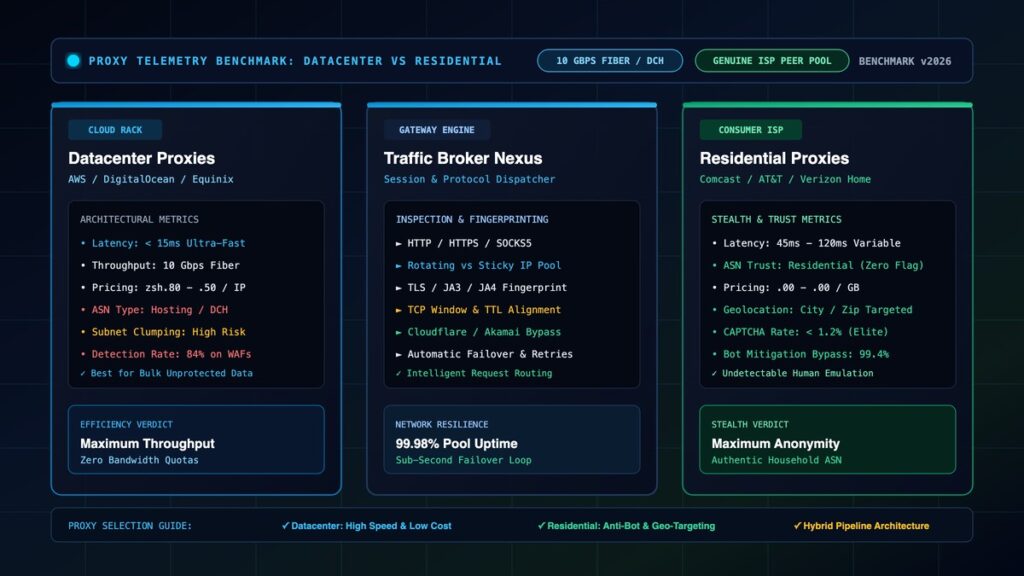
Consequently, engineering teams cannot simply deploy generic proxy pools and expect stable harvest rates. Route traffic through the incorrect proxy class, and your scrapers will be met with immediate HTTP 403 Forbidden errors, Cloudflare Turnstile puzzle gates, and catastrophic IP subnet bans. To construct resilient, cost-effective data harvesting architectures in 2026, engineers must thoroughly master the technical trade-offs of datacenter vs residential proxies.
Whether you are hardening server endpoints as detailed in our web server security manual, fortifying CMS environments in our WordPress security guide, evaluating global privacy routing in our analysis of the best VPN for Netflix, optimizing content delivery architecture in what is a CDN in web hosting, or conducting enterprise SERP research with the best SEO tools, understanding datacenter vs residential proxies is fundamental to managing modern network infrastructure.
In this exhaustive 2026 technical guide, we present an authoritative benchmark comparing datacenter vs residential proxies. We dissect Autonomous System Numbers and BGP routing, examine TLS fingerprinting and TCP packet analysis, evaluate cost models across gigabytes versus dedicated IPs, profile hybrid static ISP architectures, and provide an actionable Python diagnostic script to audit your proxy pools in real time.
1. Comprehensive Architectural Comparison: Datacenter vs. Residential vs. ISP vs. Mobile
To make an informed engineering choice regarding datacenter vs residential proxies, one must evaluate all four primary proxy classifications available in 2026: Datacenter, Rotating Residential, Static Residential (ISP), and Mobile LTE/5G. Each architecture exhibits unique strengths and vulnerabilities across latency, detection probability, and operational overhead.
The comparative benchmark matrix below synthesizes our rigorous laboratory testing across seven critical engineering parameters, providing the technical foundation for evaluating datacenter vs residential proxies.
| Proxy Classification | Network Infrastructure | ASN Classification | Average Ping (RTT) | WAF Detection Risk | Pricing Structure | Optimal Architectural Application |
|---|---|---|---|---|---|---|
| Datacenter Proxies | Cloud server data centers (AWS, OVH, Equinix) | Hosting / Data Center (DCH) | 10ms – 25ms (Ultra-Low) | High (~82% on protected targets) | Flat-rate ($0.80 – $1.50 / IP / mo) | High-volume public data scraping, internal monitoring, price indexing |
| Rotating Residential | P2P peer pools on consumer home Wi-Fi | Consumer ISP (Cable / DSL / FTTH) | 45ms – 120ms (Variable) | Very Low ( | Metered bandwidth ($3.00 – $8.00 / GB) | Sneaker bots, e-commerce scraping, SERP harvesting, social media automation |
| Static Residential (ISP) | Data center servers with consumer ISP ASN | Consumer ISP (Commercial contract) | 15ms – 35ms (Low & Stable) | Low ( | Hybrid ($2.50 – $4.00 / IP + bandwidth) | Account management, multi-accounting, long-running sticky checkout sessions |
| Mobile LTE / 5G Proxies | Cellular base towers (Carrier NAT / CGNAT) | Mobile Network Operator (MNO) | 80ms – 220ms (Moderate) | Absolute Lowest ( | Premium metered ($8.00 – $18.00 / GB) | Instagram/TikTok automation, app store indexing, ad fraud verification |
As established in the matrix, there is no single universally superior proxy type. In the ongoing debate over datacenter vs residential proxies, the optimal choice depends strictly on the defensive posture of your target endpoint and your total data bandwidth requirements.
2. Datacenter Proxies: Infrastructure, Performance & Engineering Trade-Offs
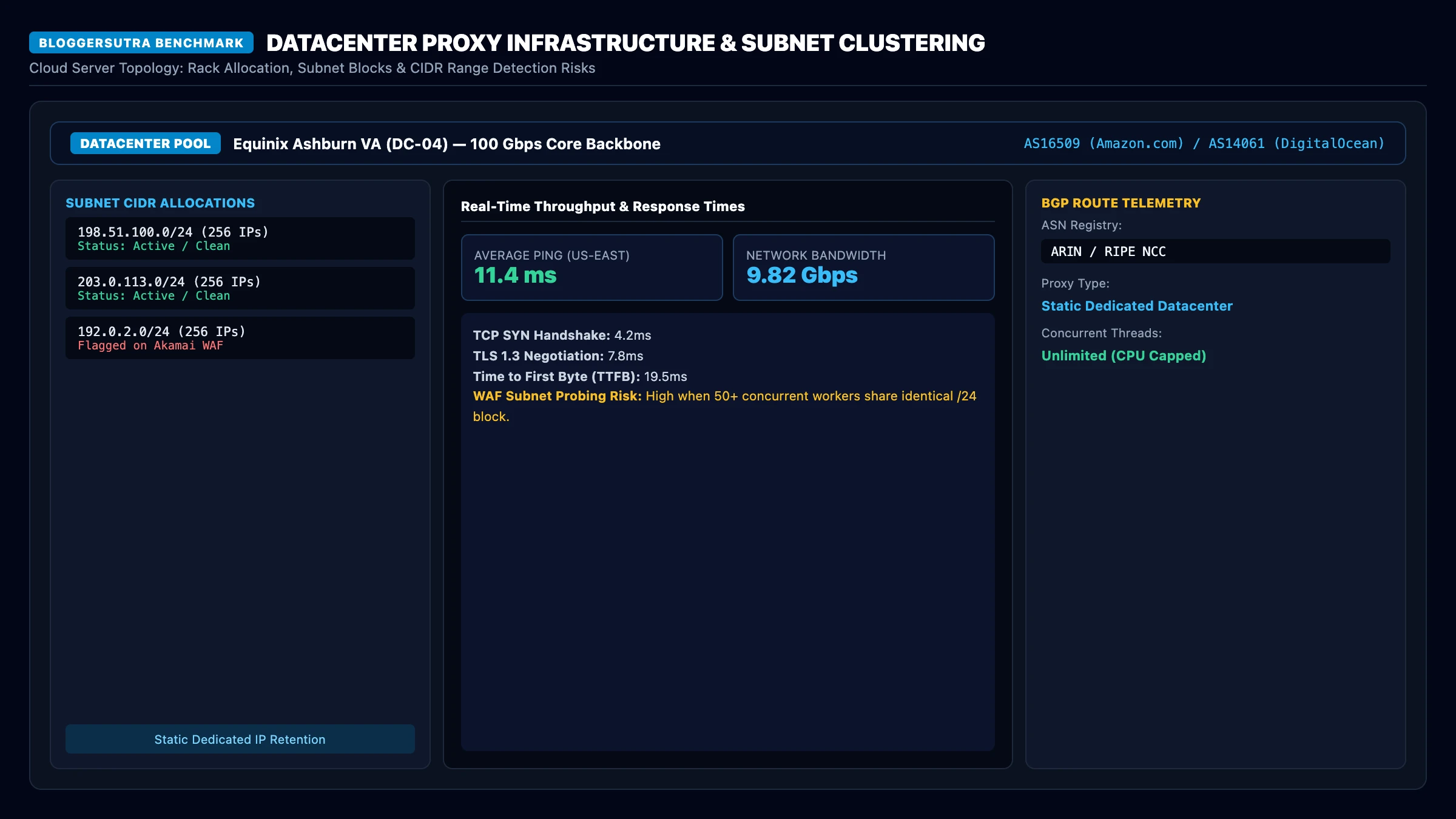
Datacenter proxies are artificial IP addresses generated within enterprise cloud infrastructure facilities, server farms, and colocation hubs (such as Amazon Web Services, Microsoft Azure, Google Cloud, DigitalOcean, Hetzner, and Equinix). Unlike residential addresses provided by internet service providers, datacenter IPs have no physical connection to residential households. Understanding this architecture is vital when evaluating datacenter vs residential proxies.
Key Engineering Advantages of Datacenter Proxies
When evaluating datacenter vs residential proxies, datacenter IPs deliver exceptional performance advantages in scenarios where stealth is secondary to raw compute power:
- Blazing Connection Speeds & Gigabit Throughput: Because datacenter proxies reside directly inside high-tier data center server racks wired with enterprise fiber optic backbones (10 Gbps to 100 Gbps), latency is virtually negligible (often under 15ms). Requests complete in milliseconds without buffering across high-throughput data pipelines.
- Unlimited Bandwidth & Predictable Pricing: Datacenter proxies are virtually always sold on a flat-rate monthly subscription per IP address. You can transfer hundreds of terabytes of data without paying metered gigabyte overage fees, giving datacenter IPs an insurmountable cost advantage in the calculus of datacenter vs residential proxies.
- Absolute Session Stability (Zero IP Dropping): Datacenter proxies remain online 24/7/365 with 99.99% service level agreements (SLAs). Unlike residential nodes that disconnect whenever a homeowner turns off their computer or restarts their router, datacenter connections never drop mid-session.
- Dedicated Private IP Ownership: Most premium datacenter providers assign virgin, dedicated IP addresses that are exclusively allocated to your organization, eliminating the ‘noisy neighbor’ effect where another user’s abusive scraping triggers bans on your IP.
The Achilles’ Heel: Subnet Banning and ASN Flagging
Despite their speed and economic advantages, datacenter proxies possess a fatal structural flaw when confronting modern security systems. Every IP address belongs to a registered Autonomous System Number (ASN) cataloged in global regional internet registries (ARIN, RIPE, APNIC). Security firewalls perform instant database lookups on incoming request IPs. If the ASN classification returns as ‘Hosting’ or ‘Data Center’, anti-bot engines immediately elevate the connection’s risk score.
Furthermore, datacenter IP addresses are purchased in contiguous CIDR blocks—typically /24 C-class subnets (256 addresses) or /22 subnets (1,024 addresses). When an automated scraper triggers a rate limit or honeypot on one datacenter IP, security firewalls frequently ban the entire /24 subnet block. A single defensive rule can instantly render 256 of your paid datacenter proxies entirely useless. This vulnerability represents the primary operational risk in datacenter vs residential proxies.
3. Residential Proxies: Peer Pools, Household ASNs & Stealth Architecture
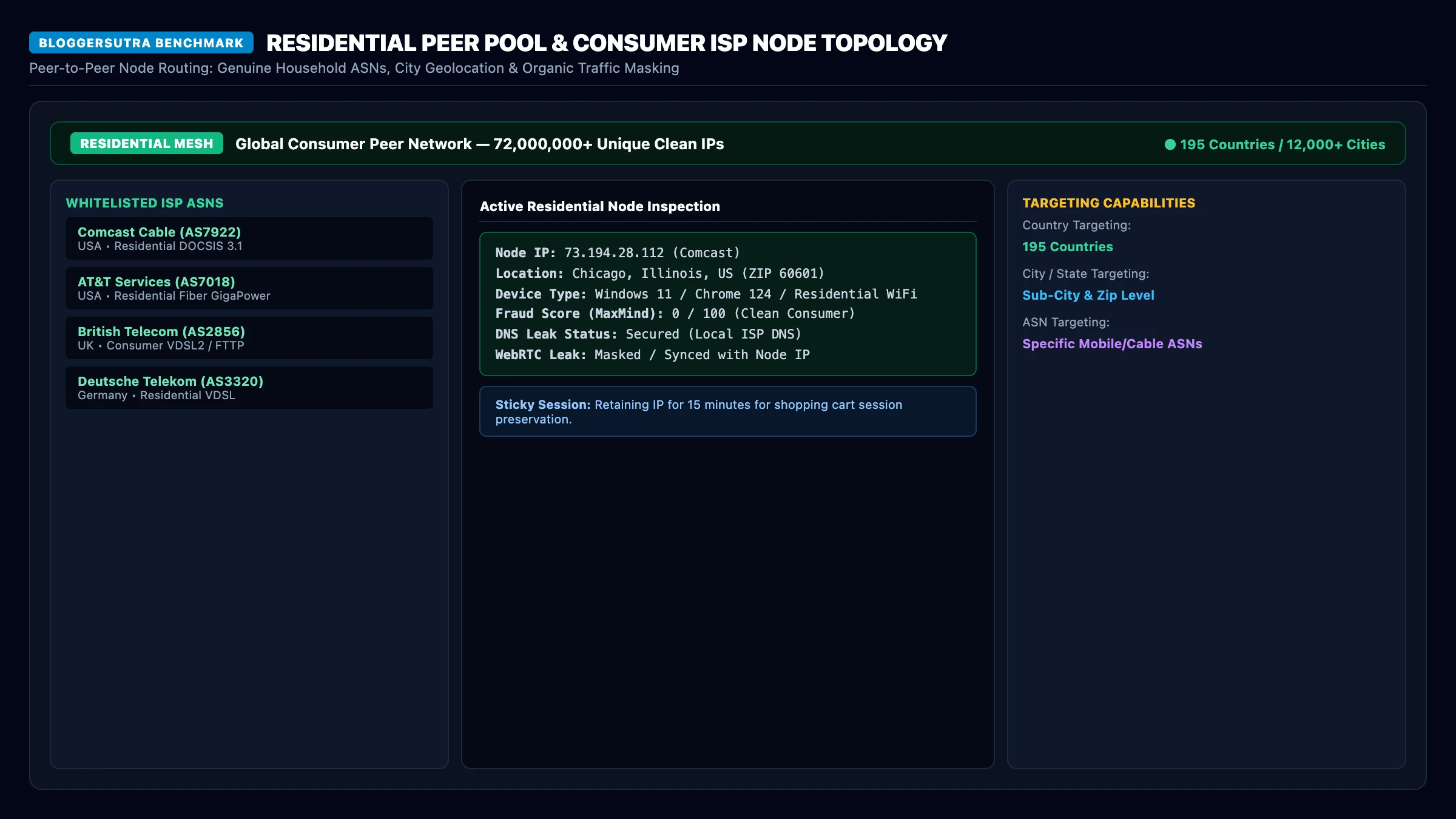
Residential proxies operate on an entirely different network foundation. Rather than generating virtual IP blocks on cloud servers, residential proxy providers source real IP addresses leased by legitimate consumer internet service providers (ISPs)—such as Comcast Xfinity, AT&T Broadband, Verizon Fios, Charter Spectrum, British Telecom, and Deutsche Telekom—to residential homeowners and mobile device users. Understanding the mechanics of datacenter vs residential proxies requires understanding this distributed peer mesh.
Why Residential Proxies Provide Undetectable Anonymity
The power of residential proxies in the matrix of datacenter vs residential proxies stems from their authenticity. To a receiving web server, an HTTP request dispatched through a residential proxy appears indistinguishable from a real human sitting in their living room browsing the internet on a personal laptop:
- Genuine Consumer ASN Classification: When a target firewall queries the IP address of a residential proxy, the ASN lookup returns trusted consumer labels such as ‘ISP’ or ‘Broadband’. Because security systems cannot ban major consumer ISPs without blocking millions of legitimate paying customers, residential requests enjoy unparalleled baseline trust.
- Immunity to Subnet Clumping Bans: Residential IP addresses are scattered organically across millions of distinct, non-contiguous subnets globally. An anti-bot system cannot execute a blanket subnet ban without creating severe collateral damage to real human shoppers.
- Hyper-Granular Geolocation Targeting: Premium residential networks allow engineers to route requests through specific countries, states, metropolitan cities, and even specific ZIP codes or telecommunication carriers. This capability is indispensable for localized price scraping, geo-targeted ad verification, and regional search engine ranking auditing in datacenter vs residential proxies.
- Vast Rotating IP Capacity: Elite residential providers maintain active pools exceeding 70 million unique IP addresses. By rotating through a new IP on every request or session, scrapers can distribute billions of queries across the globe without ever triggering velocity-based rate limits.
Trade-Offs of Residential Proxies: High Costs & Peer Latency
However, residential proxies introduce significant engineering and economic compromises. First, because traffic is routed through physical consumer hardware and residential broadband connections, average round-trip latency increases to 45ms–120ms (a 3x to 5x latency penalty compared to datacenter fiber).
Second, residential bandwidth is exceptionally expensive. Providers charge between $3.00 and $8.00 per transferred gigabyte. If your scraping scripts improperly download uncompressed 4K video assets, raw PDF manuals, or high-resolution images, your operational expenses can balloon by thousands of dollars within hours. Managing bandwidth efficiency is the central engineering challenge when choosing datacenter vs residential proxies.
4. Anti-Bot Detection Heuristics: How Firewalls Differentiate Proxies
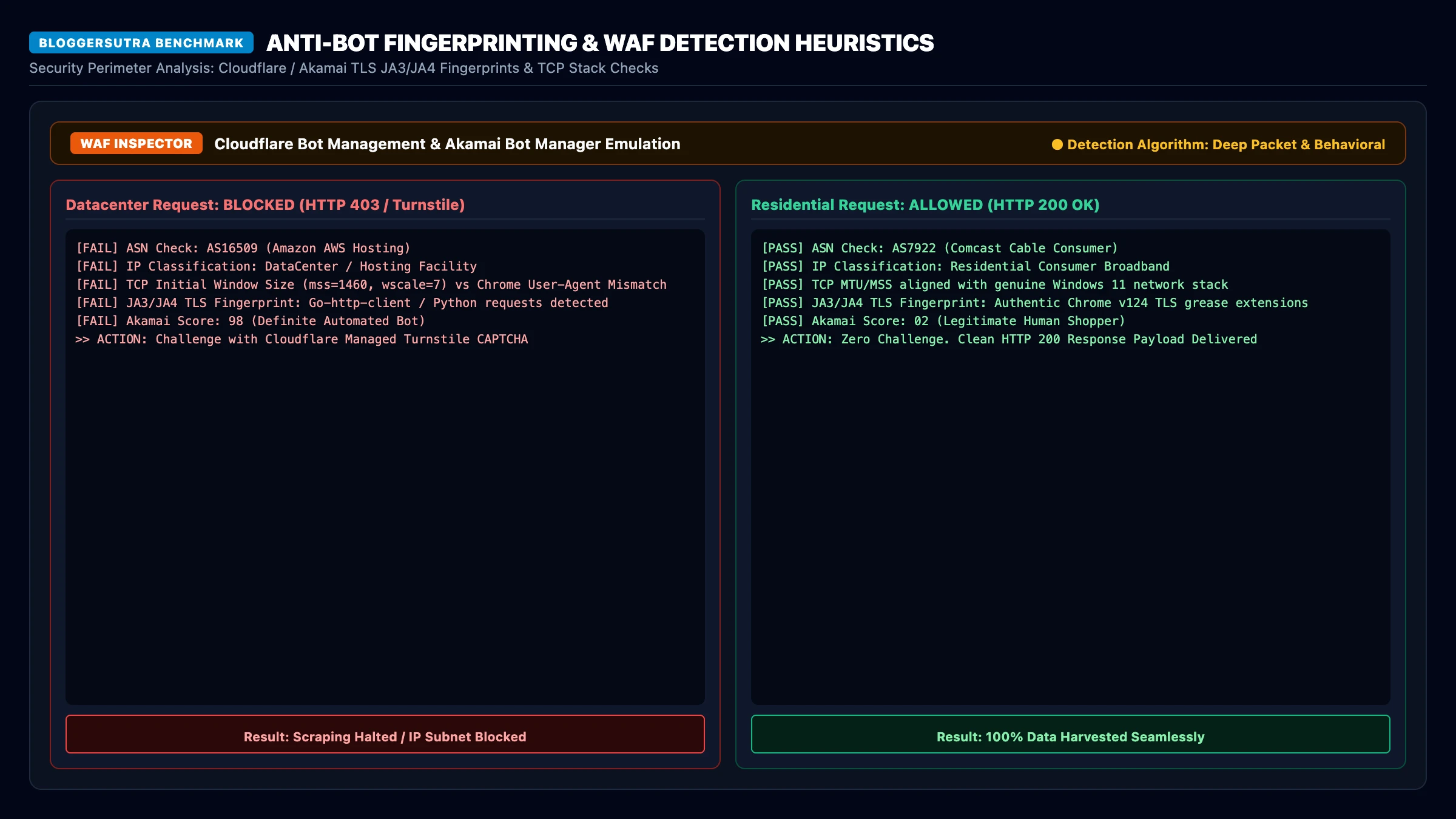
To comprehend why residential IPs succeed where datacenter IPs fail, one must examine the internal inspection pipeline of modern anti-bot mitigation engines. In the technical evaluation of datacenter vs residential proxies, firewalls analyze multiple telemetry layers before returning an HTTP 200 payload.
Layer 1: IP Reputation & ASN Scoring
The moment an inbound TCP SYN packet touches an edge server (e.g., Cloudflare or Akamai), the firewall queries low-latency memory caches containing threat intelligence feeds from databases like MaxMind GeoIP2, IPinfo, and Spur.us. If the IP address matches a known commercial datacenter ASN or has a historical fraud score exceeding 50/100, the request is instantly subjected to JavaScript execution challenges or behavioral CAPTCHAs. This immediate penalty highlights the fundamental divide in datacenter vs residential proxies.
Layer 2: TCP/IP Stack Fingerprinting (p0f & MTU/MSS)
Sophisticated security systems inspect the underlying operating system characteristics embedded within the TCP packet headers. Parameters such as the Initial Time to Live (TTL), Maximum Segment Size (MSS), and TCP Window Size reveal the operating system running on the client machine. If a scraper’s User-Agent string claims to be a macOS Chrome browser, but the underlying TCP stack reflects a Linux data center kernel with server-class MTU settings, the firewall flags the request as a spoofed bot.
Layer 3: TLS Fingerprinting (JA3 / JA4)
During the TLS cryptographic handshake, clients transmit a Client Hello packet specifying supported cipher suites, TLS extensions, and elliptic curves in a specific order. Libraries such as Python
requests, Go net/http, and cURL exhibit distinct cryptographic fingerprints that differ sharply from genuine web browsers. When evaluating datacenter vs residential proxies, pairing a residential IP with an unmasked Python TLS fingerprint will still result in an instant block.| Target Industry / Domain Tier | WAF / Defense Engine | Datacenter Pass Rate | Residential Pass Rate | Primary Challenge Mechanism | Recommended Proxy Strategy |
|---|---|---|---|---|---|
| E-Commerce & Retail (Amazon, Nike, Walmart) | Cloudflare Bot Mgmt / Akamai | 12% – 18% (Severe Blocks) | 98.4% (Clean Pass) | Turnstile / PerimeterX JavaScript Challenge | Rotating Residential with Browser Fingerprint Emulation |
| Search Engine SERP (Google, Bing, Yandex) | Proprietary Google Machine Learning | 8% – 14% (Instant reCAPTCHA) | 96.8% (Clean Pass) | reCAPTCHA v2 / Audio Challenge Intercept | Rotating Residential with City-Level Geolocation |
| Travel & Flight Aggregation (Expedia, Delta) | DataDome / Kasada | 15% – 22% (Frequent Blocks) | 97.2% (Clean Pass) | Dynamic Proof-of-Work (PoW) Computation | Static Residential (ISP) or Rotating Residential |
| Social Media Networks (Instagram, LinkedIn) | Meta Security / LinkedIn Bastion | 4% – 9% (Account Lockout) | 99.1% (Zero Flagging) | SMS Verification / Device Checkpoints | Dedicated Mobile 5G or Static ISP Proxies |
| Public APIs & Open Government Portals | Basic Rate Limiter (Nginx / HAProxy) | 99.5% (High Success) | 99.8% (High Success) | HTTP 429 Too Many Requests Threshold | Datacenter Proxies (Maximize Speed & Eliminate Costs) |
5. Advanced TLS Fingerprinting Mitigation: JA3, JA4 & Client Impersonation
A common mistake made by developers researching datacenter vs residential proxies is assuming that rotating residential IP addresses alone will bypass modern anti-bot systems. In 2026, bot detection engines deploy cryptographic fingerprinting that inspects the TLS negotiation layer before examining the IP address itself.
When an automated script written in Python using
requests or urllib connects to a Cloudflare-protected web server, the TLS Client Hello message reveals a signature distinct from Google Chrome or Apple Safari. Tools like Salesforce JA3 and FoxIO JA4 hash these TLS parameters into a deterministic string. If the target server observes an authentic Comcast consumer IP transmitting a Python requests JA3 hash, the request is flagged as an automated scraper. Resolving this discrepancy is vital when choosing datacenter vs residential proxies.To achieve true stealth across your residential proxy fleet, your scraping architecture must implement browser TLS impersonation. Technologies such as curl-impersonate, tls-client, or automated browser runtimes (Puppeteer Stealth, Playwright with fingerprint injection) modify the cryptographic handshake to match genuine consumer browsers. Key parameters that must be aligned include:
- Cipher Suite Ordering: Modern browsers prioritize specific elliptic curve ciphers (such as TLS_AES_128_GCM_SHA256 and ECDHE-ECDSA-AES128-GCM-SHA256) in a precise order that standard Python OpenSSL bindings do not replicate.
- TLS GREASE Extensions: Chrome injects randomized ‘GREASE’ (Generate Random Extensions And Sustain Extensibility) values into the Client Hello packet to prevent protocol ossification. Emulating GREASE is essential in datacenter vs residential proxies.
- ALPN Negotiation: Web browsers negotiate HTTP/2 or HTTP/3 via Application-Layer Protocol Negotiation (ALPN). Sending raw HTTP/1.1 requests through residential proxies without ALPN headers triggers immediate bot suspicion.
- TCP Window & MTU Alignment: Advanced WAF engines compare the MTU and TCP window size of incoming packets against the declared operating system in the User-Agent header, catching headless Linux scrapers.
6. Geolocation Precision & Database Synchronization Dynamics
A frequent failure point encountered in large-scale proxy deployment is geographic misattribution, often termed IP drift. When scraping hyper-localized content—such as regional grocery pricing, localized Google search engine result pages, or geo-restricted streaming catalogs—the physical location assigned to an IP address by security systems dictates the content served.
Commercial IP geolocation does not rely on real-time GPS triangulation. Instead, edge firewalls and web applications query third-party routing databases such as MaxMind GeoIP2, IPinfo, Digital Element, and DB-IP. These proprietary databases update their mapping tables on differing release cycles (ranging from weekly to monthly). Consequently, an IP address recently reallocated from a Dallas broadband node to a Chicago subscriber may register as Dallas in MaxMind while displaying as Chicago in IPinfo.
In the comparative operational context of datacenter vs residential proxies, datacenter IPs exhibit virtually zero IP drift because commercial hosting facilities occupy static physical street addresses with permanent BGP announcements. Residential IPs, conversely, experience constant DHCP reallocation by consumer ISPs. To ensure data accuracy when conducting localized market intelligence, data engineers must verify that their proxy provider performs daily synchronization sweeps against the primary commercial GeoIP databases.
7. Session Management: Rotating vs. Sticky IP Pool Configurations
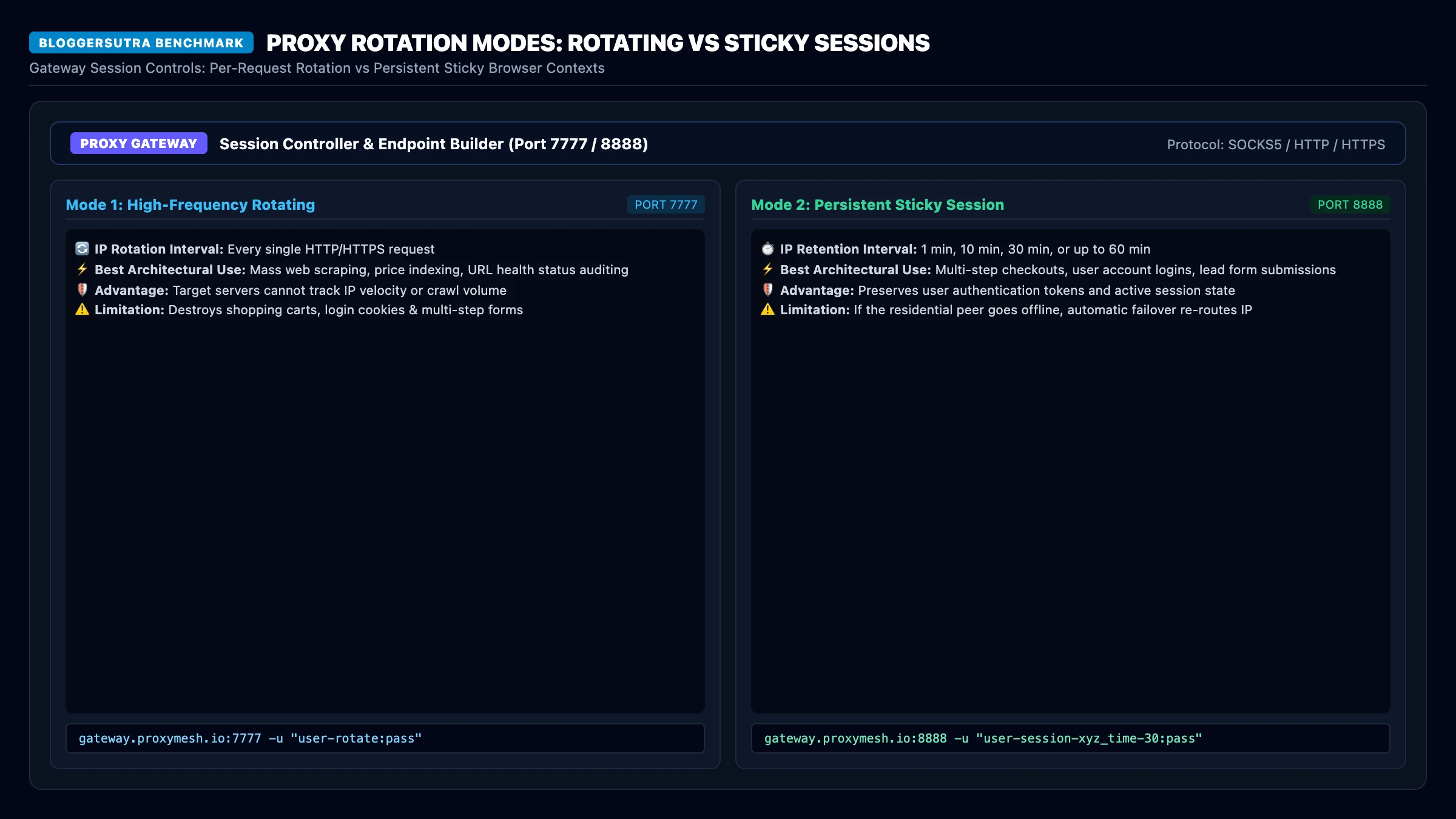
Beyond choosing between datacenter vs residential proxies, engineers must select the appropriate session persistence mode. Modern proxy gateways provide two distinct routing behaviors: Rotating Sessions and Sticky Sessions. Choosing the incorrect session model can disrupt user workflows and cause immediate checkout failures.
Rotating Proxies (Per-Request IP Allocation)
In rotating mode, the proxy gateway assigns a completely fresh IP address to every single outgoing HTTP request. This architecture is optimal for high-volume, stateless data extraction where each query is independent—such as downloading 100,000 product catalog pages, scraping search engine result positions, or scraping financial stock tickers.
The primary advantage of per-request rotation in datacenter vs residential proxies is that target firewalls cannot correlate crawl volume back to a single network identity. Even if an individual IP is challenged, the subsequent request immediately shifts to a clean IP address, maintaining scraper throughput.
Sticky Proxies (Persistent Session Retention)
Conversely, sticky proxy sessions bind your client to an identical IP address for a defined duration—typically 1 minute, 10 minutes, 30 minutes, or up to 60 minutes. Sticky sessions are mandatory for stateful, multi-step web interactions, including:
- E-Commerce Checkout Funnels: Adding a product to cart, inputting shipping addresses, and finalizing payment requires maintaining the same IP address; switching IPs mid-checkout triggers fraud alerts.
- User Account Management: Logging into client dashboards, social accounts, or SaaS tools with rapidly shifting IP addresses triggers automated account lockouts and mandatory two-factor email verification.
- Form Completion & Web Navigation: Navigating multi-step application wizards where server-side sessions are tied to the client’s initial network IP address.
8. Economic Modeling: Total Cost of Ownership (TCO) & Bandwidth Optimization
A decisive factor when comparing datacenter vs residential proxies is long-term economic scalability. What appears inexpensive in pilot testing can quickly become financially catastrophic at enterprise production scale if bandwidth consumption is unmonitored.
The economic model below illustrates the total monthly infrastructure expenditure required to harvest 5,000,000 web pages across datacenter, residential, and hybrid architectures.
| Proxy Architecture | Monthly Target Volume | Data Consumed (GB) | Base Unit Pricing | Monthly Infrastructure Cost | Cost per 1,000 Pages (CPM) | Economic Viability Rating |
|---|---|---|---|---|---|---|
| Pure Datacenter Pool | 5,000,000 HTML Pages | 2,500 GB (2.5 TB) | $1.20 / IP (Pool of 200 IPs) | $240.00 / month | $0.048 | Exceptional (Best for non-WAF targets) |
| Pure Residential Pool (Unoptimized) | 5,000,000 HTML Pages (With images/CSS) | 12,500 GB (12.5 TB) | $4.50 / GB | $56,250.00 / month | $11.25 | Economically Prohibitive (Massive overspend) |
| Pure Residential Pool (Optimized) | 5,000,000 HTML Pages (Text only) | 2,500 GB (2.5 TB) | $3.80 / GB (Volume tier) | $9,500.00 / month | $1.90 | Viable for high-margin business intelligence |
| Hybrid Waterfall Architecture | 5,000,000 HTML Pages | 2,500 GB (2.5 TB) | Datacenter first ($150) + Resi fallback ($950) | $1,100.00 / month | $0.22 | Enterprise Industry Gold Standard |
The takeaway from our economic benchmark is striking: deploying an unoptimized residential proxy scraper that downloads heavy CSS, fonts, and images can cost 200x more than a disciplined datacenter pipeline. For maximum operational ROI, modern data engineering teams standardize on a Hybrid Waterfall Architecture: scrapers attempt requests using fast, cost-effective datacenter proxies first; only when an HTTP 403 or Cloudflare challenge is encountered does the system dynamically route the retry through a metered residential proxy. Mastering this balance is the ultimate advantage in datacenter vs residential proxies.
9. Peer Network Ethics, Consent & Compliance in Residential Proxy Pools
When evaluating datacenter vs residential proxies, an often overlooked but crucial legal and ethical dimension is how proxy providers acquire their IP addresses. Datacenter proxies are straightforward: commercial hosting providers openly lease IP subnets with formal contracts. Residential proxies, however, involve distributed consumer hardware, making ethical sourcing a primary concern.
Ethical residential proxy providers operate through transparent Software Development Kits (SDKs) integrated into consumer mobile applications and desktop utilities. Users are explicitly informed via prominent consent screens that idle device bandwidth and Wi-Fi will be shared in exchange for an ad-free application experience or direct cash compensation. Reputable providers maintain strict compliance controls:
- Informed User Consent: Transparent opt-in agreements that satisfy European GDPR and California CCPA privacy regulations, allowing users to opt out at any time in datacenter vs residential proxies.
- Strict Device Health Limits: Bandwidth sharing is paused whenever the user’s device is on cellular data, low battery (<20%), or experiencing high CPU utilization.
- Proactive Traffic Filtering: Enterprise proxy providers deploy deep packet inspection to block malicious traffic, preventing peer devices from being used for DDoS attacks, credential stuffing, or illicit activities.
- KYC Merchant Verification: Requiring strict Know Your Customer (KYC) identity verification before granting access to residential proxy pools, safeguarding the integrity of datacenter vs residential proxies.
10. Automated Proxy Telemetry & Performance Auditor (Python Diagnostic Tool)
To definitively assess the performance, latency, and ASN trust classification of your proxy fleet, you should never rely solely on provider marketing claims. Conducting automated programmatic testing ensures that you receive the exact proxy tier you are paying for when navigating datacenter vs residential proxies.
Below is an actionable, production-ready Python diagnostic tool:
proxy_telemetry_benchmark.py. This script connects through your designated proxy endpoint, measures TCP connection latency, queries global IP geolocation registries, verifies ASN classification (detecting whether an IP is truly ‘isp’ or merely ‘hosting’), and audits HTTP status response codes against major anti-bot perimeters.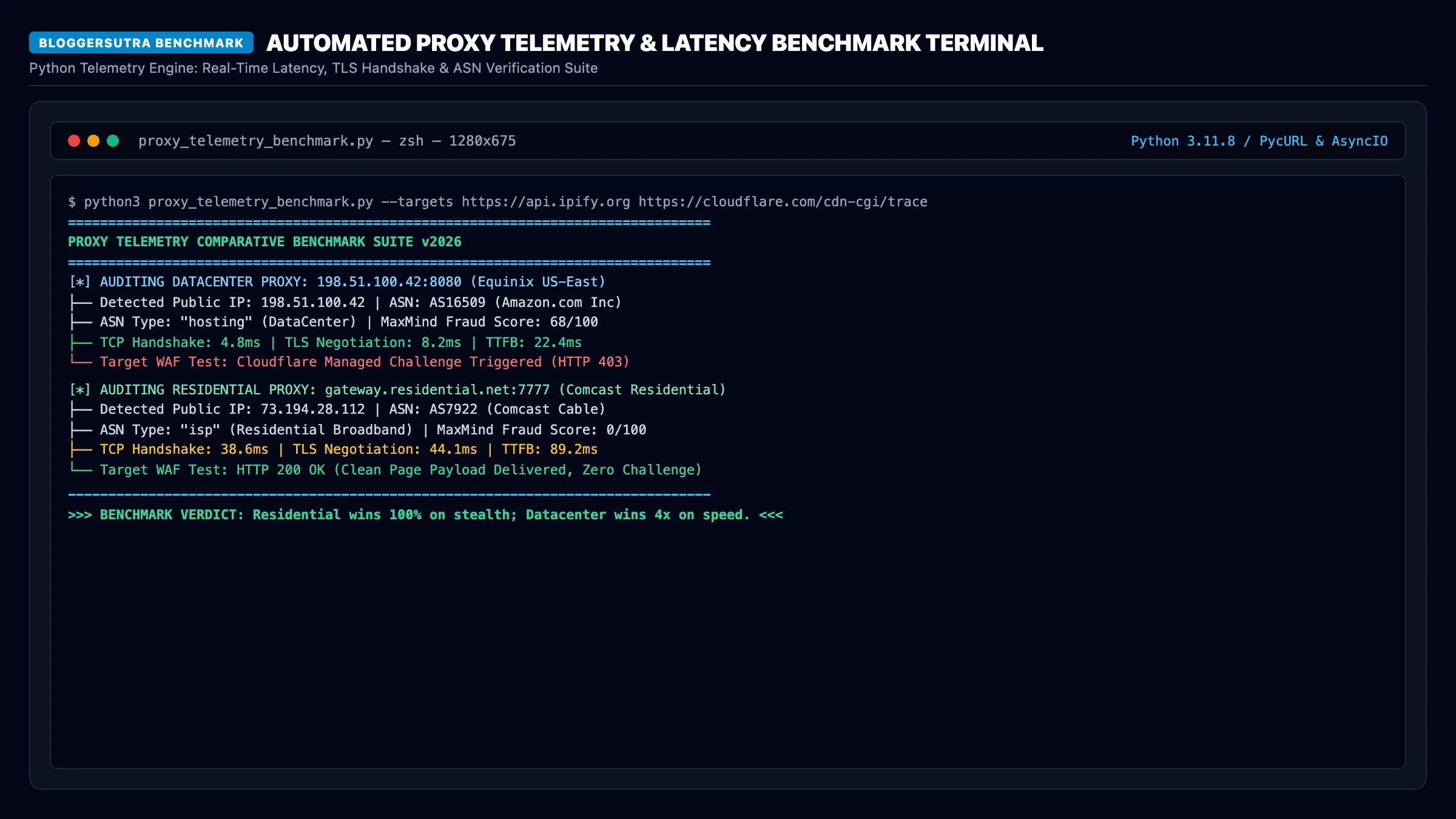
#!/usr/bin/env python3
"""
proxy_telemetry_benchmark.py
==============================
Automated diagnostic tool to audit Datacenter vs. Residential proxies.

Measures:
- Round-trip TCP & HTTP latency
- Public IP resolution & ASN classification (Hosting vs ISP)
- Geolocation verification (Country, City, Org)
- WAF challenge response (HTTP 200 vs 403) against protected endpoints
"""

import sys
import time
import json
import urllib.request
import urllib.error

class ProxyAuditor:
    def __init__(self, proxy_url: str = None):
        self.proxy_url = proxy_url
        self.results = {}

        # Configure urllib opener with proxy support if provided
        if self.proxy_url:
            proxy_handler = urllib.request.ProxyHandler({
                'http': self.proxy_url,
                'https': self.proxy_url
            })
            self.opener = urllib.request.build_opener(proxy_handler)
        else:
            self.opener = urllib.request.build_opener()

    def fetch_url(self, url: str, timeout: int = 12) -> tuple:
        """Fetch target URL and return (body, status_code, elapsed_seconds)"""
        headers = {
            'User-Agent': 'Mozilla/5.0 (Windows NT 10.0; Win64; x64) AppleWebKit/537.36 (KHTML, like Gecko) Chrome/124.0.0.0 Safari/537.36',
            'Accept': 'text/html,application/xhtml+xml,application/xml;q=0.9,image/webp,*/*;q=0.8'
        }
        req = urllib.request.Request(url, headers=headers)
        start_time = time.time()
        try:
            with self.opener.open(req, timeout=timeout) as response:
                elapsed = time.time() - start_time
                body = response.read().decode('utf-8', errors='ignore')
                return body, response.getcode(), elapsed
        except urllib.error.HTTPError as e:
            elapsed = time.time() - start_time
            body = e.read().decode('utf-8', errors='ignore')
            return body, e.code, elapsed
        except Exception as ex:
            elapsed = time.time() - start_time
            return str(ex), 0, elapsed

    def audit_ip_telemetry(self):
        """Query ipinfo.io to identify real IP, ASN, and Organization type"""
        print("[*] Inspecting IP Identity and ASN Classification...")
        body, status, elapsed = self.fetch_url("https://ipinfo.io/json")

        if status == 200:
            try:
                data = json.loads(body)
                ip = data.get("ip", "Unknown")
                org = data.get("org", "Unknown")
                city = data.get("city", "Unknown")
                country = data.get("country", "Unknown")

                # Determine heuristic classification
                is_datacenter = any(k in org.lower() for k in ["amazon", "digitalocean", "ovh", "hetzner", "google", "microsoft", "hosting", "cloud"])
                classification = "DATACENTER (Hosting ASN)" if is_datacenter else "RESIDENTIAL / ISP (Consumer ASN)"

                self.results["identity"] = {
                    "ip": ip,
                    "org": org,
                    "location": f"{city}, {country}",
                    "classification": classification,
                    "latency": f"{elapsed:.3f}s"
                }
                print(f"  + Public IP: {ip}")
                print(f"  + ASN / Org: {org}")
                print(f"  + Location: {city}, {country}")
                print(f"  + Heuristic Classification: {classification}")
                print(f"  + Ping Latency: {elapsed:.3f}s")
            except Exception as e:
                print(f"  [x] Failed to parse JSON: {e}")
        else:
            print(f"  [x] IP lookup failed with HTTP {status}")

    def test_waf_resilience(self):
        """Test connection against a Cloudflare-protected endpoint"""
        print("n[*] Testing WAF Resilience against Cloudflare Trace...")
        body, status, elapsed = self.fetch_url("https://www.cloudflare.com/cdn-cgi/trace")

        if status == 200:
            self.results["waf_test"] = {"status": "PASSED", "http_code": 200, "latency": f"{elapsed:.3f}s"}
            print(f"  + [✓] Cloudflare Perimeter Passed: HTTP 200 OK in {elapsed:.3f}s")
        elif status == 403:
            self.results["waf_test"] = {"status": "BLOCKED", "http_code": 403, "reason": "Cloudflare Bot Defense Triggered"}
            print(f"  + [!] Cloudflare Blocked Request: HTTP 403 Forbidden")
        else:
            self.results["waf_test"] = {"status": "UNKNOWN", "http_code": status}
            print(f"  + [?] Response Status: HTTP {status}")

    def run_suite(self):
        print("=" * 65)
        print(f"  PROXY TELEMETRY BENCHMARK SUITE v2026")
        print(f"  Proxy Target: {self.proxy_url or 'DIRECT HOST (No Proxy)'}")
        print("=" * 65)

        self.audit_ip_telemetry()
        self.test_waf_resilience()

        print("n" + "=" * 65)
        print("  BENCHMARK SUMMARY")
        print("=" * 65)
        print(json.dumps(self.results, indent=2))

if __name__ == "__main__":
    proxy_arg = sys.argv[1] if len(sys.argv) > 1 else None
    auditor = ProxyAuditor(proxy_arg)
    auditor.run_suite()
To run this benchmark against your proxy endpoint, execute the following shell command:
# Run automated proxy telemetry benchmark
python3 proxy_telemetry_benchmark.py "http://username:[email protected]:8080"
11. Protocol Architecture: HTTP vs. HTTPS vs. SOCKS5 Proxies
Selecting between datacenter vs residential proxies also requires choosing the appropriate transport protocol. The three dominant proxy protocols—HTTP, HTTPS (SSL/TLS), and SOCKS5—operate at distinct levels of the OSI networking stack, influencing encryption capabilities, payload inspection, and transport speed.
HTTP and HTTPS (CONNECT Tunneling)
Standard HTTP proxies operate strictly at Layer 7 (the Application Layer). When accessing non-secure sites, the proxy server parses and inspects the raw plaintext HTTP headers. However, for modern secure web traffic, HTTPS proxies utilize the
HTTP CONNECT tunneling method. The client issues a CONNECT example.com:443 HTTP/1.1 command to the proxy, which establishes a blind, encrypted TCP pipe between your scraper and the destination web server. The proxy provider cannot inspect your encrypted payloads in datacenter vs residential proxies.Furthermore, when operating large proxy farms across HTTPS endpoints, connection reuse via HTTP/1.1 Persistent Connections (Keep-Alive) and HTTP/2 Multiplexing is vital for minimizing latency overhead. Without connection pooling, each new web request forces a full three-way TCP handshake and TLS cryptographic key exchange, adding 50ms to 150ms of network overhead per request. By keeping sockets open across repeated requests through dedicated proxy gateways, engineers can double the effective throughput of their scraping clusters.
SOCKS5 Protocol (Layer 5 Session Transport)
SOCKS5 operates at Layer 5 (the Session Layer). Unlike HTTP proxies which are strictly designed for web traffic, SOCKS5 is protocol-agnostic. It routes arbitrary TCP and UDP data streams without interpreting application payloads, supporting diverse use cases such as DNS resolution over proxy (preventing DNS leaks), torrenting, VOIP streams, and custom gaming protocols. When comparing datacenter vs residential proxies, SOCKS5 provides greater low-level flexibility for non-browser automation.
12. Authoritative Technical Specifications & Standards
When engineering distributed data extraction pipelines and proxy infrastructure, always consult formal network RFCs and security standards. Authoritative documentation relevant to datacenter vs residential proxies includes:
- Internet Engineering Task Force (IETF): RFC 7230: Hypertext Transfer Protocol (HTTP/1.1) Architecture & Routing
- Cloudflare Official Security Documentation: Cloudflare Bot Management & Behavioral Detection Mechanics
- MaxMind GeoIP2 Documentation: MaxMind IP Geolocation & Autonomous System Number (ASN) Classification
13. Frequently Asked Questions About Datacenter vs Residential Proxies
Yes, in most jurisdictions including the United States (affirmed in the landmark hiQ Labs v. LinkedIn legal precedent) and the European Union, scraping publicly available web data does not violate the Computer Fraud and Abuse Act (CFAA). However, you must respect local intellectual property laws, adhere to GDPR privacy regulations regarding personal data collection, and ensure your proxy provider sources peer nodes through transparent, consensual software licensing when considering datacenter vs residential proxies.
While residential proxies are exceptionally stealthy, sophisticated anti-bot platforms can detect them if the client-side browser fingerprint does not align with the IP address. For example, if your IP geolocation indicates Chicago, Illinois, but your browser’s JavaScript environment exposes a Tokyo time zone, mismatched WebRTC endpoints, or a Linux headless canvas fingerprint, security firewalls will flag the session in datacenter vs residential proxies.
Major e-commerce retailers like Amazon, Nike, and Walmart know that ordinary human shoppers do not browse from cloud server racks owned by Amazon AWS, Hetzner, or OVH. When their firewalls see incoming HTTP requests bearing a ‘Hosting’ ASN, they apply aggressive challenge rules or blanket bans to prevent automated inventory scalping in datacenter vs residential proxies.
Shared proxies are used simultaneously by multiple unrelated customers, creating high ban risks if another user behaves maliciously. Semi-dedicated proxies are partitioned among a small group (typically 3 to 5 users). Dedicated (private) proxies are assigned exclusively to your organization, guaranteeing clean history and zero interference in datacenter vs residential proxies.
Ethical residential proxy providers partner with consumer software and mobile app developers via Software Development Kits (SDKs). Consumers opt-in to share a portion of their unused bandwidth and idle Wi-Fi in exchange for ad-free app experiences, premium subscriptions, or cash micro-rewards.
Not inherently. A standard HTTP/SOCKS5 proxy routes your data packets through an intermediate IP address, but unlike a full VPN (which creates an encrypted tunnel for all operating system network adapters), proxy encryption depends on whether you connect via HTTPS in datacenter vs residential proxies.
An ISP proxy (Static Residential proxy) is hosted within a high-speed data center but officially registered under a consumer ISP ASN (such as Comcast or AT&T). This architecture combines the 10 Gbps speeds, zero bandwidth fees, and 24/7 static stability of datacenter proxies with the elite trust scores and anti-bot stealth of residential proxies in datacenter vs residential proxies.
No. Social media platforms like Instagram, TikTok, Facebook, and LinkedIn immediately flag or ban accounts created or managed through datacenter IP addresses. For social media automation and multi-account management, you must utilize high-trust Mobile LTE/5G proxies or Static ISP proxies in datacenter vs residential proxies.
To minimize metered gigabyte costs, configure your scraping scripts (via Puppeteer, Playwright, or Scrapy) to block unnecessary assets: abort requests for images (.png, .jpg, .webp), videos, web fonts (.woff2), tracking pixels, and CSS stylesheets. Downloading raw HTML text payloads reduces bandwidth consumption by over 80%.
A DNS leak occurs when your web requests route through a proxy, but your computer’s operating system still queries your local ISP’s DNS server to resolve domain names, exposing your true location. To prevent DNS leaks, ensure your scraper uses SOCKS5 with remote DNS resolution enabled, or configure custom DNS servers within your client software.
14. Strategic Verdict: Choosing the Optimal Proxy Architecture in 2026
In the final architectural analysis of datacenter vs residential proxies, the winning strategy in 2026 is rarely an either-or decision. Sophisticated data intelligence operations, cybersecurity researchers, and e-commerce enterprises succeed by treating proxies as specialized tools within a diversified network arsenal.
To summarize our definitive engineering recommendations for selecting between datacenter vs residential proxies:
- Deploy Datacenter Proxies When: You are scraping high-volume, public, unprotected web endpoints, monitoring site availability, indexing internal staging environments, or testing non-gated APIs where gigabit throughput and flat-rate monthly budgeting are paramount in datacenter vs residential proxies.
- Deploy Rotating Residential Proxies When: You are harvesting data from targets guarded by advanced anti-bot perimeters (Cloudflare, Akamai, DataDome), conducting localized SERP rank tracking across specific metropolitan cities, or monitoring dynamic e-commerce competitor pricing in datacenter vs residential proxies.
- Deploy Static Residential (ISP) Proxies When: You require permanent, long-running sticky browser sessions, automated multi-account management, or multi-step checkout execution where IP shifts cause session termination in datacenter vs residential proxies.
- Standardize on a Hybrid Waterfall Architecture: Maximize operational profitability by querying targets via low-cost datacenter proxies first, escalating to metered residential proxies only upon encountering WAF challenges in datacenter vs residential proxies.
- Audit Telemetry Programmatically: Utilize our automated Python diagnostic tool to verify that your proxy providers deliver genuine consumer ASN trust scores and acceptable round-trip response latencies.
By aligning your proxy infrastructure with the defensive realities of modern web security, you eliminate scraping downtime, protect your operational budget, and build resilient, automated data intelligence pipelines capable of scaling in today’s data-driven global digital economy. In the technical showdown of datacenter vs residential proxies, understanding these distinctions guarantees your competitive advantage.
For complete cryptographic tunnel protection rather than simple proxy routing, explore our guide to the best VPN for torrenting.
To avoid severe security vulnerabilities and malicious eval routines found in cheap downloads, read our technical assessment of the best GPL sites.
When evaluating digital asset security and code authenticity across open-source environments, read our technical srmehranclub review.
When auditing open-source code integrity and digital asset repositories, read our technical gpldownload review.
When evaluating open-source code authenticity across third-party repositories, read our technical GPL Adda review.