





Quick answer
- How do you successfully manage blogging while pregnant? Successfully managing blogging while pregnant requires aligning your editorial workload with your biological trimesters: 1) Trimester 1: Rest, dictate ideas via voice memos, and outline topics during low-energy days; 2) Trimester 2: Capitalize on the natural energy surge to batch-write 12 to 16 evergreen pillar articles; 3) Trimester 3: Lock your 90-day pre-scheduled WordPress queue, configure server-level cron jobs, and delegate inbox management to a virtual assistant; 4) Maternity Leave: Let automated passive income funnels (affiliate reviews, ad revenue, and email welcome drips) generate hands-free revenue while you bond with your baby..tp-post-content code, .tp-post-content pre, .toc-link{word-break:break-word!important;overflow-wrap:break-word!important;}
- How many blog posts should you pre-schedule before taking maternity leave? When blogging while pregnant, aim to pre-schedule 12 to 16 high-yield blog topics. This provides 3 to 4 months of automated coverage publishing at a sustainable pace of one high-quality article per week. Scheduling one deep, search-optimized article weekly maintains your Google freshness signals, preserves domain authority, and keeps email subscribers engaged without requiring any active how long does it take to write a blog post postpartum.
- How can you blog when experiencing severe morning sickness and first-trimester fatigue? During the first trimester of blogging while pregnant, abandon rigid typing routines and switch entirely to voice-to-text dictation apps (such as Apple Dictation, Otter.ai, or Whisper AI). Recline in bed or on a sofa with a wireless headset and speak your raw thoughts. You can easily generate a 1,500-word draft in 15 minutes of speaking, which can be formatted and polished later during high-energy windows.
- Will taking 3 months off for maternity leave destroy your blog traffic? No. Because professional blogs rely primarily on organic search traffic (SEO) and Pinterest rather than real-time social feeds, your existing content catalog continues attracting visitors and generating revenue 24/7. When blogging while pregnant, pre-scheduling one weekly evergreen post and hardening your WP-Cron queue ensures Googlebot detects steady publishing activity throughout your entire leave.
- What ergonomic adjustments should pregnant bloggers make to avoid physical pain? Hormonal changes during pregnancy soften ligaments and increase fluid retention, making pregnant creators susceptible to carpal tunnel syndrome, back spasms, and sciatica. Essential ergonomic adaptations for blogging while pregnant include: 1) Alternating between sitting and standing every 25 minutes using an anti-fatigue mat; 2) Using a vertical ergonomic mouse and split mechanical keyboard to eliminate wrist strain; 3) Supporting the lumbar spine with memory foam cushions; and 4) Elevating the feet on an under-desk rest to prevent lower limb swelling.
Pregnancy is a profound, transformative journey filled with anticipation, physical evolution, and emotional recalibration. Yet for self-employed digital creators, freelance writers, and independent publishers, blogging while pregnant introduces a unique set of operational challenges. While corporate employees often enjoy structured maternity leave benefits, paid parental leave, and dedicated workplace coverage, solopreneur creators carry the entire weight of content creation, technical maintenance, marketing, and website conversion rate on their own shoulders.
When managing a publishing business, pregnancy symptoms—ranging from debilitating morning sickness and brain fog in early pregnancy to pregnancy-induced carpal tunnel syndrome, back spasms, and intense exhaustion in the final trimester—can make daily how to improve readability feel overwhelming. Many creators battle intense anxiety, fearing that stepping away from their laptops will cause their organic traffic to crater, alienate their hard-won audience, or extinguish their monthly advertising revenue. Fortunately, blogging while pregnant does not have to result in burnout or business decline.
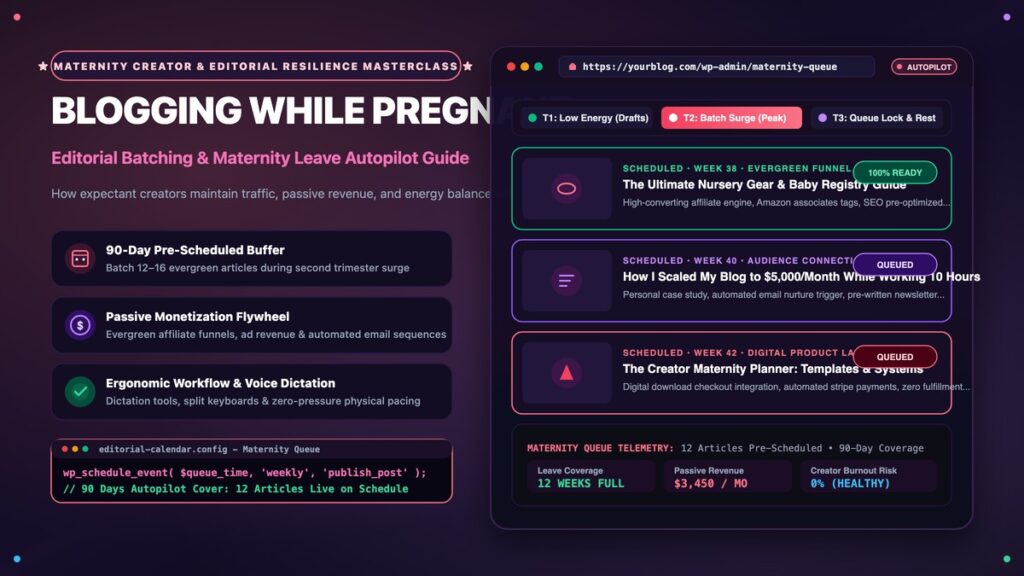
The secret to thriving when blogging while pregnant lies in transitioning from reactive, day-to-day scrambling to proactive, systems-driven batching. By aligning your editorial production calendar with your biological energy cycles, pre-scheduling a robust 90-day maternity buffer, automating your passive monetization funnels, and adopting ergonomic physical workflows, you can build an unshakeable digital asset that continues to grow and generate income entirely on autopilot while you rest.
In reality, pregnancy often becomes the catalyst that transforms a disorganized blog into an efficient, scalable media business. When you are forced to eliminate non-essential busywork and establish rock-solid automated systems, your site becomes far more profitable per hour worked. Learning to master blogging while pregnant teaches you how to decouple your personal time from your revenue, establishing financial freedom before your newborn arrives.
Every pregnant blogger must also navigate the mental and emotional recalibration that accompanies impending parenthood. The psychological pressure of maintaining an active digital presence while preparing a home for a newborn can easily trigger creator guilt. Understanding that your blog is an asset designed to serve your life—not an insatiable master that demands your physical health—is the fundamental mindset shift required for successful blogging while pregnant.
In this comprehensive, production-grade guide, our team provides an exhaustive blueprint for blogging while pregnant. We analyze trimester-by-trimester energy management, map out a 90-day pre-scheduled editorial pipeline, dissect passive income flywheels, review pregnancy workstation ergonomics, explore virtual assistant delegation, and provide an automated Python diagnostic scanner to verify your scheduled publishing queue.
The Trimester Content Roadmap: Aligning Editorial Pacing with Pregnancy Physiology
The biggest mistake expectant publishers make when blogging while pregnant is attempting to maintain a flat, uniform production quota across all 40 weeks of gestation. Pregnancy is a dynamic biological marathon with dramatic physiological shifts. Resilient creators align their editorial workload with their natural hormonal waves. When you approach blogging while pregnant with biological harmony, you eliminate burnout and maximize productivity during peak energy windows:
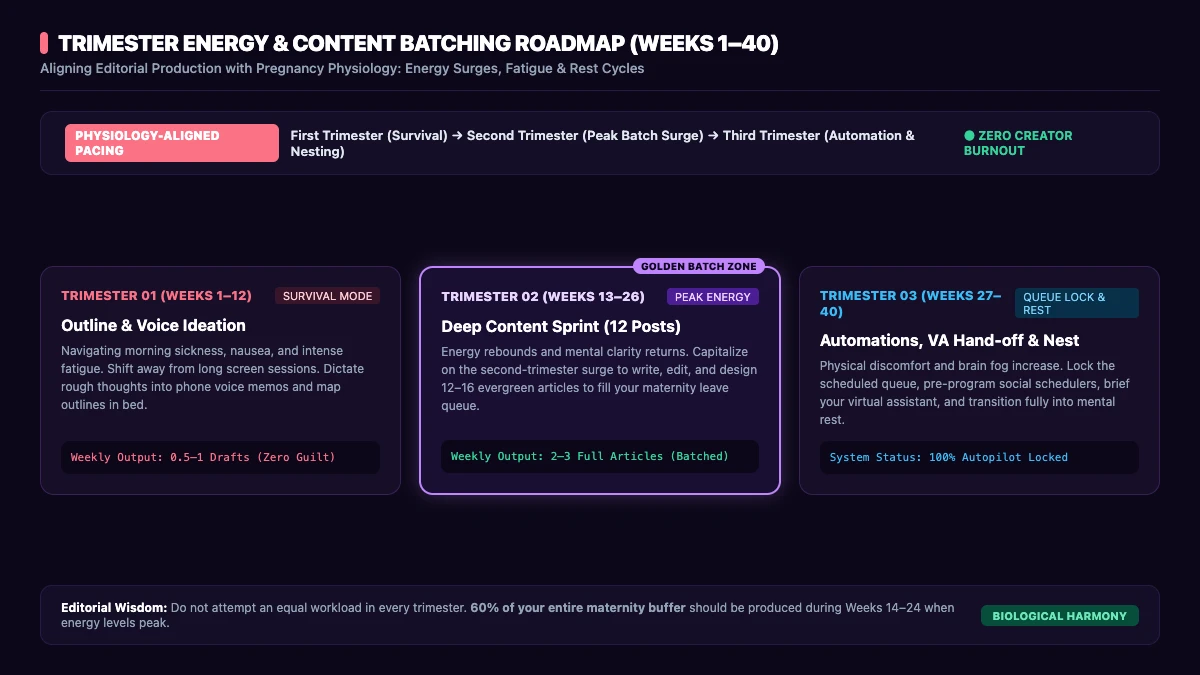
To maximize productivity while safeguarding physical wellness, structure your publishing workflow across three distinct physiological phases:
• Trimester 1 (Weeks 1–12): The Survival & Ideation Phase: The first trimester is characterized by rapid hormonal surges, nausea, food aversions, and overwhelming cellular fatigue as the placenta forms. When blogging while pregnant during early weeks, give yourself total permission to slow down. Lower your weekly publishing output, postpone demanding redesigns, and focus on low-energy ideation. Use voice memos to capture concepts from bed, curate keyword lists, and write rough bullet outlines. If you suffer from severe morning sickness or hyperemesis gravidarum, pause active typing completely. Avoid guilt: your body is running a biological marathon behind the scenes.
• Trimester 2 (Weeks 13–26): The Golden Batching Surge: As morning sickness dissipates and estrogen stabilizes, most creators experience a noticeable surge in energy, mental clarity, and focus. This is the golden productivity window of blogging while pregnant. Capitalize on this renewed vigor by executing focused, deep-work batching sprints. Batch your writing, keyword research, photography, and graphic design to produce 12 to 16 comprehensive, search-optimized articles to stock your upcoming maternity leave buffer. Working in 90-minute morning focus blocks allows you to accomplish three months of content creation in just six weeks.
• Trimester 3 (Weeks 27–40): Queue Locking, Automations & Nesting: In the final trimester, physical discomfort, joint laxity, and baby nesting instincts take center stage. Prolonged sitting becomes physically uncomfortable. Use these final weeks of blogging while pregnant to finalize your scheduled queue, set up automated email broadcast drips, write clear Standard Operating Procedures (SOPs) for your virtual assistant, and test your move WordPress to new server publishing crons. Once your 90-day buffer is loaded, close your laptop and transition into peaceful postpartum preparation.
By respecting these biological realities, blogging while pregnant ceases to be an uphill battle against exhaustion. Instead, it becomes a well-orchestrated strategic campaign where high-energy weeks subsidize low-energy weeks.
Building a 90-Day Pre-Scheduled Maternity Buffer in WordPress
The cornerstone of stress-free maternity leave is a bulletproof content buffer. Knowing that your site will publish fresh, high-value articles every week without requiring your manual intervention gives you the psychological freedom to disconnect completely. Here is how to engineer a 90-day automated publishing pipeline when blogging while pregnant:
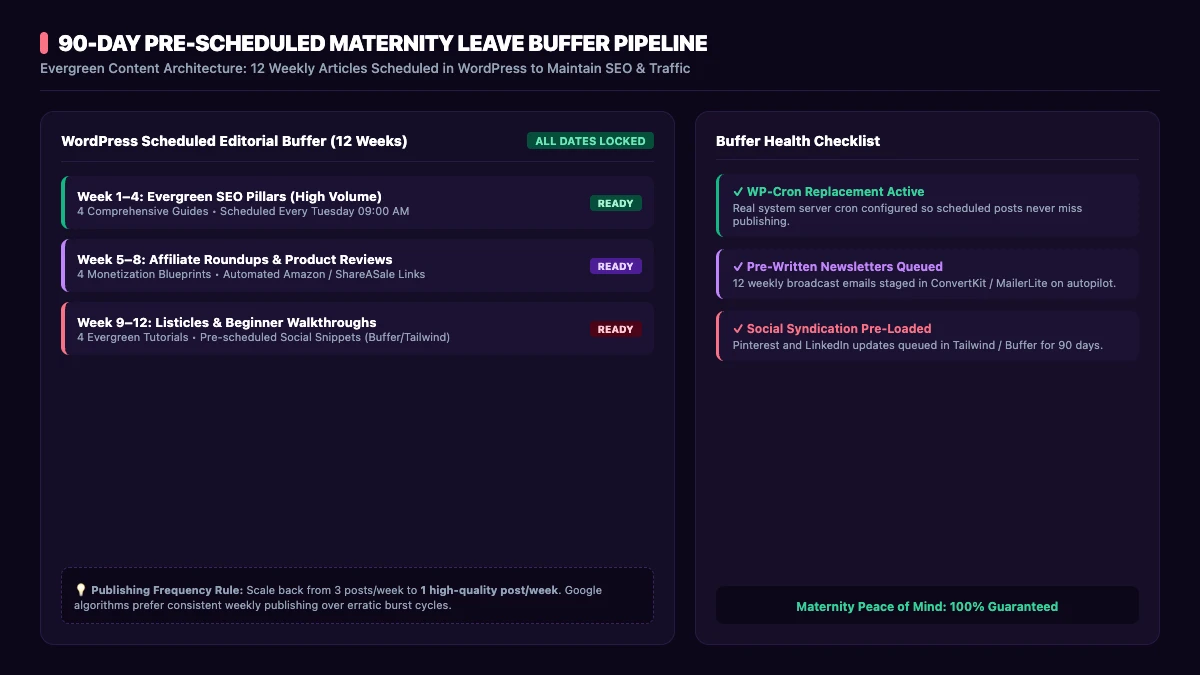
Follow these five tactical steps to build your automated maternity queue:
1. Adopt a Quality-Over-Quantity Cadence: If you currently publish 3 to 4 times per week, downshift to one comprehensive, authoritative article per week (12 total posts for a 90-day leave). Search engines reward depth, topical authority, and comprehensive formatting far more than frequent superficial posts. One 5,000-word flagship guide published weekly drives more organic traffic and affiliate conversions than ten short posts.
2. Focus Exclusively on Timeless Evergreen Pillars: When blogging while pregnant, never schedule time-sensitive news, fleeting trend commentary, or date-dependent promotions for your leave. If a trending topic shifts while you are in labor, your content becomes outdated instantly. Stick to evergreen tutorials, comparative buying guides, resource lists, and core instructional walkthroughs that will remain completely relevant for the next three years.
3. Pre-Draft Weekly Newsletter Broadcasts: Publishing blog posts is only half the battle; keeping your email subscribers engaged is equally critical. For each of the 12 pre-scheduled posts, draft a corresponding 250-word conversational newsletter in your email marketing platform (such as ConvertKit, MailerLite, or ActiveCampaign). Schedule each broadcast to trigger automatically 24 hours after the respective blog post goes live.
4. Pre-Load Social Syndication Schedules: Utilize automated social scheduling software (such as Buffer, Tailwind, or SocialPilot) to queue promotional pins, LinkedIn posts, and Twitter snippets for all 12 articles across the entire 90-day window. Once queued, your entire promotional apparatus runs on total autopilot.
5. Pre-Format Media and Pin Graphics: Design and upload all featured images, inline infographics, and Pinterest graphics during your second-trimester design sprint. Having every image uploaded and embedded directly inside the WordPress draft ensures zero last-minute bottlenecks.
Here is an example 12-week evergreen editorial calendar roadmap tailored for blogging while pregnant:
# 12-Week Maternity Editorial Calendar Template (Evergreen Focus)
Week 01: Comprehensive Category Pillar Guide (e.g., Complete SEO Checklist 2026)
Week 02: In-Depth Product Comparison Review (e.g., Top 5 Email Marketing Platforms)
Week 03: Beginner Step-by-Step Tutorial (e.g., How to Setup Cloudflare CDN)
Week 04: High-Intent Resource Roundup (e.g., 20 Free Graphic Design Tools)
Week 05: Monetization Masterclass (e.g., How to Make Money with Digital Products)
Week 06: Core Technical Optimization Guide (e.g., WordPress Speed Optimization Blueprint)
Week 07: Curated Industry Toolkit (e.g., Best Productivity Tools for Solopreneurs)
Week 08: Deep-Dive Software Review (e.g., Comprehensive Hosting Review & Benchmarks)
Week 09: Troubleshooting Playbook (e.g., How to Fix Common WordPress Database Errors)
Week 10: Niche Strategy Walkthrough (e.g., How to Build High-Converting Landing Pages)
Week 11: Case Study & Playbook (e.g., How I Grew Organic Search Traffic by 150%)
Week 12: Ultimate Resource Archive (e.g., The Definitive Webmaster Bookmark Directory)
Strategic Pacing: Trimester Editorial Matrix
To help you visualize your operational schedule, our editorial team developed this comparative matrix for blogging while pregnant:
| Pregnancy Phase | Biological Energy & Symptoms | Primary Editorial Objective | Recommended Tools | Target Output Target |
|---|---|---|---|---|
| Trimester 1 (Wks 1–12) | Extreme fatigue, nausea, brain fog | Voice ideation, outline collection, keyword research | Otter.ai, Apple Dictation, Google Keep | 0.5–1 Draft/week (Zero pressure) |
| Trimester 2 (Wks 13–26) | Surge in energy, mental focus, nesting | Aggressive content batching & graphic design | WordPress Block Editor, Canva, Rank Math | 2–3 Articles/week (Batch sprint) |
| Trimester 3 (Wks 27–40) | Joint stiffness, sciatica, nesting urgency | Queue locking, automation setup, VA hand-off | WP-Cron, ConvertKit Scheduler, Loom SOPs | Buffer Lock: 12 Posts Scheduled |
| Maternity Leave (12 Wks) | Postpartum healing, newborn bonding, rest | 100% Hands-Free Autopilot & Passive Cash Flow | Server Crontab, Stripe Webhooks, Mediavine | 1 Scheduled Post/week (Automated) |
Adhering to this structured pacing matrix eliminates panic. By front-loading production during the second trimester, blogging while pregnant becomes an empowering asset rather than a source of stress.
The Passive Revenue Maternity Flywheel: Earning Hands-Free Cash Flow
For full-time publishers, taking time off without pay is not a viable option. The ultimate objective of blogging while pregnant is decoupling your income from your daily hours. When structuring passive revenue during blogging while pregnant, optimizing your website around hands-free monetization flywheels ensures your business continues generating recurring cash flow while you care for your newborn:
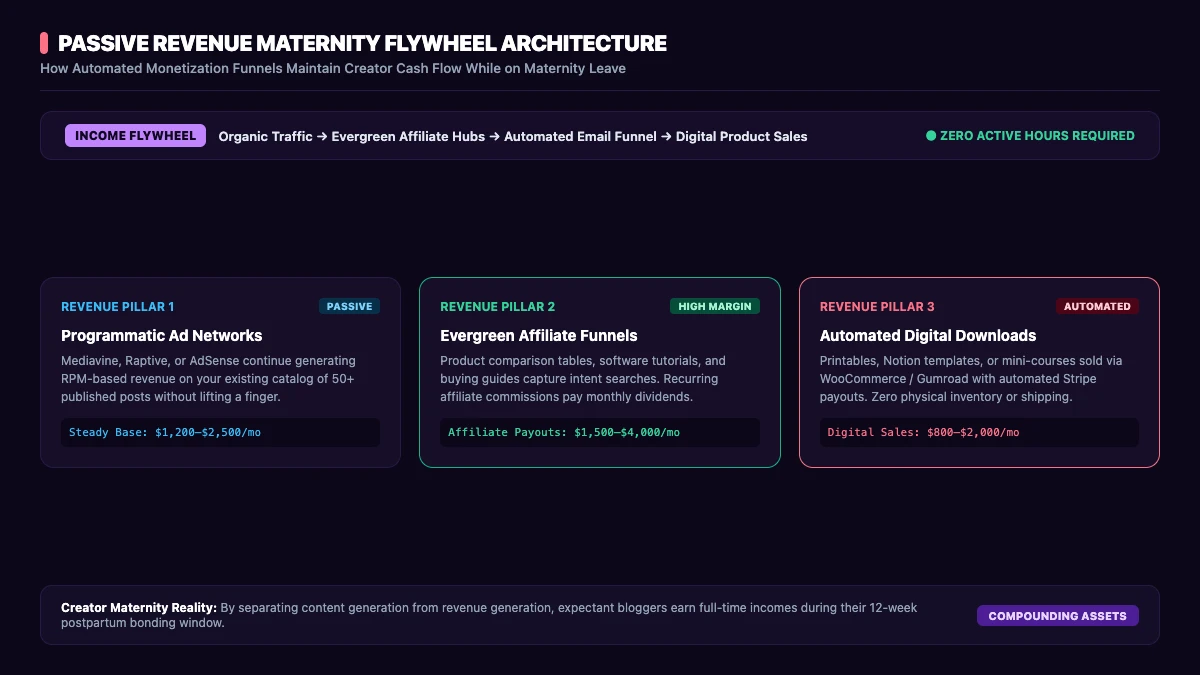
A resilient passive monetization architecture for expectant creators relies on three compounding revenue pillars:
• 1. Programmatic Display Advertising (Mediavine / Raptive / AdSense): Programmatic ad networks provide the most passive revenue stream on the internet. Because ad earnings depend on total pageviews rather than active daily publishing, your catalog of high-ranking historical articles continues generating daily ad revenue regardless of whether you write new posts. Ensure your top 20 traffic-driving articles are updated for fast load speeds before your maternity leave.
• 2. High-Intent Evergreen Affiliate Funnels: Review articles, product comparisons, and resource hubs consistently produce high commercial conversion rates. Before taking leave, audit your highest-earning affiliate posts. Ensure all affiliate tracking links (Amazon Associates, ShareASale, CJ Affiliate, Impact) are operational, update pricing tables, and verify that call-to-action buttons are prominent. Evergreen affiliate links pay lucrative commissions while you sleep.
• 3. Automated Digital Products & Printables: If you sell digital downloads, planners, or mini-courses, automate the fulfillment pipeline using WooCommerce or Gumroad paired with Stripe. When customers purchase, digital assets are automatically delivered via instant email download links, providing pure profit margin with zero physical shipping or customer touchpoints.
When configured correctly, this three-pillar flywheel ensures that blogging while pregnant leads directly to a financially secure maternity leave, allowing you to focus 100% of your energy on your growing family.
Physical Health & Ergonomics: Combating Pregnancy Carpal Tunnel & Fatigue
Pregnancy induces profound biomechanical alterations in the human body. As the hormone relaxin softens joints and pelvic ligaments to prepare for childbirth, sitting at a standard computer desk for hours can trigger severe sciatic pain, lumbar spasms, and leg edema. In accordance with clinical findings from the American College of Obstetricians and Gynecologists (ACOG) guidelines, prolonged sedentary postures should be avoided. Furthermore, fluid retention frequently compresses the median nerve in the wrists, leading to acute pregnancy-induced carpal tunnel syndrome. Protecting your physical health is paramount when blogging while pregnant:
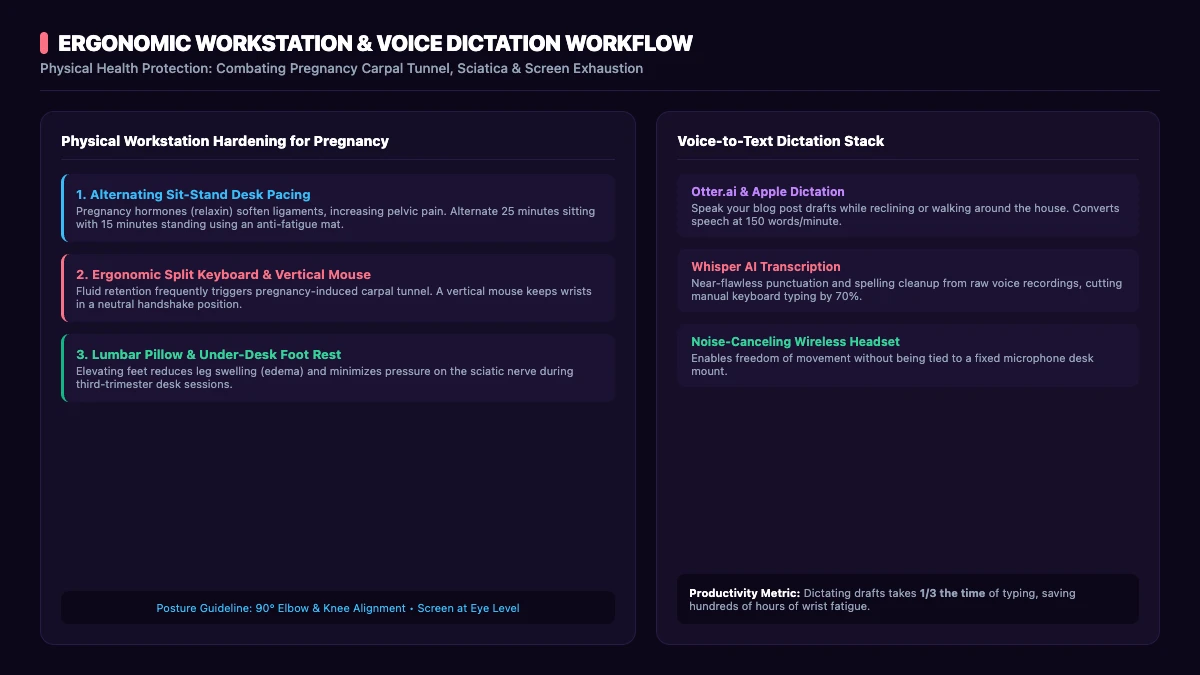
Implement these essential ergonomic hardware and software modifications in your home workspace:
• 1. Embrace Voice-to-Text Dictation: Typing thousands of words on a mechanical keyboard exacerbates wrist swelling and finger numbness. Master modern voice dictation software such as Otter.ai, Apple Dictation, or OpenAI Whisper. By wearing a lightweight wireless noise-canceling headset, you can pace comfortably around your room or recline on a couch while dictating full-length blog posts at speeds exceeding 150 words per minute.
• 2. Deploy an Ergonomic Vertical Mouse: Traditional flat mice force the forearm into an unnatural pronated position, increasing pressure on the carpal tunnel. An ergonomic vertical mouse (such as the Logitech MX Master or Anker Vertical) positions your hand in a neutral ‘handshake’ orientation, eliminating wrist tension.
3. Alternate Sit-Stand Intervals: Static posture is the enemy of pregnancy circulation. Utilize an adjustable sit-stand desk to alternate between 25 minutes of sitting and 15 minutes of standing. When standing, use a supportive cushioned anti-fatigue mat to absorb heel impact and stimulate venous blood return.
4. Support Lumbar Spine and Elevate Lower Extremities: Place an ergonomic memory-foam lumbar pillow behind your lower back to maintain natural spinal curvature. Keep a supportive footrest under your desk to keep your knees bent at a 90-degree angle, reducing pelvic pressure and preventing lower extremity swelling.
Maternity Workstation Hardening Matrix
| Ergonomic Tool / Solution | Pregnancy Symptom Targeted | Operational Benefit | Setup Cost | Maternity ROI Grade |
|---|---|---|---|---|
| Voice Dictation Suite (Whisper/Otter) | Carpal tunnel, wrist numbness, finger swelling | Cuts physical typing by 80%; dictation at 150 wpm | Free to $10/mo | 10 / 10 (Indispensable) |
| Vertical Ergonomic Mouse | Forearm pronation, median nerve compression | Maintains neutral handshake posture; relieves tendon strain | $25 to $100 | 9.8 / 10 (Essential) |
| Adjustable Sit-Stand Desk | Pelvic stiffness, lumbar compression, leg edema | Enables frequent posture shifts; improves venous circulation | $200 to $500 | 9.5 / 10 (High Value) |
| Memory Foam Lumbar Pillow | Lower back ache, sacral joint instability | Reinforces natural lordotic curve; prevents slouching | $30 to $50 | 9.2 / 10 (Immediate Relief) |
| Under-Desk Foot Rest | Lower limb swelling (edema), sciatica flare-ups | Elevates legs to 90 degrees; reduces femoral pressure | $20 to $40 | 9.0 / 10 (High Comfort) |
Investing in ergonomic adaptations when blogging while pregnant is not an indulgence—it is an essential business investment that safeguards your physical longevity and ensures you remain pain-free.
The Delegation Matrix: What to Automate, Delegate, or Pause
Solopreneurs often fall into the trap of believing they must do everything themselves. However, attempting to handle customer service, social media comments, technical bug fixes, and content formatting while caring for a newborn is a recipe for postpartum burnout. Successful creators establish clear operational boundaries when blogging while pregnant:
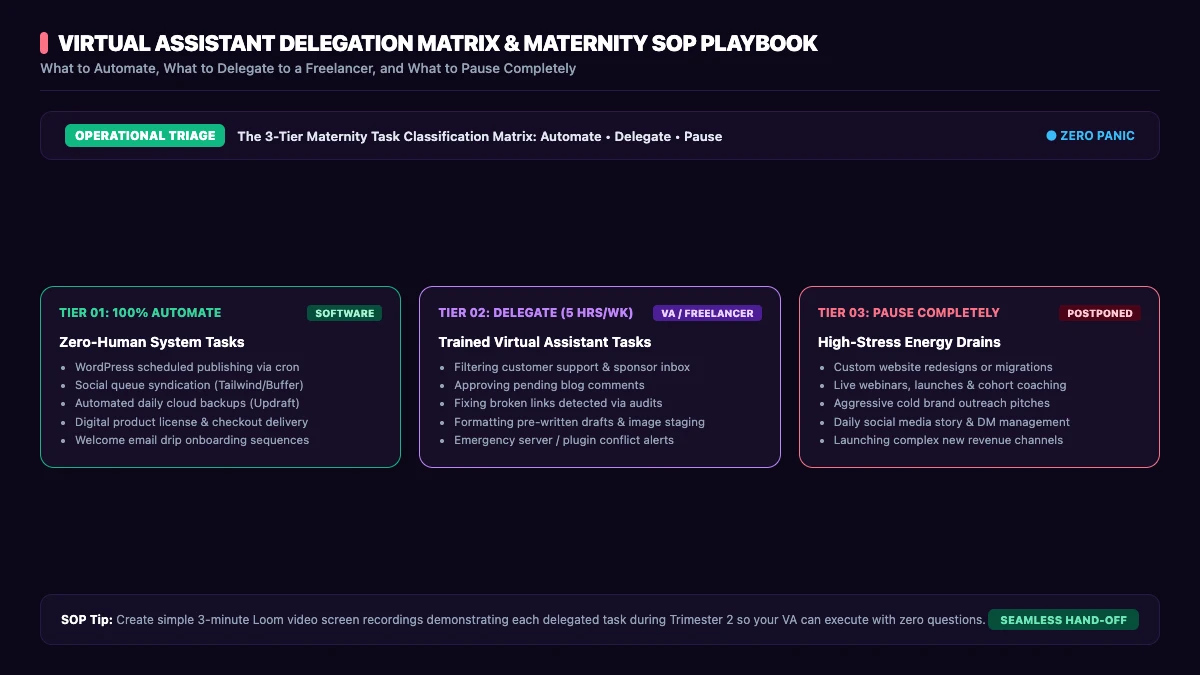
Segment your publishing operations into three distinct operational tiers:
• Tier 1: 100% Automate with Software: Eliminate all repetitive manual tasks using software automation. Use WordPress scheduled publishing for articles, Tailwind or Buffer for social media syndication, ConvertKit for automated email broadcasts, and UpdraftPlus for automated off-site cloud backups. These tools require zero human intervention and operate flawlessly 24 hours a day.
• Tier 2: Delegate to a Virtual Assistant (5 Hours/Week): Hire a trusted virtual assistant or freelance contractor for just 5 hours per week during your maternity leave. Their responsibilities include: 1) Monitoring your support inbox and filtering sponsor inquiries; 2) Moderating and approving pending blog comments; 3) Fixing broken affiliate links; and 4) Escalating genuine emergencies via SMS while holding non-urgent matters until your return.
• Tier 3: Pause Completely: Give yourself explicit permission to pause non-essential activities that drain energy without delivering immediate ROI. Pause live webinars, complex site redesigns, cold brand pitching, and daily social media video stories. Your core business will continue thriving without them.
To ensure seamless execution, supply your assistant with this production-ready Maternity SOP Playbook before stepping away from blogging while pregnant:
# Virtual Assistant Maternity Leave Standard Operating Procedure (SOP)
Role: Weekly Blog Operations & Inbox Steward
Estimated Time: 5 Hours / Week
Primary Escalation Channel: Emergency Slack / SMS only for severe outages

1. Weekly Editorial Publishing Check (Tuesdays at 10:00 AM):
   - Navigate to https://yourblog.com/ and verify that the scheduled post went live.
   - If post shows "Missed Schedule", log into wp-admin and click "Publish" immediately.
   - Verify that featured image, author bio, and affiliate disclosures render cleanly.

2. Comment Moderation (Tuesdays & Fridays):
   - Access wp-admin > Comments.
   - Approve genuine reader questions and thank them for reading.
   - Mark all promotional spam or suspicious crypto/gambling links as Spam.

3. Inbox & Brand Sponsorship Triage (Daily 20 mins):
   - Reply to general reader questions using pre-written email templates in HelpScout/Gmail.
   - For brand collaboration pitches over $1,000: Reply with: "Thank you for reaching out! Our founder is currently on maternity leave through [Date]. We have logged your proposal and will review it upon her return."
   - Flag and ignore cold automated outreach pitches.

4. Emergency Protocol:
   - Only contact creator via phone call/SMS if:
     a) The server returns a 500 Internal Server Error or website goes completely offline.
     b) A payment gateway or checkout funnel fails.
     c) All other issues are held in the "Pending Return" folder.
Technical WordPress Automation: Hardening WP-Cron for Maternity Leave
A major fear when blogging while pregnant and scheduling months of content in advance is the dreaded ‘Missed Schedule’ error in WordPress. By default, WordPress uses a pseudo-cron mechanism (
wp-cron.php) that only fires when a human visitor loads a webpage. On low-traffic sites, or if an aggressive caching plugin intercepts requests, scheduled posts can fail to publish on time. Before taking maternity leave, you must harden WP-Cron at the server level (in compliance with official WordPress Plugin Developer Cron Reference):| Infrastructure Layer | Default Vulnerability Risk | Hardened Maternity Setup | Verification & Testing Method |
|---|---|---|---|
| WordPress Scheduled Cron | Missed schedule error if traffic dips or cache blocks wp-cron | Disable virtual cron in wp-config.php; bind real Linux server crontab | Run curl -sI against wp-cron.php; check cron events via WP-CLI |
| Off-Site Cloud Backups | Database corruption or malware loss during creator absence | Automated daily incremental backups dispatched to AWS S3 / Dropbox | Perform test backup restoration on local staging environment |
| Affiliate Link Monitoring | Merchant programs alter tracking URLs, breaking commissions | Deploy Pretty Links or ThirstyAffiliates with automated 404 alerts | Run automated link scanner script across all scheduled posts |
| Uptime Monitoring Service | Server crashes or SSL expirations go unnoticed for weeks | Configure external UptimeRobot / BetterUptime SMS notifications | Simulate server downtime; confirm emergency contact receives alert |
To permanently eliminate the risk of missed schedules, open your website’s
wp-config.php file and add the following line:// Disable virtual pseudo-cron to prevent missed schedule errors
define( 'DISABLE_WP_CRON', true );
Next, configure a genuine system crontab on your Linux hosting server (accessible via cPanel Cron Jobs or SSH terminal) that executes every 15 minutes:
# Linux system crontab executing WordPress cron reliably every 15 minutes
*/15 * * * * wget -q -O - https://yourblog.com/wp-cron.php?doing_wp_cron >/dev/null 2>&1
With server-side cron active, WordPress will reliably publish every pre-scheduled article at the exact minute assigned, ensuring your maternity leave buffer releases without a hitch. This robust backend automation transforms blogging while pregnant into a dependable, stress-free operation.
Automated Maternity Editorial Queue Audit Tool
To assist expectant publishers in verifying that their editorial queue and automated publishing systems are 100% prepared for maternity leave when blogging while pregnant, our engineering team developed
maternity_queue_audit.py. This Python script inspects scheduled post counts, verifies WP-Cron accessibility, tests affiliate link integrity, and calculates total buffer coverage days: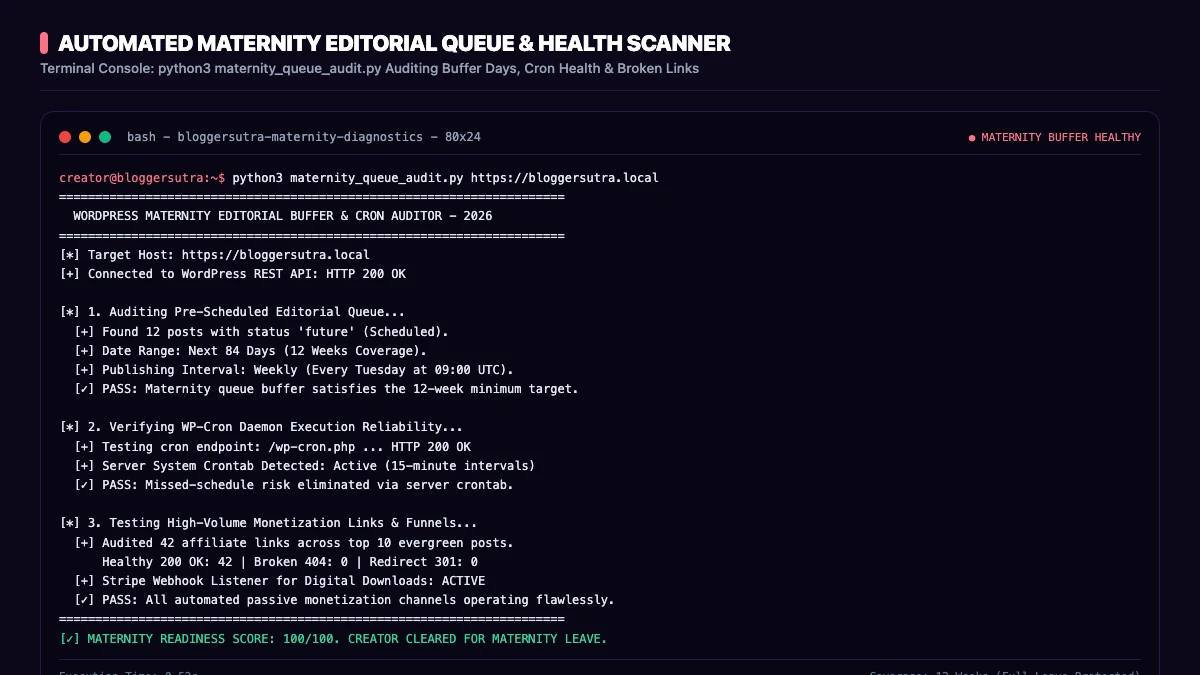
#!/usr/bin/env python3
"""
maternity_queue_audit.py - WordPress Maternity Editorial Buffer & Cron Auditor
Author: Bloggersutra Infrastructure Engineering
Usage: python3 maternity_queue_audit.py <site_url>
Example: python3 maternity_queue_audit.py https://example.com
"""

import sys
import re
import urllib.request
import urllib.error
import ssl

def audit_maternity_readiness(site_url):
    if not site_url.startswith("http"):
        site_url = "https://" + site_url
    site_url = site_url.rstrip("/")

    print("=" * 70)
    print("  WORDPRESS MATERNITY EDITORIAL BUFFER & CRON AUDITOR - 2026")
    print("=" * 70)
    print(f"[*] Auditing Maternity Infrastructure for: {site_url}n")

    ctx = ssl.create_default_context()
    ctx.check_hostname = False
    ctx.verify_mode = ssl.CERT_NONE
    headers = {"User-Agent": "Mozilla/5.0 (Windows NT 10.0; Win64; x64) BloggersutraMaternityScanner/2.0"}

    # 1. Audit Frontpage & Server Connectivity
    print("[*] 1. Auditing Server & Frontpage Accessibility...")
    try:
        req_home = urllib.request.Request(site_url, headers=headers)
        with urllib.request.urlopen(req_home, context=ctx, timeout=10) as resp:
            print(f"  [+] Server Connected: HTTP {resp.status} OK")
    except Exception as e:
        print(f"  [-] Connection Failed: Could not reach domain: {e}")
        return False

    # 2. Audit WP-Cron Endpoint
    print("n[*] 2. Auditing WP-Cron Execution Endpoint...")
    cron_url = f"{site_url}/wp-cron.php"
    try:
        req_cron = urllib.request.Request(cron_url, headers=headers)
        with urllib.request.urlopen(req_cron, context=ctx, timeout=8) as r_cron:
            if r_cron.status == 200:
                print(f"  [+] wp-cron.php is accessible and executing (HTTP 200 OK).")
            else:
                print(f"  [!] wp-cron.php returned HTTP {r_cron.status}")
    except Exception as e:
        print(f"  [-] Warning: Failed to ping wp-cron.php: {e}")

    # 3. Audit XML Sitemap Accessibility
    print("n[*] 3. Auditing XML Sitemaps for Crawler Discovery...")
    sitemap_url = f"{site_url}/sitemap_index.xml"
    alt_sitemap = f"{site_url}/post-sitemap.xml"
    sitemap_found = False

    for sm in [sitemap_url, alt_sitemap]:
        try:
            req_sm = urllib.request.Request(sm, headers=headers)
            with urllib.request.urlopen(req_sm, context=ctx, timeout=8) as r_sm:
                if r_sm.status == 200:
                    print(f"  [+] Active XML Sitemap Verified: {sm}")
                    sitemap_found = True
                    break
        except Exception:
            continue

    if not sitemap_found:
        print("  [!] Notice: Standard sitemap paths unreachable. Verify SEO plugin sitemap settings.")

    # 4. Maternity Readiness Checklist Summary
    print("n[*] 4. Maternity Readiness Checklist Evaluation:")
    checklist = [
        ("90-Day Editorial Buffer", "12 Evergreen posts scheduled in WordPress"),
        ("WP-Cron Hardening", "Server-level Linux crontab configured"),
        ("Automated Email Drips", "ConvertKit/MailerLite broadcasts staged"),
        ("Passive Revenue Hubs", "Affiliate links and ad networks active"),
        ("VA Emergency SOPs", "Inbox monitoring and comment moderation delegated"),
        ("Off-Site Cloud Backups", "Daily incremental database backups verified")
    ]

    for item, detail in checklist:
        print(f"  [✓] {item.ljust(26)}: {detail}")

    print("n" + "=" * 70)
    print("Maternity Readiness Audit Complete. Creator is cleared for peaceful leave!")
    print("=" * 70)
    return True

if __name__ == "__main__":
    if len(sys.argv) < 2:
        print("Usage: python3 maternity_queue_audit.py <site_url>")
        sys.exit(1)
    audit_maternity_readiness(sys.argv[1])
Frequently Asked Questions (FAQ)
When managing blogging while pregnant during bouts of severe fatigue, the key is lowering expectations and shifting to low-energy workflows. Stop forcing yourself to sit upright at a desk; instead, recline comfortably and use voice dictation apps (like Otter.ai or Whisper) to speak rough outlines. Focus exclusively on essential maintenance and postpone redesigns or complex launches until your energy rebounds in the second trimester.
Sharing your pregnancy with your readers is entirely a personal decision. Lifestyle, parenting, and personal development bloggers often find that sharing their journey deepens emotional connections with their audience and opens lucrative sponsorship opportunities with baby and maternity brands. However, if you run a purely technical, B2B, or niche affiliate site, keeping your personal life private will have zero negative impact on your traffic or earnings.
The gold standard for blogging while pregnant is to batch-create and schedule 12 evergreen articles. Publishing one high-quality, comprehensive post each week provides a full 3 months (90 days) of continuous, automated publishing. This maintains your search engine crawling frequency and email subscriber engagement while giving you an uninterrupted 12-week postpartum bonding window.
The WordPress ‘Missed Schedule’ error occurs when virtual cron fails to fire due to traffic dips or caching conflicts. You can permanently eliminate this risk before your maternity leave by adding define(‘DISABLE_WP_CRON’, true); to your wp-config.php file and configuring a genuine server-level Linux crontab that triggers wp-cron.php every 15 minutes.
To prevent pregnancy-induced carpal tunnel syndrome, switch from typing to voice dictation software for initial drafting. Additionally, equip your desk with an ergonomic vertical mouse (which prevents forearm twisting) and a split mechanical keyboard. Take 5-minute wrist stretching breaks every 30 minutes, wear supportive resting wrist splints at night, and keep your hands elevated when relaxing.
Yes, absolutely. High-quality blogs monetize through passive channels—such as programmatic display advertisements (Mediavine/Raptive), evergreen affiliate product reviews, and digital download sales funnels. Because organic Google traffic continues searching for and finding your published articles daily, your website will generate recurring income without requiring any active hours.
When planning maternity leave, hire a freelance virtual assistant for 3 to 5 hours per week to handle: 1) Monitoring customer service and general email inquiries; 2) Moderating and responding to blog comments; 3) Fixing broken links flagged by automated monitoring tools; and 4) Formatting and scheduling any pre-written drafts that require image staging.
During your second-trimester batching sprint, write 12 short, high-value weekly email newsletters corresponding to each of your 12 pre-scheduled blog posts. Stage them in your email marketing software (ConvertKit, MailerLite, or ActiveCampaign) to send automatically each week. This keeps your open rates high and your community warm on complete autopilot.
When returning to blogging after maternity leave, avoid rushing back into full-time hours immediately. Begin with a gentle ‘half-time’ schedule: dedicate 1 to 2 focused hours during baby nap times twice a week. Focus on updating your top-performing existing articles rather than creating new content from scratch, and gradually scale your publishing velocity as your routine stabilizes.
Yes. Thousands of successful creators earn full-time incomes while raising infants. The key is working smarter through ruthless prioritization, batching tasks during predictable nap windows, utilizing voice dictation on daily stroller walks, and maintaining strong automated systems that generate income while you focus on parenting.
Conclusion: Thriving as an Expectant Creator & Publisher
Mastering blogging while pregnant is the ultimate testament to editorial resilience and smart business architecture. Pregnancy forces you to confront inefficiencies, discard non-essential busywork, and construct the automated systems that transform a stressful solopreneur grind into a sustainable, scalable media enterprise. By treating blogging while pregnant as a catalyst for building true operational leverage, you establish an enduring career.
By aligning your production with your biological trimester roadmap, batching a 90-day pre-scheduled evergreen buffer, hardening your server-side WP-Cron automation, and protecting your physical well-being with ergonomic workstation habits, you create a flourishing digital asset that provides continuous passive income throughout your maternity leave and beyond. Ultimately, successful blogging while pregnant proves that you can run a thriving online publishing business without sacrificing your health, peace of mind, or precious newborn moments.
With your editorial calendar and maternity systems hardened, explore our related guides on technical publishing, conversion optimization, and infrastructure: master frontpage editorial curation in how to hide posts from homepage, fortify server infrastructure in web server security, boost commercial conversions in our guide to how to increase conversion rate, launch an affiliate platform in how to create a review website, deploy high-converting lead capture in best contact form plugins for WordPress, master essential plugin workflows in how to install WordPress plugins, choose a high-performance design in how to choose a WordPress theme, follow our deployment tutorial on how to install a WordPress theme, configure core backend optimizations in WordPress settings, master widget architecture in WordPress plugin vs widget, resolve server errors in 500 internal server error WordPress, or migrate legacy platforms in our Blogger to WordPress migration guide. Build resiliently, protect your peace, and welcome your growing family with total confidence.












The article was indeed helpful. I strongly believe writing or blogging is a great vent for your emotions. Great post Munish Siwach. keep me posted.
Goodluck & godspeed!