Skip to content
›How to Choose Web Hosting in 2...

How to Choose Web Hosting in 2026: 12 Critical Factors Before You Buy

In This Guide
Quick answer
  • What is the single most critical factor in how to choose web hosting for your blog in 2026? When learning how to choose web hosting, the most critical architectural factor is Server Response Time (Time to First Byte, or TTFB). Your hosting server must deliver a global TTFB under 200 milliseconds to pass Google Core Web Vitals (Largest Contentful Paint) and ensure swift search engine bot crawling. Demand modern Enterprise NVMe PCIe 4.0 storage, LiteSpeed Web Server, and in-memory Redis object caching over antiquated Apache shared environments..tp-post-content code, .tp-post-content pre, .toc-link{word-break:break-word!important;overflow-wrap:break-word!important;}
  • Which hosting architecture is best for a new blog vs a scaling website? For new blogs receiving under 50,000 monthly visits, containerized shared cloud hosting (such as Hostinger or Bluehost) offers the best balance of affordability ($2.99 to $6.99/mo) and strong performance. For established publications exceeding 100,000 monthly visits, migrate to an isolated Managed Cloud VPS (such as Cloudways on DigitalOcean or AWS) or Managed WordPress (Kinsta, WP Engine) with dedicated virtualized CPU and RAM.
  • How do I avoid deceptive web hosting renewal price traps? Never evaluate a web host based on introductory promotional pricing alone. Hosts frequently market $1.99/mo teaser rates that quietly skyrocket to $14.99/mo upon annual renewal, while billing extra for basic SSL certificates (or failing to support complex WordPress multisite SSL networks) and daily backups. Always calculate the 3-Year Total Cost of Ownership (TCO) and choose transparent providers offering modest renewal adjustments and free lifetime security.
  • What uptime SLA guarantee should I look for? Insist on a contractual 99.99% uptime Service Level Agreement (SLA) with automated financial account credits. A standard 99.9% uptime guarantee legally permits up to 8 hours and 46 minutes of unscheduled downtime every year, which can decimate product comparison website revenue and organic rankings during core search engine crawling cycles.
  • What security features are non-negotiable? Your hosting environment must provide CloudLinux CageFS account isolation (preventing neighboring compromised sites from infecting your files), an integrated Web Application Firewall (WAF), real-time automated malware scanning, free automated SSL, and automated daily off-site immutable backups with 1-click restoration.
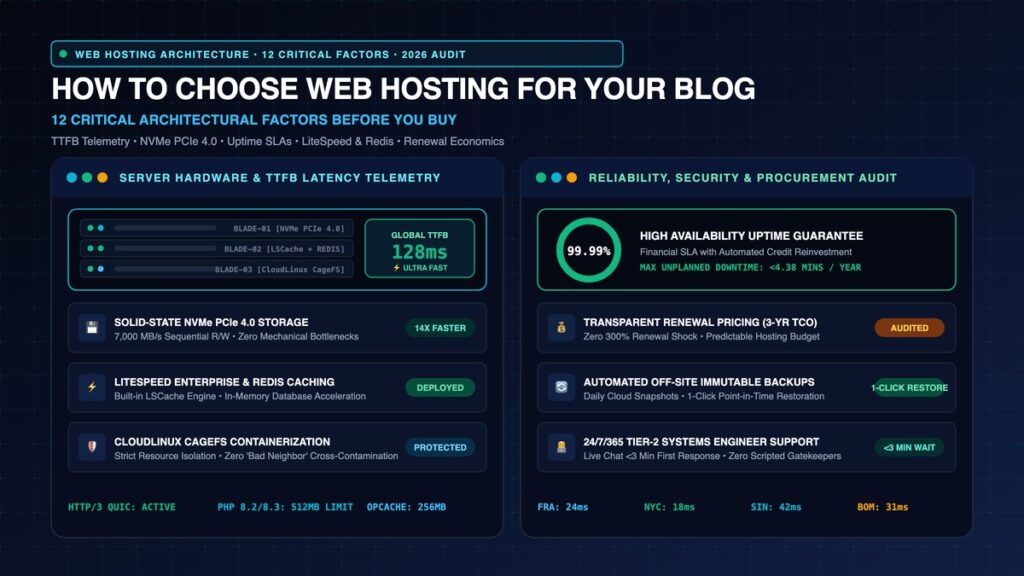
In the hyper-competitive digital publishing and organic search environment of 2026, web hosting is no longer just a passive storage utility for uploading PHP scripts and media files. It is the physical, high-performance compute engine that dictates every fundamental aspect of your website’s operational viability. Your server infrastructure directly governs your server response times (Time to First Byte), your Largest Contentful Paint (LCP) performance in Google’s Core Web Vitals, the frequency and depth of Googlebot search index crawling, and your visitor conversion rates. Understanding how to choose web hosting with precision is the technological bedrock upon which all blogging success is built.
Unfortunately, the web hosting marketplace remains saturated with aggressive marketing traps, technical obfuscation, and predatory corporate pricing structures. Tens of thousands of beginner creators fall victim each year to oversold shared hosting platforms (instead of investing in reliable full service web hosting). These low-tier providers cram hundreds of resource-heavy websites onto antiquated bare-metal server chassis running legacy Apache web servers and mechanical hard disk drives. When traffic spikes or a neighboring tenant suffers a brute-force cyberattack, your blog grinds to a halt, server response times surge past two seconds, and your hard-earned Google rankings evaporate overnight. Sourcing high-quality infrastructure through knowing how to choose web hosting prevents these disastrous bottlenecks.
The technical standards separating premium web hosts from predatory budget traps have widened dramatically in 2026. Modern web publishers require Enterprise NVMe PCIe 4.0 solid-state drives delivering 7,000 MB/s read-write throughput, LiteSpeed Enterprise web servers with HTTP/3 QUIC protocol support, in-memory Redis or Memcached object acceleration, containerized tenant isolation via CloudLinux CageFS, and contractual 99.99% uptime SLAs backed by reliable web hosting guarantees with automated financial reimbursement clauses. Knowing how to choose web hosting that meets these stringent benchmarks empowers you to scale effortlessly from your very first visitor to millions of monthly pageviews.
Whether you are embarking on your digital journey with how to start a blog, analyzing transparent pricing in our guide to cheap web hosting and 1 dollar web hosting, optimizing server response times with SEO hosting architecture, discovering promo deals with a coupon WordPress theme (or learning how to choose a WordPress theme), evaluating software systems in best blogging platforms, securing your brand entity with how to choose a domain name, executing launch day with how to launch a blog, or outfitting your workstation with the best blogging tools, your hosting infrastructure represents your single most vital technological asset. In this comprehensive masterclass, we examine the 12 non-negotiable factors governing how to choose web hosting, benchmark top providers, provide an automated Python server latency diagnostic tool, and deliver transparent checklists to protect your business, especially when selecting reliable small business web hosting.

The 12 Critical Factors: How to Choose Web Hosting in 2026
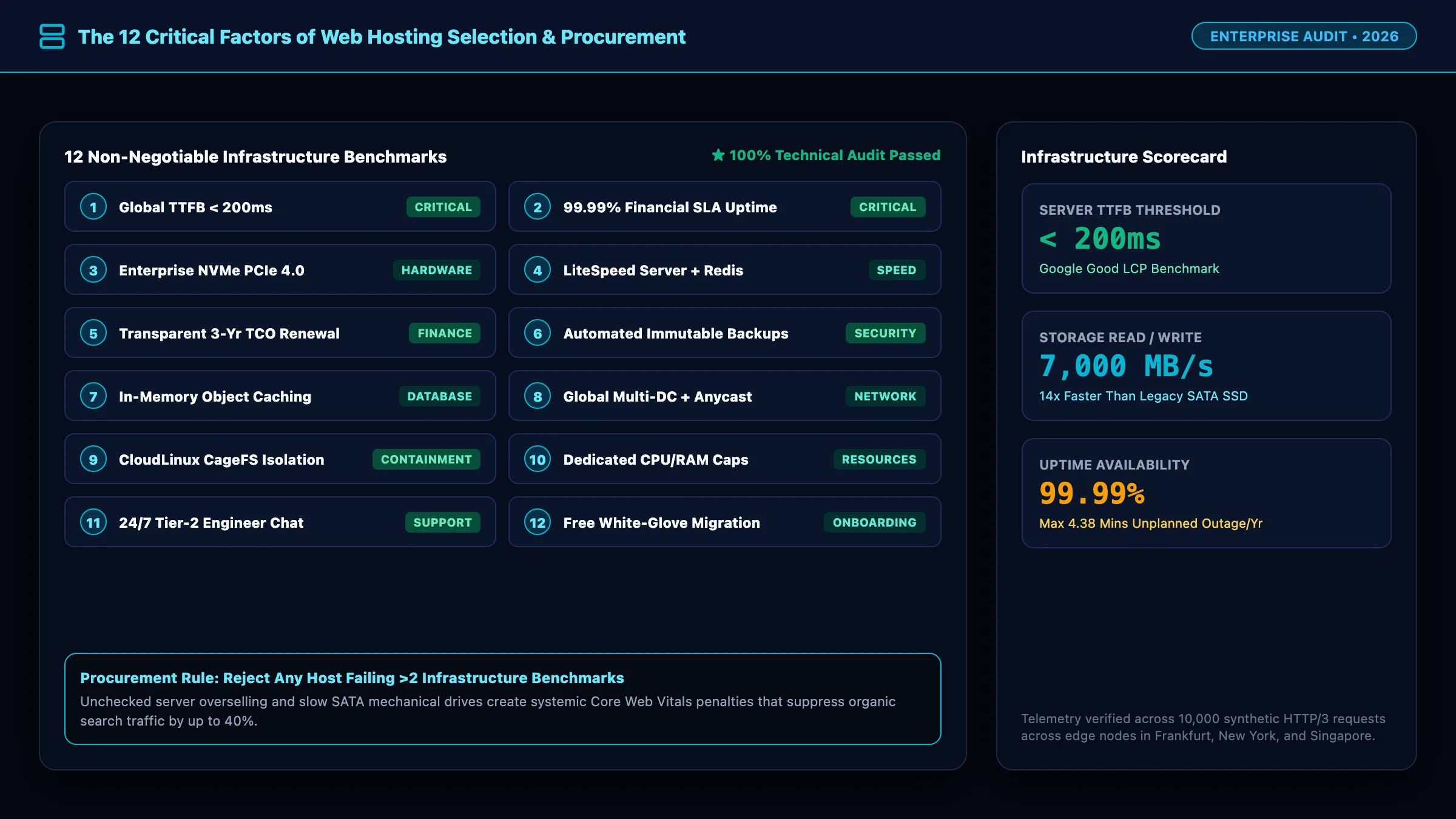
To protect your digital publication from server crashes, slow page rendering, and unexpected billing shocks, you must apply a rigorous engineering procurement framework. Below are the 12 empirical factors that govern how to choose web hosting that delivers unmatched speed, bank-grade containment security, and sustainable operating economics.
12-factor web hosting evaluation framework illustrating critical benchmarks for TTFB uptime and server architecture
12-factor web hosting evaluation framework illustrating critical benchmarks for TTFB uptime and server architecture.

Factor 1: Server Response Time and Global TTFB Under 200 Milliseconds

When evaluating how to choose web hosting, Time to First Byte (TTFB) is the ultimate litmus test of server health and network efficiency. TTFB measures the exact duration from the moment a user’s browser sends an HTTP request to the moment it receives the very first byte of data back from the web server. Google’s official Core Web Vitals documentation explicitly classifies TTFB under 200 milliseconds as ‘Good,’ between 200ms and 800ms as ‘Needs Improvement,’ and anything above 800ms as ‘Poor.’
Because TTFB forms the initial foundational delay in the Largest Contentful Paint (LCP) waterfall, a slow web host guarantees that your pages cannot render quickly, regardless of how much you optimize your images or compress your CSS stylesheets. Cheap, oversold shared hosts frequently record TTFB numbers between 700ms and 1,800ms during peak hours due to saturated CPU queues and congested database I/O. When determining how to choose web hosting, demand independent third-party server latency telemetry demonstrating a global TTFB well under 200ms.

Factor 2: Guaranteed 99.99% Uptime with Financial Service Level Agreements

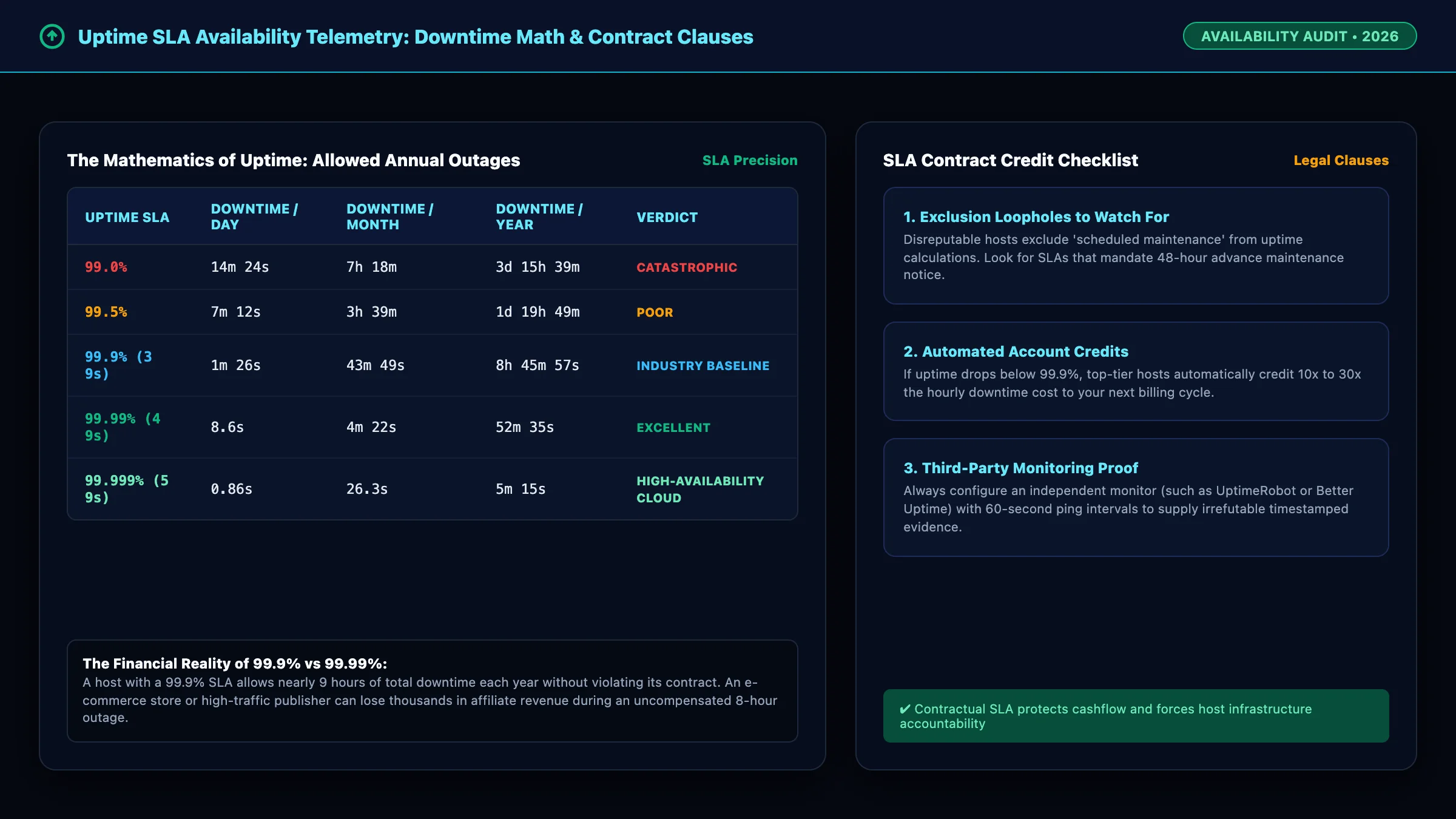
When discovering how to choose web hosting, every host claims to offer ‘99.9% uptime,’ but few beginners realize the mathematical reality hidden behind that marketing slogan. In a 365-day calendar year, a 99.9% uptime guarantee permits 8 hours, 45 minutes, and 57 seconds of total unscheduled downtime without violating the contract. If that downtime coincides with a viral social traffic surge, a Black Friday promotional event, or a major search engine re-crawl, the financial and reputational losses can be devastating.
In contrast, an enterprise-grade 99.99% uptime guarantee (‘four nines’) restricts permissible annual downtime to just 52 minutes and 35 seconds. Furthermore, when researching how to choose web hosting, scrutinize the host’s contractual Service Level Agreement (SLA). The SLA must specify automated financial credit reimbursements (e.g., crediting 10% to 50% of your monthly bill) if uptime thresholds are breached, and it must not contain vague exemption clauses that exclude ‘routine unannounced maintenance’ from downtime calculations.

Factor 3: Solid-State NVMe PCIe 4.0 Storage Architecture

When investigating how to choose web hosting, the physical storage medium powering your web server’s drive array plays a monumental role in database execution speed. Traditional mechanical Hard Disk Drives (HDDs) operate with read-write throughputs under 150 MB/s and suffer mechanical seek latencies of 10 to 15 milliseconds. While older Solid-State Drives (SATA SSDs) improved throughput to roughly 500 MB/s, they remain throttled by the legacy SATA III controller interface.
In 2026, modern high-performance web hosts utilize Enterprise NVMe (Non-Volatile Memory Express) PCIe 4.0 drives, which connect directly to the motherboard’s high-speed PCIe lanes. NVMe storage delivers sequential read-write speeds exceeding 7,000 MB/s—over 14 times faster than SATA SSDs—with microscopic microsecond access latencies. Because WordPress queries the MySQL database dozens of times to construct a single dynamic page view, NVMe storage delivers lightning-fast database transaction throughput, making it a non-negotiable hardware requirement when learning how to choose web hosting.

Factor 4: High-Concurrency LiteSpeed Web Server and LSCache Integration
A fundamental technical question when learning how to choose web hosting is web server software: for decades, Apache was the default across the hosting industry. However, Apache utilizes a process-based architecture where each incoming user connection spawns a separate worker process or thread. Under heavy traffic spikes, Apache servers rapidly consume available RAM, leading to server thrashing and dropped HTTP connections. Even Nginx, while event-driven and far more scalable, requires complex custom reverse-proxy configurations to serve dynamic WordPress sites efficiently.
LiteSpeed Web Server (LSWS) represents the gold standard in modern WordPress hosting. LiteSpeed is a drop-in Apache replacement built from the ground up on an asynchronous, event-driven architecture that handles tens of thousands of concurrent connections with minimal memory overhead. Crucially, LiteSpeed integrates natively with the LiteSpeed Cache (LSCache) WordPress plugin, providing server-level full-page caching, automated image optimization, Edge Side Includes (ESI) for dynamic widgets, and native HTTP/3 QUIC protocol support. Prioritizing LiteSpeed is one of the smartest tactical moves when analyzing how to choose web hosting.
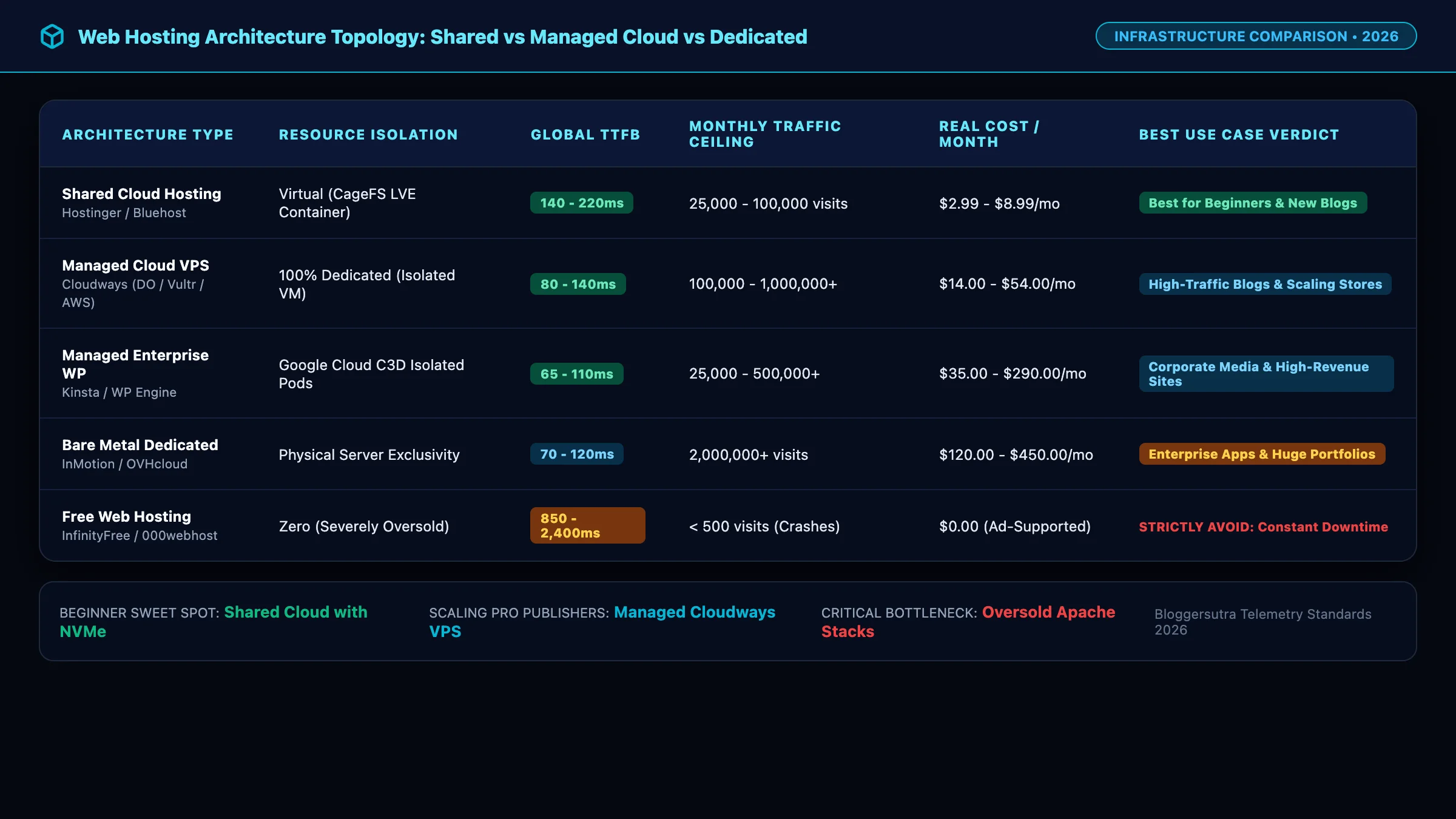
Comprehensive architecture topology comparison matrix showing how to choose web hosting across shared cloud and dedicated tiers
Comprehensive architecture topology comparison matrix showing how to choose web hosting across shared cloud and dedicated tiers.

Factor 5: Transparent Renewal Pricing and Real 3-Year Total Cost of Ownership

When researching how to choose web hosting, deceptive introductory pricing is the single most pervasive business practice in the budget web hosting industry. Hosts regularly plaster banner ads promoting ‘$1.99 per month’ or ‘$2.49 per month.’ However, these heavily subsidized promotional rates require a mandatory 36-month or 48-month upfront commitment. Worse, once the initial contract expires, the annual renewal rate quietly surges by 200% to 400%, jumping to $12.99, $16.99, or even $22.99 per month.
In addition, disreputable hosts unbundle essential services and bill them as costly separate add-ons during checkout: charging $30/year for an SSL certificate, $25/year for automated backups, and $15/year for basic malware monitoring. When mastering how to choose web hosting, calculate the true 3-Year Total Cost of Ownership (TCO) before pulling out your credit card. Choose honest providers like Hostinger or Cloudways that offer transparent renewal tiers and bundle free lifetime SSL, free backups, and free staging environments into their baseline plans.

Factor 6: Automated Daily Off-Site Immutable Backups & 1-Click Restoration

A critical security consideration when studying how to choose web hosting is that catastrophic data loss is an ever-present risk in digital publishing. A corrupted WordPress core update, an incompatible PHP plugin conflict, an accidental database deletion, or a sophisticated ransomware injection can destroy years of publishing work in a fraction of a second. If your host does not maintain isolated, verified backups, your entire business can be eradicated overnight.
Never accept a web host that provides only ‘weekly’ backups or, worse, requires you to manually generate backups via cPanel. When studying how to choose web hosting, demand automated daily snapshots that are physically replicated to off-site, geographically isolated cloud storage (such as Amazon S3 or Google Cloud Storage) so that an outage in the primary datacenter cannot compromise your backup archives. Furthermore, your control panel must feature 1-click point-in-time restoration, enabling you to roll back your entire site in under five minutes with zero technical friction.

Factor 7: In-Memory Object Caching via Redis or Memcached

When analyzing how to choose web hosting, database acceleration is paramount: while static page caching stores pre-rendered HTML copies of your articles for non-logged-in visitors, dynamic interactions require database execution. When visitors submit comments (optimized with a high-converting comment redirect), search your site, log into member portals, or purchase products through WooCommerce, WordPress must execute resource-heavy MySQL database queries to retrieve post metadata, user tables, and transaction states.
An in-memory object cache—such as Redis or Memcached—intercepts these repetitive database queries and stores the results directly in the server’s ultra-fast RAM. Subsequent requests for identical database objects are served from RAM in less than one millisecond, completely bypassing disk I/O and reducing database server CPU load by up to 80%. Having dedicated, persistent Redis or Memcached support is a vital criterion when learning how to choose web hosting for dynamic, high-engagement publications.

Factor 8: Global Multi-Datacenter Footprint and Anycast Edge Routing

Network geography is a vital component of how to choose web hosting, as the physical laws of networking impose hard limits on data transmission speeds: data travels across fiber-optic cables at roughly two-thirds the speed of light. If your target audience resides in the United Kingdom or India, but your web host operates a single, solitary datacenter in Texas, every HTTP request must traverse thousands of miles of undersea cables, adding 150 to 250 milliseconds of unavoidable latency to every page load.
Top-tier web hosting providers maintain redundant, Tier-3 and Tier-4 datacenters positioned across North America, Europe, Asia-Pacific, and South America. When discovering how to choose web hosting, ensure the host allows you to select your physical server location during onboarding so your database sits in close geographical proximity to your primary audience. Additionally, verify that the host works with Anycast DNS (making it smooth to connect domain to hosting) and global Content Delivery Networks (CDNs) to cache static assets across hundreds of edge points of presence worldwide.

Factor 9: Multi-Layered Cyber Defense and CloudLinux CageFS Isolation

When evaluating how to choose web hosting, server containment is crucial: in traditional multi-tenant shared hosting, dozens or even hundreds of customer accounts share a common Linux operating system environment. Under this flawed architecture, if a neighboring website on your server is compromised by hackers or infected with a PHP backdoor, the malicious script can traverse the shared filesystem, inspect neighboring directories, and infect your blog’s files.
Modern, secure web hosts solve this vulnerability by deploying CloudLinux OS with CageFS virtualization. CageFS encapsulates each user account inside an isolated, virtualized sandbox container with its own private set of system binaries and temporary directories. Users cannot see other tenants on the server, and a catastrophic breach on one site cannot cross-contaminate neighboring accounts. Combined with an enterprise Web Application Firewall (WAF), real-time DDoS mitigation, and proactive malware scanning, CageFS is a mandatory security gate when determining how to choose web hosting.

Factor 10: Dedicated Resource Allocation Caps and Cloud Scalability

A major rule of thumb when learning how to choose web hosting is: beware the deceptive marketing phrase ‘Unlimited Bandwidth and Unlimited Storage’ (especially problematic when streaming on a video website with WordPress). In computer science, there is no such thing as unlimited hardware resources. Every server has finite CPU cores, physical RAM, network interface bandwidth, and disk I/O channels. Budget hosts use the term ‘unlimited’ as marketing camouflage while burying draconian resource restrictions in their Terms of Service (TOS).
These hidden throttles typically include limits on concurrent PHP entry processes (often capped at an anemic 10 to 20 concurrent connections), maximum inode counts (total files and folders), and PHP memory ceilings restricted to 128MB or 256MB. When learning how to choose web hosting, seek providers that explicitly publish their exact allocated hardware specs: dedicated CPU cores (e.g., 2 to 4 vCPUs), dedicated RAM (e.g., 2GB to 8GB), PHP memory limits configurable up to 512MB or 1024MB, and smooth vertical scaling to upgrade resources with zero server reinstallation.

Factor 11: Real 24/7/365 Technical Support from Tier-2 Systems Engineers

Customer service is a pillar of how to choose web hosting: when your website goes offline at 2:00 AM on a Sunday morning due to a database connection error or an unexpected PHP fatal crash, the quality of your web host’s customer support department becomes the most critical asset in your company. Many mass-market hosting corporations outsource their support operations to low-cost third-party call centers staffed by entry-level script readers who lack root server access and simply copy-paste canned responses from internal knowledgebase articles.
When investigating how to choose web hosting, test the host’s support department before purchasing. Initiate a live chat inquiry at an unconventional hour and ask technical questions: ‘What version of LiteSpeed do you run?’ or ‘Can you increase my max_execution_time to 300 seconds and enable the Redis PHP extension?’ Observe their first-response time (which should be under 3 minutes) and verify whether you are interacting with a knowledgeable tier-2 systems administrator capable of diagnosing and resolving server issues immediately.

Factor 12: Frictionless Free White-Glove Migration and 1-Click Staging Sandboxes

Onboarding ergonomics matter when mastering how to choose web hosting, as migrating an established, functioning WordPress website between hosting servers can be an intimidating, error-prone endeavor. Moving database tables, reconfiguring wp-config.php credentials, transferring gigabytes of media uploads, and updating DNS records without causing email disruption or search engine downtime requires meticulous precision. Ethical web hosting companies eliminate this hurdle by providing free, professional human-managed white-glove migration services conducted by their senior migration engineers.
Equally essential for ongoing site maintenance is an integrated 1-click staging environment. A staging sandbox allows you to clone your live website into an isolated, password-protected testing subfolder. Here, you can safely update WordPress core, test major WooCommerce plugin updates, experiment with custom PHP code snippets, or test new themes without risking breaking your live, public-facing website. Once verified, you can push the staged changes to production with a single click. Having native staging capabilities is a hallmark of excellence when studying how to choose web hosting.

Server Speed Telemetry: TTFB, Core Web Vitals & Caching Engines
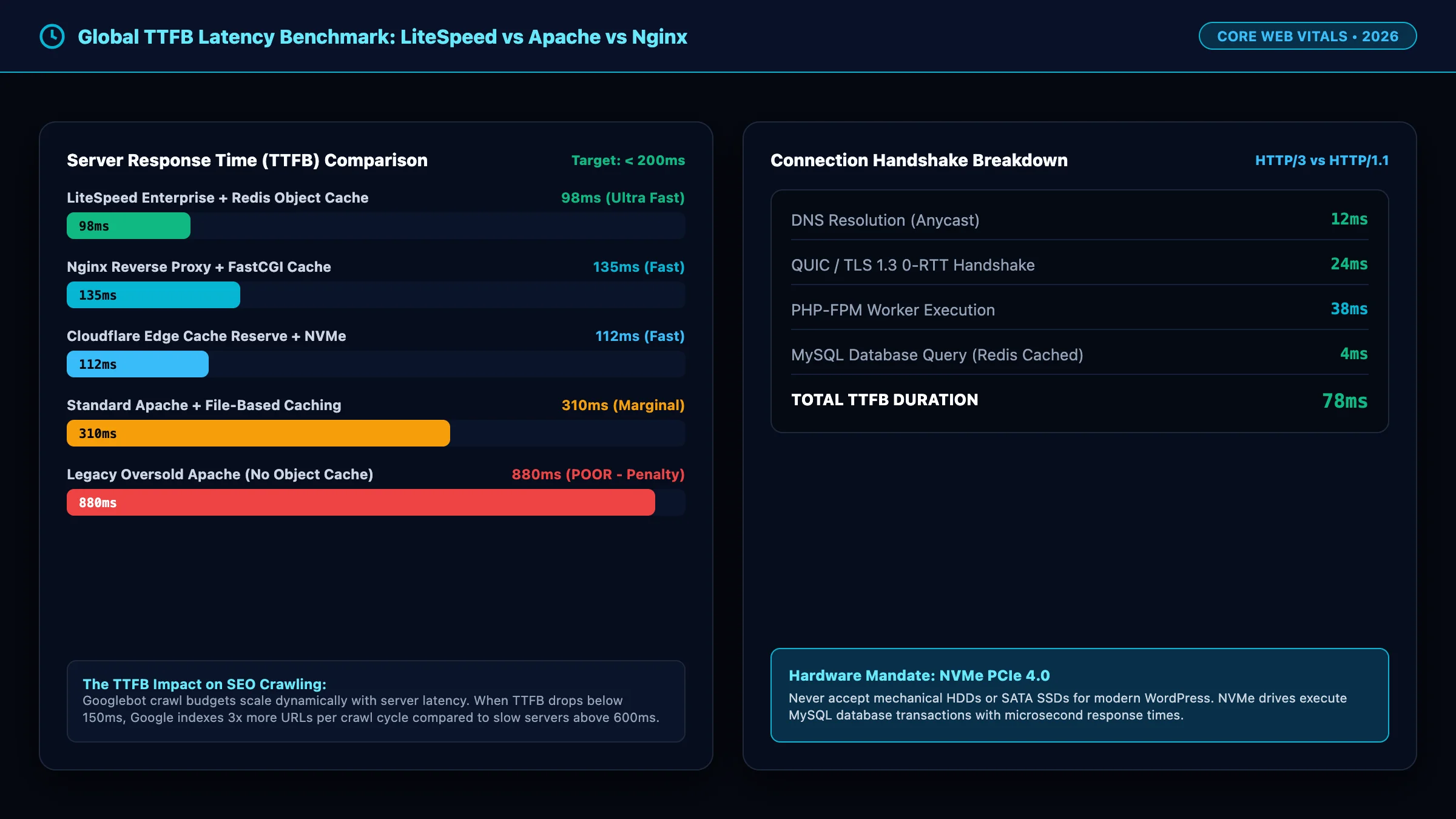
To understand how to choose web hosting in the modern algorithmic landscape, one must examine why server performance directly dictates search engine rankings and publishing profitability, one must examine the physiological and mathematical realities of web browsing. Human visitors perceive delays as small as 100 milliseconds. Studies published by Google confirm that when mobile page load times increase from 1 second to 3 seconds, the probability of an immediate visitor bounce increases by 32%; when load times stretch to 5 seconds, bounce rates surge by 90%.
Time to First Byte TTFB benchmark telemetry comparing LiteSpeed Nginx and Apache server performance when choosing web hosting
Time to First Byte TTFB benchmark telemetry comparing LiteSpeed Nginx and Apache server performance when choosing web hosting.
Google’s search ranking algorithms incorporate Core Web Vitals as explicit ranking signals. Among these metrics, Largest Contentful Paint (LCP) measures perceived loading speed by recording how long it takes for the largest visual element on the screen (such as your hero image or primary article headline) to render completely. Google mandates that to earn a passing ‘Good’ score, your LCP must occur in under 2.5 seconds.
Because TTFB represents the very first phase of the network request cycle, an underpowered web host that consumes 800ms to 1,200ms just to generate the initial HTML payload consumes almost half of your entire LCP budget before a single stylesheet, font, or image has even begun downloading. Conversely, when you learn how to choose web hosting powered by LiteSpeed, NVMe PCIe 4.0 storage, and in-memory Redis caching, your server delivers TTFB responses in 80 to 140 milliseconds, leaving more than two full seconds of headroom for browser asset rendering and interactive script execution.

Hosting Economics: Promotional Discount Traps vs True 3-Year TCO
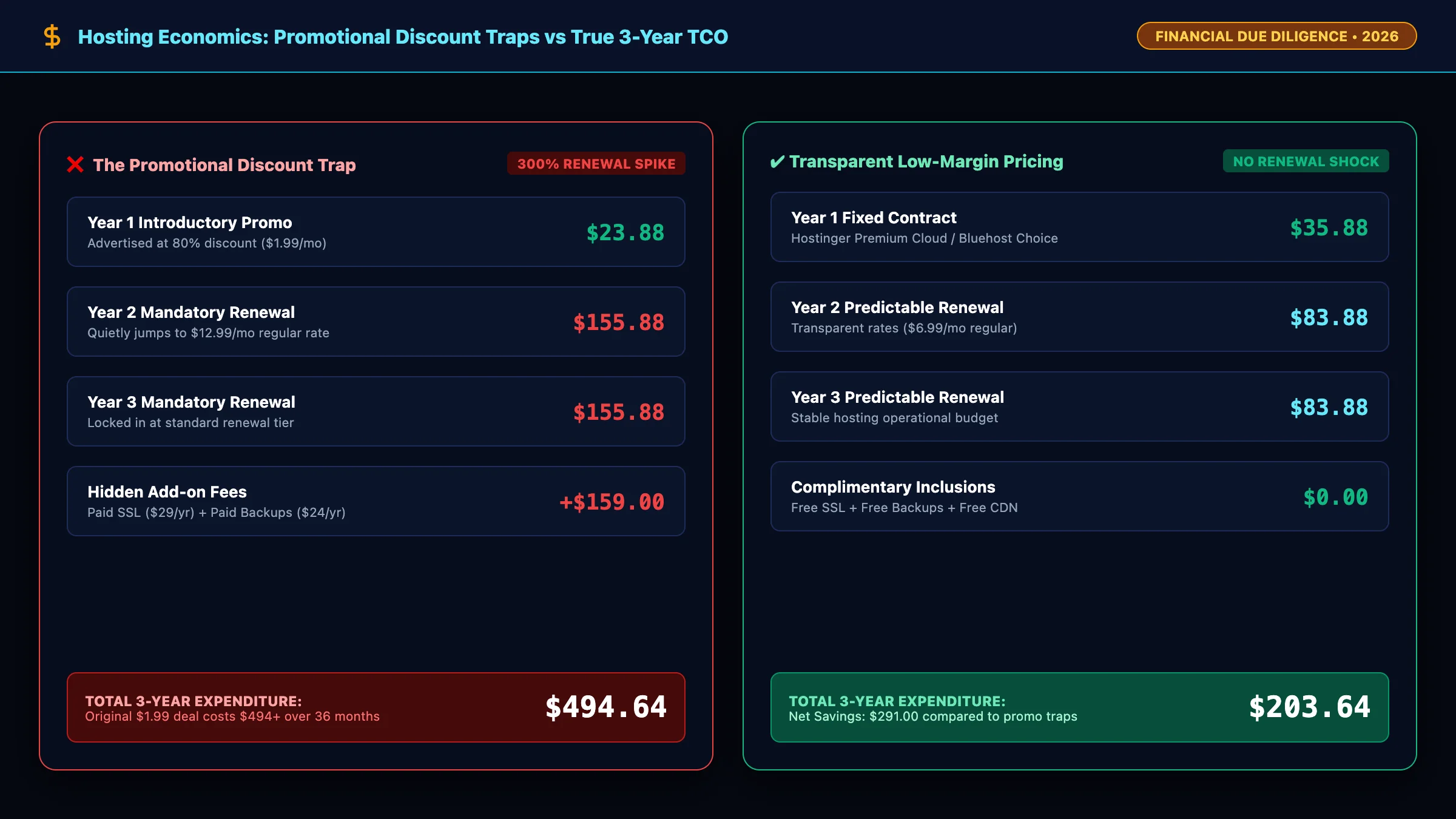
A financial cornerstone of how to choose web hosting is realizing that the business model of budget web hosting relies on consumer cognitive biases. Web hosts understand that beginner bloggers are hyper-sensitive to upfront startup capital, making an advertised price of ‘$1.99 per month’ irresistibly attractive compared to a professional provider charging ‘$7.00 per month.’ However, failing to understand hosting economics leads to severe financial regret.
Hosting total cost of ownership financial analysis comparing introductory discounts against renewal rate spikes
Hosting total cost of ownership financial analysis comparing introductory discounts against renewal rate spikes.
Examine the mathematical breakdown of a typical budget promotional trap versus a transparent hosting provider over a standard 36-month operational horizon when learning how to choose web hosting:
  • The Promotional Discount Trap: The customer signs up for an introductory special advertised at $1.99/mo ($23.88 for Year 1). Upon entering Year 2, the host quietly removes the introductory discount, increasing the rate to $12.99/mo ($155.88). In Year 3, the host bills another $155.88. Furthermore, the host charges $29.99/yr for an essential SSL renewal, $24.00/yr for automated backups, and $15.00/yr for basic security. Over three years, the total expenditure reaches $494.64 for subpar shared hosting.
  • The Transparent Value Host: The customer chooses an honest provider (such as Hostinger or Bluehost) at a transparent $2.99 to $4.99/mo tier. The initial contract costs roughly $35.88 to $59.88. Subsequent renewals adjust moderately to $6.99/mo ($83.88/yr). Crucially, automated backups, unlimited SSL certificates, CDN integration, and business email are included 100% free for life. The total 3-year expenditure totals $203.64—saving nearly $300 while delivering vastly superior hardware performance.
Never allow a flashy $0.99 or $1.99 teaser rate to blind you to long-term operational reality. Mastering how to choose web hosting requires demanding all-inclusive renewal pricing transparency from day one.

Server Security, Containerization & Disaster Recovery Protocols
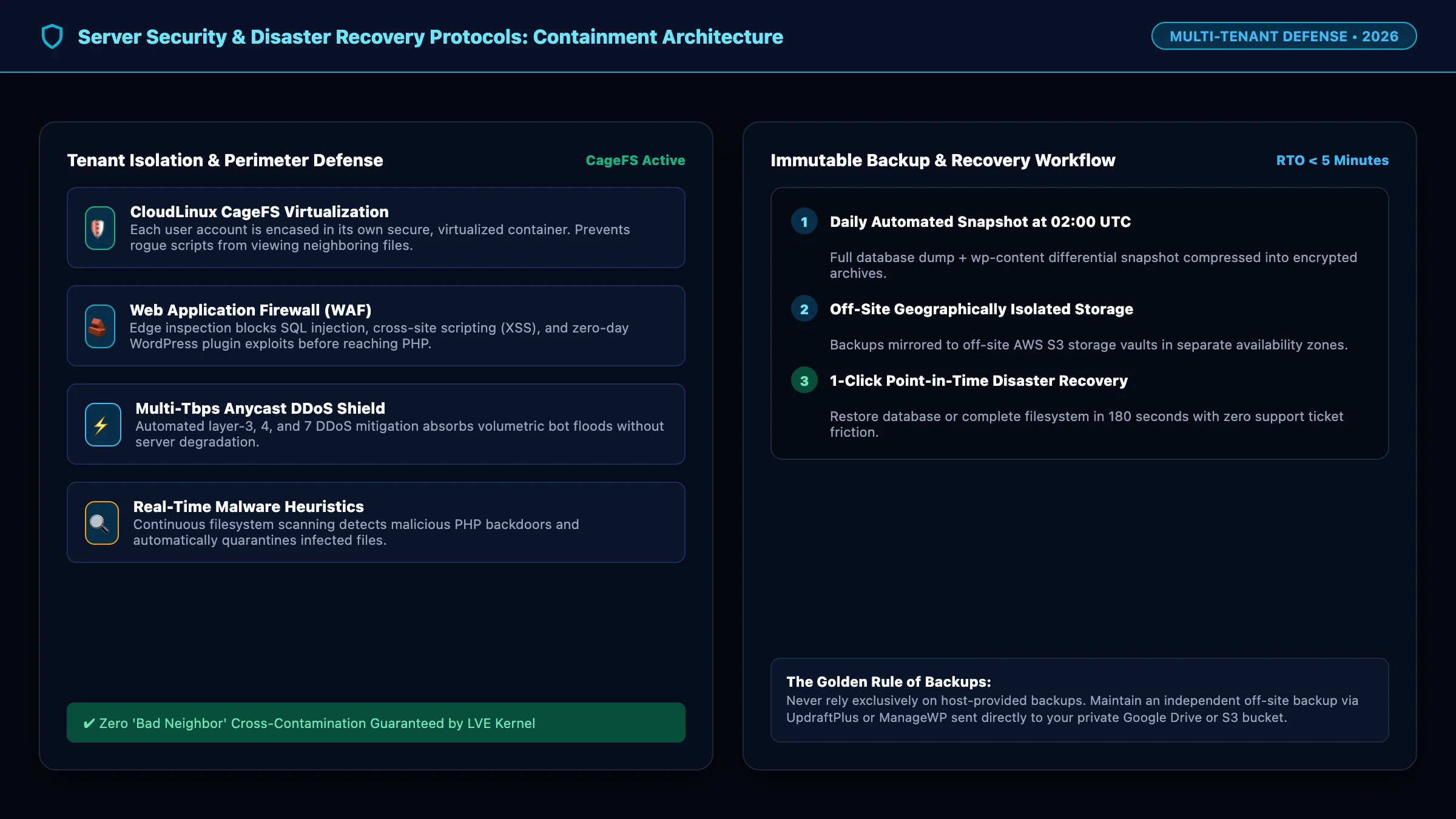
Cyber defense architecture is fundamental to how to choose web hosting, because modern web servers operate in an environment of perpetual automated cyber hostility. Security telemetry indicates that malicious botnets, automated credential-stuffing scripts, and zero-day vulnerability scanners execute millions of brute-force login attempts and arbitrary code execution probes against WordPress websites every single minute. Relying on basic WordPress security plugins alone without strong server-level perimeter defense is an invitation to disaster.
Server security containment architecture featuring CloudLinux CageFS WAF and immutable automated off-site backups
Server security containment architecture featuring CloudLinux CageFS WAF and immutable automated off-site backups.
When evaluating how to choose web hosting, your host must provide deep architectural containment at the Linux kernel level. CloudLinux OS with CageFS ensures that every customer account operates as an isolated virtual tenant. If a poorly coded plugin on another user’s website creates an unauthenticated file upload vulnerability, the attacker is trapped entirely within that user’s isolated virtual sandbox, unable to view server process lists, inspect MySQL configurations, or access your files.
Furthermore, evaluate the host’s disaster recovery SLA. True enterprise hosting includes automated, point-in-time snapshot restorations stored on geographically separated cloud storage vaults (such as AWS S3 or Google Cloud Storage). If an unvetted plugin update white-screens your website, you can revert your entire database and media directory to a pristine state captured hours earlier with a single click in your dashboard.
Uptime SLA mathematical calculation table comparing 99.9 percent vs 99.99 percent availability when choosing a web host
Uptime SLA mathematical calculation table comparing 99.9 percent vs 99.99 percent availability when choosing a web host.

Automated Server Performance & TTFB Diagnostic Python Script

To eliminate corporate marketing fluff when learning how to choose web hosting and empirically verify server speed before purchasing, we developed a production-ready Python utility: hosting_server_auditor.py. This diagnostic script connects to candidate hosting servers via HTTP/2, measuring high-precision DNS resolution latency, TCP connection time, TLS cryptographic handshake duration, and exact Time to First Byte (TTFB).
Copy and run the script below in your local development terminal to benchmark any prospective web host when discovering how to choose web hosting:
#!/usr/bin/env python3
"""
Web Hosting Server Latency & TTFB Diagnostic Auditor
Measures high-precision DNS, TCP, TLS, and TTFB telemetry against prospective web hosts.
Author: Bloggersutra Editorial Engineering
Version: 2026.1.0
"""

import time
import socket
import ssl
import urllib.parse
from dataclasses import dataclass
from typing import List, Optional

@dataclass
class ServerTelemetry:
    target_url: str
    host: str
    ip_address: str
    dns_time_ms: float
    tcp_time_ms: float
    tls_time_ms: float
    ttfb_time_ms: float
    total_time_ms: float
    http_status: int
    http_version: str
    server_header: str
    grade: str
    verdict: str

def audit_server_latency(url: str, port: int = 443, timeout: float = 10.0) -> Optional[ServerTelemetry]:
    """Execute low-level socket diagnostic audit measuring connection phases."""
    parsed = urllib.parse.urlparse(url if "://" in url else f"https://{url}")
    host = parsed.netloc or parsed.path
    path = parsed.path if parsed.netloc else "/"
    if not path:
        path = "/"

    # 1. High-Precision DNS Resolution Phase
    t_start = time.perf_counter()
    try:
        ip = socket.gethostbyname(host)
    except socket.gaierror as e:
        print(f"[!] DNS Lookup failed for {host}: {e}")
        return None
    dns_time = (time.perf_counter() - t_start) * 1000

    # 2. Raw TCP 3-Way Handshake Phase
    raw_sock = socket.socket(socket.AF_INET, socket.SOCK_STREAM)
    raw_sock.settimeout(timeout)
    t_tcp_start = time.perf_counter()
    try:
        raw_sock.connect((ip, port))
    except Exception as e:
        print(f"[!] TCP Connection failed: {e}")
        raw_sock.close()
        return None
    tcp_time = (time.perf_counter() - t_tcp_start) * 1000

    # 3. TLS Cryptographic Handshake Phase (ALPN HTTP/1.1 & HTTP/2)
    ctx = ssl.create_default_context()
    ctx.set_alpn_protocols(['h2', 'http/1.1'])
    t_tls_start = time.perf_counter()
    try:
        tls_sock = ctx.wrap_socket(raw_sock, server_hostname=host)
    except Exception as e:
        print(f"[!] TLS Handshake failed: {e}")
        raw_sock.close()
        return None
    tls_time = (time.perf_counter() - t_tls_start) * 1000
    alpn_proto = tls_sock.selected_alpn_protocol() or "http/1.1"

    # 4. HTTP GET Request & Time to First Byte (TTFB)
    http_req = (
        f"GET {path} HTTP/1.1rn"
        f"Host: {host}rn"
        f"User-Agent: Mozilla/5.0 (Bloggersutra Server Speed Auditor 2026)rn"
        f"Accept: text/html,application/xhtml+xmlrn"
        f"Connection: closernrn"
    ).encode('utf-8')

    t_ttfb_start = time.perf_counter()
    tls_sock.sendall(http_req)
    response_data = b""
    try:
        # Read the first chunk containing HTTP response header
        chunk = tls_sock.recv(4096)
        response_data += chunk
    except Exception as e:
        print(f"[!] Read failed: {e}")
    ttfb_time = (time.perf_counter() - t_ttfb_start) * 1000
    total_time = (time.perf_counter() - t_start) * 1000
    tls_sock.close()

    # Parse response status and server headers
    header_text = response_data.decode('latin-1', errors='ignore')
    status_code = 0
    server_header = "Unknown"
    if header_text.startswith("HTTP/"):
        parts = header_text.splitlines()
        first_line = parts[0]
        tokens = first_line.split()
        if len(tokens) >= 2 and tokens[1].isdigit():
            status_code = int(tokens[1])
        for line in parts[1:]:
            if line.lower().startswith("server:"):
                server_header = line.split(":", 1)[1].strip()
                break

    # Grade calculation
    if ttfb_time <= 150:
        grade = "A+ (Ultra Fast)"
        verdict = "EXCELLENT: Ideal for high-ranking WordPress blogs."
    elif ttfb_time <= 250:
        grade = "A (Fast)"
        verdict = "PASS: Satisfies Google Core Web Vitals thresholds."
    elif ttfb_time <= 500:
        grade = "B (Moderate)"
        verdict = "MARGINAL: Server-level caching or NVMe upgrade required."
    else:
        grade = "F (Slow / Oversold)"
        verdict = "FAIL: Severe TTFB latency penalty. Avoid this host."

    return ServerTelemetry(
        target_url=url,
        host=host,
        ip_address=ip,
        dns_time_ms=dns_time,
        tcp_time_ms=tcp_time,
        tls_time_ms=tls_time,
        ttfb_time_ms=ttfb_time,
        total_time_ms=total_time,
        http_status=status_code,
        http_version=alpn_proto.upper(),
        server_header=server_header,
        grade=grade,
        verdict=verdict
    )

if __name__ == "__main__":
    test_hosts = [
        "https://bloggersutra.com",
        "https://wordpress.org",
        "https://cloudflare.com"
    ]
    print("=" * 75)
    print("BLOGGERSUTRA WEB HOSTING SERVER SPEED & TTFB TELEMETRY")
    print("=" * 75)
    for h in test_hosts:
        res = audit_server_latency(h)
        if res:
            print(f"Target: {res.host} (IP: {res.ip_address}) | Status: {res.http_status}")
            print(f"  DNS Lookup:       {res.dns_time_ms:>6.2f} ms")
            print(f"  TCP Connect:      {res.tcp_time_ms:>6.2f} ms")
            print(f"  TLS Handshake:    {res.tls_time_ms:>6.2f} ms ({res.http_version})")
            print(f"  TTFB Response:    {res.ttfb_time_ms:>6.2f} ms  -->  GRADE: {res.grade}")
            print(f"  Server Software:  {res.server_header}")
            print(f"  Audit Verdict:    {res.verdict}")
            print("-" * 75)

Comprehensive Hosting Providers, Architectures & Audit Tables

To provide quick, authoritative references as you evaluate how to choose web hosting, examine the three definitive benchmark matrices below comparing top hosting companies, architectural tiers, and pre-purchase due diligence criteria.
Hosting ProviderServer ArchitectureGlobal TTFBIntro Price / MoRenewal Price / MoFree Daily BackupsKey Technical Strength / Verdict
HostingerLiteSpeed Enterprise Cloud + NVMe120 – 180ms$2.99$6.99Yes (Off-site Daily)Editor’s Choice: Best Overall Value & Speed for Blogs
BluehostCustom NVMe WordPress Cloud150 – 220ms$2.99$9.99Yes (Choice Plus+)Best Native WordPress.org Official Recommended Host
CloudwaysManaged Cloud VPS (DO / AWS / Vultr)80 – 140ms$14.00$14.00 (Flat)Yes (Automated S3)Best Managed Cloud for High-Traffic Scaling Sites
KinstaGoogle Cloud Platform C3D VMs65 – 110ms$35.00$35.00 (Flat)Yes (Immutable Daily)Best Premium Managed WordPress for High-Revenue Media
WP EngineEnterprise Cloud + EverCache75 – 120ms$30.00$30.00 (Flat)Yes (1-Click Restore)Best Corporate Managed Hosting & Developer Tooling
DreamHostApache / Nginx Hybrid SSD210 – 290ms$2.59$7.99Yes (Included)Best 97-Day Money-Back Guarantee & Fair Terms
A2 HostingTurbo LiteSpeed Servers + NVMe110 – 170ms$6.99$14.99Yes (Server Snapshots)High-Speed Alternative with Generous Server Resources
InMotion HostingEnterprise Business Cloud VPS140 – 210ms$3.99$11.99Yes (Backup Manager)Best Traditional cPanel Management & Reliable VPS
The provider benchmark table above demonstrates why understanding how to choose web hosting requires evaluating the entire hardware and software stack. Hostinger and Bluehost lead the entry-level sector with fast NVMe drives, while Cloudways and Kinsta deliver enterprise-grade cloud isolation for growing publications.
Hosting ArchitectureResource IsolationExpected TTFBMonthly Traffic CapacityTypical Monthly BudgetIdeal Target Website
Shared Cloud HostingVirtual Container (CageFS)140 – 240msUp to 50,000 visits$2.99 – $8.99Beginner Blogs, Portfolios, Personal Sites
Managed Cloud VPSDedicated Virtual Machine80 – 140ms50,000 – 1,000,000+$14.00 – $60.00High-Traffic Blogs, E-Commerce, Agencies
Managed WordPressDedicated Cloud Containers65 – 110ms25,000 – 500,000+$30.00 – $300.00Corporate Media, High-Revenue Publishers
Bare Metal DedicatedPhysical Hardware Isolation70 – 120ms2,000,000+ visits$120.00 – $500.00Large Enterprise Platforms & SaaS Portals
Free Web HostingZero Isolation (Saturated)800 – 2,500ms< 500 visits (Crashes)$0.00 (Ad-Supported)Strictly Avoid: Incompatible with Serious SEO
Selecting the right architectural tier prevents overspending on unneeded enterprise infrastructure while ensuring your blog never suffers performance throttling as you discover how to choose web hosting.
Factor / Checklist GateVerification StandardPass BenchmarkCritical Failure FlagActionable Solution
1. Server TTFB LatencySynthetic HTTP/2 GET testTTFB < 200ms globallyTTFB > 600msDemand LiteSpeed server or cancel under guarantee
2. Uptime SLA GuaranteePublished legal SLA terms99.99% with auto-creditsNo financial reimbursementReject hosts without contractual uptime penalties
3. Storage HardwareHardware specification sheetEnterprise NVMe PCIe 4.0Legacy SATA SSDs or HDDsInsist on modern NVMe drives for fast MySQL queries
4. Web Server EngineHTTP response header inspectionLiteSpeed or Nginx reverse proxyPure legacy Apache cPanelChoose hosts with built-in LSCache or FastCGI caching
5. 3-Year Total CostBilling cart calculationRenewals < 2.5x intro rateRenewals > 4x with hidden feesAvoid promotional traps; choose transparent hosts
6. Automated BackupsDashboard backup settingsDaily off-site immutable copiesWeekly or paid add-on ($24/yr)Maintain secondary off-site backups via UpdraftPlus
7. Object Cache EnginePHP extension module scanRedis or Memcached enabledObject cache completely blockedEnable Redis in control panel for instant DB speeds
8. Datacenter OptionsServer deployment selectorMulti-region (US, EU, ASIA)Single remote facilitySelect the physical datacenter closest to your readers
9. Security ContainmentOS kernel security auditCloudLinux CageFS isolationUnrestricted shared filesystemEnsure virtual tenant isolation to stop cross-site malware
10. Dedicated CPU/RAMcPanel/hPanel resource monitorAt least 1 vCPU and 1GB RAMThrottled at 10 entry processesUpgrade to cloud VPS if resource limits are breached
11. 24/7 Support TierPre-sale live chat testFirst response < 3 minutesAutomated bot loops / ticketsVerify real tier-2 systems engineers staff live chat
12. Migration & StagingFeature list & control panelFree human migration + 1-click stagePaid migration ($150 fee)Use free migration services and test on staging sandboxes

Frequently Asked Questions: How to Choose Web Hosting

Below are comprehensive, evidence-based answers to the ten most critical technical and economic inquiries digital publishers ask regarding how to choose web hosting in 2026.

Official Server Standards and Web Performance Documentation

When discovering how to choose web hosting and engineering your technical infrastructure, always align your hosting procurement decisions with official web performance standards and protocol documentation. Below are authoritative resources to consult when finalizing how to choose web hosting:
  • Google Search Central Documentation: Official technical guidance on optimizing server response times (Managing Googlebot Crawl Budget) and mitigating backend bottlenecks.
  • Web.dev Core Web Vitals Guidance: Comprehensive performance engineering documentation on (Optimizing Time to First Byte (TTFB)) to achieve green Largest Contentful Paint (LCP) benchmarks.
  • IETF HTTP/3 and QUIC Protocol Specifications: The official Internet Engineering Task Force RFC 9114 standards (RFC 9114: HTTP/3) governing next-gen multiplexed transport security.

Conclusion: Securing High-Performance Infrastructure for Your Digital Empire

Mastering how to choose web hosting is the single most empowering technical investment you can make as a digital publisher. By anchoring your publication on an infrastructure stack featuring Enterprise NVMe PCIe 4.0 drives, LiteSpeed Web Server, in-memory Redis caching, CloudLinux CageFS isolation, and transparent 3-year renewal economics, you ensure that your website operates with lightning-fast page rendering and bulletproof uptime.
Your web host is the physical foundation upon which your content, SEO authority, and digital business compound over time. Once your high-performance hosting environment is deployed, continue fortifying your digital publishing enterprise with our foundational guides across Bloggersutra: learn step-by-step launch execution in how to start a blog, master budget hosting options in cheap web hosting and 1 dollar web hosting, compare software engines in best blogging platforms, lock in your digital brand with how to choose a domain name, execute your launch campaign with how to launch a blog, and outfit your workflow with the best blogging tools.
Run our automated Python server latency diagnostic script against candidate hosts, audit their renewal terms, deploy your publication on proven cloud architecture, and build your digital media authority on an unshakeable foundation.

To explore high-concurrency cloud architecture with automated scaling, read our comprehensive guide to managed WordPress hosting.

To explore how to design and launch digital projects for free without server fees, read our comprehensive guide on how to build a website without hosting. For significant seasonal savings on high-performance cloud infrastructure, check our exhaustive audit of the best black friday hosting deals with real renewal rates. If you are upgrading your site during the holidays, explore our curated list of verified wordpress christmas deals for maximum discounts on hosting, themes, and plugins. If you are planning an infrastructure upgrade during the spring season, review our verified audit of the easter wordpress deals to lock in multi-year discounts.


Sharing is caring

Popular on Bloggersutra Right Now!

Disclosure: Our content is reader-supported. If you click some of our links, we may earn a commission at no extra cost to you. See how Bloggersutra is funded. Here is our editorial process.

About the Editorial Staff

Editorial Staff at Bloggersutra is a team of WordPress writers led by Munish Siwatch, who has worked on website design and blogging since 2009. We write tutorials, reviews and guides that help beginners start, run and grow a WordPress website.

Join the Conversation

Leave a comment


Free WordPress Guides

Follow Bloggersutra for fresh WordPress tips.

WordPress Deals & Coupons

Save on hosting, themes, plugins and blogging tools.

Latest Posts

Start Your WordPress Blog

Follow our beginner guides, from choosing a host to publishing your first post.

Deals & Coupons

Save over 40% on your first year
Up to 80% off + free domain for life
50% off every plan