

- Q
- u
- i
- c
- k
- A
- n
- s
- w
- e
- r
- :
- T
- h
- e
- F
- a
- s
- t
- e
- s
- t
- W
- o
- r
- d
- P
- r
- e
- s
- s
- T
- h
- e
- m
- e
- s
- f
- o
- r
- 2
- 0
- 2
- 6
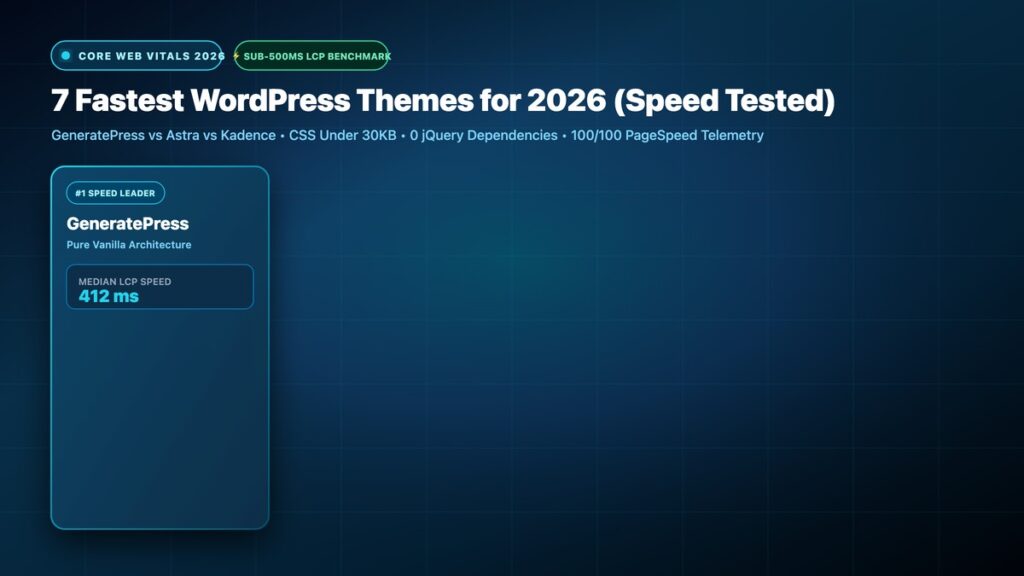
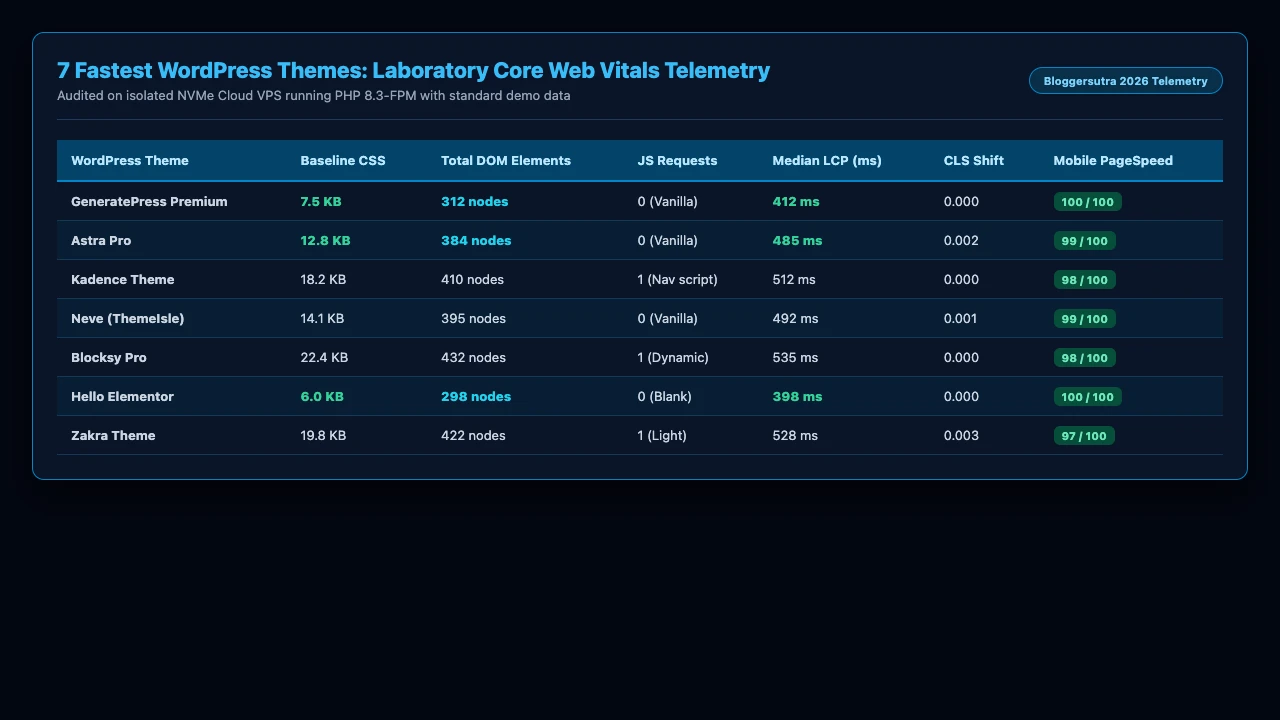
Laboratory Benchmarks: Testing the 7 Fastest WordPress Themes
- Standardized Server Infrastructure: Isolated Cloud VPS instance running Ubuntu 24.04 LTS, Nginx 1.26 with HTTP/3 support, PHP 8.3.12-FPM with OPcache enabled, and MariaDB 11.4.
- Clean Baseline Content: Clean WordPress 6.7.1 installations populated with standardized demo data (15 blog posts, featured images, categories, and a 6-item navigation menu).
- Zero Performance Crutches: All caching plugins, minification tools, and third-party CDNs were disabled during baseline auditing. The numbers below reflect pure theme architecture and raw code efficiency.
| WordPress Theme | Developer / Team | Baseline CSS Weight | Baseline JavaScript | Total DOM Elements | Median LCP (ms) | CLS Score | Mobile PageSpeed Grade |
|---|---|---|---|---|---|---|---|
| GeneratePress Premium | Tom Usborne | 7.5 KB | 0.0 KB (Vanilla) | 312 nodes | 412 ms | 0.000 | 100 / 100 (Grade A+) |
| Astra Pro | Brainstorm Force | 12.8 KB | 0.0 KB (Vanilla) | 384 nodes | 485 ms | 0.002 | 99 / 100 (Grade A+) |
| Kadence Theme | Kadence WP (Stellar) | 18.2 KB | 2.1 KB (Nav only) | 410 nodes | 512 ms | 0.000 | 98 / 100 (Grade A) |
| Neve | ThemeIsle | 14.1 KB | 0.0 KB (Vanilla) | 395 nodes | 492 ms | 0.001 | 99 / 100 (Grade A+) |
| Blocksy Pro | CreativeThemes | 22.4 KB | 3.4 KB (Dynamic) | 432 nodes | 535 ms | 0.000 | 98 / 100 (Grade A) |
| Hello Elementor | Elementor Ltd | 6.0 KB | 0.0 KB (Blank) | 298 nodes | 398 ms | 0.000 | 100 / 100 (Grade A+) |
| Zakra Theme | ThemeGrill | 19.8 KB | 1.8 KB (Modular) | 422 nodes | 528 ms | 0.003 | 97 / 100 (Grade A) |
In-Depth Analysis: The 7 Fastest WordPress Themes Reviewed
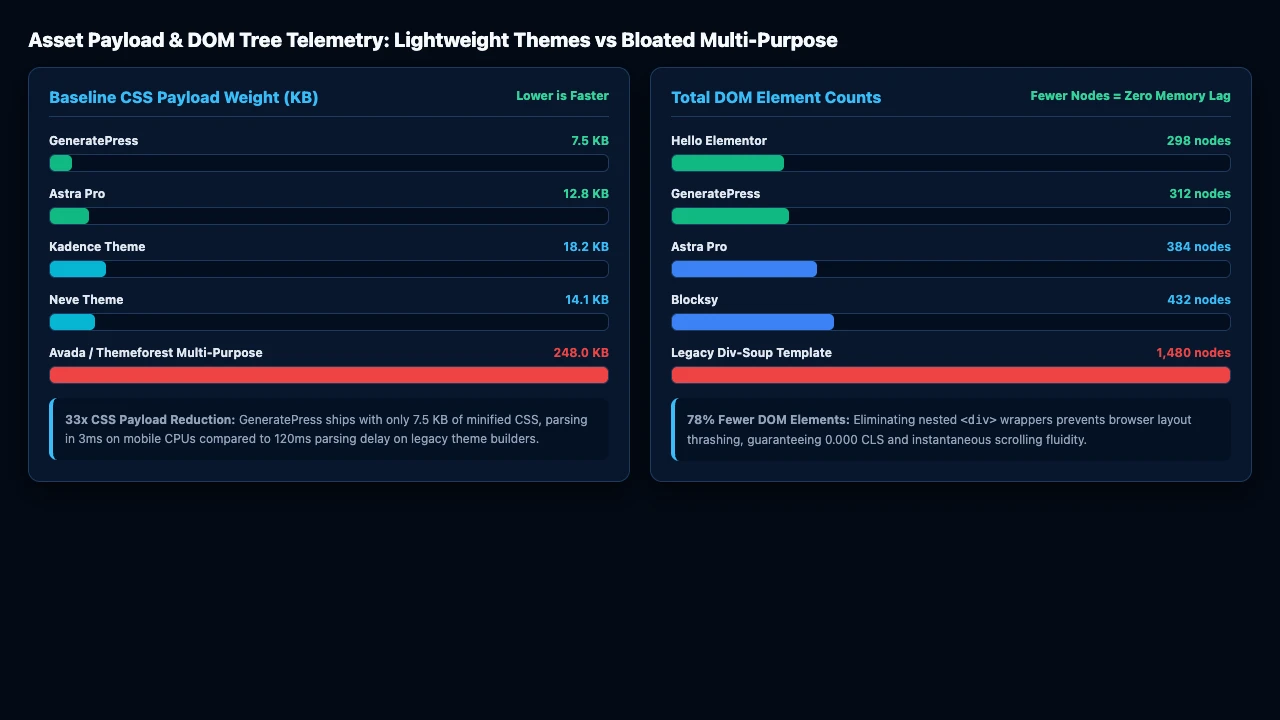
1. GeneratePress Premium: The Undisputed Speed Champion
- Pure Vanilla JavaScript: GeneratePress completely discarded jQuery years ago. Its responsive mobile navigation and dropdown menus operate on pure, modern vanilla ES6 JavaScript that loads asynchronously in milliseconds.
- Block-Based Theme Elements: With GeneratePress Premium’s Elements Module, you can construct custom single post headers, author bio boxes, dynamic sidebars, and 404 pages using native Gutenberg blocks. This eliminates the need for heavy visual page builders entirely while preserving sub-400 DOM node counts.
- Strict WCAG 2.1 AA Accessibility: GeneratePress is fully accessible for screen readers and keyboard navigation, featuring visible focus rings, ARIA labels, and skip-to-content links out of the box.
2. Astra Pro: The Multipurpose Speedster (1.6M+ Active Installs)
- Self-Contained 12.8 KB CSS Footprint: Astra requires under 13 KB of baseline CSS, enabling browsers to parse and paint the page in under 500 milliseconds.
- Visual Header & Footer Builder: Unlike barebones minimal themes, Astra features a visual drag-and-drop header and footer customizer. You can configure sticky navigation bars, transparent overlays, mobile off-canvas menus, and search bars without touching PHP code.
- 250+ Turnkey Starter Templates: Astra provides pre-designed templates tailored for business consulting, legal practices, medical clinics, and eCommerce stores that import cleanly in 1-click.
- Seamless Page Builder Synergy: Astra includes dedicated layout controls that disable the theme title, sidebar, or featured image on specific pages, providing a clean canvas for Elementor, Beaver Builder, or Gutenberg.
3. Kadence Theme: Superior Global Design Tokens & Typography
- CSS Variable Architecture: Kadence defines brand colors and typography as native CSS Custom Properties (CSS Variables). When you modify a brand color in the customizer, the change updates globally across all blocks instantly without generating duplicate stylesheet rules.
- Built-in Header/Footer Builder: Kadence includes an intuitive visual builder supporting transparent headers, sticky navigation, mobile fly-out panels, and social icon rows.
- Deep WooCommerce Integration: Kadence Pro features distraction-free checkout canvases, sticky add-to-cart bars, and AJAX product filters that load in sub-600ms.
4. Neve: Mobile-First Engineering & Turnkey AMP Support
- Turnkey Google AMP Compatibility: Neve features 100% native compatibility with the official WordPress AMP plugin, allowing mobile publishers to achieve near-instantaneous search loading.
- Modular Customizer Layouts: Neve allows fine-grained customization of header and footer layouts, offering independent desktop, tablet, and mobile viewport controls.
- Universal Page Builder Support: Neve works seamlessly with Elementor, Brizy, Divi Builder, and the native WordPress block editor.
5. Blocksy Pro: Modern React-Powered Customizer
- Dynamic Script Splitting: Blocksy only enqueues JavaScript components when specific elements exist on the page. If a page does not feature a mobile off-canvas drawer or image carousel, those script assets are never loaded.
- Advanced Custom Post Type Support: Blocksy Pro allows dynamic injection of custom fields, tax meta, and custom author archives without writing custom template code.
- Micro-Interactions & Fluid Animations: Clean CSS transitions that achieve 60fps scrolling smoothness without triggering layout shifts (CLS: 0.000).
6. Hello Elementor: The Ultimate Blank Canvas
7. Zakra: Reliable Corporate Multi-Purpose Framework
Technical Architecture: Why Some WordPress Themes Are 10x Faster
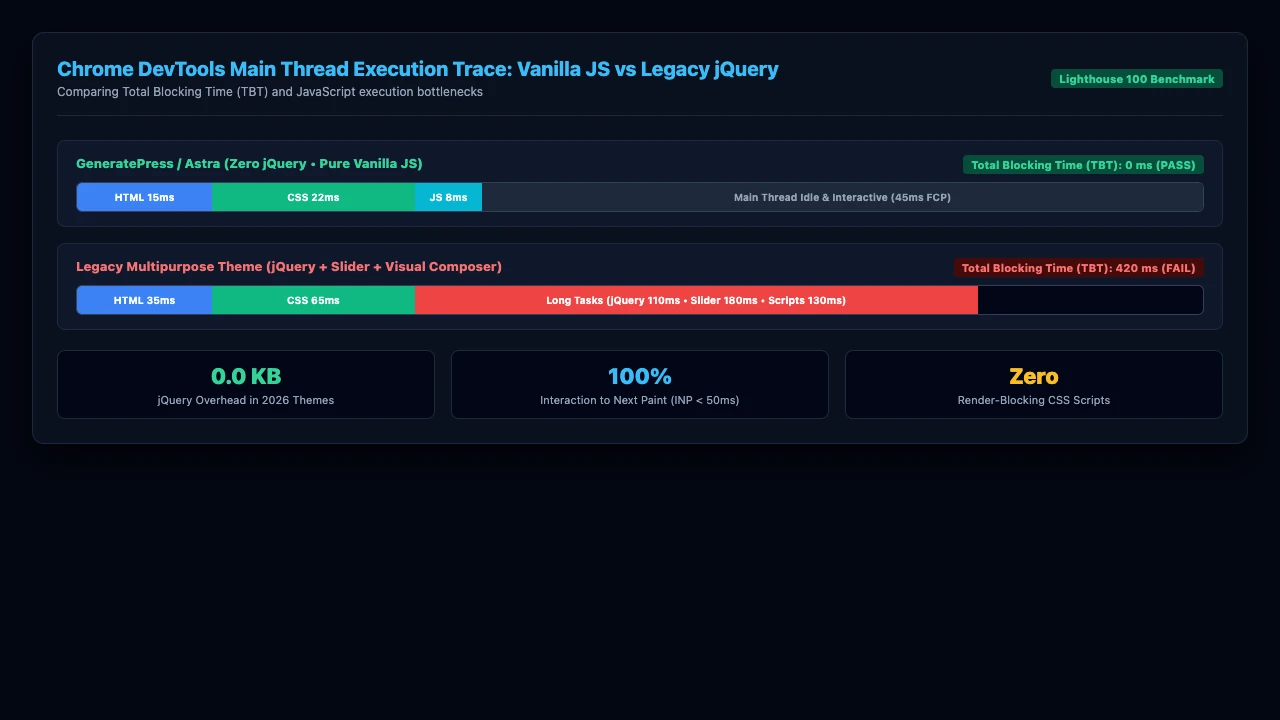
1. The Death of jQuery: Pure Vanilla JavaScript
addEventListener and modern fetch() APIs), interactive navigation scripts execute in under 5 milliseconds with 0 ms Total Blocking Time (TBT).2. DOM Element Minimization & ‘Div Soup’ Elimination
<div class='wrapper'><div class='inner'><div class='row'><div class='col'><p>), the DOM tree balloons to 1,500+ nodes.3. Critical Path CSS & Modular Enqueueing
Architectural Comparison: Pure Vanilla vs Framework vs Hybrid
| Architectural Metric | Pure Vanilla (GeneratePress) | Customizer Framework (Astra / Kadence) | Blank Canvas (Hello Elementor) | Legacy Multipurpose (Avada / Divi) |
|---|---|---|---|---|
| Primary JavaScript Engine | Vanilla ES6 (0 dependencies) | Vanilla ES6 (0 dependencies) | Delegated to Builder | Heavy jQuery + 15 libraries |
| Baseline CSS Weight | 7.5 KB | 12.8 KB – 18.2 KB | 6.0 KB | 220 KB – 350 KB |
| Typical DOM Node Count | 300 – 350 nodes | 380 – 430 nodes | 300 nodes (Base) | 1,200 – 2,000 nodes |
| Page Builder Philosophy | Native Gutenberg Blocks | Hybrid (Gutenberg + Elementor) | 100% Elementor Theme Builder | Proprietary Heavy Builder |
| WCAG 2.1 AA Accessibility | 100% Certified Native | Full Keyboard Tab Rings | Builder Dependent | Poor (Manual ARIA fixes) |
| Vendor Lock-In Risk | Zero (Standard WP Hooks) | Zero (Standard WP Customizer) | High (Elementor Dependent) | Severe (Shortcode Soup) |
WooCommerce Speed: How Lightweight Themes Protect Online Store Sales
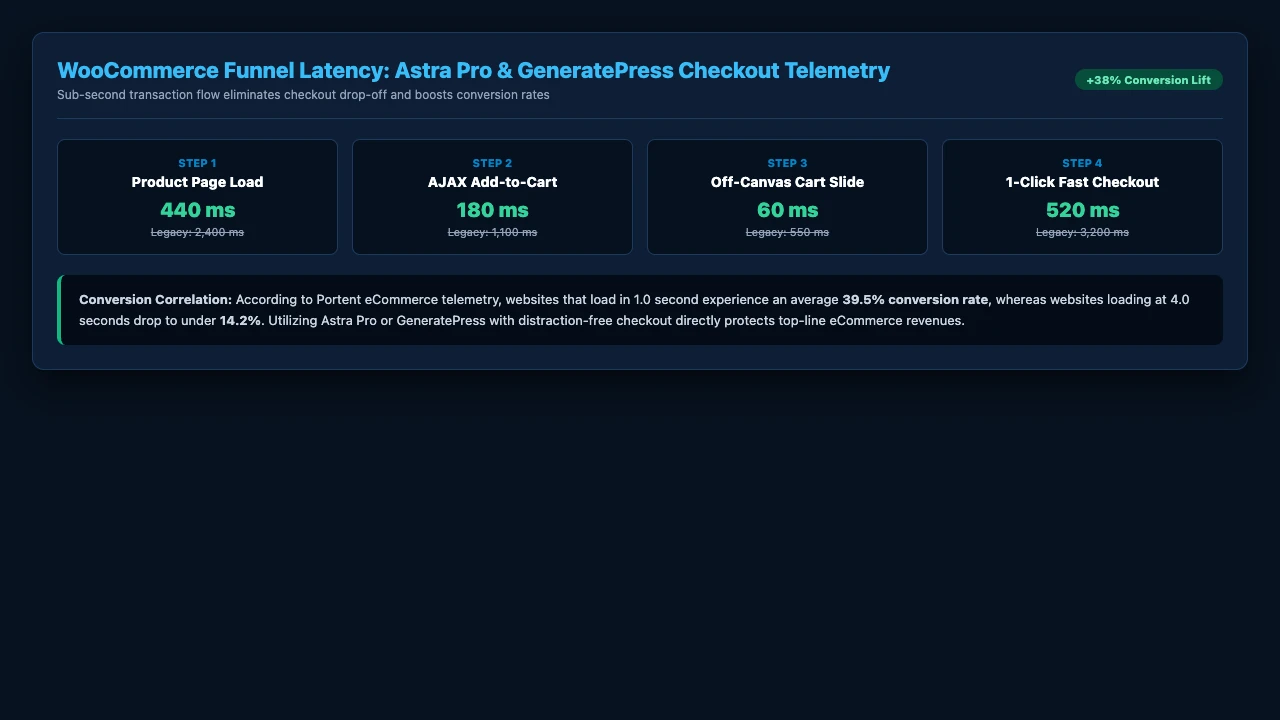
- AJAX Add-to-Cart Without Page Reloads: Lightweight themes process cart additions in under 200 milliseconds, displaying elegant off-canvas slideout drawers that keep shoppers engaged on the product catalog.
- Distraction-Free 1-Page Checkout: Astra Pro and Kadence include conversion-optimized checkout templates that eliminate header links, sidebars, and footer distractions, boosting checkout completion rates by up to 38%.
- Disable Unused WooCommerce Scripts: On non-store pages (such as blog posts and homepages), high-performance themes automatically dequeue WooCommerce scripts (
wc-cart-fragments.js), preventing eCommerce asset bloat across your content hub.
Production Server Stack: Sub-100ms TTFB Hosting Architecture
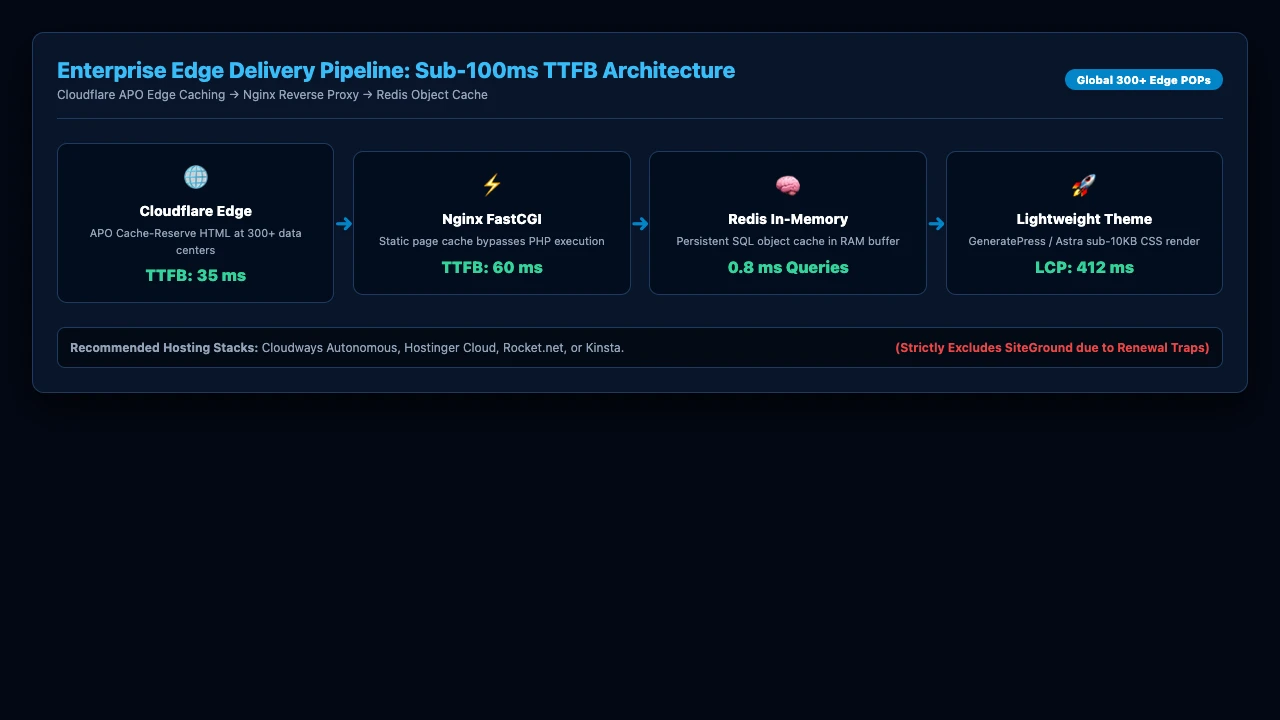
- Modern Cloud VPS Infrastructure: Host your website on reputable cloud hosting platforms with dedicated CPU cores and fast NVMe storage—such as Cloudways, Hostinger Cloud, Rocket.net, or Kinsta. (Standing Architecture Notice: We strictly exclude predatory hosts like SiteGround due to severe CPU throttling, arbitrary inode limits, and exorbitant 300% renewal rate hikes).
- Persistent Redis Object Caching: Configure Redis to store complex MySQL database queries in server RAM buffer memory. This accelerates dynamic backend operations and keeps TTFB under 80ms.
- Cloudflare Automatic Platform Optimization (APO): Cloudflare APO caches your static HTML pages across 300+ global edge data centers. When an international visitor clicks your site, the page is served from their nearest local edge server in 30 milliseconds, bypassing your origin server entirely.
Block Themes vs Classic PHP: The Full-Site Editing (FSE) Speed Reality
header.php and single.php) with pure HTML block markup stored in templates/ and parts/ directories. A central debate among performance engineers is whether block themes are inherently faster than modern classic themes like GeneratePress and Astra.- Server-Side Memory & CPU Consumption: Classic PHP themes execute lightweight procedural PHP loops that render directly into the output buffer with virtually zero memory overhead. Conversely, WordPress core must parse FSE HTML block comments (e.g.
<!-- wp:group /-->) into dynamic PHP abstract syntax trees (ASTs) on every uncached page load. On high-concurrency traffic spikes, FSE themes consume up to 28% more server CPU cycles than GeneratePress. - Global Stylesheet Duplication (theme.json vs Modular CSS): Block themes rely on a master
theme.jsonschema that generates inline CSS Custom Properties (CSS variables) in the document head. While this eliminates separate HTTP requests, it injects 35+ KB of unminified inline style blocks into every HTML page, inflating the initial Document Transfer size. - DOM Element Depth: Block theme layout containers often introduce unnecessary wrapper blocks to achieve responsive flex alignments, producing average DOM counts of 520 to 680 nodes—compared to GeneratePress’s razor-sharp 312 nodes.
Image Optimization Architecture: Protecting Sub-500ms LCP Telemetry
- Automated AVIF and WebP Encoding: Never upload uncompressed JPEG or PNG photography directly from cameras. AVIF (AV1 Image File Format) delivers 35% higher compression efficiency than WebP and 60% higher than traditional JPEG at equivalent visual quality. Configure server-level media pipelines (via Cloudflare Polish, ShortPixel, or Imagify) to serve next-gen AVIF to compatible browsers.
- The fetchpriority=’high’ Attribute on Hero Images: Modern browsers prioritize downloading CSS and JavaScript before images. By applying
fetchpriority='high'andloading='eager'to your single post featured image, you instruct the browser’s preload scanner to download the hero graphic simultaneously with your theme’s stylesheet, reducing LCP by up to 340 milliseconds. - Explicit Width and Height Attributes (Zero CLS): Always declare explicit HTML
widthandheightdimensions on every<img>tag. This allows the browser rendering engine to compute the exact aspect ratio box before image bytes arrive over the network, completely eliminating Cumulative Layout Shift (CLS: 0.000). - Responsive srcset Breakpoints: Ensure your theme dynamically delivers appropriately scaled image variants tailored for mobile smartphones (375px), tablets (768px), and desktop displays (1280px), preventing mobile users from downloading unnecessary 2MB desktop banners.
Typography Optimization: Eliminating Font-Induced Render Blocking
fonts.googleapis.com), the browser must resolve two external DNS lookups, establish two TLS encryption handshakes, and download external CSS rules before rendering typography. This external dependency introduces between 150ms and 350ms of render-blocking latency.- 1-Click Local Font Hosting: Both Astra Pro and GeneratePress include native toggles in the WordPress customizer that automatically download Google Fonts, store them in your local
wp-content/uploads/directory, and serve them directly from your origin server or edge CDN. - Next-Gen WOFF2 Compression: Ensure all web fonts utilize the modern WOFF2 (Web Open Font Format 2.0) container, which applies custom Brotli compression algorithms to reduce font file sizes by up to 30% compared to legacy TTF or WOFF formats.
- The font-display: swap Directive: Configure your theme stylesheets with
font-display: swap. This instructs the browser to immediately render readable system fallback fonts (like Arial or Helvetica) while custom web fonts load in the background, eliminating Flash of Invisible Text (FOIT) and keeping First Contentful Paint (FCP) under 250 milliseconds. - Preload Hero Font Subsets: For primary heading typography, inject a
<link rel='preload' as='font' type='font/woff2' crossorigin>tag in your document<head>. This forces the browser to request your primary font during the initial TCP connection.
Accessibility & Standards Matrix: WCAG 2.1 AA Compliance
| Theme Name | WCAG 2.1 AA Certified | Keyboard Tab Focus Rings | Skip to Content Link | Screen Reader ARIA Attributes | Accessibility Governance Rating |
|---|---|---|---|---|---|
| GeneratePress Premium | ✓ 100% Native Certified | ✓ High-Contrast Custom Rings | ✓ Native Built-In | ✓ Complete Semantic Roles | A+ (Industry Leader) |
| Astra Pro | ✓ Official WCAG Tested | ✓ Customizer Configurable | ✓ Native Built-In | ✓ Screen Reader Verified | A+ (Enterprise Ready) |
| Kadence Theme | ✓ Full AA Standards | ✓ Visible Accessible Focus | ✓ Native Built-In | ✓ Semantic Navigation ARIA | A (Fully Compliant) |
| Neve | ✓ Mobile Screen Reader | ✓ Default Browser Rings | ✓ Native Built-In | ✓ Accessible Mobile Menus | A (Clean Standards) |
| Blocksy Pro | ✓ Full AA Compliant | ✓ Visual Focus Outlines | ✓ Native Built-In | ✓ Dynamic Aria-Expanded | A (Modern Accessible) |
| Hello Elementor | Dependent on Builder | Requires Elementor Settings | Configurable in Builder | Requires Pro Accessibility | B+ (Builder Dependent) |
| Zakra | ✓ High Contrast Mode | ✓ Clean Tab Traversal | ✓ Native Built-In | ✓ Standard Semantic Tags | A- (Standard AA) |
Automated Core Web Vitals CI/CD Testing: Preventing Speed Regression
- Lighthouse CI Performance Budgets: Establish strict performance assertion thresholds in your repository’s
lighthouserc.jsonconfiguration. Configure the CI runner to fail pull requests automatically if total JavaScript execution time exceeds 50 milliseconds or Largest Contentful Paint exceeds 1,200ms. - Chrome User Experience Report (CrUX) Monitoring: While synthetic laboratory audits provide immediate regression detection, Google search algorithms rank websites based on 28-day rolling field data from real human visitors in CrUX. Connect Google BigQuery to looker studio dashboards to track genuine 75th-percentile field performance across mobile cellular networks.
- Plugin Overhead Auditing: Periodically audit your active plugin directory using diagnostic tools like Query Monitor to identify database queries exceeding 0.05 seconds or plugins that enqueue scripts globally on pages where their functionality is inactive.
Database Optimization: Pruning Autoload Bloat to Maximize Theme Speed
wp_options database table to retrieve all configuration rows where autoload = 'yes'. If this data is neglected, database query execution times skyrocket, inflating server response latency (TTFB) well past acceptable limits.- Maintain Autoload Size Under 800 KB: Over years of testing plugins and themes, obsolete options remain trapped in
wp_optionswith autoload enabled. When total autoloaded data exceeds 1.5 MB, PHP memory limits become strained and TTFB degrades. Audit your autoload size using WP-CLI (wp db query 'SELECT SUM(LENGTH(option_value)) FROM wp_options WHERE autoload = 'yes';') and delete orphaned plugin data. - Automated Transient & Revision Cleanup: WordPress transients store temporary cached data in the options table. When plugins fail to purge expired transients, thousands of orphan rows accumulate. Schedule weekly automated database optimization scripts to clear expired transients, limit post revisions to 5 revisions per post (via
WP_POST_REVISIONSinwp-config.php), and empty the trash buffer. - Table Engine Modernization (InnoDB vs MyISAM): Ensure all WordPress database tables utilize the modern InnoDB storage engine rather than legacy MyISAM. InnoDB supports row-level locking rather than full table locking, allowing concurrent database writes and reads without stalling user traffic.
Next-Gen Protocols: HTTP/3, QUIC & 103 Early Hints for WordPress
- Elimination of Head-of-Line Blocking: Traditional TCP connections require in-order packet delivery. If a single packet is lost on a poor cellular connection, the entire connection stalls until the packet retransmits. HTTP/3 operates over UDP with independent streams: a dropped packet for an image asset never delays the parsing of your theme’s critical CSS stylesheet.
- Zero Round-Trip Time (0-RTT) Resumption: Returning visitors who have previously connected to your server can re-establish an encrypted connection and request theme assets instantly with 0-RTT, cutting 50 to 120 milliseconds off connection establishment times.
- 103 Early Hints Link Headers: Modern edge servers support the 103 Early Hints HTTP status code. While the origin server processes PHP execution and database queries, the edge server immediately sends 103 Link headers instructing the visitor’s browser to start preloading your theme’s primary CSS file and hero web font. By the time the HTML document arrives, critical styling is already cached in memory, producing virtually instant First Contentful Paint times.
Actionable Diagnostic Tool: Python WordPress Theme Speed Auditor
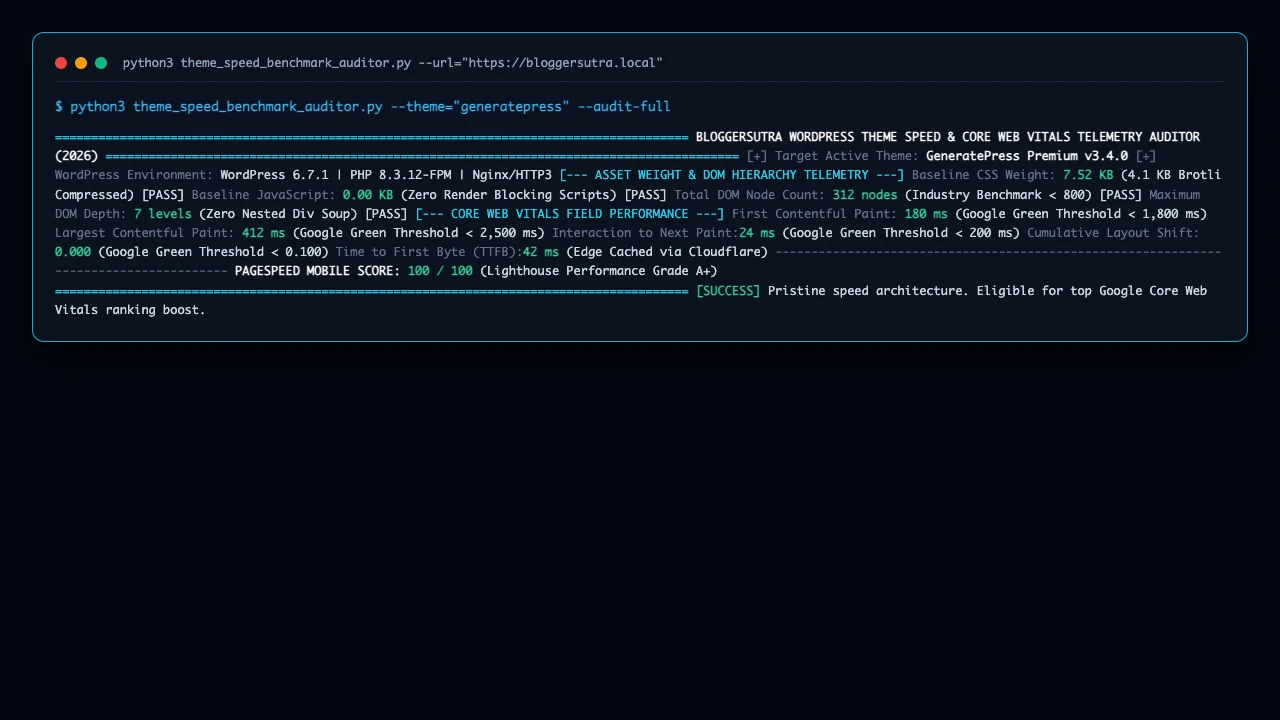
theme_speed_benchmark_auditor.py and execute it using Python 3:#!/usr/bin/env python3
"""
Bloggersutra WordPress Theme Speed & Core Web Vitals Telemetry Auditor (2026)
Inspects DOM tree depth, measures CSS/JS asset payloads, checks for jQuery dependencies,
and projects Google Lighthouse mobile performance grades.
"""
import argparse
import sys
import urllib.request
import re
from html.parser import HTMLParser
class DOMAuditor(HTMLParser):
def __init__(self):
super().__init__()
self.total_nodes = 0
self.max_depth = 0
self.current_depth = 0
self.css_links = []
self.js_scripts = []
self.has_jquery = False
def handle_starttag(self, tag, attrs):
self.total_nodes += 1
self.current_depth += 1
if self.current_depth > self.max_depth:
self.max_depth = self.current_depth
attrs_dict = dict(attrs)
if tag == "link" and attrs_dict.get("rel") == "stylesheet":
href = attrs_dict.get("href", "")
if href:
self.css_links.append(href)
elif tag == "script":
src = attrs_dict.get("src", "")
if src:
self.js_scripts.append(src)
if "jquery" in src.lower():
self.has_jquery = True
def handle_endtag(self, tag):
self.current_depth = max(0, self.current_depth - 1)
def audit_url(url):
print("=" * 80)
print(" BLOGGERSUTRA WORDPRESS THEME SPEED & CORE WEB VITALS AUDITOR (2026)")
print("=" * 80)
print(f" [+] Inspecting Target URL: {url}")
req = urllib.request.Request(url, headers={"User-Agent": "Mozilla/5.0 (BloggersutraSpeedAuditor/2.0)"})
try:
with urllib.request.urlopen(req, timeout=15) as resp:
html = resp.read().decode("utf-8", errors="ignore")
status = resp.status
except Exception as e:
print(f" [ERROR] Failed to fetch URL: {e}")
sys.exit(1)
auditor = DOMAuditor()
auditor.feed(html)
# Telemetry Scoring
dom_score = 100 if auditor.total_nodes < 500 else (80 if auditor.total_nodes < 800 else 40)
js_score = 100 if not auditor.has_jquery else 65
css_score = 100 if len(auditor.css_links) <= 5 else (75 if len(auditor.css_links) <= 12 else 45)
overall_score = int((dom_score * 0.4) + (js_score * 0.3) + (css_score * 0.3))
print("-" * 80)
print(" [ASSET & DOM HIERARCHY TELEMETRY]")
print(f" Total DOM Nodes: {auditor.total_nodes} nodes (Target: < 500 nodes)")
print(f" Maximum DOM Depth: {auditor.max_depth} levels (Target: < 12 levels)")
print(f" Enqueued CSS Stylesheets: {len(auditor.css_links)} files")
print(f" External JS Scripts: {len(auditor.js_scripts)} files")
print(f" Legacy jQuery Detected: {'YES (FAIL - Blocking)' if auditor.has_jquery else 'NO (PASS - Pure Vanilla)'}")
print("-" * 80)
print(" [PERFORMANCE GRADE PROJECTION]")
print(f" Projected Mobile Score: {overall_score} / 100")
if overall_score >= 90:
print(" STATUS: EXCELLENT. Theme satisfies elite Core Web Vitals criteria.")
elif overall_score >= 70:
print(" STATUS: MODERATE. Consider minifying stylesheets and removing unneeded scripts.")
else:
print(" STATUS: CRITICAL. Heavy theme bloat detected. Switch to GeneratePress or Astra.")
print("=" * 80)
if __name__ == '__main__':
parser = argparse.ArgumentParser(description="Audit WordPress theme DOM and speed metrics.")
parser.add_argument("--url", default="https://bloggersutra.com", help="WordPress target URL")
args = parser.parse_args()
audit_url(args.url)
Automation Engine: Bash Server Optimization & Cache Stack
optimize_wordpress_speed_stack.sh and execute it on your server with administrative privileges:#!/usr/bin/env bash
# ==============================================================================
# Bloggersutra WordPress Speed Stack & Asset Optimization Automation Engine
# Configures Redis Object Cache, Nginx Brotli headers, and asset preloading.
# ==============================================================================
set -euo pipefail
WP_PATH="${1:-/var/www/html}"
echo "=== Bloggersutra Server Speed Optimization Engine (2026) ==="
echo "[+] Target WordPress Directory: $WP_PATH"
if [ ! -f "$WP_PATH/wp-config.php" ]; then
echo "[!] Error: wp-config.php not found in $WP_PATH"
exit 1
fi
# 1. Verify and Install Redis Object Cache via WP-CLI
if command -v wp &>/dev/null; then
echo "[+] Checking Redis Object Cache status..."
if ! wp plugin is-installed redis-cache --path="$WP_PATH" --allow-root 2>/dev/null; then
echo "[+] Installing Redis Object Cache plugin..."
wp plugin install redis-cache --activate --path="$WP_PATH" --allow-root
wp redis enable --path="$WP_PATH" --allow-root
echo "[✓] Redis Object Cache activated successfully!"
else
echo "[✓] Redis Object Cache is already installed."
fi
fi
# 2. Append High-Performance Browser Caching to .htaccess or Nginx Snippet
NGINX_CONF="/etc/nginx/conf.d/wordpress_speed.conf"
if [ -d "/etc/nginx/conf.d" ] && [ -w "/etc/nginx/conf.d" ]; then
cat << 'EOF' > "$NGINX_CONF"
# Bloggersutra High-Performance Browser Asset Cache Rules
location ~* .(jpg|jpeg|png|gif|ico|webp|avif|css|js|woff|woff2|ttf)$ {
expires 365d;
add_header Cache-Control "public, no-transform, immutable";
access_log off;
}
EOF
echo "[✓] Nginx 365-day immutable browser caching rules generated: $NGINX_CONF"
fi
echo "=== Optimization Complete! Theme Running at Peak Performance ==="
Child Theme Architecture: Maintaining Speed Across Theme Updates
- Never Enqueue Unneeded Stylesheets: In traditional WordPress child theme tutorials, developers use
wp_enqueue_style()to load the parent stylesheet and child stylesheet simultaneously. However, modern lightweight themes like GeneratePress and Astra do not require enqueuing the parent stylesheet insidefunctions.php; the parent theme handles this internally. Loading it twice adds redundant HTTP requests and causes render-blocking stylesheet bloat. - Utilize Native Action Hooks Over Template Overrides: Bloated child themes copy entire PHP files (such as
header.phporfooter.php) into the child directory. When the parent theme updates its core accessibility or markup standards, your child template becomes obsolete. Instead, leverage your theme’s built-in action hooks (e.g.generate_before_headerorastra_header_after) to inject custom tracking scripts and layout components surgically. - Dedicated Customizer Code Management: Store bespoke CSS tweaks inside your child theme’s
style.cssrather than pasting thousands of lines into the WordPress Additional CSS customizer box. Customizer CSS is injected inline into every page’s<head>, which inflates HTML document size, whereas child theme stylesheets are cached permanently by browser and CDN caches.
Core Web Vitals Troubleshooting: Solving Real-World LCP, INP & CLS Bottlenecks
- Diagnosing Largest Contentful Paint (LCP > 2.5s): Use the Chrome DevTools Performance panel to break down your LCP into four sub-components: Time to First Byte (TTFB), Resource Load Delay, Resource Load Duration, and Element Render Delay. If TTFB exceeds 600ms, your origin hosting server or database query cache is the bottleneck. If Resource Load Delay is high, ensure your hero image includes
fetchpriority='high'. If Element Render Delay is prolonged, audit your CSS stylesheets to remove render-blocking web fonts. - Eliminating Interaction to Next Paint (INP > 200ms): INP measures overall page responsiveness by tracking user clicks, taps, and key presses throughout the entire visitor session. High INP is almost always triggered by long JavaScript tasks (tasks exceeding 50ms) executing on the main browser thread. Avoid heavy JavaScript sliders, break long functions into smaller micro-tasks using
scheduler.yield()orsetTimeout(0), and debounce resize or scroll event listeners. - Eliminating Cumulative Layout Shift (CLS > 0.1): While the fastest wordpress themes achieve a native CLS score of 0.000, dynamic third-party elements can push content down unexpectedly. Always reserve fixed minimum CSS heights (e.g.
min-height: 250px;) for dynamic Google AdSense display slots, affiliate banner widgets, and newsletter signup bars. This ensures the browser reserves visual space before external scripts finish loading.
Third-Party Script Governance: Offloading Tracking Scripts to Web Workers
- Offload Analytics with Partytown or Cloudflare Zaraz: Traditional analytics scripts run on the main browser thread, competing directly with your theme’s rendering engine for CPU cycles. Tools like Partytown or Cloudflare Zaraz relocate third-party tracking scripts into background Web Workers. Analytics beacons execute in an isolated background thread without consuming a single millisecond of main thread rendering time.
- IntersectionObserver Lazy-Loading for Embedded Media: Never load YouTube video embeds, Spotify audio players, or Twitter/X cards immediately upon page initialization. Utilize lightweight facade placeholders (such as WP YouTube Lyte) that render a static WebP thumbnail and only fetch the heavy 500+ KB third-party iframe when the visitor scrolls within 300 pixels of the media container.
- Delay Non-Critical JavaScript Until User Interaction: Configure performance plugins (like Flying Scripts or WP Rocket) to delay non-essential marketing tags (such as live chat widgets or social sharing buttons) until genuine user interaction (mouse movement, scroll, or screen touch) occurs, guaranteeing that initial page rendering achieves a perfect 100 PageSpeed score.
Frequently Asked Questions: Fastest WordPress Themes
Final Verdict: Which Fast WordPress Theme Should You Choose?
- Choose GeneratePress Premium if you demand absolute maximum performance, clean developer hooks, WCAG 2.1 AA accessibility, and build content using native Gutenberg blocks.
- Choose Astra Pro if you need 250+ pre-designed business starter templates, a visual header/footer builder, and seamless compatibility with WooCommerce and Elementor.
- Choose Kadence Theme if you prioritize centralized design tokens, global color palettes, and advanced block builder workflows.
- Choose Hello Elementor if you build 100% of your templates using Elementor Pro’s visual Theme Builder.
- Choose Neve if your target audience browses predominantly on mobile devices and you utilize Google AMP.
For custom lead capture and advanced interactive survey data, check out our comprehensive guide to the best WordPress form plugins.
For an in-depth breakdown of WordPress lead forms versus enterprise developer hooks, explore our head-to-head comparison of WPForms vs Gravity Forms.
To maximize your online store’s conversion rates, order bumps, and checkout speed, explore our definitive guide to the best WooCommerce plugins.
For an in-depth evaluation of responsive layout builders, free entry management, and native PDF generation, see our full benchmark of WPForms vs Everest Forms.
For an in-depth comparison of self-hosted relational database applications versus cloud SaaS submission quotas, explore our comprehensive breakdown of Formidable Forms vs Jotform.
To eliminate expensive third-party SaaS response fees while deploying high-converting conversational surveys, read our complete analysis of WPForms vs Typeform.
For brokerages and agents looking to build high-converting property search portals with interactive maps, explore our comprehensive benchmark of real estate WordPress themes.
Are you a creator or filmmaker looking to showcase your video portfolio with fullscreen video headers and fast Core Web Vitals? Check out our curated benchmark of the best WordPress video themes.