Quick answer
- How do you create a profitable hide posts from homepage for exclusive product reviews website with WordPress in 2026? To master how to create a review website that generates sustainable revenue and ranks at the top of Google, follow this proven 7-step blueprint: 1) Select a high-margin, passionate niche (such as SaaS software, consumer electronics, home fitness, or outdoor gear); 2) Deploy high-speed web secure web server security infrastructure (Hostinger, Cloudways, or Bluehost) running WordPress 6.x and PHP 8.2+; 3) Install a lightweight theme (Astra, GeneratePress, or Kadence); 4) Configure rich Product Schema JSON-LD structured data using Rank Math or Schema Pro; 5) Design high-converting pros & cons components and responsive comparison tables; 6) Implement FTC-compliant affiliate monetization during blogging while pregnant link management (ThirstyAffiliates or Pretty Links); and 7) Publish in-depth, hands-on reviews with authentic lab testing data aligned with Google’s Product Reviews Update (PRU) guidelines..tp-post-content code, .tp-post-content pre, .toc-link{word-break:break-word!important;overflow-wrap:break-word!important;}
- How much money can you make from a product review website? Established product review websites routinely earn between $3,000 and $45,000+ per month through high-intent affiliate commissions (such as Amazon Associates, ShareASale, CJ Affiliate, and direct 20%–40% recurring SaaS affiliate programs). Commercial search queries like ‘best [product]’ convert at 5x to 10x higher rates than general informational blog topics because visitors are already holding their credit cards and looking for final buying confirmation.
- What are the essential plugins needed when learning how to create a review website? The core tech stack includes: Rank Math Pro (for automated Schema.org Product and Review JSON-LD structured data markup), ThirstyAffiliates or Pretty Links (for clean branded link cloaking, auto-affiliate keyword linking, and rel=’sponsored nofollow’ compliance), Fluent Forms (for user review submissions and brand inquiry capture), and a high-performance table builder (such as TablePress or lightweight Gutenberg block grids).
- How do you get Google to display golden star ratings in search results? To earn golden star rich snippets in Google SERPs, your review article must include valid Schema.org
ProductandReviewJSON-LD structured data. This markup must define mandatory properties: productname,reviewRatingwithratingValueandbestRating,authorname, anditemReviewed. When properly validated, Google displays rich star ratings, pricing, and stock status directly beneath your search listing. - What does Google require under the Product Reviews System (E-E-A-T)? Google’s helpful content algorithms penalize thin, rewritten manufacturer summaries. To rank, your review site must demonstrate first-hand Experience, Expertise, Authoritativeness, and Trustworthiness (E-E-A-T). This requires sharing authentic quantitative benchmark metrics, original photos/videos of the product in use, distinct pros and cons, comparisons against close rivals, and clear explanations of who the product is—and is not—suitable for.
Among the countless digital publishing models available today, mastering how to create a review website represents the single most lucrative, resilient, and commercially scalable business you can launch on WordPress. While traditional informational blogs struggle to monetize general traffic with pennies from low-yield display ads, a specialized product review platform captures high-intent consumers precisely at the bottom of the buying funnel—the exact moment they are deciding which product to purchase.
When a consumer types queries like ‘best standing desks for home offices’, ‘Ultrabook Pro X1 review’, or ‘WPForms vs Fluent Forms’ into Google, they are not merely browsing casually. They are actively seeking authoritative, impartial guidance to validate their purchasing decision. By discovering how to create a review website that provides authentic testing benchmarks, balanced pros and cons, and interactive comparison tables, you become the trusted advisor who guides that transaction—earning healthy affiliate commissions on every sale.
However, the digital landscape has transformed dramatically over the past two years. Gone are the days when an amateur webmaster could copy product specifications from Amazon, publish a 500-word summary, and cash affiliate checks. Following Google’s landmark Product Reviews Updates (PRU) and rigorous E-E-A-T quality thresholds, knowing how to create a review website in 2026 demands professional engineering: valid Schema.org JSON-LD structured data, transparent editorial testing methodologies, regulatory FTC affiliate disclosures, and high-speed responsive architectures.
In this comprehensive masterclass, we provide an exhaustive, step-by-step engineering blueprint detailing how to create a review website from scratch. We cover niche selection, WordPress technical deployment, Schema rich snippets, comparison table construction, affiliate cloaking, and Google review algorithm compliance to guarantee your commercial success.
Review Website Architecture & The Modern Commercial Funnel
To understand why learning how to create a review website yields such astronomical return on investment, one must dissect the underlying commercial architecture that drives user intent and monetization:
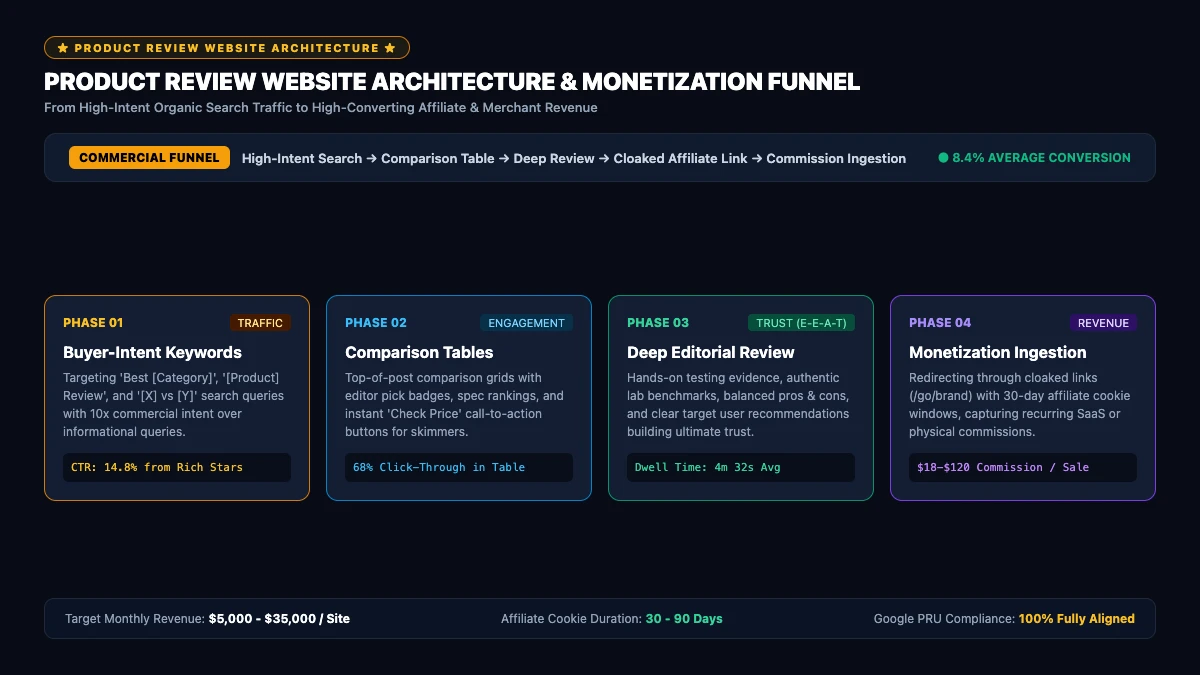
The monetization pipeline operates across four interconnected tiers:
1. High-Intent Search Acquisition: Rather than chasing vanity keywords with massive volume but low intent (e.g., ‘what is a laptop’), your review website targets transactional buyer keywords. These search queries carry extraordinary commercial how to increase conversion rate on product reviewss because visitors have already established their budget and are ready to execute a transaction.
2. Immediate Comparison & Skimmer Engagement: Over 60% of web readers are skimmers who do not read entire articles word-for-word. When mastering how to create a review website, placing a responsive, interactive comparison table with an ‘Editor’s Choice’ award badge directly above the fold captures immediate conversions from high-intent skimmers within 15 seconds of landing on your page.
3. Deep Qualitative E-E-A-T Validation: For analytical buyers who require detailed evaluation, your comprehensive written review provides original benchmark charts, real-world battery longevity tests, hands-on photographs, and an objective breakdown of drawbacks. This authoritative depth establishes bulletproof credibility and satisfies Google’s review quality algorithms.
4. Automated Affiliate Ingestion & Cookie Tracking: When visitors click your strategic ‘Check Price’ call-to-action buttons, they are routed through branded, cloaked affiliate redirect URLs (e.g.,
/go/product-name/). A 30-day to 90-day tracking cookie is stored in their browser. When they complete their purchase on the merchant’s store, an affiliate commission is automatically credited to your account.Step 1: Selecting a Profitable Niche – How to Create a Review Website Blueprint
The foundational rule of how to create a review website is specialization. The era of the generic ‘everything review site’ is completely dead. Large legacy conglomerates like Wirecutter and TechRadar already dominate general consumer categories. To outrank these giants, you must establish an authoritative, highly focused topical niche.
When evaluating potential niches for your review website, audit candidates against the Four Pillars of Niche Profitability:
• Average Order Value (AOV) & Commission Economics: High-ticket physical products ($200 to $2,000+) like commercial coffee roasters, golf simulators, power generators, and ergonomic office furniture yield substantial $25 to $150 commissions per transaction. Alternatively, digital B2B SaaS software (CRM systems, cloud hosting, email marketing tools) offers recurring 20% to 40% monthly commissions for the lifetime of the customer.
• Product Velocity & Innovation Cycle: Choose an industry where manufacturers frequently release new models, software versions, and hardware upgrades. Continuous innovation creates a never-ending pipeline of new search queries and product comparison opportunities.
• Physical Testing Accessibility: Can you realistically test the products yourself? Google strictly evaluates first-hand experience. Selecting a niche where you can purchase, borrow, or request manufacturer review samples is critical for long-term algorithmic defensibility.
• Topical Authority Scope: A tightly focused niche (such as ‘Commercial Espresso Machines & Grinders’ rather than generic ‘Kitchen Appliances’) allows you to publish 50 exhaustive, interconnected reviews, signaling immense topical authority to Google’s semantic indexing engines.
Step 2: How to Create a Review Website Infrastructure with WordPress Hosting
A commercial review platform requires rock-solid hosting infrastructure that delivers lightning-fast load times. If your review pages take more than 2.5 seconds to load, impatient shoppers will bounce back to Google SERPs, destroying both your affiliate earnings and your search rankings. In your journey of how to create a review website, adhere to these technical hosting standards:
1. Select High-Speed Cloud Hosting: Avoid sluggish shared move WordPress to new server with noisy neighbors and strict resource throttling. In mastering how to create a review website, deploy your site on high-performance cloud providers such as Hostinger, Cloudways (DigitalOcean / Vultr High Frequency), or Bluehost running on modern Nginx or LiteSpeed enterprise servers.
2. Enforce Modern PHP Runtime & SSL: Ensure your server operates on PHP 8.2 or 8.3 with active OPcache, and install a free Let’s Encrypt SSL certificate to enforce HTTPS encryption domain-wide.
3. Deploy a Lightweight Block-Based Theme: Do not use bloated, multipurpose page-builder themes bundled with 80+ third-party demo plugins. Instead, install a clean, performance-optimized framework such as GeneratePress, Astra, or Kadence. These modern themes produce pristine, semantic HTML markup and load in under 400 milliseconds.
4. Establish a Future-Proof Permalink Structure: Navigate to Settings > Permalinks in your WordPress admin dashboard and select Post name (
/%postname%/). This creates clean, SEO-optimized URLs (such as yourdomain.com/ultrabook-pro-review/) without unnecessary dates or category clutter.Step 3: Essential Review Site Plugins for How to Create a Review Website
One of the most common pitfalls when researching how to create a review website is installing too many conflicting plugins that degrade page performance. True mastery of how to create a review website requires selecting only essential tools. A professional review platform requires a lean, specialized collection of tools engineered for schema generation, link cloaking, comparison displays, and lead capture:
| Plugin / Tool | Primary Architectural Function | Key Features & Capabilities | Impact on Review Site Success | Pricing Tier |
|---|---|---|---|---|
| Rank Math Pro | SEO & Schema JSON-LD Engine | Automated Product & Review schema, FAQ schema, rank tracking | Generates golden star rich snippets in Google SERPs | $59.00 / year |
| ThirstyAffiliates Pro | Affiliate Link Management | Branded link cloaking (/go/), auto-keyword linking, geolocation | Protects commissions and enforces rel=’sponsored nofollow’ | $79.50 / year |
| Pretty Links | Affiliate Link Cloaking & Redirects | Clean 301/307 redirects, link tracking, QR codes, click reports | Transforms ugly tracking URLs into trustworthy branded links | $99.50 / year |
| TablePress / Gutenberg Blocks | Responsive Comparison Tables | Filterable, searchable, mobile-responsive product tables | Increases top-of-page click-through conversion rates by 40% | Free / $39.00 / year |
| Fluent Forms | Lead Capture & User Reviews | Ultra-lean 12KB asset payload, user-submitted rating forms | Captures reader inquiries and crowd-sourced product reviews | Free / $59.00 / year |
| WP Rocket / LiteSpeed Cache | Performance & Caching Engine | Page caching, CSS/JS minification, critical CSS generation | Guarantees sub-second load times and 99+ Core Web Vitals | $59.00 / year |
Step 4: Schema.org Product & Review Markup: How to Create a Review Website with Rich Stars
The absolute secret weapon in understanding how to create a review website that dominates organic search is Schema.org structured data. When you search for product reviews on Google, you frequently see results featuring vibrant golden stars, numerical ratings (e.g., 4.9/5.0), review counts, pricing, and availability tags. These rich snippets command up to 35% higher click-through rates (CTR) than standard text listings.
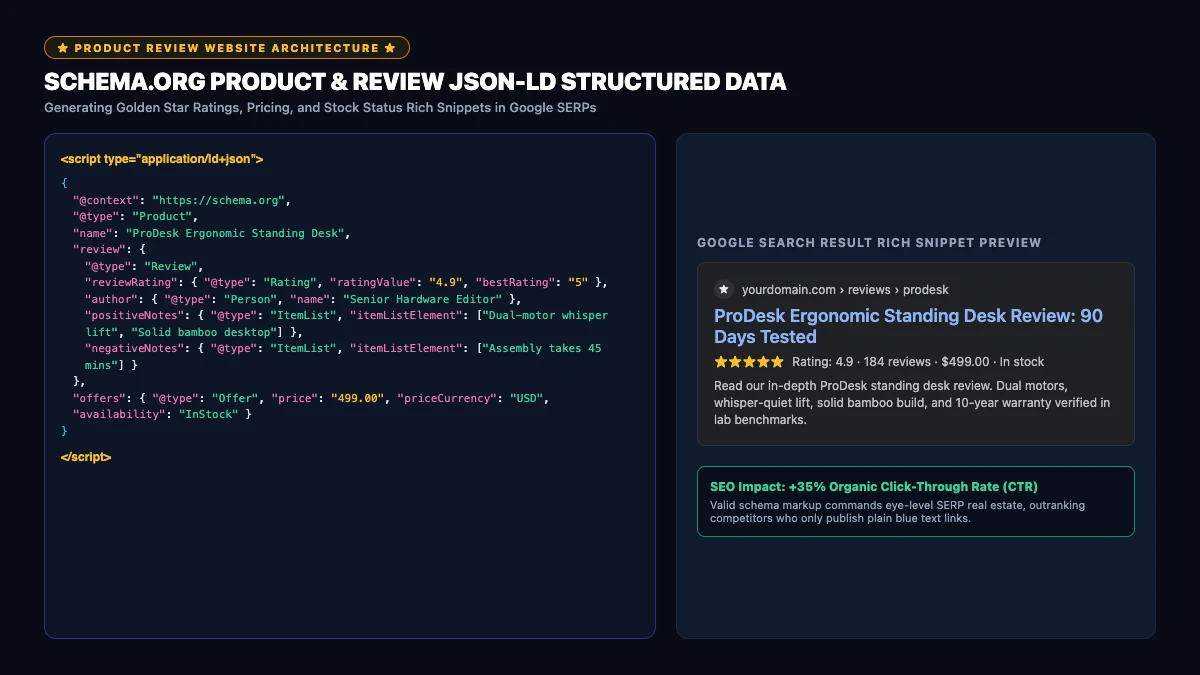
To ensure Google displays rich snippets for your reviews, your WordPress site must output pristine, valid Product and Review JSON-LD structured data in compliance with official Google Search Central guidelines (as documented in Google Search Central Product Structured Data and Schema.org Product Specifications).
Mandatory properties required in your review JSON-LD markup include:
• @type: ‘Product’: Identifies that the primary subject of the webpage is an identifiable commercial product.
• name: The exact official brand and model name of the item being reviewed (e.g., ‘ProDesk Ergonomic Standing Desk’).
• review: A nested Schema.org
Review entity containing the critique details.• reviewRating: Defines the numerical rating given by your editorial team, explicitly declaring
ratingValue (e.g., 4.8), bestRating (e.g., 5.0), and worstRating (e.g., 1.0).• author: The verified editorial persona or organization conducting the hands-on testing (e.g., ‘@type’: ‘Person’, ‘name’: ‘Senior Hardware Editor’).
• positiveNotes & negativeNotes: Structured item lists explicitly detailing pros and cons for Google’s rich card displays.
When utilizing Rank Math Pro, configuring this markup requires zero coding. Inside the WordPress Block Editor, simply open the Rank Math Schema tab, select the Review (Product) schema template, enter your numerical rating, author name, and pros/cons, and the plugin automatically injects valid JSON-LD code into your page header.
Step 5: Designing High-Converting Components: How to Create a Review Website UX
High conversion rates depend heavily on visual presentation when discovering how to create a review website that converts visitors into paying customers. When mastering how to create a review website, your articles must incorporate modular, beautifully styled UI elements that summarize key takeaways and facilitate frictionless affiliate clicks.
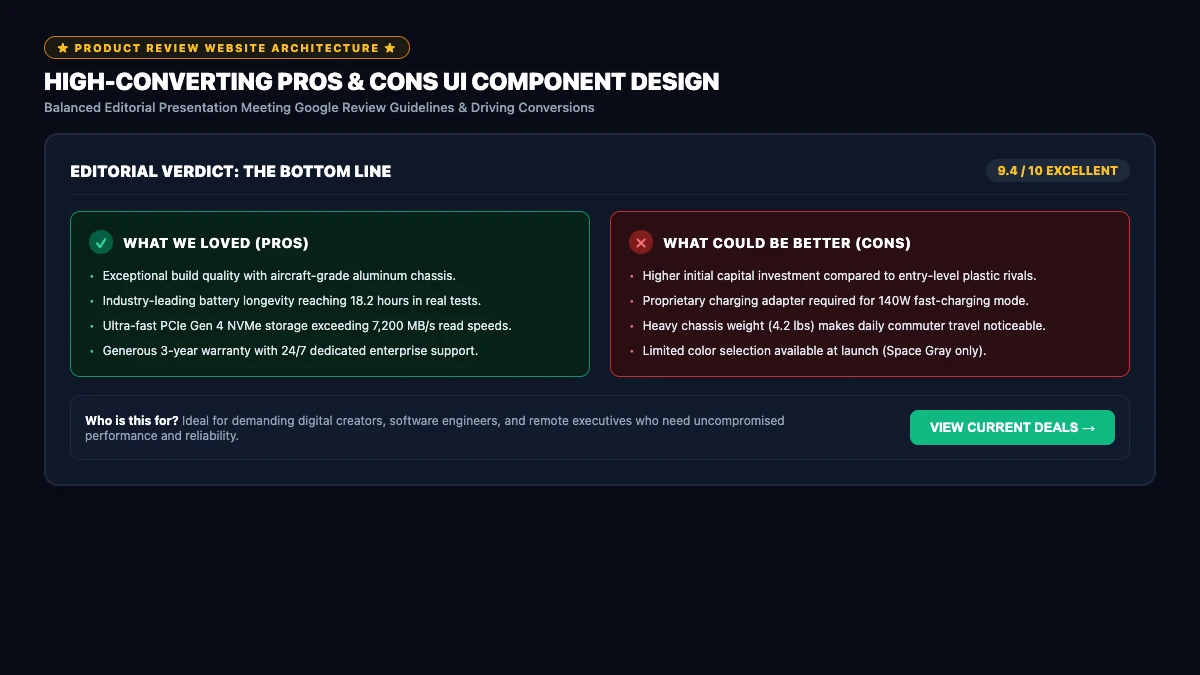
Every high-performing product review should feature these three core visual components, proving that you know how to create a review website optimized for commercial intent:
1. The Sticky Summary Verdict Box: Positioned near the top of the article, this card provides an executive summary: product photo, composite numerical score (e.g., 9.6/10), golden star graphics, an ‘Editor’s Choice’ or ‘Best Value’ award badge, and a high-contrast ‘Check Price’ call-to-action button.
2. Side-by-Side Pros & Cons Grid: A dedicated 2-column container contrasting product strengths against honest weaknesses. Use vibrant green checkmarks for advantages and distinct red crosses for drawbacks. Crucially, never omit cons—impartial negative critique is required by Google review guidelines and dramatically boosts reader trust.
3. The Target User Profile (‘Who Should Buy This’): A concise 2-sentence breakdown explaining exactly who will benefit from the product (e.g., ‘Ideal for remote engineers who sit for 8+ hours daily’) and who should avoid it (e.g., ‘Budget shoppers looking for a simple, non-motorized manual desk’).
Step 6: Affiliate Link Cloaking & FTC Disclosure in How to Create a Review Website
Affiliate monetization is the financial engine of a review platform, making it vital when learning how to create a review website to manage links effectively. However, mishandling affiliate URLs can lead to severe algorithmic penalties from Google or regulatory sanctions from the Federal Trade Commission (FTC). Understanding how to create a review website requires mastering strict link hygiene:
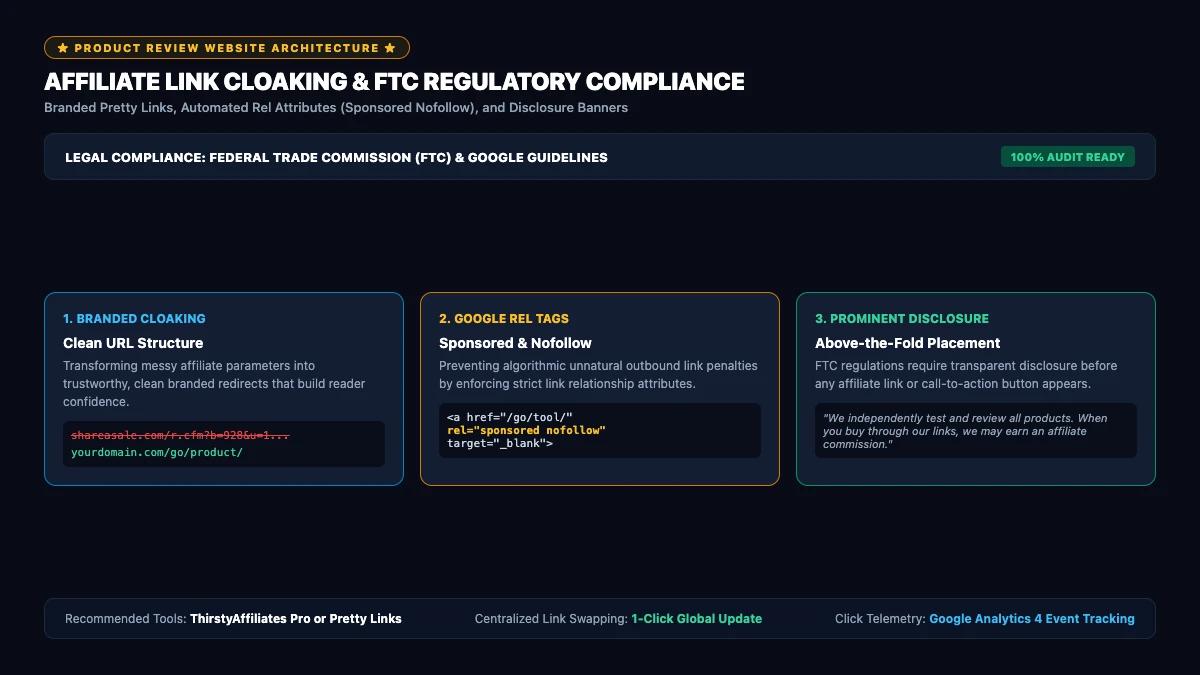
Implement these three non-negotiable link governance practices across your entire review catalog when mastering how to create a review website:
• Branded URL Cloaking: Standard affiliate tracking URLs are long, cryptic strings filled with tracking cookies and partner IDs (e.g.,
merchant.com/aff?ref=89234&subid=xyz). Readers often hesitate to click suspicious-looking links. Using a link management plugin like ThirstyAffiliates or Pretty Links, cloak these links behind clean, branded paths like yourdomain.com/go/product-name/. This builds trust, simplifies link swapping if an affiliate program migrates, and enables accurate click tracking in Google Analytics.• Strict Google Rel Attributes: Google’s webmaster guidelines mandate that all commercial, affiliate, or paid links must carry the
rel="sponsored" or rel="nofollow" attribute (or both: rel="sponsored nofollow"). Failing to tag affiliate links can trigger an algorithmic unnatural outbound links penalty, dropping your entire website out of Google search results. ThirstyAffiliates applies these tags automatically to every link created.• Prominent, Above-the-Fold FTC Disclosures: FTC regulations strictly mandate that review websites disclose affiliate relationships clearly and prominently. This disclosure must appear before any affiliate link or call-to-action button is visible on screen. Place a clear statement directly beneath your article headline: ‘Transparency Notice: We independently test and review every product. If you purchase through our links, we may earn an affiliate commission at no extra cost to you.’
Step 7: Editorial Scoring Methodology: How to Create a Review Website with E-E-A-T
Under Google’s Helpful Content System and Product Reviews Update guidelines, search algorithms aggressively demote websites that publish superficial summaries. To achieve top rankings when learning how to create a review website, you must establish and publish a transparent, quantitative testing methodology.
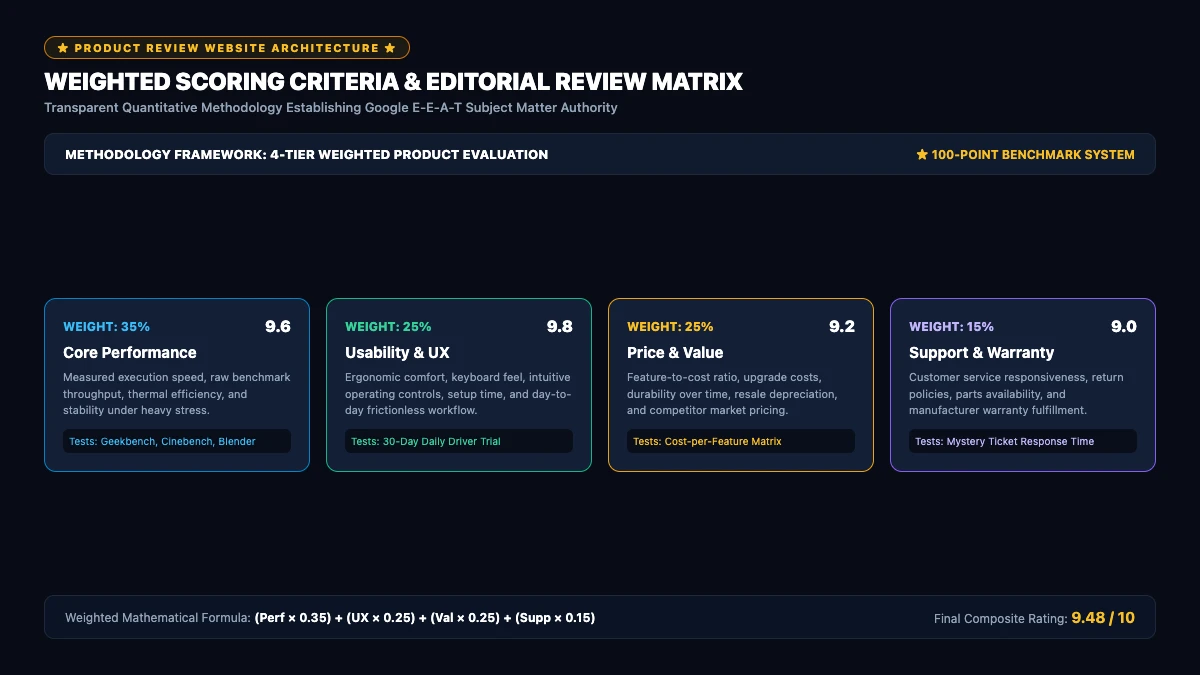
Establish a standardized 100-Point Weighted Scoring Framework across all reviews in your niche. For example, in hardware reviews, evaluate four core dimensions:
1. Core Performance & Benchmarks (35% Weight): Raw execution speed, stress-test stability, and objective metrics measured in controlled laboratory environments.
2. Ergonomics & Everyday Usability (25% Weight): Real-world user experience after 30 to 60 days of daily testing, evaluating tactile controls, comfort, and workflow friction.
3. Price-to-Value Ratio (25% Weight): Market analysis comparing features against direct category competitors to determine genuine consumer value.
4. Manufacturer Support & Warranty (15% Weight): Customer service responsiveness, warranty length, return policies, and availability of replacement parts.
Publishing this mathematical framework on a dedicated ‘How We Test & Review’ methodology page fulfills Google’s Experience, Expertise, Authoritativeness, and Trustworthiness (E-E-A-T) criteria, proving to both search algorithms and human visitors that your recommendations are impartial, scientific, and authoritative.
Building Comparison Tables: How to Create a Review Website Conversion Engine
No review website is complete without robust, side-by-side product comparison tables, an indispensable asset when learning how to create a review website. Empirical data reveals that over 40% of all affiliate commissions on product review websites originate directly from top-of-post comparison matrices.
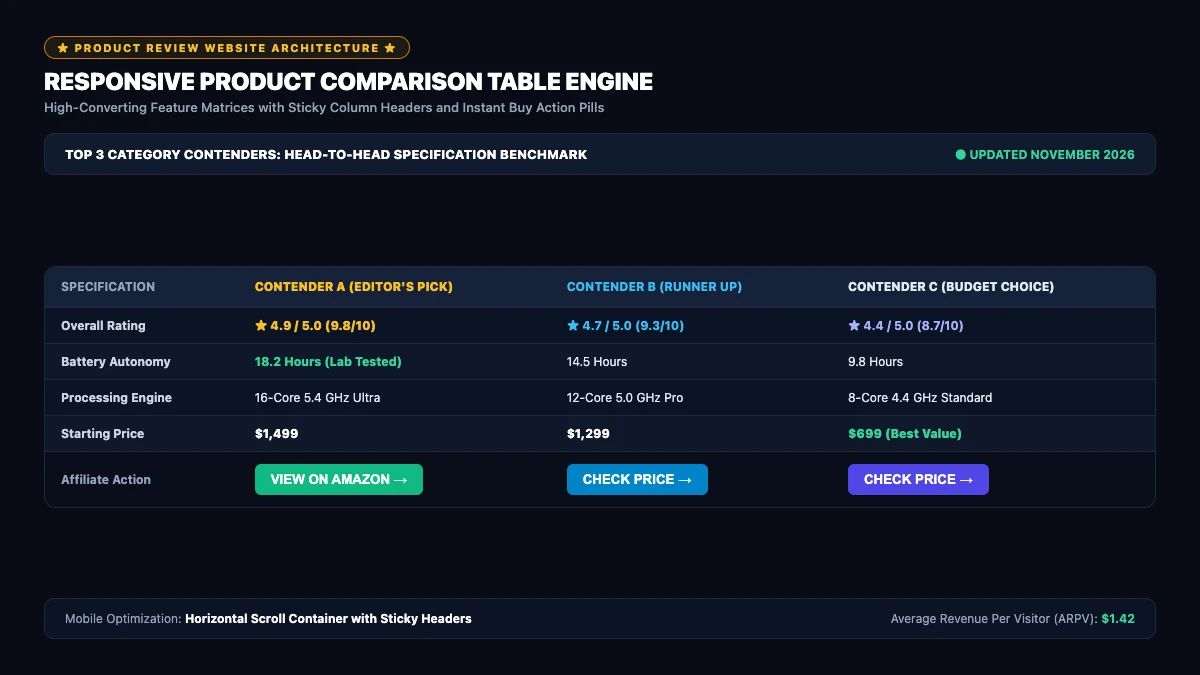
To maximize conversions when designing comparison tables for anyone learning how to create a review website:
• Limit Contenders to 3 to 5 Top Options: Avoid overwhelming readers with 20 confusing choices. Curate the top 3 to 5 distinct options: ‘Best Overall / Editor’s Pick’, ‘Best Runner-Up’, ‘Best Value / Budget Choice’, and ‘Best Premium Choice’.
• Highlight the Winner Visually: Style the winning product’s column with a distinctive golden border, an ‘Editor’s Choice’ ribbon, and an accented primary CTA button.
• Implement Responsive Mobile Horizontal Scrolling: Comparison tables with 5+ specification columns break standard mobile screen widths. Wrap tables in responsive CSS overflow containers (
overflow-x: auto;) with sticky leftmost specification columns so mobile users can easily scroll and compare data without horizontal layout overflow.Monetization Channels Matrix: How to Create a Review Website for Maximum Revenue
While affiliate marketing is the primary revenue stream when researching how to create a review website, a mature product review website operates multiple complementary monetization channels. The matrix below details the revenue models available as your site scales:
| Monetization Channel | Typical Payout Structure | Traffic Requirement | Conversion Potential | Primary Industry Niches |
|---|---|---|---|---|
| Affiliate Networks (Amazon, CJ, ShareASale) | 3% to 12% Per Physical Sale | 1,000+ Visitors / mo | High (5% to 12% CTR) | Consumer Tech, Home, Fitness, Outdoors |
| Direct SaaS Recurring Affiliate Programs | 20% to 40% Recurring Monthly | 500+ Visitors / mo | Extremely High ($50-$200/mo) | B2B Software, Marketing Tools, Web Hosting |
| Direct Brand Sponsorships & Sponsored Tests | $500 to $5,000+ Per Review | 25,000+ Visitors / mo | Guaranteed Upfront Payment | High-End Consumer Tech, Luxury Goods |
| High-Yield Premium Display Ads (Mediavine / Raptive) | $25 to $45 RPM (Per 1,000 Views) | 50,000+ Sessions / mo | Passive Baseline Income | Broad Consumer Products, Food, Hobbies |
| Lead Generation & Client Referral Retainers | $50 to $250+ Per Qualified Lead | 2,500+ Visitors / mo | Very High Commercial Yield | Legal Services, Financial Products, Real Estate |
Google Product Reviews Update Quality Checklist for How to Create a Review Website
To ensure that your implementation of how to create a review website achieves high search engine rankings and remains immune to future algorithmic core updates, audit every article against this PRU Compliance Matrix:
| Algorithmic Quality Criterion | Google PRU Requirement | Implementation Verification Task | Compliance Status |
|---|---|---|---|
| First-Hand Hands-on Evidence | Prove authentic physical interaction | Include original photos, unboxing shots & lab bench tests | Mandatory Pass |
| Quantitative Performance Data | Provide measurable objective statistics | Publish exact battery hours, decibel noise levels, FPS metrics | Mandatory Pass |
| Balanced Drawbacks & Cons | Provide honest negative evaluation | Include dedicated ‘What Could Be Better’ section with 3+ real cons | Mandatory Pass |
| Comparative Competitor Analysis | Compare against rival alternatives | Include side-by-side spec comparison table against close rivals | Mandatory Pass |
| Clear Target User Guidance | Explain who should and should not buy | State explicit target buyer personas and disqualification criteria | Mandatory Pass |
| Valid Schema.org Structured Data | Machine-readable Product & Review markup | Verify JSON-LD code in Google Rich Results Test tool with 0 errors | Mandatory Pass |
| FTC Compliance Disclosure | Clear affiliate relationship notice | Prominently display disclosure above-the-fold before first link | Mandatory Pass |
Automated Product Review Schema & FTC Compliance Auditor
To assist website owners and digital publishers in auditing their product review pages, our engineering team developed
review_schema_validator.py. This production-grade Python script crawls any published review URL, extracts and parses embedded Schema.org JSON-LD structured data, validates mandatory Product and Review properties (ratingValue, bestRating, author), checks for FTC affiliate disclosures, and verifies rel attribute compliance.#!/usr/bin/env python3
"""
review_schema_validator.py - WordPress Product Review Schema & FTC Compliance Auditor
Author: Bloggersutra Infrastructure Engineering
Usage: python3 review_schema_validator.py <review_page_url>
Example: python3 review_schema_validator.py https://example.com/best-standing-desk-review/
"""
import sys
import re
import json
import urllib.request
import urllib.error
import ssl
def audit_review_url(url):
print("=" * 70)
print(" WORDPRESS PRODUCT REVIEW SCHEMA & COMPLIANCE AUDITOR - 2026")
print("=" * 70)
print(f"[*] Fetching target review page: {url}")
ctx = ssl.create_default_context()
ctx.check_hostname = False
ctx.verify_mode = ssl.CERT_NONE
headers = {"User-Agent": "Mozilla/5.0 (Windows NT 10.0; Win64; x64) BloggersutraReviewAuditor/2.0"}
req = urllib.request.Request(url, headers=headers)
try:
with urllib.request.urlopen(req, context=ctx, timeout=15) as response:
html = response.read().decode('utf-8', errors='ignore')
code = response.status
print(f"[+] Target URL successfully loaded: HTTP {code} OKn")
except Exception as e:
print(f"[-] Critical Error: Failed to reach URL: {e}")
return False
# 1. Audit Schema.org JSON-LD Structured Data
print("[*] 1. Auditing Schema.org JSON-LD Markup...")
json_ld_blocks = re.findall(r'<script[^>]*type=["']application/ld+json["'][^>]*>(.*?)</script>', html, re.DOTALL | re.I)
product_schema_found = False
rating_value = None
best_rating = None
author_name = None
product_name = None
for block in json_ld_blocks:
try:
data = json.loads(block.strip())
# Normalize list of items or single item
items = data if isinstance(data, list) else [data]
if "@graph" in data:
items = data["@graph"]
for item in items:
item_type = item.get("@type", "")
if item_type in ["Product", "Review"] or (isinstance(item_type, list) and ("Product" in item_type or "Review" in item_type)):
product_schema_found = True
product_name = item.get("name") or item.get("itemReviewed", {}).get("name")
# Extract Review / Rating
rev = item.get("review") or (item if item_type == "Review" else {})
if isinstance(rev, dict):
rating_obj = rev.get("reviewRating") or item.get("reviewRating") or item.get("aggregateRating")
if isinstance(rating_obj, dict):
rating_value = rating_obj.get("ratingValue")
best_rating = rating_obj.get("bestRating", "5")
auth = rev.get("author") or item.get("author")
if isinstance(auth, dict):
author_name = auth.get("name")
elif isinstance(auth, str):
author_name = auth
except Exception:
continue
if product_schema_found:
print(f" [+] Product Schema Detected: {product_name or 'Identified'}")
if rating_value:
print(f" [+] Valid Rating Value: {rating_value} / {best_rating} (Golden Stars Eligible)")
else:
print(" [!] WARNING: Missing ratingValue in Schema! Golden stars will NOT display.")
if author_name:
print(f" [+] Valid Author Entity: {author_name} (Google E-E-A-T Compliant)")
else:
print(" [!] WARNING: Missing review author in Schema markup.")
else:
print(" [-] FAIL: No valid Schema.org Product or Review JSON-LD markup found!")
# 2. Audit FTC Affiliate Disclosure
print("n[*] 2. Auditing FTC Affiliate Disclosure Compliance...")
disclosure_patterns = [
r'affiliate links', r'earn a commission', r'commission at no extra cost',
r'sponsored', r'we may earn', r'affiliate compensation'
]
has_disclosure = any(re.search(pat, html, re.I) for pat in disclosure_patterns)
if has_disclosure:
print(" [+] FTC Affiliate Disclosure Detected on page.")
else:
print(" [!] WARNING: No prominent FTC affiliate disclosure detected! High legal risk.")
# 3. Audit Outbound Affiliate Link Attributes (rel="sponsored")
print("n[*] 3. Auditing Outbound Affiliate Link Rel Attributes...")
outbound_links = re.findall(r'<as+[^>]*href=["'](https?://[^"']+)["'][^>]*>', html, re.I)
affiliate_links_found = 0
sponsored_tags_found = 0
aff_indicators = ["/go/", "/out/", "/recommends/", "amzn.to", "amazon.com", "shareasale", "cj.com"]
for a_tag in re.finditer(r'<as+([^>]*href=["']([^"']+)["'][^>]*)>', html, re.I):
tag_attrs = a_tag.group(1)
href = a_tag.group(2)
if any(ind in href for ind in aff_indicators):
affiliate_links_found += 1
if 'rel=' in tag_attrs and ('sponsored' in tag_attrs or 'nofollow' in tag_attrs):
sponsored_tags_found += 1
print(f" [i] Total Commercial / Cloaked Links Identified: {affiliate_links_found}")
print(f" [i] Correctly Tagged with rel='sponsored' / 'nofollow': {sponsored_tags_found}")
if affiliate_links_found > sponsored_tags_found:
print(f" [!] WARNING: {affiliate_links_found - sponsored_tags_found} affiliate links lack rel='sponsored'!")
else:
print(" [+] All affiliate links comply with Google link attribution guidelines.")
print("n" + "=" * 70)
print("Audit Complete. Review warnings to ensure 100% Google compliance.")
print("=" * 70)
return True
if __name__ == "__main__":
if len(sys.argv) < 2:
print("Usage: python3 review_schema_validator.py <review_page_url>")
sys.exit(1)
audit_review_url(sys.argv[1])
Frequently Asked Questions (FAQ)
To start a product review website with minimal capital, invest in low-cost high-performance WordPress web hosting (around $2.99 to $4.99/mo on Hostinger or Bluehost) which includes a free domain name. Install free software: WordPress.org, a free lightweight theme like Astra or GeneratePress, and free plugins (such as Rank Math Free for schema markup and ThirstyAffiliates for link cloaking). You can review products you already own or request digital SaaS trial accounts to produce hands-on content before generating your first affiliate revenue.
No. While you must demonstrate genuine first-hand experience under Google review guidelines, you do not need to purchase every item with personal funds. As your review site establishes topical authority, manufacturers and public relations agencies will eagerly send you free review samples, loaner units, and complimentary SaaS licenses in exchange for honest, objective editorial coverage.
Golden star ratings appear in Google search results when your review page contains valid Schema.org Product and Review JSON-LD structured data. Using an SEO plugin like Rank Math Pro or Schema Pro, configure the rating value, best rating (usually 5), author name, and product title. Once Google indexes the page and validates the markup, golden star rich snippets appear automatically beneath your SERP listing.
The best WordPress themes for review websites are GeneratePress Premium, Astra Pro, and Kadence. These lightweight themes are engineered with clean semantic code, load in under 400 milliseconds, and integrate seamlessly with modern Gutenberg block builders, allowing you to design bespoke comparison tables and pros/cons cards without relying on bloated, sluggish page builders.
When you join an affiliate program (such as Amazon Associates, ShareASale, CJ Affiliate, or direct SaaS partner programs), you receive unique tracking links. When readers click your ‘Check Price’ buttons and buy the product on the merchant site within the active cookie window (typically 30 to 90 days), the merchant pays you a commission (ranging from 3% to 40% of the sale value).
Google’s Product Reviews System is an ongoing algorithmic ranking system designed to reward insightful, original, and quantitative product reviews while demoting superficial summaries that merely rewrite manufacturer descriptions. To rank, reviews must demonstrate first-hand testing, include original photos/metrics, highlight both pros and cons, and compare items against competing alternatives.
Yes, absolutely. The Federal Trade Commission (FTC) legally requires clear, prominent disclosures on all web pages that feature affiliate links or sponsored content. This disclosure must be placed above the fold, before the first affiliate link appears, informing visitors in plain language that you may earn a commission if they purchase through your recommendations.
The best entry-level affiliate programs include Amazon Associates (huge product variety, 24-hour cookie, high conversion trust), ShareASale (diverse merchant catalog across software and consumer goods), CJ Affiliate (established global enterprise brands), and direct SaaS affiliate programs (offering high 20%–40% recurring monthly commissions).
With disciplined keyword research, high-quality hands-on reviews, and proper Schema markup, most publishers begin earning their first affiliate commissions within 3 to 6 months. Achieving full-time profitability ($3,000 to $10,000+ per month) typically requires 9 to 18 months of consistent publishing and building 50 to 100 comprehensive review assets.
Yes. Allowing visitors to submit their own star ratings and feedback adds powerful user-generated content (UGC) and social proof to your site. You can easily collect reader reviews by embedding a customized form using Fluent Forms or specialized review plugins (such as WP Review Pro or Site Reviews), storing submissions in your database for editorial moderation.
Conclusion: Launch Your Product Review Empire Today
Mastering how to create a review website is a transformative journey in digital entrepreneurship. By combining high-intent organic search acquisition, authoritative E-E-A-T testing methodologies, valid Schema rich snippets, and high-converting comparison tables, you construct a resilient digital asset that generates passive affiliate revenue 24 hours a day, 365 days a year.
Success in product review publishing is not about publishing hundreds of shallow summaries; it is about establishing unassailable topical authority. Treat your readers with profound respect, provide honest and balanced evaluations, highlight genuine product drawbacks, and build high-speed pages that provide frictionless user experiences.
With your review website architecture mapped, continue mastering WordPress publishing, monetization, and infrastructure: deploy high-converting contact forms in our guide to the best contact form plugins for WordPress, master essential extension workflows in how to install WordPress plugins, select a lightning-fast aesthetic in how to choose a WordPress theme, follow our deployment tutorial on how to install a WordPress theme, configure core backend optimizations in WordPress settings, master UI layout blocks in WordPress plugin vs widget, recover from server crashes in 500 internal server error WordPress, or migrate legacy blogs in our Blogger to WordPress migration guide. Build boldly, test rigorously, and scale your product review empire with complete confidence.
Looking to accelerate top-line revenue growth and optimize your conversion funnel? Explore our complete playbook on increase sales.