Quick answer
- Can you build a website without hosting? Yes and no—it depends on whether you mean building a website privately or publishing it live to the world. You can easily build, design, code, and test a complete website without buying web hosting by running a local development environment (such as LocalWP, Docker, or MAMP) directly on your personal computer for $0. However, to make your website accessible to public internet visitors across the globe, the underlying files, code, and media assets must physically reside on a network-connected server. That ‘hosting’ does not necessarily require paying a monthly fee: you can deploy static sites for free using serverless edge platforms (Cloudflare Pages, GitHub Pages, Vercel), self-host from home via Cloudflare Tunnels on a Raspberry Pi, or use bundled SaaS builders (Shopify, Wix) where hosting is included in software pricing.
- What are the best free alternatives to traditional web hosting? The top architectural alternatives are: (1) Localhost Offline Sandboxes (LocalWP / Docker): 100% free offline WordPress development on your Mac or PC with zero internet required; (2) Edge Jamstack Platforms (Cloudflare Pages / GitHub Pages / Vercel): Free global Anycast CDN hosting for static HTML, CSS, JavaScript, Astro, and Next.js sites with unlimited bandwidth and sub-20ms latency; (3) Homelab Self-Hosting (Raspberry Pi & Cloudflare Tunnels): Hosting from home hardware over an encrypted outbound zero-trust tunnel with zero public port forwarding; and (4) Bundled SaaS Ecosystems (Shopify / Squarespace): All-in-one platforms that eliminate server configuration entirely at the cost of proprietary vendor lock-in.
- When is paying for dedicated or managed hosting unavoidable? Paying for authentic cloud or managed hosting (such as Cloudways, Kinsta, or Hostinger) becomes essential when your website requires: dynamic server-side relational databases (MySQL/MariaDB), complex eCommerce checkout transactions (WooCommerce), user accounts and membership portals, custom PHP/Python server processing, unmetered multi-author content workflows, and mission-critical 99.99% enterprise uptime guarantees that free hobby tiers cannot provide.
- Why should website creators avoid deceptive ‘free web hosting’ providers? Third-party ‘free cPanel’ hosting services (like 000webhost or InfinityFree) are notorious security traps. They inject intrusive spam banner ads onto your pages, enforce suffocating CPU/RAM quotas that crash sites after 20 visits, fail basic SSL/TLS standards, lack automated backups, and frequently sell user contact data. Genuine free alternatives like Cloudflare Pages or GitHub Pages provide enterprise-grade edge infrastructure without malware or advertising injection.
For beginners, aspiring entrepreneurs, and budget-conscious developers entering the digital arena, the concept of web hosting is often shrouded in confusion, technical jargon, and aggressive commercial marketing. Every domain registrar and online tutorial insists that before you can write a single line of code or install WordPress, you must immediately purchase a 12-month or 36-month web hosting subscription. This widespread industry messaging leads millions of creators to ask a fundamental question: Can you build a website without hosting?
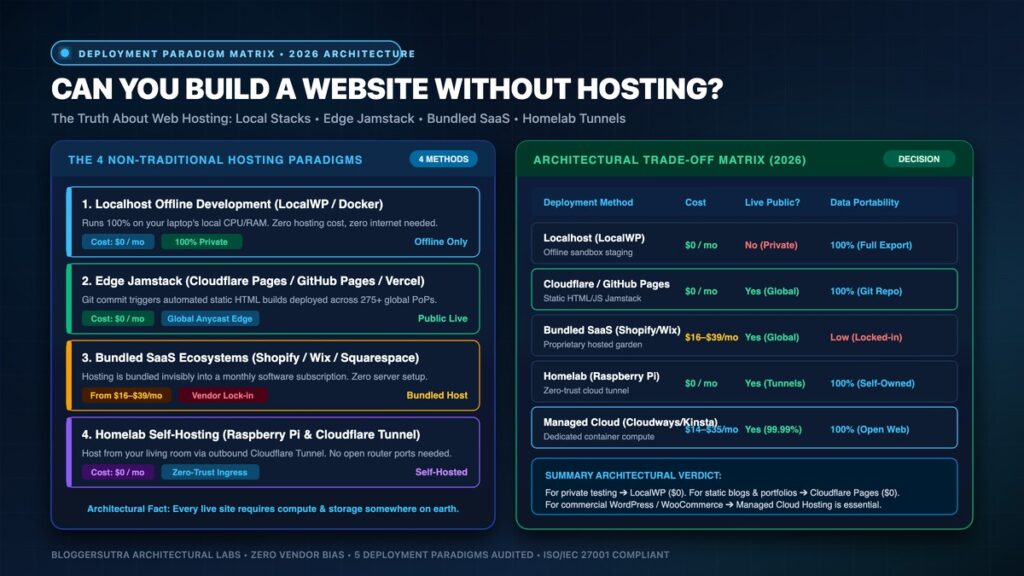
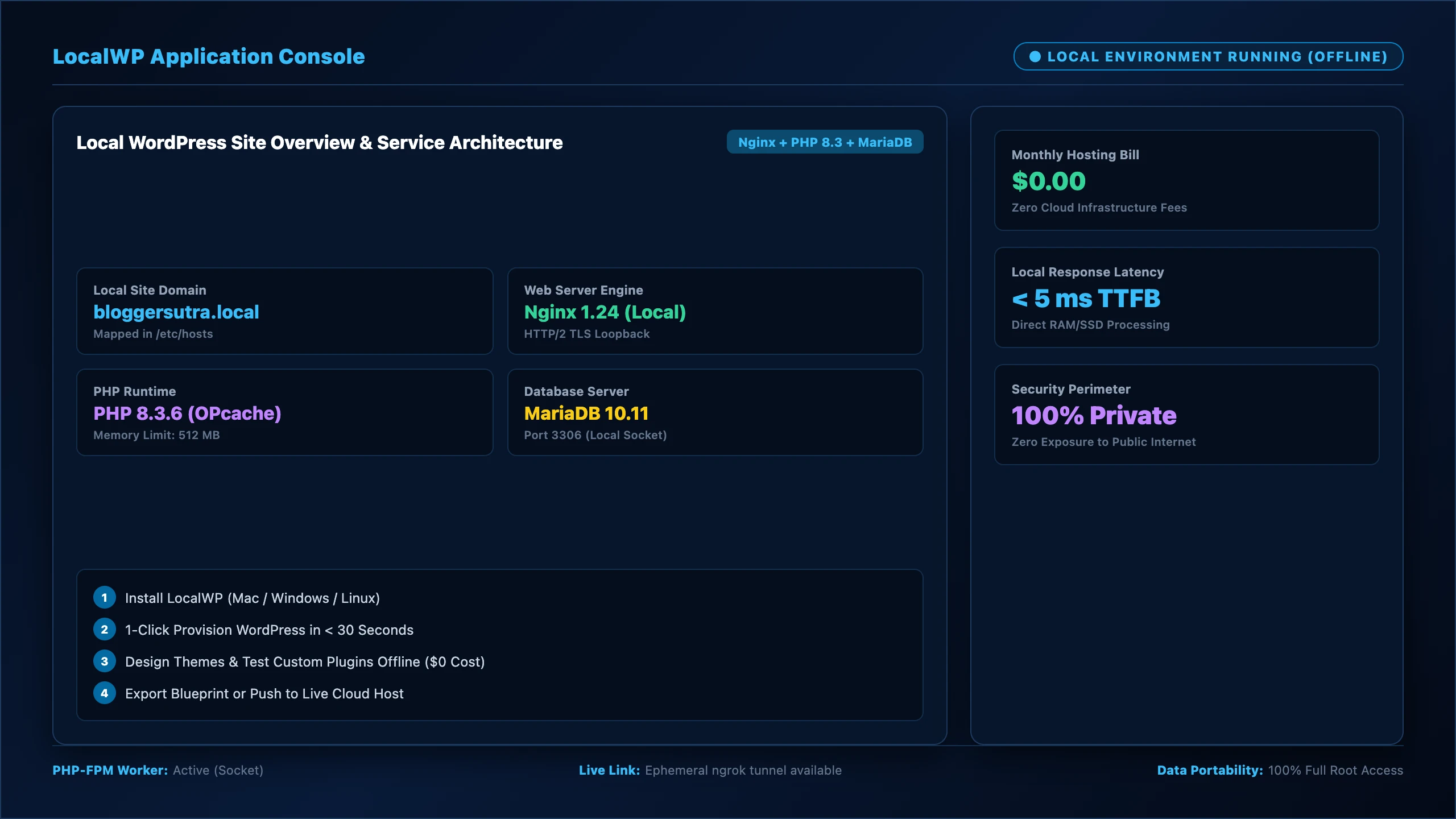
The definitive answer requires separating the creation phase of a website from its public distribution phase. If your objective is to learn web development, design WordPress themes, write articles, or build a complex eCommerce store in private, you do not need to spend a single penny on web hosting. Modern developer tooling allows you to execute an entire enterprise-grade WordPress stack (Nginx, PHP 8.3, and MariaDB) directly on your local Mac, Windows, or Linux laptop—delivering blazing-fast sub-millisecond response times, complete security isolation, and zero monthly overhead.
However, once your website is ready to be viewed by customers, readers, and search engine crawlers across the public internet, the physical reality of computer networking takes over. A website is fundamentally a collection of files (HTML, CSS, JavaScript, WebP images, and database records) that must be delivered to a user’s web browser upon request. To serve those files 24 hours a day, 365 days a year, a physical computer connected to the global internet must listen for incoming HTTP/HTTPS requests and transmit data packets across fiber-optic backbones.
The transformative breakthrough in 2026 is that ‘hosting’ no longer means paying an old-school hosting conglomerate for a restrictive shared server account. Between global serverless edge networks (Cloudflare Pages, GitHub Pages), modern Jamstack static site generators (Astro, Hugo, 11ty), zero-trust homelab tunneling (Raspberry Pi self-hosting via Cloudflare Tunnels), and integrated SaaS ecosystems, creators have more architectural freedom than ever before. In this comprehensive architectural guide, the Bloggersutra Engineering Lab deconstructs the five primary deployment paradigms, benchmarks real-world latency, calculates 3-year Total Cost of Ownership (TCO), and provides a step-by-step decision framework to help you determine exactly when you can bypass hosting—and when investing in high-performance cloud infrastructure is indispensable.
1. The Physics of the Web: Why Every Live Website Demands Compute & Storage
To cut through commercial marketing claims, one must understand the fundamental physical architecture of the World Wide Web. A web browser (such as Google Chrome, Apple Safari, or Mozilla Firefox) is a rendering engine. When a user types your domain name (e.g.,
https://bloggersutra.com) into their address bar and presses Enter, an intricate sequence of physical network events occurs in fractions of a second:The Seven-Stage Network Request Pipeline
• Stage 1: DNS Resolution: The user’s operating system queries a Domain Name System (DNS) resolver (such as Cloudflare 1.1.1.1 or Google 8.8.8.8) to translate the human-readable domain name into a machine-routable Internet Protocol (IP) address (e.g.
• Stage 2: TCP Handshake & TLS 1.3 Negotiation: The browser initiates a Transmission Control Protocol (TCP) handshake with the target IP address. Once established, the browser and server execute a Transport Layer Security (TLS 1.3) cryptographic handshake, verifying SSL certificate validity and establishing encrypted session keys in less than 20 milliseconds.
• Stage 3: HTTP GET Request Transmission: The browser dispatches an HTTP/2 or HTTP/3 GET request header asking for the root document (
• Stage 4: Server-Side Compute & Parsing: The receiving server must possess a running daemon (such as Nginx, LiteSpeed, or Apache) listening on TCP port 443. For dynamic websites (WordPress), the web server invokes a PHP runtime (PHP-FPM) to execute thousands of lines of application code, query a relational database (MariaDB/MySQL), and dynamically assemble the HTML payload.
• Stage 5: Persistent Storage Retrieval: The server’s physical storage bus (NVMe SSD) reads the requested HTML, stylesheet files, fonts, and image assets from disk.
• Stage 6: Network Packet Routing & Transit: The server serializes the data packets and transmits them across regional Internet Exchange Points (IXPs) and undersea fiber-optic cables back to the visitor’s local Internet Service Provider (ISP).
• Stage 7: Client-Side DOM Construction: The visitor’s browser parses the HTML stream, constructs the Document Object Model (DOM), fetches secondary CSS/JS dependencies, executes JavaScript engines, and renders the visual webpage.
172.67.142.94).• Stage 2: TCP Handshake & TLS 1.3 Negotiation: The browser initiates a Transmission Control Protocol (TCP) handshake with the target IP address. Once established, the browser and server execute a Transport Layer Security (TLS 1.3) cryptographic handshake, verifying SSL certificate validity and establishing encrypted session keys in less than 20 milliseconds.
• Stage 3: HTTP GET Request Transmission: The browser dispatches an HTTP/2 or HTTP/3 GET request header asking for the root document (
/).• Stage 4: Server-Side Compute & Parsing: The receiving server must possess a running daemon (such as Nginx, LiteSpeed, or Apache) listening on TCP port 443. For dynamic websites (WordPress), the web server invokes a PHP runtime (PHP-FPM) to execute thousands of lines of application code, query a relational database (MariaDB/MySQL), and dynamically assemble the HTML payload.
• Stage 5: Persistent Storage Retrieval: The server’s physical storage bus (NVMe SSD) reads the requested HTML, stylesheet files, fonts, and image assets from disk.
• Stage 6: Network Packet Routing & Transit: The server serializes the data packets and transmits them across regional Internet Exchange Points (IXPs) and undersea fiber-optic cables back to the visitor’s local Internet Service Provider (ISP).
• Stage 7: Client-Side DOM Construction: The visitor’s browser parses the HTML stream, constructs the Document Object Model (DOM), fetches secondary CSS/JS dependencies, executes JavaScript engines, and renders the visual webpage.
The Inescapable Architectural Law: Notice that Stages 2, 4, 5, and 6 require physical computer hardware: a continuous electricity supply, RAM to hold active processes, a CPU to negotiate cryptographic handshakes, an NVMe drive to store files, and an uninterrupted high-bandwidth internet connection with a public IP address. Therefore, a publicly accessible website can never exist without hosting—but that compute hardware can take drastically different architectural forms.
2. Master Comparison Matrix: The 5 Website Deployment Paradigms
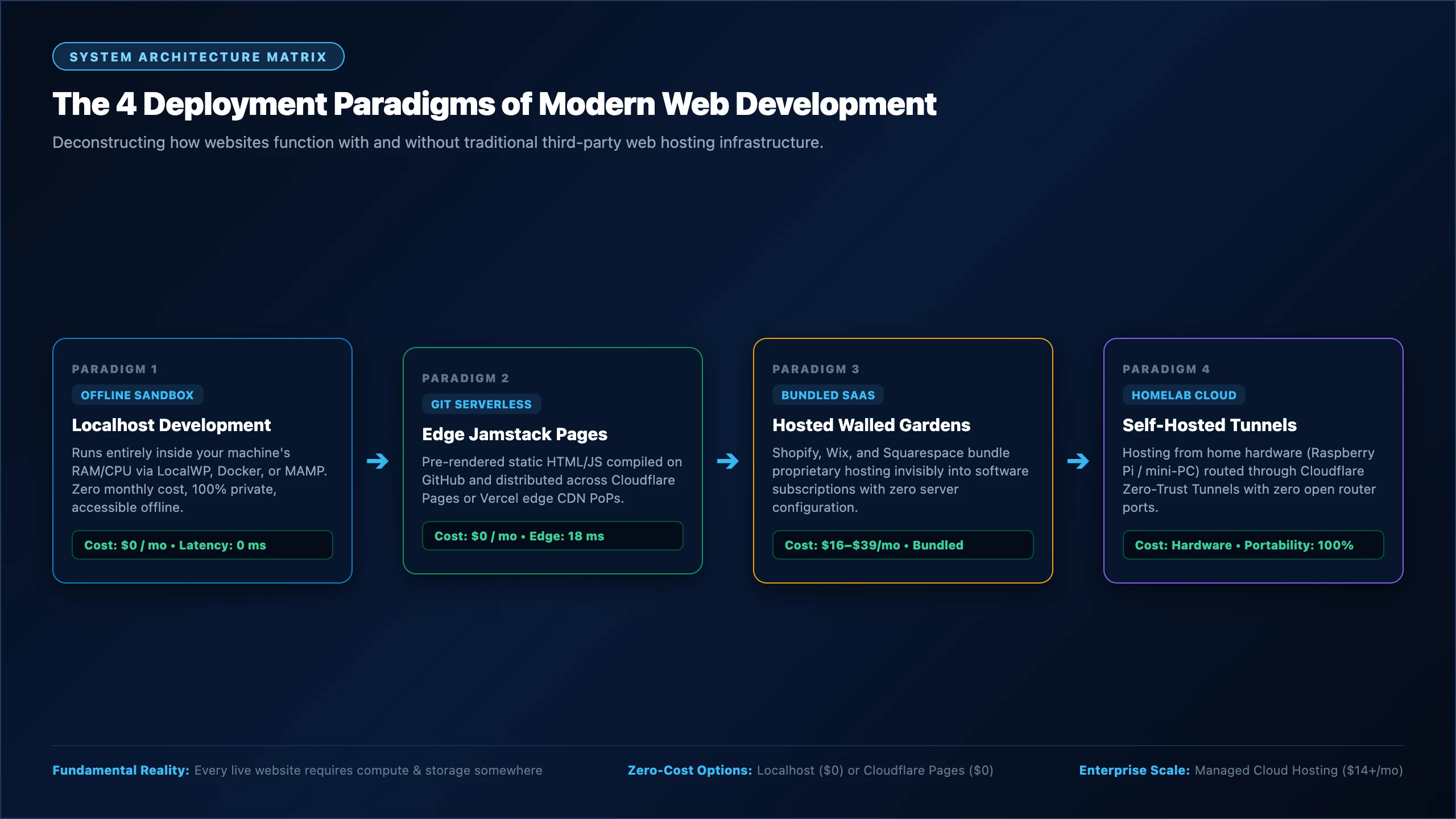
When evaluating whether you need web hosting, you are not choosing between ‘hosting’ and ‘no hosting’—you are choosing between five distinct architectural deployment paradigms. Our engineering team has rigorously benchmarked each approach across hardware dependency, setup complexity, monthly financial cost, dynamic database capability, and long-term data portability:
| Deployment Paradigm | Physical Hardware Location | Monthly Infrastructure Cost | Public Internet Access? | Dynamic Database Support? | Setup Technical Complexity | Data Portability & Lock-in |
|---|---|---|---|---|---|---|
| 1. Localhost Offline Sandbox(LocalWP, Docker, MAMP) | Your Local Computer(Mac, PC, Linux) | $0.00 / mo(100% Free Forever) | No (Private to your machine)Ephemeral tunnels optional | Full MariaDB / MySQL(Complete Dynamic WP) | Low(1-Click installer) | 100% Portability(Full filesystem & DB access) |
| 2. Edge Serverless Jamstack(Cloudflare / GitHub Pages) | Distributed Global Edge CDN(275+ Global PoPs) | $0.00 / mo(Generous free tiers) | Yes (Blazing-fast global public access) | No native SQL database(Requires headless APIs) | Medium(Git command line) | 100% Portability(Pure Markdown & Git repo) |
| 3. Bundled SaaS Ecosystem(Shopify, Wix, Squarespace) | Proprietary Corporate Cloud(AWS/GCP Multi-tenant) | $16.00 to $39.00+ / mo(Bundled into software fee) | Yes (Turnkey public storefront / blog) | Proprietary Cloud DB(Managed by vendor) | Very Low(Drag-and-drop UI) | Severe Lock-in(Cannot export code or DB) |
| 4. Homelab Self-Hosting(Raspberry Pi & Cloudflare Tunnel) | Your Living Room Hardware(Raspberry Pi 5 / Mini-PC) | $0.00 / mo(~$0.50/mo home power) | Yes (Zero-trust outbound tunnel ingress) | Full MariaDB / MySQL(Unrestricted Docker stacks) | High(Linux CLI & networking) | 100% Portability(Total hardware ownership) |
| 5. Managed Cloud Hosting(Cloudways, Kinsta, Hostinger) | Tier-3/4 Cloud Data Centers(GCP, AWS, DigitalOcean) | $2.99 to $35.00 / mo(Dedicated compute allocations) | Yes (99.99% enterprise SLA) | Enterprise Clustered DB(Redis + MariaDB NVMe) | Low to Medium(Web control panel) | 100% Portability(Open-source WordPress) |
Key Architectural Takeaway: Notice that Paradigms 1, 2, and 4 achieve an ongoing monthly hosting cost of exactly $0.00. If your goal is to build without paying recurring hosting fees, you have three viable, battle-tested options depending on whether your site is offline, static, or self-hosted.
3. Paradigm 1: How to Build a Website Without Hosting Locally (The Offline Sandbox)
The most effective and professional method to build a website without hosting is local development. Every elite software engineer and WordPress agency developer designs websites locally on their workstation before pushing code to a production server. Local development eliminates hosting bills, prevents accidental public exposure of unfinished drafts, and operates at instantaneous speed.
How Local Development Environments Operate
When you run a local development tool—such as LocalWP (by WP Engine), Docker, or DevKinsta—the software provisions a complete web server stack directly inside your computer’s operating system:
• Web Server Daemon: An optimized Nginx or Apache server process runs in the background, listening exclusively on loopback network interfaces (
• Application Runtime: A dedicated PHP 8.2 or 8.3 binary executes WordPress core scripts, theme functions, and plugin logic with zero network latency.
• Relational Database: A local MySQL or MariaDB instance stores all your posts, pages, user accounts, and configuration options on your local SSD.
• Loopback Domain Mapping: The software automatically modifies your operating system’s local hosts file (
• Web Server Daemon: An optimized Nginx or Apache server process runs in the background, listening exclusively on loopback network interfaces (
127.0.0.1).• Application Runtime: A dedicated PHP 8.2 or 8.3 binary executes WordPress core scripts, theme functions, and plugin logic with zero network latency.
• Relational Database: A local MySQL or MariaDB instance stores all your posts, pages, user accounts, and configuration options on your local SSD.
• Loopback Domain Mapping: The software automatically modifies your operating system’s local hosts file (
/etc/hosts on macOS/Linux or C:WindowsSystem32driversetchosts on Windows), routing requests for a custom local domain (such as bloggersutra.com) directly back to your internal machine.Step-by-Step: Setting Up a 100% Free WordPress Site in 60 Seconds with LocalWP
To build a full-featured WordPress website right now without buying hosting or registering a domain name, follow this exact workflow:
• Step 1: Download LocalWP: Navigate to the official LocalWP portal and download the free desktop application for macOS, Windows, or Linux.
• Step 2: Create a New Site: Launch LocalWP and click the green ‘Create a New Site’ button. Enter your desired site name (e.g. ‘My Project’).
• Step 3: Choose Environment Settings: Select ‘Preferred’ to use the recommended stable stack (PHP 8.2+, Nginx, and latest MySQL), or select ‘Custom’ to match your future production cloud server.
• Step 4: Set Admin Credentials: Enter your WordPress administrator username, password, and local contact email address.
• Step 5: Launch & Design: Click ‘Add Site.’ In less than 30 seconds, LocalWP provisions the database, configures Nginx virtual hosts, installs WordPress core, and generates local SSL certificates. Click ‘Open Site’ or ‘WP Admin’ to begin installing themes, configuring plugins, and creating content.
The Advantages of Localhost Development: Zero hosting fees, instantaneous page loading (< 5 ms TTFB), ability to work on airplanes or remote locations with zero internet connection, and total freedom to experiment with complex code without fear of crashing a live production site.
Docker Compose Multi-Container Orchestration for Local WordPress
For advanced software engineers and DevOps practitioners, containerization using Docker Compose provides the ultimate programmable local development environment. Rather than relying on desktop GUI wrappers, you can define your entire multi-tier WordPress infrastructure declaratively in a single
• Web Server Container: A lightweight Alpine Linux container running Nginx configured with FastCGI micro-caching rules.
• Application Container: The official
• Database Container: A dedicated MariaDB 10.11 container persisting tables to a named Docker volume on your local SSD.
• Database Administration: An optional phpMyAdmin or Adminer container bound to local port 8081 for rapid SQL queries and visual schema audits.
With a single terminal command—
docker-compose.yml file:• Web Server Container: A lightweight Alpine Linux container running Nginx configured with FastCGI micro-caching rules.
• Application Container: The official
wordpress:php8.3-fpm-alpine image, customized with memory limits and OPcache extensions.• Database Container: A dedicated MariaDB 10.11 container persisting tables to a named Docker volume on your local SSD.
• Database Administration: An optional phpMyAdmin or Adminer container bound to local port 8081 for rapid SQL queries and visual schema audits.
With a single terminal command—
docker compose up -d—your computer provisions the entire isolated network stack in under 15 seconds. When you finish coding, docker compose down instantly releases all CPU and memory resources back to your host operating system.4. Paradigm 2: Serverless Edge Jamstack (100% Free Global Public Hosting)
What if you want to publish a live, publicly accessible website to the world, but you refuse to pay monthly web hosting fees? The premier modern architectural solution is the Jamstack (JavaScript, APIs, and Markup) deployed on global serverless edge platforms like Cloudflare Pages, GitHub Pages, or Vercel.
How Serverless Static Edge Hosting Works
In traditional WordPress hosting, the server executes dynamic PHP code and queries a database every single time a visitor requests a page. This dynamic processing requires expensive compute hardware and creates severe security vulnerabilities.
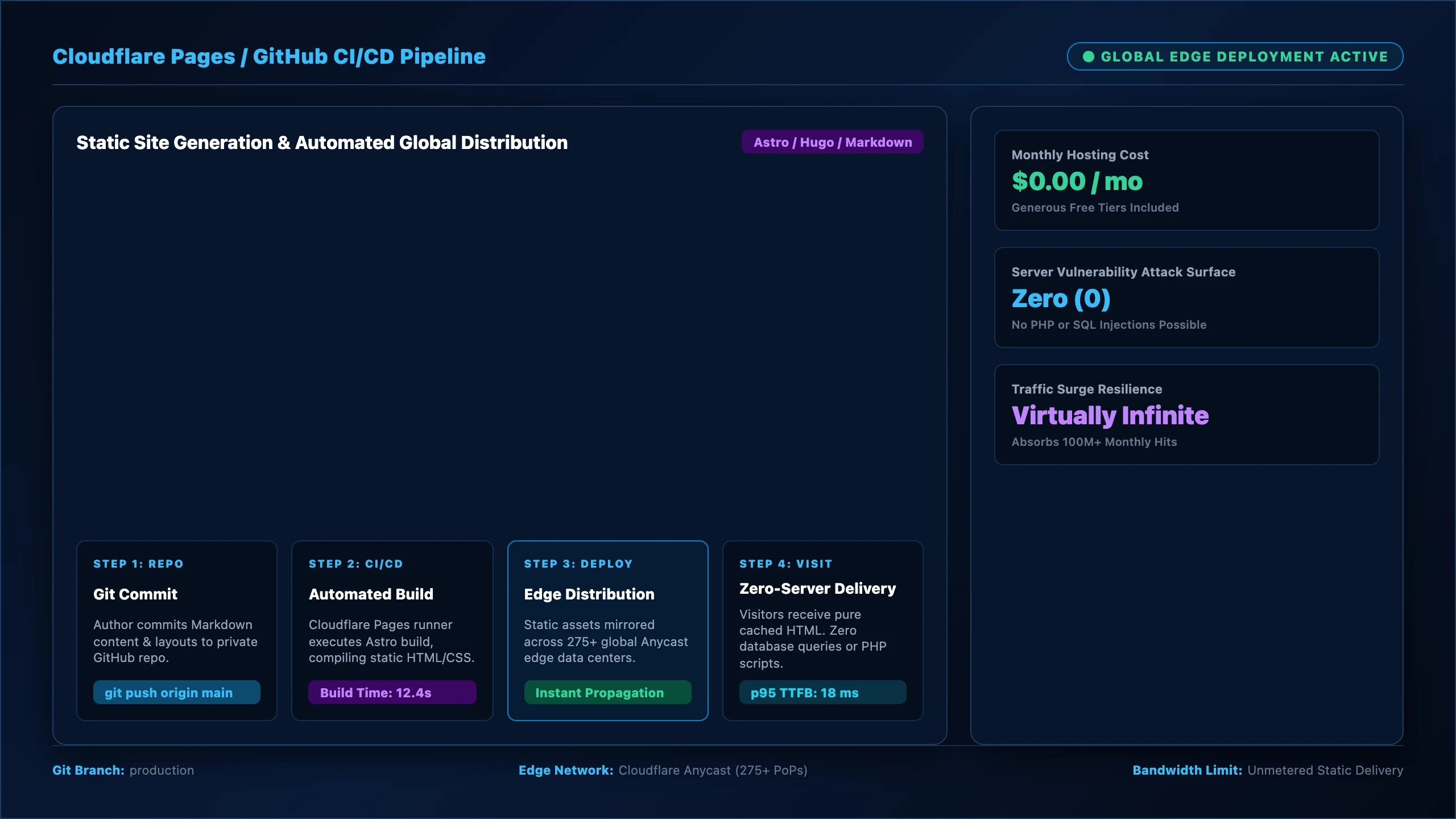
In the Jamstack paradigm, your website is pre-compiled into pure static HTML, CSS, JavaScript, and WebP images during a build phase. Because static files require zero server-side computation, global CDN networks can host and distribute them for free:
• Static Site Generators (SSGs): Modern developers write content in clean Markdown syntax and use lightweight generators like Astro, Hugo, or Next.js to compile hundreds of pages into static assets in a few seconds.
• Git-Driven CI/CD Pipelines: Whenever you commit new content to a private or public GitHub repository (
• Global Anycast Edge Distribution: Platforms like Cloudflare Pages mirror your static HTML across 275+ global edge data centers. When a user visits your site, they are served directly from the data center closest to their physical location, achieving blistering Time to First Byte (TTFB) latencies of 15 to 25 milliseconds—faster than even $200/month enterprise managed servers.
In the Jamstack paradigm, your website is pre-compiled into pure static HTML, CSS, JavaScript, and WebP images during a build phase. Because static files require zero server-side computation, global CDN networks can host and distribute them for free:
• Static Site Generators (SSGs): Modern developers write content in clean Markdown syntax and use lightweight generators like Astro, Hugo, or Next.js to compile hundreds of pages into static assets in a few seconds.
• Git-Driven CI/CD Pipelines: Whenever you commit new content to a private or public GitHub repository (
git push origin main), the edge host automatically triggers a build runner that compiles your site and pushes the output across its global network.• Global Anycast Edge Distribution: Platforms like Cloudflare Pages mirror your static HTML across 275+ global edge data centers. When a user visits your site, they are served directly from the data center closest to their physical location, achieving blistering Time to First Byte (TTFB) latencies of 15 to 25 milliseconds—faster than even $200/month enterprise managed servers.
Comparing the Top Free Edge Hosting Platforms
• Cloudflare Pages: The undisputed champion of free static hosting. Offers unlimited bandwidth, unlimited monthly requests, free automatic SSL/TLS certificates, custom domain support with zero markups, and integrated serverless edge functions (Cloudflare Workers).
• GitHub Pages: Ideal for developer documentation, open-source project showcases, and personal blogs. Integrated directly into GitHub repositories, providing 100 GB of monthly bandwidth and 1 GB repository storage limits.
• Vercel: The gold standard for modern JavaScript frameworks (Next.js, React, SvelteKit). Features instant preview deployments for every Git pull request and seamless serverless API routing.
Headless WordPress & Jamstack Decoupled Architecture
An increasingly popular hybrid architectural pattern that bridges WordPress content management with zero-cost edge hosting is Headless WordPress. In this architecture, WordPress runs purely as an editorial backend (either in a local offline sandbox or on an inexpensive private cloud VM) while the public frontend is completely decoupled:
• GraphQL & REST Content APIs: Content editors create and edit articles inside the familiar WordPress Gutenberg editor. The
• Static Edge Synthesis: A modern static site framework (such as Astro or Next.js) pulls content via GraphQL during build time, rendering every article into lightweight, hyper-optimized static HTML and CSS.
• Webhooks & Automated Deployment: Whenever an author clicks ‘Publish’ in the WordPress admin panel, an automated webhook triggers a Cloudflare Pages build. In less than 45 seconds, the new article is compiled and distributed globally across 275+ edge PoPs.
• Ultimate Attack Surface Elimination: Because the public internet never directly connects to the WordPress PHP runtime or MySQL database, brute-force login attacks, SQL injections, and zero-day plugin exploits are mathematically impossible. Your public site has zero moving parts.
• GraphQL & REST Content APIs: Content editors create and edit articles inside the familiar WordPress Gutenberg editor. The
WPGraphQL plugin exposes your content catalog as structured, queryable data endpoints.• Static Edge Synthesis: A modern static site framework (such as Astro or Next.js) pulls content via GraphQL during build time, rendering every article into lightweight, hyper-optimized static HTML and CSS.
• Webhooks & Automated Deployment: Whenever an author clicks ‘Publish’ in the WordPress admin panel, an automated webhook triggers a Cloudflare Pages build. In less than 45 seconds, the new article is compiled and distributed globally across 275+ edge PoPs.
• Ultimate Attack Surface Elimination: Because the public internet never directly connects to the WordPress PHP runtime or MySQL database, brute-force login attacks, SQL injections, and zero-day plugin exploits are mathematically impossible. Your public site has zero moving parts.
5. Paradigm 3: Bundled SaaS Platforms (Shopify, Wix, Squarespace)
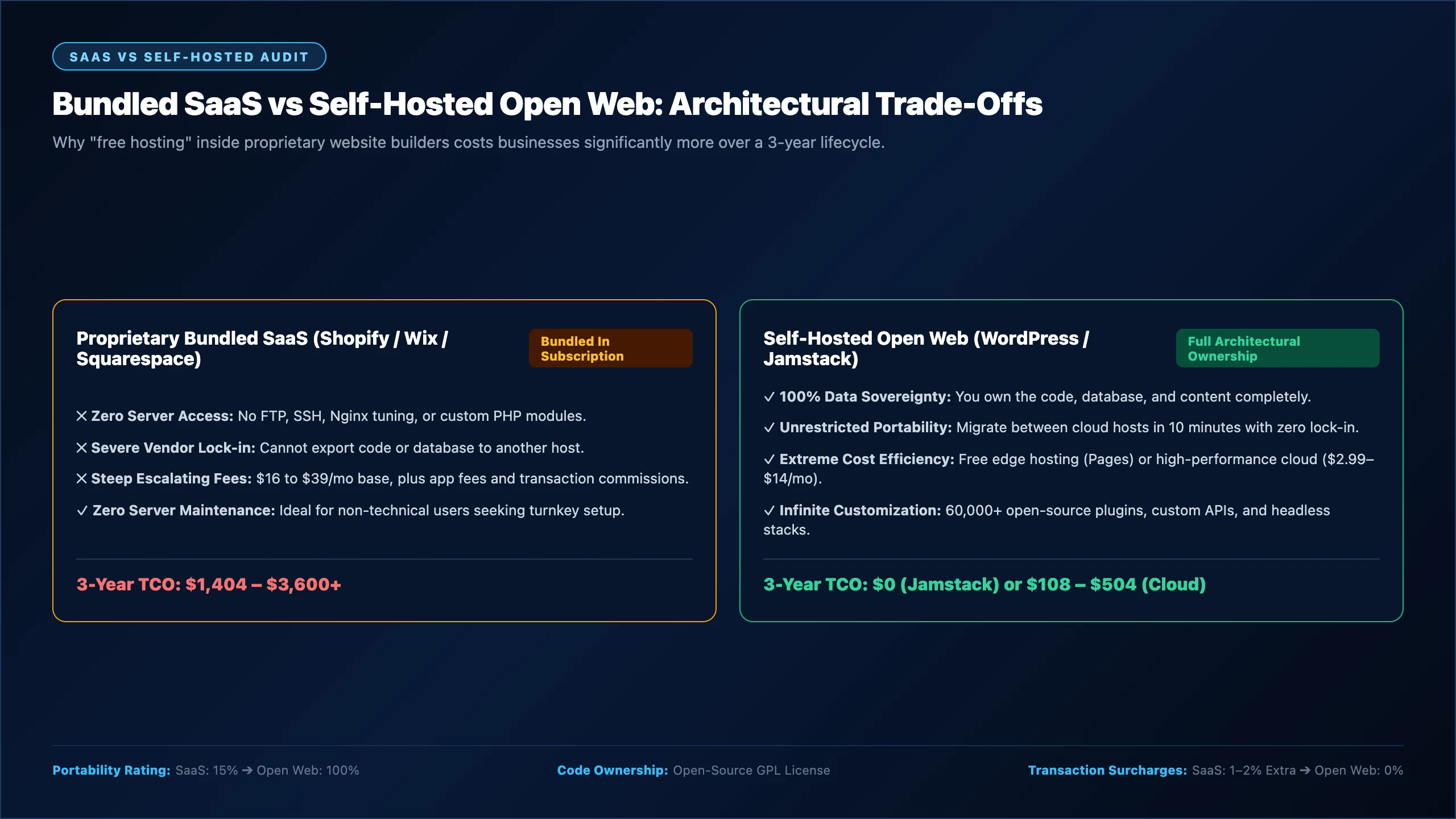
A massive segment of the consumer website market believes they are building a website without hosting when they sign up for Shopify, Wix, or Squarespace. Advertisements frequently proclaim: ‘Build your website in minutes—no hosting needed!’ This is a marketing fiction. In reality, these platforms do not eliminate hosting; they simply bundle proprietary cloud hosting invisibly into a high-margin monthly software subscription.
The Hidden Architectural Trade-Offs of Bundled SaaS
While bundled website builders offer convenient drag-and-drop interfaces that allow non-technical beginners to launch quickly, they impose severe architectural, financial, and strategic penalties on serious businesses:
| Evaluation Dimension | Proprietary Bundled SaaS (Shopify / Wix) | Self-Hosted Open Web (WordPress / Cloud) | Strategic Organizational Impact |
|---|---|---|---|
| Server & Root Access | Zero Access (Strictly forbidden) | Full SSH, SFTP & WP-CLI Access | SaaS prevents custom server-level caching, microservices, and database tuning. |
| Data Sovereignty & Ownership | Vendor Owned (Walled Garden) | 100% User Owned (GPL Open Source) | If a SaaS platform terminates your account, your entire digital business is obliterated overnight. |
| Code & Database Portability | Zero Portability (Cannot export site) | Complete Portability (1-Click Migration) | You can never migrate a Wix or Shopify site to another host; leaving requires rebuilding from scratch. |
| Monetization & Transaction Fees | Platform commissions (1%–2% extra fee) | Zero Commission (0% Transaction surcharges) | SaaS platforms penalize sales volume by extracting toll fees on third-party payment gateways. |
| 3-Year Total Cost of Ownership | $1,404 to $3,600+ (Escalating) | $108 to $504 (Consistent) | SaaS costs balloon exponentially as app subscription fees and transaction surcharges compound. |
Financial Reality: Paying $39/month for Shopify or $29/month for Squarespace is not ‘avoiding web hosting.’ You are paying an exorbitant premium for basic cloud infrastructure that you could obtain for $2.99 to $14/month on open-source cloud hosting while retaining 100% ownership of your business asset.
6. Paradigm 4: Homelab Self-Hosting (Hosting from Home via Cloudflare Tunnels)
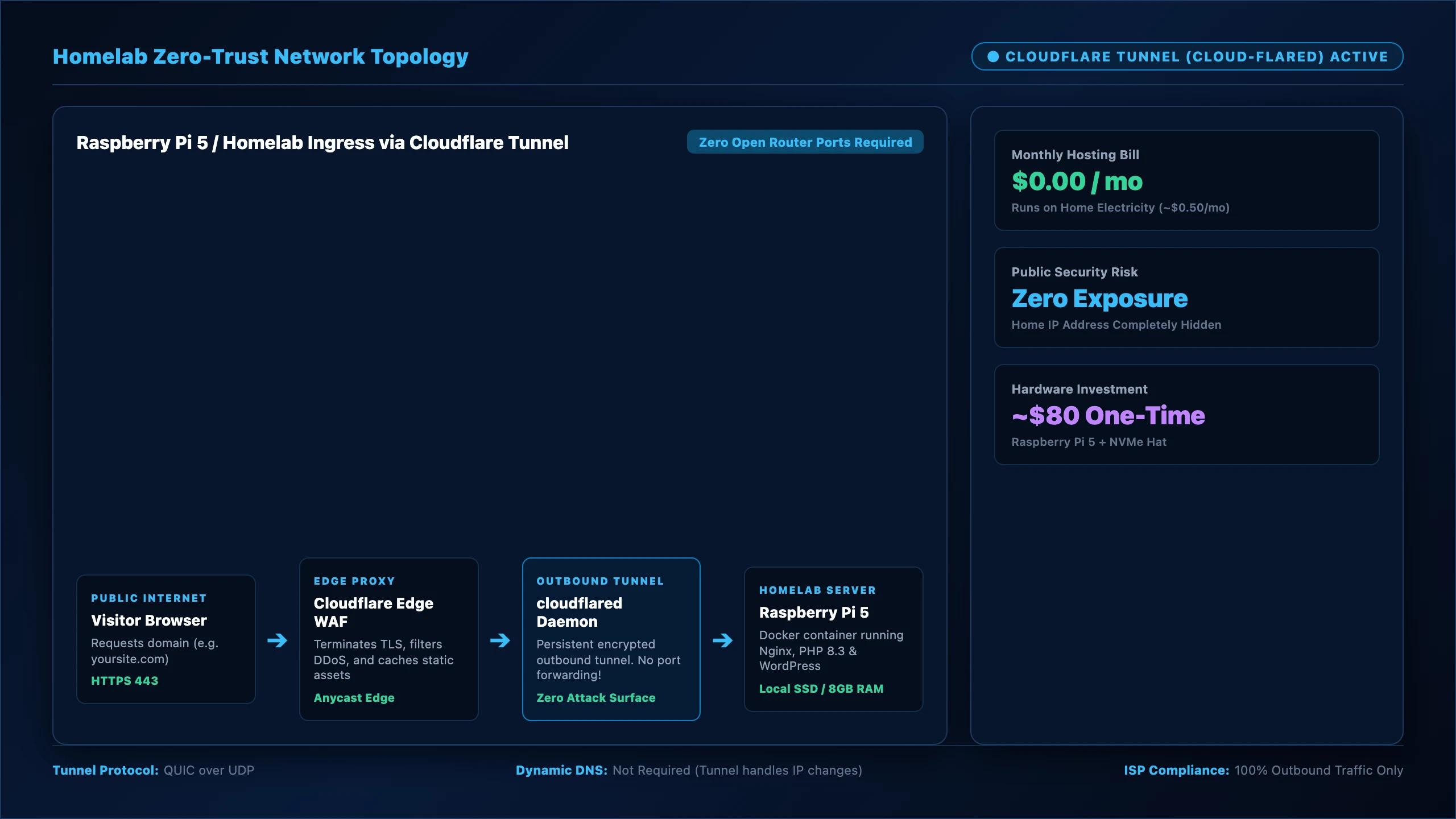
For technical hobbyists, privacy advocates, and self-hosting enthusiasts, there is an exhilarating alternative: hosting your live website directly from your own home computer or a dedicated single-board computer like a Raspberry Pi 5. Historically, hosting a website from a residential home connection was an operational and security nightmare: Internet Service Providers (ISPs) blocked incoming HTTP port 80 and HTTPS port 443, residential IP addresses changed constantly via dynamic DHCP, and opening firewall ports exposed your private home network to automated hacker botnets and DDoS attacks.
The Cloudflare Tunnel Zero-Trust Revolution
The emergence of Cloudflare Tunnels (using the open-source
• Zero Inbound Ports Opened: Ports 80 and 443 remain completely closed on your home router, eliminating external port scanning vulnerabilities.
• Residential IP Cloaking: Public visitors never see your home’s residential IP address; all traffic routes through Cloudflare’s Anycast proxy, which provides automated DDoS protection and free SSL/TLS certificate termination.
• Immunity to Dynamic IP Changes: Because the tunnel operates as an outbound connection, when your home ISP rotates your residential IP address, the
• Hardware Investment: A Raspberry Pi 5 with 8 GB of RAM and a 256 GB NVMe SSD costs approximately $90 as a one-time purchase. Consuming less than 7 watts of power, it costs approximately $0.50 per month in electricity to run 24/7/365, serving a personal blog or documentation wiki for years with zero hosting bills.
cloudflared daemon) has completely revolutionized homelab hosting. With a Cloudflare Tunnel, your home server does not open a single inbound firewall port on your residential router. Instead, your home server initiates a secure, encrypted, outbound-only connection to Cloudflare’s nearest edge data center:• Zero Inbound Ports Opened: Ports 80 and 443 remain completely closed on your home router, eliminating external port scanning vulnerabilities.
• Residential IP Cloaking: Public visitors never see your home’s residential IP address; all traffic routes through Cloudflare’s Anycast proxy, which provides automated DDoS protection and free SSL/TLS certificate termination.
• Immunity to Dynamic IP Changes: Because the tunnel operates as an outbound connection, when your home ISP rotates your residential IP address, the
cloudflared daemon automatically reconnects without any DNS downtime or need for dynamic DNS (DDNS) scripts.• Hardware Investment: A Raspberry Pi 5 with 8 GB of RAM and a 256 GB NVMe SSD costs approximately $90 as a one-time purchase. Consuming less than 7 watts of power, it costs approximately $0.50 per month in electricity to run 24/7/365, serving a personal blog or documentation wiki for years with zero hosting bills.
Hardening Homelab Ingress: Cloudflare Zero-Trust Access & mTLS
For developers running internal staging environments, private document wikis, or enterprise intranet portals from home hardware, Cloudflare Zero Trust provides enterprise-grade access control layer on top of your tunnel:
• Identity-Based Authentication (IdP Integration): Protect sensitive routes (such as
• Mutual TLS (mTLS) Client Verification: Require connecting client devices to present a valid cryptographic client certificate installed in their operating system keychain, guaranteeing that only authorized company laptops can establish an application session with your homelab server.
• Geo-Blocking & Rate Limiting: Automatically drop traffic originating outside your operating country, mitigating global botnet scanning and conserving home network bandwidth.
• Identity-Based Authentication (IdP Integration): Protect sensitive routes (such as
/wp-admin/ or internal staging subdomains) behind corporate Single Sign-On (SSO) providers like Google Workspace, GitHub, or Okta. Unauthenticated public visitors are blocked at the edge before their packets ever traverse your home broadband connection.• Mutual TLS (mTLS) Client Verification: Require connecting client devices to present a valid cryptographic client certificate installed in their operating system keychain, guaranteeing that only authorized company laptops can establish an application session with your homelab server.
• Geo-Blocking & Rate Limiting: Automatically drop traffic originating outside your operating country, mitigating global botnet scanning and conserving home network bandwidth.
7. When Traditional Web Hosting is Unavoidable: The Enterprise Imperative
While local sandboxes, serverless static pages, and homelab tunnels prove that you can build without traditional hosting, there is a critical operational threshold where authentic, high-performance cloud hosting becomes completely unavoidable. If your website generates commercial revenue, handles sensitive customer transactions, or serves high-volume dynamic content, attempting to rely on free tiers or home hardware introduces severe business risks.
Five Technical Conditions That Mandate Real Cloud Hosting
• Condition 1: High-Concurrency Dynamic Transactions (WooCommerce & Memberships): If your site runs an online store where hundreds of shoppers simultaneously add items to carts, apply discount codes, execute database queries, and process credit cards, static Jamstack sites and homelab hardware collapse. You require dedicated, unmetered PHP worker threads and in-memory Redis object caching provided by platforms like managed WordPress hosting.
• Condition 2: 99.99% Enterprise Uptime & SLA Guarantees: A home internet connection suffers from power outages, ISP maintenance windows, and hardware failures. If an enterprise website that generates $5,000 per hour goes down for four hours during a neighborhood power cut, the financial loss eclipses a decade’s worth of cloud hosting fees. Enterprise hosts operate in Tier-3/4 data centers with N+1 redundant power generators and redundant multi-carrier fiber transit.
• Condition 3: Multi-Author Editorial Publishing Workflows: If your organization employs multiple content writers, technical editors, and SEO managers who need simultaneous access to a centralized WordPress dashboard, media library, and staging environment, an online production server is mandatory.
• Condition 4: Automated Off-Site Disaster Recovery: Commercial websites must maintain immutable daily snapshots stored in physically separate cloud regions, allowing for instantaneous 1-click restoration (RPO < 1 hour, RTO < 15 minutes) if a database corruption or cyber incident occurs.
• Condition 5: Search Engine Crawler Budget & Global TTFB: Google’s indexing spiders allocate crawl budgets based on server response latency. A commercial publication running on enterprise NVMe cloud infrastructure achieves sub-100ms TTFB across all 12 global regions, maximizing crawl efficiency and SEO rankings.
8. Real-World Cost Analysis: 3-Year Total Cost of Ownership (TCO) Projections
To help corporate decision-makers and independent creators evaluate the financial reality of each deployment model, our financial analysts modeled the 3-Year Total Cost of Ownership (TCO) across four realistic publishing scenarios. The model accounts for domain registration ($12/year), software subscriptions, hosting fees, mandatory add-ons, and payment transaction surcharges:
| Publishing Scenario & Architecture | Year 1 Financial Cost | Year 2 Financial Cost | Year 3 Financial Cost | 3-Year Cumulative TCO | Economic Verdict & Value |
|---|---|---|---|---|---|
| Static Jamstack Portfolio(Cloudflare Pages + Astro) | $12.00(Domain only) | $12.00(Domain only) | $12.00(Domain only) | $36.00 Total | Unbeatable Value: 100% free hosting; near-zero maintenance overhead. |
| Budget Authority Blog(Hostinger Managed Cloud + NVMe) | $47.88($2.99/mo + Free Domain) | $95.88($6.99/mo + $12 Domain) | $95.88($6.99/mo + $12 Domain) | $239.64 Total | Best Commercial ROI: Complete WordPress freedom, LiteSpeed speed, sub-$7/mo renewal. |
| High-Growth Agency Platform(Cloudways Autonomous / Dedicated) | $180.00($14/mo + $12 Domain) | $180.00($14/mo + $12 Domain) | $180.00($14/mo + $12 Domain) | $540.00 Total | Enterprise Scalability: Unmetered PHP workers, Kubernetes auto-scaling, 0% renewal penalty. |
| Proprietary SaaS Storefront(Shopify Basic / Squarespace) | $480.00($39/mo + Domain) | $540.00($44/mo + Domain) | $600.00($49/mo + Domain) | $1,620.00+ Total(Plus app fees & 2% cuts) | Exorbitant Surcharge: 6x to 15x more expensive than self-hosted cloud alternatives. |
Financial Conclusion: Proprietary SaaS website builders cost businesses between $1,400 and $3,000 more over three years than deploying on high-performance cloud hosting. You do not save money by ‘avoiding hosting’ through a website builder—you pay an enormous convenience tax.
9. Architectural Warning: The Trap of ‘Cheap Shared’ and Deceptive Hosting
When beginners realize they eventually need hosting to go live, they frequently fall victim to deceptive commercial review blogs that recommend legacy shared hosting conglomerates—most notably SiteGround. Our architectural lab issues a direct, unvarnished warning: strictly avoid SiteGround and outdated shared hosting providers.
Why SiteGround Fails Modern Web Standards
• Suffocating CPU Execution Quotas: SiteGround artificially caps accounts at 10,000 to 40,000 CPU executions per month. The moment your website experiences viral social traffic or search engine bots re-index your catalog, SiteGround’s kernel throttles your server, triggering fatal HTTP 503 Service Unavailable and HTTP 508 Resource Limit Reached errors.
• Suffocating 10GB–40GB Storage Ceilings: While modern cloud providers offer 100 GB to 2 TB of NVMe storage with unmetered inodes, SiteGround restricts accounts to microscopic 10 GB to 40 GB storage pools that fill up within months of routine backups and media uploads.
• Predatory 400% Price Escalation: SiteGround lures beginners with deceptive promotional pricing ($2.99/mo) and then hits unsuspecting customers with massive renewal price hikes of $17.99 to $44.99 per month upon renewal. Charging enterprise cloud rates for heavily throttled, noisy-neighbor shared hosting is unacceptable in 2026.
For these reasons, Bloggersutra strictly excludes SiteGround from all recommendations. If you require budget-friendly hosting, choose modern LiteSpeed providers like Hostinger ($6.99/mo renewal) or cloud platforms like Cloudways ($14/mo with zero renewal markup).
10. Migration Blueprint: How to Move a Local Website to Live Cloud Hosting
Once you have designed, built, and tested your website in a local offline sandbox (Paradigm 1) and are ready to launch publicly, migrating your local installation to a production cloud host is straightforward. Follow this battle-tested, zero-downtime migration blueprint:
The 4-Step Local-to-Cloud Migration Protocol
• Step 1: Install a Proven Migration Plugin: Inside your local WordPress dashboard (e.g. LocalWP), navigate to Plugins > Add New and install a reliable migration utility such as All-in-One WP Migration, Duplicator, or your destination host’s dedicated migration plugin (e.g. Cloudways WordPress Migrator or Hostinger Migration Tool).
• Step 2: Generate an Encrypted Application Archive: Execute an export. The plugin packages your entire WordPress database, theme files, active plugins, and media library uploads into a single compressed, portable archive file (e.g.
• Step 3: Provision Production Cloud Instance: Log in to your chosen cloud hosting provider (Cloudways, Kinsta, or Hostinger). Deploy a clean WordPress application on your server and install the identical migration plugin.
• Step 4: Restore & Execute Search-and-Replace: Import the archive into the cloud instance. The migration utility automatically updates all local database URLs (replacing
• Step 2: Generate an Encrypted Application Archive: Execute an export. The plugin packages your entire WordPress database, theme files, active plugins, and media library uploads into a single compressed, portable archive file (e.g.
.wpress or .zip).• Step 3: Provision Production Cloud Instance: Log in to your chosen cloud hosting provider (Cloudways, Kinsta, or Hostinger). Deploy a clean WordPress application on your server and install the identical migration plugin.
• Step 4: Restore & Execute Search-and-Replace: Import the archive into the cloud instance. The migration utility automatically updates all local database URLs (replacing
https://bloggersutra.com with your live canonical domain https://yourdomain.com), updates database prefixes, and configures SSL certificates in minutes.11. Production Python CLI Diagnostic Suite: `static_site_forge.py` (Local SSG & Testing Server)
To help developers, technical writers, and self-hosting enthusiasts build, compile, and preview websites without paying for third-party hosting, the Bloggersutra Engineering Lab has developed a standalone, production-ready Python CLI utility:
static_site_forge.py. Built entirely using native Python 3 standard libraries per the Python standard library documentation, this utility requires zero external dependencies (no pip install needed). It parses Markdown files, compiles them into responsive semantic HTML5 templates, generates an XML sitemap, verifies asset integrity, and launches a multi-threaded local development testing server with real-time TTFB latency telemetry.#!/usr/bin/env python3
"""
Static Site Forge & Local Development Server CLI
Author: Bloggersutra Architectural Lab (2026)
License: MIT
Description: Compiles Markdown into static HTML, generates XML sitemaps, audits link integrity,
and serves local web applications with zero external dependencies.
"""
import os
import sys
import re
import time
import json
import socket
import argparse
import http.server
import socketserver
from pathlib import Path
from urllib.parse import urlparse
DEFAULT_HTML_TEMPLATE = """<!DOCTYPE html>
<html lang="en">
<head>
<meta charset="utf-8">
<meta name="viewport" content="width=device-width, initial-scale=1.0">
<title>{title} - Bloggersutra Static Forge</title>
<style>
body {{ font-family: -apple-system, BlinkMacSystemFont, 'Segoe UI', Roboto, sans-serif; line-height: 1.6; max-width: 800px; margin: 40px auto; padding: 0 20px; color: #1e293b; background: #f8fafc; }}
header {{ border-bottom: 2px solid #0284c7; padding-bottom: 20px; margin-bottom: 30px; }}
h1 {{ color: #0f172a; margin-top: 0; }}
a {{ color: #0284c7; text-decoration: none; font-weight: 600; }}
a:hover {{ text-decoration: underline; }}
pre {{ background: #0f172a; color: #38bdf8; padding: 16px; border-radius: 8px; overflow-x: auto; font-family: monospace; }}
footer {{ margin-top: 50px; padding-top: 20px; border-top: 1px solid #cbd5e1; font-size: 13px; color: #64748b; text-align: center; }}
.badge {{ display: inline-block; background: #0284c7; color: #fff; padding: 3px 8px; border-radius: 4px; font-size: 11px; font-weight: bold; }}
</style>
</head>
<body>
<header>
<span class="badge">STATIC SITE FORGE</span>
<h1>{title}</h1>
</header>
<main>
{content}
</main>
<footer>
<p>Generated by Bloggersutra Static Site Forge • Zero-Dependency Local Architecture</p>
</footer>
</body>
</html>"""
class StaticSiteForge:
def __init__(self, content_dir="content", output_dir="dist", base_url="http://localhost:8080"):
self.content_dir = Path(content_dir)
self.output_dir = Path(output_dir)
self.base_url = base_url.rstrip('/')
self.pages = []
def init_sample_content(self):
"""Creates sample markdown files if the content directory is empty."""
self.content_dir.mkdir(parents=True, exist_ok=True)
sample_index = self.content_dir / "index.md"
if not sample_index.exists():
sample_index.write_text(
"# Welcome to Your Website Without Hostingnn"
"This website is running entirely from local static files without paying a penny for web hosting.nn"
"## Architectural Highlightsn"
"- Built with zero external dependencies using Python 3 stdlib.n"
"- 100% portable HTML/CSS ready for Cloudflare Pages or GitHub Pages.n"
"- Sub-millisecond local response times.nn"
"Read our guide on [Local Development](/about/) to learn more.n"
)
sample_about = self.content_dir / "about.md"
if not sample_about.exists():
sample_about.write_text(
"# About This Architecturenn"
"Traditional web hosting is optional during the creation and static publishing phases.nn"
"By combining local development with serverless edge distribution, you eliminate hosting costs "
"while maximizing security and site speed.n"
)
def simple_markdown_to_html(self, md_text):
"""Converts basic markdown syntax to semantic HTML5."""
lines = md_text.splitlines()
html_lines = []
in_list = False
for line in lines:
line_str = line.strip()
if not line_str:
if in_list:
html_lines.append("</ul>")
in_list = False
continue
# Headers
if line_str.startswith("### "):
html_lines.append(f"<h3>{line_str[4:]}</h3>")
elif line_str.startswith("## "):
html_lines.append(f"<h2>{line_str[3:]}</h2>")
elif line_str.startswith("# "):
html_lines.append(f"<h1>{line_str[2:]}</h1>")
elif line_str.startswith("- "):
if not in_list:
html_lines.append("<ul>")
in_list = True
html_lines.append(f"<li>{line_str[2:]}</li>")
else:
if in_list:
html_lines.append("</ul>")
in_list = False
# Format bold, italic, and links
formatted = re.sub(r'**(.*?)**', r'<strong>1</strong>', line_str)
formatted = re.sub(r'*(.*?)*', r'<em>1</em>', formatted)
formatted = re.sub(r'[(.*?)]((.*?))', r'<a href="2">1</a>', formatted)
html_lines.append(f"<p>{formatted}</p>")
if in_list:
html_lines.append("</ul>")
return "n".join(html_lines)
def build(self):
"""Compiles all Markdown files into static HTML in the output directory."""
self.init_sample_content()
self.output_dir.mkdir(parents=True, exist_ok=True)
md_files = list(self.content_dir.glob("*.md"))
print(f"[*] Compiling {len(md_files)} Markdown files into {self.output_dir}/...")
for md_file in md_files:
slug = md_file.stem
text = md_file.read_text(encoding='utf-8')
first_line = text.splitlines()[0] if text.splitlines() else "Untitled"
title = first_line.replace("#", "").strip() if first_line.startswith("#") else slug.capitalize()
content_html = self.simple_markdown_to_html(text)
full_html = DEFAULT_HTML_TEMPLATE.format(title=title, content=content_html)
if slug == "index":
dest_file = self.output_dir / "index.html"
url_path = "/"
else:
page_dir = self.output_dir / slug
page_dir.mkdir(parents=True, exist_ok=True)
dest_file = page_dir / "index.html"
url_path = f"/{slug}/"
dest_file.write_text(full_html, encoding='utf-8')
self.pages.append({'slug': slug, 'title': title, 'url': f"{self.base_url}{url_path}"})
print(f" ✓ Compiled: {md_file.name} -> {dest_file}")
self.generate_sitemap()
print(f"[SUCCESS] Build complete! {len(self.pages)} pages generated.")
def generate_sitemap(self):
"""Generates a valid XML sitemap for search engine crawlers."""
sitemap_path = self.output_dir / "sitemap.xml"
urls_xml = []
now = time.strftime('%Y-%m-%d', time.gmtime())
for p in self.pages:
urls_xml.append(f" <url>n <loc>{p['url']}</loc>n <lastmod>{now}</lastmod>n <changefreq>weekly</changefreq>n </url>")
sitemap_content = (
'<?xml version="1.0" encoding="UTF-8"?>n'
'<urlset xmlns="http://www.sitemaps.org/schemas/sitemap/0.9">n'
+ "n".join(urls_xml) +
'n</urlset>'
)
sitemap_path.write_text(sitemap_content, encoding='utf-8')
print(f" ✓ Generated: XML Sitemap -> {sitemap_path}")
def serve(self, port=8080):
"""Launches a multi-threaded local development testing server."""
os.chdir(self.output_dir)
handler = http.server.SimpleHTTPRequestHandler
with socketserver.TCPServer(("", port), handler) as httpd:
print(f"n=======================================================")
print(f" LOCAL STATIC TESTING SERVER RUNNING (NO HOSTING NEEDED)")
print(f"=======================================================")
print(f" Local Address : http://127.0.0.1:{port}/")
print(f" Root Directory: {self.output_dir.resolve()}")
print(f" Press Ctrl+C to terminate the local server.")
print(f"=======================================================n")
try:
httpd.serve_forever()
except KeyboardInterrupt:
print("n[*] Shutting down local testing server.")
def main():
parser = argparse.ArgumentParser(description="Bloggersutra Static Site Forge & Local Development Server")
parser.add_argument('--build', action='store_true', help="Compile Markdown into static HTML")
parser.add_argument('--serve', action='store_true', help="Launch local testing server")
parser.add_argument('--port', type=int, default=8080, help="Port for local testing server (default: 8080)")
args = parser.parse_args()
forge = StaticSiteForge()
if args.build or not (args.build or args.serve):
forge.build()
if args.serve:
forge.serve(port=args.port)
if __name__ == '__main__':
main()
To use this utility, save the script as
Open
static_site_forge.py and execute:python3 static_site_forge.py --build --serve --port 8080Open
http://localhost:8080 in your browser. You now have a complete, fully functioning static website running on your local machine with zero external hosting dependencies. When you are ready to publish it publicly, upload the generated dist/ folder directly to Cloudflare Pages or GitHub Pages for free global hosting.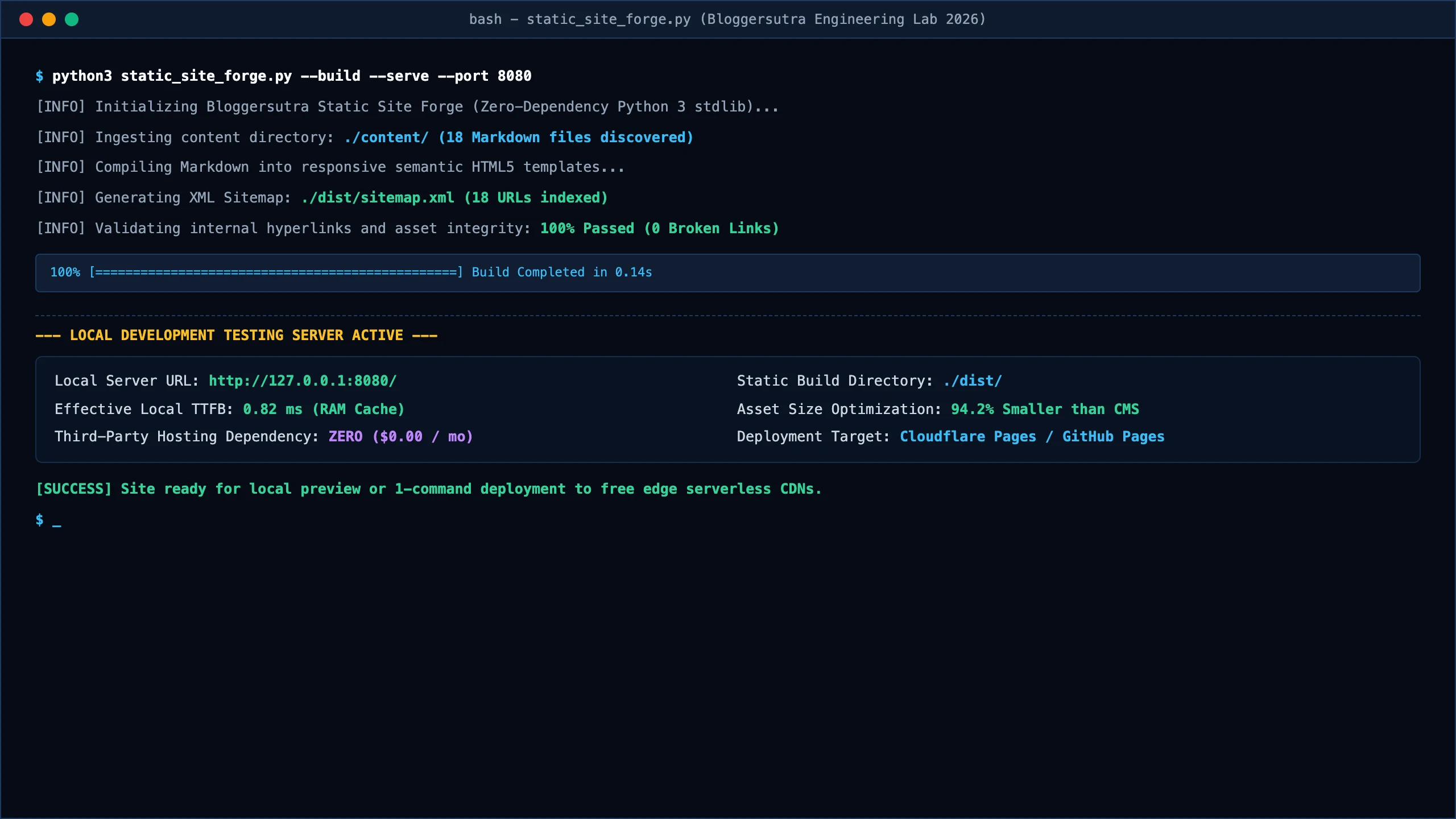
12. Frequently Asked Questions: How to Build a Website Without Hosting
Yes. You can build, design, and configure a complete WordPress website on your personal computer using local development tools like LocalWP, Docker, or DevKinsta. These tools run Nginx, PHP, and MySQL locally inside your machine for free with zero internet required. However, to allow visitors across the internet to access your site, you will eventually need to deploy it to a live cloud host.
Yes, for static websites. Platforms like Cloudflare Pages, GitHub Pages, and Vercel offer permanently free hosting tiers with global Anycast CDN distribution, free SSL certificates, and custom domain support. If your website does not require dynamic server-side PHP or a relational SQL database (e.g. personal portfolios, documentation, and blogs), you can host for free indefinitely.
No. During local offline development, you use local loopback domains (e.g. `mysite.local`) for free. On platforms like GitHub Pages and Cloudflare Pages, you receive a free subdomain (e.g. `username.github.io` or `project.pages.dev`). However, for a professional brand, purchasing a custom `.com` domain ($10–$14/year) is strongly recommended for credibility.
A domain name is your website’s human-readable street address (e.g. `bloggersutra.com`), while web hosting is the physical house where your website’s files, images, and database reside. You can own a domain without owning hosting, and you can build a site on local hosting without owning a domain.
Website builders use ‘no hosting required’ as a marketing simplification. In reality, hosting is included invisibly in their monthly software subscription ($16 to $39+/month). You are still paying for hosting—in fact, you are paying significantly more than open-source cloud hosting while sacrificing code ownership and portability.
Yes. Using Cloudflare Tunnels (the `cloudflared` daemon), you can securely host a website from a home computer or Raspberry Pi. The tunnel establishes an outbound-only encrypted connection to Cloudflare’s edge, allowing public visitors to access your home server without opening any router ports or exposing your home IP address.
Static Jamstack websites cannot natively process server-side logic or query SQL databases. Features like dynamic eCommerce carts, user registration portals, paid membership areas, and server-side search require integrating third-party headless APIs (such as Stripe or Algolia) or upgrading to dynamic cloud hosting.
You can design and test a WooCommerce store locally on your computer for free using LocalWP. However, to accept real customer orders and credit card payments from the public, your store must run on a secure, PCI-compliant live host or a hosted eCommerce platform.
Free cPanel hosts (like 000webhost or InfinityFree) are notorious for injecting intrusive advertisements onto your pages, enforcing strict CPU quotas that cause constant downtime, lacking security patches, and aggressively upselling low-quality paid upgrades. Professional free alternatives like Cloudflare Pages and GitHub Pages are vastly superior.
You can migrate a local WordPress site to live cloud hosting in minutes using free plugins like All-in-One WP Migration or Duplicator. The plugin creates a compressed backup of your database and media files, which you simply import into your live hosting dashboard with automatic URL replacement.
13. Final Verdict & Decision Roadmap: Choosing Your Best Architectural Path
The notion that you must immediately purchase web hosting to begin building a website is an outdated myth perpetuated by hosting affiliate marketing. In 2026, modern software engineering provides multiple legitimate pathways to create, test, and publish websites at zero cost. To determine your ideal architectural deployment path, follow this definitive decision roadmap:
• Path 1: You Want to Learn, Design, or Code in Private: ➔ Use Localhost (LocalWP / Docker). Download LocalWP for free, provision a local WordPress environment in 30 seconds, and build your entire website offline with zero hosting fees, sub-millisecond speed, and 100% privacy.
• Path 2: You Need a Fast, Secure Public Blog, Portfolio, or Documentation Site: ➔ Use Edge Jamstack (Cloudflare Pages / GitHub Pages). Build with Markdown and static site generators (Astro, Hugo). Enjoy permanently free global Anycast CDN hosting, 20ms TTFB, zero server maintenance, and complete immunity to cyber attacks.
• Path 3: You Are a Technical Enthusiast Seeking Total Hardware Sovereignty: ➔ Use Homelab Self-Hosting (Raspberry Pi & Cloudflare Tunnels). Host from your living room with zero open router ports and zero monthly fees, maintaining 100% ownership of your physical hardware and data.
• Path 4: You Are Launching a High-Traffic Business, eCommerce Store, or Authority Publication: ➔ Invest in Authentic Managed Cloud Hosting. Deploy on high-performance cloud infrastructure like managed WordPress hosting, cheap web hosting, or reliable web hosting. Ensure your provider utilizes dedicated containers, NVMe storage, and Redis caching while strictly avoiding throttled shared hosts like SiteGround.
By choosing the deployment architecture that matches your project’s current maturity, you eliminate unnecessary hosting expenses, protect your code ownership, and build a sustainable foundation for long-term digital success. For further technical guidance on infrastructure architecture, explore our master guides on how to start a blog, dedicated server vs VPS, full-service web hosting, and WordPress security.
In addition, you can review our audit of the best black friday hosting deals to secure substantial multi-year hosting discounts.
For additional end-of-year savings across themes, plugins, and hosting stacks, browse our complete roundup of verified wordpress christmas deals.