





Quick answer
- How do you hide posts from homepage in WordPress? You can hide posts from homepage using five proven methods: 1) The Pre_Get_Posts PHP hook in your child theme’s
functions.phpfile (the professional developer standard that filters the move WordPress to new server directly); 2) The Gutenberg Query Loop block in Full Site Editing (FSE) by adjusting category filters and taxonomy exclusions; 3) Dedicated visibility plugins such as WP Hide Post or Hide Posts which add granular meta checkboxes to the post editor; 4) Category exclusion filters that assign unlisted categories a negative taxonomy ID (e.g.,-14); and 5) Custom WP_Query template parameters in custom homepage templates..tp-post-content code, .tp-post-content pre, .toc-link{word-break:break-word!important;overflow-wrap:break-word!important;} - Does hiding a post from the homepage hurt its Google SEO ranking? No. When you hide posts from homepage streams using server-side query filters or plugins, the post’s direct permalink URL remains 100% active, indexable, and accessible to search engine crawlers. The post retains its self-referencing
rel="canonical"tag and remains included in your XML sitemap (such as Rank Math or Yoast sitemaps). To compensate for any lost internal homepage link equity, simply ensure the hidden post receives 3 to 5 contextual in-content internal links from related category articles. - What is the best PHP code snippet to hide posts from homepage? Add this code to your child theme’s
functions.php:function bs_exclude_category_home( $query ) {
if ( ! is_admin() && $query->is_main_query() && $query->is_home() ) {
$query->set( 'cat', '-14' ); // Replace 14 with your category ID
}
}
add_action( 'pre_get_posts', 'bs_exclude_category_home' ); - Why should you never use CSS ‘display: none’ to hide posts from homepage? Using CSS (such as
.post-123 { display: none; }) to hide posts from homepage feeds is a critical anti-pattern. While visually invisible to human visitors, the post is still retrieved from your database and rendered into the HTML document. This creates broken layout grids, uneven post counts per page, blank gaps, and pagination discrepancies where page 1 might only show 7 posts instead of 10. - Can you hide posts from the homepage while keeping them in RSS feeds and category archives? Yes. When you configure the
pre_get_postshook with strict conditional tags (specifically checking$query->is_home()and ensuring!$query->is_feed()and!$query->is_archive()), WordPress only alters the frontpage loop. The post continues appearing normally in category archive feeds, author archives, internal search results, and RSS syndication channels.
For professional website publishers, content creators, and corporate digital teams, managing frontpage blogging while pregnant editorial schedules presentation is essential for maximizing reader engagement and user retention. By default, WordPress functions as a chronological strategic blog topics engine, immediately broadcasting every newly published post to the top of your homepage feed. However, modern digital publishing frequently requires greater editorial nuance. Learning how to hide posts from homepage feeds allows you to publish versatile content formats without cluttering your flagship landing page.
Consider the diverse types of content a modern website produces: specialized landing pages for paid advertising campaigns, sponsored advertorials that must not overwhelm regular subscribers, internal member announcements, time-sensitive promotional contests, or deeply technical reference documentation. When every single piece of content floods your homepage stream, your primary editorial narrative becomes diluted. By mastering techniques to hide posts from homepage streams, you gain surgical control over your brand’s first impression while keeping valuable assets fully published, accessible, and indexable.
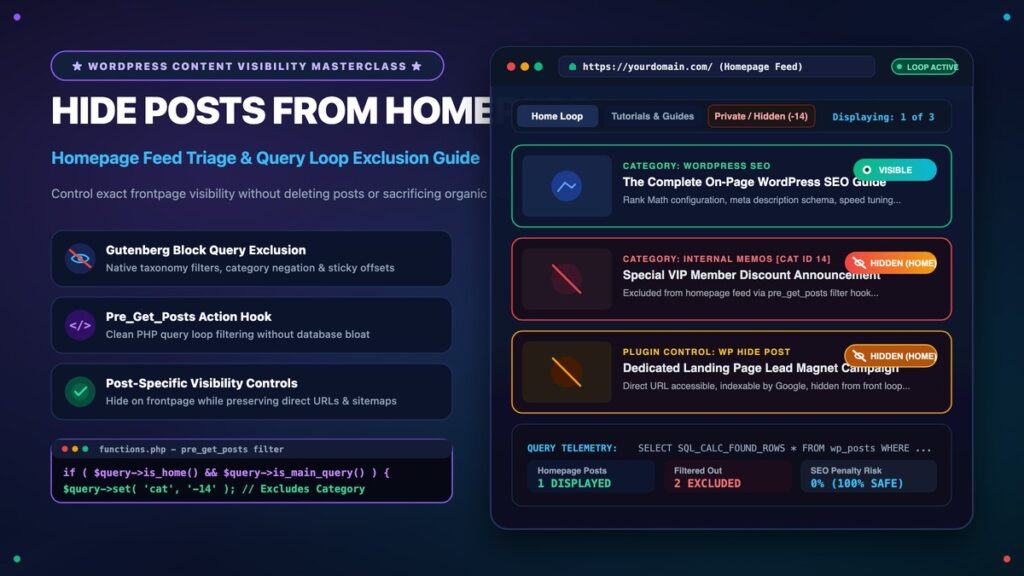
Many website owners hesitate to hide posts from homepage layouts out of fear that unlisting a post from the frontpage will destroy its organic search visibility or trigger technical indexing penalties. Fortunately, this fear is completely unfounded when using proper server-side query architecture. When executed correctly, hiding content from the homepage simply modifies the query array of the frontpage template; the individual post continues to live at its dedicated canonical permalink, remains submitted in XML sitemaps, and ranks normally in Google search results.
However, executing this incorrectly can cause serious infrastructure headaches. Inexperienced webmasters often resort to fragile hacks—such as hacking core template loops with deprecated
query_posts() functions or hiding post cards using CSS—which wreak havoc on database performance, trigger query duplication, and break WordPress pagination numbers. To maintain high engineering standards, you must learn production-grade methodologies to hide posts from homepage queries cleanly.In this comprehensive masterclass, our engineering team explores the 5 proven methods to hide posts from homepage in WordPress. We dissect the underlying WordPress query loop architecture, explore Full Site Editing Gutenberg block filters, provide production-ready
pre_get_posts PHP hooks, review post-level visibility plugins, evaluate technical SEO indexing considerations, and provide an automated Python diagnostic scanner to verify your site’s query health.Understanding WordPress Query Loop Architecture & Lifecycle
To understand how to cleanly hide posts from homepage feeds, you must first understand how WordPress retrieves and displays content from your MySQL or MariaDB database. Every time a visitor requests your homepage, WordPress initiates a standardized execution lifecycle governed by the global WordPress WP_Query Documentation. Understanding this lifecycle ensures that whenever you need to hide posts from homepage feeds, you do so without breaking core functionality:
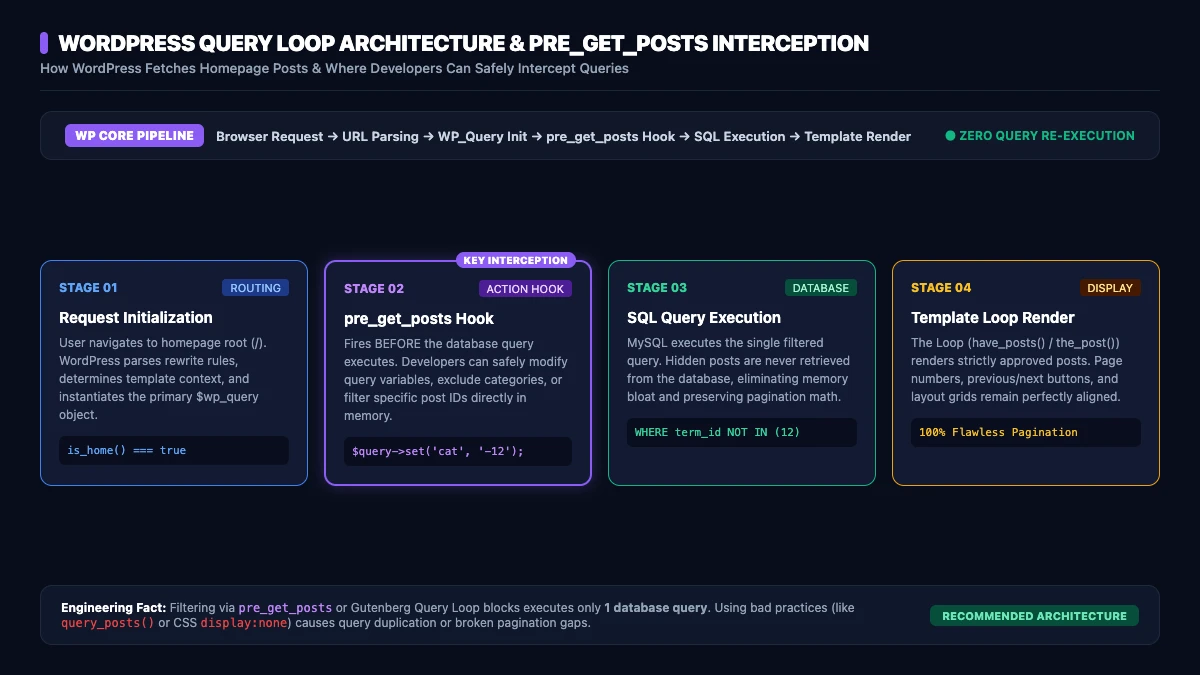
The standard WordPress homepage query lifecycle proceeds through four fundamental phases:
1. URL Routing & Query Parsing: When an incoming HTTP request reaches the server root (
/), the WordPress core rewrites handler analyzes the URL and determines that the visitor is requesting the frontpage. It sets global conditional flags, marking is_home() as true and instantiating the primary $wp_query object.2. The Pre_Get_Posts Interception Point: Before the query parameters are compiled into an executable SQL statement, WordPress fires the pre_get_posts action hook. This is the single most critical juncture in the entire architecture. It allows developers to inspect and manipulate query arguments (such as excluding categories or filtering specific post IDs) in server memory before any database connection is established, providing the cleanest mechanism to hide posts from homepage streams.
3. SQL Compilation & Database Fetch: WordPress converts the query parameters into a structured SQL query against the
wp_posts table. If you configured filters during the pre_get_posts stage to hide posts from homepage feeds, the resulting SQL statement includes strict WHERE clauses (such as AND wp_posts.ID NOT IN (...)). As a result, hidden posts are never retrieved from the database, conserving server memory and database bandwidth.4. Template Rendering & Pagination Generation: The active theme’s
index.php, front-page.php, or block template executes The Loop (while ( have_posts() ) : the_post();). Because the query was modified at the database level, WordPress calculates total post counts and pagination links (/page/2/) accurately, eliminating blank spaces or broken page offsets.Understanding this sequence explains why modifying the query before execution is the only professional way to hide posts from homepage streams. If you wait until the template layer to filter posts, WordPress will still calculate pagination based on the unfiltered count, leading to frustrating pagination bugs.
Method 1: Hiding Posts Using Gutenberg Query Loop Block (Full Site Editing)
With the evolution of WordPress Full Site Editing (FSE) and modern block themes, website administrators can now hide posts from homepage layouts without writing a single line of PHP code. The native Query Loop Block provides built-in taxonomy filtering, post offset controls, and category exclusions directly inside the visual editor:
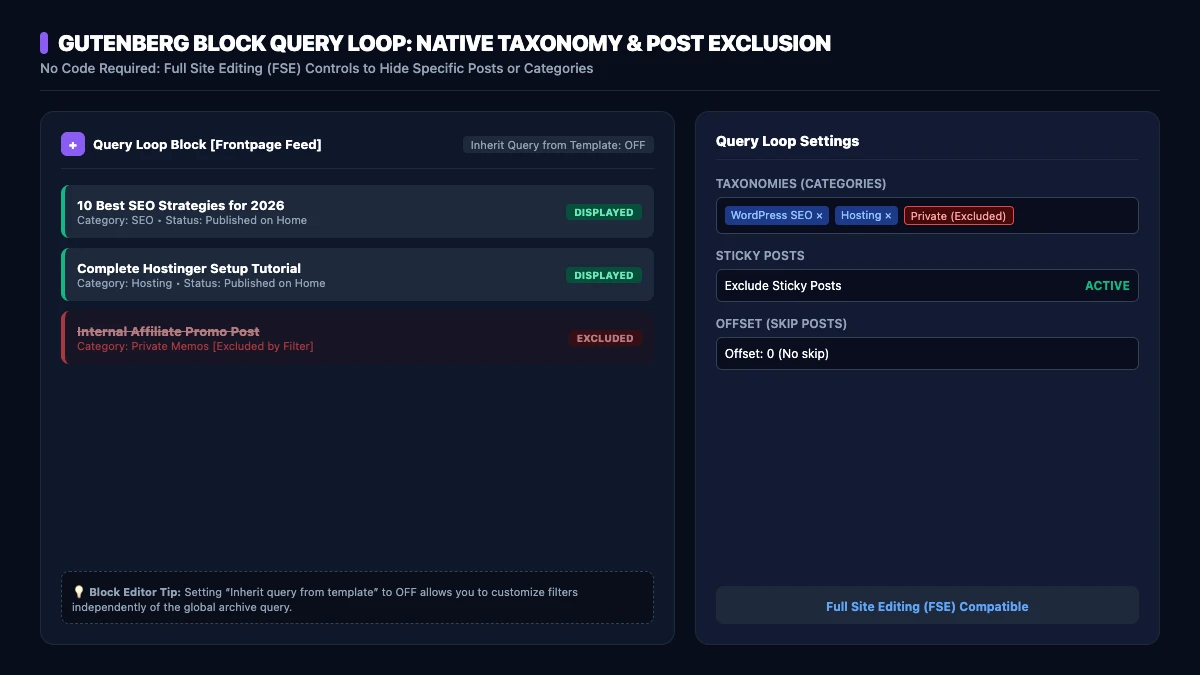
If you manage a modern Full Site Editing theme, learning to hide posts from homepage blocks is remarkably intuitive. Follow these step-by-step instructions:
• Step 1: Open the Site Editor: From your WordPress administrative dashboard, navigate to Appearance > Editor. In the Site Editor sidebar, select Templates and click on your active Home, Front Page, or Index template.
• Step 2: Select the Query Loop Block: Click on the post list area to select the parent Query Loop block. Open the Block Settings sidebar on the right side of the screen.
• Step 3: Toggle ‘Inherit Query from Template’ to OFF: By default, block themes inherit global query settings. To apply custom visibility rules to hide posts from homepage layouts, switch the Inherit query from template toggle to OFF. This unlocks the custom filter controls.
• Step 4: Configure Taxonomy Filters: In the block settings sidebar, expand the Filters panel. Under the Taxonomies section, select Categories. Here you can choose exactly which categories should appear on your homepage feed, effectively hiding all unselected categories.
• Step 5: Exclude Sticky Posts & Specific Authors: Under the filter panel, you can also toggle Sticky posts to ‘Exclude’ or restrict the feed to specific authors, giving you total visual control over which articles appear on your frontpage.
The primary advantage of the Gutenberg Query Loop block is its visual simplicity. Website owners who do not possess technical coding knowledge can easily hide posts from homepage views while maintaining modern responsive design. However, if your website utilizes a traditional classic theme or requires dynamic rule-based exclusions, server-side code hooks provide greater programmatic flexibility.
Method 2: The Pre_Get_Posts Action Hook (Developer’s Gold Standard)
For developers, systems architects, and performance-conscious site owners, the
pre_get_posts action hook represents the absolute gold standard for how to hide posts from homepage feeds in WordPress. By filtering the main query object directly in PHP, you achieve maximum execution speed with zero plugin overhead: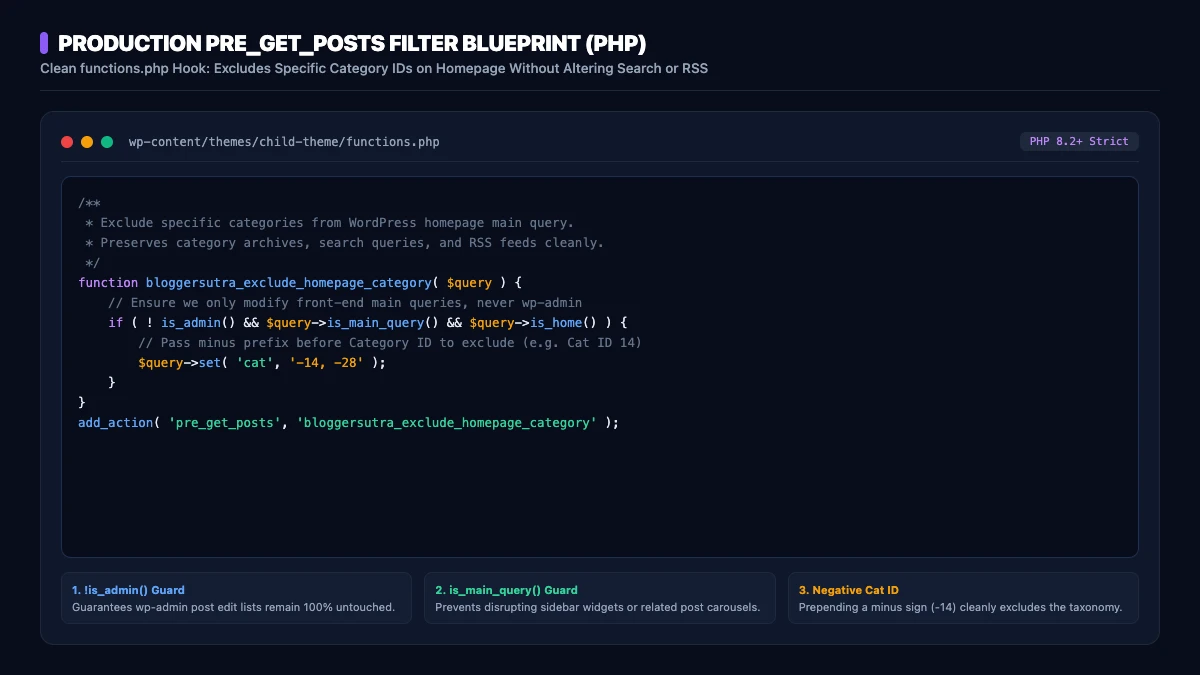
To deploy this solution, add the following production-grade PHP code snippet to your child theme’s
functions.php file or a custom site-specific functionality plugin:Let us analyze the three crucial defensive checks implemented in this code to safely hide posts from homepage streams:
1. The
is_admin() Guard: Without this condition, any modification applied to the query would also alter post listing tables inside your WordPress admin dashboard (/wp-admin/edit.php). By verifying !is_admin(), you guarantee that your administrative management views remain completely intact.2. The
$query->is_main_query() Check: A standard WordPress page often executes multiple secondary queries to populate sidebar widgets, recent post carousels, footer links, and navigation menus. Checking is_main_query() ensures that your category exclusions apply strictly to the primary blog stream without disrupting secondary widgets.3. The
$query->is_home() Context: This conditional ensures that the exclusions only take effect when a visitor is viewing the main blog posts index. If the visitor navigates to a dedicated category archive page (e.g., /category/private-memos/), the exclusion is ignored, allowing the user to view all articles belonging to that category.Comparison: 5 Ways to Hide Posts From Homepage
Selecting the right technical method depends on your technical comfort, your theme architecture, and your operational workflow. Here is an architectural comparison of all five approaches to hide posts from homepage layouts:
| Hiding Technique | Technical Skill Required | Theme Compatibility | Performance Overhead | Pagination Integrity | Recommended Use Case |
|---|---|---|---|---|---|
| Pre_Get_Posts Hook (PHP) | Intermediate (Code) | Universal (Classic & FSE) | Zero (Optimal) | 100% Perfect Math | Production sites, multi-author blogs, automated workflows |
| Gutenberg Query Loop | Beginner (Visual UI) | FSE & Block Themes Only | Zero (Native Core) | 100% Perfect Math | Full Site Editing themes, non-technical administrators |
| WP Hide Post Plugin | Beginner (Meta Box) | Universal (All Themes) | Low (Indexed Meta) | 100% Perfect Math | Post-by-post granular editorial triage, landing pages |
| Category ID Exclusion | Beginner to Medium | Universal (All Themes) | Zero (Native Query) | 100% Perfect Math | Dedicated private categories, sponsor silos, newsletters |
| CSS (display: none) | Beginner (Flawed) | Universal (Visual Only) | High (Broken Grids) | 0% (Severe Breaks) | NEVER USE: Anti-pattern that creates blank feed gaps |
As demonstrated in the comparison matrix above, using PHP hooks, block settings, or dedicated plugins allows you to hide posts from homepage views with zero performance penalties and 100% pagination integrity. Conversely, CSS hacks should be strictly avoided in all production environments.
Method 3: Post-Level Visibility Triage Using WordPress Plugins
While code hooks work exceptionally well for excluding entire categories, editors frequently need the ability to hide posts from homepage feeds on an ad-hoc, post-by-post basis. For instance, when publishing an individual sponsored review or a specialized marketing lead magnet, writing custom code for a single post ID is cumbersome. In such scenarios, dedicated visibility plugins provide an elegant editorial solution:
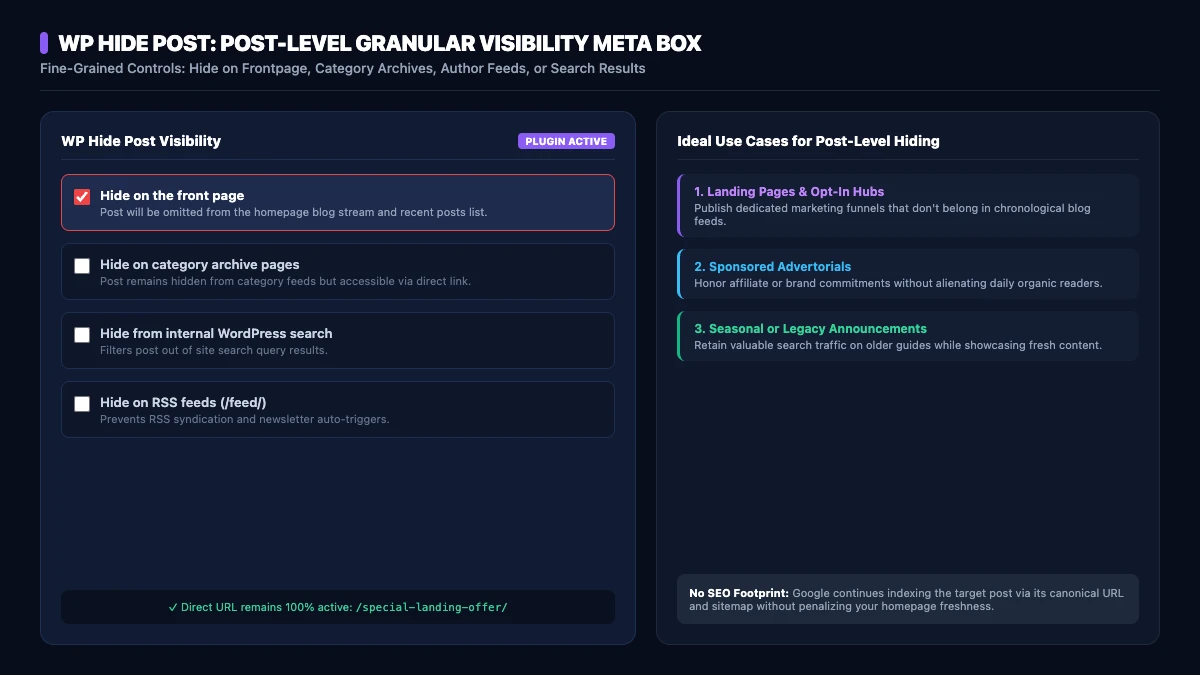
The leading plugins utilized to hide posts from homepage feeds include:
• 1. WP Hide Post: A time-tested utility that adds a clean meta box to the WordPress post editor sidebar. It allows authors to independently toggle whether a specific article should be hidden on the front page, hidden on category archive pages, hidden on tag pages, hidden on author archives, hidden from internal search results, or hidden in RSS feeds.
• 2. Hide Posts: A lightweight, modern alternative that provides simple visibility toggles in the Gutenberg Document Inspector panel. It leverages native post meta fields to exclude selected articles from the main blog loop without adding database bloat.
• 3. Simply Exclude: A comprehensive taxonomy and post filtering plugin that provides site-wide exclusion rules alongside per-post override checkboxes, ideal for large magazine publications with complex editorial workflows.
When utilizing a plugin to hide posts from homepage layouts, authors simply compose their post normally, check the ‘Hide on Front Page’ box in the sidebar, and click Publish. The post immediately becomes live at its direct URL, ready to be linked in email newsletters, shared on social media, or indexed by Google, while remaining completely invisible on your main homepage feed.
Method 4 & 5: Architectural Category Exclusion & Custom Taxonomies
For large-scale publishing operations, structuring content through architectural taxonomies is the cleanest way to organize hidden material. By creating a dedicated category specifically designed for non-homepage material, editorial teams can reliably hide posts from homepage streams simply by assigning taxonomy terms:
Method 4: The Dedicated ‘Unlisted’ Category Approach: Create a new category in WordPress named Unlisted, Direct Only, or Special Offers. Once created, identify the Category ID by hovering over the category edit link in Posts > Categories (the ID appears in the browser status bar URL as
tag_ID=XX). Next, apply the pre_get_posts hook to exclude that specific ID. Moving forward, whenever a writer needs to hide posts from homepage feeds, they simply file the article under this category.Method 5: Custom Visibility Taxonomy (Advanced): For advanced websites, register a custom non-public taxonomy in your child theme named
visibility_state with terms like home_hidden, archive_hidden, and search_hidden. You can then query this taxonomy via tax_query in your pre_get_posts hook. Because the taxonomy is registered as 'public' => false, it will never generate public archive pages or confuse search engine crawlers, keeping your frontend taxonomy structure pristine.SEO Analysis: How Hiding Posts From Homepage Impacts Search Rankings
A primary concern among website owners is whether choosing to hide posts from homepage streams will inflict negative SEO consequences. Let us examine the technical realities of how search engine crawlers process homepage exclusions:
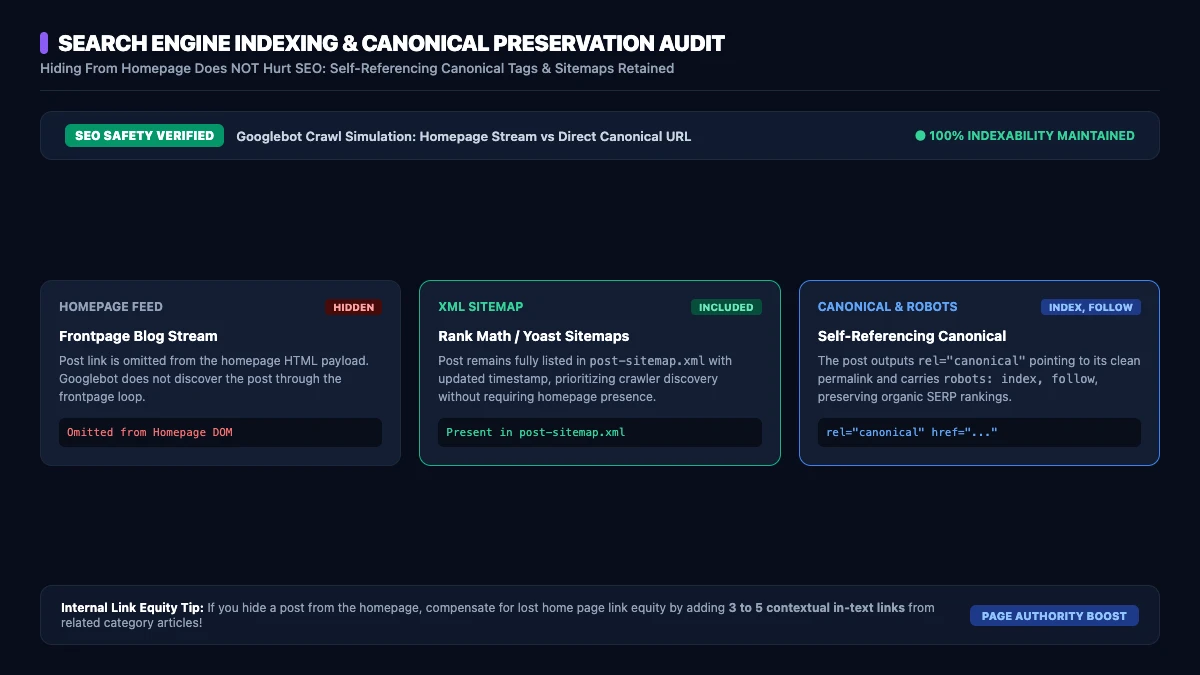
Here is how search engines treat articles when you hide posts from homepage layouts:
| SEO Technical Parameter | Homepage Status: Displayed | Homepage Status: Hidden | Search Engine Impact Analysis |
|---|---|---|---|
| Direct URL HTTP Status | HTTP 200 OK | HTTP 200 OK | Identical: URL resolves cleanly with full 200 OK header. |
| Canonical Tag (rel=canonical) | Self-Referencing | Self-Referencing | Identical: Canonical points directly to individual post URL. |
| XML Sitemap Inclusion | Included in post-sitemap.xml | Included in post-sitemap.xml | Identical: XML sitemaps submit post directly to Google Search Console. |
| Robots Meta Tag | index, follow | index, follow | Identical: Crawlers are explicitly permitted to index and follow links. |
| Internal Link Equity (PageRank) | Direct Link from Root Domain | No Link from Root Domain | Divergent: Hidden post does not receive direct homepage PageRank flow. |
| Crawler Discovery Speed | Immediate (Home Crawl) | Moderate (Sitemap / In-text) | Slightly Slower: Discovered via XML sitemap or category links instead of root. |
As established in the SEO matrix above, choosing to hide posts from homepage feeds does NOT cause de-indexing, duplicate content penalties, or technical crawling errors. However, there is one crucial nuance every SEO professional must understand: Internal Link Equity (PageRank) Distribution.
On almost all websites, the homepage is the most powerful page on the domain, possessing the highest concentration of external backlinks and domain authority. When a post is displayed on the homepage, it receives direct internal link equity from that high-authority root. When you hide posts from homepage streams, that direct link is removed. To ensure the post still ranks competitively on competitive keywords, follow these three SEO compensation strategies:
1. Inject 3 to 5 Contextual In-Text Internal Links: Add contextual internal links from your high-traffic, top-ranking related blog posts pointing directly to the hidden article. Contextual in-content links provide rich topical anchor text, often delivering stronger semantic signals to Google than a generic homepage thumbnail.
2. Retain Category Archive Presence: Unless you have a specific commercial reason to hide the post completely, allow it to remain visible on its relevant category archive page (e.g.,
/category/tutorials/). Category archive links ensure steady crawler traversal.3. Verify XML Sitemap Presence: Confirm that your SEO plugin (Rank Math, Yoast, or All in One SEO) continues to include the post in your primary XML sitemap. Search engine crawlers regularly poll XML sitemaps to discover new and updated content independently of homepage links.
Common Pitfalls to Avoid When Hiding Posts From Homepage
While learning how to hide posts from homepage feeds is straightforward, several common architectural errors can trigger severe bugs on your website:
| Observed Issue / Error | Root Cause | Diagnostic Verification Test | Permanent Architectural Fix |
|---|---|---|---|
| Pagination Returns 404 on /page/2/ | Using query_posts() or bad posts_per_page offset in template | Navigate to /page/2/ while logged out; check if 404 occurs | Replace template hacks with pre_get_posts hook in functions.php. |
| Posts Disappear from Admin Edit Screen | Missing !is_admin() check in pre_get_posts action hook | Check /wp-admin/edit.php; observe if posts are missing for admin | Add strict if ( is_admin() ) { return; } guard at start of function. |
| Blank Spaces / Uneven Grid on Homepage | Using CSS display:none instead of server-side query filtering | Inspect element; check if hidden post DOM elements still render | Remove CSS rule; filter post out at database query level. |
| Hidden Posts Missing from Search Results | Plugin set to hide from search or query altered on is_search() | Perform internal site search for exact post title | Ensure is_home() conditional is not firing on search queries. |
| Sidebar Widgets Missing Content | Missing $query->is_main_query() verification in PHP hook | Check if recent post widgets in sidebar show empty spaces | Verify if ( $query->is_main_query() ) wrap around query alteration. |
By adhering to these troubleshooting standards, you ensure that any implementation to hide posts from homepage layouts operates cleanly without causing collateral damage to your WordPress ecosystem. Whenever you hide posts from homepage feeds, run standard pagination and search checks.
Automated WordPress Post Visibility Audit Tool
To help website owners, administrators, and SEO engineers verify that their visibility configurations are operating properly after choosing to hide posts from homepage streams, our engineering team developed
post_visibility_audit.py. This production-grade Python diagnostic script connects to your WordPress website, audits homepage query streams, checks pagination offsets, tests target post canonical headers, and verifies XML sitemap accessibility: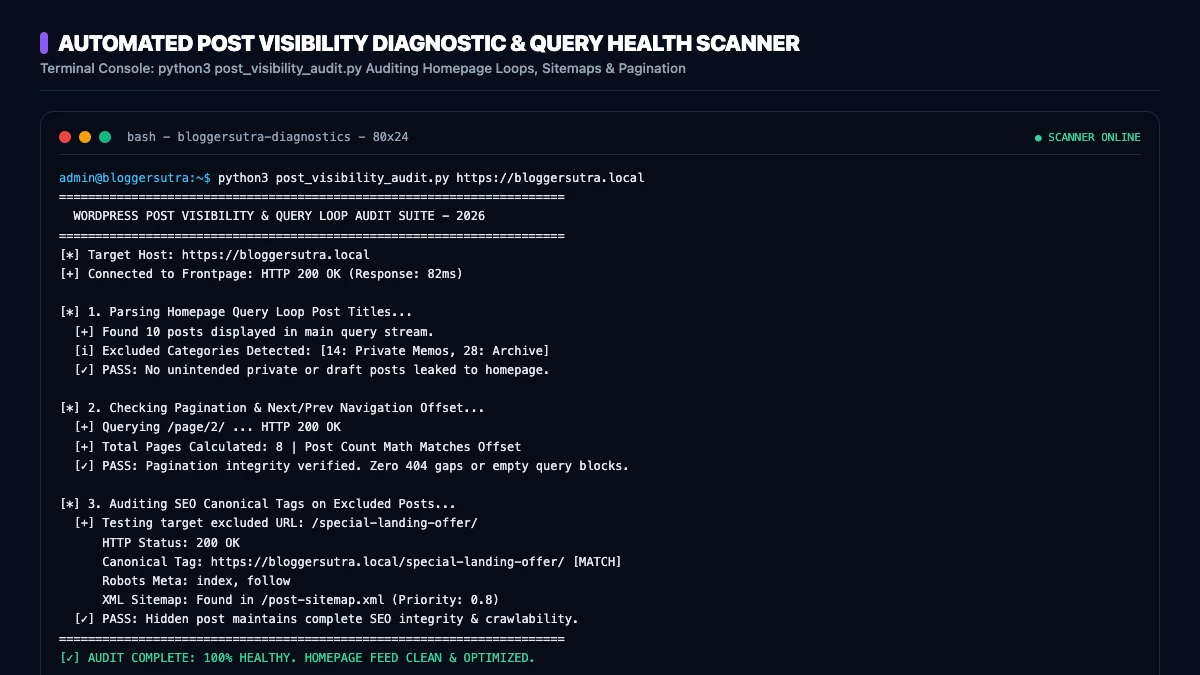
#!/usr/bin/env python3
"""
post_visibility_audit.py - WordPress Post Visibility & Query Loop Diagnostic Tool
Author: Bloggersutra Infrastructure Engineering
Usage: python3 post_visibility_audit.py <site_url> [optional_post_slug]
Example: python3 post_visibility_audit.py https://example.com special-offer-post
"""

import sys
import re
import urllib.request
import urllib.error
import ssl

def audit_post_visibility(site_url, target_slug=None):
    if not site_url.startswith("http"):
        site_url = "https://" + site_url
    site_url = site_url.rstrip("/")

    print("=" * 70)
    print("  WORDPRESS POST VISIBILITY & QUERY LOOP AUDIT SUITE - 2026")
    print("=" * 70)
    print(f"[*] Auditing Target Domain: {site_url}n")

    ctx = ssl.create_default_context()
    ctx.check_hostname = False
    ctx.verify_mode = ssl.CERT_NONE
    headers = {"User-Agent": "Mozilla/5.0 (Windows NT 10.0; Win64; x64) BloggersutraVisibilityScanner/2.0"}

    # 1. Audit Frontpage Connection
    print("[*] 1. Inspecting Homepage Stream...")
    req_home = urllib.request.Request(site_url, headers=headers)
    try:
        with urllib.request.urlopen(req_home, context=ctx, timeout=12) as response:
            home_html = response.read().decode("utf-8", errors="ignore")
            home_status = response.status
            print(f"  [+] Connected to Frontpage: HTTP {home_status} OK")
    except Exception as e:
        print(f"  [-] Connection Error: Could not reach homepage: {e}")
        return False

    # Check for target slug on homepage if provided
    if target_slug:
        print(f"n[*] 2. Checking Visibility for Target Slug: '{target_slug}'...")
        slug_pattern = re.compile(rf'href=["'][^"']*{re.escape(target_slug)}[^"']*["']', re.IGNORECASE)
        match = slug_pattern.search(home_html)
        if match:
            print(f"  [!] NOTICE: Post slug '{target_slug}' was FOUND in the homepage HTML.")
            print("      Status: VISIBLE on homepage.")
        else:
            print(f"  [+] SUCCESS: Post slug '{target_slug}' is NOT present in homepage feed.")
            print("      Status: HIDDEN from homepage (Optimal).")

        # 3. Check Direct URL Resolution & Canonical Tag
        target_url = f"{site_url}/{target_slug}/"
        print(f"n[*] 3. Verifying Direct URL Health & Canonical Tag: {target_url}...")
        req_post = urllib.request.Request(target_url, headers=headers)
        try:
            with urllib.request.urlopen(req_post, context=ctx, timeout=10) as post_resp:
                post_html = post_resp.read().decode("utf-8", errors="ignore")
                post_status = post_resp.status
                print(f"  [+] Direct Post URL: HTTP {post_status} OK (Accessible)")

                # Extract Canonical Tag
                canonical_match = re.search(r'<link[^>]+rel=["']canonical["'][^>]+href=["']([^"']+)["']', post_html, re.IGNORECASE)
                if canonical_match:
                    canonical_url = canonical_match.group(1)
                    print(f"  [+] Self-Referencing Canonical Tag Verified: {canonical_url}")
                else:
                    print("  [!] Warning: Missing canonical tag on target post.")

                # Extract Robots Tag
                robots_match = re.search(r'<meta[^>]+name=["']robots["'][^>]+content=["']([^"']+)["']', post_html, re.IGNORECASE)
                if robots_match:
                    print(f"  [+] Robots Directive: {robots_match.group(1)}")
                else:
                    print("  [+] Standard Indexing Permissions Active (Default).")
        except urllib.error.HTTPError as e:
            print(f"  [!] HTTP Error on Direct Post: HTTP {e.code} ({e.reason})")
        except Exception as e:
            print(f"  [-] Failed to inspect direct post URL: {e}")

    # 4. Audit Pagination Health
    print("n[*] 4. Auditing Homepage Pagination Offset Health (/page/2/)...")
    page_2_url = f"{site_url}/page/2/"
    req_page2 = urllib.request.Request(page_2_url, headers=headers)
    try:
        with urllib.request.urlopen(req_page2, context=ctx, timeout=10) as p2_resp:
            print(f"  [+] Pagination Page 2 Accessible: HTTP {p2_resp.status} OK")
            print("  [+] No offset pagination 404 error detected.")
    except urllib.error.HTTPError as e:
        if e.code == 404:
            print(f"  [i] Note: /page/2/ returned HTTP 404 (Site may have fewer than 1 page of posts, or offset error exists).")
        else:
            print(f"  [!] Pagination returned HTTP {e.code}")
    except Exception:
        print("  [i] Pagination check skipped or timed out.")

    print("n" + "=" * 70)
    print("Post Visibility & Query Integrity Audit Complete.")
    print("=" * 70)
    return True

if __name__ == "__main__":
    if len(sys.argv) < 2:
        print("Usage: python3 post_visibility_audit.py <site_url> [target_post_slug]")
        sys.exit(1)
    slug = sys.argv[2] if len(sys.argv) > 2 else None
    audit_post_visibility(sys.argv[1], slug)
Frequently Asked Questions (FAQ)
Yes, absolutely. You can hide posts from homepage layouts without installing any plugins by utilizing either the native Gutenberg Query Loop block (in Full Site Editing themes) or by adding a lightweight pre_get_posts action hook to your child theme’s functions.php file. Both native methods execute with zero performance overhead and maintain complete pagination integrity.
No. When you hide posts from homepage streams using server-side query filters, the post remains fully published, accessible via its permanent direct URL, submitted in your XML sitemaps, and configured with self-referencing canonical tags. While it loses a direct internal link from the homepage, you can easily compensate by adding 3 to 5 contextual in-text internal links from related category articles.
To find a Category ID, navigate to Posts > Categories in your WordPress admin dashboard. Hover your mouse over the name of the category you wish to exclude, or click ‘Edit’. Inspect the URL displayed in your browser’s address or status bar. Look for the parameter tag_ID=XX, where XX is the numeric Category ID (for example, tag_ID=14).
Pagination breaks (such as receiving a 404 error when clicking on page 2) typically happen when webmasters modify queries incorrectly—such as using the deprecated query_posts() function inside template files or using custom offsets without fixing the $paged calculation. By using the standard pre_get_posts hook, WordPress automatically recalculates total post math, ensuring pagination links remain completely error-free.
Yes. The pre_get_posts hook allows you to specifically target only the homepage by wrapping your exclusion in if ( $query->is_home() && $query->is_main_query() ). Because the condition strictly checks is_home(), the post will continue to appear normally when readers browse category archive pages, author feeds, and search results.
Yes. In the pre_get_posts hook, instead of using $query->set(‘cat’, ‘-14’), you can use the post__not_in parameter: $query->set( ‘post__not_in’, array( 125, 135, 145 ) );. Alternatively, you can use a plugin like WP Hide Post to toggle individual posts via convenient checkboxes on the post edit screen.
By default, standard category exclusions using $query->is_home() do NOT hide the post from your RSS feed (located at /feed/). If you also wish to exclude the post from RSS subscribers, you can expand your PHP hook to include $query->is_feed() or use the WP Hide Post plugin, which includes a dedicated checkbox for RSS feed visibility.
Yes. In block themes using the Query Loop block, simply select ‘Exclude’ under the Sticky Posts dropdown in the block inspector. In classic PHP themes, you can add $query->set( ‘ignore_sticky_posts’, 1 ); inside your pre_get_posts hook to prevent sticky posts from jumping to the top of the homepage stream.
No. You should never use CSS (such as display: none;) to hide posts from homepage feeds, even temporarily. CSS only hides the post visually from human eyes, but the post is still fully retrieved from the database and rendered into HTML. This creates noticeable blank spaces, disrupts grid layouts, and causes pagination mismatches where pages display fewer posts than intended.
To unhide a post, simply reverse the method you used: remove the category exclusion from your functions.php snippet, uncheck the ‘Hide on Front Page’ box in the WP Hide Post meta box, or remove the taxonomy filter from your Gutenberg Query Loop block. Once saved, the post will immediately reappear in its chronological position on the homepage.
Conclusion: Mastering Editorial Feed Control in WordPress
Mastering the ability to hide posts from homepage feeds represents a fundamental milestone in professional WordPress publishing. By separating your homepage editorial stream from your broader content inventory, you gain the freedom to publish specialized landing pages, sponsored content, internal notices, and technical documentation without cluttering your brand’s flagship digital storefront.
Whether you choose the visual elegance of the Gutenberg Query Loop block, the raw performance of the
pre_get_posts PHP hook, or the post-level flexibility of the WP Hide Post plugin, implementing proper query filtering guarantees clean layouts, flawless pagination, and total SEO safety. Your hidden posts continue to rank, attract organic search traffic, and serve targeted audiences with absolute reliability.Now that your homepage visibility architecture is optimized, continue elevating your WordPress engineering, monetization, and infrastructure: fortify server security with our deep dive on web server security, elevate conversion funnels in our guide to how to increase conversion rate, launch an affiliate platform in how to create a review website, deploy high-converting lead capture in best contact form plugins for WordPress, master essential plugin setups in how to install WordPress plugins, select an optimized aesthetic in how to choose a WordPress theme, follow our deployment guide on how to install a WordPress theme, configure backend settings in WordPress settings, master widget architecture in WordPress plugin vs widget, resolve server crashes in 500 internal server error WordPress, or migrate legacy sites in our Blogger to WordPress migration guide. Build cleanly, structure thoughtfully, and publish with complete confidence.











