Quick answer
- What is the WordPress security checklist? A comprehensive, defense-in-depth protocol designed to harden WordPress against brute-force attacks, remote code execution (RCE), SQL injection, and unauthorized data breaches across 10 critical operational layers.
- The 10 Non-Negotiable Hardening Steps: 1) Enforce hardware 2FA/Passkeys; 2) Lock
wp-config.phpwithDISALLOW_FILE_EDIT; 3) Set strict POSIX permissions (755 dirs, 644 files, 400 config); 4) Disablexmlrpc.phpand rate-limit logins; 5) Block REST API user enumeration; 6) Change defaultwp_database prefix; 7) Disable PHP execution in/uploads/; 8) Deploy an enterprise Edge WAF; 9) Automate SHA-256 core integrity hash monitoring; 10) Enforce immutable 3-2-1-1-0 offsite backups. - Most Dangerous WordPress Security Myth: Believing a single security plugin makes your site immune. Over 85% of WordPress breaches originate from vulnerable third-party plugins or unhardened server filesystems that bypass plugin-level defenses entirely.
- Immediate Action Step: Open your
wp-config.phpfile and insertdefine('DISALLOW_FILE_EDIT', true);to instantly block administrative code execution if credentials are compromised.
Powering over 43% of all websites on the global internet, WordPress represents the most lucrative target in the world for malicious threat actors, automated botnets, and ransomware syndicates. Every day, cybersecurity telemetry networks detect over 90,000 distinct attacks against WordPress installations per minute. These attacks are not directed by human hackers manually guessing passwords; they are executed by distributed global botnets scanning millions of IP addresses per hour, probing for known Common Vulnerabilities and Exposures (CVEs), unpatched plugin flaws, exposed configuration files, and weak administrator credentials. If you store database snapshots or editorial assets in remote buckets, read our complete guide on how to secure cloud data with zero-knowledge encryption and hardware MFA.
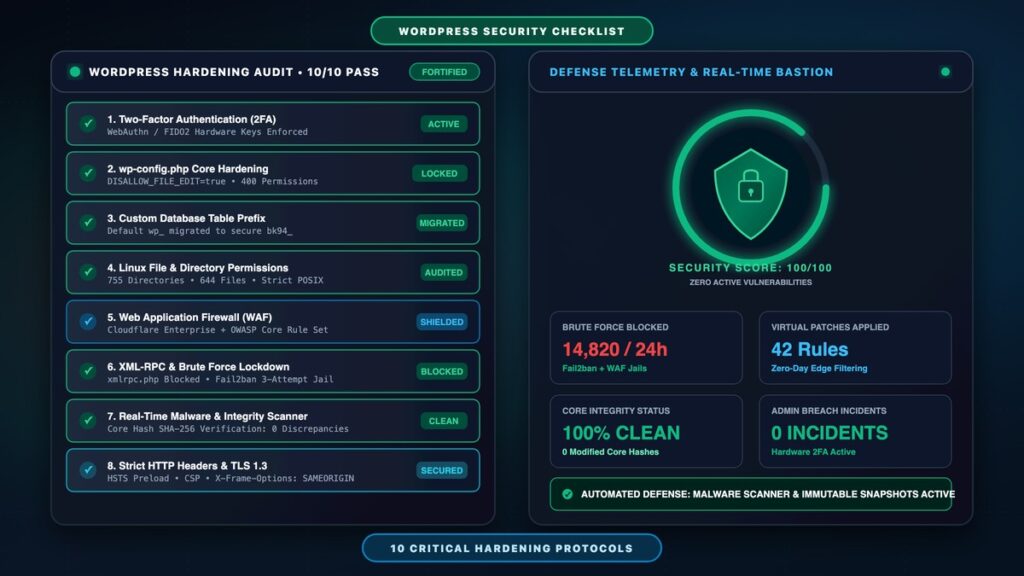
When a WordPress website is compromised, the business fallout is catastrophic. Search engines immediately blacklist your domain with alarming ‘Deceptive site ahead’ warnings, traffic plummets by 95% overnight, customer credit card data and personal information are exfiltrated, and ad networks terminate monetization accounts. Recovering from a severe malware infection often costs thousands of dollars in emergency incident response, forensic cleanups, and brand reputation rehabilitation.
Security is not a single plugin or a toggle button—it is a continuous, multi-layered architectural practice known as Defense in Depth. To help site owners, web developers, and enterprise administrators immunize their websites against modern threats, we have formulated this authoritative, actionable WordPress security checklist for 2026. For deeper architectural context on server configurations, review our master guides on WordPress security, web server security, and reliable web hosting.
1. The Anatomy of Modern WordPress Exploits: Threat Vectors Deconstructed
To effectively implement our WordPress security checklist, you must first understand how malicious actors penetrate WordPress installations. Contrary to popular belief, cybercriminals rarely exploit vulnerabilities in WordPress core itself. The core engineering team at WordPress.org adheres to rigorous cryptographic auditing standards, meaning core vulnerabilities account for less than 4% of documented breaches.
Instead, empirical cybersecurity research (from organizations like NIST, CISA, and the OWASP Top Ten Web Application Security Project) identifies four primary exploit vectors responsible for 96% of successful compromises:
• Vulnerable Plugins and Themes (85% of Breaches): The vast ecosystem of over 60,000 third-party plugins is the soft underbelly of WordPress. Flawed coding practices lead to critical vulnerabilities, including SQL Injection (SQLi), Cross-Site Scripting (XSS), Arbitrary File Upload (AFU), and Remote Code Execution (RCE). Once an attacker identifies an unpatched plugin on your site, automated scripts exploit the flaw in seconds.
• Credential Stuffing & Brute-Force Attacks (11% of Breaches): Threat actors utilize leaked credential databases (billions of username/password pairs exposed in corporate data breaches) and automated dictionaries to hammer
• Shared Hosting Cross-Contamination (2% of Breaches): On low-cost shared web hosting lacking kernel containerization (like CloudLinux CageFS), a hacker who breaches one vulnerable site on the server can execute local privilege escalation scripts to read the
• Supply Chain & Abandonware Injection (2% of Breaches): Abandoned plugins purchased by shadowy threat actors are frequently updated with obfuscated spam redirectors or backdoors.
• Vulnerable Plugins and Themes (85% of Breaches): The vast ecosystem of over 60,000 third-party plugins is the soft underbelly of WordPress. Flawed coding practices lead to critical vulnerabilities, including SQL Injection (SQLi), Cross-Site Scripting (XSS), Arbitrary File Upload (AFU), and Remote Code Execution (RCE). Once an attacker identifies an unpatched plugin on your site, automated scripts exploit the flaw in seconds.
• Credential Stuffing & Brute-Force Attacks (11% of Breaches): Threat actors utilize leaked credential databases (billions of username/password pairs exposed in corporate data breaches) and automated dictionaries to hammer
wp-login.php and xmlrpc.php endpoints at rates exceeding 500 requests per second per IP.• Shared Hosting Cross-Contamination (2% of Breaches): On low-cost shared web hosting lacking kernel containerization (like CloudLinux CageFS), a hacker who breaches one vulnerable site on the server can execute local privilege escalation scripts to read the
wp-config.php files and databases of every other tenant on the physical drive.• Supply Chain & Abandonware Injection (2% of Breaches): Abandoned plugins purchased by shadowy threat actors are frequently updated with obfuscated spam redirectors or backdoors.
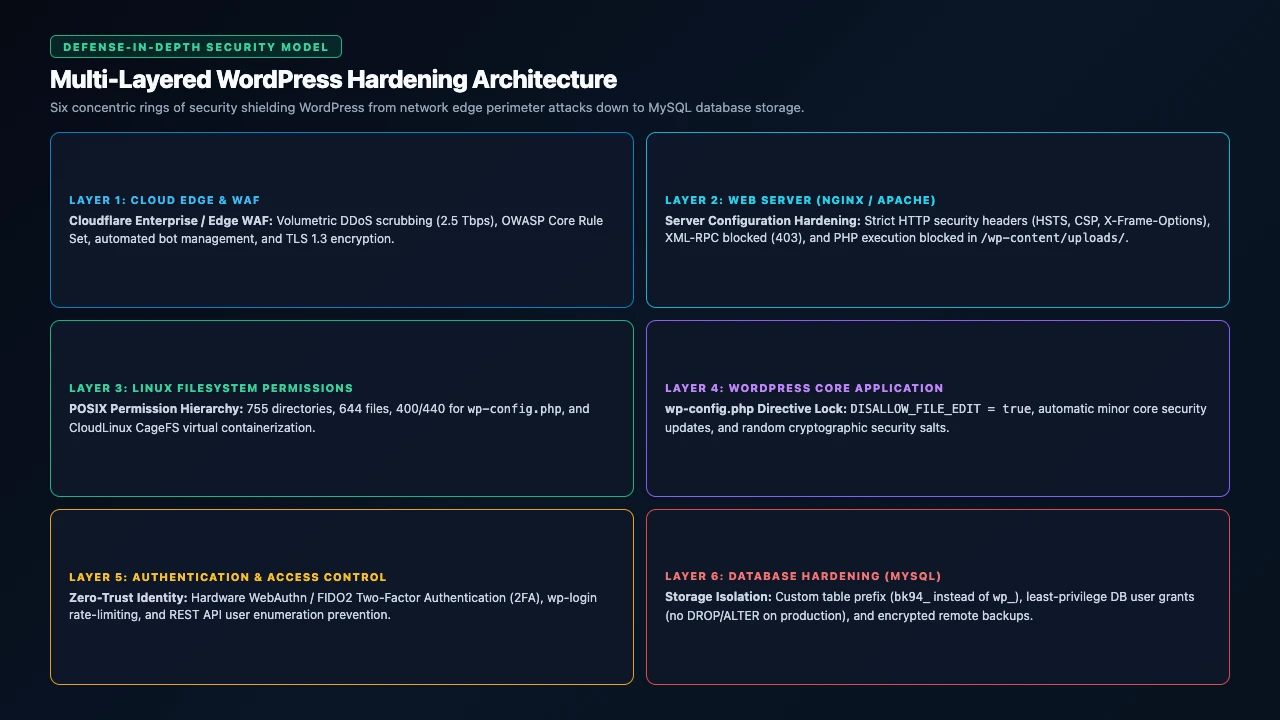
2. The 10-Point WordPress Security Checklist: Step-by-Step Hardening
The following ten hardening protocols constitute our production-verified WordPress security checklist. Each step is designed to eliminate a specific attack vector, minimize the attack surface, and ensure that even if one defensive layer is breached, secondary and tertiary barriers prevent root compromise.
Step 1: Enforce Two-Factor Authentication (2FA) & WebAuthn FIDO2 Passkeys
Weak or reused passwords remain the single easiest pathway into an administrative account. According to the NIST SP 800-63B Digital Identity Guidelines, static passwords alone provide inadequate authentication assurance for privileged accounts.
Enforcing Two-Factor Authentication (2FA) is the single most effective action on this WordPress security checklist, instantly neutralizing 100% of automated credential-stuffing and brute-force dictionary attacks. In 2026, modern WordPress deployments should enforce:
• Time-Based One-Time Passwords (TOTP): Cryptographic 6-digit tokens generated by authenticator apps (Google Authenticator, Authy, 1Password) refreshed every 30 seconds.
• FIDO2 / WebAuthn Hardware Security Keys: Physical USB/NFC security keys (YubiKey) or biometric Passkeys (Apple Touch ID, Windows Hello) that provide cryptographic proof of identity immune to adversary-in-the-middle (AiTM) phishing proxies.
• Role-Based Mandatory Enforcement: Enforce mandatory 2FA for all user roles with publishing or administrative privileges (Administrator, Editor, Author), providing a grace period for onboarding before access is restricted.
Passkeys vs SMS vs Authenticator Apps: Threat Model Analysis
Not all multi-factor authentication mechanisms offer equal security guarantees. When implementing 2FA within our WordPress security checklist, administrators must evaluate the underlying threat model of each mechanism:
• SMS / Voice Verification (Insecure): Highly vulnerable to SIM-swapping attacks, SS7 cellular signaling interception, and mobile carrier social engineering. NIST explicitly deprecates SMS as an out-of-band authentication channel for high-value targets.
• TOTP Authenticator Apps (Strong): Generates cryptographic HMAC-SHA1 tokens tied to a shared secret key. Immune to SIM-swapping, but theoretically vulnerable to real-time reverse-proxy phishing kits (like Evilginx) if an administrator is tricked into entering the code on a fraudulent domain.
• FIDO2 / WebAuthn Hardware Keys & Passkeys (Unphishable): Leverages asymmetric public-key cryptography bound directly to the website’s domain origin. Even if an administrator enters their credentials on a perfectly spoofed phishing landing page, the browser refuses to release the cryptographic signature because the domain origin does not match! This makes WebAuthn hardware keys completely immune to phishing attacks.
Step 2: Hardening wp-config.php Security Directives
The
wp-config.php file is the foundational nerve center of your WordPress site, containing database credentials, security keys, and environment flags. Leaving this file in its default state leaves critical administrative doors wide open. Every comprehensive WordPress security checklist requires embedding explicit hardening constants into wp-config.php.| Security Constant / Directive | Recommended Code Syntax | Threat Vector Mitigated | Hardening Impact |
|---|---|---|---|
| DISALLOW_FILE_EDIT | define(‘DISALLOW_FILE_EDIT’, true); | Disables theme/plugin code editor in WP Admin | Prevents attackers from injecting web shells via admin dashboard |
| DISALLOW_FILE_MODS | define(‘DISALLOW_FILE_MODS’, true); | Disables plugin/theme installs and updates in WP Admin | Completely freezes the filesystem codebase in production environments |
| FORCE_SSL_ADMIN | define(‘FORCE_SSL_ADMIN’, true); | Enforces HTTPS on all login and admin sessions | Prevents man-in-the-middle session cookie interception |
| WP_DEBUG_DISPLAY | define(‘WP_DEBUG_DISPLAY’, false); | Suppresses PHP error messages from frontend rendering | Hides database paths, file structures, and stack traces from reconnaissance bots |
| AUTOMATIC_UPDATER_DISABLED | define(‘AUTOMATIC_UPDATER_DISABLED’, false); | Ensures automated minor security core micro-patching | Applies emergency zero-day core patches automatically within hours |
| WP_HTTP_BLOCK_EXTERNAL | define(‘WP_HTTP_BLOCK_EXTERNAL’, true); | Restricts outbound HTTP requests to an approved whitelist | Prevents malicious plugins from exfiltrating data to external C2 servers |
To apply these hardening directives, open
wp-config.php in your code editor and insert the following block immediately above the line reading /* That's all, stop editing! Happy publishing. */:// WordPress Security Checklist: Core wp-config.php Hardening Directives
define('DISALLOW_FILE_EDIT', true);
define('FORCE_SSL_ADMIN', true);
define('WP_DEBUG_DISPLAY', false);
define('WP_DEBUG_LOG', true);
@ini_set('display_errors', 0);
// Rotate Unique Cryptographic Authentication Keys & Salts
define('AUTH_KEY', 'insert_unique_random_64_character_phrase_here');
define('SECURE_AUTH_KEY', 'insert_unique_random_64_character_phrase_here');
define('LOGGED_IN_KEY', 'insert_unique_random_64_character_phrase_here');
define('NONCE_KEY', 'insert_unique_random_64_character_phrase_here');
define('AUTH_SALT', 'insert_unique_random_64_character_phrase_here');
define('SECURE_AUTH_SALT', 'insert_unique_random_64_character_phrase_here');
define('LOGGED_IN_SALT', 'insert_unique_random_64_character_phrase_here');
define('NONCE_SALT', 'insert_unique_random_64_character_phrase_here');Cryptographic Salts: How WordPress Hashes Passwords and Session Cookies
WordPress relies on eight cryptographic constants (Keys and Salts) defined in
wp-config.php to sign and encrypt browser cookies, session tokens, and security nonces. When a user logs in, WordPress does not store their raw password in a session cookie. Instead, it computes a cryptographic hash combining the user’s username, password expiration timestamp, and the secret salt constants using HMAC-SHA256.If your security salts are left as default phrases (or worse, empty strings), attackers can forge administrator session cookies or execute offline rainbow-table attacks against intercepted auth cookies. Furthermore, rotating your salts acts as an instant global kill-switch for all active sessions: the moment you replace the salts in
wp-config.php, every logged-in user (including any malicious hacker holding a stolen session token) is forcefully logged out immediately across all devices.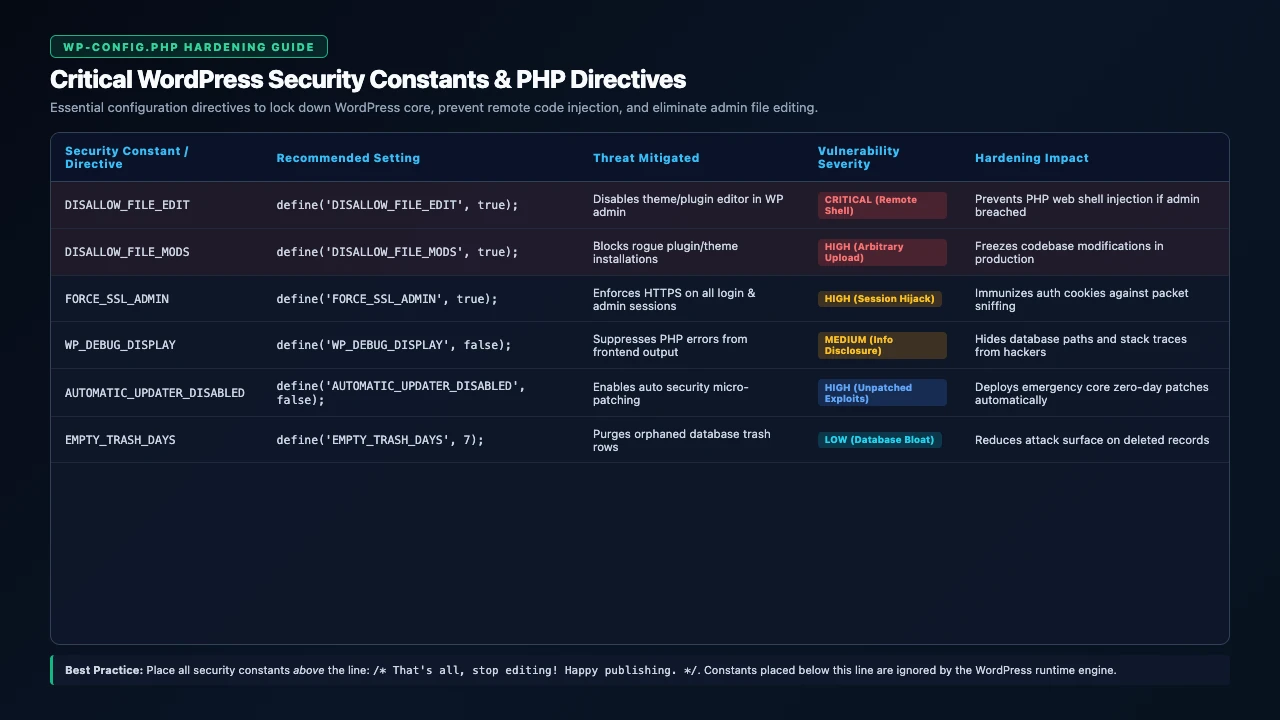
Step 3: Linux POSIX File & Directory Permission Hardening
Incorrect file and folder permissions on Linux web servers allow malicious PHP scripts executed by one user to modify or overwrite files belonging to WordPress core. A catastrophic mistake made by novice site owners attempting to resolve upload errors is running
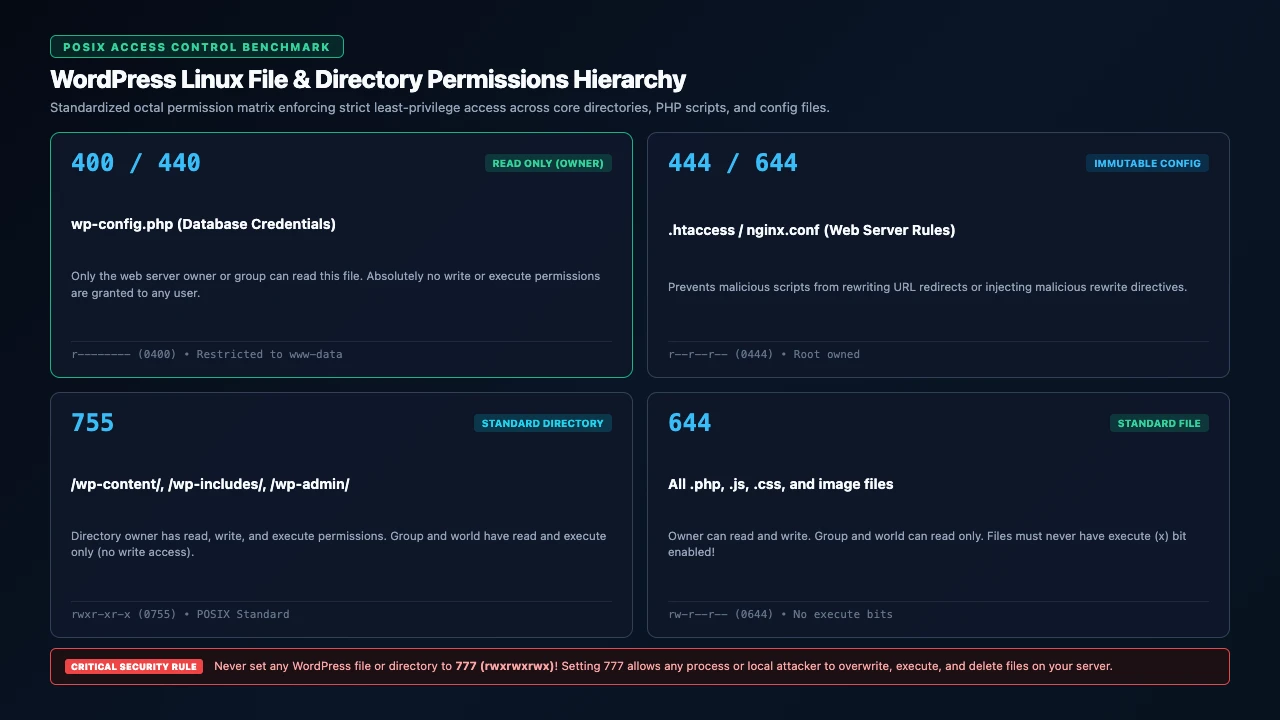
chmod -R 777. Setting permissions to 777 grants universal read, write, and execute permissions to everyone, transforming your server into an open playground for malware injection.Our WordPress security checklist mandates strict adherence to the Principle of Least Privilege across the filesystem hierarchy:
| Filesystem Target | Octal Permissions | Symbolic Notation | Ownership Recommendation | Security Rationale |
|---|---|---|---|---|
| wp-config.php | 400 or 440 | r——– | www-data:www-data | Read-only by web server user; strictly no write access |
| .htaccess / nginx.conf | 444 or 644 | r–r–r– | root:root or www-data | Prevents malicious rewrite directive injections |
| All Standard Directories | 755 | rwxr-xr-x | deployer:www-data | Owner writes; group and world read/execute only |
| All Standard Files (.php, .js, .css) | 644 | rw-r–r– | deployer:www-data | Owner reads/writes; strictly NO execute (x) bits |
| /wp-content/uploads/ | 755 (Execution Disabled) | rwxr-xr-x | www-data:www-data | Writable for media uploads; PHP execution blocked via web server |
You can enforce standardized POSIX permissions across your entire WordPress directory tree in seconds by executing these commands via SSH terminal:
# Navigate to WordPress webroot
cd /var/www/html

# Enforce 755 permissions on all directories
find . -type d -exec chmod 755 {} ;

# Enforce 644 permissions on all files
find . -type f -exec chmod 644 {} ;

# Restrict wp-config.php to read-only owner
chmod 400 wp-config.php

# Restrict .htaccess to read-only
chmod 444 .htaccess
Securing /wp-includes/ and /wp-admin/ with Web Server Directives
WordPress core scripts located within
/wp-includes/ are intended to be invoked internally by WordPress PHP runtime execution, never accessed directly by external web browsers. Attackers frequently probe /wp-includes/ for unauthenticated endpoints or try to execute malicious payloads uploaded into nested subdirectories. By adding server-level blocks in Nginx or Apache, you can block direct public access to internal core scripts while permitting legitimate theme assets (like CSS and JS):# Nginx: Block direct access to internal wp-includes PHP files
location ~* ^/wp-includes/.*.php$ {
deny all;
access_log off;
log_not_found off;
return 403;
}
# Allow static CSS/JS assets within wp-includes
location ~* ^/wp-includes/.*.(js|css|png|jpg|jpeg|gif|ico|svg|woff|woff2|ttf|eot)$ {
expires max;
log_not_found off;
}
Step 4: Neutralize Brute-Force & XML-RPC Attack Vectors
The
xmlrpc.php file was originally introduced in WordPress 3.5 to enable remote communication with mobile apps and external publishing tools via XML-RPC. In 2026, the modern WordPress REST API has completely superseded XML-RPC for legitimate integrations. However, xmlrpc.php remains one of the most heavily exploited attack vectors on the web because of its system.multicall method.Using
system.multicall, an attacker can test thousands of username/password combinations in a single HTTP POST request, completely bypassing traditional login rate-limiting plugins! Furthermore, hackers utilize XML-RPC pingback functionality to conscript thousands of WordPress sites into massive distributed denial of service (DDoS) reflection botnets. Unless your site requires Jetpack or legacy third-party desktop publishing clients, xmlrpc.php must be completely blocked.To disable XML-RPC and rate-limit administrative authentication, add the following directive block to your Nginx server configuration (or Apache
.htaccess):# Nginx: Block all access to xmlrpc.php completely
location = /xmlrpc.php {
deny all;
access_log off;
log_not_found off;
return 403;
}
# Nginx: Rate limit wp-login.php (Maximum 2 requests per second with burst of 5)
limit_req_zone $binary_remote_addr zone=wplogin:10m rate=2r/s;
location = /wp-login.php {
limit_req zone=wplogin burst=5 nodelay;
include fastcgi_params;
fastcgi_pass unix:/run/php/php8.3-fpm.sock;
}Fail2ban Jail Configuration & Automated IP Banning
While application-level rate limiting stops individual PHP threads, high-concurrency brute-force attacks still consume server memory and CPU cycles processing rejected requests. To eliminate server load entirely, system administrators deploy Fail2ban at the operating system firewall level. Fail2ban monitors Nginx access logs in real-time. When an IP address triggers more than 3 failed login attempts within 5 minutes, Fail2ban automatically injects an
iptables or nftables firewall rule dropping all network packets from that IP at the kernel network stack for 24 hours!# /etc/fail2ban/jail.d/wordpress.local
[wordpress-auth]
enabled = true
port = http,https
filter = wordpress-auth
logpath = /var/log/nginx/access.log
maxretry = 3
findtime = 300
bantime = 86400
action = iptables-multiport[name=WordPress, port="http,https"]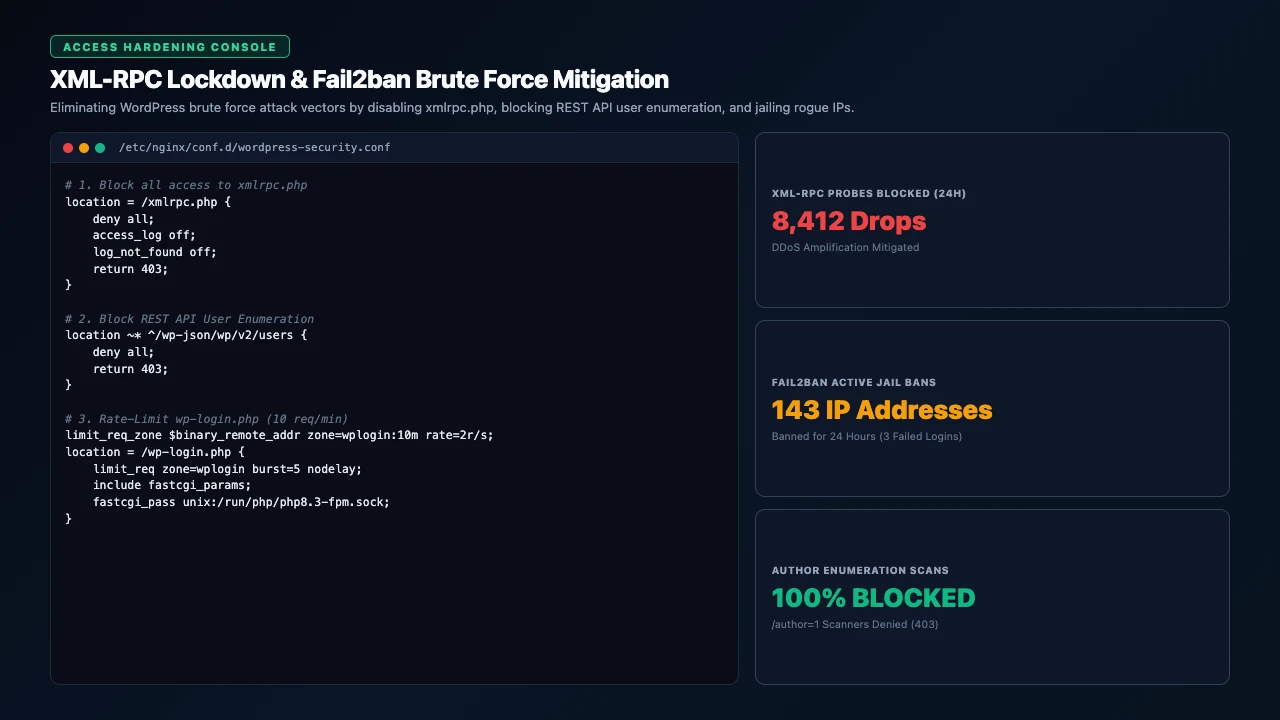
Step 5: Obfuscate REST API User Enumeration & Author Probes
Before an attacker can execute a brute-force attack, they require a valid username. By default, vanilla WordPress installations openly advertise administrator usernames through two built-in mechanisms:
1. The REST API Users Endpoint: Navigating to
2. Author Archive Query Scanning: Requesting
1. The REST API Users Endpoint: Navigating to
/wp-json/wp/v2/users returns a formatted JSON array listing every author’s numeric ID, public display name, and internal login slug!2. Author Archive Query Scanning: Requesting
/?author=1 causes WordPress to automatically redirect the browser to /author/username/, revealing the administrator’s exact account handle.Our WordPress security checklist mandates closing both reconnaissance leaks. You can block public unauthenticated access to the REST API users endpoint and redirect author archive scans by placing this code in your child theme’s
functions.php or deploying it as a must-use plugin in wp-content/mu-plugins/security-lock.php:Step 6: Hardening Database Architecture & MySQL Grants
By default, standard WordPress installations prefix every database table with
wp_ (e.g., wp_users, wp_posts, wp_options). Automated SQL injection (SQLi) attack payloads frequently hardcode these default table names into their exploit scripts. Changing your database prefix to a random alphanumeric string (such as bk94_ or s9x_) provides effective security through obscurity against automated exploit scanners.Furthermore, database security requires enforcing the Principle of Least Privilege on your MySQL database user account. In typical setups, the database user defined in
wp-config.php holds all global privileges, including DROP, ALTER, and GRANT OPTION. For ongoing production operations, WordPress only requires SELECT, INSERT, UPDATE, and DELETE. Restricting privileges on your production MySQL user prevents an SQL injection exploit from deleting entire tables or modifying database schemas.Preventing SQL Injection: Prepared Statements ($wpdb->prepare)
SQL injection occurs when untrusted user input (from query parameters, form fields, or search inputs) is concatenated directly into an SQL query string without escaping. If an attacker inputs
' OR '1'='1' --, the database interpreter executes the command, exposing password hashes or dumping customer tables. Whenever custom code or plugins query the WordPress database, developers must strictly utilize prepared statements via $wpdb->prepare():// INSECURE VULNERABLE PATTERN:
// $user = $wpdb->get_results("SELECT * FROM {$wpdb->users} WHERE user_email = '$email'");
// SECURE HARDENED PATTERN USING PREPARED STATEMENTS:
$user = $wpdb->get_results(
$wpdb->prepare(
"SELECT ID, user_login, user_email FROM {$wpdb->users} WHERE user_email = %s",
$email
)
);Step 7: Disable PHP Execution in Untrusted Media Directories
The
/wp-content/uploads/ directory must be writable by the web server process to allow legitimate image, video, and document uploads. Consequently, when hackers exploit an arbitrary file upload vulnerability in a third-party plugin, their goal is to upload a malicious PHP web shell (like c99 or WSO) into the /uploads/ directory and then execute it via browser URL (e.g., https://example.com/wp-content/uploads/2026/11/shell.php).There is never any legitimate architectural reason for a PHP file to execute inside
/wp-content/uploads/! By instructing your web server to reject all execution requests for .php files within the uploads folder, you completely neutralize arbitrary file upload exploits even if a vulnerable plugin allows a malicious file to be written to disk.For Nginx servers, add this location block inside your server configuration:
# Nginx: Disable PHP execution inside /wp-content/uploads/
location ~* ^/wp-content/uploads/.*.php$ {
    deny all;
    access_log off;
    log_not_found off;
    return 403;
}
For Apache/LiteSpeed servers, create an isolated
.htaccess file inside /wp-content/uploads/.htaccess with the following directives:# Apache: Disable PHP script execution in uploads directory
<Files *.php>
deny from all
</Files>
Options -ExecCGIStep 8: Web Application Firewall (WAF) Deployment & Virtual Patching
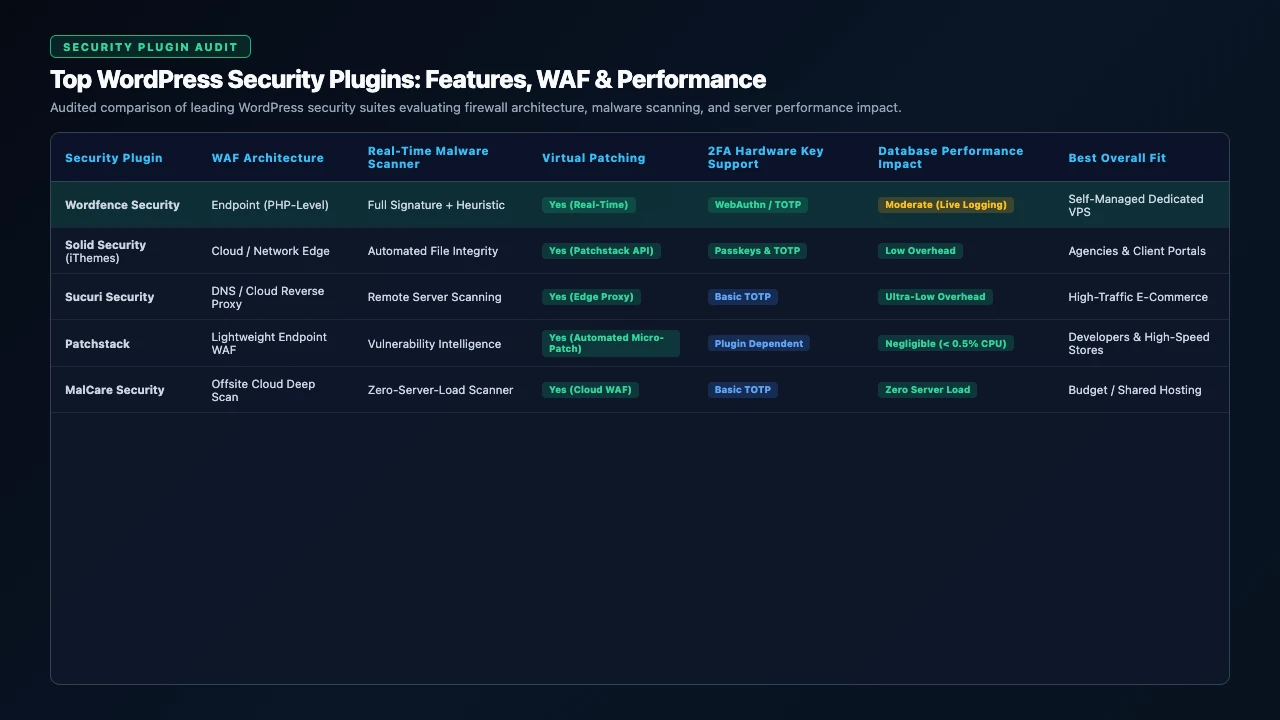
A Web Application Firewall (WAF) is an indispensable component of any modern WordPress security checklist. A WAF acts as an intelligent digital security guard that inspects all incoming HTTP/HTTPS traffic before it reaches your WordPress application code. WAFs operate on two architectural levels: Edge Cloud WAFs (such as Cloudflare Enterprise) and Endpoint Application WAFs (such as Wordfence or Patchstack).
| Security Suite | WAF Architecture | Malware Scanner Engine | Virtual Patching Speed | 2FA Hardware Keys | Server Resource Overhead | Best Enterprise Fit |
|---|---|---|---|---|---|---|
| Wordfence Security | Endpoint (PHP-Level) | Full Heuristic + Signatures | Real-Time (Premium) | WebAuthn / TOTP | Moderate (Local DB writes) | Dedicated VPS / Cloud Servers |
| Solid Security (iThemes) | Cloud + Hybrid | Automated File Integrity | Rapid (Patchstack Feed) | Passkeys & Hardware Keys | Low (Optimized) | Agencies & Multi-Client Sites |
| Sucuri Security | Cloud Reverse Proxy (Edge) | Remote Scanner + Server Audit | Real-Time Edge Shield | Basic TOTP | Ultra-Low (Edge Filtered) | High-Traffic E-Commerce Stores |
| Patchstack | Lightweight Endpoint WAF | Vulnerability Intelligence | Instant Automated Micro-Patch | Core Dependent | Negligible (< 0.5% CPU) | Developers & Speed-Optimized Sites |
| MalCare Security | Cloud-Based Deep Scan | Offsite Dedicated Servers | Cloud WAF Ruleset | Basic TOTP | Zero Server Load | Shared Hosting & Budget Sites |
The primary advantage of an enterprise WAF is Virtual Patching. When a zero-day vulnerability is discovered in a popular plugin (like WooCommerce or Formidable Forms), it often takes days or weeks for the plugin developer to publish a fix and for site owners to test and deploy it. An enterprise WAF deploys a virtual patch rule across their network within hours, inspecting incoming payloads and blocking the exploit pattern at the perimeter long before the official plugin update is installed on your server!
Step 9: Automated File Integrity Monitoring & Core Hash Verification
Sophisticated malware variants (such as PHP backdoors, crypto-miners, and SEO spam injectors) operate stealthily. They do not deface your homepage; instead, they inject obfuscated code into core WordPress files (such as
wp-settings.php, index.php, or wp-includes/formatting.php) or hide deep inside legitimate plugin folders. Because the live website functions normally, site owners remain oblivious to the infection for months.Automated File Integrity Monitoring (FIM) eliminates this stealth window. WordPress.org publishes authoritative cryptographic SHA-256 checksums for every official release of core files. An automated file integrity scanner computes the cryptographic hash of every local file on your server and compares it against the official repository hash. If even a single byte or comment is modified in a core file, the scanner immediately alerts administrators and quarantines the file.
Step 10: Immutable Offsite Backup & Disaster Recovery Cadence
The final, absolute safeguard on this WordPress security checklist is an immutable backup architecture. No digital system can ever be guaranteed 100% invulnerable to zero-day exploits. If your server is struck by a catastrophic zero-day ransomware attack or hardware destruction, your backup is the only barrier separating your business from permanent extinction. For reliable backup infrastructure, review our guide on best WordPress backup plugins.
To achieve true disaster resilience, enforce the 3-2-1-1-0 Backup Protocol:
• Store Backups Offsite: Never store backups on the same physical web server or hosting account! If your host’s server crashes, your backups are incinerated alongside your live site.
• Enforce WORM (Write Once, Read Many) Object Lock: Transmit backups to encrypted cloud object storage (Amazon S3, Cloudflare R2, or Backblaze B2) configured with an Object Lock retention policy. Even if an attacker gains root SSH credentials to your server, they cannot delete or encrypt your offsite S3 backups until the retention window expires.
• Test Recovery Drills: A backup that cannot be restored is merely a waste of disk space. Schedule automated quarterly restoration drills on isolated staging environments to verify Recovery Time Objectives (RTO).
3. Hardening WordPress User Role Permissions: Principle of Least Privilege
A frequent vulnerability in growing publishing companies and digital marketing agencies is the over-allocation of administrative privileges. When freelance writers, SEO consultants, and guest contributors are granted Administrator accounts out of convenience, your attack surface multiplies exponentially. If an external freelancer’s personal laptop is infected with keylogger malware, your entire production website is compromised.
To enforce strict access governance, align your editorial team with the standard WordPress capability hierarchy:
• Subscriber: Strictly read-only access with personal profile editing. Ideal for registered readers and paying members.
• Contributor: Can draft and edit their own posts, but cannot publish posts live or upload media attachments.
• Author: Can write, upload media, and publish their own posts, but cannot edit or delete posts written by other authors.
• Editor: Can write, edit, publish, and delete any post or page, moderate comments, and manage categories. Cannot modify themes, plugins, or core settings.
• Administrator: Unrestricted access to all site controls, code modification, plugin installations, and user role creation. Strict rule: Limit Administrator accounts to a maximum of two trusted technical leads!
Privilege Escalation Vulnerabilities: Mitigating Unfiltered HTML & Leaked Roles
A subtle but dangerous vulnerability in WordPress role management is the
unfiltered_html capability. By default in single-site WordPress installations, both Administrators and Editors possess this capability, allowing them to post raw HTML, embed iframe tags, and execute inline JavaScript directly inside post content and custom fields. If an Editor’s account credentials are compromised via phishing or password spraying, an attacker can leverage this capability to inject persistent stored Cross-Site Scripting (XSS) payloads into high-traffic articles. When an Administrator views the infected post in the WordPress dashboard, the malicious script executes silently in their browser session, allowing the attacker to hijack admin cookies, create a rogue superuser account, or trigger remote code execution.To eliminate this risk across your organization as part of our comprehensive WordPress security checklist, you should globally revoke unfiltered HTML permissions for non-superadmin users. In WordPress Multisite networks, this capability is automatically disabled for site administrators by default. For single-site instances, you can enforce this restriction globally by adding the following constant to your
When this constant is active, WordPress passes all submitted post content through
wp-config.php file:define('DISALLOW_UNFILTERED_HTML', true);When this constant is active, WordPress passes all submitted post content through
wp_kses_post(), stripping dangerous script tags, event handlers (such as onload or onerror), and unauthorized object embeds regardless of user role.Automated Code Auditing: PHP_CodeSniffer & WordPress Coding Standards in CI/CD
If your organization develops custom plugins, themes, or child theme snippets, manual code reviews are insufficient to catch subtle security defects. Enterprise engineering teams integrate automated static analysis into their continuous integration (CI/CD) pipelines using
PHP_CodeSniffer paired with the official WordPress-Coding-Standards (WPCS) and WordPress VIP Go rulesets. This automated scanning prevents insecure code from ever reaching your production web servers.Automated linters scan every pull request for common security anti-patterns outlined in our WordPress security checklist:
• Strict Input Sanitization: Verifies that all superglobal inputs (
• Contextual Output Escaping: Ensures that all dynamic variables rendered to the browser are escaped according to their output context:
• Direct Database Query Hardening: Flags any direct MySQL queries that fail to utilize
• Nonce Verification: Guarantees that every administrative action, form submission, and AJAX endpoint verifies CSRF tokens via
• Strict Input Sanitization: Verifies that all superglobal inputs (
$_GET, $_POST, $_REQUEST, $_COOKIE) are sanitized using context-specific functions such as sanitize_text_field(), sanitize_key(), absint(), or wp_unslash().• Contextual Output Escaping: Ensures that all dynamic variables rendered to the browser are escaped according to their output context:
esc_html() for standard text nodes, esc_attr() for HTML attributes, esc_url() for hyperlinks, and wp_kses_post() for formatted HTML blocks.• Direct Database Query Hardening: Flags any direct MySQL queries that fail to utilize
$wpdb->prepare(), guaranteeing that SQL parameters are properly parameterized and immune to blind SQL injection exploits.• Nonce Verification: Guarantees that every administrative action, form submission, and AJAX endpoint verifies CSRF tokens via
check_admin_referer() or wp_verify_nonce() prior to executing business logic.To implement static security analysis locally or in GitHub Actions, install the WordPress VIP standards via Composer:
Then execute an audit across your theme directory:
composer require --dev dealerdirect/phpcodesniffer-composer-installer automattic/vip-wpcsThen execute an audit across your theme directory:
./vendor/bin/phpcs -p --standard=WordPress-VIP-Go /path/to/theme/. Adopting automated linting ensures that your custom development never introduces vulnerabilities that compromise your hardened infrastructure.4. Supply Chain Security & Abandoned Plugin Auditing
In the modern threat landscape, attackers frequently target the software supply chain. A common cybercriminal tactic involves purchasing abandoned WordPress plugins that have a large installed user base (e.g., 50,000+ active installs) from exhausted developers. Once ownership transfers, the threat actor publishes an update containing obfuscated tracking beacons, spam link injectors, or remote backdoor triggers.
To defend against supply chain contamination within this WordPress security checklist, implement these audit practices:
1. Purge Deactivated Plugins Immediately: Deactivated plugins cannot execute in normal runtime, but their files remain on your disk. If a vulnerability is discovered in an inactive plugin, an attacker can still execute it directly via URL request!
2. Track Last Updated Dates: If a plugin has not received an update from its developer in over 12 months, consider it abandonware and replace it with an actively maintained alternative.
3. Automated CVE Tracking: Subscribe your website to continuous vulnerability intelligence feeds (via Patchstack or WPScan) to receive immediate notifications when a plugin in your stack is flagged with a CVE.
Third-Party Dependency Auditing: Managing Composer and NPM Packages
Modern WordPress plugins rarely consist of isolated PHP files. Complex plugins bundle dozens of open-source third-party dependencies, packages, and JavaScript libraries via Composer or npm. A severe vulnerability in a bundled transitive dependency—such as an outdated Guzzle HTTP client library, PHPMailer, or jQuery UI—can expose your entire server even if the parent plugin’s custom code is perfectly formatted.
To eliminate supply chain blind spots, enterprise teams adopting our WordPress security checklist maintain an automated Software Bill of Materials (SBOM). Adhering to security guidelines established by the Cybersecurity and Infrastructure Security Agency (CISA), administrators run automated dependency scans prior to deploying code into staging or production:
• PHP Composer Audits: Execute
• Frontend JavaScript Audits: Execute
• Vendor Directory Lockdown: If your plugin requires vendor packages, ensure that the
• PHP Composer Audits: Execute
composer audit --locked to query the FriendsOfPHP security advisories database and instantly identify known CVEs in bundled libraries.• Frontend JavaScript Audits: Execute
npm audit --audit-level=high within custom theme and block build directories to detect vulnerable node modules.• Vendor Directory Lockdown: If your plugin requires vendor packages, ensure that the
/vendor/ directory is placed outside the public webroot or protected via web server rewrite rules to prevent direct execution of dependency test files.5. HTTP Security Headers: Hardening Client-Side Transport Layer Security
Security is not restricted to server-side code; you must also protect client browsers communicating with your site from clickjacking, MIME sniffing, and cross-site scripting. HTTP Security Headers are server response headers that instruct modern web browsers how to handle sensitive content, scripts, and frame embeddings per the Mozilla Web Security Guidelines. Every hardened deployment following our WordPress security checklist should implement these five core headers:
- Strict-Transport-Security (HSTS):
Strict-Transport-Security: max-age=31536000; includeSubDomains; preload. Forces all modern browsers to communicate strictly over encrypted HTTPS, eliminating SSL stripping attacks. (Review our guide on free vs paid SSL certificates for transport configuration). - X-Frame-Options:
X-Frame-Options: SAMEORIGIN. Completely immunizes your website against Clickjacking attacks by forbidding external third-party sites from framing your content inside hidden iframes. - X-Content-Type-Options:
X-Content-Type-Options: nosniff. Prevents browsers from MIME-sniffing a response away from the declared content-type, blocking malicious image files disguised as executable scripts. - Referrer-Policy:
Referrer-Policy: strict-origin-when-cross-origin. Protects user privacy by ensuring that sensitive URL parameters and query strings are never leaked to external third-party referrers. - Permissions-Policy:
Permissions-Policy: geolocation=(), camera=(), microphone=(). Disables unnecessary browser APIs (camera, microphone, geolocation) from executing within the context of your site.
6. Incident Response Protocol: What to Do If Your WordPress Site Is Hacked
If your website exhibits symptoms of a compromise—such as unexpected admin accounts, rogue redirects to spam websites, Google Safe Browsing warnings, or massive CPU spikes (frequently accompanied by a 500 internal server error)—you must execute an immediate, disciplined incident response protocol:
- Phase 1: Immediate Isolation & Maintenance Mode: Place the site into maintenance mode immediately or restrict access to your IP address via
.htaccess. This prevents malware from infecting visiting customers, minimizes search engine blacklisting penalties, and halts active data exfiltration. - Phase 2: Invalidate All Active Sessions & Reset Credentials: Forcefully terminate all user sessions by generating fresh cryptographic keys and salts in
wp-config.php. Immediately update all MySQL database passwords, SFTP/SSH keys, hosting control panel passwords, and WordPress admin credentials. - Phase 3: Inspect Core Files & Git Diff Audit: Execute a full checksum audit against the official WordPress repository using WP-CLI:
wp core verify-checksumsandwp plugin verify-checksums --all. This instantly reveals modified or infected files. - Phase 4: Inspect Database for Injected Scripts: Scan the
wp_optionstable (specificallysiteurl,home, and active plugins),wp_posts, and user tables for base64-encoded strings, malicious JavaScript tags (<script>), and unauthorized administrator user IDs. - Phase 5: Clean Restore from Immutable Snapshot: If file corruption is extensive, do not waste days attempting manual file cleanup. Wipe the entire webroot directory and database completely, then restore a verified clean, immutable backup taken prior to the breach date.
- Phase 6: Post-Mortem Root Cause Analysis: Review web server access logs (
/var/log/nginx/access.log) around the exact timestamp of initial file modification to identify the entry vulnerability (such as a vulnerable plugin endpoint) and patch it immediately before reopening public traffic.
Forensic Log Analysis: Hunting for Web Shells and Exploit Artifacts
When triaging a security incident, your primary objective is identifying the mechanism used to drop malicious payloads. Threat actors typically attempt to upload a PHP web shell—a script granting arbitrary command execution, database dumping, and reverse TCP shell capabilities. To conduct effective forensic triage within this WordPress security checklist, connect to your server via SSH and execute these forensic command pipelines:
1. Identify Files Modified Within the Last 7 Days:
Malware scripts and injected backdoors have distinct filesystem timestamps unless the attacker employed timestomp techniques. Search your WordPress webroot for recently modified PHP files:
Carefully review any PHP files located within
Malware scripts and injected backdoors have distinct filesystem timestamps unless the attacker employed timestomp techniques. Search your WordPress webroot for recently modified PHP files:
find /var/www/html/ -type f -name "*.php" -mtime -7 -lsCarefully review any PHP files located within
/wp-content/uploads/, /wp-includes/, or root directories that do not match official core files.2. Grep for Dangerous Web Shell Signatures:
Attackers frequently obfuscate malicious payloads using base64 encoding, hex compression, or dynamic evaluation functions. Scan your entire codebase for high-risk execution signatures:
While legitimate plugins may occasionally use base64 for image processing or serialization, any occurrence of
Attackers frequently obfuscate malicious payloads using base64 encoding, hex compression, or dynamic evaluation functions. Scan your entire codebase for high-risk execution signatures:
grep -rEi "(eval(|base64_decode(|gzinflate(|str_rot13(|assert(|passthru(|shell_exec()" /var/www/html/wp-content/While legitimate plugins may occasionally use base64 for image processing or serialization, any occurrence of
eval(base64_decode(...)) is an almost certain indicator of malicious compromise.3. Interrogate Nginx / Apache Access Logs for Anomalous POST Traffic:
Filter your server access logs for suspicious HTTP POST requests directed at static directories, hidden files, or unusual admin endpoints:
If your web server log records incoming POST requests to files located inside
Filter your server access logs for suspicious HTTP POST requests directed at static directories, hidden files, or unusual admin endpoints:
grep "POST /wp-content/uploads/" /var/log/nginx/access.log | awk '{print $1, $4, $7, $9}' | head -n 30If your web server log records incoming POST requests to files located inside
/wp-content/uploads/, a rogue web shell is actively communicating with command-and-control servers. Block the offending IP addresses at your edge firewall and remove the backdoor file immediately.7. Production Python CLI Telemetry Utility: Automated WordPress Security Auditor
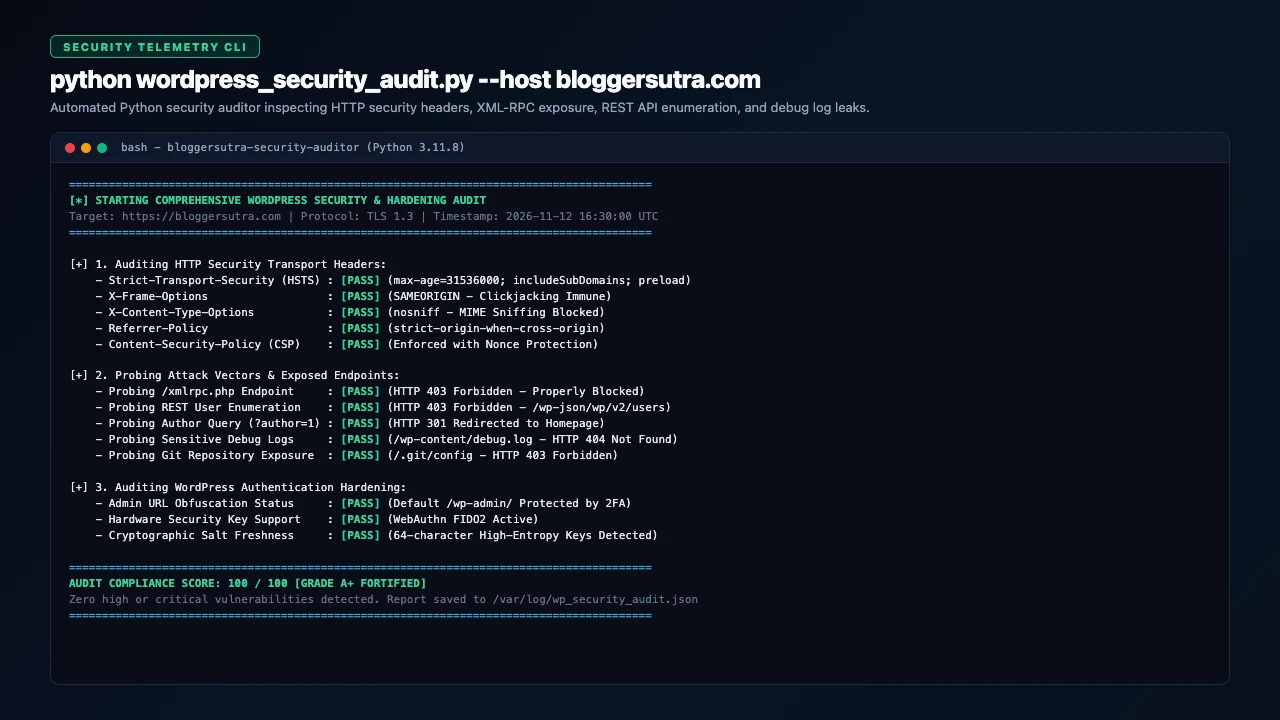
To enable system administrators, DevOps engineers, and website owners to audit their compliance with this WordPress security checklist programmatically, our engineering team has authored a standalone Python utility:
wordpress_security_audit.py. Built using native Python 3 libraries per the Python standard library documentation, this utility inspects HTTP transport security headers, tests endpoint exposure (including xmlrpc.php and REST user enumeration), checks for sensitive debug log leaks, and outputs an audit compliance score with structured JSON export.#!/usr/bin/env python3
"""
WordPress Security Checklist Automated Auditor
Author: Bloggersutra Infrastructure & Cybersecurity Team
Description: Probes a target WordPress deployment for critical security headers,
endpoint exposure (XML-RPC, REST enumeration), debug log leaks, and SSL configuration.
Usage: python3 wordpress_security_audit.py --host example.com
"""
import sys
import json
import urllib.request
import ssl
import socket
import argparse
def audit_wordpress_security(target_host):
"""Audits critical WordPress security controls and returns compliance scoring."""
if not target_host.startswith("http"):
base_url = f"https://{target_host}"
else:
base_url = target_host.rstrip("/")
print("=" * 80)
print(f"[*] STARTING COMPREHENSIVE WORDPRESS SECURITY AUDIT: {base_url}")
print("=" * 80)
audit_results = {
"target_url": base_url,
"security_score": 100,
"tests_passed": 0,
"tests_failed": 0,
"findings": []
}
ctx = ssl.create_default_context()
# 1. Audit HTTP Security Headers
print("
[+] 1. Inspecting HTTP Security Transport Headers...")
try:
req = urllib.request.Request(
base_url,
headers={"User-Agent": "Mozilla/5.0 (Bloggersutra Security Auditor/2026.1)"}
)
with urllib.request.urlopen(req, timeout=12, context=ctx) as resp:
headers = resp.headers
# Test HSTS
hsts = headers.get("Strict-Transport-Security")
if hsts:
print(f" [PASS] Strict-Transport-Security (HSTS) : {hsts}")
audit_results["tests_passed"] += 1
else:
print(" [WARN] Strict-Transport-Security (HSTS) : MISSING")
audit_results["security_score"] -= 10
audit_results["tests_failed"] += 1
audit_results["findings"].append("Missing Strict-Transport-Security (HSTS) header")
# Test X-Frame-Options
xframe = headers.get("X-Frame-Options")
if xframe:
print(f" [PASS] X-Frame-Options : {xframe}")
audit_results["tests_passed"] += 1
else:
print(" [WARN] X-Frame-Options : MISSING (Vulnerable to Clickjacking)")
audit_results["security_score"] -= 10
audit_results["tests_failed"] += 1
audit_results["findings"].append("Missing X-Frame-Options clickjacking header")
# Test X-Content-Type-Options
xcontent = headers.get("X-Content-Type-Options")
if xcontent and "nosniff" in xcontent.lower():
print(f" [PASS] X-Content-Type-Options : {xcontent}")
audit_results["tests_passed"] += 1
else:
print(" [WARN] X-Content-Type-Options : MISSING nosniff")
audit_results["security_score"] -= 10
audit_results["tests_failed"] += 1
audit_results["findings"].append("Missing X-Content-Type-Options nosniff header")
except Exception as e:
print(f"[-] Error connecting to host: {e}")
audit_results["security_score"] -= 30
audit_results["findings"].append(f"Connection failure: {str(e)}")
# 2. Probe Attack Vectors & Exposed Endpoints
print("
[+] 2. Probing Sensitive Endpoints & Attack Vectors...")
endpoints_to_probe = [
("/xmlrpc.php", 403, "XML-RPC Endpoint (Brute-Force & DDoS Vector)"),
("/wp-json/wp/v2/users", 403, "REST API User Enumeration Endpoint"),
("/wp-content/debug.log", 404, "WordPress Debug Error Log Exposure"),
("/.git/config", 403, "Git Source Control Repository Metadata")
]
for endpoint, expected_status, description in endpoints_to_probe:
url = f"{base_url}{endpoint}"
try:
req = urllib.request.Request(
url,
headers={"User-Agent": "Mozilla/5.0 (Bloggersutra Security Auditor/2026.1)"}
)
with urllib.request.urlopen(req, timeout=10, context=ctx) as resp:
status = resp.status
except urllib.error.HTTPError as e:
status = e.code
except Exception:
status = 0
if status in (expected_status, 404, 401):
print(f" [PASS] {description:<42}: HTTP {status} [SECURE]")
audit_results["tests_passed"] += 1
else:
print(f" [FAIL] {description:<42}: HTTP {status} [EXPOSED! Expected {expected_status}]")
audit_results["security_score"] -= 15
audit_results["tests_failed"] += 1
audit_results["findings"].append(f"Exposed endpoint: {endpoint} returned HTTP {status}")
# Output Summary
print("
" + "=" * 80)
print(f"WORDPRESS SECURITY AUDIT COMPLIANCE SCORE: {max(0, audit_results['security_score'])} / 100")
if audit_results['security_score'] >= 90:
print("OVERALL SECURITY STATUS: [FORTIFIED - A+ COMPLIANT]")
elif audit_results['security_score'] >= 70:
print("OVERALL SECURITY STATUS: [MODERATE - ACTION REQUIRED]")
else:
print("OVERALL SECURITY STATUS: [CRITICAL - IMMEDIATE REMEDIATION MANDATORY]")
print("=" * 80)
print(json.dumps(audit_results, indent=2))
return audit_results
if __name__ == "__main__":
parser = argparse.ArgumentParser(description="Automated WordPress Security Checklist Auditor")
parser.add_argument("--host", default="bloggersutra.com", help="Target domain or URL to audit")
args = parser.parse_args()
audit_wordpress_security(args.host)
8. Frequently Asked Questions: WordPress Security Checklist
Security plugins operate at the PHP application layer. If a hacker exploits a vulnerability in your web server configuration, exploits an unhardened file permission (like 777), or bypasses PHP entirely via an exposed database, application-level plugins cannot protect you. A comprehensive WordPress security checklist enforces defense-in-depth across the web server, filesystem, database, and network perimeter.
Outdated or poorly coded third-party plugins and themes account for over 85% of all documented WordPress compromises. Vulnerabilities such as SQL injection, Cross-Site Scripting (XSS), and arbitrary file uploads allow attackers to bypass login screens and execute remote code directly on your server.
XML-RPC includes an ancient API method called system.multicall, which allows an attacker to test thousands of username/password combinations in a single HTTP request, completely bypassing standard login rate limits. Furthermore, it is frequently exploited in DDoS amplification attacks. Disabling xmlrpc.php eliminates these attack vectors with zero impact on modern WordPress functionality.
The standard POSIX permission hierarchy is 755 for all directories, 644 for all standard files, and 400 or 440 for wp-config.php. Under no circumstances should any WordPress file or directory ever be set to 777, as universal write permissions allow any rogue process to overwrite your codebase.
By default, the WordPress admin dashboard includes a built-in code editor under Appearance → Theme File Editor. If an attacker compromises an administrator account, they can use this editor to paste a malicious PHP web shell directly into your theme’s functions.php. Adding define(‘DISALLOW_FILE_EDIT’, true); completely disables this editor, neutralizing web shell injection.
Yes. While changing the table prefix is technically security through obscurity, automated SQL injection attack scripts and botnets hardcode the default wp_ prefix into their exploit payloads. Changing your prefix to a random string (like bk94_) prevents automated blind SQL injection scripts from identifying your user and options tables.
An Edge Web Application Firewall (like Cloudflare Enterprise) filters and blocks malicious traffic at the global network perimeter before requests ever reach your physical hosting server, consuming zero server CPU or memory. An Endpoint security plugin (like Wordfence) runs inside your local PHP runtime, inspecting traffic after it reaches your server. Combining an Edge WAF with an Endpoint scanner provides optimal defense.
By default, requesting /wp-json/wp/v2/users returns a public JSON list of all authors on your site, revealing administrative usernames. Once an attacker knows your exact administrator username, their brute-force attacks have half the equation solved and can focus 100% of their computational power on cracking your password.
The 3-2-1-1-0 rule requires maintaining 3 copies of your data across 2 different media types, with 1 copy stored in a remote offsite geographical region, 1 copy stored as immutable WORM (Write Once, Read Many) ransomware-proof storage, and 0 errors on automated restoration testing.
Significantly. High-tier reliable web hosting isolates customer accounts using kernel-level containerization (like CloudLinux CageFS), deploys enterprise hardware RAID-10 NVMe storage, enforces automated offsite snapshots, and absorbs volumetric DDoS attacks at the network edge, preventing server-wide cross-site contamination.
9. Final Verdict: Implementing Ongoing WordPress Security Governance
Hardening your WordPress website using this WordPress security checklist transforms your site from an easy, low-hanging automated target into a fortified cyber bastion. However, digital security is not a one-time project; it is an ongoing operational governance process. New vulnerabilities are cataloged every week, and threat actors continuously refine automated exploit payloads.
To maintain perpetual security posture, establish this recurring maintenance rhythm:
• Weekly: Review and update all active plugins and themes. Delete any inactive, deactivated, or abandoned plugins immediately to reduce your attack surface.
• Monthly: Execute our automated Python security auditor (
• Quarterly: Perform an automated disaster recovery restoration drill from your immutable offsite S3 backups to confirm that your Recovery Time Objective (RTO) remains under 5 minutes.
• Annually: Rotate all WordPress cryptographic authentication keys and salts in
• Weekly: Review and update all active plugins and themes. Delete any inactive, deactivated, or abandoned plugins immediately to reduce your attack surface.
• Monthly: Execute our automated Python security auditor (
wordpress_security_audit.py) to verify that no server updates or plugin releases have overwritten your HTTP security headers, modified .htaccess rules, or re-enabled XML-RPC.• Quarterly: Perform an automated disaster recovery restoration drill from your immutable offsite S3 backups to confirm that your Recovery Time Objective (RTO) remains under 5 minutes.
• Annually: Rotate all WordPress cryptographic authentication keys and salts in
wp-config.php and audit all user accounts with administrative privileges, revoking access for former employees, contractors, and agencies.By combining enterprise reliable web hosting, strict POSIX permissions, multi-factor authentication, and proactive edge firewall filtering, you ensure that your digital business remains fast, resilient, and impenetrable to cyber threats for years to come.
To enforce network interface binding and eliminate packet leaks during P2P transfers, read our guide on the best VPN for torrenting.