Quick answer
- When should you hire Blogger to WordPress migration project on WordPress designer instead of building the site yourself? You should hire WordPress designer when your website directly generates commercial revenue, when your custom blog name ideas and branding requires a bespoke layout beyond off-the-shelf templates, or when the founder’s time is worth more than $75/hour. If spending 80 hours fighting page builder CSS costs you $6,000+ in lost business development, hiring a WordPress designer for $3,500 delivers immediate positive ROI while producing a superior, conversion-focused asset..tp-post-content code, .tp-post-content pre, .toc-link{word-break:break-word!important;overflow-wrap:break-word!important;}
- What is the realistic average WordPress designer cost in 2026? The average wordpress designer cost ranges from $50 to $150 per hour for vetted freelancers, or $2,500 to $8,500 for a fixed-price, 5-to-10-page custom website redesign. Full-service boutique agencies charge between $10,000 and $25,000+ for enterprise UI/UX design, custom block theme development, and conversion rate optimization.
- What is the difference between a WordPress web designer and a WordPress developer? A wordpress web designer focuses on visual aesthetics, typography, color harmony, user journeys, responsive mobile UI, and conversion rate optimization (CRO). A WordPress developer focuses on server-side architecture, custom PHP functions, database query tuning, REST API endpoints, and complex plugin logic. When you hire WordPress designer, you are investing in how your site looks, feels, and converts.
- What are the most dangerous red flags when hiring a WordPress designer? Critical red flags include: demanding 100% payment upfront, relying on bloated multi-purpose commercial themes packed with 50+ plugins, refusing to build on a private staging server, lacking real-world Core Web Vitals optimization skills, and failing to provide an explicit contract transferring 100% intellectual property rights upon completion.
- Should I hire a web designer for a brand new blog or hobby site? If you are launching a personal blog or early-stage proof-of-concept with zero existing revenue, the answer to ‘should i hire a web designer’ is usually no. You should start with a clean, lightweight block theme and validate your content niche first. Once your traffic and affiliate or ad revenue scale, you can hire WordPress designer to rebrand and maximize conversion funnels.
In the modern digital publishing and online business landscape of 2026, your website is the primary commercial engine of your brand. It is your storefront, your sales representative, your digital portfolio, and your credibility anchor. When potential clients, affiliate partners, or prospective customers arrive on your homepage, they form a subconscious judgment about your business authority in less than 50 milliseconds. This is why thousands of businesses choose to hire WordPress designer experts each year. For many entrepreneurs, site owners, and scaling publishers, the critical question inevitably arises: should you hire WordPress designer or attempt to build the site yourself?
A decade ago, launching a WordPress website required either manual code editing or settling for rigid, cookie-cutter themes. Today, the democratization of no-code visual site builders and modern Gutenberg Full Site Editing (FSE) makes it technically possible for anyone to piece together a functional website. However, there is a profound, revenue-defining chasm between a site that merely exists and a high-converting digital asset engineered to drive sales, retain visitors, and dominate organic search rankings. Knowing when and how to hire WordPress designer is one of the most profitable strategic decisions an entrepreneur can make.
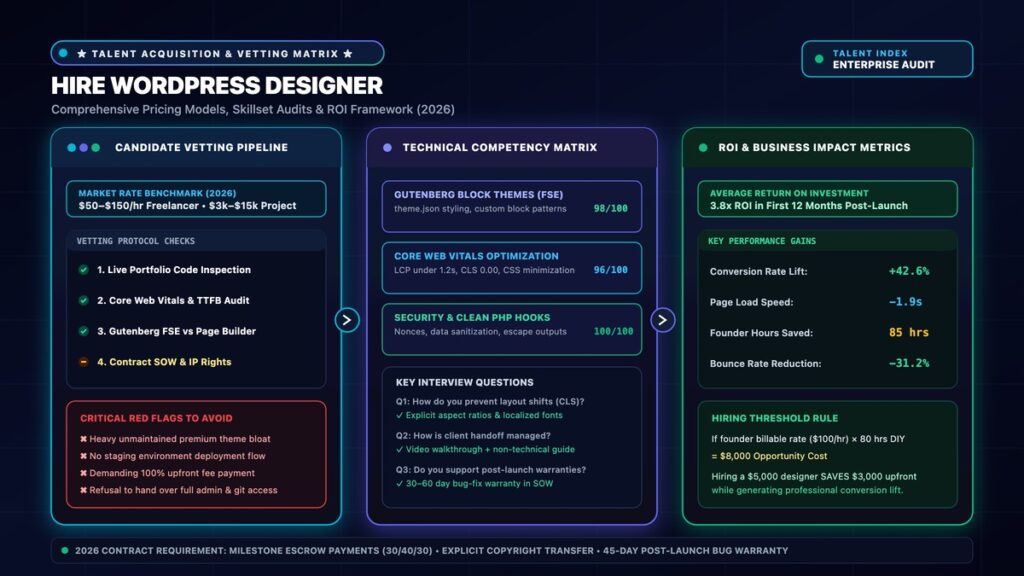
Navigating the talent marketplace can be overwhelming when you seek to hire WordPress designer contractors across various platforms. Pricing wildly fluctuates from $250 offshore gigs to $30,000 agency proposals. Job boards are flooded with amateurs claiming to be experts, many of whom simply install an off-the-shelf theme and call it custom work. To avoid costly mistakes, wasted months, and broken websites, you need an objective, rigorous framework when you prepare to hire WordPress designer talent. Deciding to hire WordPress designer professionals requires clear criteria. Understanding the true wordpress designer cost, establishing a foolproof contract, and auditing live code will protect your investment.
Just as you would optimize your site architecture by discovering how to choose a WordPress plugin vs widget and WordPress theme, mastering how to install WordPress plugins, or auditing database health to remove unused shortcodes in WordPress, learning how to properly hire WordPress designer ensures your digital infrastructure is built for long-term scalability and maximum organic visibility.
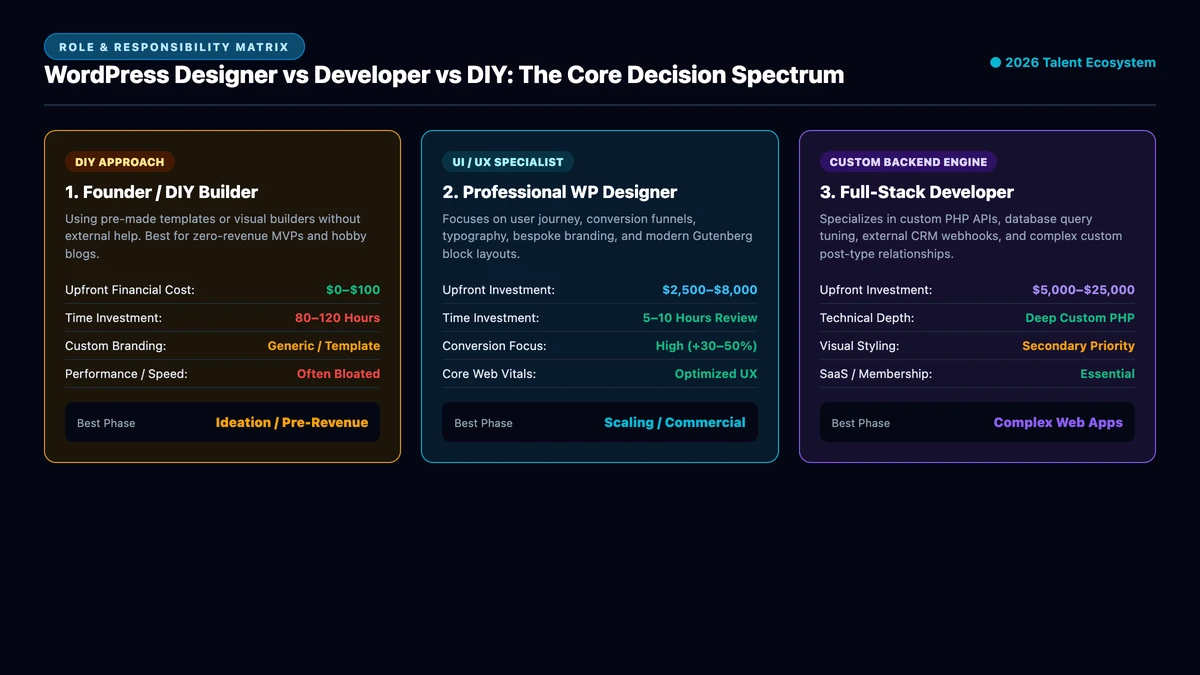
The Core Spectrum: WordPress Designer vs Developer vs DIY
Before posting a job listing or reviewing portfolios, you must define precisely what type of talent your project demands. In the WordPress ecosystem, the terms ‘designer’ and ‘developer’ are frequently conflated, leading to misaligned expectations and disappointing project outcomes. When you seek to hire WordPress designer, you must understand where design ends and custom engineering begins.
Let us delineate the three distinct pathways on the web creation spectrum:
1. The Professional WordPress Web Designer: A dedicated wordpress web designer is a visual and behavioral architect. Their primary domain is user experience (UX) and user interface (UI) design. They analyze customer personas, design intuitive navigation flows, select complementary typography hierarchies, design custom color palettes, and ensure responsive mobile perfection across all viewport sizes. In 2026, an elite wordpress web designer also masters modern Gutenberg block patterns, CSS Grid, Flexbox, and Core Web Vitals optimization. When you hire WordPress designer, your goal is a visually magnetic, high-converting digital presentation.
2. The Full-Stack WordPress Developer: A WordPress developer focuses primarily on server-side architecture and complex backend logic. Developers write custom PHP code, register custom post types and taxonomies, build custom REST API integrations, optimize MySQL database queries, integrate custom payment gateways, and ensure enterprise server security. While a developer can make any feature work, they may lack the visual aesthetic training to make it visually captivating. When hiring a WordPress designer, you should verify whether their technical capabilities match your visual versus backend needs.
3. The Founder DIY Builder: The DIY path involves the site owner personally configuring themes and visual builders like Kadence, GeneratePress, or Elementor. While the financial barrier to entry is minimal, the hidden cost is immense: tens of hours diverted away from product development, sales calls, marketing campaigns, and content generation. Answering the fundamental question—should i hire a web designer—comes down to calculating whether your founder hours are best spent playing web designer.
WordPress Web Designer Pricing Models & Cost Benchmark (2026)
Examine the detailed market analysis below comparing the five primary engagement structures when evaluating wordpress designer cost:
| Hiring Model | Typical Pricing Range | Target Project Scope | Financial Budget Risk | Delivery Timeline | Recommended For |
|---|---|---|---|---|---|
| Hourly Freelancer | $50 to $150 / hour | Iterative tasks, audits, landing pages, small redesigns | Medium (Uncapped unless max hours agreed) | 1 to 3 weeks | Targeted design tweaks & existing site upgrades |
| Fixed-Price Project | $2,500 to $8,500 | Full 5–10 page custom redesign, blog name ideas and branding & launch | Low (Predictable milestone budget) | 4 to 6 weeks | Established bloggers, service firms & consultants |
| Boutique Design Agency | $10,000 to $25,000+ | Enterprise UX research, custom illustration, multi-page CRO | Very Low (Formal contract & dedicated PM) | 8 to 12 weeks | High-growth startups & scaling e-commerce brands |
| Monthly Design Retainer | $750 to $2,500 / month | Ongoing CRO testing, new landing pages & asset creation | Predictable OpEx (Monthly recurring) | Continuous iterative agile | Active affiliate publishers & SaaS marketing teams |
| DIY Page Builder Route | $100 to $300 (tools only) | Off-the-shelf theme setup with basic visual blocks | High Opportunity Cost (80–120 founder hours) | Self-paced (Often 2–4 months) | Zero-revenue personal blogs & pre-seed ideas |
Understanding WordPress Designer Cost in 2026: Real Market Rates
One of the most confusing aspects of the talent market is the extreme variance in wordpress designer cost. On freelance marketplaces like Fiverr or Upwork, you will encounter bids ranging from $150 to $15,000 for what ostensibly appears to be the same project scope. To avoid being swindled by low-quality work or overpaying for unnecessary agency overhead, you must understand what drives pricing when you hire WordPress designer.
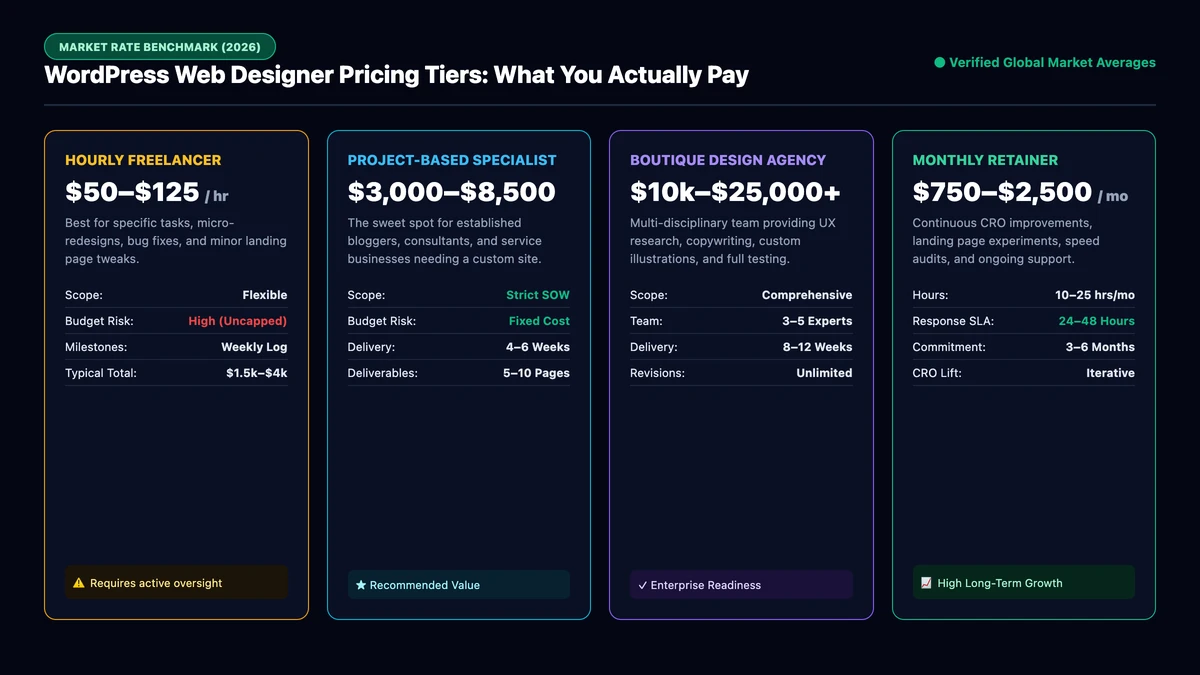
In 2026, when you hire WordPress designer specialists, pricing is governed by three primary factors: technical execution methodology, bespoke design depth, and business conversion strategy. Here is what you can realistically expect at each tier of wordpress designer cost:
• The Budget Tier ($500 to $1,500): At this price point, you are typically hiring a junior freelancer or overseas contractor. In 90% of cases, they do not create custom designs. Instead, they purchase an off-the-shelf commercial theme, import the demo content, swap your logo and text, and install 35+ disparate plugins. The site may look passable initially, but it often suffers from severe PageSpeed bloat, messy CSS, broken mobile breakpoints, and zero strategic conversion focus. For a commercial venture, this tier is often a false economy.
• The Mid-Market Professional Tier ($2,500 to $8,500): This represents the golden sweet spot for the vast majority of established bloggers, consultants, SaaS startups, and local businesses. When you hire WordPress designer in this tier, you receive a truly bespoke design. The designer conducts brand discovery, creates interactive Figma wireframes, develops custom Gutenberg block patterns or clean theme templates, optimizes Core Web Vitals (ensuring LCP < 1.5s), and structures every page around proven conversion pathways. The resulting asset is fast, maintainable, and uniquely yours.
• The Premium Agency Tier ($10,000 to $25,000+): High-revenue content networks, enterprise WooCommerce stores, and venture-backed tech companies operate in this category. Engagement includes full user persona research, user journey mapping, bespoke copywriting, proprietary icon systems, custom block theme engineering, advanced CRM integrations, and rigorous cross-browser testing. When evaluating wordpress designer cost at this level, the investment is readily justified by high transaction volumes where a 0.5% conversion increase represents hundreds of thousands of dollars in annual revenue.
The 7-Step Evaluation Framework to Hire WordPress Designer Safely
To ensure a smooth engagement that finishes on time, stays within budget, and delivers an outstanding digital asset, follow our battle-tested 7-step protocol when you hire WordPress designer:
Why You Should Hire WordPress Designer Professionals Over Generalists
When companies decide to hire WordPress designer specialists rather than generalist graphic artists, the commercial difference is immediate. A generalist designer may build attractive mockups in Photoshop or Canva, but when you hire WordPress designer experts, they understand the underlying block architecture, the official WordPress Block Editor handbook, responsive fluid clamp values, and the performance standards outlined in web.dev performance guidelines.
When asking ‘should i hire a web designer’, consider that an experienced wordpress web designer ensures every template uses semantic HTML5 markup. As you calculate the wordpress designer cost, factor in the lifetime revenue impact. Deciding to hire WordPress designer talent gives your brand a massive competitive edge, transforming ordinary visitors into loyal paying customers.
In addition, hiring a WordPress designer ensures your site avoids the bloat of unnecessary plugins. Exploring curated repositories like the official WordPress plugin vs widget and WordPress theme directory provides a foundation, but a bespoke wordpress web designer tailors templates specifically to your user conversion journey.
Step 1: Define Your Specific Project Scope and Deliverables
Vague project descriptions attract amateur contractors and lead to catastrophic scope creep. Before contacting any candidate, write down a comprehensive creative brief. Detail the exact page templates required (Homepage, Category Hub, Single Post, Contact, About, Lead Magnet Landing Page), primary business conversion goals (email newsletter signups, consultation bookings, product purchases), brand assets on hand (logos, brand guidelines, high-res photos), and hard launch deadlines.
Step 2: Source Candidates Through High-Signal Channels
Avoid generic bottom-of-the-barrel job boards where thousands of automated bots spam every listing. High-signal channels for discovering top-tier wordpress web designer talent include:
• Direct Inspiration Audits: Find 3–5 websites in your industry whose typography, layout, and speed you admire. Scroll to the footer to identify the credit link or reach out to the site owner asking for an introduction to their designer.
• Curated Design Communities: Search Dribbble, Behance, and Codeable for specialized WordPress portfolios.
• Word of Mouth: Ask peers in private blogging communities, mastermind groups, or Twitter/X digital publishing circles for personal recommendations.
• Curated Design Communities: Search Dribbble, Behance, and Codeable for specialized WordPress portfolios.
• Word of Mouth: Ask peers in private blogging communities, mastermind groups, or Twitter/X digital publishing circles for personal recommendations.
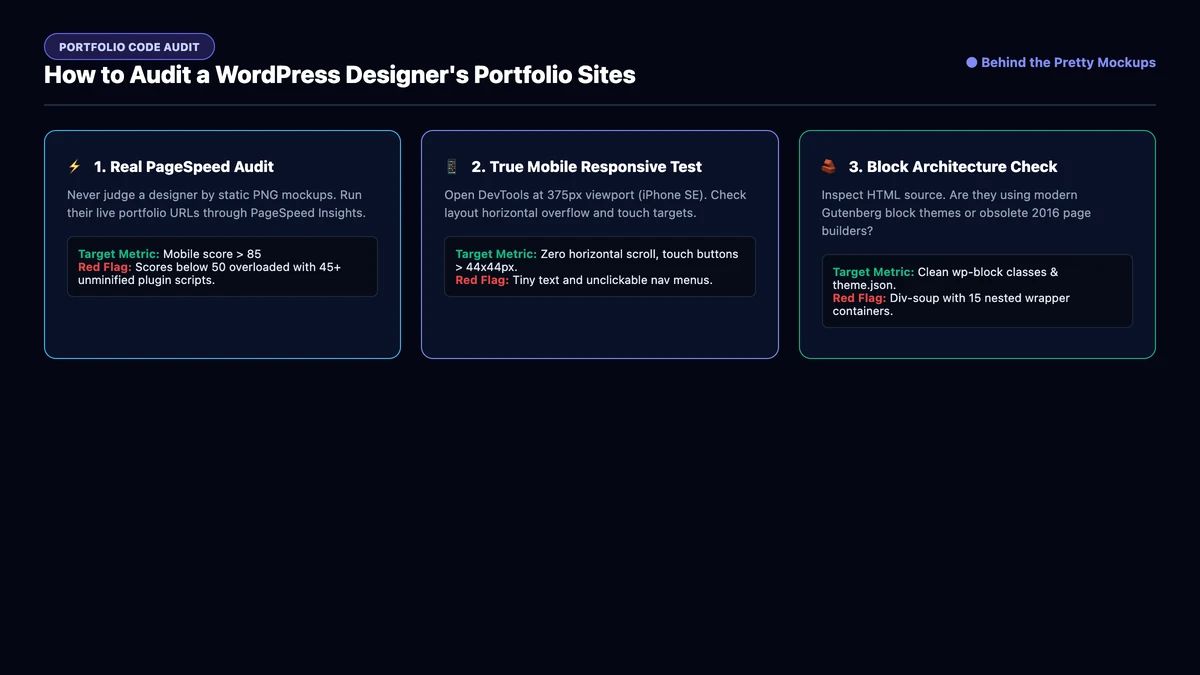
Step 3: Conduct a Technical Portfolio and Live Code Audit
Static image screenshots on Dribbble can be deeply deceptive; any designer can create a stunning graphic mockup in Figma. The real test of an elite wordpress web designer is how their creations perform in the real world on live servers. Ask for 3 live URLs of sites they personally designed and built. Then, perform three objective technical checks:
1. Run Google PageSpeed Insights: Enter the live URL into PageSpeed Insights. Does the site score 85+ on mobile? Is the Largest Contentful Paint (LCP) under 1.8 seconds? If a designer’s portfolio sites score 32/100 and take 6 seconds to load, your site will suffer the exact same sluggish fate.
2. Test Mobile Viewports: Open Chrome DevTools, toggle device mode, and set the screen to 375px (iPhone SE). Check for horizontal scrollbars, unreadable 10px text, or overlapping tap targets.
3. Inspect HTML Source Code: Right-click and choose Inspect Element. Check whether the DOM is clean and semantic (using modern
wp-block-* classes) or if it is clogged with 20 nested div wrapper tags generated by an obsolete page builder.Technical Skillset & Competency Vetting Matrix
Use this evaluation matrix to grade candidate competencies across modern web standards when you hire WordPress designer:
| Skill Competency Area | Novice / Amateur Indicator | Mid-Tier Competent Indicator | Elite Top 10% Specialist Indicator | Impact on Your Business |
|---|---|---|---|---|
| Gutenberg Block Architecture | Insists on heavy visual page builders for every section | Builds standard Gutenberg blocks with generic plugins | Custom theme.json design tokens, custom block patterns & FSE | Lightning fast TTFB, zero plugin bloat, easy post-launch editing |
| Core Web Vitals & Speed | Ignores speed, recommends 12 caching plugins | Minifies CSS and uses basic WebP image converter | Inline critical CSS, localized fonts, zero CLS, sub-1.2s LCP | Higher Google rankings, lower bounce rates, higher mobile sales |
| Responsive UI / UX Design | Desktop-first, broken mobile navigation menus | Responsive with standard media query breakpoints | Fluid typography (clamp), touch-friendly 48px hit areas | Exceptional user engagement across smartphones & tablets |
| Accessibility (a11y) | Zero contrast checks, missing alt tags and aria labels | Passable color contrast and basic keyboard tabbing | WCAG 2.1 AA compliant, screen reader tested, semantic DOM | Legal compliance, broader audience reach, superior SEO |
| Conversion Architecture | Designs purely for art with hidden calls to action | Places standard generic CTA buttons at bottom | Strategic F-pattern scanning, sticky headers, high-contrast CRO | 30% to 50% higher lead capture and transaction rates |
Step 4: Interview Candidates with High-Signal Questions
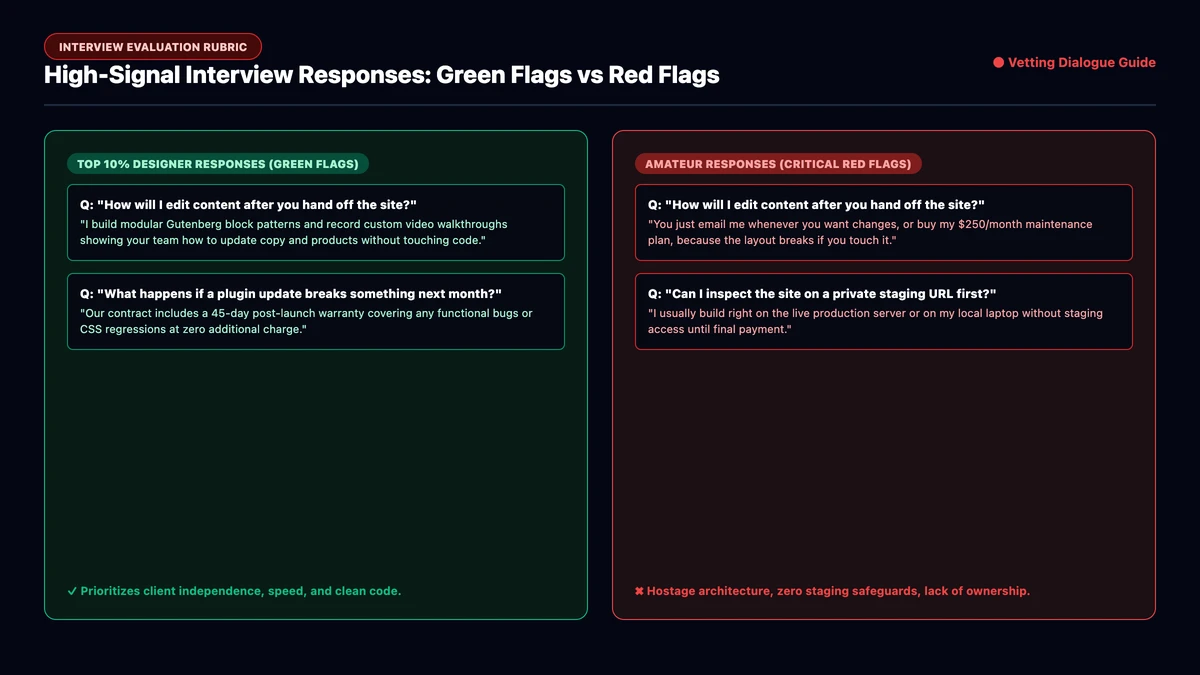
When conducting discovery calls, avoid superficial questions like ‘How long have you used WordPress?’ Instead, ask high-signal questions that separate true design engineers from template customizers:
• Question 1: ‘What theme foundation or framework do you use, and why?’
Green Flag: ‘I use lightweight block themes like GeneratePress, Kadence, or custom Full Site Editing (FSE) block patterns with a clean
Red Flag: ‘I use multi-purpose commercial themes packed with 80 demo templates and 40 bundled slider plugins.’
Green Flag: ‘I use lightweight block themes like GeneratePress, Kadence, or custom Full Site Editing (FSE) block patterns with a clean
theme.json.’Red Flag: ‘I use multi-purpose commercial themes packed with 80 demo templates and 40 bundled slider plugins.’
• Question 2: ‘How do you ensure the site passes Google Core Web Vitals on mobile?’
Green Flag: ‘I optimize font loading, enforce explicit image aspect ratios to prevent CLS, and minimize external render-blocking scripts.’
Red Flag: ‘I just install a caching plugin at the end of the project.’
Green Flag: ‘I optimize font loading, enforce explicit image aspect ratios to prevent CLS, and minimize external render-blocking scripts.’
Red Flag: ‘I just install a caching plugin at the end of the project.’
• Question 3: ‘How easily will my team be able to edit and publish new pages after launch?’
Green Flag: ‘I create modular, reusable block patterns and record custom video walkthroughs showing you how to update content without touching CSS.’
Red Flag: ‘You’ll need to email me whenever you want to change a layout or pay my monthly retainer.’
Green Flag: ‘I create modular, reusable block patterns and record custom video walkthroughs showing you how to update content without touching CSS.’
Red Flag: ‘You’ll need to email me whenever you want to change a layout or pay my monthly retainer.’
Before you hire WordPress designer contractors, ensure you have documented all functional requirements. When businesses prepare to hire WordPress designer agencies, having clear visual blog name ideas and branding accelerates timelines. Furthermore, when you hire WordPress designer freelancers, milestone contracts protect your investment. Choosing to hire WordPress designer specialists eliminates the frustrations of amateur design.
Step 5: Enforce a Watertight Statement of Work (SOW)
Never begin a web design project on a handshake or verbal agreement. Insist on a formal contract featuring an explicit Statement of Work (SOW) that covers five non-negotiable clauses:
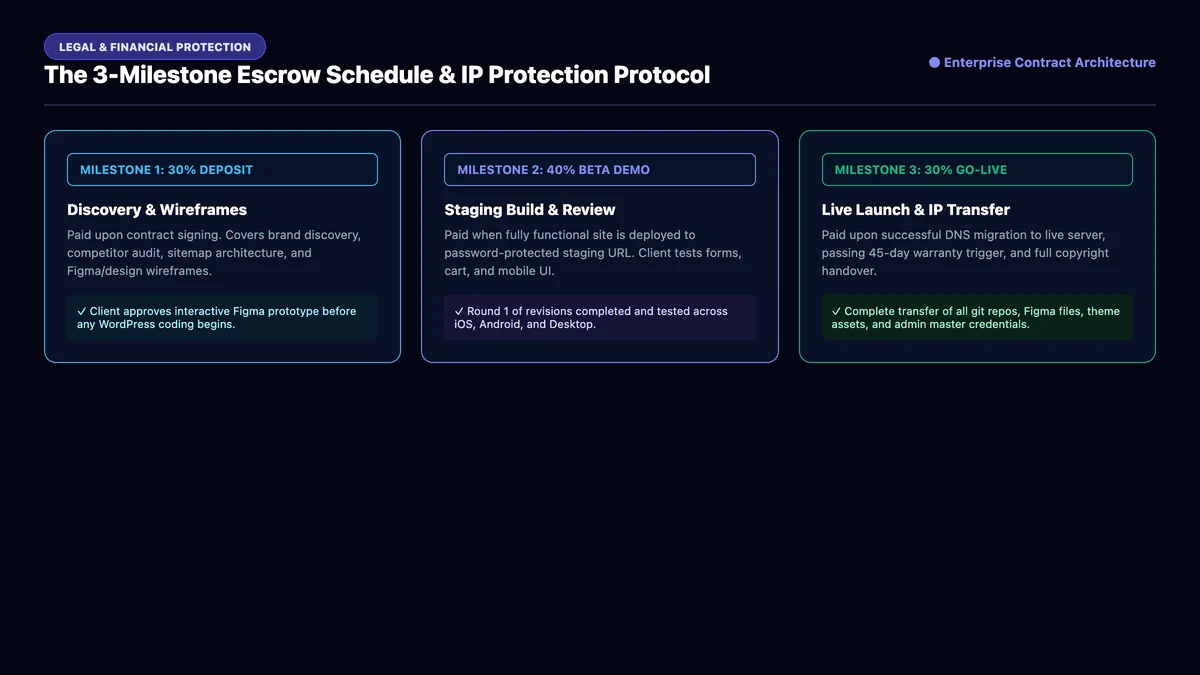
1. Strict Milestone Payment Schedule: The industry standard is 30% deposit upon signing, 40% upon staging demo approval, and 30% upon live launch. Never agree to pay 100% upfront.
2. Explicit Revision Rounds: Clearly define the number of revision cycles included (typically 2 formal rounds per phase). This protects both parties from endless disputes.
3. Staging Environment Requirement: Development must take place on a staging subdomain or local environment—never on your live production website.
4. Full Intellectual Property (IP) Transfer: The contract must state in writing that upon final payment, all copyright, custom code, graphics, and design assets belong 100% to you.
5. 30- to 60-Day Post-Launch Warranty: Ensure the designer guarantees to fix any unexpected bugs, responsive glitches, or browser layout discrepancies discovered within 30 to 60 days post-launch at zero additional charge.
Step 6: Manage the Design & Development Phases via Staging
During the project, keep communication organized. When you hire WordPress designer talent, structured weekly sprints ensure smooth progress. Review interactive Figma or Adobe XD wireframes first before any WordPress page building commences. Once development begins, review progress on the staging URL. Test contact forms, test WooCommerce checkout flows, test newsletter opt-in integrations, and verify responsive behavior across both Apple Safari and Google Chrome.
Step 7: Execute a Flawless Production Launch and Handoff
On launch day, ensure your DNS records are migrated with minimal TTL. When you hire WordPress designer engineers, they coordinate the DNS cutover with zero downtime. Once live, audit all 301 redirects, test SSL certificates, and confirm that your Google Search Console XML sitemaps are submitted. Finally, receive all administrative credentials, Git repository access, and video training documentation.
The Mathematical Decision Framework: Calculating Your Real ROI
To definitively resolve the debate of whether you should hire WordPress designer or build the site yourself, you must move beyond emotional hesitation and look at the mathematical reality of founder opportunity cost.
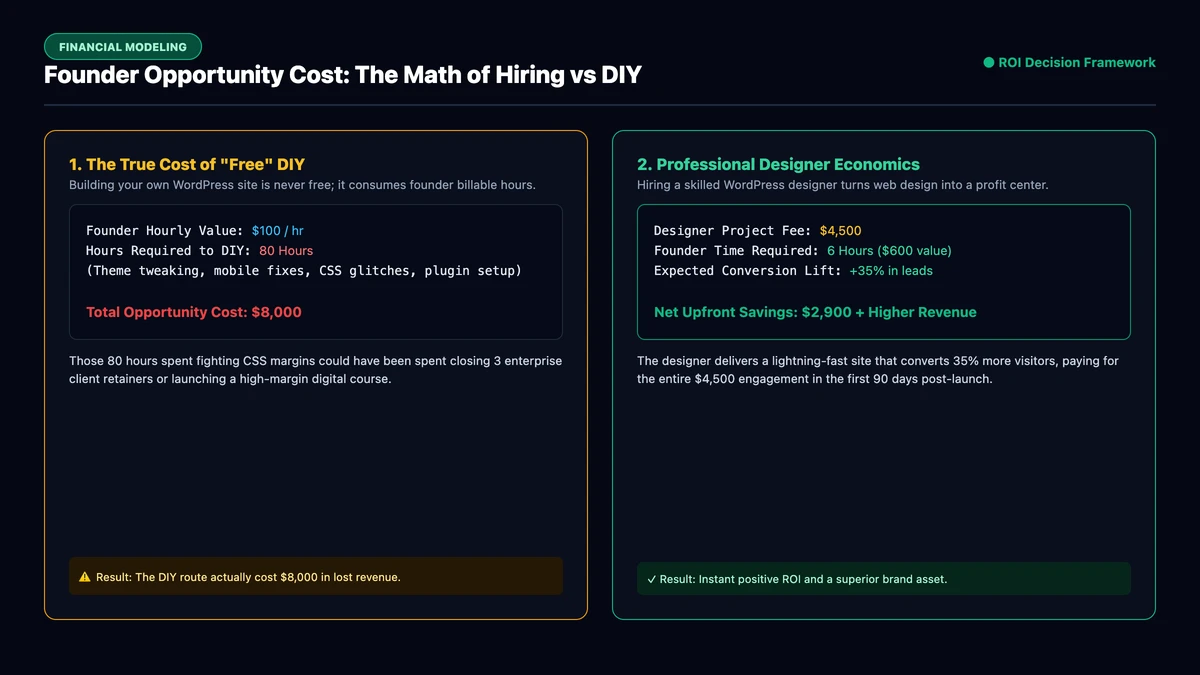
Consider the following economic equation comparing the DIY route against professional engagement:
Scenario A: The Hidden $8,000 Cost of ‘Free’ DIY
Suppose your effective earning rate as a business owner, consultant, or freelancer is $100 per hour. Building a custom, high-converting, fully responsive WordPress website from scratch typically requires 80 to 120 hours for a non-specialist (navigating theme options, debugging mobile responsiveness, fixing CSS margins, configuring speed plugins, and fighting font hierarchies).
80 hours × $100/hr = $8,000 in lost billable founder time.
By attempting to ‘save money’ through DIY, you actually spent $8,000 of your time, diverted focus from acquiring paying clients, and ended up with a website that converts at amateur baseline rates.
Scenario B: The $4,500 Professional Investment
Suppose you hire WordPress designer for a fixed fee of $4,500. Your time commitment is reduced to approximately 6 hours of discovery, feedback, and final review ($600 in founder time).
Total Investment: $4,500 fee + $600 time = $5,100.
You save nearly $3,000 in opportunity cost immediately. More importantly, the professional delivers a conversion-optimized user experience that lifts your site’s average visitor conversion rate by 35% to 50%, paying for itself within months.
Hiring Decision Tree & Business Milestone Thresholds
Consult this strategic decision matrix to determine your exact readiness when considering whether you should hire WordPress designer:
| Business Milestone / Revenue Stage | Primary Site Objective | Founder Technical Skill | Recommended Action | Expected Business Payoff |
|---|---|---|---|---|
| Pre-Revenue / New Blog ($0/mo) | Validate content niche & audience demand | Beginner to Intermediate | 100% DIY with lightweight block theme | Preserves initial capital, validates core topic |
| Early Traction ($500 to $2,500/mo) | Establish brand credibility & grow email list | Basic CSS & WordPress familiarity | Hire Freelancer for targeted visual upgrade ($1k–$2.5k) | Doubles newsletter signups & builds authority |
| Established Business ($3,000 to $15,000/mo) | Scale customer acquisition & high-ticket sales | Non-technical or time-constrained | HIRE FULL WORDPRESS DESIGNER ($3.5k–$7.5k) | Dramatic conversion lift (+30–60%), saves 80+ founder hours |
| High-Volume E-Commerce ($20k+/mo) | Maximize checkout velocity & AOV | Team requires streamlined admin UX | Hire Boutique Agency or Retainer Specialist | Reduces cart abandonment, accelerates mobile revenue |
| Brand Pivot / Complete Reblog name ideas and branding | Reposition in enterprise market | Any technical level | HIRE WORDPRESS DESIGNER with custom Figma UX | Secures higher contract values & premium positioning |
Automated Python Script: Calculate Your Web Designer ROI & Break-Even
To eliminate the guesswork from your hiring decision, our team has developed an open-source Python financial modeling utility:
calculate_web_designer_roi.py.This diagnostic script calculates your exact founder opportunity cost, analyzes your current monthly traffic and conversion numbers, determines the exact break-even conversion lift required to pay for the designer’s fee, and models projected 12-month net profit gains.
#!/usr/bin/env python3
"""
WordPress Web Designer ROI & Opportunity Cost Calculator
Author: Bloggersutra Financial Engineering
Description: Analyzes founder opportunity cost, required conversion rate lift, and 12-month ROI of hiring a professional WordPress designer.
"""

import sys

def calculate_designer_roi(
    founder_hourly_rate: float,
    diy_estimated_hours: float,
    designer_quoted_fee: float,
    monthly_visitors: int,
    current_conversion_rate: float,
    average_order_value: float,
    designer_management_hours: float = 6.0
):
    print("==================================================================")
    print("★ WORDPRESS DESIGNER ROI & OPPORTUNITY COST ANALYSIS (2026) ★")
    print("==================================================================n")

    # 1. Opportunity Cost Calculations
    diy_opportunity_cost = founder_hourly_rate * diy_estimated_hours
    hire_founder_cost = founder_hourly_rate * designer_management_hours
    total_hire_investment = designer_quoted_fee + hire_founder_cost
    upfront_time_savings = diy_opportunity_cost - total_hire_investment

    print(f"[*] Founder Hourly Billable Value:       ${founder_hourly_rate:,.2f} / hr")
    print(f"[*] Estimated Hours Required to DIY:     {diy_estimated_hours:.0f} hours")
    print(f"[*] True Cost of 'Free' DIY Route:       ${diy_opportunity_cost:,.2f}")
    print(f"[*] Quoted Designer Project Fee:         ${designer_quoted_fee:,.2f}")
    print(f"[*] Founder Management Time (6 hrs):     ${hire_founder_cost:,.2f}")
    print(f"[*] Total Professional Investment:       ${total_hire_investment:,.2f}")

    if upfront_time_savings > 0:
        print(f"[+] Immediate Upfront Time Savings:      ${upfront_time_savings:,.2f} (SAVINGS!)n")
    else:
        print(f"[-] Upfront Premium Over DIY:            ${abs(upfront_time_savings):,.2f}n")

    # 2. Revenue & Conversion Lift Modeling
    monthly_current_conversions = monthly_visitors * (current_conversion_rate / 100.0)
    monthly_current_revenue = monthly_current_conversions * average_order_value
    annual_current_revenue = monthly_current_revenue * 12.0

    print("--- REVENUE & CONVERSION BENCHMARK ---")
    print(f"[*] Monthly Visitors:                    {monthly_visitors:,}")
    print(f"[*] Current Conversion Rate:             {current_conversion_rate:.2f}%")
    print(f"[*] Average Order / Lead Value:          ${average_order_value:,.2f}")
    print(f"[*] Current Annual Revenue:              ${annual_current_revenue:,.2f}n")

    # Calculate break-even lift
    required_annual_lift_revenue = total_hire_investment
    required_monthly_lift_revenue = required_annual_lift_revenue / 12.0
    required_additional_monthly_conversions = required_monthly_lift_revenue / average_order_value
    required_new_conversion_rate = ((monthly_current_conversions + required_additional_monthly_conversions) / monthly_visitors) * 100.0
    conversion_rate_delta = required_new_conversion_rate - current_conversion_rate

    print("--- BREAK-EVEN BENCHMARK (12-Month Payback) ---")
    print(f"[*] Required Additional Monthly Revenue: ${required_monthly_lift_revenue:,.2f}")
    print(f"[*] Additional Orders Needed Per Month:  {required_additional_monthly_conversions:.1f} orders")
    print(f"[*] Required Break-Even Conversion Rate: {required_new_conversion_rate:.2f}%")
    print(f"[+] Total Conversion Lift Needed:        +{conversion_rate_delta:.2f}% (e.g. from {current_conversion_rate:.2f}% to {required_new_conversion_rate:.2f}%)n")

    # Model standard 30% professional conversion lift
    projected_lift_pct = 30.0
    projected_new_rate = current_conversion_rate * (1 + projected_lift_pct / 100.0)
    projected_monthly_conversions = monthly_visitors * (projected_new_rate / 100.0)
    projected_monthly_revenue = projected_monthly_conversions * average_order_value
    projected_annual_revenue = projected_monthly_revenue * 12.0
    net_12mo_profit_gain = (projected_annual_revenue - annual_current_revenue) - total_hire_investment
    roi_multiple = ((projected_annual_revenue - annual_current_revenue) / total_hire_investment)

    print("--- PROJECTED PERFORMANCE WITH PROFESSIONAL DESIGN (+30% LIFT) ---")
    print(f"[*] Projected New Conversion Rate:       {projected_new_rate:.2f}%")
    print(f"[*] Projected Annual Revenue:            ${projected_annual_revenue:,.2f}")
    print(f"[+] Net 12-Month Profit Increase:        ${net_12mo_profit_gain:,.2f}")
    print(f"[+] 12-Month Return on Investment:       {roi_multiple:.1f}x ROIn")
    print("==================================================================")

if __name__ == '__main__':
    # Default model: $100/hr founder, 80 hrs DIY, $4,500 designer, 10k visits, 1.5% CR, $75 order
    calculate_designer_roi(
        founder_hourly_rate=100.0,
        diy_estimated_hours=80.0,
        designer_quoted_fee=4500.0,
        monthly_visitors=10000,
        current_conversion_rate=1.5,
        average_order_value=75.0
    )
You can run this script locally with custom business metrics by executing
python3 calculate_web_designer_roi.py. By translating abstract design decisions into concrete economic projections, you can approach the decision to hire WordPress designer with total financial clarity.Frequently Asked Questions About Hiring a WordPress Designer
Review answers to the ten most common questions entrepreneurs ask regarding how to hire WordPress designer:
A professional WordPress web designer typically costs between $50 and $150 per hour for freelance work, or between $2,500 and $8,500 for a fixed-price 5-to-10 page custom website redesign. Full-service digital agencies charge $10,000 to $25,000+ for enterprise UI/UX design, custom block theme development, and comprehensive conversion optimization.
A WordPress designer focuses on user interface (UI), user experience (UX), blog name ideas and branding, responsive mobile layouts, typography, and conversion funnels. A WordPress developer focuses on backend PHP engineering, database queries, custom API integrations, plugin development, and server security. While many modern designers build clean Gutenberg themes, developers handle complex backend logic.
If you are launching a personal blog or early proof-of-concept with zero revenue, DIY is sensible. However, if your business generates income or your time is worth more than $75/hour, spending 80+ hours building your own site creates massive opportunity cost. A professional designer creates a faster, higher-converting asset while saving you dozens of productive hours.
Never evaluate a designer based solely on static image mockups. Ask for 3 live URLs of sites they built. Test those live sites on Google PageSpeed Insights (verify mobile scores > 80), test responsive layouts on a 375px mobile viewport, and inspect the code to ensure they use modern, lightweight Gutenberg block themes rather than bloated legacy page builders.
The industry standard milestone schedule is 30% upfront deposit upon contract signing, 40% upon approval of the functional staging demo, and 30% upon final live launch and IP transfer. Never pay 100% upfront, and ensure payments are tied to tangible project deliverables.
A standard 5-to-10 page custom redesign by a skilled freelance designer typically takes 4 to 6 weeks. This timeline includes brand discovery and wireframes (weeks 1–2), staging site development (weeks 3–4), client review and revisions (week 5), and final launch testing (week 6). Complex agency projects may span 8 to 12 weeks.
Yes, provided you hire a designer who uses modern WordPress standards. Top designers build reusable Gutenberg block patterns and record personalized video training walkthroughs showing your team how to update copy, change images, and publish new articles without touching code or risking broken layouts.
The most dangerous red flag is a designer who relies on bloated multi-purpose commercial themes packed with 40+ plugins, or one who develops directly on your live production server without a private staging environment. Other red flags include demanding 100% upfront payment and refusing to transfer copyright ownership.
A professional contract must include: an exact list of page templates to be designed, responsive mobile requirements, Core Web Vitals performance benchmarks, the number of revision rounds included (usually 2), a 30- to 60-day post-launch bug warranty, and an explicit clause transferring 100% of all intellectual property and copyright to you upon final payment.
High-signal channels include inspecting the footer credits of websites you admire, browsing specialized design portfolios on Dribbble and Behance, using vetted platforms like Codeable, and asking for personal recommendations in established publishing and digital business communities.
Conclusion: Transforming Web Design into a Predictable Growth Engine
Deciding to hire WordPress designer specialists is a major operational milestone. When you hire WordPress designer professionals, you secure a durable competitive advantage. When you transition from amateur DIY tweaking to professional UI/UX architecture, you transform your website from an untidy technical chore into a precision-engineered growth asset that works for your business around the clock.
By applying our 7-step evaluation protocol—auditing live portfolio code, asking high-signal interview questions, enforcing a 30/40/30 milestone contract, and calculating your real founder opportunity cost—you eliminate the risks traditionally associated with creative talent acquisition. A world-class wordpress web designer does not just deliver a visually stunning website; they provide the speed, mobile usability, and conversion infrastructure required to outrank competitors and scale your business.
As you continue expanding your WordPress ecosystem, explore our other technical guides: selecting optimal themes in how to choose a WordPress plugin vs widget and WordPress theme, installing essential tools in how to install WordPress plugins, optimizing configuration in WordPress settings, or cleaning legacy bloat to remove unused shortcodes in WordPress. Elevate your standards, invest strategically in your digital assets, and build your online presence with confidence.
Ready to build a modern, high-converting web presence with zero coding? Follow our complete step-by-step masterclass on how to design a website using WordPress.