Quick answer
- What is the fastest way to remove unused shortcodes in WordPress? If you need an instant fix without touching your database, use a safe PHP stub snippet in your child theme’s
functions.phpor WPCode: registeradd_shortcode('orphan_tag', '__return_empty_string');. This tells the WordPress parser to output an empty string whenever it encounters the orphaned bracket tag, immediately hiding the broken shortcode from site visitors and search engines..tp-post-content code, .tp-post-content pre, .toc-link{word-break:break-word!important;overflow-wrap:break-word!important;} - Why are shortcodes showing as raw text in your published posts? Shortcodes show up as ugly bracketed strings like
[su_button]or[contact-form-7]when the plugin or theme that registered the shortcode’s callback function is deactivated or deleted. Because the WordPress core parser (do_shortcode()) no longer recognizes the tag in the global$shortcode_tagsarray, it skips execution and dumps the raw brackets directly into your rendered HTML DOM. - How do you permanently remove unused shortcodes from your WordPress database? To permanently purge shortcodes from
wp_posts, use a database-safe search-and-replace tool such as Better Search Replace or WP-CLI. Run a regex search (e.g.,[/?(old_tag)[^]]*]) and replace with an empty string. Always perform a dry run first and ensure serialized PHP arrays are protected from string-length byte corruption. - Is it safe to run a direct SQL REPLACE query in phpMyAdmin to remove unused shortcodes? You can run a direct
UPDATE wp_posts SET post_content = REPLACE(...)query only for simple content inwp_posts. However, you must NEVER run raw SQL replacements onwp_postmetaorwp_optionsbecause raw SQL breaks serialized PHP array byte counts (s:length:"value"), corrupting widget, theme customizer, and page builder configurations. - Do unused shortcodes harm your WordPress SEO and site speed? Yes. Orphaned shortcodes exposed as raw text degrade user experience, reduce organic dwell time, increase bounce rates, and signal unmaintained site quality to Google crawlers. Furthermore, accumulated orphan tags increase database payload size and bloat HTML DOM document trees.
In the lifecycle of managing and scaling a blog name ideas and WordPress website, plugin experimentation is virtually inevitable. Webmasters routinely test and swap slider plugins, form builders, pricing tables, call-to-action modules, and affiliate link boxes. However, when you deactivate or delete an old plugin, it leaves behind an insidious technical debt: unused shortcodes wordpress site owners often overlook. You suddenly find broken shortcodes showing as text inside your published content. Discovering how to properly remove unused shortcodes from your database and frontend templates is a fundamental maintenance discipline for modern site publishers.
When a plugin is uninstalled, WordPress does not automatically clean up the shortcode brackets stored inside your database. As a result, visitors and search engine bots are greeted with unsightly raw bracketed tokens such as
[su_box title="Notice"], [pricing-table id="3"], or [contact-form-7 id="404"] plastered across your paragraphs. These broken strings shatter your brand’s editorial credibility, create an unpolished user experience, and trigger indexing anomalies. Discovering how to remove shortcodes wordpress administrators need to clean up is vital when you see shortcodes showing as text. Learning the exact steps to remove unused shortcodes safeguards your site against visual corruption.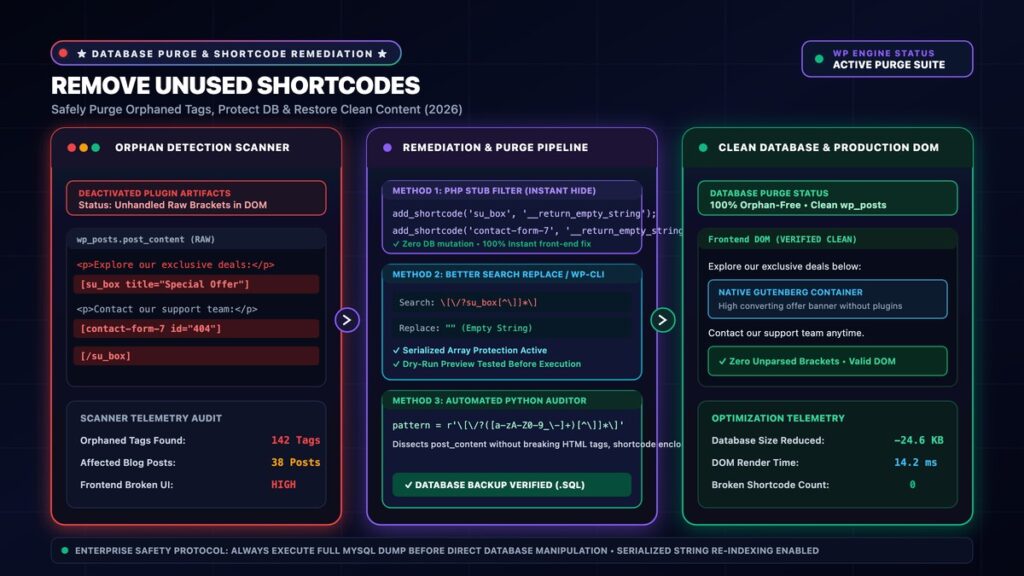
Many website owners assume that reinstalling the retired plugin or manually clicking into hundreds of historic posts is the only recourse. Fortunately, there are highly efficient, automated methods to remove unused shortcodes safely. Whether you need an emergency non-destructive filter hook, an automated database-wide search-and-replace routine, or developer-level WP-CLI terminal automation, learning how to remove shortcodes wordpress publishers struggle with will resolve all unused shortcodes wordpress systems accumulate. In this masterclass, we explore five proven strategies to remove unused shortcodes with zero risk of database corruption.
Just as you would optimize performance by discovering how to install WordPress plugin vs widget architecture and WordPress plugins properly, auditing core WordPress settings, or configuring automated WordPress search redirects, mastering how to remove unused shortcodes is essential for maintaining pristine technical health and accelerating PageSpeed metrics.
Understanding the Core Mechanics of Orphaned Shortcodes in WordPress
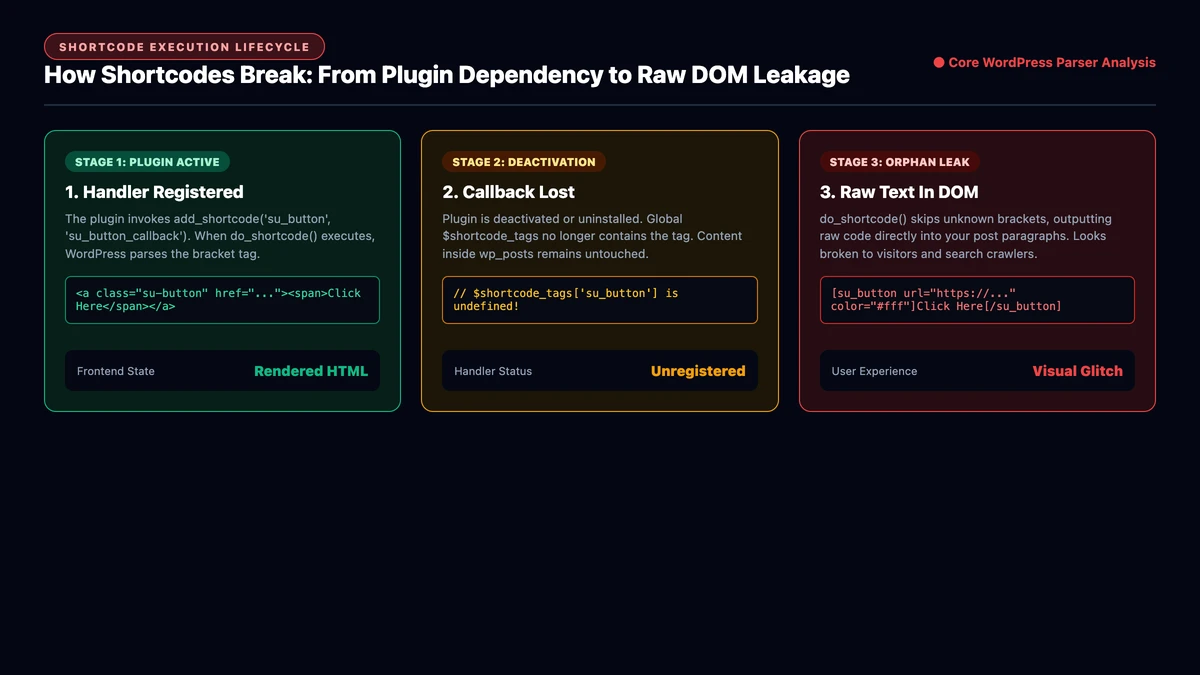
To effectively remove unused shortcodes, one must first comprehend how WordPress core processes shortcodes internally. The official WordPress Shortcode API, introduced in WordPress 2.5, is an abstraction layer that allows content creators to embed rich, dynamic server-side output into post content using simplified square-bracket markup. Under the hood, WordPress relies on three central constructs:
1. Registration (add_shortcode()): A plugin or theme registers a shortcode tag and pairs it with a PHP callback function (e.g.,
2. Storage (
3. Parsing (do_shortcode()): When a visitor requests the page, the
add_shortcode('my_box', 'my_box_render_function');). This populates the global $shortcode_tags array in memory.2. Storage (
wp_posts): When you save an article, WordPress saves the literal bracket string (such as [my_box]content[/my_box]) as raw text inside the post_content column of the wp_posts MySQL database table. WordPress deliberately does not save the expanded HTML to avoid database bloat.3. Parsing (do_shortcode()): When a visitor requests the page, the
the_content filter triggers do_shortcode(). The core parser traverses the content via regular expressions, matches the bracket tags against $shortcode_tags, executes the registered callback, and replaces the brackets with dynamic HTML in memory before streaming the response to the visitor’s browser.The breakdown occurs the moment you deactivate the host plugin. When dealing with unused shortcodes wordpress core simply passes unhandled tokens directly into the HTML, leaving ugly shortcodes showing as text across your site. When the plugin’s code no longer loads during the WordPress bootstrapping sequence, the callback registration is erased from
$shortcode_tags. However, the raw string [my_box] still resides in your wp_posts database records. When do_shortcode() runs its regex scan, it finds no matching callback in memory. Core WordPress design dictates that unrecognized bracketed tokens must be preserved intact to prevent corrupting legitimate bracketed text (such as mathematical formulas or code snippets). Consequently, the raw shortcode leaks directly into your published HTML.This fundamental decoupling between database storage and runtime callback execution explains why deactivating a plugin instantly exposes raw brackets, why shortcodes showing as text appear after theme updates, and why you must proactively remove unused shortcodes and systematically remove shortcodes wordpress databases preserve.
Comparison of Methodologies to Remove Unused Shortcodes
Before choosing a cleanup pathway, examine the comprehensive feature matrix below detailing five different strategies to remove unused shortcodes:
| Cleanup Method | Technical Approach | Execution Speed | Serialized DB Safe? | Reversibility | Best Use Case |
|---|---|---|---|---|---|
| Method 1: Safe PHP Dummy Stub | Memory filter hook (add_shortcode) | Instantaneous (< 1 ms) | 100% Safe (0 DB writes) | 100% Reversible (Delete snippet) | Emergency fix for live sites & client sites |
| Method 2: Better Search Replace | WordPress Admin GUI Plugin | Fast (1–3 minutes) | 100% Safe (Auto-deserialization) | Requires Database Backup | Non-technical site owners & bloggers |
| Method 3: WP-CLI Regex Command | Server SSH Terminal execution | Sub-second (< 0.5s) | 100% Safe (Protected regex) | Requires Database Backup | Developers, agency admins & VPS hosts |
| Method 4: Direct phpMyAdmin SQL | Raw MySQL UPDATE query | Sub-second (< 0.1s) | RISKY (Breaks serialized strings) | Irreversible without backup | Simple post_content text only (Advanced) |
| Method 5: Manual Block Conversion | Gutenberg Core Block Editor | Slow (Hours/Days manual work) | 100% Safe (Visual inspection) | Revision history preserved | High-value cornerstone articles & redesigns |
Method 1: Safe PHP Stubbing to Hide Unused Shortcodes Instantly
When broken shortcodes are actively leaking into live traffic on high-visibility articles with shortcodes showing as text, you need a remediation strategy that takes effect in seconds without altering database rows to handle unused shortcodes wordpress blogs exhibit. The most elegant, risk-free way to remove unused shortcodes from the frontend is to register a dummy PHP callback that intercepts the orphaned tag and returns an empty string.
WordPress core includes a native helper function called
__return_empty_string() specifically designed for this purpose. By combining shortcode_exists() with add_shortcode(), you can silence any orphaned shortcode globally across your entire site. When the page renders, the WordPress parser finds your dummy callback, executes it, and outputs nothing, completely neutralizing the visual glitch. This allows you to effectively remove unused shortcodes visually while planning a permanent database purge.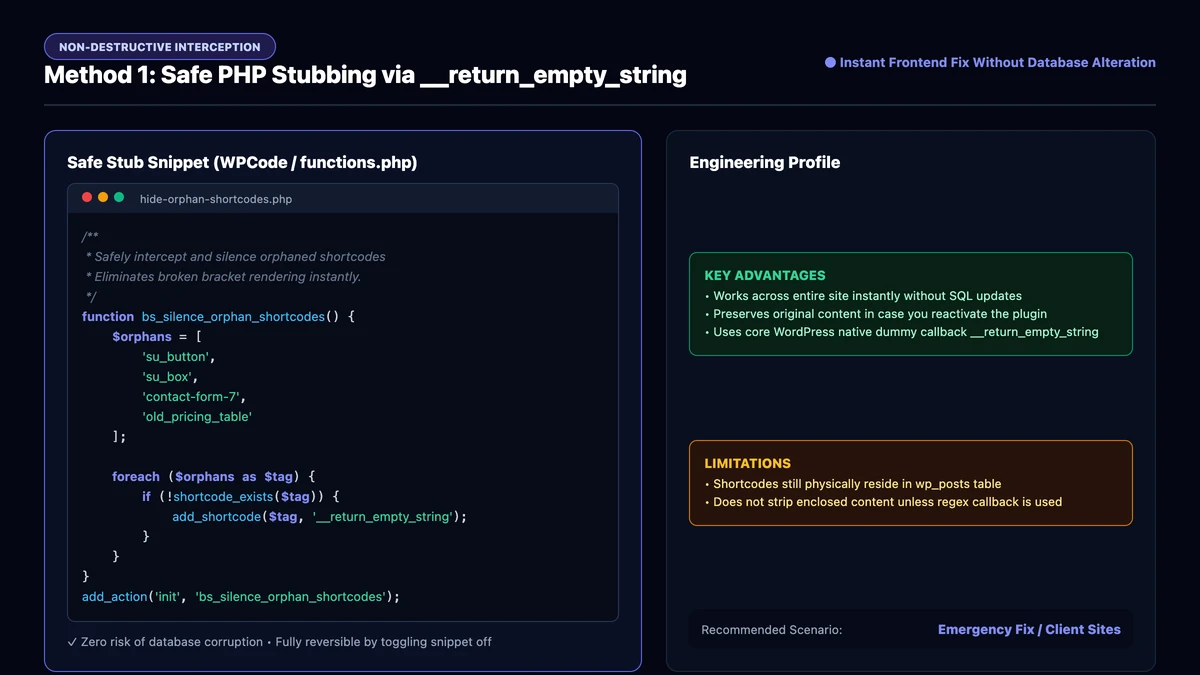
To deploy this emergency fix, you can place the following snippet inside your child theme’s
functions.php file, or preferably, within a site-specific code management plugin such as WPCode:This snippet checks
!shortcode_exists($tag) before assigning the dummy stub. This defensive guard ensures that if you ever reactivate the original plugin or install a new plugin utilizing the same tag, your custom stub will never override the legitimate plugin handler. Using this technique to remove unused shortcodes guarantees zero database risk, perfect reversibility, and instantaneous frontend resolution.Handling Enclosing Shortcodes vs Self-Closing Tags
A critical technical nuance when you remove unused shortcodes is distinguishing between self-closing shortcodes and enclosing shortcodes. Failing to recognize the difference can result in accidentally hiding valuable post copy or leaving orphaned inner text stranded in the middle of a sentence.
Consider the two structural variations of shortcode syntax:
• Self-Closing Shortcodes: These represent standalone modules that do not wrap content. Common examples include
• Enclosing Shortcodes: These wrap around actual body text, having both an opening tag and a closing tag. Examples include
[contact-form-7 id="123"], [rev_slider alias="home"], or • Enclosing Shortcodes: These wrap around actual body text, having both an opening tag and a closing tag. Examples include
[su_box title="Tip"]Always backup your database before running queries.[/su_box] or [su_quote]Great software builds great businesses.[/su_quote].If you use
__return_empty_string on an enclosing shortcode, WordPress will swallow the opening bracket, but the closing tag [/su_box] may still remain visible, or worse, if the callback suppresses the inner content parameter ($content), your valuable advice (‘Always backup your database…’) will disappear from the page! To preserve the inner content while stripping the outer wrapper tags, use a callback that returns the raw $content:By returning
do_shortcode($content), the outer formatting brackets vanish, while the inner educational text remains intact and readable. This distinction is vital whenever you execute an audit to remove unused shortcodes.Method 2: Permanent Database Purge Using Better Search Replace
While PHP stubbing solves frontend display instantly, unused shortcodes wordpress tables store will still clutter your database. When you decide to remove shortcodes wordpress sites contain permanently, you must eliminate shortcodes showing as text from raw post records. For long-term site health, reducing database size, and streamlining REST API endpoints, you should permanently remove unused shortcodes from the
wp_posts table. The most accessible tool for non-technical users is the free Better Search Replace plugin from the official WordPress plugin repository.Better Search Replace is specifically engineered to handle WordPress database modifications safely. Unlike generic MySQL commands, it understands serialized PHP arrays. When a plugin stores data in
wp_postmeta, arrays are often stored in serialized format: a:2:{s:4:"text";s:18:"[su_button]Click[/su_button]";}. Notice the s:18 string-length marker. If you replace that text with a raw SQL query, the string length changes, the byte count becomes mismatched, the array fails to unserialize, and the entire data structure breaks. Better Search Replace unserializes the data, applies the replacement, recalculates the exact string byte lengths, and safely reserializes the record. This is essential when attempting to remove unused shortcodes across the database.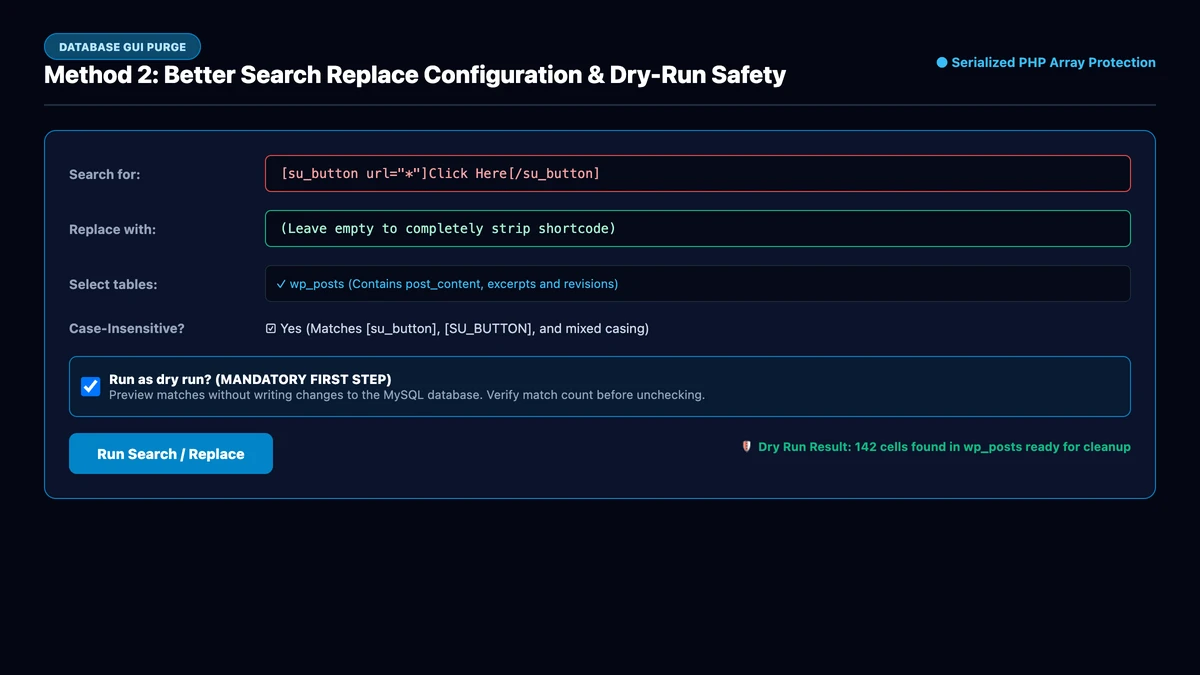
Follow this exact step-by-step procedure to remove unused shortcodes using Better Search Replace:
1. Install Better Search Replace: In your WordPress dashboard, navigate to Plugins → Add New, search for ‘Better Search Replace’ by WP Engine, click Install Now, and activate the plugin.
2. Navigate to the Interface: Go to Tools → Better Search Replace.
3. Enter Search Parameter: In the Search for field, enter the exact shortcode string you wish to eradicate (e.g.,
4. Set Replacement: In the Replace with field, leave it completely empty to delete the tag.
5. Select Target Tables: In the Select tables multi-select box, click on
6. Enable Case-Insensitive Matching: Check Case-Insensitive? so that variations like
7. Execute Dry Run: Ensure the checkbox Run as dry run? is CHECKED. Click Run Search/Replace.
8. Review Results: The tool will report how many matching cells were found in
9. Execute Live Purge: Once verified, uncheck Run as dry run?, click Run Search/Replace again, and confirm the execution.
2. Navigate to the Interface: Go to Tools → Better Search Replace.
3. Enter Search Parameter: In the Search for field, enter the exact shortcode string you wish to eradicate (e.g.,
[contact-form-7 id="404"]).4. Set Replacement: In the Replace with field, leave it completely empty to delete the tag.
5. Select Target Tables: In the Select tables multi-select box, click on
wp_posts (or your custom database table prefix). Unless the shortcode is specifically embedded in widget options, confining your cleanup to wp_posts maximizes execution speed and eliminates unnecessary risks.6. Enable Case-Insensitive Matching: Check Case-Insensitive? so that variations like
[SU_BUTTON] and [su_button] are both caught.7. Execute Dry Run: Ensure the checkbox Run as dry run? is CHECKED. Click Run Search/Replace.
8. Review Results: The tool will report how many matching cells were found in
wp_posts without modifying a single row.9. Execute Live Purge: Once verified, uncheck Run as dry run?, click Run Search/Replace again, and confirm the execution.
When the live run completes, Better Search Replace will confirm the exact number of replacements made. You have now permanently succeeded to remove unused shortcodes from your database records.
Benchmark of Tools to Detect and Remove Unused Shortcodes
Evaluate the specialized scanning tools available to identify and remove unused shortcodes across complex WordPress environments:
| Tool Name | Detection Scope | Regex Support | Dry-Run Simulation | DB Modification Risk | Recommended Skill Level |
|---|---|---|---|---|---|
| WP-CLI (search-replace) | Entire DB (wp_posts, postmeta, options) | Yes (Full PCRE regex with flags) | Yes (–dry-run flag) | Zero (with proper dry-run verification) | Advanced (Terminal & SSH access) |
| Better Search Replace Plugin | Selectable tables in wp-admin GUI | No (Literal string replacement only) | Yes (Built-in dry run checkbox) | Low (Protects serialized array bytes) | Beginner to Intermediate |
| Search Regex Plugin | wp_posts (post_content, excerpts, titles) | Yes (Full PCRE regex support in GUI) | Yes (Interactive match preview) | Low (Gives row-by-row confirmation) | Intermediate to Advanced |
| phpMyAdmin (Raw SQL Query) | Individual MySQL tables via SQL tab | No (Standard MySQL LIKE / REPLACE) | No (Commits directly to database) | HIGH (Corrupts serialized postmeta) | Expert Only (DB Administrators) |
| Custom Python AST Auditor | SQL dumps & staging database exports | Yes (Python re library with AST tokens) | Yes (Read-only offline audit) | Absolute Zero (Offline execution) | Developers & Technical Webmasters |
Method 3: Advanced WP-CLI Regex Purges for Bulk Operations
For developers, agency teams, and sysadmins managing high-volume WordPress sites or multisite networks with thousands of unused shortcodes wordpress installations collect, point-and-click GUI plugins are often too slow. To effectively remove shortcodes wordpress networks accumulate and eliminate shortcodes showing as text, regular expressions provide sub-second purges. If a legacy shortcode has dynamic attributes across hundreds of posts (e.g.,
[su_button url="..." target="blank" style="flat" color="#fff"]), entering every individual combination into a GUI search box is practically impossible. The professional developer method to remove unused shortcodes is WP-CLI.WP-CLI features a robust
wp search-replace command equipped with full PCRE regular expression matching (--regex) and serialized data safety. It allows you to match any variation of an opening tag, optional attributes, and closing tag in a single sub-second terminal execution.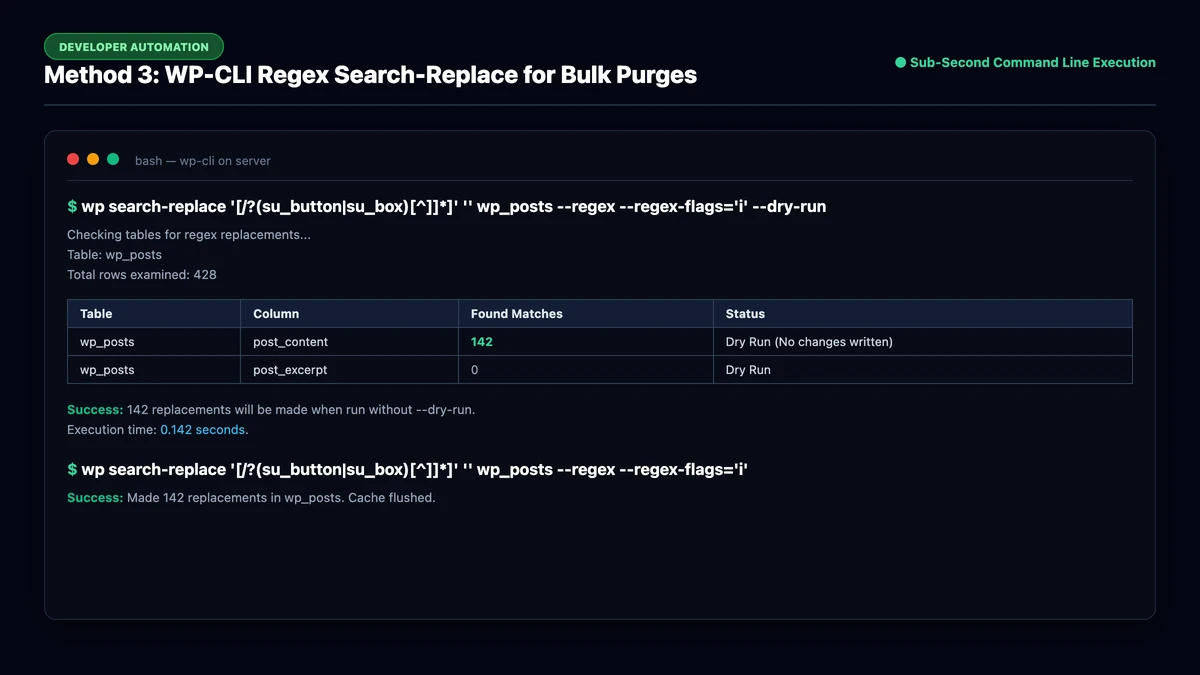
Connect to your server via SSH, navigate to your WordPress root directory (where
wp-config.php resides), and execute the following WP-CLI commands:Step 1: Test with a Dry-Run Simulation
Always simulate your regular expression with the
--dry-run parameter to inspect matched rows without writing changes:# Dry run regex search to detect both opening and closing shortcode tags
wp search-replace '[/?(su_button|su_box|su_note)[^]]*]' '' wp_posts
--regex
--regex-flags='i'
--dry-run
Explanation of parameters:
•
•
•
•
•
•
'[/?(su_button|su_box|su_note)[^]]*]': The regular expression. [ matches the opening square bracket; /? optionally matches a closing slash; (su_button|su_box|su_note) matches any of the target orphaned tags; [^]]* matches any attributes, parameters, or URLs up to the closing bracket; and ] matches the ending square bracket.•
'': The replacement string (empty string to delete the matched token).•
wp_posts: Restricts the execution specifically to the posts table.•
--regex: Instructs WP-CLI to treat the search string as a regular expression.•
--regex-flags='i': Makes the search case-insensitive.•
--dry-run: Performs the entire search, counts matches, and displays a summary table without updating a single record.Step 2: Execute the Live Purge
Once WP-CLI confirms the expected number of matches (e.g., 142 replacements found), execute the live command by removing
--dry-run:# Execute the live purge across the wp_posts table
wp search-replace '[/?(su_button|su_box|su_note)[^]]*]' '' wp_posts
--regex
--regex-flags='i'
# Flush object cache to reflect immediate changes
wp cache flush
In under one second, WP-CLI replaces all matching variations across thousands of records, automatically preserves serialized data structures, and commits the clean records. WP-CLI represents the gold standard for web engineering teams who must remove unused shortcodes across enterprise networks.
Method 4: Direct SQL Queries in phpMyAdmin and Serialized Data Hazards
Experienced database administrators often gravitate toward executing raw SQL queries in phpMyAdmin because raw SQL executes with blinding speed when you need to remove shortcodes wordpress databases store and clean up unused shortcodes wordpress authors left behind. While executing a direct
UPDATE query to remove unused shortcodes is technically feasible for plain body text in wp_posts.post_content, it carries grave architectural hazards if misapplied.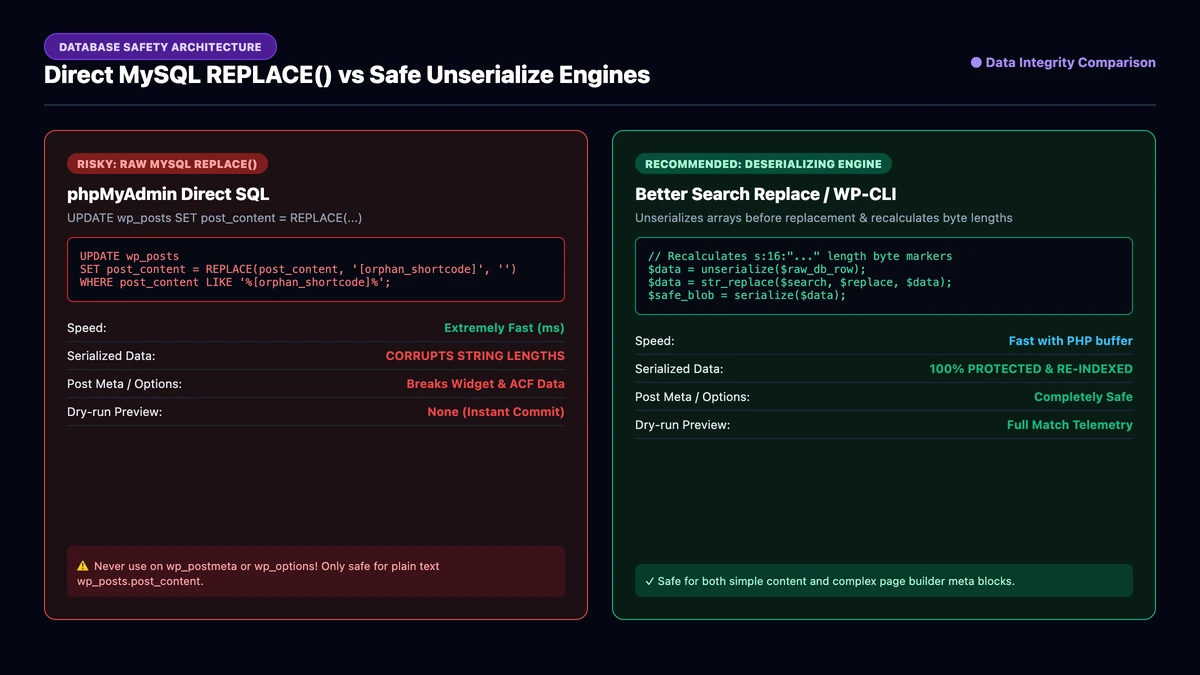
To understand why raw SQL is dangerous, consider how modern WordPress themes and plugins store page layout data. In
wp_postmeta, page builders (like Elementor or Beaver Builder) store complex layouts as serialized PHP strings. A serialized string contains explicit byte-length metadata:a:1:{i:0;a:2:{s:4:"type";s:6:"button";s:7:"content";s:23:"[su_button]Buy[/su_button]";}}
Notice the notation
s:23:"[su_button]Buy[/su_button]". This tells the PHP interpreter: ‘The following string is exactly 23 bytes long.’ If you execute a standard MySQL REPLACE() query to strip [su_button] and [/su_button], leaving only Buy (3 bytes), the raw SQL query changes the string but leaves the length marker at s:23. The next time WordPress loads that post, PHP’s unserialize() function encounters a 3-byte string where a 23-byte string was declared. The unserializer immediately throws a fatal deserialization error, returns false, and your page layout breaks into a blank white screen.Therefore, if you choose to use phpMyAdmin to remove unused shortcodes, adhere strictly to these non-negotiable rules:
1. Target ONLY
2. NEVER target
3. Always export a
wp_posts.post_content: Plain post content is standard non-serialized text, making MySQL REPLACE() safe.2. NEVER target
wp_postmeta, wp_options, or wp_termmeta with raw SQL: Always use WP-CLI or Better Search Replace for meta tables.3. Always export a
.sql backup first: Export the table before executing any raw UPDATE statement.For a simple self-closing shortcode with no variable attributes, here is the exact safe SQL query to run in phpMyAdmin:
-- Safe direct SQL update targeting ONLY plain post content
UPDATE wp_posts
SET post_content = REPLACE(post_content, '[contact-form-7 id="404"]', '')
WHERE post_content LIKE '%[contact-form-7 id="404"]%'
  AND post_type IN ('post', 'page');
This query replaces the exact literal string with an empty string, specifically filtering for posts and pages, avoiding unnecessary locks on revision rows. Understanding these boundaries ensures you remove unused shortcodes without corrupting serialized settings.
Method 5: Manual Block Conversion for High-Value Cornerstone Articles
Automated database purges and PHP stubs are essential for bulk operations across hundreds of legacy posts. However, for your top 10–20 high-traffic cornerstone articles, automated deletion is not always optimal. When a retired plugin provided a functional UI element—such as a styled callout box, notification banner, button, or pricing table—simply stripping the shortcode leaves a structural hole in your content hierarchy. The superior strategy for high-value articles is manual conversion to native Gutenberg core blocks.
Native WordPress Gutenberg blocks (introduced in WordPress 5.0 and matured in modern WordPress 6.x) offer dedicated core replacements for virtually all legacy shortcode utilities:
• Shortcode
• Shortcode
• Shortcode
• Shortcode
[su_button]: Replace with the core Buttons block (wp:button). Provides accessible markup, customizable background colors, gradient fills, border radiuses, and rel attributes without third-party plugin overhead.• Shortcode
[su_box] or [su_note]: Replace with the core Group or Quote block (wp:group). Add a background tint, border accent, and padding directly in the editor sidebar.• Shortcode
[su_column]: Replace with the core Columns block (wp:columns) for responsive multi-column layouts that adapt perfectly to mobile viewports.• Shortcode
[pricing-table]: Replace with the core Table block (wp:table) or a Group block styled with CSS flexbox.By manually replacing retired shortcodes with core blocks in your highest-converting articles, you achieve three decisive benefits: you permanently remove unused shortcodes, eliminate third-party plugin script bloat, and protect your content against future deactivations forever because core Gutenberg blocks are natively supported by WordPress core.
Shortcode Remediation Protocol & Failure Scenario Matrix
Review the troubleshooting matrix below for resolving complex shortcode issues across diverse production environments:
| Failure Scenario | Primary Symptom | Critical Safety Risk | Recommended Resolution Step | Verification Command |
|---|---|---|---|---|
| Missing Plugin Deactivation | Raw brackets [plugin_tag] visible in body copy | Brand damage & crawler confusion | Deploy Method 1 (PHP stub) for instant masking; then run Method 2 (BSR) to clean DB | curl -s URL | grep -F ‘[plugin_tag]’ |
| Nested Shortcode Containers | [su_row][su_col]Text[/su_col][/su_row] | Corrupted column alignment & layout shifts | Use WP-CLI recursive regex matching inner content first, then strip outer wrappers | wp search-replace ‘\[\/?su_row[^\]]*\]’ ” wp_posts –regex |
| Serialized Page Builder Meta | Blank white page or fatal error after DB replace | CORRUPTED SERIALIZATION in wp_postmeta | Restore SQL backup immediately; re-run replacement strictly using Better Search Replace | wp post meta get POST_ID _elementor_data |
| Broken Closing Tag Only | Raw [/su_box] exposed at end of paragraph | Unclosed DOM elements or trailing brackets | Search database for exact closing tag string ‘\[\/su_box\]’ and replace with empty string | wp search-replace ‘\[\/su_box\]’ ” wp_posts |
| Massive Multisite Network | Thousands of orphaned tags across 50+ subsites | High CPU spikes & database timeout during update | Execute scripted WP-CLI loop with wp site list and run search-replace per subsite sequentially | for site in $(wp site list –field=url); do wp search-replace … –url=$site; done |
The 4-Step Enterprise Shortcode Remediation Protocol
Whenever you perform automated modifications on a production WordPress database, you must adhere to rigorous systems engineering hygiene. A single misplaced regex escape character can strip legitimate brackets from formulas, remove essential product IDs, or truncate post paragraphs. Adhere strictly to this 4-step enterprise remediation protocol whenever you remove unused shortcodes:
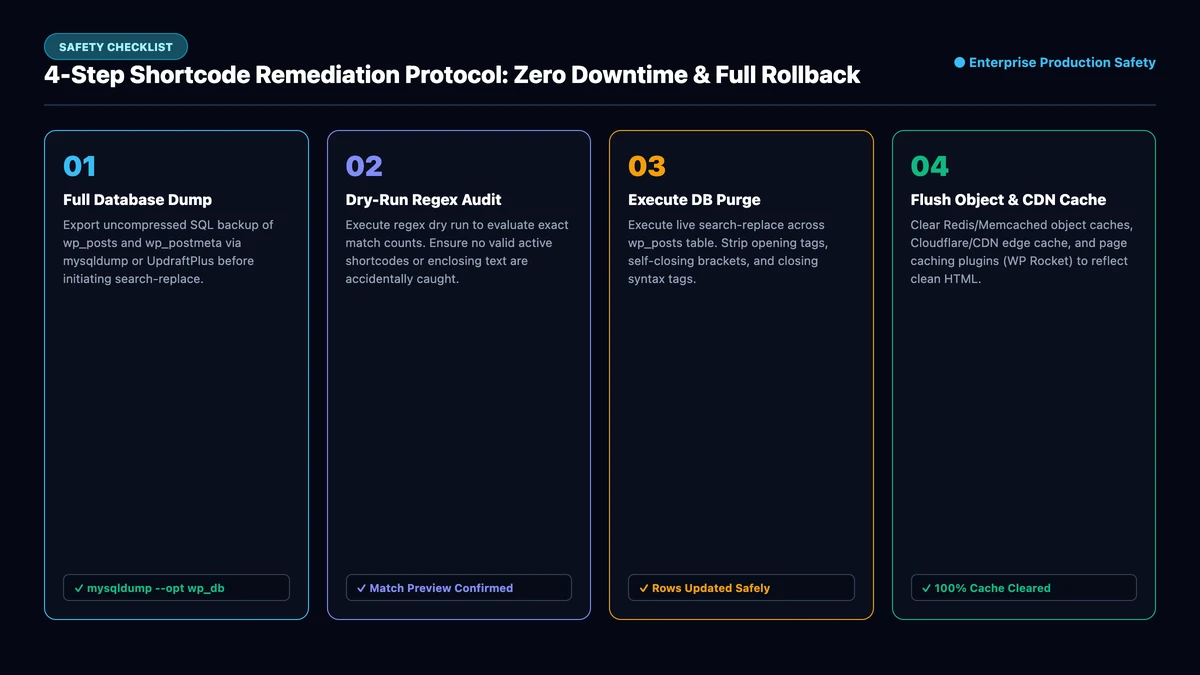
Step 1: Execute a Full Database Dump
Before running any search-and-replace command, create a complete, uncompressed MySQL database backup. You can export your database via WP-CLI:
# Create a timestamped SQL backup in a secure directory
wp db export ~/backups/pre-shortcode-purge-$(date +%Y%m%d-%H%M%S).sql
If you do not have SSH terminal access, use a reputable backup plugin such as UpdraftPlus or export your database directly via phpMyAdmin. Verify that the backup file size is greater than zero before proceeding.
Step 2: Perform a Dry-Run Regex Audit
Never execute a destructive write operation without first reviewing the matched rows. Whether using the dry-run checkbox in Better Search Replace or the
--dry-run flag in WP-CLI, inspect the total match count. If your site has 50 articles and the dry run reports 2,000 matches, your regex pattern is likely too broad and may be capturing legitimate brackets or code blocks.Step 3: Execute the Database Purge
Run your targeted search-and-replace routine. If you are cleaning both opening and closing tags for enclosing shortcodes, execute the cleanup in two targeted passes or use a validated regex pattern that strips both tags simultaneously.
Step 4: Flush Object, Page, and CDN Caches
After successfully updating the database, your site will continue serving old, broken shortcode HTML to visitors until all caching layers are refreshed. Execute a comprehensive cache purge:
• Persistent Object Cache: Flush Redis or Memcached (
• Page Caching Plugins: Clear cache in WP Rocket, LiteSpeed Cache, or W3 Total Cache.
• Edge CDN Cache: Log in to Cloudflare or your CDN provider and execute a Purge Everything request.
• Browser Verification: Open an incognito browser window and inspect the formerly broken post using Chrome DevTools (Right click → Inspect) to verify that raw brackets are 100% eliminated from the DOM.
wp cache flush).• Page Caching Plugins: Clear cache in WP Rocket, LiteSpeed Cache, or W3 Total Cache.
• Edge CDN Cache: Log in to Cloudflare or your CDN provider and execute a Purge Everything request.
• Browser Verification: Open an incognito browser window and inspect the formerly broken post using Chrome DevTools (Right click → Inspect) to verify that raw brackets are 100% eliminated from the DOM.
Automated Python Script to Audit Orphaned Shortcodes
To assist webmasters, developers, and agency teams in diagnosing exactly which orphaned shortcodes are lingering across their databases, our engineering team has developed an open-source Python diagnostic script:
audit_orphaned_shortcodes.py.This diagnostic utility can parse an exported WordPress SQL database dump (or connect directly to a database via pymysql), scan all
post_content records, identify every bracketed token, match them against a user-defined whitelist of active shortcodes, aggregate total occurrences, identify affected post IDs, and output the exact WP-CLI cleanup commands needed to remove unused shortcodes.#!/usr/bin/env python3
"""
WordPress Orphaned Shortcode Auditor & Remediation Generator
Author: Bloggersutra Engineering
Description: Parses SQL dumps or raw post content to detect unhandled shortcodes and generate WP-CLI purge commands.
"""
import re
import sys
from collections import Counter
# Whitelist of known active shortcodes currently registered on your site
ACTIVE_SHORTCODES_WHITELIST = {
'embed',
'caption',
'gallery',
'audio',
'video',
'playlist',
'wp_caption'
}
def scan_sql_dump(sql_file_path):
print(f"[*] Scanning WordPress database dump: {sql_file_path}...")
# Regex to match shortcode tags: [tag_name or [/tag_name
shortcode_pattern = re.compile(r'[/?([a-zA-Z0-9_-]+)(?:s+[^]]*)?]')
found_tags = Counter()
sample_contexts = {}
try:
with open(sql_file_path, 'r', encoding='utf-8', errors='ignore') as f:
for line_no, line in enumerate(f, 1):
# Only inspect INSERT INTO or UPDATE statements touching posts
if 'wp_posts' in line:
matches = shortcode_pattern.findall(line)
for tag in matches:
tag_clean = tag.lower().strip()
if tag_clean not in ACTIVE_SHORTCODES_WHITELIST:
found_tags[tag_clean] += 1
if tag_clean not in sample_contexts:
sample_contexts[tag_clean] = line[:120].strip()
except FileNotFoundError:
print(f"[-] Error: File not found at {sql_file_path}")
sys.exit(1)
print(f"[+] Audit Complete. Discovered {len(found_tags)} unique orphaned shortcode tags:n")
print(f"{'Orphaned Shortcode Tag':<30} | {'Occurrences':<12} | {'Action Required'}")
print("-" * 65)
for tag, count in found_tags.most_common():
action = "PURGE RECOMMENDED" if count > 0 else "CLEAN"
print(f"[{tag:<28}] | {count:<12} | {action}")
print("n[+] Recommended WP-CLI Remediation Commands:n")
for tag, _ in found_tags.most_common():
cmd = f"wp search-replace '[/?{tag}[^]]*]' '' wp_posts --regex --regex-flags='i' --dry-run"
print(f"# Audit {tag}:n{cmd}n")
if __name__ == '__main__':
if len(sys.argv) < 2:
print("Usage: python3 audit_orphaned_shortcodes.py <path_to_wp_db_dump.sql>")
sys.exit(1)
scan_sql_dump(sys.argv[1])
To run this diagnostic audit, download your latest database export and run
python3 audit_orphaned_shortcodes.py backup.sql in your terminal. The script will output an actionable summary table and provide copy-paste WP-CLI commands tailored to your exact database records, allowing you to systematically remove unused shortcodes with complete confidence.Frequently Asked Questions About Removing Unused Shortcodes
Review detailed answers to the ten most critical technical questions regarding how to remove unused shortcodes in WordPress:
Shortcodes appear as raw text when the plugin or theme responsible for registering the shortcode handler function is deactivated, updated with breaking changes, or deleted. Core WordPress does not store rendered HTML in the database; it stores raw bracket strings. When the plugin’s callback is no longer loaded in memory, the WordPress parser skips the tag and renders the raw brackets directly into the HTML document.
The best non-destructive approach is PHP dummy stubbing. Add a snippet in your child theme’s functions.php or WPCode registering add_shortcode(‘orphan_tag’, ‘__return_empty_string’);. This immediately instructs WordPress to output an empty string whenever it encounters that shortcode tag on the frontend, hiding it from visitors without touching a single database row.
If you target only the wp_posts table to remove unused shortcodes from post body text, the risk is minimal. However, if you run raw search-and-replace queries across wp_postmeta or wp_options without a tool that protects serialized PHP arrays (like Better Search Replace or WP-CLI), you can corrupt serialized string lengths, breaking page builder layouts and widget configurations. Always create a database backup first.
If you use a simple empty string replacement or __return_empty_string on an enclosing shortcode like [su_box]Important Content[/su_box], the inner content (‘Important Content’) will either be deleted or left with an orphaned closing tag [/su_box]. To keep the inner content while stripping the outer wrapper, use a custom PHP stub that returns do_shortcode($content) or a regex pattern that specifically targets the opening and closing brackets separately.
You can search for the shortcode string directly in your WordPress admin post list search bar (e.g., search ‘[su_button]’). For an automated site-wide inventory, run a dry-run search using WP-CLI: wp search-replace ‘[su_button’ ” wp_posts –dry-run. This will output a report of every row containing the tag.
Yes. WP-CLI’s search-replace command natively handles PCRE regular expressions when the –regex flag is supplied. Furthermore, WP-CLI automatically detects serialized PHP strings, unpacks them, applies the replacement, recalculates byte markers, and reserializes them safely. Always execute with –dry-run first to preview match counts.
PHP stubbing is an excellent immediate emergency fix. However, permanently purging unused shortcodes from the database is the recommended long-term best practice. Purging reduces database storage size, speeds up database queries, keeps REST API endpoints clean, and ensures you do not accumulate endless PHP stub snippets over years of site maintenance.
Yes, indirectly and directly. Exposed raw brackets look unprofessional to visitors, increasing bounce rates and reducing time-on-page, which negatively impacts engagement signals. Furthermore, search engine crawlers index the literal bracket text, meaning users searching Google may see ‘[su_button url=…]’ in your search result snippets rather than a compelling meta description.
Raw MySQL REPLACE() queries perform dumb string replacements without understanding PHP serialization. If a shortcode is stored inside serialized metadata (common with page builders like Elementor or WPBakery), altering the string length without updating the serialization byte counter (e.g., s:25) corrupts the data structure, resulting in critical deserialization errors.
After executing a database cleanup, you must clear all three caching tiers: 1) Persistent object cache (via WP-CLI wp cache flush or Redis/Memcached object cache settings); 2) Page caching plugins (click ‘Purge All’ in WP Rocket, LiteSpeed, or W3 Total Cache); and 3) Edge CDN cache (purge cache in Cloudflare). Then verify the live page in an incognito browser window.
Conclusion: Maintaining a Pristine, Orphan-Free WordPress Architecture
Eradicating technical debt is an ongoing responsibility of high-performance web publishing. When you see shortcodes showing as text, taking immediate action to address unused shortcodes wordpress installs hold and permanently remove shortcodes wordpress editors no longer use ensures your site maintains peak technical excellence. When you retire legacy plugins, failing to remove unused shortcodes leaves an untidy digital footprint that compromises your site’s aesthetic polish, inflates database bloat, and harms search engine snippet presentations. Fortunately, modern WordPress engineering provides powerful tools to eliminate orphaned brackets completely.
By leveraging Method 1’s non-destructive PHP stubbing, you can eliminate frontend visual glitches in seconds without touching database records. When preparing for a permanent architectural cleanup, tools like Better Search Replace and WP-CLI regex search-and-replace allow you to safely remove unused shortcodes across thousands of articles while fully preserving serialized array integrity. Finally, converting legacy shortcode elements in your top cornerstone articles into native Gutenberg core blocks ensures your content remains robust, performant, and future-proof for years to come.
As you continue refining your digital publishing workflow—whether exploring how to choose a WordPress theme, mastering WordPress settings, or streamlining navigation via a WordPress search redirect—regularly executing shortcode audits will ensure your website delivers an immaculate user experience to every visitor.