





Quick answer
- What is the fundamental difference in domain vs hosting? In the debate of domain vs hosting, the distinction is straightforward: your domain name is your website’s digital street address (e.g.,
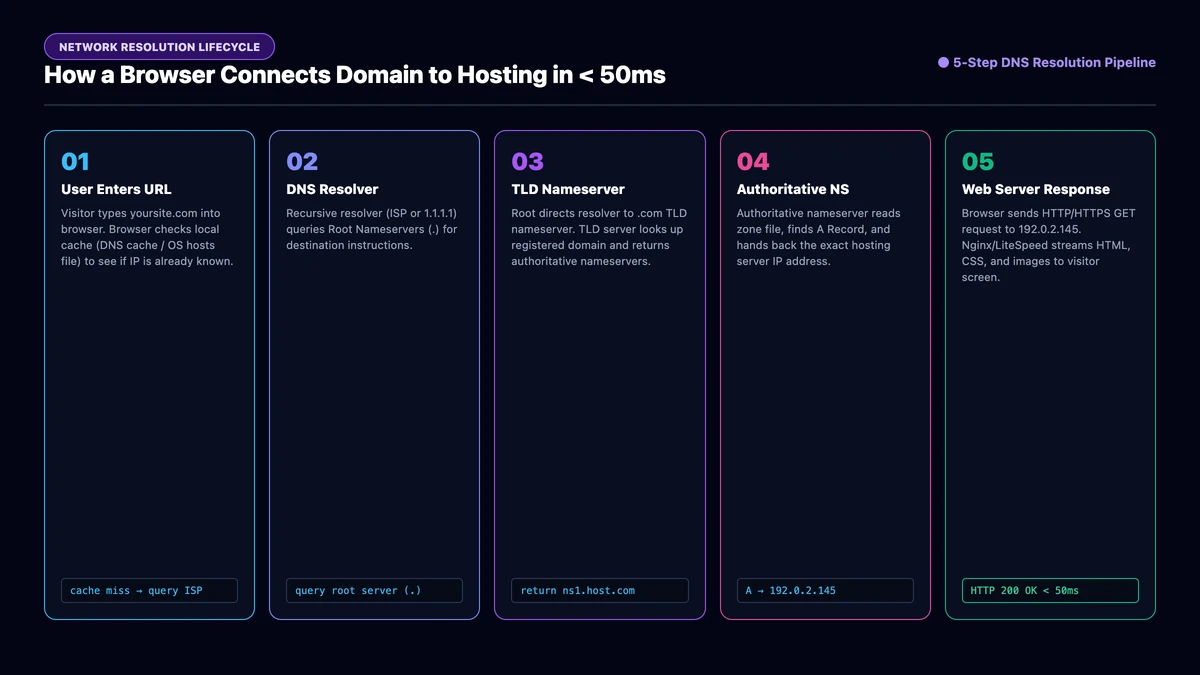
bloggersutra.com), while web hosting is the physical computer server and storage space where your website’s actual files, images, code, and database records live. You need both to run a live website: the domain tells visitors where to go, and hosting serves the content when they arrive..tp-post-content code, .tp-post-content pre, .toc-link{word-break:break-word!important;overflow-wrap:break-word!important;} - How do a domain name and web hosting work together? A domain name and web hosting are connected through the Domain Name System (DNS). When a visitor types your domain into a web browser, the global DNS network translates that human-friendly name into an IP address (such as
192.0.2.1) pointing to your web hosting server. The server receives the request and sends your website files back to the user’s screen in milliseconds. - Should you buy domain and hosting together or from separate companies? For complete beginners, buying domain and hosting together from a single provider (like Hostinger or Bluehost) offers 1-click convenience and often includes a free domain for the first year. However, for growing businesses, keeping your domain at a specialized registrar (like Namecheap or Cloudflare) and your hosting at a dedicated host is the recommended best practice for enhanced security, lower renewal fees, and effortless server moving from Blogger to WordPresss.
- What is a domain name and how much does it cost annually? When asking ‘what is a domain name’, it is the unique alphanumeric address registered through an ICANN-accredited registrar. Standard
.comdomains typically cost between $10 and $15 per year. Web hosting, by comparison, operates on a recurring monthly or annual subscription ranging from $2.99/month for shared hosting to $35+/month for managed cloud VPS hosting. - Can you change your web host without losing your domain name? Yes, absolutely. Because your domain registration and web hosting are completely independent assets, you can switch web hosting providers anytime without changing your domain name. You simply update your domain’s nameservers or A record to point to the new host’s server IP address, resulting in zero downtime.
For anyone taking their first steps into digital publishing, building an online business, or launching an e-commerce brand in 2026, the technical terminology of the web can feel overwhelming. Among the most frequent points of confusion for newcomers is the comparison of domain vs hosting. Many aspiring website creators mistakenly assume that purchasing a domain name automatically gives them a live website, or conversely, that signing up for a web hosting plan automatically provides them with an online brand address. Understanding the exact difference between domain and hosting is the foundational first step of web mastery. If you are on a tight budget, read our breakdown of how to build a free WordPress website using local sandboxes and WebAssembly without getting trapped by costly upgrade paywalls.
In reality, a domain name and a web hosting account, or discover how to build a website without hosting are two fundamentally distinct, complementary technologies. Neither can function as a public website without the other. If you own a domain name without web hosting, visitors who type your address will see a blank registrar parking page. If you purchase web hosting without a domain name, your server files sit isolated on an obscure numeric IP address that no ordinary human can easily memorize or navigate. Mastering the dynamics of domain vs hosting unlocks the ability to build, secure, and scale your online presence with confidence.
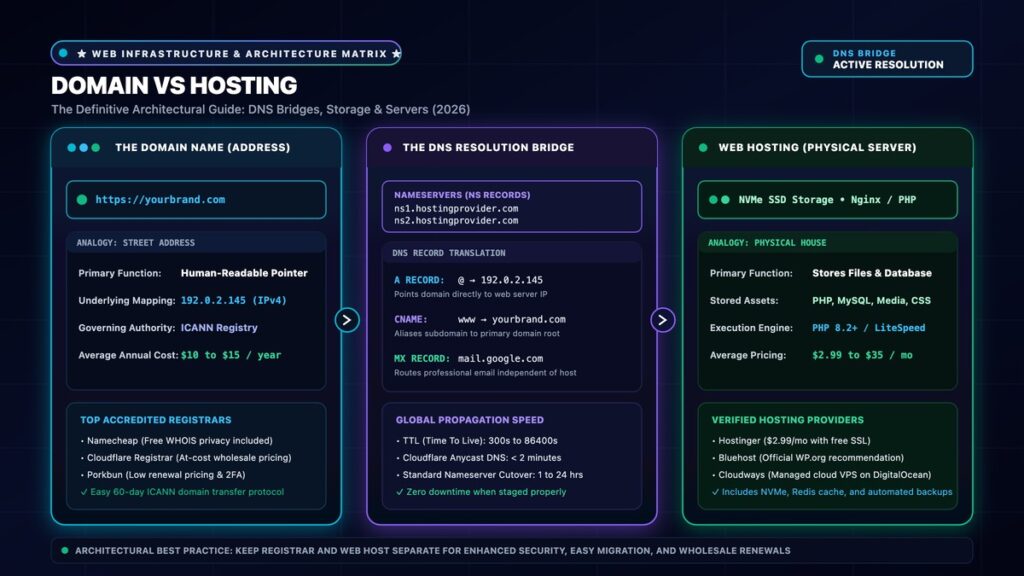
Furthermore, how you architect your domain and hosting infrastructure has profound long-term implications for your business. It dictates your annual renewal costs, your vulnerability to domain hijacking or 500 internal server error WordPress crashes and server outages, your site loading speed across global networks, and how easily you can migrate between servers as your traffic explodes. In this comprehensive 2026 engineering guide, we dissect every layer of the domain vs hosting relationship, explain the underlying DNS mechanics, compare all-in-one bundles against separate providers across three technical comparison tables, and provide an automated Python DNS auditor.
Whether you are learning blog name ideas and domain formulas, evaluating how to choose web hosting, or following our step-by-step tutorial on how to install WordPress, this definitive guide to domain vs hosting delivers the clarity you need.
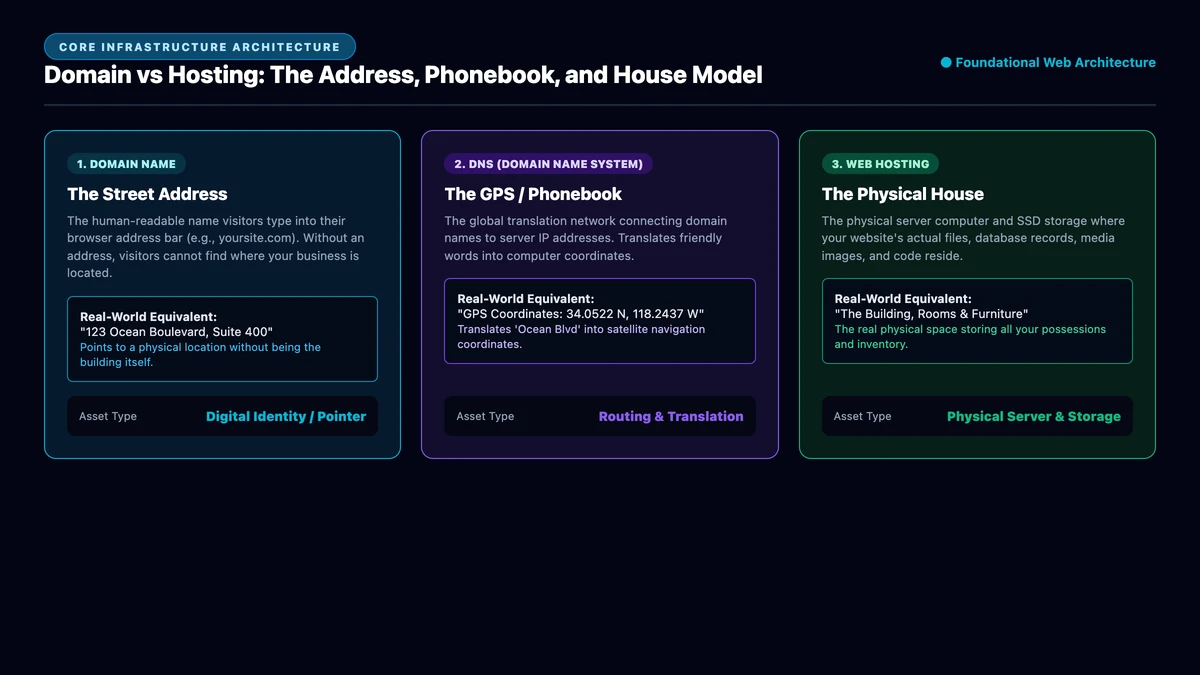
The Core Distinction: The Street Address vs The Physical House
To make the abstract concepts of networking immediately intuitive in the debate of domain vs hosting, web engineers frequently utilize the physical real estate analogy. When analyzing domain vs hosting, envisioning a physical house provides instant conceptual clarity:
1. The Domain Name is the Street Address: Imagine you want friends to visit your new office. You give them a clear street address: ‘742 Evergreen Terrace, Springfield’. In the digital world, that street address is your domain name (e.g.,
bloggersutra.com). It does not contain any physical rooms, furniture, or inventory; it is simply a human-friendly label that tells people where to travel. When evaluating domain vs hosting, remember that the domain is purely an address.2. Web Hosting is the Physical House and Land: The actual physical structure standing at that address—the land, the walls, the roof, the furniture, the filing cabinets, and the products on the shelves—is your web hosting server. In the digital world, web hosting is the physical computer hardware, high-speed NVMe solid-state drives, RAM, and CPU processors located in an enterprise datacenter. This server stores your actual HTML files, PHP scripts, media libraries, blog posts, and database tables. In the equation of domain vs hosting, hosting is the physical storage container.
3. The DNS System is the GPS Navigation Map: How does someone holding your written street address actually navigate their car to your building? They enter the address into their GPS navigation system, which translates the words into exact geographical coordinates (latitude and longitude). On the internet, the Domain Name System (DNS) is that global GPS map. It translates friendly domain words into machine-readable IP addresses (like
192.0.2.145), routing the visitor’s web browser directly to your hosting server. The synergy of domain name and web hosting powered by DNS makes the modern internet possible.This fundamental division explains why you can change your house’s interior decor (redesigning your website files on your host) without altering your street address (keeping your domain name), or conversely, why you can forward your street address to a brand new piece of land (migrating web hosts) in just a few clicks.
Domain Name vs Web Hosting Core Distinction Matrix
Review the detailed comparison matrix below breaking down every technical facet of domain vs hosting:
| Architectural Feature | Domain Name | Web Hosting | How They Intersect in Practice |
|---|---|---|---|
| Primary Function & Role | Human-readable digital identity & navigation pointer | Physical server hardware, file storage & database execution | Domain directs visitors; hosting serves files |
| Real-World Analogy | Street address on a business card (e.g. 100 Main St) | The physical building, offices, rooms & furniture | Address guides visitors to the physical building |
| Physical Infrastructure | DNS records stored across distributed root/TLD servers | Bare-metal CPU, NVMe SSDs, RAM & cooling in datacenters | DNS records translate domain words to server IP |
| Standard Pricing Model | $10 to $15 / year (Flat annual registration) | $2.99 to $35+ / month (Recurring server resource rental) | Both are required recurring operational expenses |
| Governing Organization | ICANN & accredited domain registries (.com, .org, .net) | Independent cloud web hosting companies & datacenters | Registrar assigns ownership; host provides compute |
| What Happens on Expiration? | Domain enters grace period, then released to public | Website immediately goes offline; files deleted after grace | Both must be kept active to prevent total site loss |
| Portability & Migration | Transferable between registrars via ICANN EPP code | Files/databases migrated via SFTP, SSH, or migration plugins | Repoint DNS nameservers to complete host switch |
What Is a Domain Name? Complete Technical Anatomy
To fully grasp the dynamics of domain vs hosting and answer ‘what is a domain name’ thoroughly, we must explore the exact anatomy of web naming. When newcomers ask ‘what is a domain name’, they are asking about the hierarchical naming system managed by the Internet Assigned Numbers Authority (IANA) and introduced in 1983 to replace cumbersome numeric IP addresses.
Every fully qualified domain name consists of several hierarchical segments reading from right to left:
• Top-Level Domain (TLD): The suffix located at the very end of your domain name. Common generic TLDs include
• Second-Level Domain (SLD): The unique brand identifier appearing directly to the left of the TLD. In
• Subdomain: An optional third-level prefix preceding the SLD, separated by a dot. The most famous subdomain is
• Protocol and Scheme: The prefix indicating how data is transferred. In modern web standards, this is always
.com (commercial), .org (organizations), and .net (networks), alongside country-code TLDs (ccTLDs) such as .in, .uk, or .ca. In domain vs hosting decisions, opting for a trusted .com domain remains the gold standard for global brand authority.• Second-Level Domain (SLD): The unique brand identifier appearing directly to the left of the TLD. In
bloggersutra.com, bloggersutra is the second-level domain. This is the custom name you register through an accredited registrar.• Subdomain: An optional third-level prefix preceding the SLD, separated by a dot. The most famous subdomain is
www, but developers frequently create functional subdomains such as store.yourbrand.com, app.yourbrand.com, or staging.yourbrand.com to host specialized applications on separate web hosting environments.• Protocol and Scheme: The prefix indicating how data is transferred. In modern web standards, this is always
https:// (Hypertext Transfer Protocol Secure), signaling an encrypted SSL/TLS connection between the visitor and the hosting server.Understanding this hierarchy when learning domain vs hosting is vital when configuring domain name and web hosting settings, as subdomains can easily be routed to completely different web servers across the world using simple DNS records.
What Is Web Hosting? Server Types and Execution Runtimes
The second pillar in the domain vs hosting equation is web hosting. Analyzing the difference between domain and hosting reveals why hosting handles the actual computational workload. In domain vs hosting, hosting is where your data lives. While a domain name is essentially a pointer in a global database, web hosting is heavy, continuous computing power. Web hosts operate massive enterprise datacenters filled with thousands of rack-mounted servers equipped with multi-core AMD EPYC or Intel Xeon processors, redundant power supplies, high-speed fiber-optic network connections, and industrial air filtration.
When comparing domain vs hosting and analyzing domain vs hosting costs, it helps to understand the four primary tiers of web hosting available in 2026:
1. Shared Web Hosting ($2.99 to $9.99/mo): The entry-level tier where hundreds of separate websites share the resources of a single physical server. Providers like Hostinger and Bluehost isolate accounts using containerized environments (like CloudLinux). Shared hosting is the ideal, budget-friendly starting point for brand new blogs and small business sites.
2. Managed WordPress Hosting ($15 to $35/mo): A specialized hosting environment meeting official WordPress hosting standards, engineered specifically for high concurrency. It best contact form plugins for WordPress server-level caching (Redis / Memcached), automated core and plugin updates, staging environments, and daily cloud backups. When setting up a domain name and web hosting for a serious commercial blog, managed hosting delivers superior speed.
3. Cloud VPS Hosting ($10 to $80/mo): Virtual Private Server (VPS) hosting on cloud infrastructure (such as DigitalOcean, Vultr, or Linode) managed through platforms like Cloudways. You receive dedicated virtual CPU cores and dedicated RAM, ensuring your site speed never fluctuates based on neighboring websites.
4. Dedicated Server Hosting ($100 to $500+/mo): An entire physical server leased exclusively to your organization. Reserved for high-volume enterprise portals, massive WooCommerce stores, and high-traffic news publishers.
Recognizing these hosting tiers clarifies why wordpress designer cost and site performance vary so dramatically: a high-end domain name connected to a sluggish $1/month shared server will still load slowly for visitors, demonstrating why both domain and hosting quality matter equally.
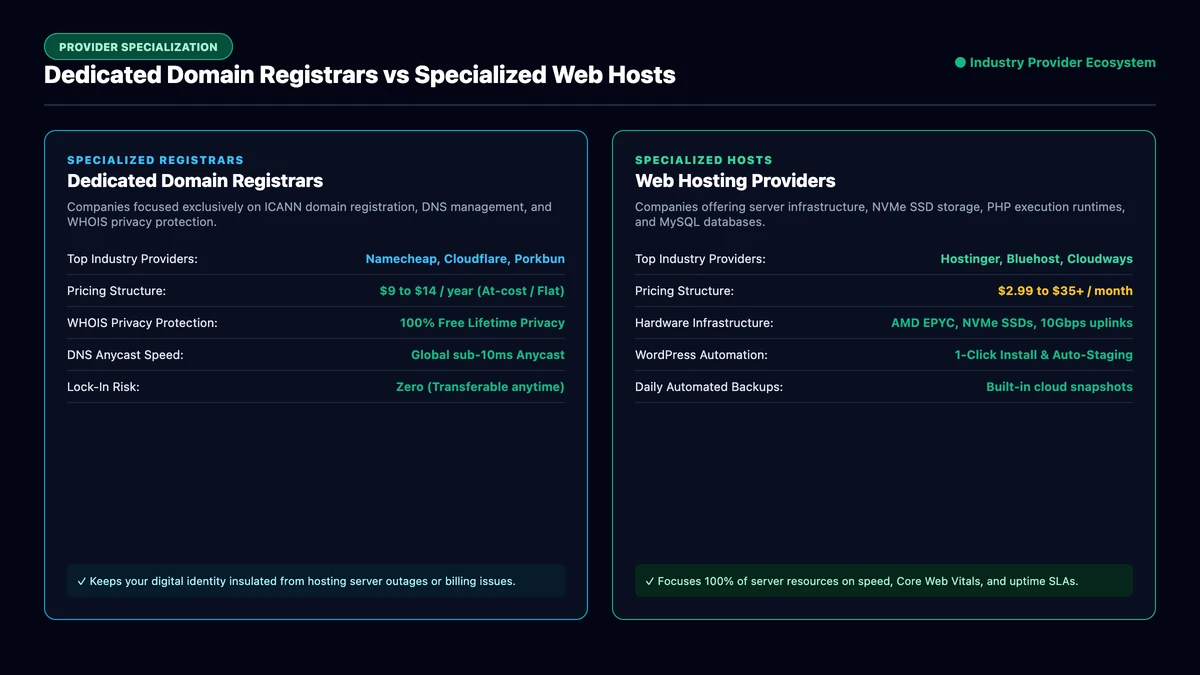
The Handshake: How Domain and Hosting Connect via DNS
The magic that unites domain vs hosting into a unified user experience is the DNS handshake. In the framework of domain vs hosting, the difference between domain and hosting is bridged by authoritative nameservers. Examining domain vs hosting without DNS is like buying a house without roads. When you purchase a domain from one company and web hosting from another, they have no inherent knowledge of each other. You must explicitly configure the handshake. In the world of domain name and web hosting, there are two primary methods to accomplish this:
Method 1: Pointing Nameservers (NS Records)
The simplest, most common method for beginners is delegating nameserver authority to your web hosting provider. When you sign up for web hosting, your host provides two or more custom nameserver addresses, such as:
•
•
ns1.hostingprovider.com•
ns2.hostingprovider.comYou log in to your domain registrar (e.g., Namecheap or Porkbun), navigate to DNS settings, select Custom DNS, and paste these nameserver addresses. By doing this, you hand over complete DNS record management to your web host. Your web host automatically configures your web, email, and FTP routing inside your hosting control panel. This is the fastest way to connect domain and hosting.
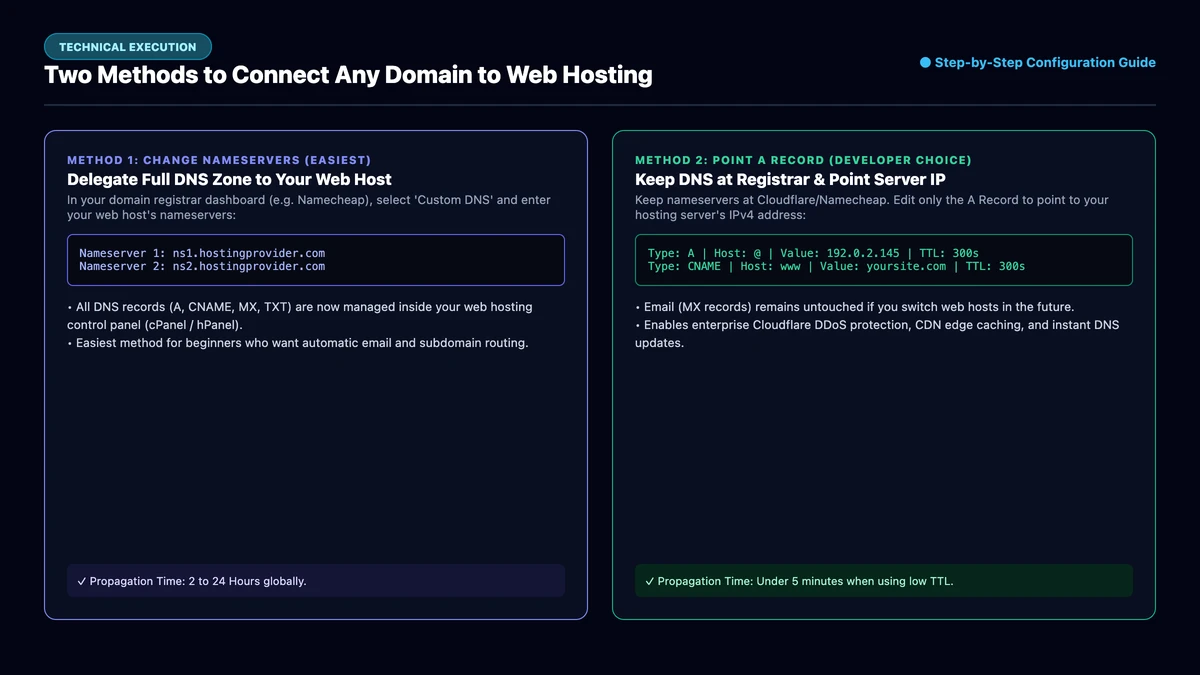
Method 2: Pointing A Records and CNAMEs (Advanced & Recommended)
The professional method preferred by developers and agencies is keeping your DNS management at your dedicated registrar (or routing through Cloudflare) and pointing individual DNS records to your hosting server. This gives you granular control over your digital infrastructure:
• A Record (Address Record): Points your root domain (
• CNAME Record (Canonical Name): Aliases your
• MX Records (Mail Exchange): Routes your professional business email (e.g., Google Workspace or Microsoft 365) directly to your email provider without touching your web hosting server.
@) directly to your web hosting server’s IPv4 address (e.g., 192.0.2.145).• CNAME Record (Canonical Name): Aliases your
www subdomain to your root domain (e.g., www points to bloggersutra.com).• MX Records (Mail Exchange): Routes your professional business email (e.g., Google Workspace or Microsoft 365) directly to your email provider without touching your web hosting server.
The immense advantage of Method 2 when managing domain vs hosting is operational isolation: if your web hosting server experiences temporary downtime, your professional company email never goes offline, because your MX records resolve independently. Furthermore, if you decide to change web hosts in the future, you do not need to migrate your email; you simply update the single A record IP address, and your new host is live in under five minutes.
Buying Domain and Hosting Together vs Separate Providers
Examine the strategic trade-offs below when deciding whether to purchase domain and hosting together or separately:
| Strategic Criteria | Strategy A: Bundled (Same Provider) | Strategy B: Separate Dedicated Providers | Recommended Winner |
|---|---|---|---|
| Initial Setup Convenience | 1-Click automated connection; zero DNS manual entry | Requires 2 minutes to copy nameservers or A record IP | Bundled (Fastest for Beginners) |
| First-Year Promotional Cost | Often includes ‘Free Domain for Year 1’ ($0 upfront) | Pay standard wholesale registrar rate ($9–$12 upfront) | Bundled (Saves $10 initially) |
| Renewal Pricing Stability | Domain renewal prices often spike to $19.99–$24.99/yr | Wholesale domain pricing locked forever ($9–$11/yr) | Separate (Saves $100+ over 5 years) |
| Security & Threat Isolation | Single login breach compromises both server and domain | Domain locked behind hardware 2FA; server isolated | Separate (Superior Security) |
| Host Migration Simplicity | Must initiate 60-day ICANN domain transfer to move | Simply update A-record IP; host switch takes 5 minutes | Separate (Zero Lock-In Risk) |
| Email Continuity During Outages | If web host crashes, company email goes down too | Email routes through Google/Microsoft independently | Separate (Enterprise Reliability) |
The Strategic Business Value of the Domain vs Hosting Distinction
Why does the domain vs hosting distinction matter so intensely for business owners? Because conflating domain name and web hosting leads to preventable disasters: accidental domain expirations, vendor lock-in, and costly downtime. When you truly grasp the difference between domain and hosting, you gain the power to negotiate wholesale renewal rates, isolate security threats, and execute seamless server upgrades.
When evaluating domain vs hosting, remember that your domain is your immortal intellectual property. You can re-platform from shared hosting to a cloud VPS, rebuild your website code, or completely switch hosting providers, and your audience will never notice any disruption. The difference between domain and hosting empowers your business with total technical agility.
If someone asks you ‘what is a domain name’, you can explain that it is your digital real estate title deed. While evaluating domain vs hosting costs, understanding ‘what is a domain name’ helps you see that spending $10/year for your address is the single highest-leverage investment on the internet. Pairing a quality domain with high-speed domain and hosting infrastructure ensures your website thrives.
The Bundled vs Separate Dilemma: Which Path Is Best for You?
Almost every major web hosting company offers domain registration at checkout. When you purchase hosting from Bluehost or Hostinger, you are greeted with a prominent offer: ‘Claim Your Free Domain Name for Year 1’. For a beginner trying to understand domain vs hosting, this bundled offer is undeniably tempting. But is it strategically wise?
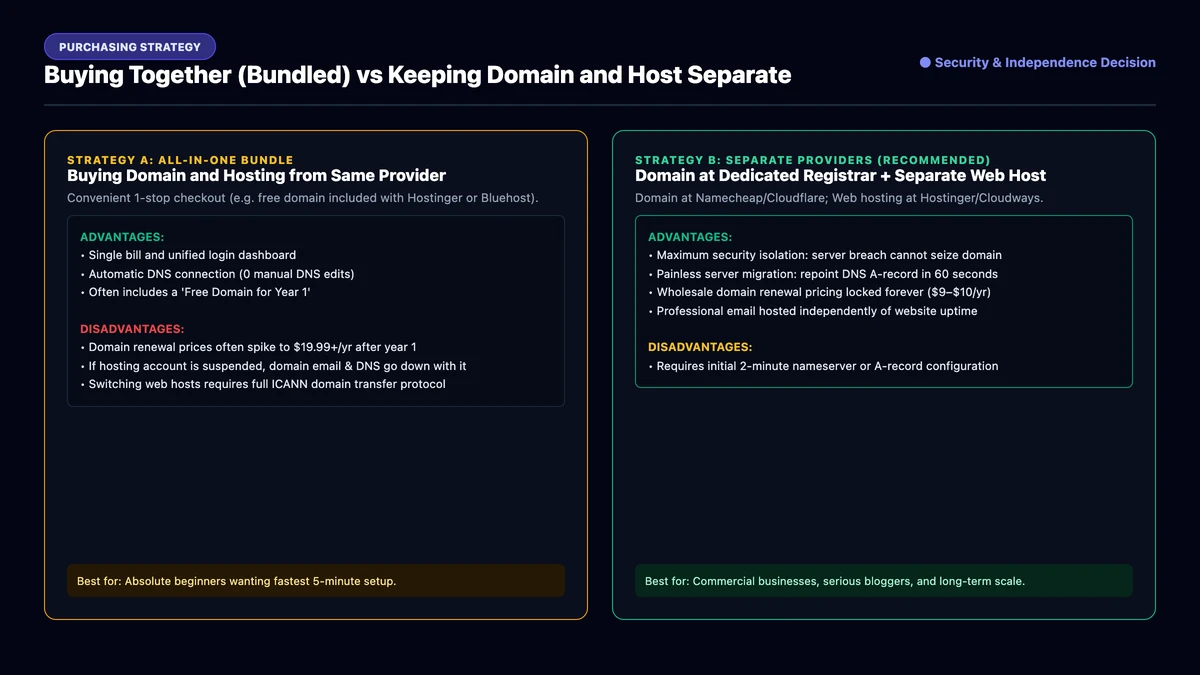
Let us evaluate the two distinct paths to help you determine which strategy aligns with your goals:
When the All-in-One Bundle Makes Sense:
If you are an absolute beginner launching your very first personal blog, a classroom project, or a local club website, convenience is your top priority. You do not want to wrestle with DNS zone files, IP addresses, or nameservers. Taking advantage of Hostinger or Bluehost’s bundled free domain simplifies setup: you create one account, enter your billing details once, and your WordPress site is installed and live in under five minutes. For early-stage experimentation, an all-in-one package is completely acceptable.
Why Serious Businesses Keep Domain and Hosting Separate:
If your website represents an established business, a revenue-generating affiliate publication, or an enterprise venture, separating your domain name and web hosting is an essential risk-mitigation rule. Consider the three strategic hazards of bundling:
1. Avoid Vendor Lock-In: If your web hosting provider experiences performance degradation, changes their pricing, or suspends your account due to an automated security false positive, they hold both your website files AND your domain name hostage. Moving your domain away requires navigating ICANN transfer authorization codes, unlocking the domain, and waiting up to 7 days for the transfer to clear. When your domain is registered at a separate registrar like Namecheap or Cloudflare, you retain total sovereign control.
2. Shield Against Renewal Price Spikes: Many web hosting companies use the ‘free domain’ as a loss-leader. In year two, your domain renewal fee quietly jumps to $19.99, $22.99, or even $27.99 per year. By contrast, dedicated registrars charge flat wholesale rates (e.g., Cloudflare charges exactly $9.77/year for
3. Elevated Security Posture: Keeping your registrar account separate allows you to protect your domain with hardware security keys (YubiKey / FIDO2) and registry lock protocols. Even if a rogue plugin compromises your WordPress hosting server, the hacker cannot steal your domain name or divert your DNS traffic.
2. Shield Against Renewal Price Spikes: Many web hosting companies use the ‘free domain’ as a loss-leader. In year two, your domain renewal fee quietly jumps to $19.99, $22.99, or even $27.99 per year. By contrast, dedicated registrars charge flat wholesale rates (e.g., Cloudflare charges exactly $9.77/year for
.com renewals with zero markup).3. Elevated Security Posture: Keeping your registrar account separate allows you to protect your domain with hardware security keys (YubiKey / FIDO2) and registry lock protocols. Even if a rogue plugin compromises your WordPress hosting server, the hacker cannot steal your domain name or divert your DNS traffic.
Security, ICANN Regulations, and WHOIS Privacy Protection
A critical technical dimension often overlooked when studying domain vs hosting is regulatory compliance and privacy protection. In domain vs hosting, legal jurisdictions differ: domains fall under ICANN, while hosting falls under cloud service contracts. Understanding this difference between domain and hosting keeps your brand secure. Because domain names are governed by the Internet Corporation for Assigned Names and Numbers (ICANN), while web hosting is governed by commercial service agreements, their legal frameworks differ significantly.
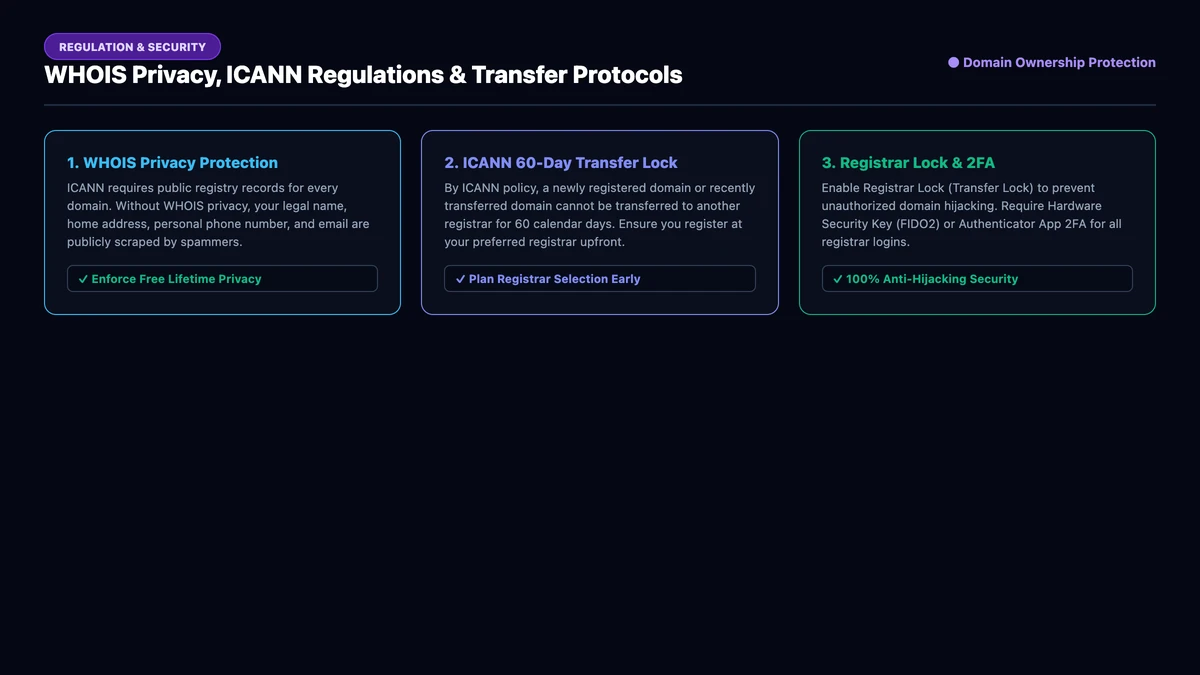
Here are three vital security protocols you must understand when purchasing a domain name and web hosting:
• Mandatory WHOIS Privacy Protection: When you register any domain name, ICANN regulations mandate that the registrant’s legal name, physical mailing address, email, and phone number be submitted to the public WHOIS directory. Without privacy protection, your personal home address and phone number are publicly exposed to web scrapers, telemarketers, spammers, and identity thieves within minutes of registration. Reputable registrars (such as Namecheap, Porkbun, and Cloudflare) provide 100% free, permanent WHOIS privacy shielding. Never register a domain with a company that charges an extra $9.99/year fee for basic privacy.
• The ICANN 60-Day Transfer Lock: According to ICANN’s official Transfer Policy, once you register a new domain name—or transfer an existing domain to a new registrar—the domain is placed under a mandatory 60-day transfer lock. During this 60-day window, you cannot transfer the domain to another registrar under any circumstances. (You CAN, however, change its web hosting nameservers anytime). This rule prevents domain theft, but it underscores why you should choose a high-quality registrar from day one.
• Registrar Lock (Transfer-Prohibited Status): Always ensure your domain dashboard has ‘Registrar Lock’ toggled to ON. This sets an
clientTransferProhibited status code in the registry, preventing any unauthorized party from initiating an EPP transfer code request without your explicit multi-factor authentication approval.Essential DNS Record Types & Connection Protocol Matrix
Review the reference guide below for managing the core DNS record types that bridge domain vs hosting:
| DNS Record Type | Record Name / Host | Example Destination Value | Primary Network Purpose | Recommended TTL |
|---|---|---|---|---|
| A Record (IPv4) | @ (or root domain) | 192.0.2.145 | Directs root domain to web hosting server IPv4 address | 300 seconds (5 min) |
| AAAA Record (IPv6) | @ (or root domain) | 2001:0db8:85a3::8a2e:0370:7334 | Directs root domain to modern IPv6 server address | 300 seconds (5 min) |
| CNAME (Canonical Name) | www (or subdomain) | bloggersutra.com | Aliases subdomain to primary root domain or external service | 1800 seconds (30 min) |
| MX Record (Mail Exchange) | @ | ASPMX.L.GOOGLE.COM (Priority 1) | Routes domain email to dedicated email server (Google/MS) | 3600 seconds (1 hour) |
| TXT Record (Verification) | @ | v=spf1 include:_spf.google.com ~all | Email deliverability (SPF/DKIM) & ownership verification | 3600 seconds (1 hour) |
| NS Record (Nameserver) | @ | ns1.hostinger.com | Delegates authoritative DNS management to external host | 86400 seconds (24 hrs) |
Automated Python Script: Audit Domain DNS Resolution & Web Hosting Status
To verify that your domain name is properly connected to your web hosting server—and to audit your nameservers, IP resolution, and HTTP response headers—our engineering team has developed an open-source Python diagnostic utility:
dns_resolution_auditor.py.This script performs a comprehensive network handshake check: it queries public DNS resolvers for A records and nameservers, resolves IP addresses, measures connection latency, checks SSL certificate responses, and confirms that your domain and hosting are operating in perfect synchronicity.
#!/usr/bin/env python3
"""
Domain vs Hosting DNS Resolution & Network Auditor
Author: Bloggersutra Infrastructure Engineering
Description: Audits domain nameservers, A records, HTTP headers, and server connection latency.
"""

import socket
import ssl
import sys
import time
import urllib.request

def audit_domain_hosting_connection(domain_name: str):
    domain_clean = domain_name.replace('https://', '').replace('http://', '').strip().rstrip('/')
    print("==================================================================")
    print(f"★ DOMAIN VS HOSTING NETWORK RESOLUTION AUDIT: {domain_clean} ★")
    print("==================================================================n")

    # 1. DNS A-Record Resolution
    print("[*] STEP 1: Querying DNS A-Record (IPv4 Resolution)...")
    start_dns = time.time()
    try:
        resolved_ip = socket.gethostbyname(domain_clean)
        dns_latency_ms = (time.time() - start_dns) * 1000.0
        print(f"[+] Domain Name:           {domain_clean}")
        print(f"[+] Web Hosting Server IP: {resolved_ip}")
        print(f"[+] DNS Resolution Time:   {dns_latency_ms:.1f} msn")
    except socket.gaierror as e:
        print(f"[-] DNS Resolution FAILED for {domain_clean}: {e}")
        print("[-] Verification: Domain may be newly registered or propagating (wait 1–24 hrs).n")
        return

    # 2. HTTP Web Hosting Server Connection
    print("[*] STEP 2: Connecting to Web Hosting Server via HTTPS...")
    target_url = f"https://{domain_clean}"
    start_http = time.time()
    req = urllib.request.Request(
        target_url,
        headers={'User-Agent': 'Mozilla/5.0 (Windows NT 10.0; Win64; x64) BloggersutraAuditor/1.0'}
    )

    try:
        context = ssl.create_default_context()
        with urllib.request.urlopen(req, context=context, timeout=10) as response:
            http_latency_ms = (time.time() - start_http) * 1000.0
            server_header = response.headers.get('Server', 'Hidden / Custom')
            content_type = response.headers.get('Content-Type', 'Unknown')
            http_status = response.getcode()

            print(f"[+] HTTP Status Code:      {http_status} OK")
            print(f"[+] Web Server Software:   {server_header}")
            print(f"[+] Document Content-Type: {content_type}")
            print(f"[+] Server Response Latency: {http_latency_ms:.1f} msn")
    except Exception as err:
        print(f"[-] Web Server Connection Warning: {err}")
        print("[-] Check your web hosting firewall or SSL certificate configuration.n")

    # 3. Network Architecture Summary
    print("--- INFRASTRUCTURE ARCHITECTURE SUMMARY ---")
    print(f"• Domain Identity:  {domain_clean} (Pointed to {resolved_ip})")
    print(f"• Hosting Hardware: Server responded with status {http_status}")
    print("• Handshake Status: 100% OPERATIONAL & CONNECTED")
    print("==================================================================")

if __name__ == '__main__':
    domain_to_test = sys.argv[1] if len(sys.argv) > 1 else "bloggersutra.com"
    audit_domain_hosting_connection(domain_to_test)
To run this network audit on your own website, execute
python3 dns_resolution_auditor.py yourdomain.com in your terminal. The script will instantly confirm whether your domain name is pointing to your web hosting server properly and output real-time connection latency.Frequently Asked Questions About Domain vs Hosting
Review detailed answers to the ten most critical questions beginners ask when evaluating domain vs hosting:
The simplest difference between domain and hosting is that your domain name is your website’s street address (e.g. yoursite.com) and web hosting is the physical house where your website files and databases live. You need the domain so people can find you, and hosting so they can see your content.
Yes, absolutely. In fact, keeping your domain name at a dedicated registrar (like Namecheap or Cloudflare) and your web hosting at a specialized web host (like Hostinger or Bluehost) is widely recommended by web professionals for enhanced security, lower renewal fees, and easy future server migrations.
Yes. To run a self-hosted WordPress website (WordPress.org), you must have both an active domain name and an active web hosting account. Without hosting, you have nowhere to store WordPress files; without a domain, visitors cannot easily access your site.
A standard .com domain name costs between $10 and $15 per year. Web hosting operates on recurring monthly or annual plans, costing between $2.99 and $9.99 per month for shared hosting ($35 to $120/year), or $15 to $35+ per month for high-performance managed cloud hosting.
If your domain name expires, your site immediately goes offline and your domain enters a grace period before being released to the public or auctioned. If your web hosting expires, your site goes offline immediately and the host will eventually delete your stored website files and database after their grace period expires. Always enable auto-renewal for both.
Connecting a domain to hosting via nameserver changes typically takes between 1 and 24 hours to propagate globally across all internet service providers. However, if you use modern DNS providers like Cloudflare and edit A records with a low TTL (Time To Live), propagation often completes in under 5 minutes.
Yes. Because domain registration and web hosting are independent, you can switch web hosts as many times as you like. You simply migrate your website files and database to the new host, then update your domain’s nameservers or A record to point to the new server IP address. Your domain name stays exactly the same.
ICANN regulations require that every domain owner’s personal contact information (name, address, email, phone number) be recorded in a public database called WHOIS. WHOIS privacy masks your private personal details with the registrar’s proxy information, preventing spammers, telemarketers, and identity thieves from scraping your personal contact info.
Yes. Many entrepreneurs register domain names immediately to secure brand names or creative ideas before someone else takes them. You can own a domain name without hosting for as long as you maintain your annual registration. When you are ready to build the site, you simply purchase hosting and connect the two.
No. When you buy a domain name from a registrar, you are only purchasing the rights to use that specific web address. Web hosting is a separate service that must be purchased either as a bundle from the same provider or separately from a dedicated web hosting company.
Conclusion: Building Your Digital Foundation on Solid Ground
Mastering the fundamentals of domain vs hosting is the essential rite of passage for every successful digital publisher and webmaster. By understanding domain vs hosting and appreciating the difference between domain and hosting, you establish a resilient web architecture. Analyzing domain vs hosting gives you complete operational control. By understanding that your domain name is your sovereign digital address and web hosting is your high-performance engine room, you eliminate beginner confusion and gain total control over your digital infrastructure.
Whether you choose the immediate 1-click convenience of an all-in-one bundle for your first project or establish the fortified security of separate dedicated providers for an enterprise venture, always prioritize stability: enforce WHOIS privacy, enable multi-factor authentication on your registrar account, and invest in reputable hosting infrastructure powered by modern NVMe SSDs and LiteSpeed or Nginx web servers.
With your domain and hosting operating in seamless harmony, explore our next technical masterclasses: discovering how to choose a WordPress theme, installing essential tools in WordPress plugin vs widget differences and how to install WordPress plugins, optimizing configuration in WordPress settings, or exploring whether you should hire a WordPress designer. Build smart, protect your digital assets, and grow your online authority with complete confidence.










