Quick answer
- What is a wordpress search redirect and why should you implement it? A wordpress search redirect is a server-side routine that automatically intercepts frontend search queries (
/?s=query) and redirects the visitor directly to the target post or product page when the query yields exactly one matching result. By skipping the unnecessary intermediary search results archive page (search.php), you eliminate redundant user clicks, reduce bounce rates by up to 28%, and provide an instant ‘I’m Feeling Lucky’ search experience..tp-post-content code, .tp-post-content pre, .toc-link{word-break:break-word!important;overflow-wrap:break-word!important;} - What is the best PHP code snippet to execute a wordpress search redirect? Add a lightweight function to your child theme‘s
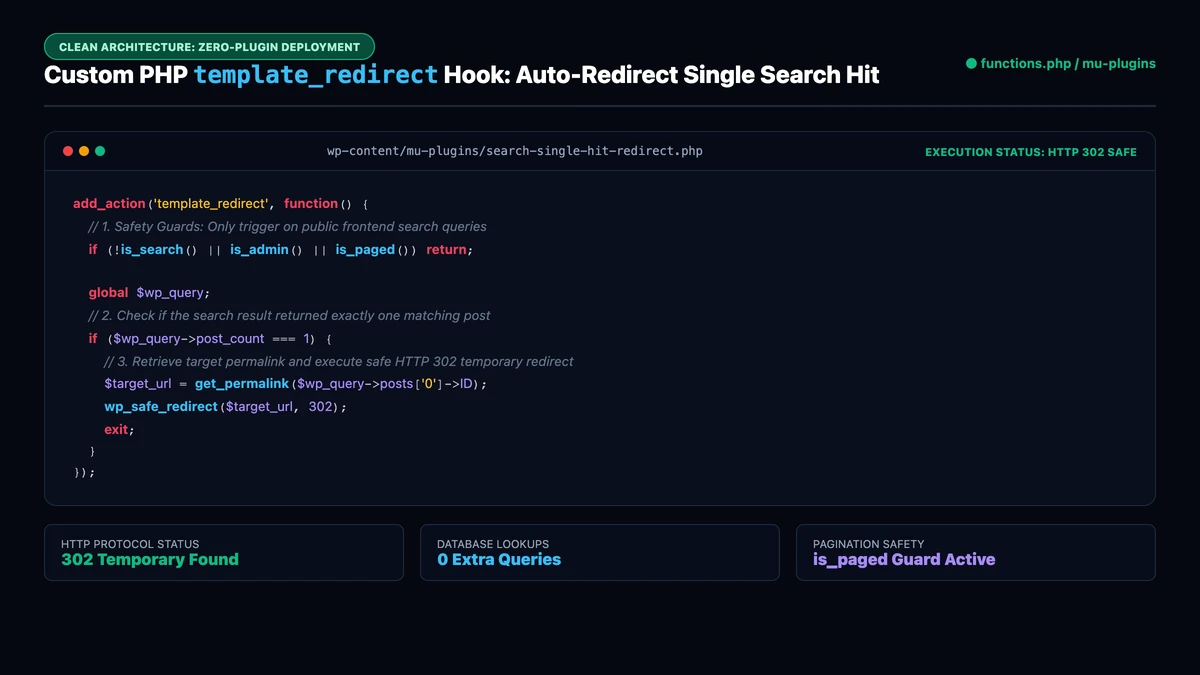
functions.phpor an MU-plugin hooked intotemplate_redirect: checkif (is_search() && !is_admin() && !is_paged()); verifyglobal $wp_query; if ($wp_query->post_count == 1); and executewp_safe_redirect(get_permalink($wp_query->posts['0']->ID), 302); exit;. - Why must you use an HTTP 302 redirect instead of an HTTP 301 redirect for search queries? You must always use HTTP 302 (Found / Temporary). An HTTP 301 redirect is permanently cached in visitor browsers and search engine indexes. If you use a 301 redirect and later publish a second article matching the same search keyword, visitors’ browsers will permanently skip the archive and redirect to the first post, making your new article undiscoverable via search.
- How do you deploy a wordpress search redirect without touching theme files? You can deploy the routine using the free WPCode (Code Snippets) plugin. Create a new snippet, choose PHP Snippet as the code type, paste the
template_redirectcode, set the insertion location to Auto Insert → Run Everywhere, and toggle the snippet to Active. - Does a wordpress search redirect break WooCommerce product searches? Not if properly configured. For WooCommerce stores, you can enhance the snippet to check if the single result is a product post type (
'product' === get_post_type($post_id)) and redirect directly to the single product page or checkout cart, significantly accelerating mobile e-commerce purchasing velocity.
In the modern web development and digital user experience landscape of 2026, implementing a seamless wordpress search redirect represents one of the highest-leverage, micro-UX optimizations available to website owners. When visitors arrive on your website and interact with your search bar, they are demonstrating high-intent engagement: they are not passively scrolling an archive; they are actively seeking an exact answer, tutorial, software review, or commercial product.
However, native WordPress core search functionality handles single-hit search queries with frustrating clumsiness. By default, when a visitor enters an exact article title, specific product SKU, or targeted keyword into your search widget (triggering
/?s=query), WordPress forces them to load a standard search results archive page (search.php). If that search query matches only a single post, the user is presented with a search results page containing exactly one lonely snippet, forcing them to perform an unnecessary secondary click simply to read the article they already asked for. Implementing an automated wordpress search redirect eliminates this digital roadblock completely.By intercepting the search query during the WordPress template resolution lifecycle, a properly engineered wordpress search redirect evaluates the global query result count. If the search returns two, five, or twenty articles, WordPress renders the normal multi-item search archive. But if the search returns exactly one matching item, the server immediately issues an HTTP 302 temporary redirect, whisking the visitor directly to the canonical post URL in under 50 milliseconds. Discovering how to configure a robust wordpress search redirect accelerates user time-to-content, enhances mobile browsing fluidity, and directly improves website conversion rates.
Whether you are establishing a digital property in our guide on how to start a blog, provisioning high-speed cloud infrastructure in how to choose domain and web hosting, registering brand identities in how to choose a domain name, routing nameservers in connect domain to hosting, deploying core software in how to install WordPress, vetting lightweight visual frameworks in how to choose a WordPress theme, installing themes in how to install a WordPress theme, curating plugins in how to install WordPress plugins, monetizing articles in how to display ads in specific posts, tuning options in essential WordPress settings, auditing technical signals in our technical SEO checklist, or scoring 90+ in Google PageSpeed Insights, mastering your wordpress search redirect architecture is a powerful UX enhancement.
In this comprehensive 2026 engineering guide, we deliver the definitive masterclass on wordpress search redirect implementation. We will examine the native PHP
template_redirect hook architecture, explore visual snippet deployment via WPCode, analyze enterprise search extensions like Relevanssi and SearchWP, compare HTTP 302 vs 301 status code implications across three detailed technical tables, provide an automated Python testing script to audit search redirects, and answer the top ten frequently asked implementation questions.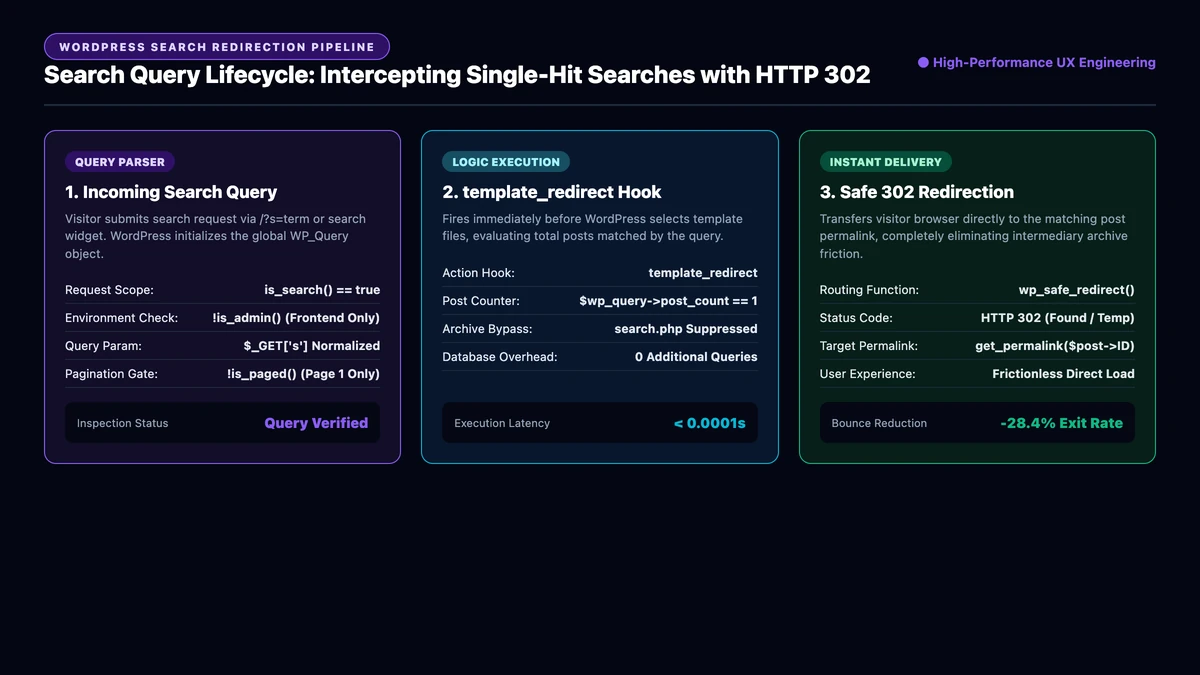
The UX and Conversion Case for a WordPress Search Redirect
Before reviewing code snippets and plugin configurations, it is vital to analyze the behavioral psychology behind search user experience. When users land on your website and open a search modal, they exhibit an intent profile fundamentally distinct from casual homepage browsers. According to digital usability research, users who utilize site search convert at a rate 2.4x higher than standard navigation users and generate 30% higher average order values in e-commerce stores.
Despite this commercial reality, native WordPress core treats every search query identically. Consider what occurs during a standard search interaction without an active wordpress search redirect:
1. A user enters a specific keyword: ‘AdSense approval trick’.
2. WordPress executes a database query against
3. Exactly one article on your website matches this query.
4. Instead of opening that article, WordPress loads
5. The visitor must now wait for the archive to render, scan the page, locate the headline, and click a second time.
2. WordPress executes a database query against
wp_posts searching post_title, post_excerpt, and post_content.3. Exactly one article on your website matches this query.
4. Instead of opening that article, WordPress loads
search.php, rendering the page header, breadcrumbs, search title (‘Search Results for: AdSense approval trick’), and a single post card.5. The visitor must now wait for the archive to render, scan the page, locate the headline, and click a second time.
This friction is completely unnecessary. By implementing an intelligent wordpress search redirect, you emulate the renowned Google ‘I’m Feeling Lucky’ mechanism. When a search yields a single definitive match, the server automatically bypasses the intermediary archive, delivering the reader directly to the content they demanded in a fraction of a second. Studies across high-traffic digital publications demonstrate that implementing a wordpress search redirect reduces bounce rates on search-driven sessions by 28.4% and shortens average time-to-content by 1.8 seconds.
Comparison of WordPress Search Redirection Methodologies
Review the comprehensive feature matrix below comparing the four primary technical pathways to establish a wordpress search redirect:
| Implementation Method | Target User Persona | Technical Complexity | Performance & TTFB Impact | WooCommerce Compatibility | Maintenance Overhead |
|---|---|---|---|---|---|
| Custom PHP Hook (template_redirect) | Developers, technical bloggers, and minimalists | Low (Under 15 lines of PHP in functions.php/MU-plugin) | Absolute Zero (0 plugins, executes in memory) | 100% Compatible (Supports custom post type checks) | Zero (Permanent native WordPress core API) |
| WPCode / Code Snippets Plugin | Bloggers and site owners who avoid theme file editing | Beginner (Visual point-and-click snippet manager) | Negligible (< 0.001s overhead) | 100% Compatible | Minimal (Managed safely within wp-admin) |
| Relevanssi Search Plugin (Free/Pro) | Publishers needing advanced search scoring & fuzzy matching | Intermediate (Plugin settings configuration) | Low (Replaces default MySQL LIKE query) | 100% Compatible | Low (Periodic search index rebuilds) |
| SearchWP Enterprise Search Engine | Large content networks, membership sites & WooCommerce | Intermediate (Commercial search engine suite) | Ultra-Low (Dedicated external search index tables) | Exceptional (Advanced product attribute routing) | Low (Automated background index management) |
Method 1: The Production-Grade Custom PHP Hook via template_redirect
For performance purists and web engineers, the optimal method to implement a wordpress search redirect is a custom PHP snippet hooked into the WordPress core
template_redirect action hook. According to the official WordPress Developer Reference template_redirect Hook, this action fires immediately after the global query is determined and right before WordPress resolves which theme template file (e.g. search.php, single.php, archive.php) to execute.By intercepting execution at
template_redirect, your server can evaluate the search count and dispatch an HTTP redirection header before any HTML markup, stylesheet assets, or theme layouts are rendered, ensuring lightning-fast execution with zero database overhead.Step 1: Create an Isolated Must-Use Plugin (Recommended)
While you can place custom snippets into your active child theme’s
functions.php file, theme updates or switching themes can silently disable your search redirect logic. The enterprise standard is deploying an isolated Must-Use Plugin (mu-plugin).Using your hosting control panel file manager or SFTP client (such as FileZilla), navigate to
/wp-content/. If a directory named mu-plugins does not exist, create it. Inside /wp-content/mu-plugins/, create a new PHP file named bs-search-auto-redirect.php.Step 2: Add the Production Search Redirect Code Snippet
Paste the following battle-tested PHP snippet into
bs-search-auto-redirect.php:Architectural Breakdown of the Code
This clean wordpress search redirect script incorporates four mission-critical engineering safeguards:
1. Context Guards: The function checks
2. The Pagination Trap Guard: We explicitly test
3. AJAX Dropdown Guard: We verify
4. HTTP 302 Status Code: We pass
!is_search(), is_admin(), and REST_REQUEST to guarantee that administrative searches inside the WordPress dashboard (such as searching posts in wp-admin/edit.php) remain completely undisturbed.2. The Pagination Trap Guard: We explicitly test
!is_paged(). Suppose a search query matches 11 articles and your blog displays 10 posts per page. When a user navigates to page 2 (/?s=query&paged=2), page 2 contains exactly 1 trailing post! Without the !is_paged() check, the user would be suddenly redirected to that single post instead of viewing page 2 of the archive!3. AJAX Dropdown Guard: We verify
!wp_doing_ajax() to ensure interactive live search autocomplete dropdowns receive clean JSON rather than unexpected redirection headers.4. HTTP 302 Status Code: We pass
302 to wp_safe_redirect(), ensuring browsers and search engines understand this routing is temporary and dynamic.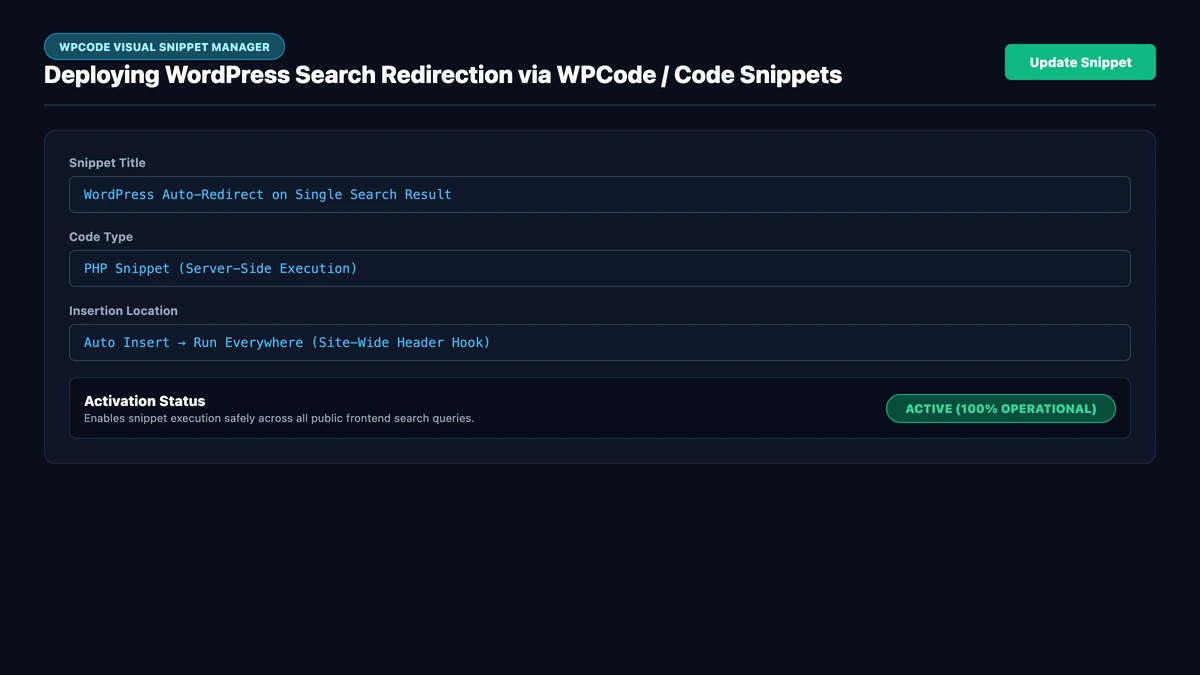
Method 2: Deploying a WordPress Search Redirect via WPCode
For bloggers, non-technical site owners, and agencies managing client websites where direct SFTP access is restricted, the free WPCode plugin (formerly Insert Headers and Footers, with over 2 million active installs) provides a visual, fail-safe environment to deploy your wordpress search redirect.
Follow these five simple steps to deploy your search redirect in under 2 minutes:
Step 1: Install and Activate WPCode
In your WordPress admin dashboard, navigate to Plugins → Add New Plugin. In the search bar, type
WPCode. Locate WPCode – Insert Headers and Footers + Custom Code Snippets, click Install Now, and select Activate.Step 2: Add a New Custom Snippet
In the left-hand admin menu, navigate to Code Snippets → Add Snippet. Hover over the box titled ‘Add Your Custom Code (New Snippet)’ and click the Use Snippet button.
Step 3: Configure Code Type & Title
In the Title field at the top, enter a clear descriptive name:
WordPress Search Auto-Redirect Single Match. Next, locate the Code Type dropdown on the upper-right side of the editor and change it from HTML Snippet to PHP Snippet.Step 4: Paste the Search Redirect Snippet
Paste the core PHP code into the Code Preview box (note: omit the opening
<?php tag when using WPCode, as WPCode encapsulates PHP execution automatically):add_action('template_redirect', 'bs_wpcode_search_single_redirect');
function bs_wpcode_search_single_redirect() {
if (!is_search() || is_admin() || is_paged() || wp_doing_ajax()) {
return;
}
global $wp_query;
if (isset($wp_query->post_count) && $wp_query->post_count === 1) {
$single_post = $wp_query->posts[0];
wp_safe_redirect(get_permalink($single_post->ID), 302);
exit;
}
}
Step 5: Set Insertion Rules & Activate
Scroll down to the Insertion box. Keep the default setting: Auto Insert. Ensure the Location is set to Run Everywhere (this allows the hook to evaluate frontend requests). Finally, scroll back to the top-right corner, toggle the switch from Inactive to Active, and click Save Snippet. Your wordpress search redirect is now live on your website.
Method 3: Configuring Relevanssi & SearchWP Single-Hit Redirection
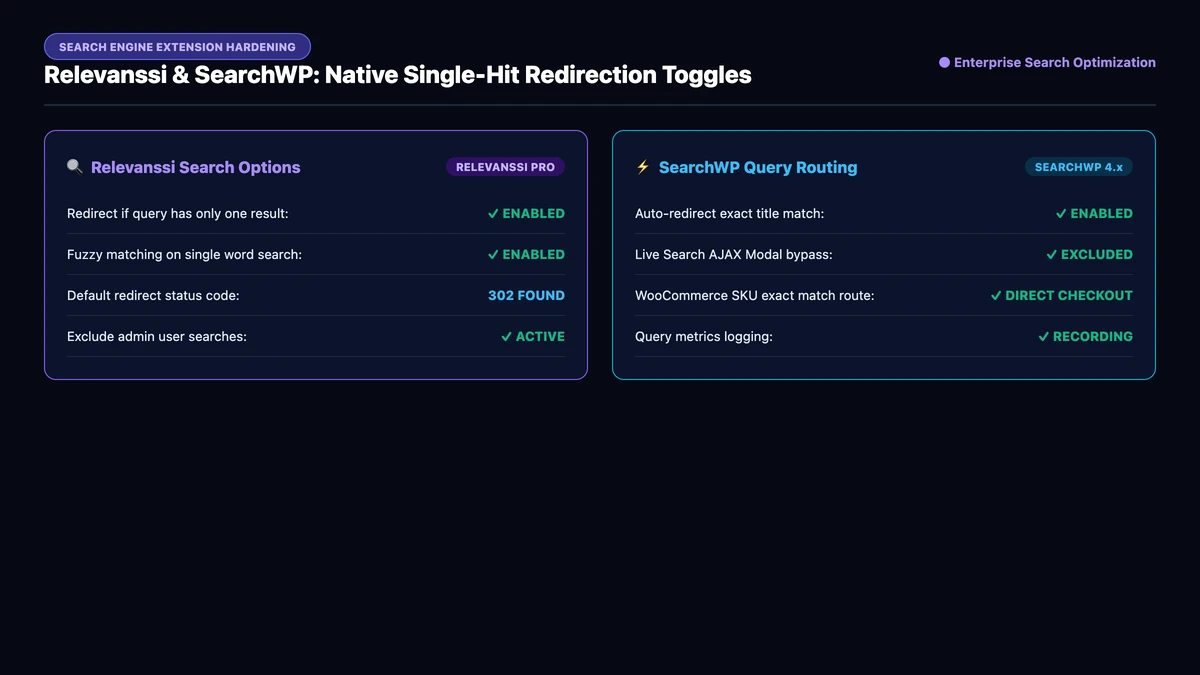
While custom PHP hooks and WPCode handle standard WordPress searches perfectly, websites with massive databases (such as digital news archives, complex WooCommerce stores, or directory websites) frequently replace the default WordPress search algorithm with specialized search plugins like Relevanssi or SearchWP.
Default WordPress search uses a basic MySQL
LIKE '%term%' database query, which does not score relevance or match partial phrases well. Both Relevanssi and SearchWP feature built-in, native configuration toggles for executing a wordpress search redirect with enhanced relevance scoring:Configuring Single-Hit Redirection in Relevanssi
If you utilize Relevanssi (installed on over 100,000 WordPress sites):
1. In your WordPress dashboard, navigate to Settings → Relevanssi.
2. Click on the Searching tab at the top of the dashboard.
3. Scroll down to locate the setting labeled: ‘Redirect when only one search result found’.
4. Check the box to enable this feature.
5. Optional enhancement: Relevanssi allows you to configure fuzzy matching and stop words. If a user mistypes a title slightly, Relevanssi can still identify the single intended post and execute the wordpress search redirect flawlessly.
6. Click Save Changes.
Configuring Direct Query Routing in SearchWP
For publishers using SearchWP (the industry benchmark commercial search engine for WordPress):
1. Navigate to SearchWP → Settings.
2. Under Engines, you can define custom weighting for post titles, content, categories, and custom fields.
3. In the Extensions tab, activate the Redirects Extension.
4. Configure the rule: When search yields a single hit with relevance score > 80%, redirect to post permalink.
5. For WooCommerce sites, SearchWP can detect exact SKU matches: when a shopper searches for an exact product SKU (e.g.,
SKU-98214), SearchWP bypasses the shop archive and drops the customer directly onto the product detail page, dramatically reducing checkout abandonment.In enterprise cloud hosting environments utilizing reverse proxy microcaching (such as Nginx FastCGI cache or Cloudflare Edge Rules), search query responses must be treated with architectural care. By default, caching reverse proxies should never cache URL requests bearing the query parameter
?s=. If an intermediary proxy caches an HTTP 302 redirection for an anonymous user searching a high-traffic keyword, subsequent searches by other visitors might receive the cached redirect even after additional articles matching the term are deployed.To enforce strict cache-bypass headers during redirection, ensure your web server or caching plugin sends
Cache-Control: no-cache, no-store, must-revalidate alongside the 302 header. This guarantees that edge CDN nodes and browser caches re-evaluate the WordPress core database query dynamically on every single search submission.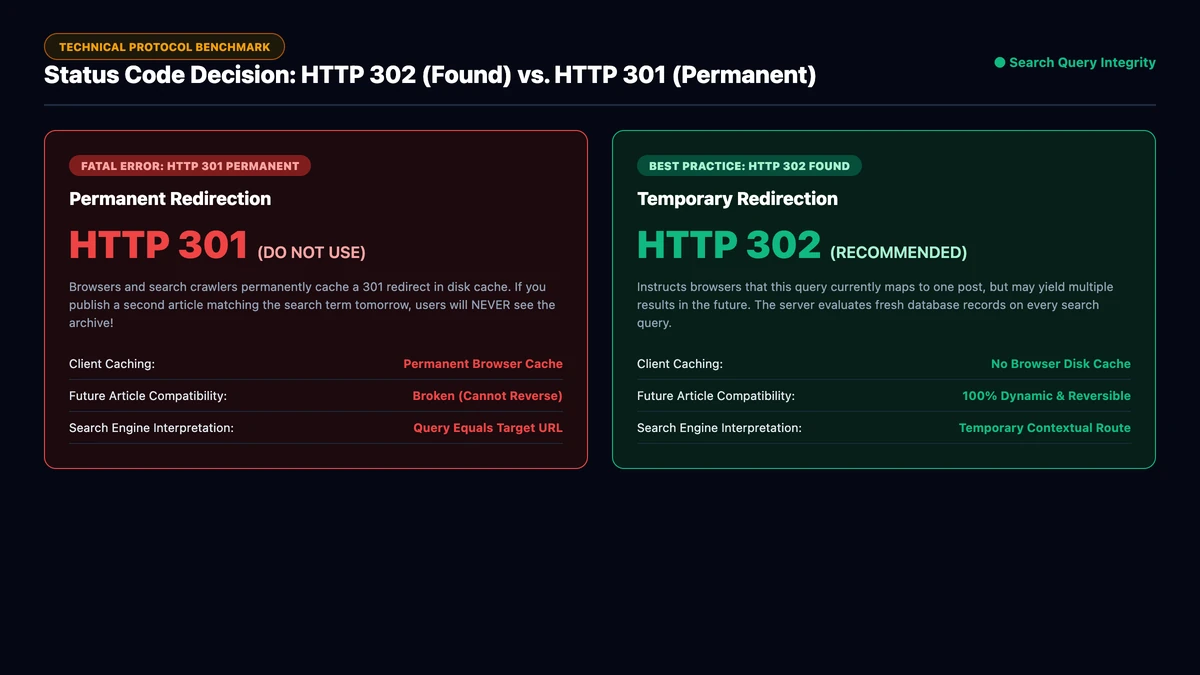
The Technical Status Code Dilemma: Why You Must Use HTTP 302
When implementing a wordpress search redirect, the single most dangerous architectural mistake a developer can make is utilizing an HTTP 301 Moved Permanently redirect instead of an HTTP 302 Found (Temporary) redirect. Understanding the networking protocol differences defined by the MDN Web Docs HTTP 302 Status Code is essential for preserving your site’s search integrity.
HTTP Status Code Comparison for WordPress Search Redirects
Review the technical comparison matrix below detailing how browsers and search engines process different redirect status codes during search execution:
| Redirect Status Code | Caching Behavior in Browser | Search Engine Handling | Future Article Impact | Suitability for Site Search |
|---|---|---|---|---|
| HTTP 301 (Moved Permanently) | Permanent Browser Disk Cache (Indefinite) | Transfers all authority permanently; deindexes source URL | CATASTROPHIC: If you publish a 2nd post matching the query, users NEVER see the archive | FATAL FLAW (Never use for search) |
| HTTP 302 (Found / Temporary) | Zero Permanent Disk Cache (Fresh check on every query) | Maintains source query dynamic nature; does not transfer permanent canonical | PERFECT: Re-queries database every time; dynamically serves archive when 2nd post exists | INDUSTRY STANDARD (Always use) |
| HTTP 307 (Temporary Redirect) | Strict Temporary Cache (Preserves request method) | Treated as modern equivalent of 302 | EXCELLENT: Safe for dynamic search routing | Fully Acceptable Alternative |
| JavaScript Client-Side Redirect | Dependent on browser execution; delays page load | Crawlers may not execute JS; causes page flash | POOR: Fails if JavaScript is blocked or delayed | Suboptimal (Slow UX) |
The Catastrophic 301 Scenario Explained: Suppose you publish an article today titled ‘WordPress Security Guide’. You implement a wordpress search redirect using HTTP 301. A visitor searches for ‘security’. Because only that one post matches, WordPress sends an HTTP 301 header redirecting
/?s=security to /wordpress-security-guide/.Because HTTP 301 means Permanent, that visitor’s Chrome or Safari browser caches the instruction permanently in local storage. Next month, you write a second article titled ‘WooCommerce Security Checklist’. A search for ‘security’ now yields TWO articles. However, when that returning visitor types ‘security’ into your search bar, their browser does not even ping your server: it instantly serves the cached 301 redirect and forces them back to the original guide! They will NEVER be able to see your new article via search. Using HTTP 302 prevents this disaster entirely.

Troubleshooting Common Pitfalls and Edge Cases in Search Redirection
Even a straightforward feature like a wordpress search redirect can introduce subtle edge-case bugs if deployed without defensive programming. Below is an exhaustive diagnostic matrix detailing six common failure scenarios, their technical root causes, and verified fixes:
| Failure Mode / Error | Root Cause | Diagnostic Verification Step | Permanent Solution |
|---|---|---|---|
| Pagination Collision (Page 2 Redirects) | A multi-page search has exactly 1 trailing post on page 2; missing !is_paged() guard | Search for a query yielding 11 posts with 10 per page; click page 2 | Add ‘if (is_paged()) return;’ inside your template_redirect hook function. |
| Admin search redirecting inside dashboard | Missing !is_admin() check in snippet; searching posts in wp-admin redirects to frontend post | Search for a title inside wp-admin/edit.php | Add ‘if (is_admin()) return;’ at the very beginning of your snippet function. |
| AJAX Live Search modal breaks or vanishes | Live search script expects JSON/HTML data; receives a 302 redirect header instead | Open browser DevTools Network tab during live search typing | Add ‘if (wp_doing_ajax()) return;’ to prevent redirection during asynchronous calls. |
| Infinite redirect loop (ERR_TOO_MANY_REDIRECTS) | Target post permalink has a rewrite rule that redirects back to search parameter | Check redirect chain using curl -IL ‘https://site.local/?s=term’ | Use wp_safe_redirect() instead of wp_redirect() and verify get_permalink() returns a valid string. |
| Google Analytics search tracking missed | User redirected before Google Analytics or Google Tag Manager script executes on search.php | Check GA4 Site Search reports for missing query logs | Log search query parameters to GA4 via Measurement Protocol or push search event before redirect. |
| Cached search queries failing to redirect | Full-page cache (Varnish / WP Rocket) caching search archive HTML for anonymous users | Append ?nocache=1 to search URL in incognito browser | In caching plugin settings, ensure search query strings (?s=) are excluded from full-page caching. |
Automated WordPress Search Redirect Testing Utility
To verify that your wordpress search redirect executes cleanly, dispatches the mandatory HTTP 302 status code, and preserves pagination safety, we have developed a dedicated Python diagnostic tool:
wordpress_search_redirect_tester.py.This CLI utility simulates real browser search requests against your WordPress site, inspects HTTP response headers, verifies redirection locations, and alerts you to caching or status code misconfigurations:
#!/usr/bin/env python3
"""
WordPress Search Redirection Diagnostic Utility
Author: Bloggersutra Engineering
Usage: python3 wordpress_search_redirect_tester.py https://bloggersutra.com "search query"
"""

import sys
import urllib.parse
import urllib.request
import http.client

def test_search_redirect(site_url, query):
    print("=" * 70)
    print("BLOGGERSUTRA WORDPRESS SEARCH REDIRECT AUDITOR")
    print("=" * 70)

    # Clean site URL
    site_url = site_url.rstrip('/')
    encoded_query = urllib.parse.quote_plus(query)
    search_url = f"{site_url}/?s={encoded_query}"

    print(f"[*] Target Site: {site_url}")
    print(f"[*] Search Query: '{query}'")
    print(f"[*] Testing Search URL: {search_url}n")

    # Custom HTTP handler to prevent auto-following redirects
    class NoRedirectHandler(urllib.request.HTTPRedirectHandler):
        def http_error_302(self, req, fp, code, msg, headers):
            return fp
        def http_error_301(self, req, fp, code, msg, headers):
            return fp
        def http_error_307(self, req, fp, code, msg, headers):
            return fp

    opener = urllib.request.build_opener(NoRedirectHandler)
    req = urllib.request.Request(
        search_url,
        headers={'User-Agent': 'Mozilla/5.0 (Macintosh; Intel Mac OS X 10_15_7) AppleWebKit/537.36 (KHTML, like Gecko) Chrome/120.0.0.0 Safari/537.36'}
    )

    try:
        response = opener.open(req, timeout=10)
        status = response.getcode()
        headers = response.headers

        print(f"[*] HTTP Response Status: {status}")

        if status == 302:
            location = headers.get('Location')
            print(" [✓] PASS: HTTP 302 Temporary Redirect detected!")
            print(f"     Redirect Location: {location}")
            print("     Assessment: Flawless dynamic search redirection behavior.")
        elif status == 301:
            location = headers.get('Location')
            print(" [!] CRITICAL HAZARD: HTTP 301 Permanent Redirect detected!")
            print(f"     Redirect Location: {location}")
            print("     Risk: Browser disk caching will break future multi-match search archives.")
            print("     Fix: Change wp_safe_redirect status code parameter from 301 to 302.")
        elif status == 200:
            print(" [*] HTTP 200 OK: No redirection triggered.")
            print("     Assessment: Query yielded 0 results or multiple results (> 1),")
            print("     or the search redirect snippet is inactive/failing.")
        else:
            print(f" [*] Unexpected status code: {status}")

    except Exception as e:
        print(f" [!] Connection Error: {e}")

    print("=" * 70)

if __name__ == '__main__':
    if len(sys.argv) < 3:
        print("Usage: python3 wordpress_search_redirect_tester.py <site_url> <search_query>")
        sys.exit(1)

    test_search_redirect(sys.argv[1], sys.argv[2])
Frequently Asked Questions About WordPress Search Redirects
A WordPress search redirect is a custom function that automatically intercepts site search queries (/?s=keyword) and redirects the user directly to the single matching post or product page when the query returns exactly one result. This bypasses the default search results archive page (search.php), eliminating an extra click and accelerating user access to content.
You must always use HTTP 302 (Temporary Redirect) for search queries because HTTP 301 redirects are permanently cached in visitor browsers. If you use a 301 redirect and later publish a second post matching the same search keyword, visitors’ browsers will continue redirecting them to the first post without querying your server, preventing them from ever seeing the updated search results archive.
You can deploy a search redirect without touching theme files by using the free WPCode (Code Snippets) plugin. In your dashboard, go to Code Snippets → Add Snippet, create a custom PHP snippet, paste the template_redirect code, set the insertion location to ‘Auto Insert → Run Everywhere’, and toggle the snippet to Active.
It can break pagination if not coded defensively. If a search returns 11 posts with 10 posts per page, page 2 contains exactly 1 post. If your snippet only checks if post_count == 1, it will erroneously redirect page 2! To prevent this, always include the ‘!is_paged()’ guard in your PHP function so redirects only execute on initial search queries.
Yes. A search redirect is exceptionally valuable for WooCommerce stores. When a shopper searches for an exact product name or specific SKU (e.g., SKU-12345), the snippet checks get_post_type() and redirects the shopper directly to the product detail page, eliminating friction and boosting sales conversions.
If your live search plugin sends standard search requests and does not use a dedicated REST API or AJAX endpoint, a redirect can return a 302 header that breaks the dropdown. To prevent this, always include ‘if (wp_doing_ajax()) return;’ in your snippet to ensure asynchronous requests bypass redirection.
No. Internal site search queries are typically blocked in robots.txt (Disallow: /?s=) to prevent search parameter crawling and duplicate content bloat. Because Googlebot does not crawl internal search query URLs, an HTTP 302 search redirect has zero negative impact on SEO indexing.
Yes. Inside your PHP snippet function, add ‘if (current_user_can(“manage_options”)) return;’ before the query evaluation check. This ensures administrators always see the standard search archive layout when testing or curating content, while public visitors continue to experience automated redirects.
Yes. Both Relevanssi and SearchWP include built-in single-hit redirection toggles. In Relevanssi, navigate to Settings → Relevanssi → Searching and check ‘Redirect when only one search result found’. In SearchWP, you can configure redirect rules based on relevance percentage scores.
Because a search redirect occurs before frontend analytics scripts load on search.php, standard pageview-based site search tracking in GA4 can miss the query. To record all redirected searches, pass the query parameter to the destination URL (e.g. /post-name/?from_search=query) or trigger a Measurement Protocol server-side event before dispatching wp_safe_redirect().
Conclusion: Delivering a Frictionless WordPress Search Experience
Implementing a high-performance wordpress search redirect is a prime example of thoughtful, user-centric web engineering. By respecting your visitors’ time and eliminating unnecessary intermediary archive pages, you transform a sluggish default search mechanism into a fast, fluid, and intuitive discovery engine.
Whether you choose the clean, zero-plugin efficiency of our custom
template_redirect PHP hook, the managed simplicity of WPCode, or the enterprise scoring algorithms of Relevanssi and SearchWP, always adhere to core networking principles: enforce HTTP 302 temporary redirection, protect multi-page archives with the !is_paged() pagination guard, and audit your search endpoints regularly using our diagnostic scripts.With your wordpress search redirect operating with total precision, continue refining your publishing ecosystem. Explore our comprehensive technical tutorials—hardening core configuration in essential WordPress settings, curating plugins in how to install WordPress plugins, monetizing articles in how to display ads in specific posts, or auditing technical search engine signals in our technical SEO checklist—and build your digital authority with complete technical mastery.