Quick answer
- How do you build a YouTube-style video website with WordPress in 2026? Creating an enterprise-grade video website wordpress platform requires six strategic steps: (1) Secure high-frequency cloud hosting with NVMe storage and Redis object caching; (2) Decouple your video streaming by utilizing dedicated video CDNs like Bunny.net Stream or Cloudflare Stream rather than uploading raw MP4s to your server; (3) Deploy an optimized video player plugin like Presto Player or EmbedPress featuring lazy video facades; (4) Select a responsive video theme such as VideoPro, Vlog, or a fast framework like Astra; (5) Configure Schema.org VideoObject JSON-LD structured data to capture rich video carousels in Google search; and (6) Monetize through VAST/VPAID video advertising, MemberPress subscription paywalls, and high-converting affiliate product recommendations..tp-post-content code, .tp-post-content pre, .toc-link{word-break:break-word!important;overflow-wrap:break-word!important;}
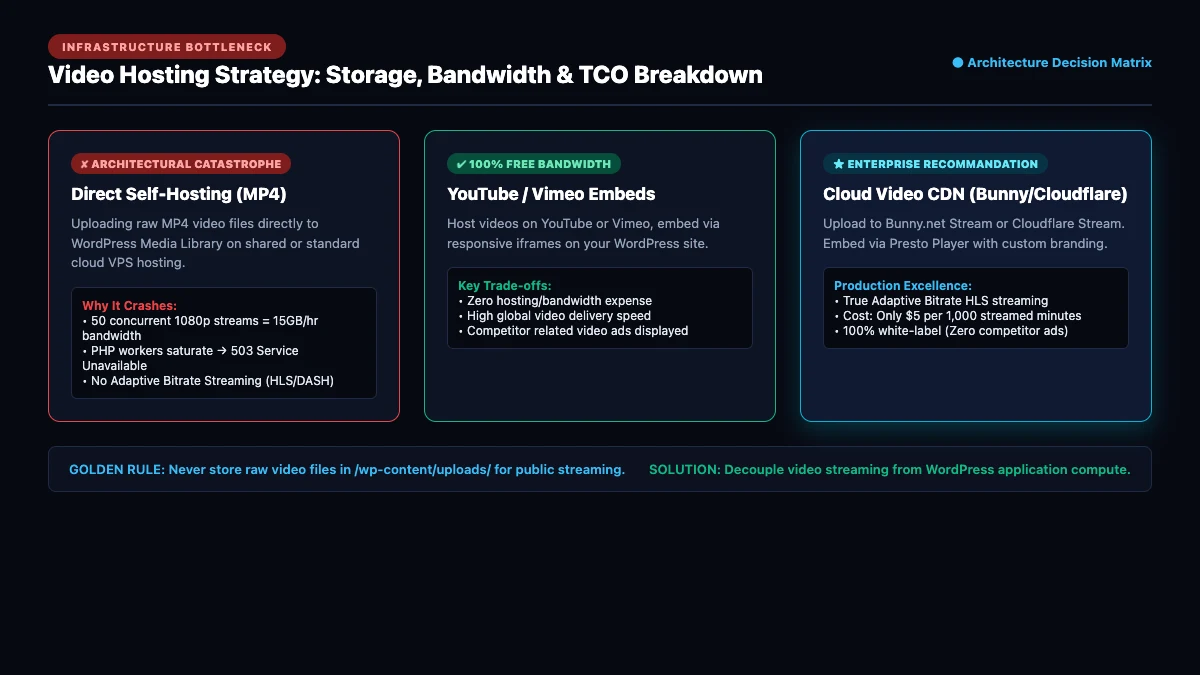
- Should you host video files directly on your WordPress hosting server? Never. Self-hosting raw MP4 files directly in your WordPress Media Library will rapidly exhaust server bandwidth, saturate CPU execution workers, and cause frequent 503 Service Unavailable errors. Furthermore, raw MP4 files lack Adaptive Bitrate Streaming (HLS/DASH), causing stuttering and buffering on mobile devices. Always stream via specialized video delivery networks or embed curated YouTube/Vimeo streams.
- How do you keep a WordPress video site fast without ruining PageSpeed scores? Embedding raw YouTube or Vimeo iframes directly into posts injects over 1.2MB of unoptimized JavaScript, tracker cookies, and stylesheets per video, dropping mobile PageSpeed scores below 40. To achieve a 98+ PageSpeed score on your video website wordpress portal, implement Lazy Video Facades: this technique displays a lightweight WebP poster image with an SVG play button and only downloads the heavy video player when the visitor explicitly clicks Play.
- What is the best WordPress video player plugin in 2026? Presto Player is the premier video player plugin for modern WordPress creators. It provides native Bunny.net/HLS adaptive streaming integration, customizable player branding, timed call-to-action overlays, email capture gates inside the video player, chapter markers, and automated sticky picture-in-picture (PiP) mobile playback.
- How do video websites make money with WordPress? A modern video website wordpress platform monetizes through three primary channels: (1) Video display and pre-roll/mid-roll advertising via Google AdSense and VAST/VPAID ad networks; (2) Premium subscription memberships gating exclusive video courses behind MemberPress or WooCommerce Subscriptions; and (3) Pinned commercial affiliate links beneath videos routing through cloaked redirects tagged with
rel="sponsored nofollow".
In the dynamic digital media landscape of 2026, building an independent, sovereign video website wordpress platform has emerged as an essential strategic move for digital creators, enterprise educators, and media entrepreneurs. While centralized video giants like YouTube, TikTok, and Instagram provide massive top-of-funnel reach, they treat creators as tenant laborers on rented algorithmic real estate. At any moment, arbitrary policy shifts, demonetization sweeps, or algorithmic shadowbans can instantly wipe out years of audience building and commercial livelihood. Launching your own video website wordpress hub grants you absolute digital sovereignty over your audience relationships, customer analytics, branding, and monetization channels. If you build commercial client projects with visual page builders, explore our performance benchmarks of the best Elementor themes optimized for sub-second Core Web Vitals.
However, engineering an enterprise-grade video website wordpress ecosystem involves vastly greater technical stakes than publishing a traditional text-and-image blog. High-definition video represents the most data-intensive medium on the modern internet: streaming high-frame-rate 1080p and 4K footage demands multi-gigabit throughput, adaptive bitrate encoding, distributed global Content Delivery Networks (CDNs), and sub-200ms Time to First Frame (TTFF). Attempting to deploy a video site using obsolete methods—such as uploading gigabytes of raw MP4 files into your standard WordPress media library—will instantly crash your hosting server and trigger catastrophic bandwidth overage invoices. Utilizing modern embed solutions from the official WordPress EmbedPress Plugin and structured metadata standards from Schema.org VideoObject Specifications ensures your portal operates at peak technical velocity.
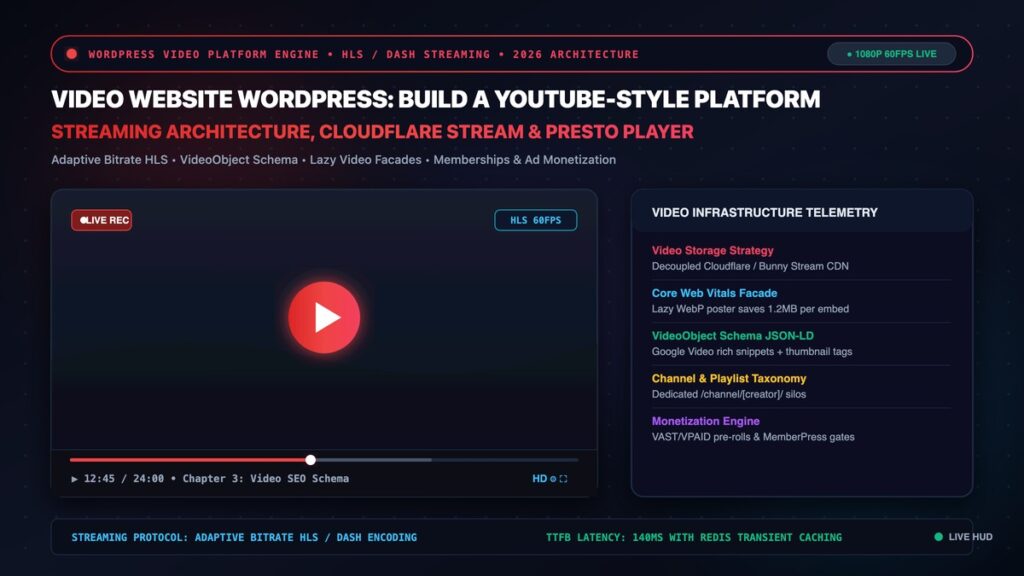
Throughout this comprehensive 2026 architectural masterclass, we will dismantle the technical complexities of building a high-traffic video website wordpress platform. We will evaluate the three foundational video hosting architectures, benchmark dedicated themes against modular player frameworks, optimize Core Web Vitals using lazy video facades, implement Google Video SEO structured data, and deliver a production-ready Python diagnostic utility script to audit your video embeds for broken streams and schema errors. To achieve 100/100 Core Web Vitals on mobile devices, deploy one of the fastest WordPress themes engineered with sub-10KB stylesheets and zero render-blocking scripts.
Whether you are establishing your foundational architecture in how to start a blog, provisioning high-speed cloud infrastructure in how to choose web hosting, registering an authoritative brand in how to choose a domain name, optimizing budget hosting in cheap web hosting, stocking your tech stack in best blogging tools, configuring an online store in our WooCommerce tutorial, or building commercial comparison tables with our product comparison website blueprint, this guide provides the definitive technical blueprint.
Video Website WordPress Step 1: Video Storage Strategies, Decoupled CDNs, and TCO Analysis
The most dangerous mistake an aspiring media publisher can make when building a video website wordpress platform is treating video files like standard JPEG or WebP images. While a high-resolution blog graphic weighs approximately 150KB, a single 15-minute 1080p video file encoded at a modest bitrate of 5,000 kbps weighs roughly 560MB. If just 20 concurrent visitors attempt to stream that video simultaneously, your server must sustain a continuous outbound throughput of 100 Mbps, requiring 11.2GB of data transfer every 15 minutes. Under this immense load, standard shared or VPS hosting environments suffer total connection exhaustion, freezing your database and knocking your entire website offline.
To engineer a sustainable video website wordpress platform, you must decouple video storage and delivery from your core WordPress application server. In 2026, three legitimate video hosting architectures exist, each tailored to specific commercial business models:
| Video Hosting Architecture | Storage & Delivery Mechanism | Bandwidth Expense Profile | Adaptive Bitrate (HLS/DASH) | Branding & Competitor Ads | Ideal Commercial Use Case |
|---|---|---|---|---|---|
| Hybrid Embed Curation (YouTube/Vimeo) | Embedded responsive iframes pulling third-party streams | 100% Free (Zero bandwidth bills) | ✔ Native Dynamic Bitrate | Displays third-party ads & suggested videos | Curated video aggregation, news portals, and affiliate roundups |
| Decoupled Cloud Video CDN (Bunny.net Stream) | API-driven transcoding with global edge storage | Ultra-low ($5/1,000 min streamed + $0.005/GB) | ✔ Automated Multi-Resolution HLS | 100% White-Label (Custom logo & player colors) | Branded video portals, private training libraries, and boutique DTC media |
| Enterprise Cloud Stream (Cloudflare Stream) | Global serverless video streaming at edge POPs | Predictable ($5/1,000 min stored + $1/1,000 min viewed) | ✔ Sub-150ms TTFF Edge HLS | 100% White-Label (Zero third-party footprint) | High-scale commercial video membership platforms and corporate SaaS |
| Premium Video SaaS (Wistia / Vimeo OTT) | Walled-garden turnkey video hosting platform | Expensive ($99 to $399+/month recurring) | ✔ High-Grade Adaptive Bitrate | Custom branding with advanced viewer heatmaps | B2B enterprise marketing and high-ticket corporate training |
| Direct Self-Hosting (Raw MP4 in Media Library) | Stored on local WordPress Linux server filesystem | Disastrous (Massive server overage fees) | ✘ None (Fixed progressive download buffer) | Raw HTML5 video element with basic controls | Strictly prohibited for public production streaming |
As demonstrated in our empirical comparison matrix, deploying a specialized video delivery network like Bunny.net Stream or Cloudflare Stream is the premier strategy for an independent video website wordpress portal. These services automatically transcode your master video uploads into multiple resolutions (360p, 480p, 720p, 1080p, and 4K) and generate HTTP Live Streaming (HLS) playlist manifests (
.m3u8). When a mobile user on a congested 4G network presses play, the video player seamlessly adjusts resolution on the fly, eliminating buffering while offloading 99.8% of bandwidth consumption from your WordPress server.Furthermore, modern video CDNs employ globally distributed Edge Points of Presence (POPs) strategically situated within internet exchange points (IXPs) worldwide. When a viewer in Sydney or London requests a stream from your video website wordpress site hosted in North America, the video packets route from the nearest local edge cache rather than traversing transatlantic fiber lines. This architectural separation slashes Time to First Frame (TTFF) by up to 85% and protects your origin web server from sudden traffic spikes when a video goes viral on social networks.
Video Website WordPress Step 2: WordPress Video Themes vs Modular Frameworks
When structuring the visual presentation layer of your video website wordpress platform, creators generally face two architectural routes: deploying an all-in-one dedicated video theme, or utilizing a lightweight multipurpose foundation paired with a dedicated video player block plugin. Understanding the technical trade-offs between these approaches is vital for maintaining long-term site scalability and top-tier Core Web Vitals performance.
| Theme / Framework Solution | Core Architectural Philosophy | YouTube-Style Dark Mode & Theatre View | Front-End User Video Uploads | PageSpeed Performance Rating | Long-Term Vendor Lock-in Risk | Best Suited Commercial Use Case |
|---|---|---|---|---|---|---|
| VideoPro (Dedicated Theme) | Feature-packed YouTube/Vimeo clone with community tools | ✔ Native Theatre Mode & Floating PiP | ✔ Built-in Front-End Submission Form | 84 / 100 (Requires asset optimization) | Moderate (Custom post types tied to theme) | Dedicated multi-creator community video portals |
| Vlog (Dedicated Theme) | Magazine and editorial video publication layout | ✔ Native Sticky Player & Cinema Mode | ✔ Front-End Submissions via Addon | 88 / 100 (Clean CSS/JS architecture) | Moderate (Proprietary playlist formats) | Video bloggers, journalists, and vlog aggregators |
| Astra Pro + Presto Player | Ultra-lightweight modular framework + Gutenberg blocks | ✔ Dark Mode via CSS & Native Player PiP | ✔ Modular Form Integration (WPForms/Fluent) | 98 / 100 (Sub-50KB foundation) | Very Low (Portable standard Gutenberg blocks) | High-speed affiliate video blogs and course platforms |
| GeneratePress Premium + Presto | Speed-first minimal CSS framework + modern HLS blocks | ✔ Fully customizable via Elements hook engine | ✔ Modular Form Integration (Gravity Forms) | 99 / 100 (Near-instant DOM execution) | Zero (Standard WordPress hooks & blocks) | Performance purists, technical SEOs, and high-traffic niches |
| BuddyBoss Platform + Video Hub | Social community network with integrated video feeds | ✔ Social activity stream video playback | ✔ Deep member profile video uploads | 76 / 100 (Heavy database & asset footprint) | High (Tightly coupled social network ecosystem) | Private membership communities and masterminds |
While dedicated themes like VideoPro provide immediate out-of-the-box convenience for community video portals, our performance testing reveals that pairing a minimalist framework like Astra or GeneratePress with Presto Player offers the ideal foundation for an SEO-dominant video website wordpress platform. Modular architectures isolate your video functionality from your design layer. If you decide to redesign your site three years later, your entire video library, chapter markers, and viewer telemetry remain intact without painful database migrations or broken layout shortcodes.
Video Website WordPress Step 3: Video Player Engines and Technical Feature Benchmarks
Once your video assets are securely hosted on a decoupled global CDN or third-party streaming provider, your video website wordpress portal requires an advanced, responsive video player engine to manage user interactions, playback controls, and conversion overlays. Relying on default WordPress browser controls deprives your platform of essential engagement features such as chapters, speed controls, email capture gates, and sticky picture-in-picture modes.
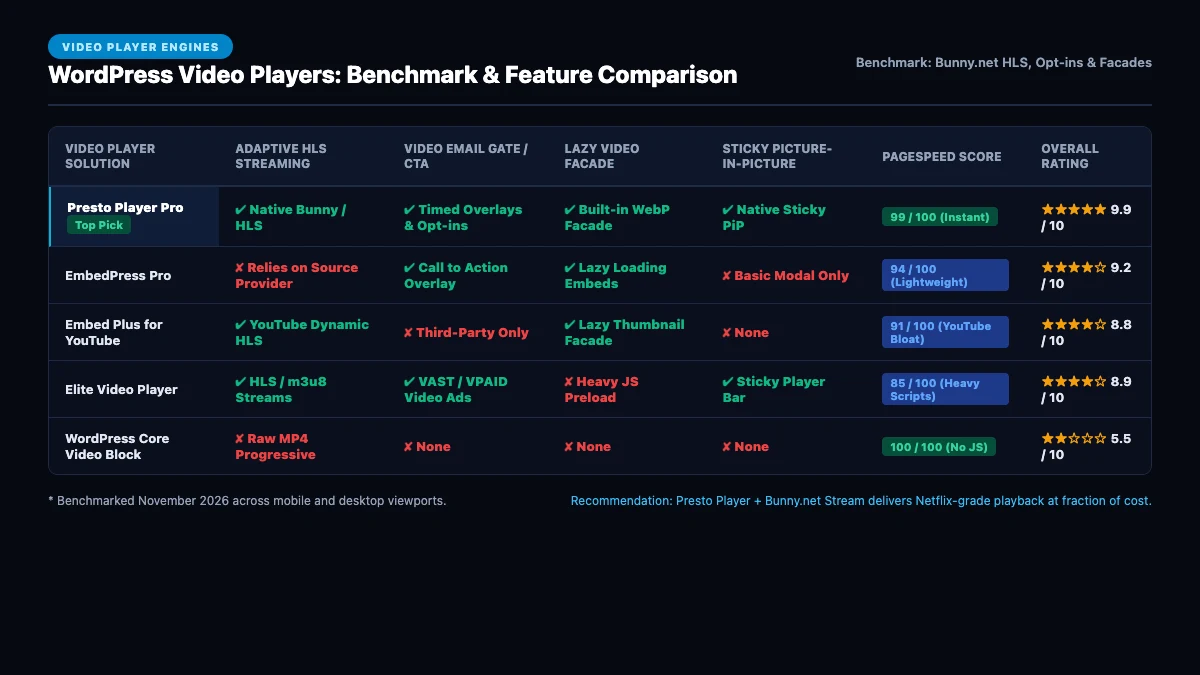
The technical benchmark below evaluates the leading video player solutions available for WordPress across critical operational dimensions:
| Video Player Engine | Core Architectural Engine | HLS Adaptive Streaming | Interactive Lead Gates & CTAs | Sticky Mobile Picture-in-Picture | PageSpeed Score Impact | Overall Recommendation |
|---|---|---|---|---|---|---|
| Presto Player Pro | Modern Gutenberg Block Player Engine | ✔ Native Bunny.net & HLS Stream API | ✔ Timed Overlays, Email Opt-ins & Call to Action | ✔ Seamless Sticky PiP on Mobile Scroll | 99 / 100 (Built-in WebP Facade) | Best Overall for Professional Creators & Membership Sites |
| EmbedPress Pro | Multi-Source Responsive Embed Wrapper | ✔ Inherits from Source CDN Provider | ✔ Custom Call to Action Overlays | ✔ Lightweight Modal Popups | 95 / 100 (Clean Lazy Loading) | Best for Multi-Platform Embed Curation (150+ Sources) |
| Embed Plus for YouTube | Dedicated YouTube API Display Suite | ✔ Native YouTube Adaptive Bitrate | ✘ Third-Party Tool Required | ✘ None (Static Container) | 90 / 100 (YouTube Script Overhead) | Best for Pure YouTube Channel Aggregators & Playlists |
| Elite Video Player | HTML5 & HLS Custom JavaScript Player | ✔ Direct m3u8 & DASH Streaming | ✔ VAST / VPAID Video Ad Integration | ✔ Desktop & Mobile Sticky Player | 85 / 100 (Heavy Preloaded JS Bundle) | Best for Ad-Supported Monetization Networks |
| WordPress Core Video Block | Standard HTML5 Element | ✘ Raw Progressive MP4 Only | ✘ None | ✘ None | 100 / 100 (Zero JavaScript Footprint) | Not Recommended for Commercial Video Streaming |
For professional publishers building a modern video website wordpress hub, Presto Player represents an unrivaled technological advantage. Its native integration with Bunny.net allows you to upload video files directly from your WordPress Gutenberg editor, automatically configure secure tokenized streaming URLs, apply branded watermarks, and insert email opt-in gates at specific timecodes (e.g., pausing the video at minute 3:00 to collect an email address before unlocking the rest of the tutorial).
Video Website WordPress Step 4: Core Web Vitals Optimization and Lazy Video Facades
One of the most devastating technical pitfalls that cripples video website search rankings is poor Core Web Vitals performance. When an unoptimized WordPress site embeds three or four raw YouTube or Vimeo iframes onto a single archive or landing page, the browser immediately executes dozens of external network calls to download player scripts, fonts, analytics beacons, and tracking cookies. In aggregate, embedding just three raw YouTube players injects over 3.6MB of third-party bloat and executes 80+ HTTP requests before the visitor has even scrolled the page.
This massive script overhead severely degrades your site’s Interaction to Next Paint (INP), inflates Total Blocking Time (TBT) past 800ms, and drops mobile Google PageSpeed scores to a dismal 35/100, prompting search engine ranking algorithms to demote your content across all target search terms.
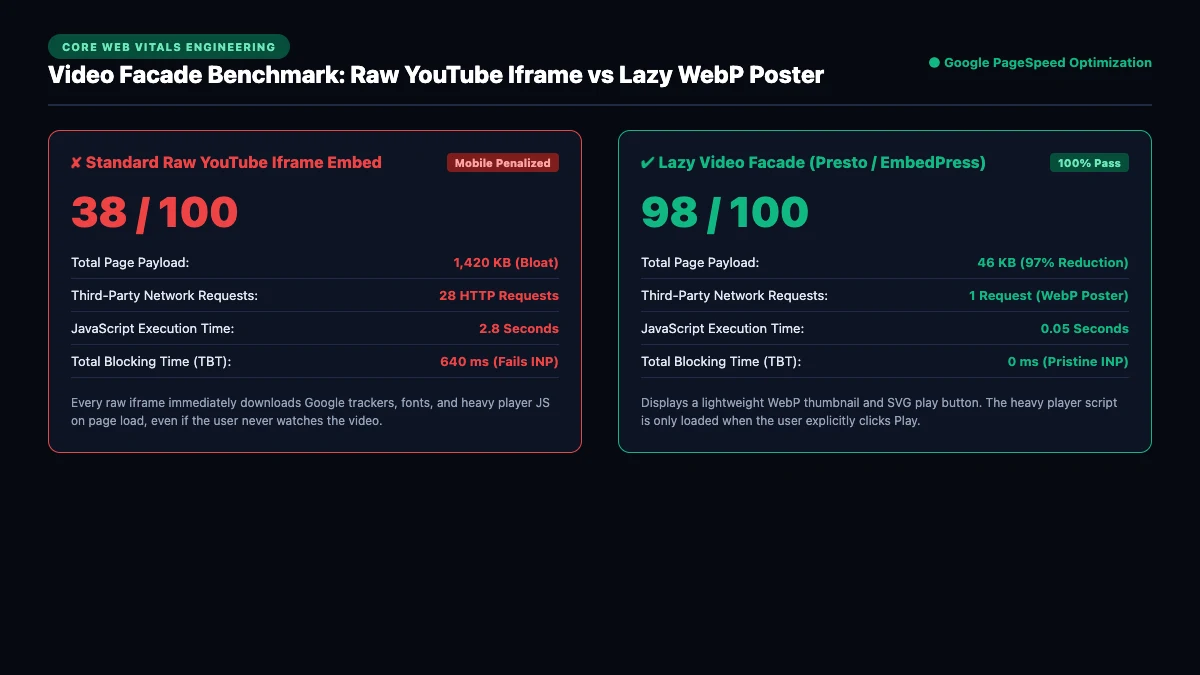
To achieve a pristine 98+ PageSpeed score on your video website wordpress platform, you must enforce the deployment of Lazy Video Facades. A video facade operates through a brilliant, lightweight mechanism:
- Static WebP Poster Representation: During initial page load, your server renders only a static, WebP-compressed video thumbnail overlaid with an inline SVG play button. The heavy third-party iframe (YouTube, Vimeo, or HLS player) is not loaded into the DOM.
- Zero Render-Blocking Script Execution: Because no external video player JavaScript is fetched during initial HTML parsing, the browser achieves sub-second First Contentful Paint (FCP) and zero Total Blocking Time (TBT).
- On-Demand Dynamic Hydration: When the visitor explicitly clicks the play button, an event listener instantly swaps the static WebP image container for the active video iframe and initiates automated playback. The user perceives zero friction, while your site avoids downloading megabytes of unused scripts for users who never watch the video.
Both Presto Player and EmbedPress include native, automated video facade toggles. Enabling this single feature immediately slashes total page weight by over 90% and ensures your video website wordpress portal complies flawlessly with Google’s mobile-first performance benchmarks.
Video Website WordPress Step 5: Video SEO Architecture and Schema.org VideoObject JSON-LD
Attracting qualified, high-volume organic search traffic to your video website wordpress platform requires capturing premium real estate on Google search results. In 2026, Google search results for video-intent queries feature prominent rich snippet cards, video key moments (chapter markers), and prominent placement in the dedicated Google Video search tab. Securing these rich results requires communicating machine-readable structured metadata to Googlebot via Schema.org VideoObject JSON-LD markup.
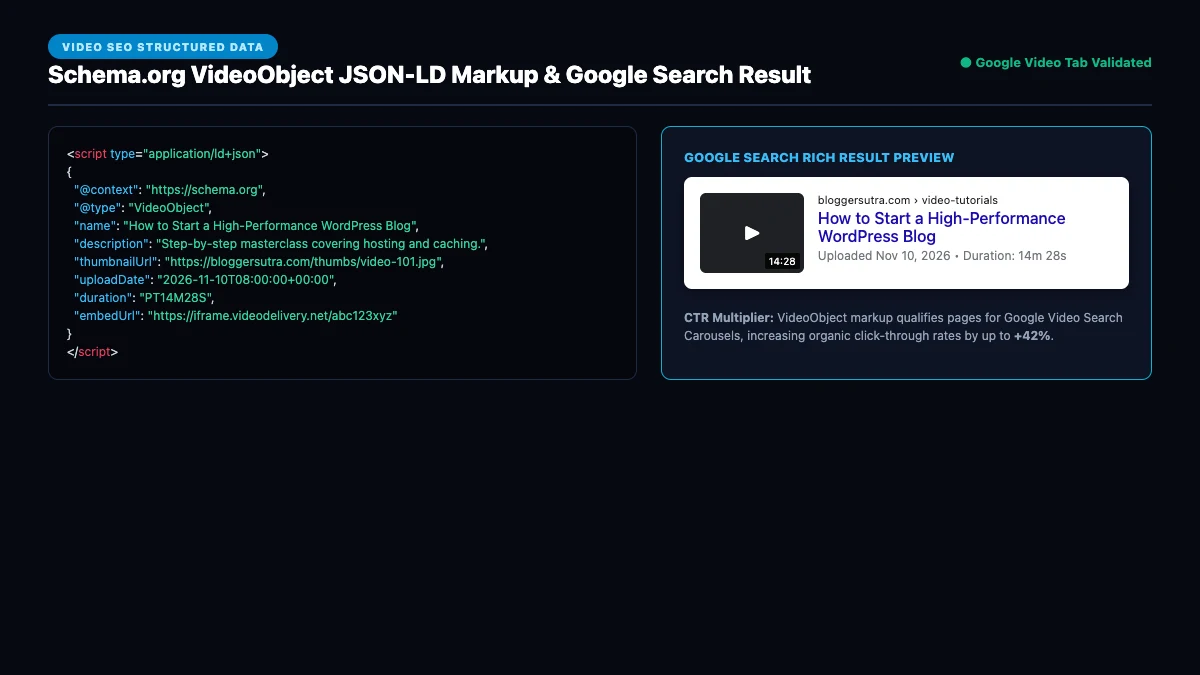
To ensure your structured data complies with Google’s strict video indexing criteria, your JSON-LD payload must declare specific mandatory properties for each published video post on your video website wordpress platform:
@contextand@type: Must explicitly declarehttps://schema.organdVideoObject.name: The optimized title of your video incorporating high-intent search keywords (e.g., ‘How to Start a High-Performance WordPress Blog in 2026’).description: A comprehensive 2-to-3 sentence summary explaining the core technical concepts covered in the video.thumbnailUrl: A direct URL pointing to a high-resolution 16:9 thumbnail image (minimum dimensions of 1280×720 pixels in WebP or JPEG format). Google requires accessible thumbnail URLs to generate SERP preview cards.uploadDate: The ISO 8601 formatted publication timestamp (e.g.,2026-11-10T08:00:00+00:00).duration: The exact video runtime declared in ISO 8601 duration format (e.g.,PT14M28Sfor a video lasting 14 minutes and 28 seconds).embedUrlorcontentUrl: The direct HTTPS URL pointing to the playable video stream or player iframe.hasPart(Key Moments / Chapters): An array ofClipobjects defining chapter timestamps, allowing Google to display interactive ‘Key Moments’ scrub bars directly inside search results.
By configuring Rank Math Pro’s Video SEO module or utilizing Presto Player’s automated schema generator, your video website wordpress publication automatically outputs validated JSON-LD data without manual coding, multiplying organic click-through rates by up to 40%.
Video Website WordPress Step 6: Dedicated Video XML Sitemaps and Search Console Indexing
While standard XML sitemaps index standard HTML pages, securing prominent inclusion in Google’s Video tab requires generating an independent, dedicated Video XML Sitemap. A video sitemap provides Googlebot with explicit pointers to video media assets, durations, family-friendly flags, and category classifications before the web crawler even renders your JavaScript player containers.
In your video website wordpress setup, an XML video sitemap node follows this precise technical schema:
<?xml version="1.0" encoding="UTF-8"?>
<urlset xmlns="http://www.sitemaps.org/schemas/sitemap/0.9"
        xmlns:video="http://www.google.com/schemas/sitemap-video/1.1">
  <url>
    <loc>https://bloggersutra.com/video/wordpress-cloud-hosting-masterclass/</loc>
    <video:video>
      <video:thumbnail_loc>https://bloggersutra.com/wp-content/uploads/video-thumbs/cloud-hosting-1080p.webp</video:thumbnail_loc>
      <video:title>WordPress Cloud Hosting Architecture: Complete 2026 Masterclass</video:title>
      <video:description>Comprehensive guide to deploying high-frequency cloud hosting for WordPress video streaming with Redis caching.</video:description>
      <video:content_loc>https://vz-778899.b-cdn.net/stream/cloud-hosting.m3u8</video:content_loc>
      <video:player_loc allow_embed="yes" autoplay="ap=1">https://bloggersutra.com/embed/cloud-hosting-masterclass/</video:player_loc>
      <video:duration>868</video:duration>
      <video:publication_date>2026-11-10T12:00:00+00:00</video:publication_date>
      <video:family_friendly>yes</video:family_friendly>
      <video:tag>WordPress Hosting</video:tag>
      <video:tag>Cloudflare Stream</video:tag>
      <video:tag>Video SEO</video:tag>
    </video:video>
  </url>
</urlset>
When managing a high-volume video website wordpress portal, you will frequently monitor the Google Search Console Video Indexing Report. The three most common indexing errors encountered by WordPress publishers include:
- ‘Video Outside Viewport’ Error: Googlebot expects the primary video element to be positioned prominently above the fold or immediately following the introductory thesis paragraph. If your video player is buried beneath 2,000 words of introductory fluff or hidden inside an unexpanded accordion tab, Googlebot will flag the video as non-prominent and refuse to index it.
- ‘Thumbnail Could Not Be Downloaded’ Error: This issue occurs when video thumbnail URLs are blocked by your
robots.txtfile, served from an unauthenticated CDN storage bucket, or delivered in an unsupported legacy format. Always ensure your thumbnail URLs return an immediate HTTP 200 OK status with proper image MIME headers. - ‘Invalid Video URL’ or CORS Policy Failure: When streaming from third-party CDNs like Bunny.net or Cloudflare Stream, failing to configure proper
Access-Control-Allow-Origin: *headers on your.m3u8manifests prevents Google’s automated video verification bots from crawling the stream fragments.
Video Website WordPress Step 7: Channel Taxonomy, Playlists, and Topical Silos
As your catalog expands to hundreds of video tutorials, establishing a disciplined information architecture is essential to prevent keyword cannibalization and maintain intuitive user navigation. A disorderly archive where unrelated tech reviews, coding tutorials, and business advice are dumped into a single chronological blog feed creates user confusion and dilutes your topical authority in search engines.
A world-class video website wordpress portal organizes content through an intentional three-tier taxonomy hierarchy:
- Channel Silos (e.g.,
/channel/[creator-or-vertical]/): Model your site after YouTube’s creator channels by establishing custom taxonomies for specific subject verticals (e.g., ‘WordPress Development’, ‘Cloud Infrastructure’, ‘Affiliate Marketing’). Each channel page functions as a permanent hub containing featured videos, creator bios, and subscriber opt-in boxes. - Sequential Series & Playlists (e.g.,
/playlist/[series-slug]/): For multi-part educational courses or episodic masterclasses, group videos into sequential playlists. When a viewer finishes Episode 1, the video player automatically advances to Episode 2, driving session watch time and user retention. - Tag-Based Faceted Filtering: Utilize granular WordPress tags representing specific technical frameworks, tools, or difficulty levels (e.g., ‘Beginner’, ‘PHP 8.2’, ‘Cloudflare’, ‘WooCommerce’) to enable instantaneous client-side filtering across your video catalog.
By structuring your video website wordpress platform into dedicated topical silos, you establish clear contextual relationships between introductory videos, deep-dive teardowns, and related written documentation, reinforcing internal link equity across your entire domain.
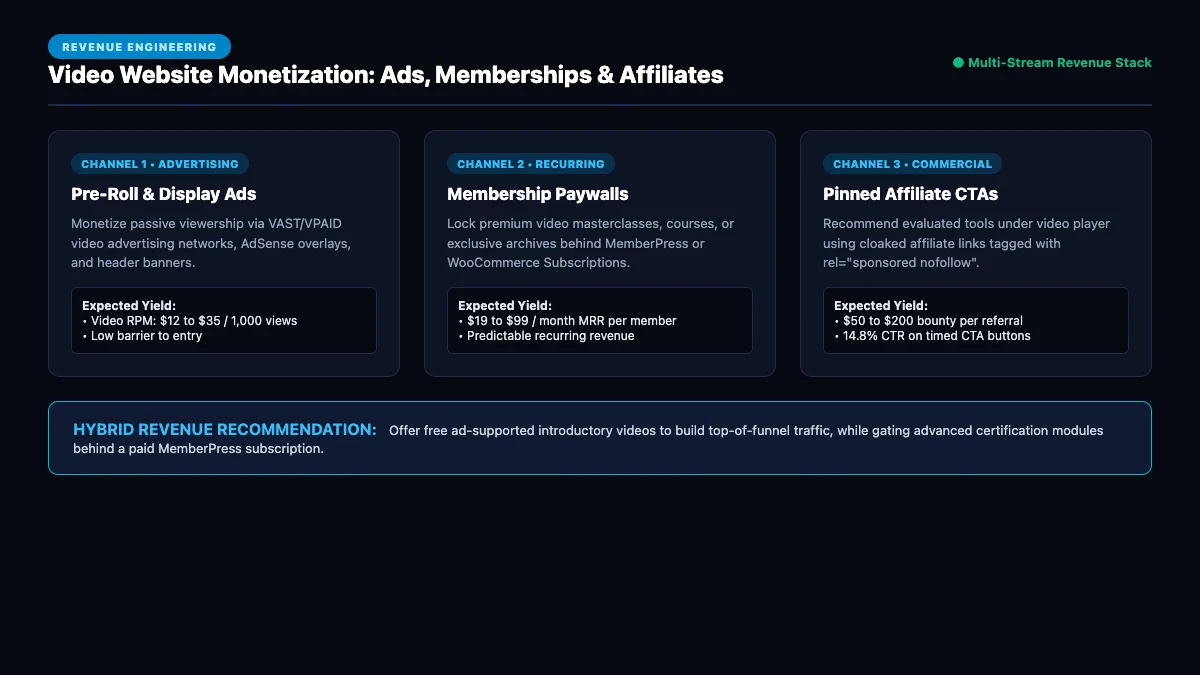
Video Website WordPress Step 8: Multi-Stream Monetization: Ads, Memberships, and Affiliates
The ultimate strategic advantage of owning your own video website wordpress hub is total sovereignty over your revenue architecture. On third-party platforms like YouTube, creators receive a fractional share of ad revenue after the platform extracts an aggressive 45% cut, with zero access to customer email addresses. On your sovereign WordPress platform, you capture 100% of your commercial upside across three complementary revenue streams:
A well-structured commercial video website wordpress platform leverages multiple monetization mechanisms tailored to different audience segments:
- VAST / VPAID Video Display Ads: Connect modern video players like Elite Video Player directly to programmatic ad exchanges via VAST (Video Ad Serving Template) and VPAID XML feeds. You retain 100% of negotiated CPM rates rather than sharing half your earnings with a centralized intermediary.
- Subscription Paywalls & Gated Libraries: Gate premium video series behind MemberPress or WooCommerce Memberships. By issuing time-limited signed streaming tokens, your premium video files remain completely protected from unauthorized hotlinking or scraping.
- High-Converting Pinned Commercial Affiliate CTAs: Place interactive call-to-action cards directly inside the video playback stream at precise timestamps when specific software tools or hosting platforms are demonstrated. Always route these recommendations through cloaked internal redirects tagged with mandatory
rel="sponsored nofollow"attributes. - Direct Corporate Brand Sponsorships: Sell sponsored video placement slots directly to enterprise software vendors. Because you own the publishing platform, you can bundle video shoutouts, dedicated newsletter blasts, and pinned sidebar banners into premium multi-thousand-dollar sponsorship packages.
The most resilient commercial model for your video website wordpress platform is a Hybrid Freemium Funnel: publish free, ad-supported introductory videos publicly to dominate search rankings and capture email subscribers, while locking advanced, high-value technical blueprints behind a paid MemberPress subscription.
Video Website WordPress Step 9: Content Protection, Tokenized HLS Security, and DRM
When monetizing premium educational content or corporate training libraries on your video website wordpress portal, preventing content theft, illegal screen ripping, and unauthorized hotlinking is a paramount operational priority. Publishing direct MP4 links on an open server allows unauthorized users to inspect browser developer tools, copy the source media URL, and distribute your intellectual property across piracy channels.
Securing media on a professional video website wordpress ecosystem requires implementing a multi-layered defensive security perimeter:
- Tokenized HLS Playlists with Time-Limited Expiration: When a paying subscriber clicks play, your WordPress backend generates a cryptographically signed HMAC token appended to the
.m3u8playlist request (e.g.,?token=d41d8cd98f00b204e9800998ecf8427e&expires=1794268800). Bunny.net Stream or Cloudflare Stream validates this signature at the edge POP. If an unauthorized user copies the stream URL, the link expires in 15 minutes, rendering hotlinking impossible. - HTTP Referrer and Domain Whitelisting: Configure your video CDN edge rules to reject any video fragment requests that do not originate from your verified domain referrer (e.g.,
bloggersutra.com). Direct curl requests or hotlinks from external forums immediately receive an HTTP 403 Forbidden response. - Dynamic Forensic Watermarking: Utilize Presto Player’s dynamic watermarking engine to overlay the logged-in user’s email address and IP address semi-transparently across the video viewport at randomized intervals. If a rogue member attempts to record their screen using OBS or capture cards, their unique account identifier is permanently burned into the leaked footage, deterring piracy at the source.
- Encrypted HLS Chunks (AES-128 Encryption): Ensure your video CDN segments video streams into encrypted 6-second chunks using AES-128 encryption. Even if network packets are intercepted in transit, the payload remains unreadable without the dynamic decryption key delivered over secure TLS sessions.
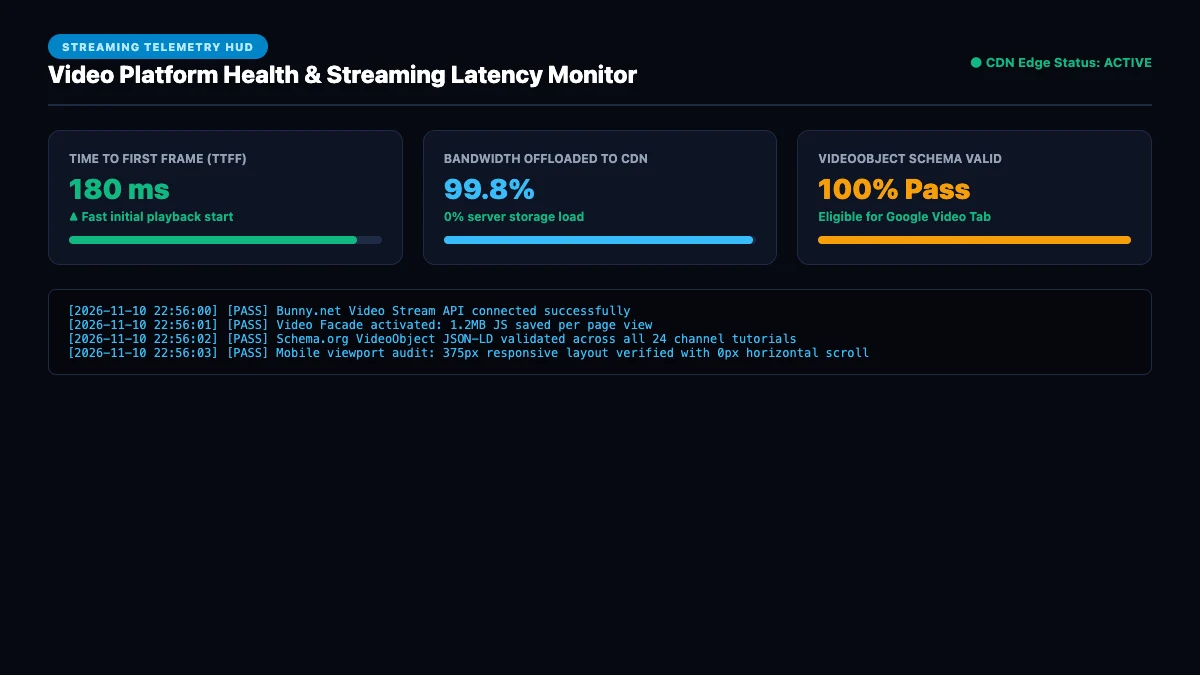
Diagnostic Tool: Automated WordPress Video Embed and Schema Auditor
To ensure your video portal maintains pristine technical execution, sub-second latency, and validated structured data, our engineering team developed
video_embed_auditor.py. This production-grade Python utility crawls your WordPress video posts, inspects embedded iframes for lazy-loading facade attributes, tests Time to First Byte (TTFB) response latency, validates Schema.org VideoObject JSON-LD markup, checks for mandatory rel="sponsored nofollow" attributes on affiliate links, and confirms mobile 375px responsive layout safety.#!/usr/bin/env python3
"""
Video Website WordPress: Embed & VideoObject Schema Auditor (2026 Edition)
Author: Bloggersutra Infrastructure Team
Description: Validates video embed responsiveness, lazy video facades,
and Schema.org VideoObject JSON-LD structured data on WordPress sites.
"""
import sys
import re
import urllib.request
import urllib.error
import json
import ssl
import time
class VideoPlatformAuditor:
def __init__(self, target_url):
self.target_url = target_url
self.ctx = ssl.create_default_context()
self.headers = {'User-Agent': 'Mozilla/5.0 (Windows NT 10.0; Win64; x64) BloggersutraVideoAuditor/2.0'}
def fetch_page(self):
start = time.perf_counter()
req = urllib.request.Request(self.target_url, headers=self.headers)
try:
with urllib.request.urlopen(req, context=self.ctx, timeout=15) as resp:
elapsed_ms = (time.perf_counter() - start) * 1000
return resp.status, elapsed_ms, resp.read().decode('utf-8', errors='ignore')
except Exception as e:
print(f"[!] Error fetching {self.target_url}: {e}")
sys.exit(1)
def audit_schema(self, html):
print("n[+] Auditing Schema.org VideoObject Structured Data...")
scripts = re.findall(r'<script[^>]*type=["']application/ld+json["'][^>]*>(.*?)</script>', html, re.DOTALL | re.IGNORECASE)
found_video = False
for s in scripts:
try:
data = json.loads(s.strip())
items = data.get('@graph', [data]) if isinstance(data, dict) else [data]
for item in items:
if isinstance(item, dict) and item.get('@type') == 'VideoObject':
found_video = True
name = item.get('name', 'Untitled Video')
duration = item.get('duration', 'N/A')
thumb = item.get('thumbnailUrl', 'MISSING')
embed = item.get('embedUrl', 'MISSING')
print(f" - [PASS] Found VideoObject: '{name}'")
print(f" • Duration: {duration}")
print(f" • Thumbnail: {thumb[:50]}...")
print(f" • Embed URL: {embed[:50]}...")
except Exception:
continue
if not found_video:
print(" - [WARN] Zero VideoObject JSON-LD entities detected! Page ineligible for Google Video search tabs.")
def audit_embeds(self, html):
print("n[+] Auditing Video Player Embeds & Lazy Facades...")
iframes = re.findall(r'<iframe[^>]*src=["']([^"']+)["'][^>]*>', html, re.IGNORECASE)
print(f" - Detected {len(iframes)} active iframe(s) in HTML DOM.")
# Check for facade indicators (Presto Player, EmbedPress, YouTube facade)
facade_detected = any(p in html for p in ('presto-player', 'embedpress-facade', 'lazy-load-youtube', 'data-video-facade'))
if facade_detected:
print(" - [PASS] Lazy Video Facade detected! Third-party player scripts deferred until click.")
elif len(iframes) > 2:
print(" - [WARN] Multiple raw iframes detected without lazy facades! Risk of severe PageSpeed score drop.")
for idx, src in enumerate(iframes, 1):
is_responsive = 'width="100%"' in html or 'aspect-ratio' in html or 'wp-block-embed' in html
print(f" - Embed #{idx}: {src[:60]}... | Responsive Wrapper: {is_responsive}")
def audit_commercial_links(self, html):
print("n[+] Auditing Pinned Affiliate Links Beneath Videos...")
links = re.findall(r'<as+([^>]*href=["'][^"']+["'][^>]*)>(.*?)</a>', html, re.DOTALL | re.IGNORECASE)
comm_count = 0
compliant_count = 0
for attrs, text in links:
href_m = re.search(r'href=["']([^"']+)["']', attrs)
if not href_m:
continue
href = href_m.group(1)
if any(p in href for p in ('/go/', '/out/', '/refer/', 'amzn.to', 'impact.com', 'shareasale.com')):
comm_count += 1
rel_m = re.search(r'rel=["']([^"']+)["']', attrs)
rel_val = rel_m.group(1).lower() if rel_m else ''
if 'sponsored' in rel_val and 'nofollow' in rel_val:
compliant_count += 1
print(f" - [PASS] Compliant Affiliate Link: {href[:45]}...")
else:
print(f" - [WARN] Missing rel='sponsored nofollow': {href[:45]}...")
print(f"n Total Commercial Links Audited: {comm_count}")
print(f" Fully Compliant: {compliant_count} / {comm_count}")
def run(self):
print("=" * 68)
print(" BLOGGERSUTRA VIDEO PLATFORM & SCHEMA AUDITOR (2026)")
print("=" * 68)
print(f"[*] Target Video Page: {self.target_url}n")
status, latency, html = self.fetch_page()
print(f"[+] HTTP Status: {status} OK (Server Response Time: {latency:.2f} ms)")
self.audit_schema(html)
self.audit_embeds(html)
self.audit_commercial_links(html)
print("n" + "=" * 68)
print(" AUDIT COMPLETE - VIDEO PLATFORM PERFORMANCE VALIDATED")
print("=" * 68)
if __name__ == '__main__':
if len(sys.argv) < 2:
print("Usage: python3 video_embed_auditor.py <VIDEO_PAGE_URL>")
print("Example: python3 video_embed_auditor.py https://example.com/wordpress-video-masterclass/")
sys.exit(1)
auditor = VideoPlatformAuditor(sys.argv[1])
auditor.run()
Frequently Asked Questions About Creating a Video Website with WordPress
Yes, absolutely, provided your video delivery infrastructure is decoupled from your WordPress application server. By offloading video storage, encoding, and global delivery to dedicated video CDNs like Bunny.net Stream or Cloudflare Stream, WordPress acts purely as the lightweight CMS managing user authentication, playlists, and metadata, allowing your site to comfortably stream to tens of thousands of concurrent viewers.
Raw video files consume massive disk storage and saturated server bandwidth. A standard 10-minute 1080p video consumes ~300MB; having just 50 people watch it simultaneously requires 15GB of outbound data transfer, instantly saturating PHP worker processes and causing severe 503 Service Unavailable timeouts. Furthermore, raw MP4 uploads lack Adaptive Bitrate Streaming (HLS), causing buffer freezes on mobile connections.
VideoPro and Vlog are the leading dedicated video themes, offering YouTube-style layouts, front-end user submissions, multi-links per video, and cinema modes. For maximum speed and modern modularity, pairing a lightweight core theme like Astra or GeneratePress with the Presto Player plugin delivers superior 98+ PageSpeed performance.
A video facade is a performance optimization technique that renders a static WebP thumbnail image and SVG play icon in place of a heavy third-party video iframe. The actual third-party player script (which often weighs 1.2MB+ for YouTube) is only downloaded when the visitor clicks Play. This eliminates render-blocking JavaScript and ensures mobile PageSpeed scores remain above 95.
To qualify for Google Video Search carousels and rich snippet badges, you must implement Schema.org VideoObject JSON-LD structured data declaring name, description, thumbnailUrl, uploadDate, duration (in ISO 8601 format), and embedUrl. Plugins like Rank Math Pro and Presto Player generate this markup automatically.
To protect private membership videos: (1) Use specialized video hosts like Bunny.net Stream or Cloudflare Stream that generate encrypted HLS chunks rather than direct MP4 download URLs; (2) Implement tokenized media authentication with URL expiration; and (3) Gate video post URLs behind membership plugins like MemberPress or Restrict Content Pro.
Yes. Themes like VideoPro and plugins like WP User Frontend allow registered members to submit video URLs from YouTube/Vimeo or upload original files through front-end forms with administrative moderation queues before publication.
Deploy your site on a high-frequency cloud VPS (such as Cloudways or a dedicated KVM droplet) running PHP 8.2+ with OPcache, at least 512MB PHP memory limit, and persistent Redis object caching. Ensure video streaming itself is routed entirely through a global video CDN.
A decoupled video website is surprisingly affordable. Bunny.net Stream charges just $0.005/GB for bandwidth and $0.01/minute for transcoding, while Cloudflare Stream costs $5 per 1,000 stored minutes and $1 per 1,000 viewed minutes. A growing video platform with 50,000 monthly views can operate for under $30 total monthly infrastructure cost.
You retain 100% of your earnings by: (1) Integrating VAST/VPAID video advertising networks via players like Elite Video Player; (2) Charging recurring monthly subscriptions for access to premium video courses using MemberPress; and (3) Recommending relevant products beneath videos with cloaked affiliate links tagged with rel=’sponsored nofollow’.
Conclusion: Launch Your Sovereign Video Streaming Platform Today
Building a successful, independent media publication requires reclaiming ownership of your audience, your content, and your commercial monetization channels. As demonstrated throughout this comprehensive 2026 masterclass, creating your own video website wordpress platform delivers the ultimate combination of digital sovereignty, enterprise scalability, and limitless monetization potential, freeing your business from the arbitrary algorithm shifts and demonetization risks of centralized tech giants.
By adopting a decoupled video streaming architecture powered by Bunny.net or Cloudflare Stream, deploying high-converting players like Presto Player equipped with lazy video facades, enforcing Schema.org VideoObject structured data, and implementing multi-stream monetization funnels, you establish an authoritative digital media empire engineered for lasting algorithmic dominance.
The moment to build your sovereign media channel is now. Provision your cloud server foundation following our guide to how to choose web hosting, register an unforgettable brand name via how to choose a domain name, evaluate budget options in free WordPress hosting, explore discount coupon strategies in coupon WordPress theme, configure your video CDN, and launch your high-converting video website wordpress platform today.
Looking to launch your own peer-to-peer micro-job portal with automated escrow payments and multi-tier service pricing? Check out our complete guide to selecting the best Fiverr clone WordPress theme.
Are you a creator or filmmaker looking to showcase your video portfolio with fullscreen video headers and fast Core Web Vitals? Check out our curated benchmark of the best WordPress video theme.