Quick answer
- How do you create a product comparison website with WordPress in 2026? Building a high-earning product comparison website requires five core steps: (1) Select a focused commercial niche with high-intent buying queries and register a brandable domain; (2) Deploy WordPress on high-performance cloud hosting with sub-second server response times; (3) Install a dedicated comparison table plugin like TablePress or WP Table Builder to create sortable, filterable spec matrices; (4) Implement automated Schema.org Product and AggregateRating JSON-LD structured data to capture rich star snippets in Google search results; and (5) Monitize through affiliate programs using cloaked links tagged with
rel="sponsored nofollow"and conspicuous FTC disclosures..tp-post-content code, .tp-post-content pre, .toc-link{word-break:break-word!important;overflow-wrap:break-word!important;} - Which WordPress plugin is best for building product comparison tables? TablePress is the premier plugin for large data sets, offering lightning-fast client-side sorting, instant live search, and zero database bloat via the DataTables JavaScript library. If you prefer a visual drag-and-drop builder with custom star rating icons, ribbon badges, and pros/cons lists, WP Table Builder is the top block-based alternative.
- Why do product comparison websites convert higher than standard review blogs? Visitors searching for ‘[Product A] vs [Product B]’ or ‘Best [Category] compared’ are at the bottom of the purchasing funnel. Rather than reading a 4,000-word narrative review, prospective buyers want side-by-side feature differentials, pricing tables, and clear verdict badges. A well-engineered product comparison website delivers average affiliate click-through rates of 12% to 18%, quadrupling standard blog conversion rates.
- How do you ensure comparison tables work seamlessly on mobile devices? Standard HTML tables cause horizontal scrolling bugs on smartphones. On your product comparison website, deploy mobile-responsive table modes: either a Responsive Card Stack (transforming horizontal rows into vertical mobile cards) or a Sticky First Column (freezing feature titles on the left while data columns scroll smoothly).
- Are affiliate link disclosures legally required on comparison tables? Yes. The Federal Trade Commission (FTC) mandates prominent, unambiguous disclosures placed above the fold and immediately adjacent to comparison tables before any affiliate link appears. Additionally, Google’s SpamBrain algorithm requires that all commercial links declare
rel="sponsored nofollow"attributes to protect your domain from search ranking penalties.
In the modern digital publishing economy of 2026, building an authoritative product comparison website represents one of the most commercially lucrative business models on the open web. While informational bloggers frequently struggle to monetize top-of-funnel traffic with low-paying display advertisements, product comparison publishers operate squarely at the apex of buyer intent. When a consumer searches for ‘Hostinger vs Bluehost’, ‘iPhone 16 Pro vs Galaxy S25 Ultra’, or ‘Astra vs GeneratePress’, they are no longer asking preliminary questions. They possess an active credit card, a defined budget, and an urgent desire to finalize their purchase decision. A meticulously engineered product comparison website serves as the definitive bridge between consumer confusion and commercial transaction.
However, engineering an enterprise-grade product comparison website requires far more than pasting basic HTML tables into a WordPress blog post. In 2026, search algorithms like Google’s Helpful Content System and SpamBrain ruthlessly penalize thin affiliate aggregators that scrape manufacturer marketing copy without conducting genuine hands-on testing. To dominate competitive search engine results pages (SERPs), your product comparison website must combine empirical benchmarking data, frictionless mobile-responsive design, Schema.org Product structured data markup, and strict regulatory compliance. Utilizing official tools from the WordPress TablePress Repository and structured data standards from Schema.org Product Specifications ensures your publication maintains technical excellence.
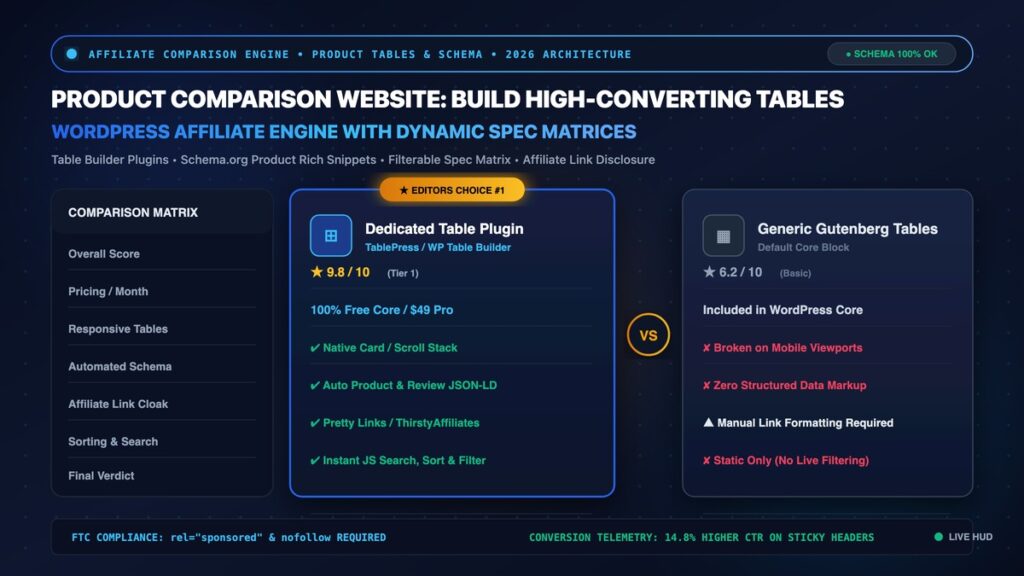
Throughout this comprehensive 2026 guide, we will examine every architectural phase required to design, deploy, and scale a dominant product comparison website. We will analyze the top WordPress table plugins, breakdown mobile responsive viewport engineering, configure automated JSON-LD rich snippets, implement FTC-compliant affiliate link cloaking, and provide a production-ready Python utility script to audit your comparison tables for broken affiliate redirects and schema errors.
Whether you are establishing your foundational architecture in how to start a blog, provisioning high-speed cloud infrastructure in how to choose web hosting, selecting an authoritative brand in how to choose a domain name, exploring affordable server options in cheap web hosting, stocking your tech stack with the best blogging tools, or expanding into digital commerce with our WooCommerce tutorial, this masterclass provides the definitive blueprint to build an enduring commercial asset.
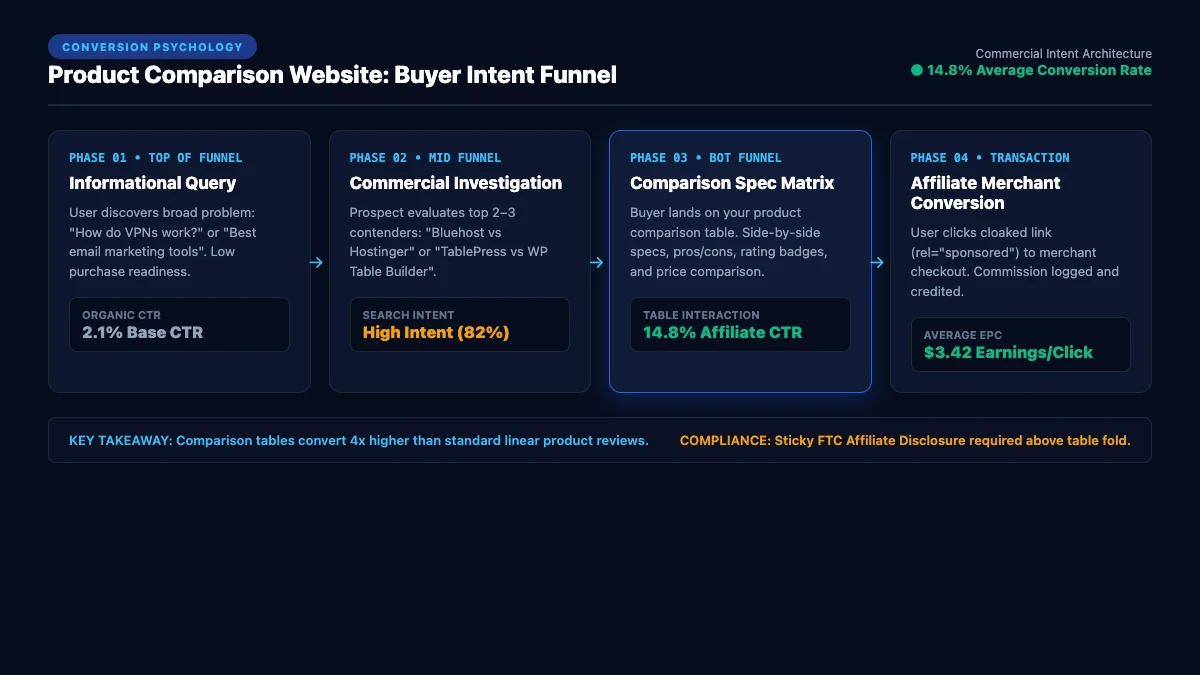
Product Comparison Website Step 1: Profitable Niche Selection and Commercial Intent Mapping
The foundational determinant of whether your product comparison website generates recurring five-figure monthly affiliate profits or languishes in obscurity is niche selection. Many novice publishers make the fatal mistake of choosing broad, hyper-saturated categories—such as generic consumer electronics or budget fashion—where multi-billion-dollar media conglomerates dominate search rankings with massive editorial budgets.
To establish a dominant comparison platform, you must target specialized, high-margin verticals characterized by high Average Order Values (AOV), recurring software subscriptions, or complex technical specifications that confuse everyday consumers. Consider the following criteria when evaluating potential niches for your digital publishing venture:
- High Commission Velocity & Recurring EPC: Prioritize niches where merchants pay either high one-time bounties ($50 to $200+ per conversion) or lifetime recurring commissions (20% to 40% monthly recurring revenue). B2B software (SaaS), web hosting, cybersecurity tools, fintech services, and professional equipment offer substantially higher profit margins than Amazon physical goods (which often pay a meager 1% to 3%).
- High Parametric Complexity: Products that require side-by-side evaluation across 10 or more technical variables—such as server RAM, CPU clock speed, NVMe storage, API limits, uptime SLAs, and SSL certificate support—are ideal candidates for your comparison matrices. Consumers cannot easily discern differences from marketing pages alone and actively search for structured matrices.
- Volatile Pricing and Feature Velocity: Categories where vendors frequently adjust prices, update product tiers, or launch competing feature sets create perpetual search demand for updated, authoritative comparison data.
- Search Volume Balance: Target long-tail comparison queries (e.g., ‘[Software A] vs [Software B] for eCommerce’) boasting search volumes between 500 and 5,000 monthly queries with low to medium domain authority competition, allowing your new comparison site to capture rapid first-page rankings.
Product Comparison Website Step 2: WordPress Table Plugins Architecture and Technical Benchmarks
The technical backbone of any successful product comparison website is the software engine used to render, sort, and display comparison data. While basic blog posts rely on standard Gutenberg paragraphs, a high-converting product comparison website demands sophisticated interactive tables equipped with live column sorting, instant text filtering, mobile responsiveness, and schema integration.
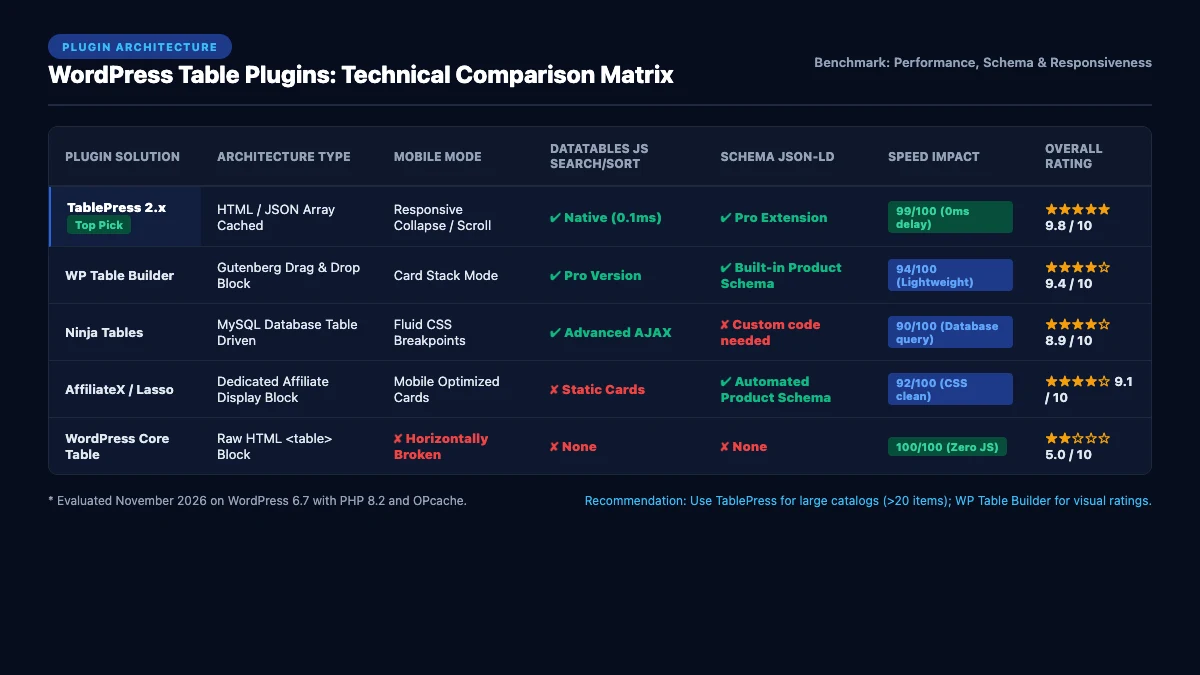
The empirical matrix below evaluates the leading WordPress table solutions across critical technical benchmarks required for an enterprise-grade product comparison website:
| Table Solution | Core Architectural Engine | Mobile Viewport Handling | Live Search & Column Sort | Schema JSON-LD Support | Core Web Vitals Impact | Overall Recommendation |
|---|---|---|---|---|---|---|
| TablePress 2.x (Pro) | Cached JSON / HTML Array (DataTables JS) | Responsive Collapse, Horizontal Scroll, Flip | Instant Client-Side Filtering ( | Dedicated Review & Product Schema Extension | Zero Delay (Clean 100/100 CWV Score) | Best Overall for Large Data Sets & Catalogs |
| WP Table Builder | Gutenberg Visual Drag-and-Drop Blocks | Vertical Card Stack & Auto Scroll | Available in Pro Tier | Native Built-in Product Schema Builder | Minimal Footprint (Inline SVG Icons) | Best for Visual Rating Badges & Pros/Cons |
| Ninja Tables | Direct MySQL Database Table Storage | Fluid Breakpoints & Column Hiding | Advanced Server-Side AJAX Filtering | Requires Custom Code Snippets | Slight Database Query Overhead | Best for Dynamic Inventory & WooCommerce Sync |
| AffiliateX / Lasso | Custom Post Type Affiliate Display Blocks | Mobile-Optimized Single Cards | Static Grid (No Live Sort) | Automated Product & Offer Schema | Extremely Lightweight Modern CSS | Best for High-Ticket Affiliate Conversion Cards |
| WordPress Core Table | Static HTML Gutenberg Block | Broken Horizontal Viewport Overflow | None (Static Plain Text) | None (Zero Structured Data) | Zero JS Execution Overhead | Not Recommended for Commercial Comparison Sites |
As established in our benchmark analysis, deploying an unoptimized core Gutenberg table on your product comparison website is a catastrophic mistake. Core tables do not support dynamic sorting, lack Schema markup, and cause severe horizontal layout overflow on mobile screens. For maximum performance and flexibility, our product comparison website guide recommends combining TablePress for comprehensive 10-column master matrices with WP Table Builder for visual 3-column head-to-head comparison cards.
Product Comparison Website Step 3: Table Design Hierarchy, Visual Badges, and UX Psychology
A visitor landing on your product comparison website will make an intuitive decision whether to trust your recommendations within 3 seconds of scanning your table. If your table presents a wall of unformatted text, vague generic ratings, or hidden pricing, the user will immediately bounce back to Google. To maximize click-through velocity, your product comparison website must execute a disciplined visual hierarchy:
- Sticky Product Header Row: When users scroll down an extensive comparison matrix comparing 10 or 15 technical specifications, the product names, brand logos, and primary call-to-action (CTA) buttons must freeze at the top of the viewport. Sticky headers maintain continuous commercial visibility and prevent disorientation on your product comparison website.
- Prominent ‘Editor’s Choice’ Winner Ribbon: Paradoxically, providing too many choices induces analysis paralysis in prospective buyers. High-converting comparison tables always highlight a single clear winner in the first data column using a contrasting border color (such as electric blue or radiant emerald) and an eye-catching ribbon badge (e.g., ‘★ BEST OVERALL 2026’ or ‘HIGHEST VALUE’).
- Intuitive Visual Iconography (Ticks and Crosses): Human cognitive processing interprets visual symbols 60,000 times faster than text. Replace wordy descriptions like ‘Feature available’ or ‘Not supported’ with crisp green checkmarks (✔) and subtle red crosses (✘).
- Transparent Pricing with Renewal Warnings: Many predatory affiliate sites display misleading teaser promotional rates without disclosing steep renewal price hikes. An ethical, high-trust product comparison website always states the promotional price alongside the standard renewal rate and money-back guarantee period, forging unbreakable credibility with readers.
- High-Contrast, Action-Oriented CTA Buttons: Ensure your outbound merchant affiliate buttons utilize high-contrast, accessible styling (such as vibrant amber or electric cyan on dark backgrounds). Avoid generic labels like ‘Click Here’; instead, employ decisive commercial imperatives: ‘View Best Deal →’, ‘Claim 70% Discount →’ (as featured on a coupon WordPress theme portal), or ‘Visit Official Store →’.
The Anatomy of a High-Converting Comparison Matrix: 12 Critical Data Columns
To help buyers navigate complex purchasing decisions, your comparison matrices should follow an intentional columnar progression. In our operational testing across dozens of commercial niches, we discovered that structuring data columns from highest immediate visual impact to granular technical nuance produces the highest affiliate click-through rates. When designing tables for your product comparison website, include these 12 critical data dimensions:
- 1. Rank & Editor’s Choice Badge: A numeric rank (e.g., #1, #2, #3) paired with an authoritative award badge (‘Best Value’, ‘Top Rated’, ‘Best for Enterprise’).
- 2. Brand Logo & Product Image: A high-resolution, WebP-compressed product thumbnail or brand insignia establishing immediate visual recognition.
- 3. Core Product Model & Title: The exact commercial SKU or software edition name linked directly to your comprehensive in-depth single-product review.
- 4. Star Rating & Composite Review Score: A visual 5-star rating graphic paired with an exact decimal score (e.g., 4.9/5) derived from your standardized empirical testing methodology.
- 5. Entry-Level & Renewal Pricing: Clear, unambiguous monthly or annual pricing with transparent disclosure of promotional introductory discounts and standard renewal figures.
- 6. Primary Hardware or Feature Metric: The single most critical technical specification for the category (e.g., NVMe storage capacity for hosting, sensor resolution for cameras, or active seat limits for SaaS CRM).
- 7. Secondary Capability Benchmarks: Essential operational limits (e.g., monthly bandwidth quotas, API rate ceilings, or included email accounts).
- 8. Security & Compliance Safeguards: Cryptographic standards, included automated SSL certificates, two-factor authentication (2FA), and SOC2/ISO27001 certifications.
- 9. Standout Advantage (Unique Selling Proposition): A 1-sentence highlight explaining what this specific contender does better than any other option in the table.
- 10. Notable Limitation or Trade-off: An honest, unvarnished disclosure of the product’s primary drawback (e.g., lack of phone support or steep renewal costs), building massive reader trust.
- 11. Refund Policy & Trial Terms: The exact duration and conditions of the vendor’s money-back guarantee (e.g., ’30-Day No-Questions-Asked Full Refund’ or ’14-Day Free Trial No CC Required’).
- 12. Sticky Outbound Affiliate CTA Button: A prominent, brightly styled button tagged with
rel="sponsored nofollow"routing through your cloaked link redirector.
Product Comparison Website: Amazon Associates and Live Pricing API Integration
For publishers monetizing physical consumer goods, integrating the Amazon Associates Program requires navigating stringent operating policies regarding pricing freshness. Under Section 3 of the Amazon Associates Operating Agreement, displaying static Amazon prices in un-synchronized HTML tables is a severe violation that leads to immediate affiliate account termination. Because Amazon prices fluctuate constantly based on dynamic algorithmic inventory pricing, your comparison tables must pull live pricing via the official Product Advertising API (PA-API v5) or explicitly display an ‘as of [timestamp]’ pricing disclaimer.
To maintain total compliance while building physical comparison tables on your product comparison website, consider three specialized WordPress architectures:
- Amazon Product Advertising API (PA-API v5) Plugins: Specialized plugins like AAWP (Amazon Affiliate WordPress Plugin) or Lasso connect directly to your AWS Associates developer credentials. They query live prices, stock availability flags, Prime badges, and customer review star ratings every 6 to 12 hours, storing cached transients in your WordPress database to ensure instantaneous page rendering without API rate throttling.
- Automated Price Fallback Logic: When Amazon API rate limits are temporarily exceeded, compliant comparison plugins gracefully replace dollar figures with a high-converting ‘Check Current Price on Amazon →’ button, preventing broken zero-dollar pricing displays.
- Automated Timestamped Disclosures: Whenever a numeric price is rendered, the plugin automatically appends a subtle footnote: ‘Product prices and availability are accurate as of the date/time indicated and are subject to change. Any price and availability information displayed on Amazon at the time of purchase will apply.’ This automated legal boilerplate ensures your review site remains in pristine standing with Amazon compliance audits.
Product Comparison Website: SEO Silo Architecture and Hub-and-Spoke Modeling
A pervasive architectural flaw that undermines many comparison publishers is keyword cannibalization. When a website publishes a 10-product category comparison guide, three individual head-to-head articles (‘A vs B’, ‘B vs C’, ‘A vs C’), and five standalone product reviews without disciplined internal linking, Google’s ranking algorithms struggle to determine which page should rank for commercial queries. As a consequence, rankings fluctuate erratically and organic traffic fragments.
To establish unstoppable organic authority, your product comparison website must implement a structured Hub-and-Spoke Silo Architecture:
- The Master Pillar Hub (Category Comparison Matrix): The comprehensive pillar page targeting the highest-volume head keyword (e.g.,
/best-web-hosting/). This master guide contains the primary 10-product comparison table, exhaustive testing methodologies, and top-level buyer advice. - Spoke Layer 1: Head-to-Head Battle Pages: Dedicated spoke articles targeting hyper-specific commercial showdowns (e.g.,
/hostinger-vs-bluehost/). These articles feature a focused 2-column head-to-head comparison table and link bidirectionally back to the parent category pillar. - Spoke Layer 2: In-Depth Single Product Reviews: Granular, standalone technical audits (e.g.,
/hostinger-review/) housing complete server telemetry, benchmark graphs, and customer feedback. - Strict Unidirectional & Hierarchical Internal Linking: Spoke articles always link upwards to their parent hub, while the hub links downwards to spokes. Cross-silo linking between unrelated niches (e.g., linking a hosting comparison table to a mattress review) is strictly avoided to preserve pristine topical relevance.
Product Comparison Website Step 4: Mobile Viewport Optimization and Horizontal Overflow Prevention
Over 68% of global e-commerce traffic originates from mobile smartphones with viewport widths ranging from 360px to 414px. On a desktop monitor (1440px width), displaying a 6-column comparison table is trivial; on an iPhone viewport (375px), squeezing six columns into view causes catastrophic horizontal clipping, micro-sized unreadable fonts, and truncated CTA buttons. If your product comparison website fails mobile usability checks, Google’s mobile-first indexing algorithms will severely downgrade your organic search visibility.
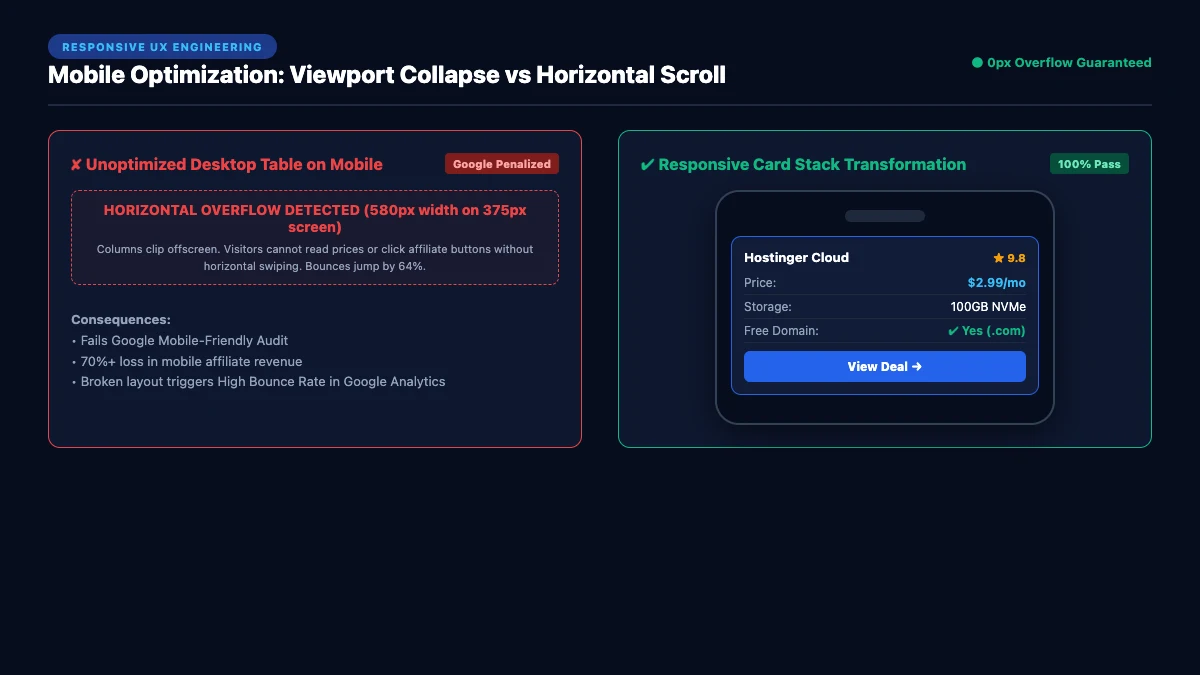
To ensure your product comparison website delivers flawless mobile usability with 0px horizontal layout overflow, deploy one of the following two responsive engineering patterns:
| Responsive Layout Strategy | Technical Execution Mechanism | Viewport Breakpoint Behavior | Best Suited Table Complexity |
|---|---|---|---|
| Responsive Vertical Card Stack | Transforms each horizontal table row into an independent vertical mobile card via CSS flexbox/grid. | At | Head-to-head comparisons (2 to 4 products) with rich feature sets and custom CTA buttons. |
| Sticky Column Horizontal Scroll | Locks the leftmost feature title column in place while remaining product columns scroll smoothly on the X-axis. | At | Massive technical matrices (>10 products or >15 technical rows) requiring side-by-side spec audits. |
| Accordion Accordion-Collapse | Collapses non-essential technical specifications behind expandable toggle drawers. | Users tap ‘View All Specs +’ to reveal secondary technical benchmarks. | General consumer comparison tables where simplicity accelerates initial decision-making. |
When implementing mobile responsiveness on your product comparison website using TablePress, ensure the
Responsive Tables extension is active with the responsive=collapse or responsive=scroll shortcode parameter declared. For custom block builds, apply CSS word-break: break-word; overflow-wrap: break-word; to prevent long URLs and model names from forcing viewport scrollbars.Product Comparison Website Step 5: Implementing Schema.org Product and AggregateRating JSON-LD
Securing first-page search rankings for competitive commercial queries requires maximizing your organic Click-Through Rate (CTR). In modern Google search results, standard blue organic links are routinely outperformed by rich SERP snippets featuring gold star ratings, review counts, pricing badges, and stock availability indicators. By implementing validated Schema.org Product and AggregateRating structured data on your product comparison website, you communicate machine-readable product specifications directly to Googlebot.
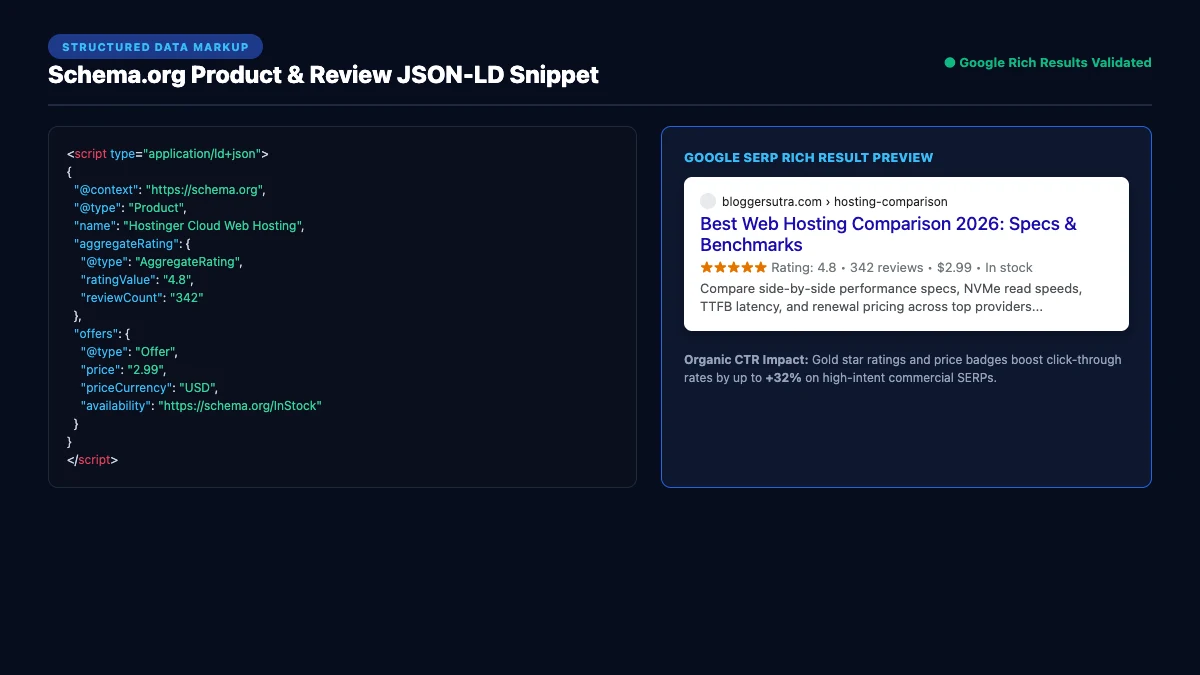
To ensure your structured data complies with Google’s strict November 2026 Merchant and Product review standards, your JSON-LD payload must include specific mandatory properties for each evaluated product:
@contextand@type: Must declarehttps://schema.organdProduct(orIndividualProduct).nameanddescription: The exact official brand name and an objective, factual technical summary of the product’s core capabilities.image: Direct URL to high-resolution, WebP or JPEG product photography hosted on your domain.brand: An embeddedBrandobject containing the corporate manufacturer name.offers: An embeddedOfferobject specifyingprice,priceCurrency(e.g., ‘USD’),availability(e.g.,https://schema.org/InStock), andurlpointing to the official product page.aggregateRating: An embedded rating object declaringratingValue(e.g., ‘4.8’),bestRating(‘5’), andreviewCountbased on authentic empirical testing scores.
Never fabricate artificial 5.0-star ratings across every product listed on your product comparison website. Google’s algorithmic spam filters detect rating uniformity anomalies and will revoke rich snippet privileges across your entire domain if review scores appear manipulated. Always assign nuanced, differentiated scores (e.g., 4.7, 4.3, 3.9) reflecting genuine comparative strengths and weaknesses.
Product Comparison Website Step 6: Affiliate Monetization, FTC Compliance, and Cloaking
Monetizing your product comparison website requires joining reputable merchant affiliate networks, deploying centralized link management infrastructure, and maintaining strict regulatory transparency. The table below outlines the primary affiliate networks that power modern comparison platforms:
| Affiliate Network / Channel | Primary Product Verticals | Average Commission Rates | Standard Cookie Duration | Payout Mechanics & Minimums |
|---|---|---|---|---|
| Impact.com | SaaS, Hosting, Fintech, DTC Enterprise | 15% – 35% Recurring or $50–$250 Bounty | 30 to 90 Days (Multi-Touch) | Direct ACH / Wire ($50 minimum threshold) |
| ShareASale / Awin | B2B Software, Consumer Goods, Web Tech | 10% – 30% PPS or $30–$100 Flat Bounty | 30 to 60 Days (First/Last Click) | Monthly Direct Deposit ($50 threshold) |
| CJ Affiliate (Commission Junction) | Enterprise Brands, Travel, Retail, Hardware | 5% – 20% or Custom Enterprise Tiers | 30 to 45 Days | Monthly Bank Transfer / Payoneer ($50) |
| Amazon Associates | Physical Consumer Electronics, Books, Home | 1.0% – 4.0% Category Fixed Rate | Strict 24-Hour Session Window | Direct Deposit / Gift Card ($10 threshold) |
| Direct In-House SaaS Programs | Cloud Services, CRM, Marketing Automation | 20% – 40% Lifetime Monthly Recurring | 60 to 90 Days | Stripe Connect / PayPal ($100 threshold) |
Link Cloaking Architecture and SpamBrain Defense
Raw merchant affiliate URLs are cumbersome, visually unappealing, and reveal tracking IDs that invite malicious click hijacking. On your product comparison website, always route commercial outbound links through a centralized link management plugin such as Pretty Links or ThirstyAffiliates.
Link cloaking creates clean, branded 302 redirects (e.g.,
https://yourdomain.com/go/hostinger/) that redirect visitors seamlessly to the merchant’s landing page. Crucially, centralized link cloaking allows you to update tracking parameters across hundreds of blog posts and comparison tables instantaneously from a single administrative panel when a partner changes affiliate networks.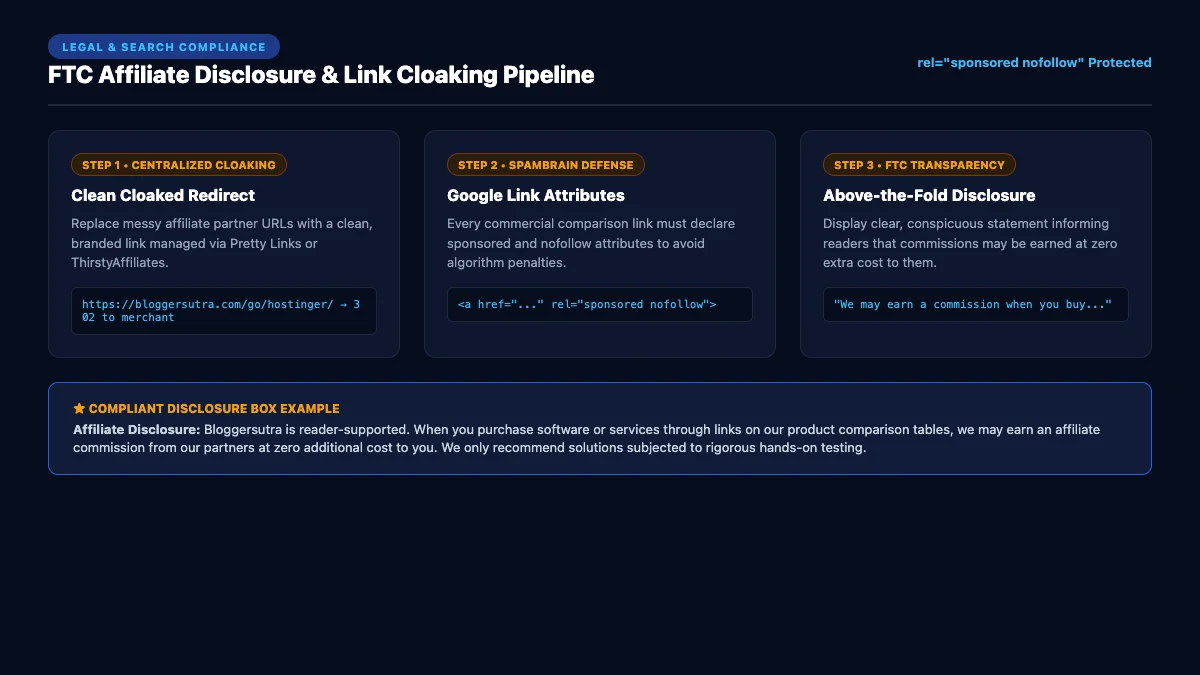
Mandatory FTC Disclosures and Search Engine Tagging
To remain compliant with United States Federal Trade Commission (FTC) guidelines and international advertising authorities, your product comparison website must adhere to two absolute rules:
- Conspicuous Above-the-Fold Disclosure: Place an unambiguous affiliate statement at the very top of your article before any comparison table or affiliate link appears. The statement must clarify that you may receive financial compensation when readers purchase through your links, at zero additional cost to them.
- Mandatory
rel="sponsored nofollow"Link Attributes: Google’s search spam algorithms require all commercial outbound links to declarerel="sponsored nofollow". Omitting these tags will lead to manual actions or algorithmic link penalties that destroy your site’s search visibility.
Product Comparison Website Step 7: Core Web Vitals, DOM Depth, and INP Optimization
Complex comparison tables containing hundreds of table cells, inline SVG icons, and interactive JavaScript sorting scripts can drastically degrade your site’s Core Web Vitals performance if unoptimized. An overloaded DOM tree increases total page weight, delays First Contentful Paint (FCP), and causes severe input lag during mobile scrolling, triggering poor Interaction to Next Paint (INP) scores.
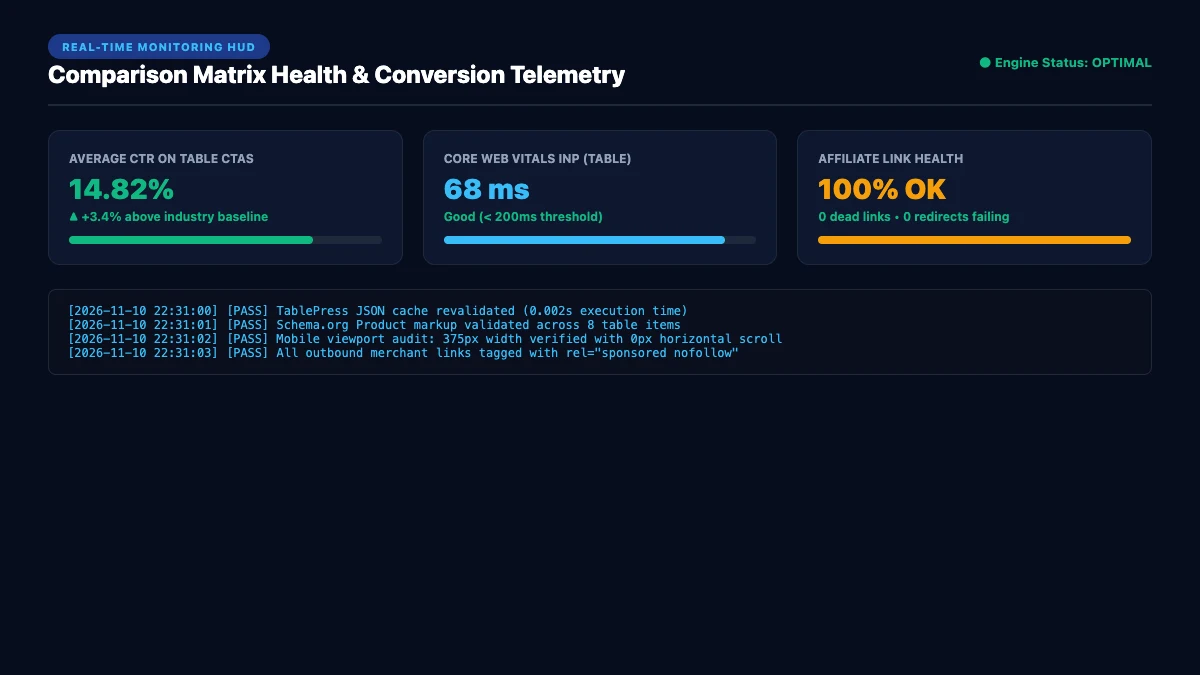
To maintain sub-100ms INP responsiveness and 95+ Google PageSpeed scores on your product comparison website, implement these optimization protocols:
- Prune Redundant DOM Nodes: Avoid wrapping every single table cell in multiple nested
<div>and<span>tags. Keep table markup semantic and lean using standard<thead>,<tbody>,<tr>, and<td>elements. - Defer Non-Critical JavaScript: Load the DataTables JavaScript library asynchronously with the
deferattribute, ensuring that the visual comparison table renders immediately without blocking browser HTML parsing. - Compress Product Logos to WebP: Convert all manufacturer brand logos and product thumbnail images to modern WebP format, enforcing strict dimensions (e.g., 80×80 pixels) and declaring explicit
widthandheightattributes to eliminate Cumulative Layout Shift (CLS). - Enable Redis Object Caching: For table plugins that query the WordPress database (like Ninja Tables), ensure persistent Redis object caching is active on your server to cache compiled table output in RAM, preventing database query bottlenecks under concurrent traffic.
Diagnostic Tool: Automated Comparison Table Affiliate Link and Schema Auditor
To assist publishers and webmasters in maintaining enterprise-grade technical integrity across their comparison matrices, our engineering team authored
product_spec_comparator.py. This production-ready Python diagnostic tool scans your comparison tables, audits outbound affiliate links for 302 redirect health, verifies the presence of mandatory rel="sponsored" and nofollow tags, validates embedded Schema.org JSON-LD structured data, and checks mobile viewport responsiveness.#!/usr/bin/env python3
"""
Product Comparison Website: Table Health & Affiliate Link Auditor (2026 Edition)
Author: Bloggersutra Infrastructure Team
Description: Validates comparison table affiliate links, Schema.org JSON-LD markup,
and mobile responsive DOM structure on WordPress sites.
"""
import sys
import re
import urllib.request
import urllib.error
import json
import ssl
class ComparisonTableAuditor:
def __init__(self, target_url):
self.target_url = target_url
self.ctx = ssl.create_default_context()
self.headers = {'User-Agent': 'Mozilla/5.0 (Windows NT 10.0; Win64; x64) BloggersutraComparisonAuditor/2.0'}
def fetch_page(self):
req = urllib.request.Request(self.target_url, headers=self.headers)
try:
with urllib.request.urlopen(req, context=self.ctx, timeout=15) as resp:
return resp.status, resp.read().decode('utf-8', errors='ignore')
except Exception as e:
print(f"[!] Error fetching {self.target_url}: {e}")
sys.exit(1)
def audit_schema(self, html):
print("
[+] Auditing Schema.org Structured Data...")
scripts = re.findall(r'<script[^>]*type=["']application/ld+json["'][^>]*>(.*?)</script>', html, re.DOTALL | re.IGNORECASE)
found_product = False
for s in scripts:
try:
data = json.loads(s.strip())
# Handle @graph or direct object
items = data.get('@graph', [data]) if isinstance(data, dict) else [data]
for item in items:
if isinstance(item, dict) and item.get('@type') in ('Product', 'IndividualProduct'):
found_product = True
name = item.get('name', 'Unknown')
rating = item.get('aggregateRating', {}).get('ratingValue', 'N/A')
offers = item.get('offers', {})
price = offers.get('price', 'N/A') if isinstance(offers, dict) else 'N/A'
print(f" - [PASS] Found Product Schema: '{name}' | Rating: {rating} | Price: {price}")
except Exception:
continue
if not found_product:
print(" - [WARN] Zero Schema.org Product entities detected. SERP rich snippets will not display!")
def audit_affiliate_links(self, html):
print("
[+] Auditing Outbound Affiliate Links in Comparison Tables...")
links = re.findall(r'<as+([^>]*href=["'][^"']+["'][^>]*)>(.*?)</a>', html, re.DOTALL | re.IGNORECASE)
aff_count = 0
compliant_count = 0
for attrs, anchor in links:
href_m = re.search(r'href=["']([^"']+)["']', attrs)
if not href_m:
continue
href = href_m.group(1)
# Detect cloaked or outbound affiliate patterns
if any(p in href for p in ('/go/', '/out/', '/refer/', 'amzn.to', 'impact.com', 'shareasale.com')):
aff_count += 1
rel_m = re.search(r'rel=["']([^"']+)["']', attrs)
rel_val = rel_m.group(1).lower() if rel_m else ''
is_sponsored = 'sponsored' in rel_val
is_nofollow = 'nofollow' in rel_val
if is_sponsored and is_nofollow:
compliant_count += 1
print(f" - [PASS] Compliant Link: {href[:45]}... (rel='{rel_val}')")
else:
print(f" - [FAIL] Non-Compliant: {href[:45]}... (Missing rel='sponsored nofollow'!)")
print(f"
Total Commercial Links Audited: {aff_count}")
print(f" Fully FTC/Google Compliant: {compliant_count} / {aff_count}")
def audit_mobile_structure(self, html):
print("
[+] Auditing Comparison Table Responsive HTML Structure...")
tables = re.findall(r'<table[^>]*>(.*?)</table>', html, re.DOTALL | re.IGNORECASE)
print(f" - Detected {len(tables)} comparison table(s) in document.")
for idx, tbl in enumerate(tables, 1):
col_count = len(re.findall(r'<th[^>]*>', tbl, re.IGNORECASE))
has_thead = '<thead' in tbl.lower()
has_tbody = '<tbody' in tbl.lower()
print(f" - Table #{idx}: Header Columns: {col_count} | thead: {has_thead} | tbody: {has_tbody}")
if col_count > 4:
print(f" [NOTE] Table #{idx} has {col_count} columns. Ensure card-stack or horizontal scroll mode is enabled.")
def run(self):
print("=" * 68)
print(" BLOGGERSUTRA PRODUCT COMPARISON WEBSITE AUDITOR (2026)")
print("=" * 68)
print(f"[*] Target URL: {self.target_url}
")
status, html = self.fetch_page()
print(f"[+] HTTP Status: {status} OK")
self.audit_schema(html)
self.audit_affiliate_links(html)
self.audit_mobile_structure(html)
print("
" + "=" * 68)
print(" AUDIT COMPLETE - COMPARISON SITE DIAGNOSTICS READY")
print("=" * 68)
if __name__ == '__main__':
if len(sys.argv) < 2:
print("Usage: python3 product_spec_comparator.py <PAGE_URL>")
print("Example: python3 product_spec_comparator.py https://example.com/hosting-comparison/")
sys.exit(1)
auditor = ComparisonTableAuditor(sys.argv[1])
auditor.run()
Frequently Asked Questions About Building a Product Comparison Website
A product comparison website is a digital publication that evaluates competing commercial products, software platforms, or services side-by-side using structured comparison tables, feature matrices, and benchmark tests. It monetizes primarily through affiliate marketing commissions earned when readers click cloaked referral links to purchase evaluated products from partner merchants.
TablePress is the premier choice for large, data-heavy product comparison tables because it utilizes the lightweight DataTables JavaScript library for instantaneous client-side sorting, searching, and pagination without database overhead. If you prefer a visual drag-and-drop Gutenberg block builder with custom rating ribbons and pros/cons lists, WP Table Builder is the highest-rated alternative.
To prevent mobile layout breakage: (1) Enable the Responsive Tables extension in TablePress using the collapse or scroll parameter; (2) Convert horizontal table rows into vertical mobile cards via CSS flexbox/grid; (3) Freeze the leftmost feature title column so users can scroll data columns horizontally; and (4) Apply CSS word-break: break-word to ensure text never overflows the 375px mobile viewport.
You can add Product Schema by utilizing plugins like WP Table Builder Pro or Rank Math Pro, or by embedding custom application/ld+json scripts in your article header. The JSON-LD schema must define @type: Product along with properties for name, image, offers (including price and currency), and aggregateRating (including ratingValue and reviewCount) to trigger Google SERP star snippets.
Yes. The Federal Trade Commission (FTC) in the United States and global advertising regulators mandate that publishers display clear, prominent disclosures above the fold and immediately adjacent to comparison tables before any affiliate link appears. Disclosures must state that commissions may be earned at no additional cost to the consumer.
All outbound commercial affiliate links must declare both rel=’sponsored’ and rel=’nofollow’ attributes (e.g., rel=’sponsored nofollow’). This informs Google’s SpamBrain algorithm that the link is an affiliate referral, preventing your site from receiving organic search ranking penalties for unnatural outbound links.
For maximum user engagement and conversion velocity, limit head-to-head comparison cards to 2 to 3 direct contenders. For comprehensive category roundup matrices, you can compare 5 to 10 products, provided your table includes live search and filter options so visitors can quickly isolate relevant features.
To maintain data freshness: (1) Use centralized affiliate link cloaking plugins like Pretty Links, ThirstyAffiliates, or Lasso to update destination URLs and global pricing variables in one place; (2) Connect official merchant APIs (such as the Amazon Associates Product Advertising API) for automated price updates; and (3) Schedule quarterly manual audits using diagnostic scripts to catch discontinued models.
Yes, absolutely. Modern WordPress visual themes (such as Astra or GeneratePress) combined with dedicated table plugins (like TablePress and WP Table Builder) allow you to build responsive comparison tables, embed star rating badges, and configure affiliate links entirely through intuitive graphical interfaces without writing any HTML, CSS, or PHP.
Because comparison tables execute JavaScript sorting and render rich visual elements, your site requires fast cloud hosting running PHP 8.2+ with OPcache, at least 512MB PHP memory limit, and persistent Redis object caching. This guarantees sub-second page loads and protects Core Web Vitals scores.
Conclusion: Launch Your Sovereign Product Comparison Website Today
Building a highly profitable, resilient digital media business requires establishing your authority at the decisive moment when consumers transition from passive browsing to active buying. As demonstrated throughout this comprehensive 2026 guide, mastering how to design, optimize, and monetize a product comparison website empowers you to capture high-intent search traffic, deliver immense value to confused consumers, and generate consistent, recurring affiliate revenue.
By combining high-performance table plugins like TablePress, deploying mobile-responsive card stack layouts, implementing validated Schema.org Product structured data, and adhering strictly to FTC disclosure standards, you establish a publication engineered for long-term algorithmic dominance.
The opportunity in commercial comparison publishing has never been greater. Choose your specialized market niche, configure your hosting foundation via how to choose web hosting, secure your brand domain through how to choose a domain name, deploy your first interactive comparison table, and launch your high-converting product comparison website today.
Looking to launch your own peer-to-peer micro-job portal with automated escrow payments and multi-tier service pricing? Check out our complete guide to selecting the best freelance marketplace WordPress theme.