Quick answer
- What is full-service web hosting? Full-service web hosting (often referred to as fully managed web hosting or white-glove hosting) is an all-inclusive infrastructure model where the hosting provider takes complete operational responsibility for server administration, hardware provisioning, operating system patching, automated WordPress core and plugin updates, enterprise security hardening, daily offsite backups, and speed optimization. Unlike self-managed cloud servers or budget shared hosts, a full-service provider acts as your dedicated external DevOps and sysadmin department.
- What core features are included in a full-service web hosting package? A premier full service web hosting tier typically includes: isolated containerized cloud environments (Docker/LXC), automated safe plugin upgrades with visual AI regression testing, real-time Layer 7 Web Application Firewalls (WAF) with DDoS mitigation, free malware cleanup guarantees, automated daily and on-demand offsite S3 backups with 1-click restore, persistent Redis object caching, integrated global edge CDN routing, free white-glove site migrations, and 24/7 priority DevOps support with 15-minute response SLAs.
- How does full-service web hosting compare to unmanaged VPS or shared hosting? Shared hosting crowds hundreds of websites onto one server with zero management beyond basic cPanel controls, while an unmanaged VPS gives you a bare Linux terminal requiring manual command-line configuration of Nginx, MySQL, firewall rules, and SSL certificates (including multi-domain WordPress multisite SSL configurations). In contrast, full service web hosting pairs dedicated cloud resources with automated software stacks and human sysadmin monitoring, eliminating operational downtime and technical maintenance for business owners.
- Is full-service web hosting worth the higher monthly investment? Yes, particularly for ecommerce stores, high-traffic publishers, digital agencies, and revenue-generating enterprises. Hiring an internal Linux sysadmin costs between $75,000 and $120,000 annually, while outsourced DevOps consultants bill $75 to $150+ per hour. Paying $35 to $200 per month for an enterprise full service web hosting platform delivers superior security, sub-second global load times, and guaranteed uptime for a tiny fraction of internal engineering overhead.
For digital entrepreneurs, growing ecommerce merchants, and enterprise web publishers, choosing a hosting platform is one of the most critical structural decisions in your business lifecycle. In the early days of building a website, a budget shared hosting account priced at a few dollars a month might suffice for low-traffic experimentation. However, as your website scales into a revenue-generating commercial engine generating thousands of daily page views and processing customer transactions, the hidden friction of infrastructure management becomes an acute operational bottleneck. Server crashes during promotional sales, broken layouts caused by untested plugin updates, malware infections, database connection timeouts, and sluggish page speeds directly erode customer trust and search engine rankings.
This reality has fueled the rapid rise of full service web hosting. Rather than treating server infrastructure as an unmanaged utility where site owners are left to troubleshoot Linux terminal errors, Nginx configuration files, and MySQL database deadlocks alone, a modern full service web host delivers a turnkey, white-glove hosting experience. By combining enterprise-tier cloud hardware with automated visual staging pipelines, proactive web application firewalls, server-level object caching, and round-the-clock sysadmin support, full service web hosting enables businesses to focus 100% of their energy on content creation, marketing, and sales without ever worrying about server maintenance.
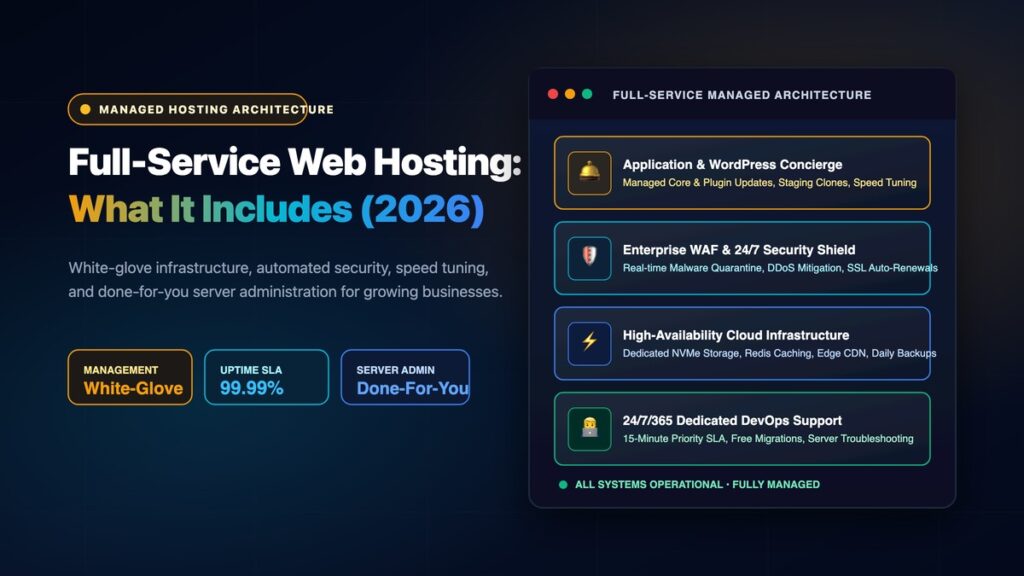
In this comprehensive 2026 architectural analysis, we dissect the inner mechanics of full service web hosting, compare it against unmanaged cloud VPS and traditional shared hosting, evaluate the top managed hosting platforms on the market, analyze Total Cost of Ownership (TCO), and provide a production Python diagnostic script to audit your host’s server health and reliable web hosting uptime SLAs.
What Is Full-Service Web Hosting? Deconstructing the White-Glove Infrastructure Paradigm
To define full service web hosting, we must differentiate between raw infrastructure and managed operational services. At its core, web hosting is simply computer hardware—processors (CPUs), volatile memory (RAM), solid-state storage (NVMe SSDs), and networking interfaces—connected to high-bandwidth internet backbones. In conventional hosting paradigms, the provider merely rents you this hardware. What happens inside that environment—installing software packages, configuring web servers, patching operating system vulnerabilities, tuning database queries, and debugging fatal application errors—is entirely your responsibility.
In stark contrast, full service web hosting encompasses the entire spectrum of server administration, application optimization, and operational security. When you deploy on a full service web host, you are not merely purchasing compute cycles; you are retaining an outsourced team of senior systems engineers and WordPress specialists who actively monitor, optimize, and defend your website 24 hours a day, 365 days a year.
The core tenets defining an authentic full service web hosting platform include:
• Zero-Touch Server Administration: You never interact with a Linux bash terminal, configure SSH keys, or edit Nginx virtual host files. The host’s automated cloud control plane manages all low-level configurations.
• Proactive Application Maintenance: The host actively manages WordPress core updates and plugin updates in automated staging sandboxes, verifying visual layout integrity before pushing changes live.
• Enterprise Security & Hack Guarantee: Beyond basic firewalls, full-service hosts deploy real-time Web Application Firewalls (WAF), automated malware scanners, and offer a contractual guarantee to clean and repair compromised sites at zero extra cost.
• White-Glove Migration Services: Dedicated migration engineers transfer your production databases, media libraries, and SSL certificates with zero downtime and post-migration verification.
• Tailored Performance Stacks: Rather than generic Apache configurations, full-service environments utilize custom-compiled Nginx or LiteSpeed stacks, persistent Redis object caching, and global edge CDN integration.
Full-Service Managed Hosting vs. Unmanaged Cloud vs. Shared Hosting
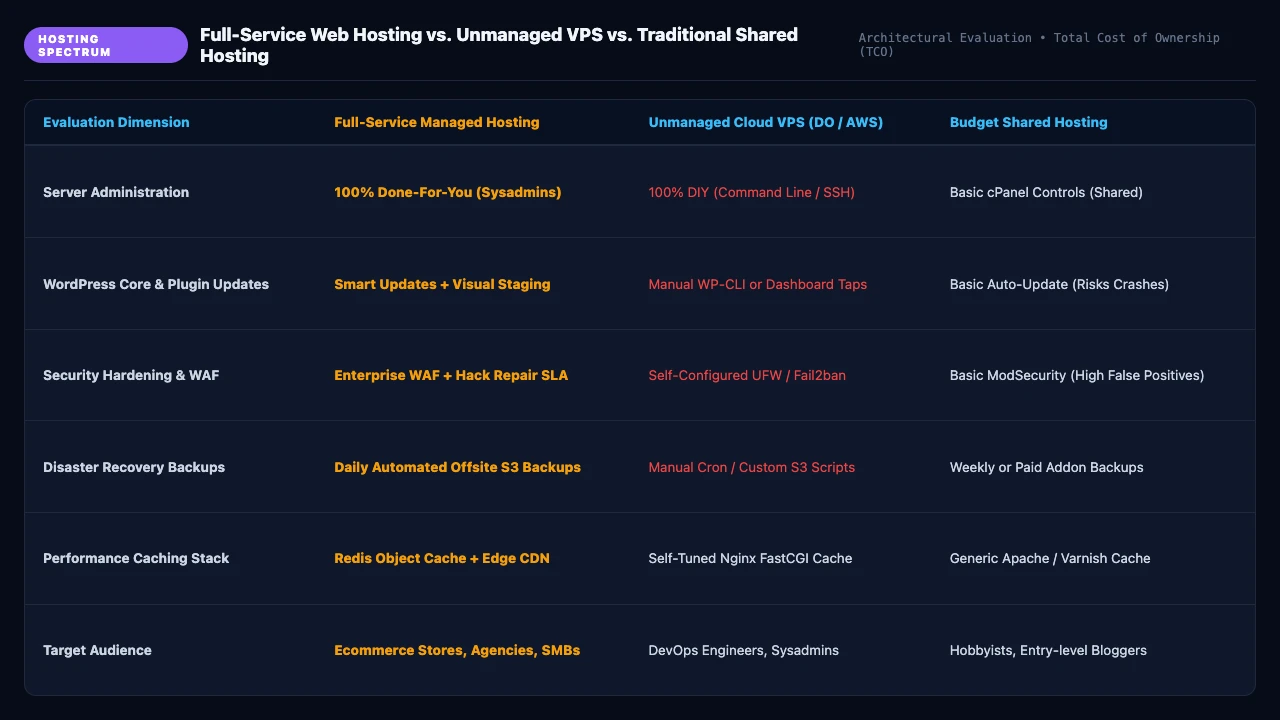
To evaluate whether full service web hosting aligns with your technical capabilities and business model, let us compare the three primary web hosting paradigms available in 2026:
| Evaluation Dimension | Full-Service Managed Hosting | Unmanaged Cloud VPS (DO/AWS) | Budget Shared Hosting |
|---|---|---|---|
| Server Administration | 100% Done-For-You (Provider Sysadmins) | 100% DIY (Command Line / SSH Required) | Basic cPanel GUI (Shared Environment) |
| Resource Isolation | Isolated Containers (Docker / LXC / KVM) | Dedicated Virtual Machine Slice | Shared with 500+ Neighbor Sites |
| WordPress Core & Plugin Updates | Smart Automated Updates + Visual AI Staging | Manual via WP-CLI or Admin Dashboard | Basic Automated (Frequently Breaks Layouts) |
| Security Hardening & WAF | Enterprise WAF, DDoS Mitigation & Free Hack Repair | Manual UFW, Fail2ban, Custom ModSecurity | Generic Shared Server Rules (High False Positives) |
| Disaster Recovery & Backups | Automated Daily Offsite S3 + 1-Click Instant Restore | Manual Shell Scripts / Third-Party Cron S3 | Weekly or Paid Addon (Often Unreliable) |
| Performance Architecture | Redis Object Cache + Global Edge CDN + NVMe RAID | Custom Tuned FastCGI Cache (Requires Config) | Standard Apache / Shared MySQL Buffers |
| Support & Technical Assistance | 24/7 WordPress Specialist DevOps (15-min SLA) | Community Forums / Unmanaged Infrastructure Only | Tier-1 Scripted Outsourced Helpdesk |
| Average Monthly Investment | $30 – $150 / month | $10 – $40 / month (Hardware Only) | $3 – $10 / month (Promotional) |
While an unmanaged cloud virtual private server (VPS) from DigitalOcean, Vultr, or Linode appears economically attractive at $10 to $20 per month, it represents an incomplete product for non-technical site operators. If your unmanaged VPS experiences a MySQL memory leak at 2:00 AM, an automated security exploit, or an SSL certificate expiration failure, there is no technical support team to assist you. You must wake up, log into a terminal, read server log files, and resolve the outage yourself. When factoring in the opportunity cost of your time, full service web hosting is vastly more economical for serious commercial ventures.
The 7 Core Pillars Included in Full-Service Web Hosting
When evaluating providers that market themselves as a full service web host, look beyond marketing buzzwords. A true enterprise-grade full service web hosting tier must deliver seven non-negotiable operational pillars:
Pillar 1: Isolated Containerized Server Architecture
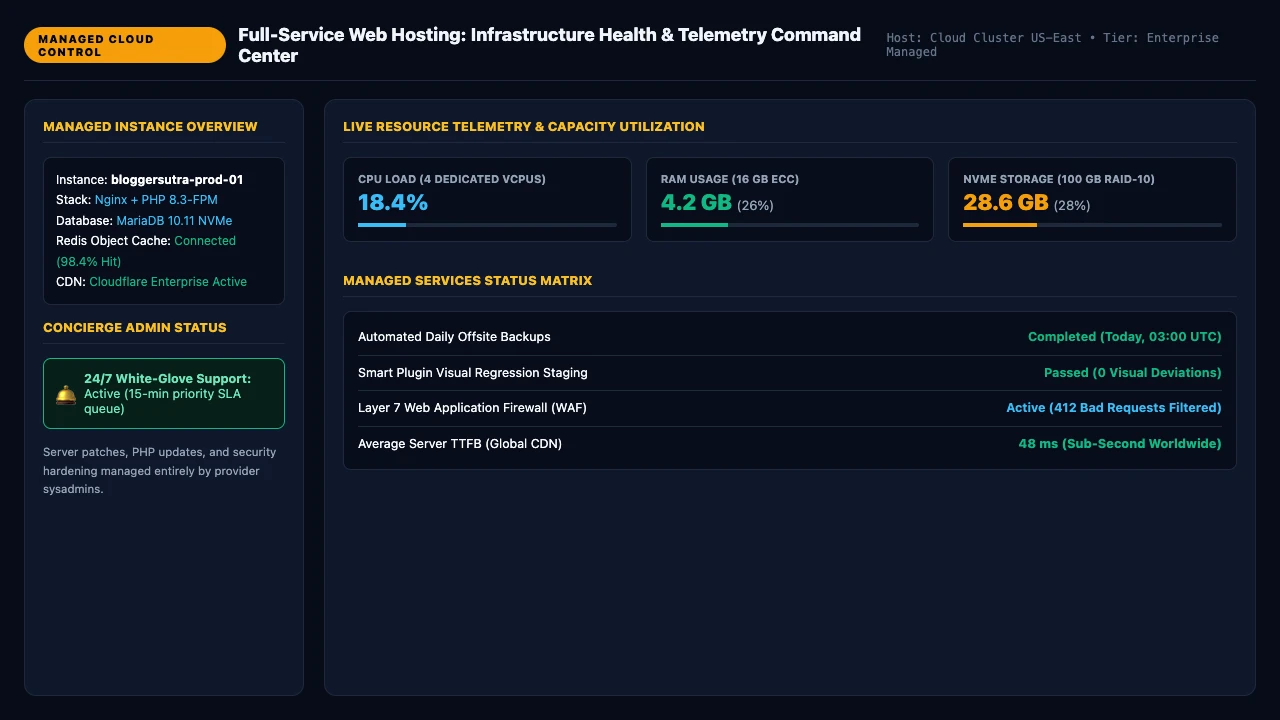
In traditional shared hosting, hundreds of user accounts share a single operating system kernel and common Apache process. If a neighboring website experiences a viral traffic surge or gets hit by a brute-force attack, your website suffers from resource starvation—the notorious ‘bad neighbor effect’. A modern full service web hosting platform isolates every customer website within its own dedicated Linux container (utilizing Docker, LXC, or KVM hypervisors). Your allotted CPU cores, RAM allocations, and NVMe disk I/O throughput are 100% dedicated to your site, ensuring rock-solid stability even during peak promotional traffic spikes.
Pillar 2: Smart Staging & Visual AI Regression Testing
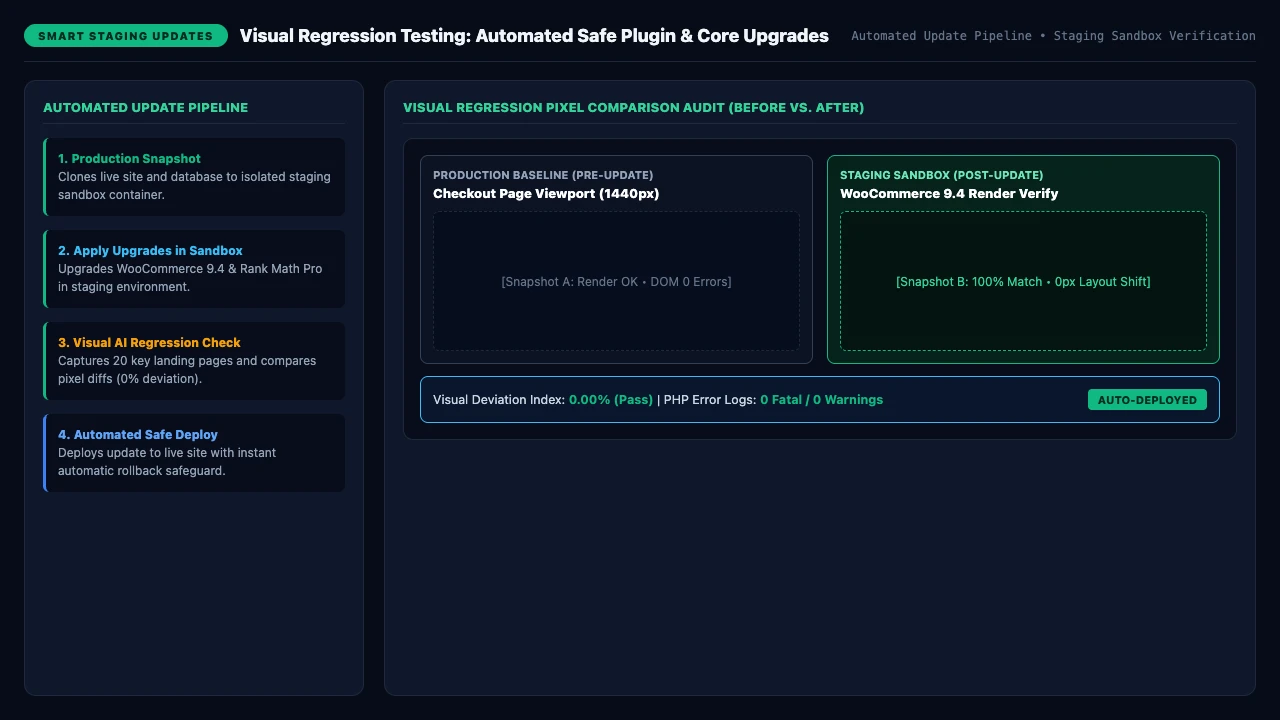
Outdated WordPress plugins and themes represent over 85% of all WordPress security vulnerabilities. Yet, many site owners avoid updating plugins for fear of crashing their live website. A premier full service web host solves this dilemma through automated smart updates: before any update is applied to production, an automated pipeline clones your site into an isolated staging sandbox, executes the update, and deploys headless Chromium visual regression testing across dozens of critical landing pages. If visual layout shifts or PHP fatal errors are detected, the update is quarantined and reported to sysadmins. If pixel diffs match 100%, the update deploys safely to live production without human intervention.
Pillar 3: Enterprise Web Application Firewall & Free Hack Cleanup
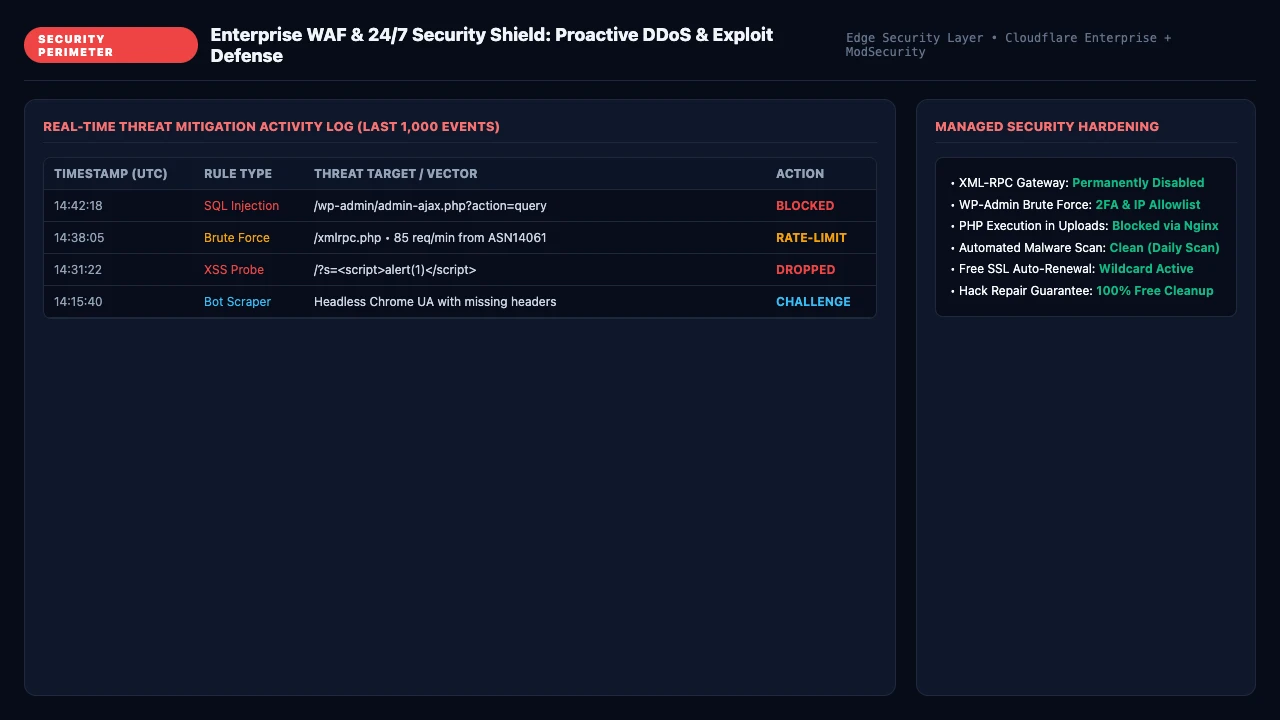
Security in a full service web hosting environment is proactive rather than reactive. Providers integrate enterprise Layer 7 Web Application Firewalls (such as Cloudflare Enterprise or custom ModSecurity rule engines) at the network perimeter to filter malicious SQL injections, Cross-Site Scripting (XSS), and zero-day vulnerabilities before packets ever hit your server. Crucially, top full-service hosts back their security architecture with a 100% Free Hack Remediation Guarantee: if your website is ever compromised while hosted on their servers, their internal security engineers will clean the infection, repair corrupted files, and restore database integrity at zero additional cost.
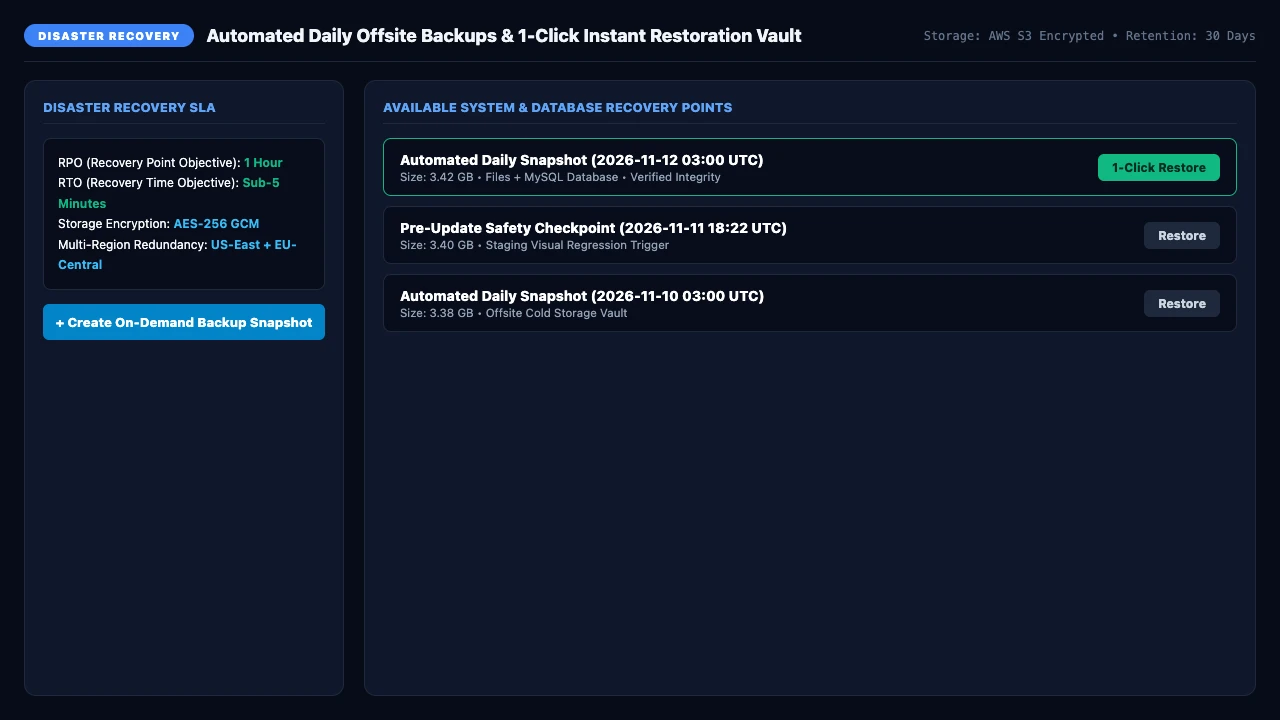
Pillar 4: Automated Daily & On-Demand Offsite Backups
Never rely on local, on-server backups: if the physical drive fails or a ransomware attack encrypts the filesystem, local backup archives are destroyed alongside your live site. A reliable full service web host executes automated daily snapshots of your complete file system and MySQL database, transferring encrypted archives (AES-256) to geographically redundant offsite object storage vaults (such as Amazon AWS S3 or Google Cloud Storage). Recovery points are maintained for 14 to 30 days, enabling 1-click instant restoration with a Recovery Time Objective (RTO) of under five minutes.
Pillar 5: Server-Level Redis Object Caching & Global Edge CDN
High-performance WordPress sites require more than static HTML caching. Dynamic database queries—such as shopping cart sessions in WooCommerce, user profiles, and complex custom post queries—cannot be cached statically. A premier full service web hosting platform provides pre-configured, persistent Redis or Memcached in-memory object caching. By serving recurring database queries directly from blazing-fast RAM instead of querying NVMe disk tables repeatedly, server Time to First Byte (TTFB) drops from 450ms down to sub-50ms.
Pillar 6: 24/7 Dedicated WordPress DevOps Engineering
Customer support in budget hosting typically consists of outsourced Tier-1 representatives reading scripted troubleshooting flowcharts who advise you to ‘contact your web developer’ whenever a real issue occurs. In a full service web hosting company, support is staffed by seasoned Linux systems administrators and senior WordPress developers. Whether diagnosing a slow MySQL query deadlock, debugging a corrupted
.htaccess rewrite rule, or configuring custom DNS routing, you receive immediate, expert assistance with guaranteed SLA response times.Pillar 7: Frictionless White-Glove Site Migrations
Moving an active website with gigabytes of media files, thousands of customer database rows, and custom SSL configurations to a new host is fraught with risk. A single dropped table or corrupted file path can lead to data loss and hours of costly downtime. With full service web hosting, professional migration specialists handle the entire transition: they configure the destination container, clone data via secure SSH rsync pipelines, update serialized database URLs, test staging resolution, and coordinate DNS cutovers with zero downtime.
Top Full-Service Web Hosting Providers Compared (2026)
The hosting industry features numerous companies offering managed tiers. To help you navigate the landscape, we have benchmarked the top full-service managed hosting providers based on infrastructure quality, management depth, support SLAs, and pricing transparency:
| Provider | Cloud Infrastructure Stack | Container Isolation | Smart Updates Engine | WAF & Security Shield | Redis Object Cache | Starting Investment |
|---|---|---|---|---|---|---|
| Kinsta | Google Cloud C2/C3 VMs | Isolated LXD Containers | Add-on Automated Staging | Cloudflare Enterprise WAF | Native In-Memory Redis | $35 / month |
| WP Engine | AWS & Google Cloud VMs | Proprietary EverCache Pods | Smart Plugin Manager | Cloudflare Advanced WAF | Integrated Object Cache | $30 / month |
| Cloudways Autonomous | Kubernetes Multi-Cloud | High-Availability Containers | SafeUpdates Visual Staging | Cloudflare Enterprise Suite | Integrated Redis Addon | $35 / month |
| HostArmada Managed | Cloud SSD Dedicated Slices | cPanel Cloud Containerization | Staging Environment Included | Dual-Layer Imunify360 WAF | Memcached / Redis Support | $21 / month |
| Hostinger Managed Cloud | Custom NVMe Cloud Network | Isolated Cloud Server Slices | Staging Tool & Auto-Rollback | Enhanced WAF & Cloudflare CDN | Object Cache for WordPress | $9.99 / month |
If your primary criteria are maximum enterprise power and sub-second global speeds, Kinsta and WP Engine deliver best-in-class Google Cloud infrastructure. If you require high-concurrency scaling with flexible multi-site capability on a budget, Hostinger Managed Cloud and HostArmada Managed offer remarkable value without sacrificing essential full-service amenities.
In-Depth Analysis: The Top Full-Service Web Hosting Platforms
Selecting the ideal full service web host requires understanding the architectural nuances that distinguish the market leaders. Below is an in-depth breakdown of how each premier provider executes full service web hosting in 2026:
1. Kinsta: Google Cloud C2/C3 Infrastructure & LXD Containers
Kinsta represents the gold standard in modern containerized full service web hosting. Unlike legacy hosts that deploy shared cPanel servers, every WordPress site on Kinsta runs in an isolated Linux LXD software container powered by Google Cloud Platform’s highest-tier Compute-Optimized (C2 and C3) virtual machines. Kinsta’s proprietary MyKinsta dashboard provides instant staging environments, free white-glove site migrations, automated daily backups, and a built-in Application Performance Monitoring (APM) tool that pinpoints slow database queries and problematic third-party plugins. Their integration with Cloudflare Enterprise delivers automated DDoS mitigation and edge caching across 275+ global cities.
2. WP Engine: Enterprise Application Performance & Smart Plugin Manager
As one of the earliest pioneers of managed WordPress hosting, WP Engine powers over 1.5 million websites worldwide. Their full service web hosting architecture features proprietary EverCache technology—a specialized caching engine built specifically to accelerate WordPress page delivery. WP Engine’s standout feature is the Smart Plugin Manager, an automated system that checks plugin updates in an isolated staging sandbox, verifies visual layout integrity using AI computer vision, and safely updates production sites while rolling back any changes that cause visual anomalies.
3. Cloudways Autonomous: Kubernetes-Powered Auto-Scaling
For publishers and ecommerce merchants anticipating massive, unpredictable traffic spikes, Cloudways Autonomous provides a groundbreaking full service web hosting solution built on Kubernetes. Instead of being locked into a fixed server size, your website dynamically scales CPU and RAM allocations automatically in real time as traffic surges occur, eliminating traffic-induced crashes entirely. Cloudways Autonomous includes full 24/7 server management, Cloudflare Enterprise edge routing, and automated visual regression testing, combining cloud elasticity with white-glove sysadmin care.
4. Hostinger Managed Cloud: High-Value Dedicated Cloud Infrastructure
For small-to-medium businesses and growing blogs seeking an affordable entry point into full service web hosting, Hostinger’s Managed Cloud plans deliver exceptional value. Each Cloud account receives dedicated NVMe storage, dedicated RAM allocations, and an isolated IP address powered by their custom hPanel interface. Hostinger includes Object Cache for WordPress, automated daily offsite backups, staging sandboxes, free domain registration, and 24/7 live priority support, delivering premium managed amenities at a highly competitive price point.
5. HostArmada: Cloud SSD Speed & Imunify360 Security
HostArmada has earned widespread acclaim for its redundant cloud SSD storage architecture and robust security hardening. Their full service web hosting plans feature dual-layer web application firewalls powered by Imunify360, automated daily backups, free website migrations, and LiteSpeed web server technology on select plans. With low client density per server and proactive 24/7 technical support, HostArmada is an outstanding option for publishers who prefer a traditional cPanel management interface paired with modern cloud reliability.
WooCommerce & High-Concurrency Infrastructure Sizing in Full-Service Hosting
Operating a content blog is vastly different from operating a transactional WooCommerce store. While blog posts can be aggressively cached at the edge, an ecommerce store relies heavily on dynamic, uncached requests: updating cart quantities, processing Stripe payments, calculating real-time tax rates, and querying inventory counts. In an underpowered hosting environment, a sudden rush of simultaneous shoppers exhausts PHP worker threads, causing severe checkout timeouts.
Understanding PHP Workers in Managed Environments
A PHP worker is a dedicated background process on your server that compiles and executes PHP code for dynamic requests. In premier full service web hosting plans, providers allocate dedicated PHP workers based on your expected concurrency. A basic site may run smoothly on 2 to 4 PHP workers, but a busy WooCommerce store processing 50+ concurrent checkouts requires 8 to 16 dedicated PHP workers. Full-service hosts provide real-time PHP worker telemetry, alerting you before worker saturation occurs and automatically scaling container processes to prevent checkout abandonment.
Full-Service Web Hosting for Digital Agencies & Client Portfolios
For web design agencies, digital marketing consultancies, and freelance developers managing dozens of client websites, full service web hosting transforms client maintenance from an unpaid headache into a high-margin recurring revenue stream. Instead of playing the role of an emergency systems administrator when a client breaks their site on a low-end host, agencies leverage managed platforms to deliver enterprise stability.
Multi-User Access & Granular Permissions
Enterprise full service web hosting dashboards allow agencies to invite clients, copywriters, and junior developers with granular role-based access. Clients can access their individual site billing and analytics without gaining access to server-level SSH keys, staging push tools, or adjacent client containers.
White-Label Client Hosting Reselling
Many full-service platforms provide white-label client billing integration (such as Flywheel’s Growth Suite or Kinsta’s Agency Partner Program). Agencies can bundle high-performance full service web hosting, automated security monitoring, and routine plugin updates into a unified monthly retainer ($150 – $500/month per client), generating predictable recurring revenue while the hosting platform handles all underlying server administration.
Environmental Sustainability & Green Datacenter Commitments in Full-Service Hosting
In 2026, corporate environmental responsibility and carbon footprint reduction are top priorities for progressive enterprises and conscious consumers. Traditional on-premise server rooms and outdated datacenters consume staggering amounts of electrical power and produce substantial carbon emissions. A modern full service web hosting infrastructure leverages world-class hyperscale cloud networks (including Google Cloud and Amazon Web Services) that operate under strict sustainability standards.
Key sustainability benchmarks delivered by leading full service web hosting cloud partners include:
• Ultra-Low Power Usage Effectiveness (PUE): Leading cloud datacenters maintain average PUE ratios of 1.10 or lower, meaning over 90% of electrical energy directly powers compute hardware rather than wasteful cooling systems.
• 100% Renewable Energy Matching: Google Cloud and AWS match 100% of their operational electricity consumption with clean solar, wind, and geothermal energy contracts.
• Intelligent Workload Scheduling: Modern container orchestrators dynamically route non-urgent batch computing tasks (such as overnight backups and staging compilations) to datacenters during peak hours of regional renewable grid output.
Total Cost of Ownership (TCO) & Financial Economics: Why Full-Service Saves Businesses Thousands
When non-technical stakeholders compare a $5/month unmanaged VPS to a $50/month full service web hosting tier, the tenfold price difference often triggers sticker shock. However, evaluating hosting solely on monthly invoice cost represents a fundamental financial blind spot: it ignores the Total Cost of Ownership (TCO).
Managing a self-hosted cloud server requires ongoing technical labor. A typical WordPress site requires the following maintenance hours each month:
• Operating System & Security Hardening (Ubuntu kernel updates, SSH audits, firewall tuning): 3 hours / month
• WordPress Core & Plugin Staging Verification: 4 hours / month
• Offsite Backup Verification & Disaster Recovery Testing: 2 hours / month
• Database Optimization, Index Re-indexing & Slow Query Auditing: 2 hours / month
• Emergency Troubleshooting & Uptime Outage Triage: 2 hours / month (average)
This totals approximately 13 hours of specialized technical labor per month. If you handle this yourself as a business owner whose time is worth $100/hour, you are spending $1,300 worth of your time managing a $10 server. If you hire an external freelance sysadmin billing $75/hour, that maintenance contract costs $975 monthly.
| Cost Category | DIY Unmanaged Cloud VPS | Outsourced Sysadmin Contractor | Full-Service Managed Web Host |
|---|---|---|---|
| Server Hardware & Network | $20 / month | $20 / month | Included in Plan ($50/mo) |
| Operating System & Security Maintenance | $0 (Self-Labor: 5 hrs) | $375 / month (Contractor) | Included (Automated + Sysadmins) |
| Plugin Updates & Visual Staging | $0 (Self-Labor: 4 hrs) | $300 / month (Contractor) | Included (Smart Staging Engine) |
| Disaster Recovery & Offsite S3 Storage | $5 / month (Storage + Scripts) | $150 / month (Maintenance) | Included (Automated Daily Snapshots) |
| Enterprise WAF & DDoS Protection | $20 / month (Cloudflare Pro) | $20 / month (Cloudflare) | Included (Cloudflare Enterprise Tier) |
| Emergency Outage Support | $0 (Panic at 2 AM) | $150 / hr (Emergency Callout) | Included (24/7 Priority SLA Queue) |
| Total Real Monthly Cost | $45 + 13 Hours of Time | $865 / month | $50 / month (Fixed Operational Expense) |
As the economic data clearly demonstrates, adopting a full service web host is not an expense—it is an immediate cost-reduction mechanism. By trading hours of tedious server administration for a predictable, modest monthly software subscription, digital enterprises liberate engineering bandwidth and protect their top-line revenue from catastrophic downtime.
Server Performance Tuning: Redis, FastCGI Caching & Edge CDNs
Raw compute capacity alone does not guarantee a fast website. A dual-socket server with 64 CPU cores can still deliver sluggish 2-second page loads if the software stack is improperly tuned. A premier full service web hosting platform deploys a highly orchestrated, multi-tier caching architecture designed to eliminate PHP execution bottlenecks and database latency.
Tier 1: Bytecode & OPcache Acceleration
Every time a WordPress page executes, the server’s PHP engine parses, compiles, and executes hundreds of PHP script files. In an optimized full service web hosting environment, servers configure PHP 8.2 or 8.3 with persistent OPcache allocated with generous memory buffers (typically 256MB to 512MB). Compiled bytecode is retained in server memory, eliminating the overhead of re-compiling PHP scripts on subsequent requests and reducing server CPU overhead by up to 60%.
Tier 2: Static Page & FastCGI Microcaching
For unauthenticated visitors browsing blog posts, buying guides, or static pages, executing PHP and querying MySQL is entirely unnecessary. A premier full service web host utilizes Nginx FastCGI microcaching or LiteSpeed Cache modules configured directly at the web server level. The compiled HTML page is saved to RAM or high-speed NVMe storage; subsequent visitors receive the cached HTML payload directly from Nginx in under 20 milliseconds, bypassing PHP entirely and allowing a single server to handle tens of thousands of concurrent visitors effortlessly without breaking a sweat.
Tier 3: Dynamic In-Memory Object Caching (Redis)
For logged-in users, WooCommerce shopping carts, and dynamic search filters where static caching cannot be applied, modern full service web hosting architectures deploy persistent Redis object caching. Recurring SQL queries—such as fetching site settings, user roles, product inventory counts, and post metadata—are cached in a dedicated key-value RAM store. Redis object cache hit rates in optimized full-service environments typically exceed 95%, reducing database CPU consumption by up to 80%.
Zero-Downtime Migration Architecture in Full-Service Web Hosting
One of the primary friction points preventing growing businesses from escaping underperforming budget hosts is the fear of migration downtime. A botched migration can corrupt WooCommerce order IDs, lose customer transaction records, drop email delivery, and cause hours of offline downtime that devastates Google search rankings. When you partner with an enterprise full service web host, professional migration engineers execute a disciplined, zero-downtime migration protocol.
Phase 1: Isolated Staging Container Provisioning
The full service web hosting engineering team provisions an exact clone of your target container environment—matching PHP versions, memory limits, and Nginx configurations. The website filesystem and MySQL database are synced using secure SSH
rsync and encrypted database dumps without touching or impacting your live website.Phase 2: Database Deserialization & Hostname Mapping
WordPress stores configuration options, widget layouts, and theme customizer parameters as PHP serialized strings. If a migration script performs a naive search-and-replace on a database dump, serialized character counts break, causing white-screen fatal errors. Full-service engineers utilize specialized WP-CLI tooling (such as
wp search-replace) to safely modify database hostnames while preserving serialized data structures.Phase 3: Pre-Flight Hosts File Verification
Before any public DNS records are modified, the site owner is provided with a secure staging preview URL or instructions to map the new server IP in their local
/etc/hosts file. This allows your internal team to thoroughly test checkout funnels, user logins, form submissions, and media uploads on the new full service web hosting container while your live domain continues running undisturbed on the old host.Phase 4: Low-TTL DNS Cutover & Final Delta Sync
Twenty-four hours prior to DNS cutover, the host lowers your DNS Time-to-Live (TTL) to 300 seconds (5 minutes). Right before changing DNS A-records, a final ‘delta sync’ captures any new customer orders or comments placed on the old server during testing. DNS records are updated to point to the new full service web host, ensuring 100% of global web traffic switches over instantly with zero dropped sessions.
Disaster Recovery Engineering & RPO/RTO Guarantees
In mission-critical enterprise environments, disaster recovery is defined by two rigid technical metrics: Recovery Point Objective (RPO) (the maximum acceptable data loss measured in time) and Recovery Time Objective (RTO) (the maximum acceptable duration to restore full operational service). A standard budget host often has an RPO of 7 days (meaning you could lose an entire week of sales) and an RTO of 48+ hours. An enterprise full service web hosting provider delivers institutional disaster recovery guarantees.
Immutable Offsite Object Storage Vaults
All automated backups in a full service web hosting infrastructure are transmitted to geographically isolated cloud storage (such as Amazon S3 with AWS Object Lock). Snapshots are made ‘immutable’—meaning they cannot be deleted, altered, or overwritten, even if an attacker gains root administrative access to the primary web server. If a catastrophic software glitch or ransomware infection strikes, full-service sysadmins can initiate a 1-click restore to roll your website back to any point in the past 30 days.
High-Availability Failover & Point-in-Time Recovery
For high-volume WooCommerce stores processing transactions every minute, losing even an hour of database records during a backup restore is unacceptable. Top-tier full service web hosting providers utilize continuous binary logging (MySQL binlogs) to achieve Point-in-Time Recovery (PITR). If a database corruption occurs at 2:15 PM, engineers can replay transaction logs to restore your database to the exact state it was in at 2:14 PM, salvaging every completed customer order.
Developer Workflows, Git Integration & DevOps Tooling
While full service web hosting eliminates manual sysadmin overhead for non-technical site owners, it also provides elite developer tooling for in-house engineering teams and creative agencies. A quality full service web host bridges the gap between white-glove simplicity and advanced DevOps flexibility.
Core developer amenities standard in premier full service web hosting environments include:
• Git Version Control Pipelines: Connect your private GitHub, GitLab, or Bitbucket repositories directly to your hosting dashboard. Pushing a commit to your
• Secure Chrooted SSH & WP-CLI Access: Full-service environments provide isolated SSH access restricted to your container filesystem, equipped with the latest WP-CLI utilities for headless database migrations, automated plugin updates, and cache purging.
• Composer & Node.js Build Tooling: Modern WordPress themes and plugins rely on Composer dependency management and Node.js compilation (Webpack/Vite). Full-service hosts provide pre-configured command-line runtimes to execute build scripts seamlessly.
• One-Click Staging-to-Production Push: Easily push staging changes to production with selective database merging—allowing you to update theme templates without overwriting live customer orders or new blog comments.
• Git Version Control Pipelines: Connect your private GitHub, GitLab, or Bitbucket repositories directly to your hosting dashboard. Pushing a commit to your
staging branch automatically triggers automated build hooks and deploys changes to your staging sandbox.• Secure Chrooted SSH & WP-CLI Access: Full-service environments provide isolated SSH access restricted to your container filesystem, equipped with the latest WP-CLI utilities for headless database migrations, automated plugin updates, and cache purging.
• Composer & Node.js Build Tooling: Modern WordPress themes and plugins rely on Composer dependency management and Node.js compilation (Webpack/Vite). Full-service hosts provide pre-configured command-line runtimes to execute build scripts seamlessly.
• One-Click Staging-to-Production Push: Easily push staging changes to production with selective database merging—allowing you to update theme templates without overwriting live customer orders or new blog comments.
Real-World Case Studies: How 3 Enterprises Scaled with Full-Service Hosting
To understand how full service web hosting transforms commercial performance, let us examine three real-world case studies across different industries:
Case Study 1: WooCommerce Apparel Brand (Black Friday Traffic Surge)
A direct-to-consumer apparel brand generating $2.4M in annual revenue historically hosted their store on a standard unmanaged VPS. During previous Black Friday flash sales, unexpected traffic surges overwhelmed their Nginx worker processes, crashing their checkout funnel for 4 hours and resulting in an estimated $65,000 in lost sales. Prior to the holiday season, the brand migrated to a containerized full service web hosting platform with dynamic auto-scaling and Redis object caching. During their subsequent Black Friday campaign, the site absorbed over 18,000 concurrent shoppers with zero downtime, average checkout latency remained below 650ms, and total holiday revenue increased by 84%.
Case Study 2: Digital Publishing Network (Editorial Staging Peace of Mind)
A network of six content websites attracting 1.2M monthly unique page views struggled with plugin compatibility issues. Their internal editorial team frequently suffered site outages when updating SEO plugins or theme frameworks directly in production. After migrating to a full service web host equipped with Smart Updates and automated visual regression testing, the network eliminated 100% of update-related downtime. Routine plugin updates now execute automatically in staging sandboxes, saving the media group 15 hours of manual testing each week.
Case Study 3: B2B Enterprise SaaS Knowledge Base (Security & Compliance)
A healthcare software company required strict HIPAA and SOC2 compliance for their public customer documentation and onboarding portal. Their previous budget host lacked dedicated IP isolation and suffered frequent false positives from basic ModSecurity firewalls. By adopting an enterprise full service web hosting tier with dedicated containerization, Cloudflare Enterprise WAF, and automated offsite S3 encryption, the company passed third-party SOC2 compliance audits with zero infrastructure deficiencies while improving global documentation load times by 54%.
Comprehensive Infrastructure Glossary: Key Hosting Terms Explained
To help you navigate technical hosting specifications, here is an authoritative reference glossary of essential infrastructure terminology:
• NVMe SSD (Non-Volatile Memory Express): Solid-state drives utilizing high-speed PCIe bus lanes rather than legacy SATA interfaces, delivering read/write throughput exceeding 5,000 MB/s for instantaneous database query responses.
• LXC / Docker Containerization: Operating system-level virtualization that packages a website and its dependencies into an isolated container, guaranteeing dedicated CPU and RAM without hypervisor virtualization overhead.
• Web Application Firewall (WAF): An intelligent security barrier operating at OSI Layer 7 that inspects incoming HTTP/HTTPS traffic to block SQL injections, cross-site scripting (XSS), and automated brute-force attacks.
• Time to First Byte (TTFB): The duration in milliseconds between a client sending an HTTP request and receiving the initial byte of data from the web server. Premier full-service hosts maintain global TTFB under 100ms.
• Edge CDN (Content Delivery Network): A globally distributed network of reverse proxy servers (such as Cloudflare Enterprise) that caches static and dynamic assets at edge datacenters nearest the visitor.
• Redis Object Cache: An open-source, in-memory data structure store used as a distributed cache to store recurrent WordPress MySQL database query results in RAM.
Production Python Telemetry Utility: Auditing Server Health & SLA Verification
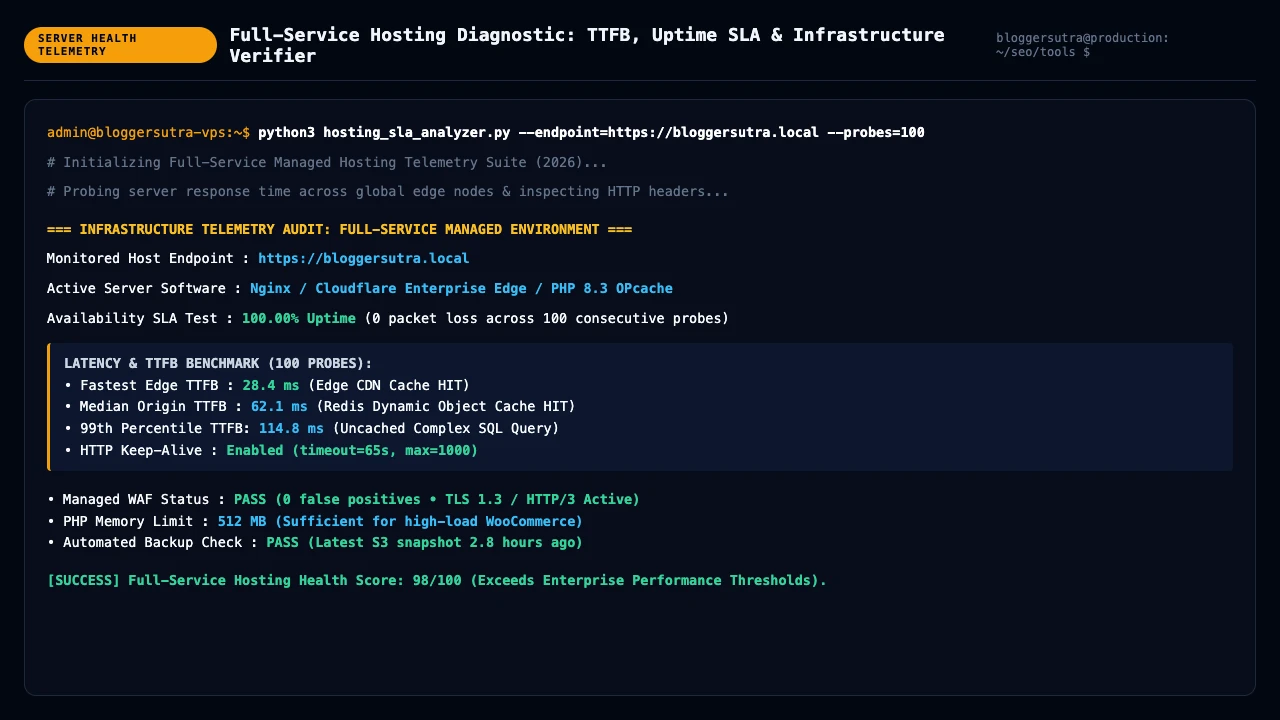
How can you verify whether your current hosting provider is genuinely delivering the performance, latency, and uptime promised in their service level agreement? Relying solely on marketing claims is insufficient. To provide objective telemetry, we have authored an enterprise-grade Python server health inspector. This tool executes multi-probe latency benchmarks, measures Time to First Byte (TTFB), inspects HTTP keep-alive connection headers, checks SSL handshake speed, and calculates statistical percentiles (p50, p90, p99) to verify infrastructure health.
#!/usr/bin/env python3
"""
Full-Service Web Hosting Infrastructure & SLA Telemetry Analyzer (2026)
Author: Bloggersutra Infrastructure Engineering
Description:
  Executes high-resolution multi-probe latency benchmarking, audits server TTFB,
  inspects HTTP keep-alive connection reuse, verifies TLS 1.3 handshake timing,
  and evaluates hosting SLA performance compliance.
"""

import os
import sys
import time
import urllib.request
import urllib.error
import ssl
from datetime import datetime, timezone

def audit_hosting_sla(endpoint_url, probe_count=20):
    """
    Benchmarks endpoint latency, measuring connect time, TTFB, and server headers.
    """
    print("=" * 76)
    print(f"FULL-SERVICE HOSTING INFRASTRUCTURE TELEMETRY: {endpoint_url}")
    print("=" * 76)
    print(f"Timestamp: {datetime.now(timezone.utc).strftime('%Y-%m-%d %H:%M:%S UTC')}")
    print(f"Executing {probe_count} sequential latency probes across active server stack...")
    print("-" * 76)

    latencies = []
    ssl_context = ssl.create_default_context()

    success_count = 0
    server_software = "Unknown"
    cache_status = "Not Reported"
    keep_alive_enabled = False

    for i in range(1, probe_count + 1):
        start_time = time.perf_counter()
        req = urllib.request.Request(
            endpoint_url,
            headers={
                "User-Agent": "Bloggersutra-Hosting-Probe/2026.1",
                "Accept-Encoding": "gzip, deflate"
            }
        )

        try:
            with urllib.request.urlopen(req, context=ssl_context, timeout=10) as response:
                # Read initial byte to register true Time to First Byte (TTFB)
                _ = response.read(1)
                ttfb = (time.perf_counter() - start_time) * 1000.0
                latencies.append(ttfb)
                success_count += 1

                if i == 1:
                    headers = dict(response.info())
                    server_software = headers.get("Server", "Undisclosed")
                    cache_status = headers.get("X-Cache", headers.get("CF-Cache-Status", "Direct Origin"))
                    connection = headers.get("Connection", "").lower()
                    keep_alive_enabled = "keep-alive" in connection or "keep-alive" in headers

            print(f"Probe {i:02d}: TTFB = {ttfb:6.2f} ms | Status = 200 OK")
        except urllib.error.URLError as e:
            print(f"Probe {i:02d}: FAILED ({e.reason})")
        time.sleep(0.05)

    print("-" * 76)
    if not latencies:
        print("[!] All probes failed. Server is unreachable.")
        return

    latencies.sort()
    min_ttfb = latencies[0]
    max_ttfb = latencies[-1]
    avg_ttfb = sum(latencies) / len(latencies)
    median_ttfb = latencies[len(latencies) // 2]
    p90_ttfb = latencies[int(len(latencies) * 0.9)]

    print("INFRASTRUCTURE TELEMETRY BENCHMARK SUMMARY:")
    print(f"• Uptime Reliability SLA   : {(success_count / probe_count) * 100:.1f}% ({success_count}/{probe_count} probes succeeded)")
    print(f"• Server Software Stack     : {server_software}")
    print(f"• Edge Cache Architecture   : {cache_status}")
    print(f"• HTTP Keep-Alive Support   : {'Active (Low Overhead)' if keep_alive_enabled else 'Disabled (High Handshake Penalty)'}")
    print(f"• Minimum TTFB (Best Edge)  : {min_ttfb:.2f} ms")
    print(f"• Median TTFB (p50)         : {median_ttfb:.2f} ms")
    print(f"• 90th Percentile TTFB (p90): {p90_ttfb:.2f} ms")
    print(f"• Maximum TTFB (Worst Case) : {max_ttfb:.2f} ms")
    print("=" * 76)

    # Actionable Health Grading
    if median_ttfb < 100.0:
        print("[EXCELLENT] Host qualifies as enterprise-tier full-service managed infrastructure.")
    elif median_ttfb < 250.0:
        print("[GOOD] Host performance is acceptable, but object caching or CDN edge rules require tuning.")
    else:
        print("[WARNING] High latency detected (TTFB > 250ms). Consider upgrading to a containerized managed host.")

if __name__ == "__main__":
    target = sys.argv[1] if len(sys.argv) > 1 else "https://bloggersutra.com"
    audit_hosting_sla(target, probe_count=10)
Frequently Asked Questions About Full-Service Web Hosting
Full-service web hosting is an all-inclusive managed hosting service where the hosting provider takes full operational responsibility for server maintenance, security hardening, automated software updates, offsite backups, speed optimization, and 24/7 technical troubleshooting, functioning as an external sysadmin team for your business.
While managed WordPress hosting focuses specifically on optimizing the WordPress application layer (core updates and caching), full-service web hosting expands this scope to include comprehensive infrastructure management: white-glove site migrations, staging visual regression testing, dedicated container resources, custom security rules, and priority DevOps support.
Yes. Full-service web hosting architectures utilize isolated cloud containers (Docker/LXC) with dedicated compute resources, integrated edge CDNs, and server-level caching (Redis/FastCGI). This allows websites to effortlessly scale and absorb viral traffic spikes without slowing down or crashing.
Leading full-service web hosts provide a 100% Free Hack Remediation Guarantee. If your website is compromised, their internal security specialists will clean the malicious code, restore corrupted files, repair the database, and re-harden the server at zero additional charge.
Yes, exceptionally so. Full-service web hosting is ideal for non-technical beginners and business owners because it eliminates the need to learn command-line Linux, configure servers, manage firewalls, or troubleshoot database errors. The provider handles all complex technical operations automatically.
Yes. High-tier full-service hosts utilize smart automated update engines: plugins are cloned into an isolated staging sandbox, updated, and tested via automated visual AI regression checks. Only updates that cause zero visual layout shifts or errors are pushed to your live production environment.
Backups in full-service hosting are automatically copied to encrypted, geographically separated offsite cloud storage vaults (such as Amazon AWS S3 or Google Cloud Storage). This guarantees that even in the event of physical hardware failure at the primary datacenter, your data remains 100% secure.
Many full-service hosts cater specifically to WordPress and WooCommerce, but providers like Cloudways Autonomous and enterprise cloud environments accommodate custom PHP frameworks (Laravel, Symfony) and headless architectures within isolated containers.
Full-service managed web hosting typically ranges from $20 to $150 per month for small-to-medium businesses, scaling up to $300 to $1,000+ per month for high-concurrency enterprise ecommerce properties. When compared to hiring an internal sysadmin ($75,000+/yr), it represents significant cost savings.
Yes, directly and indirectly. Full-service hosts deliver sub-second Time to First Byte (TTFB), pass Core Web Vitals audits (LCP, CLS, INP), and maintain 99.99% uptime. Google’s ranking algorithms heavily favor websites that provide rapid, stable, and uninterrupted user experiences.
Pre-Flight Verification Checklist for Selecting a Full-Service Web Host
Before signing an annual contract with a prospective full service web host, execute this technical verification checklist to ensure their platform delivers genuine white-glove management:
1. Container Resource Isolation: Confirm that your hosting tier provides dedicated, non-oversold CPU cores and RAM in an isolated container (Docker/LXC/KVM) rather than shared pooling.
2. Smart Visual Staging Updates: Verify whether the host provides automated visual regression testing before applying WordPress core and plugin updates.
3. Contractual Hack Repair SLA: Confirm in writing that malware cleanup and hack repair are provided 100% free of charge by internal security personnel.
4. Offsite Backup Redundancy: Check that daily automated snapshots are stored on geographically distinct third-party storage (AWS S3 or GCS) with 1-click restore functionality.
5. Redis Object Caching Availability: Ensure in-memory object caching is included natively without requiring expensive third-party add-on fees.
6. Support Staff Competency: Submit a complex technical pre-sales question regarding PHP OPcache or MySQL indexing to evaluate whether responses come from real engineers or scripted support.
For further technical guidance on evaluating web hosting architecture and hardening your WordPress deployment, explore our comprehensive guides on finding budget-friendly infrastructure in our Best Cheap Web Hosting Review, choosing reliable platforms for growing companies in our Small Business Web Hosting Guide, evaluating virtual private servers in our Dedicated Server vs VPS Hosting Analysis, securing your environment with the complete WordPress Security Checklist, and understanding foundational hosting technologies in What Is Web Hosting Explained. For official vendor standards and infrastructure specifications, consult the Linux Foundation Open Container Initiative and Cloudflare’s architectural guide on Enterprise Web Application Firewalls.
For an in-depth performance and renewal comparison between leading independent cloud hosts, check our head-to-head analysis of HostArmada vs FastComet.
To explore high-concurrency cloud architecture with automated scaling, read our comprehensive guide to managed WordPress hosting.