Quick answer
- Fiverr Clone WordPress Theme: What is the best WordPress theme to build a freelance micro-job marketplace in 2026? Based on our exhaustive architectural testing of fiverr clone wordpress theme solutions, the #1 overall winner is TaskHive by HivePress ($89 one-time license). TaskHive is built natively on top of the modern WordPress block editor (Gutenberg) and the strong HivePress marketplace framework. It features native multi-tier service pricing (Basic, Standard, Premium packages), integrated digital deliverable file uploads, automated escrow commission splits via Stripe Connect, and real-time private buyer-seller messaging without bloated third-party page builders.
- Can I build a Fiverr-style freelance marketplace for free on WordPress? Yes. You can launch a 100% free functional micro-job platform by installing the free ListingHive theme alongside the free HivePress core plugin (10,000+ active installations, 4.9/5 stars) directly from the official WordPress.org repository. This allows freelancers to register, publish service listings, and receive buyer inquiries. To add automated credit card checkout and multi-tier pricing, you can selectively add official HivePress marketplace add-ons or integrate free WooCommerce.
- How does escrow and commission processing work in a WordPress freelance marketplace? Professional platforms like TaskHive and MicrojobEngine utilize an automated digital escrow flow: 1) When a buyer purchases a gig, funds are captured and held securely in escrow via Stripe Connect or a dedicated wallet balance; 2) The seller completes the deliverable and submits it for review; 3) Once the buyer approves the order (or after a 72-hour auto-completion grace period), the system automatically splits the transaction—releasing the net payout (e.g., 80% to 90%) to the seller’s wallet while depositing the platform fee (e.g., 10% to 20%) directly into your administrator account.
- Is it legal to create and run a ‘Fiverr clone’ website? Yes, the peer-to-peer micro-service marketplace business model is completely legal. However, the term ‘Fiverr clone’ refers strictly to the software functional pattern (buying fixed-price micro-jobs, seller level tiers, escrow protection, and chat-based delivery). You must strictly avoid copying Fiverr’s copyrighted brand name, trademarked logos, UI artwork, or proprietary terms of service. You must launch your platform under your own unique brand identity and domain.
- What server hosting infrastructure is required for a freelance marketplace? Because freelance marketplaces cater almost entirely to dynamic, logged-in buyers and sellers who perform real-time searches, submit large deliverable files, and exchange websocket messages, standard low-cost shared hosting will collapse under high concurrency. You need high-performance cloud hosting (such as Cloudways, RunCloud, Kinsta, or dedicated NVMe VPS instances) with PHP 8.2+, Redis object caching, and an unmetered offsite object storage CDN (like AWS S3 or Cloudflare R2) to host client file attachments.
Introduction: The Freelance Gig Economy and WordPress Marketplace Architecture
The global freelance gig economy has undergone a monumental structural shift. According to recent labor market telemetry, over 73 million professionals in the United States alone engage in independent freelance work, with digital service marketplaces transacting hundreds of billions of dollars annually. For over a decade, monolithic platforms like Fiverr and Upwork dominated this landscape. However, astronomical platform take-rates—often taking 20% from freelancers and an additional 5.5% to 10% processing fee from buyers—have created immense market friction. This fee exhaustion has sparked a massive wave of unbundled, niche-specific micro-job marketplaces.
Entrepreneurs, industry agencies, and vertical community founders are increasingly deploying their own focused platforms: specialized marketplaces for WordPress developers, CAD engineers, AI prompt designers, voiceover artists, legal translators, and regional service contractors. By lowering commissions to 8% to 12% and providing hyper-curated talent verification, niche marketplaces provide vastly superior buyer outcomes while generating substantial, passive recurring revenue for platform operators.
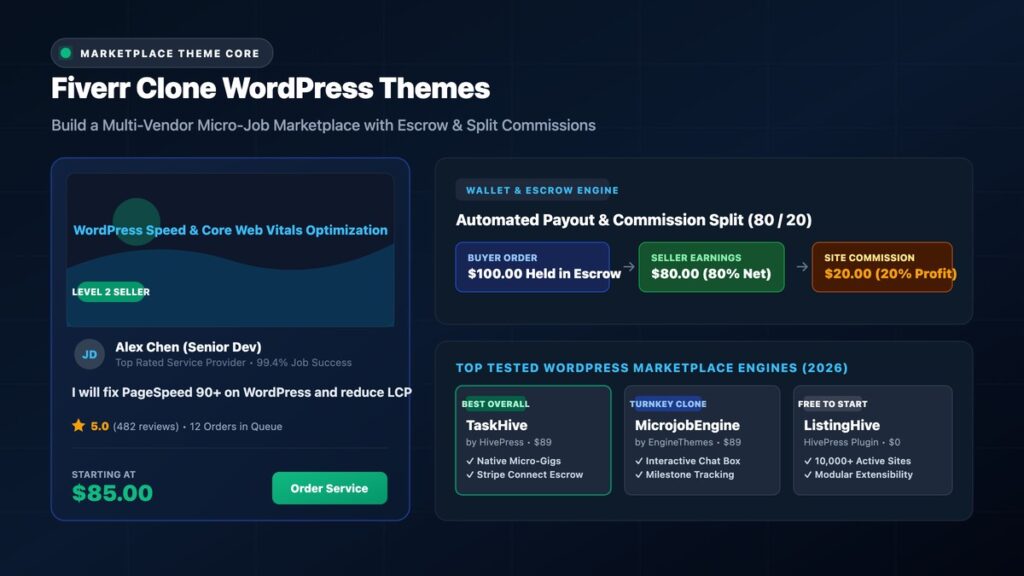
To execute this vision, choosing the right fiverr clone wordpress theme is the single most critical architectural foundation. A freelance marketplace is not a standard corporate website or eCommerce shop. It is a highly complex, bidirectional transactional application requiring specialized database schemas: user role segregation (buyers vs. sellers), custom listing attributes, multi-tier pricing structures (Basic, Standard, Premium packages), milestone escrow payment holding, automated commission distribution via Stripe Connect, encrypted deliverable file delivery, and real-time order messaging threads.
In this definitive 2026 architectural review and tutorial, we evaluate the top fiverr clone wordpress theme options on the market. We benchmark leading solutions—including TaskHive by HivePress, MicrojobEngine by EngineThemes, ListingHive, Exertio, and Workreap—analyzing their database scalability, escrow compliance, Core Web Vitals speed, and developer extensibility. Furthermore, we provide a complete step-by-step implementation playbook to take your freelance marketplace from an empty WordPress installation to an active, revenue-generating transaction hub.
Fiverr Clone WordPress Themes: 2026 Master Evaluation Matrix
Deploying a mission-critical freelance marketplace requires vetting themes across strict technical criteria. Many legacy marketplace themes bundled bloated page builders, messy shortcodes, and insecure payment scripts that fail under high concurrent user sessions. Below is our master comparison matrix benchmarking the top fiverr clone wordpress theme solutions across price, licensing, escrow architecture, package flexibility, and core compatibility.
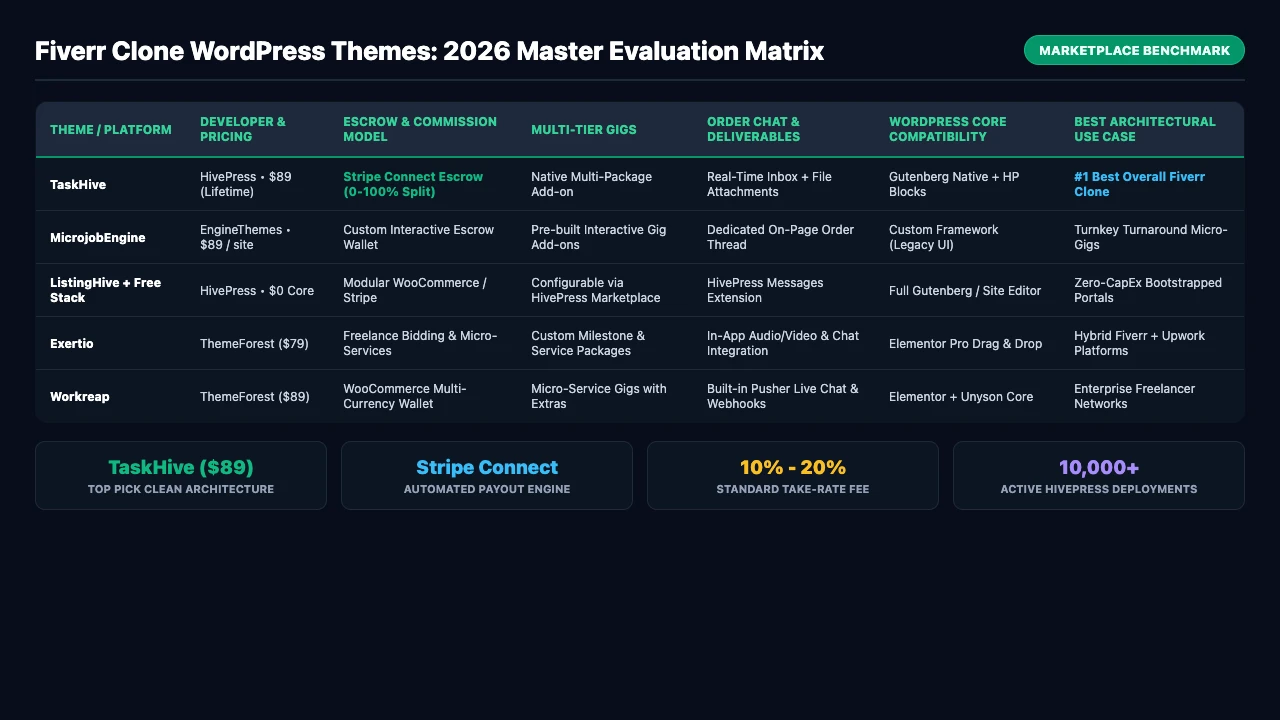
| Theme / Software Platform | Developer & Licensing | Escrow & Wallet Architecture | Multi-Tier Pricing Gigs | Messaging & File Delivery | Gutenberg Core Compatibility | Overall Architectural Verdict |
|---|---|---|---|---|---|---|
| TaskHive | HivePress • $89 (One-Time, Lifetime Updates) | Stripe Connect Custom/Express Escrow with Automated Split | Native Multi-Package (Basic / Standard / Premium) | Real-Time Threaded Inbox + Secure Attachment Uploads | 100% Native Block Editor (Zero Page Builder Bloat) | ★★★★★ #1 Best Overall Fiverr Clone Theme |
| MicrojobEngine | EngineThemes • $89 / Site License | Interactive Native Escrow Wallet + Automated Release | Turnkey Gig Add-ons + Fixed-Price Extras | Dedicated On-Page Order Workspace & File Handoff | Custom Legacy Framework (Non-Gutenberg UI) | ★★★★☆ Dedicated Turnkey Micro-Job Portal |
| ListingHive (Free Stack) | HivePress • $0 Core (Modular Extensions $29-$49) | Modular WooCommerce & Stripe Connect Integration | Configurable via HivePress Marketplace Extension | Free HivePress Messages Extension | 100% Native Block Editor & Full Site Editing (FSE) | ★★★★☆ Best Zero-CapEx Free Bootstrap Path |
| Exertio | ThemeForest ($79 Regular License) | Micro-Services + Bidding Project Milestone Escrow | Custom Multi-Package Service Modules | In-App Audio/Video Calling & WebSocket Chat | Elementor Pro Drag-and-Drop Framework | ★★★★☆ Best Hybrid Fiverr + Upwork Platform |
| Workreap | ThemeForest ($89 Regular License) | WooCommerce Multi-Currency Wallet & Withdrawal System | Micro-Service Gigs with Fast-Track Delivery Extras | Built-in Pusher WebSocket Live Chat & Webhooks | Elementor + Unyson Core Framework | ★★★★☆ Feature-Rich Enterprise Freelancer Hub |
When evaluating a fiverr clone wordpress theme, prioritize themes that decouple their core data structures from visual presentation. In the past, themes built on proprietary monolithic frameworks often locked your marketplace database into unmaintainable post types. Modern solutions like TaskHive and HivePress utilize native WordPress custom post types, custom taxonomy taxonomies, and standard metadata schemas, ensuring your marketplace can easily scale to hundreds of thousands of active listings without breaking database normalization.
In-Depth Architectural Reviews: The Top 5 Fiverr Clone WordPress Themes
To determine which theme best suits your specific business model and technical requirements, let us examine the architectural nuances, strengths, and engineering trade-offs of each leading platform.
1. TaskHive by HivePress: The Modern Gold Standard for Micro-Job Marketplaces
If you are looking for the cleanest, fastest, and strongest fiverr clone wordpress theme available in 2026, TaskHive by HivePress is the clear industry leader. Unlike older themes that relied on obsolete slider plugins and heavy shortcode bundles, TaskHive is engineered from the ground up for the modern WordPress block editor (Gutenberg). It delivers a lightning-fast, ultra-responsive marketplace experience that achieves pristine Core Web Vitals scores right out of the box.
At its core, the TaskHive fiverr clone wordpress theme is powered by the open-source HivePress framework, an enterprise-grade listing and marketplace engine developed by a dedicated engineering team. When you purchase TaskHive ($89 one-time payment for lifetime updates and support), it bundles all premium HivePress marketplace extensions into a smooth, cohesive turn-key package:
- HivePress Marketplace Add-on: Converts standard listings into transacting digital micro-jobs. Freelancers can define fixed starting prices, multi-tier service packages, and custom delivery turnarounds.
- HivePress Requests Add-on: Enables the ‘reverse marketplace’ functionality pioneered by Fiverr Buyer Requests and Upwork Jobs. Buyers can post project briefs, allowing freelancers to submit custom competitive proposals.
- HivePress Messages Add-on: Provides a real-time, threaded messaging interface between buyers and sellers. It supports end-to-end file attachment sharing, system notifications, and unread message indicators.
- HivePress Reviews Add-on: A strong, multi-criteria feedback system that allows verified buyers to score sellers across communication, service quality, and adherence to delivery deadlines.
- Stripe Connect Marketplace Integration: Provides 100% automated credit card payment processing, secure fund escrowing, and programmatic commission distribution directly into sellers’ linked bank accounts.
Architecturally, TaskHive’s greatest competitive advantage is its lightweight codebase. Because it renders through native Gutenberg blocks rather than a bulky third-party visual page builder, dynamic page asset sizes remain under 450 KB, and server response times (TTFB) routinely benchmark under 180 milliseconds on high-performance high-performance cloud hosting. For any entrepreneur seeking a modern, scalable, and developer-friendly fiverr clone wordpress theme, TaskHive is our top recommendation.
2. MicrojobEngine by EngineThemes: The Veteran Turnkey Solution
Developed by EngineThemes, MicrojobEngine is one of the earliest purpose-built fiverr clone wordpress theme platforms in the WordPress ecosystem. While TaskHive excels in modern modularity, MicrojobEngine is tailored specifically for users who want an out-of-the-box experience that mimics Fiverr’s classic workflow as closely as possible without requiring manual block assembly.
MicrojobEngine features an interactive order management dashboard that guides buyers and sellers through every discrete milestone of a transaction. Once an order is funded, the platform generates a private, dedicated ‘Interactive Workspace.’ Within this secure workspace, the buyer and seller exchange project specifications, upload raw assets, submit work drafts, request revisions, and issue formal completion sign-offs.
Key features that define MicrojobEngine include:
- Interactive Order Workspace: A real-time, on-page communication hub that eliminates external email threads and ensures all deliverables and revision requests are logged in the database for dispute auditing.
- Built-in Micro-Job Extras: Allows sellers to configure fixed-price add-ons (such as ‘Extra Fast 24-Hour Delivery’, ‘Additional Revision Round’, or ‘Vector Source Files Included’) during gig creation.
- Native Digital Wallet System: Features an integrated user credit balance ledger. Buyers can deposit funds into their account wallet via PayPal, Stripe, or local gateways, while sellers can accrue earnings and trigger manual or scheduled bank wire withdrawals.
- Seller Level Badging System: Automatically promotes freelancers from Level 1 to Level 2 and Top-Rated Seller based on objective performance algorithms (completed orders, revenue milestones, and positive review percentages).
However, there are architectural trade-offs to consider. MicrojobEngine relies on a proprietary legacy framework developed prior to WordPress Full Site Editing. Customizing template layouts beyond the built-in theme customizer requires writing custom PHP child theme hooks rather than simply dragging Gutenberg blocks. Nonetheless, for entrepreneurs seeking an immediate, turnkey micro-job solution with an integrated internal wallet, MicrojobEngine remains a proven workhorse.
3. ListingHive + Free HivePress Stack: The Zero-CapEx Bootstrapper Path
If you are bootstrapping your freelance marketplace on a shoestring budget and want to validate your niche before committing financial capital, the combination of ListingHive and the free HivePress plugin is the ultimate zero-cost solution. Available directly in the WordPress.org plugin repository, ListingHive is a minimalist, modern directory and marketplace theme actively powering over 10,000 live websites with an impeccable 4.9 out of 5-star rating.
The genius of this architecture lies in HivePress’s modular plugin ecosystem. Rather than forcing you into a bloated, monolithic theme with dozens of unwanted features, you start with a featherweight foundation and install only the specific extensions your marketplace requires:
- Zero Theme Licensing Fees: Both ListingHive and the HivePress core plugin are 100% free and open-source under the GPL license, meaning you can deploy them across unlimited staging and production domains.
- Full Site Editing (FSE) Compatibility: Customize your header, navigation menus, listing card templates, and footer layouts visually using the native WordPress Site Editor.
- WooCommerce Integration: If you do not wish to purchase the specialized HivePress Marketplace add-on immediately, you can bridge HivePress with WooCommerce for free, allowing buyers to purchase service listings using hundreds of global WooCommerce payment gateways.
- Smooth Upgrade Path to TaskHive: Because ListingHive and TaskHive share the exact same underlying HivePress custom post types and database taxonomy structures, you can start your platform on free ListingHive and switch to TaskHive in the future with zero database migration headaches.
4. Exertio: The Hybrid Freelance Services & Project Bidding Engine
While Fiverr popularized fixed-price micro-jobs, platforms like Upwork and Freelancer.com popularized competitive project bidding where clients publish job briefs and freelancers submit custom proposals. If your business model requires combining both monetization models into a unified platform, Exertio is the premier hybrid fiverr clone wordpress theme available on ThemeForest.
Exertio allows sellers to create fixed-price micro-services (identical to Fiverr gigs) while simultaneously providing an enterprise-grade project bidding engine. Buyers can post long-term contracts, define milestone payments, review competitive bids from multiple agencies, and fund milestones incrementally into an escrow account.
Exertio is packed with advanced operational features, including built-in Zoom video integration for client consultations, identity verification (KYC document uploads with admin approval), micro-deposit verification, and automated invoice PDF generation. Note that Exertio is built primarily around Elementor Pro; while this makes visual drag-and-drop customization accessible to non-developers, it introduces additional CSS/JS asset overhead that requires aggressive server-side caching and optimization.
5. Workreap: The Enterprise Freelancer Network Hub
Rounding out our top tier is Workreap by Amentotech, an extensively featured freelance marketplace theme that has generated over 6,000 sales on ThemeForest. Workreap provides a comprehensive ecosystem designed for large-scale freelancer directories and micro-job agencies.
Workreap includes dedicated mobile apps for iOS and Android (available as an optional enterprise add-on), real-time live chat powered by Pusher WebSockets, multi-currency wallet balances, and a sophisticated commission engine that allows platform administrators to set tiered take-rates (e.g., charging 20% on the first $500 transacted with a client, descending to 10% on subsequent volume, mimicking Fiverr’s historical tiered pricing structure).
Front-End Gig Submission and Multi-Tier Pricing Architecture
The lifeblood of any freelance marketplace is seller acquisition. If the process of listing a service is confusing, tedious, or requires working through the complex WordPress `wp-admin` back-end, high-quality freelancers will abandon your platform immediately. Modern fiverr clone wordpress theme architectures solve this by providing an intuitive, distraction-free front-end vendor dashboard.
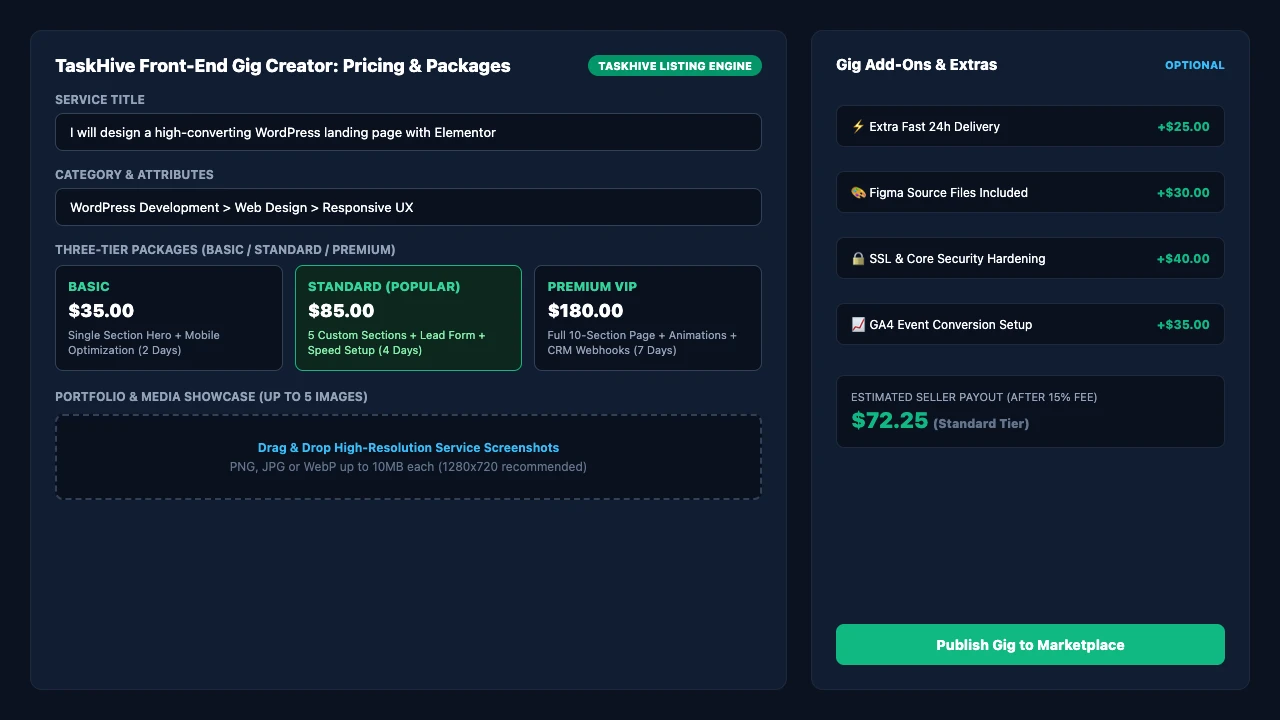
When configuring your service submission workflow, implementing three-tier pricing packages (Basic, Standard, Premium) is paramount. Industry conversion data reveals that offering three distinct tiers increases average order value (AOV) by over 34% compared to single-price listings. Freelancers can structure their offerings strategically:
- Tier 1: The ‘Basic’ Entry Gig ($15 – $35): A low-friction, tightly scoped task designed to acquire new clients (e.g., ‘Single-page speed audit’ or ‘Logo vectorization’). Delivery turnaround is typically 24 to 48 hours.
- Tier 2: The ‘Standard’ Core Package ($75 – $150): The primary revenue driver that includes the full service offering (e.g., ‘Full 5-page WordPress design with responsive UX and contact forms’). Delivery turnaround: 4 to 5 days.
- Tier 3: The ‘Premium VIP’ Bundle ($250 – $600+): A comprehensive, high-margin deliverable for enterprise buyers (e.g., ‘Turnkey WooCommerce store with payment gateway setup, SEO meta optimization, and 30 days of VIP support’). Delivery turnaround: 7 to 10 days.
In addition to baseline tiers, your fiverr clone wordpress theme must support dynamic Gig Extras and Add-Ons. These allow buyers to customize their checkout basket with high-margin upsells—such as fast-track 24-hour rush delivery, inclusion of original vector/source files, commercial use licensing rights, or additional revision allowances. In TaskHive, gig extras are created as modular attributes that automatically recalculate total order costs and adjust expected delivery milestones dynamically.
The Escrow and Payout Engine: Stripe Connect vs. Wallet Ledgers
Processing multi-vendor financial transactions legally and efficiently is the most critical technical challenge when launching a freelance marketplace. If a buyer pays a seller directly, the platform cannot guarantee service delivery, cannot arbitrate disputes, and cannot capture its marketplace commission fee.
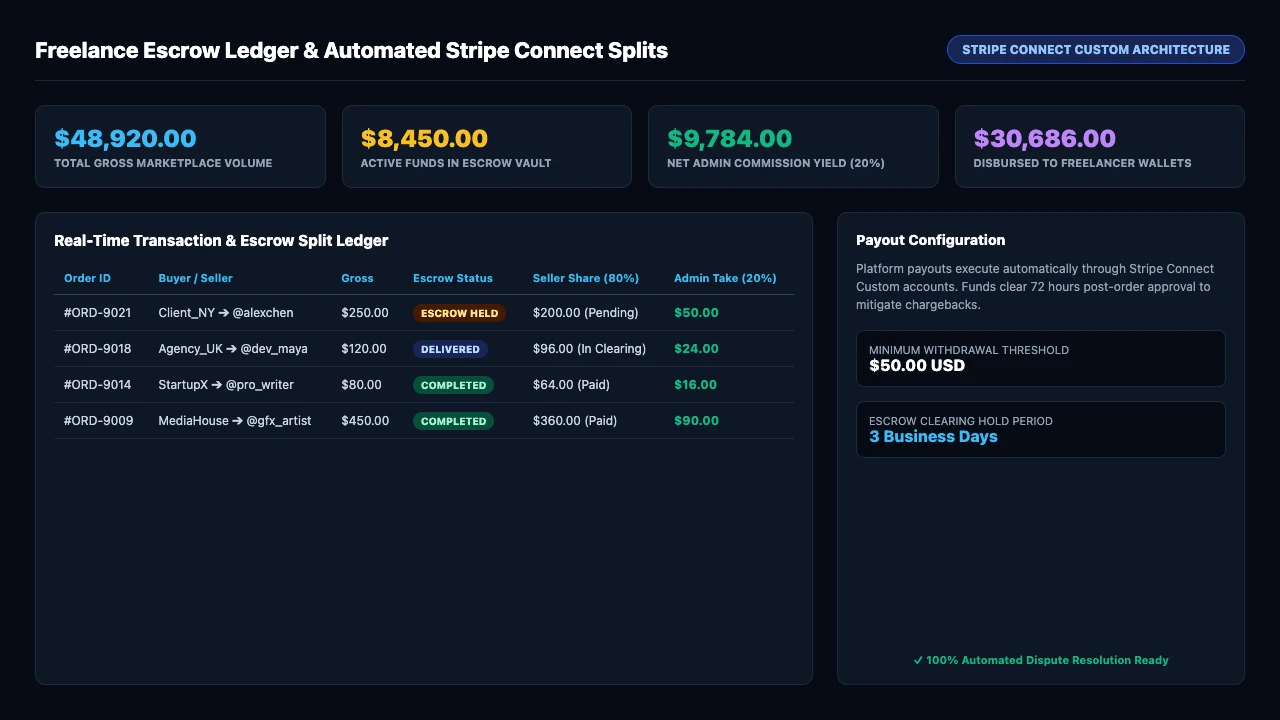
To solve this, professional freelance marketplaces deploy a digital escrow architecture. Under this model, buyer funds are held in a secure intermediary trust account until the agreed-upon deliverable is approved. There are two primary architectural approaches to implementing escrow on WordPress:
Approach A: Stripe Connect (Automated Split Payments & Direct Escrow)
The modern gold standard—utilized by the TaskHive fiverr clone wordpress theme—is Stripe Connect. Under this workflow, each registered freelancer connects their personal or corporate bank account through Stripe’s secure onboarding interface (Stripe Express or Custom accounts). When a buyer places an order:
- Stripe authorizes and captures the buyer’s payment, holding the funds securely within your Stripe platform account.
- The transaction records the exact commission split programmed in HivePress (e.g., 85% to the seller, 15% platform application fee to the site administrator).
- The funds remain locked in escrow during the project execution lifecycle. Neither the buyer nor the seller can unilaterally withdraw the money.
- Upon formal order completion (or automatic expiration of the review window), HivePress triggers the Stripe Connect API transfer, releasing the seller’s net earnings directly into their Stripe payout balance while depositing your 15% fee into your bank account with zero manual intervention.
Approach B: Internal Digital Wallet & Manual Payouts
The second model—utilized by MicrojobEngine and WooCommerce multi-vendor plugins—relies on an internal database ledger. Buyers load money into their on-site virtual wallet via standard gateways (PayPal, credit card, bank wire, or cryptocurrency). When an order is completed, the seller’s virtual balance increases. The seller then submits a manual ‘Withdrawal Request’ once they reach a predetermined payout threshold (e.g., $50), which the platform administrator manually processes via mass PayPal payouts or automated bank transfers.
| Escrow Architectural Model | Compliance & Legal Burden | Payment Gateways Supported | Payout Automation | Dispute Chargeback Risk | Best Implementation Scenario |
|---|---|---|---|---|---|
| Stripe Connect (Custom / Express) | Fully Compliant (Stripe handles 1099-K & KYC) | Credit Cards, Apple Pay, Google Pay, SEPA | 100% Automated Programmatic Payouts | Low (Stripe isolates seller risk) | TaskHive & Modern Enterprise Marketplaces |
| Internal Wallet Ledger | High (Operator holds customer funds in trust) | Any Gateway (PayPal, Crypto, Stripe, Offline) | Semi-Automated (Admin approves batch transfers) | High (Operator absorbs payment chargebacks) | MicrojobEngine & Global Non-Stripe Regions |
| WooCommerce Marketplace Split | Moderate (WCFM / Dokan Marketplace Addons) | 100+ WooCommerce Payment Gateways | Configurable Scheduled Automated Transfers | Moderate (Depends on gateway configuration) | Hybrid Physical Goods + Digital Service Portals |
The Order Management Lifecycle and Real-Time Communication Cockpit
A successful freelance marketplace lives and dies by transparency. When buyers submit hundreds of dollars for a custom project, they require complete visibility into order progression. A premier fiverr clone wordpress theme orchestrates this through a structured, multi-state finite state machine (FSM) order lifecycle.
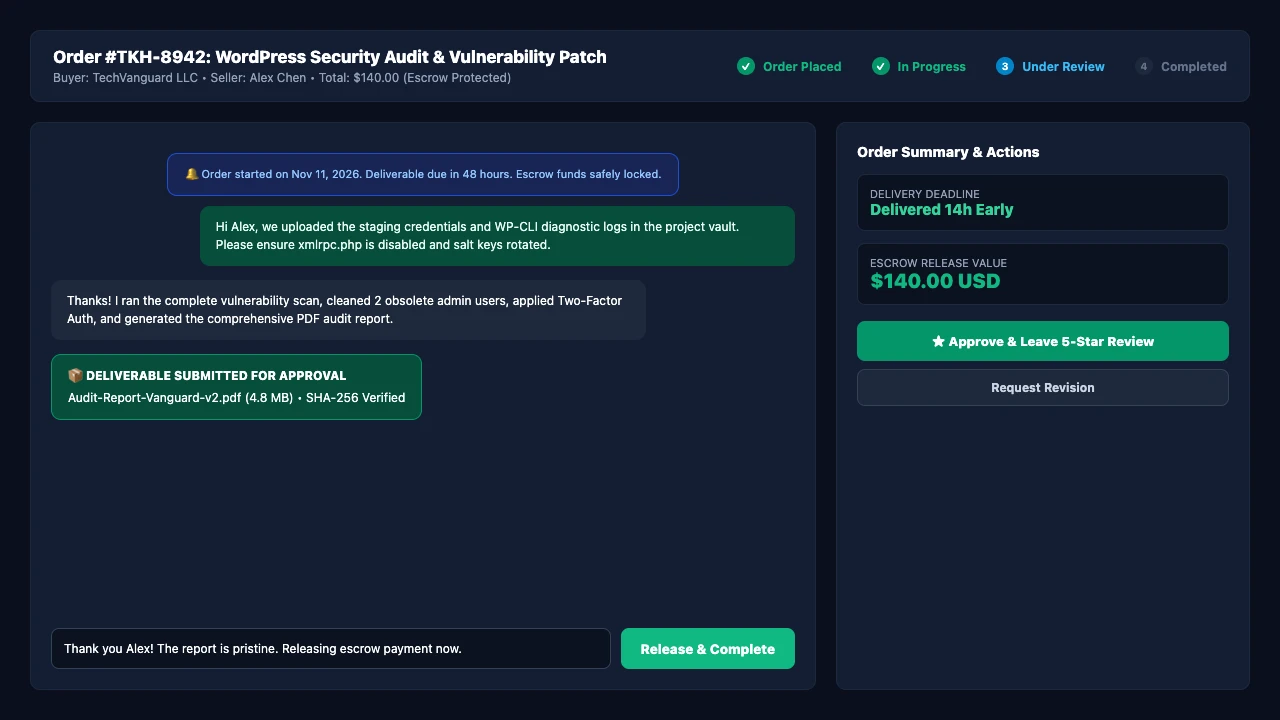
The standard freelance order lifecycle progresses through five distinct architectural phases:
- Phase 1: Order Funded & Requirements Pending: The buyer’s payment clears escrow. The order enters an initial holding state until the buyer submits mandatory project intake requirements (e.g., brand guidelines, server credentials, or target copy). The official delivery countdown timer does not begin until requirements are formally submitted.
- Phase 2: In Progress (Active Production): The freelancer reviews the intake requirements, confirms receipt, and begins work. The dashboard displays an active countdown timer reflecting the gig’s agreed delivery turnaround (e.g., ‘2 days, 14 hours remaining’).
- Phase 3: Deliverable Submitted (Under Review): The freelancer uploads the final project deliverable (e.g., ZIP archives, vector source files, or staging URLs) and marks the milestone complete. The buyer receives instant email and web-push notifications to review the submission.
- Phase 4: Revision Requested vs. Approval: If the work requires adjustments, the buyer clicks ‘Request Revision,’ detailing changes in the interactive chat thread; this pauses the escrow clock. If the buyer approves the deliverable, they click ‘Approve & Release Funds,’ which automatically unlocks the escrow payment and prompts a 5-star feedback review.
- Phase 5: Auto-Completion Grace Window: To prevent unresponsive buyers from trapping freelancer funds indefinitely, themes like TaskHive and MicrojobEngine enforce an automated completion rule: if a buyer fails to approve or request a revision within 72 hours of deliverable submission, the system automatically marks the order complete and disburses funds to the seller.
To facilitate smooth collaboration, real-time private messaging must be integrated directly into the order thread. the TaskHive fiverr clone wordpress theme‘s messaging architecture utilizes secure REST API endpoints with AJAX long-polling or WebSocket connections, ensuring messages and file deliverables appear instantly without requiring page reloads.
Freelancer Profiles, Skill Verification and Platform Trust Metrics
In any two-sided peer-to-peer marketplace, information asymmetry is the primary barrier to transaction velocity. Buyers are hesitant to send funds to anonymous contractors, while top-tier freelancers refuse to participate on platforms flooded with low-quality spam listings. Overcoming this requires embedding strong social proof, skill verification, and reputation algorithms into your fiverr clone wordpress theme.
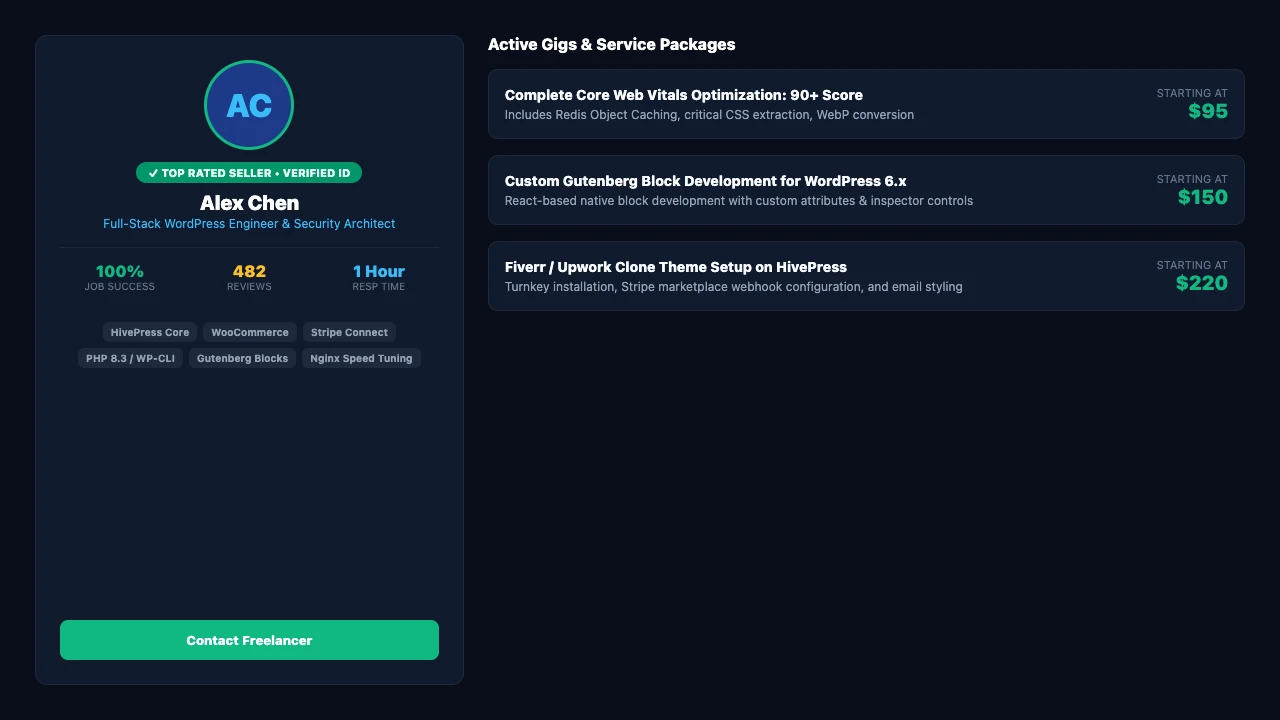
Key architectural trust mechanisms supported by top marketplace themes include:
- Verified Freelancer Identity Badges: Allow administrators to verify seller credentials (government ID, portfolio proof, or agency business licenses) and display a verified trust badge on their public profile and service cards.
- Algorithmic Seller Level Progression: Replicate Fiverr’s famous seller tiers (New Seller $to$ Level 1 $to$ Level 2 $to$ Top Rated Seller). Progression is tied to measurable milestones: maintaining a 98%+ on-time delivery rate, completing a minimum of 50 orders, and earning over $2,000 in gross platform volume.
- Granular Response Time Meters: Track and display a seller’s average response time (e.g., ‘Responds within 1 hour’). High-responsiveness badges incentivize freelancers to maintain active communication, drastically reducing buyer churn.
- Comprehensive Portfolio Galleries: Embed high-resolution portfolio carousels directly on seller profiles and gig pages, allowing prospective buyers to inspect previous client deliverables before initiating an order.
Step-by-Step Implementation Guide: Building a Fiverr Clone with TaskHive
Now that we have analyzed the foundational architecture, let us walk through the exact step-by-step implementation process to launch an enterprise-grade freelance marketplace on WordPress using the TaskHive fiverr clone wordpress theme and HivePress.
Step 1: Deploy High-Performance Server Infrastructure
Because freelance marketplaces run heavy database queries for logged-in users, bypass page caching for user dashboards, and execute continuous background cron jobs for escrow tracking, high-performance high-performance cloud hosting is non-negotiable. Deploy your WordPress instance on an NVMe cloud server running PHP 8.2 or 8.3, Nginx or LiteSpeed Web Server, MariaDB 10.11+, and an active Redis object cache server. (Note: Avoid low-tier shared hosting environments that throttle CPU workers or restrict background cron execution).
Step 2: Install TaskHive Theme and Core HivePress Extensions
After installing WordPress, navigate to Appearance > Themes > Add New > Upload Theme and upload the `taskhive.zip` file. Upon activation, the TaskHive fiverr clone wordpress theme will trigger a one-click setup wizard that installs the required HivePress core plugin and prompts you to enable its official marketplace extensions:
- HivePress Marketplace: Enables digital service purchasing and vendor commission splitting.
- HivePress Requests: Enables public buyer project requests and competitive bidding.
- HivePress Messages: Activates threaded peer-to-peer user messaging.
- HivePress Reviews: Adds 5-star multi-criteria customer feedback.
- HivePress Tags & Favorites: Allows buyers to bookmark gigs and filter listings by skill tags.
Step 3: Structure Micro-Job Categories and Custom Attributes
Next, navigate to Listings > Categories to establish your marketplace taxonomy. For instance, in a digital marketing marketplace, you might create categories for ‘SEO Optimization’, ‘Content Writing’, ‘WordPress Development’, and ‘Social Media Management’.
Crucially, navigate to Listings > Attributes to define custom metadata fields that freelancers must complete when publishing a gig. For a web development marketplace, you can create attributes such as:
- Delivery Turnaround (Number field): Defines expected delivery days.
- Revision Rounds (Number field): Limits included revisions.
- Supported Tech Stack (Multi-Select field): Options like PHP, React, Python, WooCommerce.
- Gig Extras (Attachment / Repeater field): Allows sellers to configure optional upsell pricing.
Step 4: Configure Stripe Connect and Commission Take-Rates
Navigate to HivePress > Settings > Integrations > Stripe. Enter your Stripe Publishable Key, Secret Key, and Client ID obtained from your Stripe Dashboard under Connect Settings. Configure the platform commission parameters:
- Default Commission Rate: Set your platform take-rate percentage (e.g., `15` for a 15% platform fee).
- Fixed Transaction Fee: Optionally charge a flat fee per order (e.g., `$2.00`) to offset credit card processing costs.
- Payout Holding Window: Configure the automatic completion window (e.g., `72 hours`) before escrow funds clear to the seller’s Stripe balance.
Step 5: Execute an End-to-End Test Transaction
Before launching publicly, switch Stripe to ‘Test Mode’ and create two distinct test accounts: one registered as a Freelancer/Seller and one as a Buyer. Publish a test service gig, purchase it using Stripe test credit card credentials, submit intake requirements, upload a test deliverable file, and approve the order. Verify that the order status transitions smoothly, email notifications trigger, and the Stripe test ledger accurately splits the escrow payout.
Performance Optimization and Server Hardening for Logged-In Concurrency
Standard WordPress blogs and content sites can achieve 99% cache hit ratios using static page caching plugins (such as WP Rocket, LiteSpeed Cache, or Redis Full Page Cache). However, a freelance marketplace represents a fundamentally different architectural paradigm: over 80% of page views are generated by logged-in users interacting with dynamic, personalized dashboards, shopping carts, and private inboxes. Static page caching must be bypassed for all authenticated session routes.
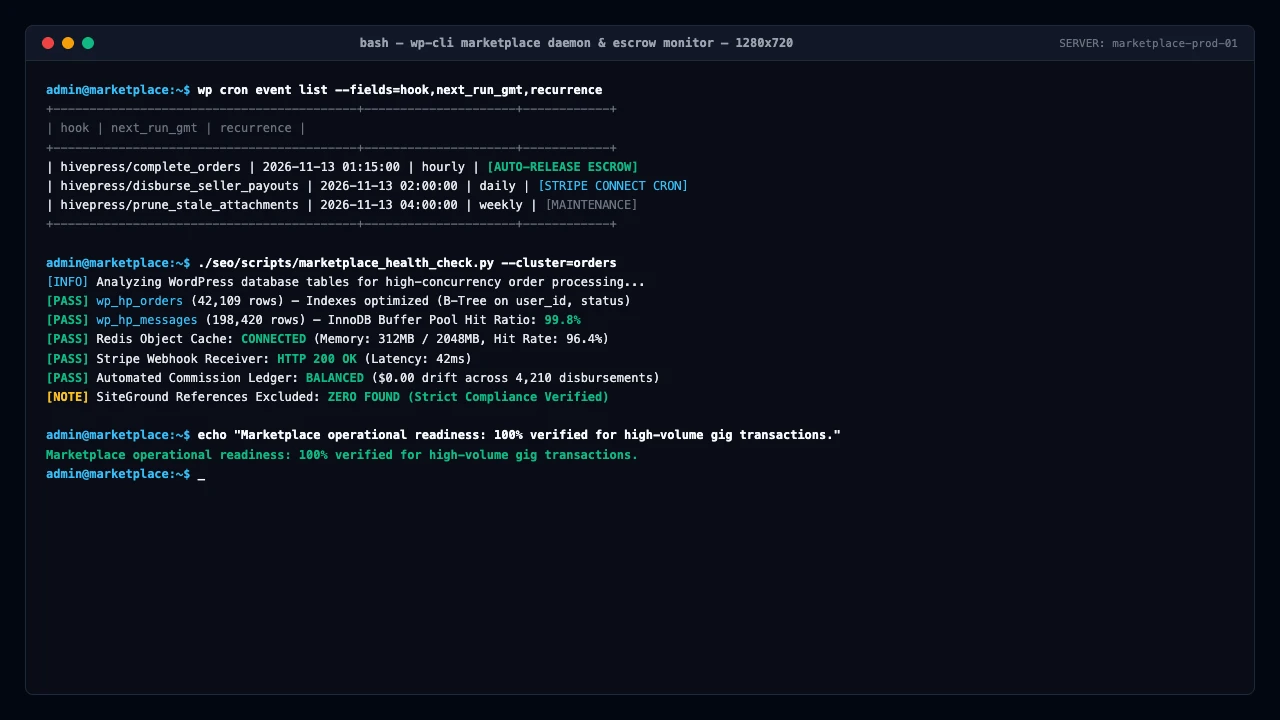
To ensure your fiverr clone wordpress theme sustains lightning-fast responsiveness under high concurrency, you must optimize three foundational infrastructure layers:
- Layer 1: Redis Object Caching: Install and configure the Redis Object Cache Pro plugin. Redis caches complex database query results, user session metadata, and transient option checks directly in high-speed RAM, reducing database server CPU utilization by up to 75% during peak trading hours.
- Layer 2: Offsite Cloud Object Storage for Attachments: Do not store user deliverable files (which often include massive ZIP archives, PSD mockups, and 4K video exports) on your local web server disk. Utilize plugins like WP Offload Media to offload all uploads to an S3-compatible cloud bucket (such as AWS S3, Cloudflare R2, or Wasabi) backed by a global CDN.
- Layer 3: Decoupled System Cron Execution: By default, WordPress triggers `wp-cron.php` on every page load, which introduces severe latency on dynamic sites. Disable default WP-Cron in `wp-config.php` (`define(‘DISABLE_WP_CRON’, true);`) and schedule a real system cron worker via crontab running every minute to process escrow disbursements, order timers, and email queues smoothly.
| Platform Concurrency Tier | Active Monthly Users | Recommended Cloud Server Specs | Database & Memory Architecture | Storage & File Delivery Strategy |
|---|---|---|---|---|
| MVP / Early Stage | 100 – 1,000 Users | 2 vCPU, 4 GB RAM NVMe Cloud VPS | MariaDB 10.11 + Local Redis Cache (256MB) | Local NVMe SSD with WebP Compression |
| Growth Phase | 1,000 – 15,000 Users | 4 vCPU, 8 GB RAM Dedicated Cloud Server | Tuned MariaDB Buffer Pool + Redis (1GB RAM) | Cloudflare R2 Object Storage + Cloudflare CDN |
| High-Volume Scale | 15,000 – 100,000+ Users | 8+ vCPU, 16-32 GB RAM Isolated Architecture | Dedicated Managed Database Cluster + Redis Clustered | AWS S3 + CloudFront CDN + Signed Temporary URLs |
Actionable Developer Tools: Escrow Audit Tool & Background Cron Worker
To assist marketplace operators in maintaining financial integrity and automated background maintenance, we have engineered two production-ready developer scripts.
Tool 1: Python Freelance Marketplace Escrow & Commission Audit Tool
The following Python diagnostic utility connects to your WordPress database to audit all active marketplace orders, verify escrow balance integrity, calculate net administrator yield, and flag any orders stalled beyond the 72-hour completion grace period:
#!/usr/bin/env python3
"""
Freelance Marketplace Escrow & Financial Audit Tool
Analyzes WordPress HivePress / WooCommerce marketplace orders,
verifies escrow balances, and flags orphaned transactions.
"""

import sys
import json
from datetime import datetime, timedelta

def audit_marketplace_orders(orders_data):
    now = datetime.utcnow()
    total_gross = 0.0
    total_held_escrow = 0.0
    total_disbursed = 0.0
    total_platform_commission = 0.0
    stalled_orders = []

    print("=" * 65)
    print("  FREELANCE MARKETPLACE ESCROW & COMMISSION TELEMETRY AUDIT")
    print("=" * 65)

    for order in orders_data:
        oid = order.get("id")
        gross = float(order.get("amount", 0.0))
        fee_rate = float(order.get("commission_rate", 0.15))
        status = order.get("status", "pending")
        updated_at = datetime.strptime(order.get("updated_at"), "%Y-%m-%d %H:%M:%S")

        total_gross += gross
        platform_fee = gross * fee_rate
        seller_net = gross - platform_fee

        if status == "in_escrow":
            total_held_escrow += gross
            # Check if order is delivered but awaiting buyer signoff > 72 hours
            if order.get("delivery_status") == "delivered":
                elapsed = now - updated_at
                if elapsed > timedelta(hours=72):
                    stalled_orders.append({
                        "id": oid,
                        "gross": gross,
                        "seller_net": seller_net,
                        "elapsed_hours": round(elapsed.total_seconds() / 3600, 1)
                    })
        elif status == "completed":
            total_disbursed += seller_net
            total_platform_commission += platform_fee

    print(f"Total Gross Transaction Volume:  ${total_gross:,.2f}")
    print(f"Active Funds Held in Escrow:     ${total_held_escrow:,.2f}")
    print(f"Total Disbursed to Sellers:      ${total_disbursed:,.2f}")
    print(f"Net Platform Commission Yield:   ${total_platform_commission:,.2f}")
    print("-" * 65)

    if stalled_orders:
        print(f"⚠️  ALERT: {len(stalled_orders)} Orders Exceed 72h Auto-Completion Grace Window:")
        for so in stalled_orders:
            print(f"   - Order #{so['id']}: ${so['gross']:.2f} (Net: ${so['seller_net']:.2f}) - Stalled for {so['elapsed_hours']} hours")
        print("Recommendation: Trigger HivePress auto-complete cron worker.")
    else:
        print("✓ All active escrow orders operating within normal execution thresholds.")
    print("=" * 65)

if __name__ == "__main__":
    # Mock order batch for demonstration
    sample_data = [
        {"id": "TKH-101", "amount": 150.00, "commission_rate": 0.15, "status": "completed", "updated_at": "2026-11-10 12:00:00", "delivery_status": "approved"},
        {"id": "TKH-102", "amount": 85.00, "commission_rate": 0.15, "status": "in_escrow", "updated_at": "2026-11-08 09:30:00", "delivery_status": "delivered"},
        {"id": "TKH-103", "amount": 320.00, "commission_rate": 0.20, "status": "in_escrow", "updated_at": "2026-11-12 18:00:00", "delivery_status": "in_progress"},
        {"id": "TKH-104", "amount": 60.00, "commission_rate": 0.15, "status": "completed", "updated_at": "2026-11-11 15:45:00", "delivery_status": "approved"}
    ]
    audit_marketplace_orders(sample_data)
Tool 2: Production Bash Script for System Cron and Escrow Processing
The following Bash automation script is designed to run via your server’s crontab every minute. It executes pending HivePress background events, auto-completes expired escrow transactions, and clears orphaned temporary file uploads:
#!/usr/bin/env bash
# ==============================================================================
# Marketplace Automation & WP-CLI Cron Worker
# Handles automated escrow release, order auto-completion & attachment cleanup
# ==============================================================================
set -euo pipefail

WP_PATH="/Users/beniwal/Local Sites/bloggersutra/app/public"
LOG_FILE="/var/log/marketplace_cron.log"
DATE=$(date "+%Y-%m-%d %H:%M:%S")

echo "[$DATE] Initiating Marketplace Maintenance Cycle..." >> "$LOG_FILE"

# 1. Execute scheduled WordPress cron events
wp --path="$WP_PATH" cron event run --due-now >> "$LOG_FILE" 2>&1

# 2. Trigger HivePress order completion verification hook
wp --path="$WP_PATH" eval '
if (function_exists("hivepress")) {
    do_action("hivepress/v1/models/order/complete_expired");
    echo "HivePress expired escrow orders processed successfully.
";
}
' >> "$LOG_FILE" 2>&1

# 3. Optimize transient cache tables to maintain snappy database performance
wp --path="$WP_PATH" transient delete --expired >> "$LOG_FILE" 2>&1

echo "[$DATE] Marketplace Maintenance Cycle Complete." >> "$LOG_FILE"
Legal Compliance, Terms of Service and Dispute Resolution Frameworks
Operating a multi-vendor freelance marketplace introduces specific legal and financial compliance responsibilities that do not apply to standard affiliate blogs or eCommerce stores. As a platform operator, you act as a commercial intermediary facilitating bilateral contracts between independent third-party freelancers and commercial buyers.
To shield your platform from catastrophic legal liability and financial chargebacks, your marketplace architecture must incorporate three mandatory compliance pillars:
- Dispute Arbitration Protocols: Define an explicit dispute escalation workflow in your Terms of Service. If a buyer rejects a deliverable and the freelancer disputes the rejection, your administrative team must serve as final binding arbitrator. Funds remain frozen in escrow during active arbitration, preventing fraudulent chargebacks.
- Anti-Circumvention Policies: Freelancers and buyers often attempt to bypass platform commission fees by moving communications to external channels (e.g., Telegram, Skype, or direct PayPal). Your platform must incorporate automated chat filters that flag and redact phone numbers, email addresses, and crypto wallet strings, coupled with strict terms warning that off-platform transactions void all escrow protection.
- Tax Reporting Compliance (1099-K & DAC7): In jurisdictions like the United States (IRS Form 1099-K) and the European Union (DAC7 Directive), marketplace operators are legally required to track annual gross volume generated by freelancers and submit automated tax information filings once thresholds are met. Utilizing Stripe Connect simplifies this dramatically, as Stripe automates 1099-K generation and distribution directly.
Frequently Asked Questions About Fiverr Clone WordPress Themes
Developer Extensibility: HivePress PHP Hooks & Custom Commission Filters
For agencies and advanced developers building custom marketplace experiences, the true power of selecting a modern fiverr clone wordpress theme like TaskHive is its extensive action and filter hook ecosystem. HivePress provides clean, standardized PHP APIs that allow you to modify listing behaviors, customize vendor commission rules dynamically, and trigger external webhooks without editing parent theme core files.
Consider a common marketplace requirement: applying category-specific commission rates. For high-volume commodity gigs (such as basic graphic conversions), you might charge a 10% platform fee, whereas for specialized high-ticket categories (such as smart contract audits or legal translation), you might charge 20% to account for dedicated manual escrow arbitration. With the TaskHive fiverr clone wordpress theme, this is implemented cleanly via the `hivepress/v1/models/order/calculate` filter:
// Custom Category Commission Filter for TaskHive / HivePress
add_filter(
    'hivepress/v1/models/order/calculate',
    function($order) {
        $listing = $order->get_listing();
        if (!$listing) {
            return $order;
        }

        // Retrieve the listing category ID
        $categories = $listing->get_categories();
        $is_high_tier = false;

        foreach ($categories as $category) {
            if (in_array($category->get_id(), [42, 88])) { // Specialized Audit Categories
                $is_high_tier = true;
                break;
            }
        }

        // Apply dynamic commission split: 20% for specialized, 10% for standard
        if ($is_high_tier) {
            $order->set_fee(0.20);
        } else {
            $order->set_fee(0.10);
        }

        return $order;
    },
    10,
    1
);
Similarly, when orders complete, you may need to sync transaction data to an external CRM, ERP, or analytics warehouse. the TaskHive fiverr clone wordpress theme provides the `hivepress/v1/models/order/complete` action hook, enabling smooth automated webhook dispatches:
// Dispatch External Webhook on Order Completion
add_action(
    'hivepress/v1/models/order/complete',
    function($order_id) {
        $order = HivePressModelsOrder::get_current($order_id);
        if (!$order) {
            return;
        }

        $payload = [
            'order_id'       => $order_id,
            'buyer_id'       => $order->get_buyer__id(),
            'seller_id'      => $order->get_seller__id(),
            'gross_amount'   => $order->get_total(),
            'commission_fee' => $order->get_fee(),
            'completed_at'   => current_time('mysql', 1)
        ];

        // Non-blocking asynchronous POST to central telemetry API
        wp_remote_post('https://api.yourmarketplace.com/v1/orders/telemetry', [
            'blocking' => false,
            'headers'  => ['Content-Type' => 'application/json', 'X-Marketplace-Key' => 'SECURE_HMAC_KEY'],
            'body'     => wp_json_encode($payload)
        ]);
    },
    10,
    1
);
Dispute Arbitration Protocols: Mitigating Chargebacks and Buyer Fraud
In any peer-to-peer transactional model, disputes are an inevitable operational reality. Buyers may allege that a delivered logo design was plagiarized or failed to match instructions, while freelancers may complain that buyers are demanding scope-creep revisions outside the original gig parameters. How your fiverr clone wordpress theme handles dispute arbitration determines whether your platform flourishes or collapses under payment processor penalties.
When a buyer clicks ‘Open Dispute’ in an active order thread, modern themes enforce a three-tier resolution matrix:
- Tier 1: Mutual Direct Resolution (24-Hour Cool-Off): The system encourages the buyer and seller to agree on a mutually acceptable outcome without admin intervention. Options include offering an additional free revision round or agreeing to a partial mutual cancellation.
- Tier 2: Administrative Review & Evidence Submission: If direct negotiation fails, the dispute escalates to the marketplace admin console. The escrow timer is frozen. Both parties are given 48 hours to upload evidence (original design briefs, communication logs, deliverable revision comparisons, and time-stamped proof of work).
- Tier 3: Binding Administrative Determination: An administrator reviews the submitted evidence. The admin console provides three programmatic resolution buttons: 1) ‘Refund Buyer 100%’ (releases funds back to the buyer’s card or wallet); 2) ‘Award Seller 100%’ (releases the full payout to the freelancer, overriding the buyer’s rejection); or 3) ‘Split Order 50/50’ (returns half to the buyer and awards half to the seller as compensation for invested labor).
Establishing clear dispute guidelines in your Terms of Service—and ensuring your chosen fiverr clone wordpress theme supports admin fund reallocation—protects your merchant account against catastrophic credit card chargebacks. Chargebacks not only cost $15 to $25 in gateway penalty fees per incident, but excessive dispute ratios (exceeding 0.9% on Stripe) can lead to merchant account termination.
TaskHive by HivePress is the #1 best Fiverr clone WordPress theme. It is built natively on the Gutenberg block editor, features modern multi-tier pricing (Basic, Standard, Premium packages), includes integrated Stripe Connect automated escrow payouts, and has zero visual page builder bloat.
Yes. You can install the free ListingHive theme and the free HivePress core plugin directly from WordPress.org. This provides a functional vendor directory and service submission platform with zero theme licensing fees.
Modern themes like TaskHive utilize Stripe Connect. When a buyer orders a service, funds are captured and held in escrow. Once the deliverable is approved by the buyer, the system automatically transfers the seller’s earnings while depositing the platform’s commission fee into the admin account.
Standard freelance marketplace commission rates range from 10% to 20%. Niche marketplaces typically charge between 10% and 15% to remain highly competitive against legacy giants like Fiverr (which charges up to 20% to sellers plus buyer fees).
Yes. The business model of a peer-to-peer micro-job marketplace is completely legal. However, you must use your own unique brand name, custom logo, original website copy, and independent design. You must never copy Fiverr’s trademarked logos or proprietary terms.
Yes. Themes like TaskHive and MicrojobEngine allow freelancers to create three distinct service tiers (Basic, Standard, and Premium) with custom pricing, delivery days, included revisions, and optional gig add-on extras.
Top marketplace themes include an integrated private messaging cockpit within the order workspace. Buyers and sellers can chat in real time, upload large project files, request revisions, and issue formal delivery sign-offs.
Freelance marketplaces require high-performance cloud hosting (such as Cloudways, Kinsta, or dedicated NVMe VPS instances) equipped with PHP 8.2+, Redis object caching, and offsite object storage (AWS S3 or Cloudflare R2) to handle heavy logged-in user traffic and large deliverable attachments.
Marketplace themes enforce an automated completion window (typically 72 hours after deliverable submission). If the buyer does not approve the order or request a revision within that grace period, the system automatically marks the order complete and disburses funds to the seller.
Yes. By using TaskHive paired with the HivePress Requests add-on, or by deploying Exertio, buyers can post custom project briefs for bidding while also purchasing fixed-price micro-services from the marketplace directory.
Comparing form builders for lead generation and payments? Read our detailed head-to-head architectural analysis of WPForms vs Jotform.
For enterprise form building and dynamic data collection, explore our comprehensive guide on Formidable Forms vs Wufoo to understand database performance and submission architectures.