





Quick answer
- How do you create WooCommerce coupons for your online store? To create promotional woocommerce coupons: 1) Ensure coupons are enabled under WooCommerce > Settings > General > Enable coupons; 2) Navigate to Marketing > Coupons and click Add coupon; 3) Enter your custom coupon code (e.g.,
SAVE25VIP) and an optional internal description; 4) Select your discount type (Percentage discount, Fixed cart discount, or Fixed product discount) and set the coupon amount; 5) Configure usage restrictions (minimum spend, exclude sale items) and usage limits (usage limit per user); 6) Click Publish. - What is the difference between percentage and fixed cart WooCommerce coupons? A percentage discount coupon deducts a dynamic percentage (e.g., 20% off) from the total qualifying items in the customer’s cart, scaling higher as cart value increases. A fixed cart discount applies a static dollar reduction (e.g., $15 off total order) regardless of total cart size, making it ideal for encouraging lower-ticket shoppers to cross minimum spend thresholds.
- How do you prevent coupon abuse and discount stacking in WooCommerce? To safeguard your profit margins when configuring woocommerce coupons: 1) Check the box labeled Individual use only to prevent shoppers from stacking multiple coupons on a single order; 2) Check Exclude sale items so discounts cannot be applied to already marked-down inventory; 3) Set a Minimum spend threshold; 4) Restrict the Usage limit per user to
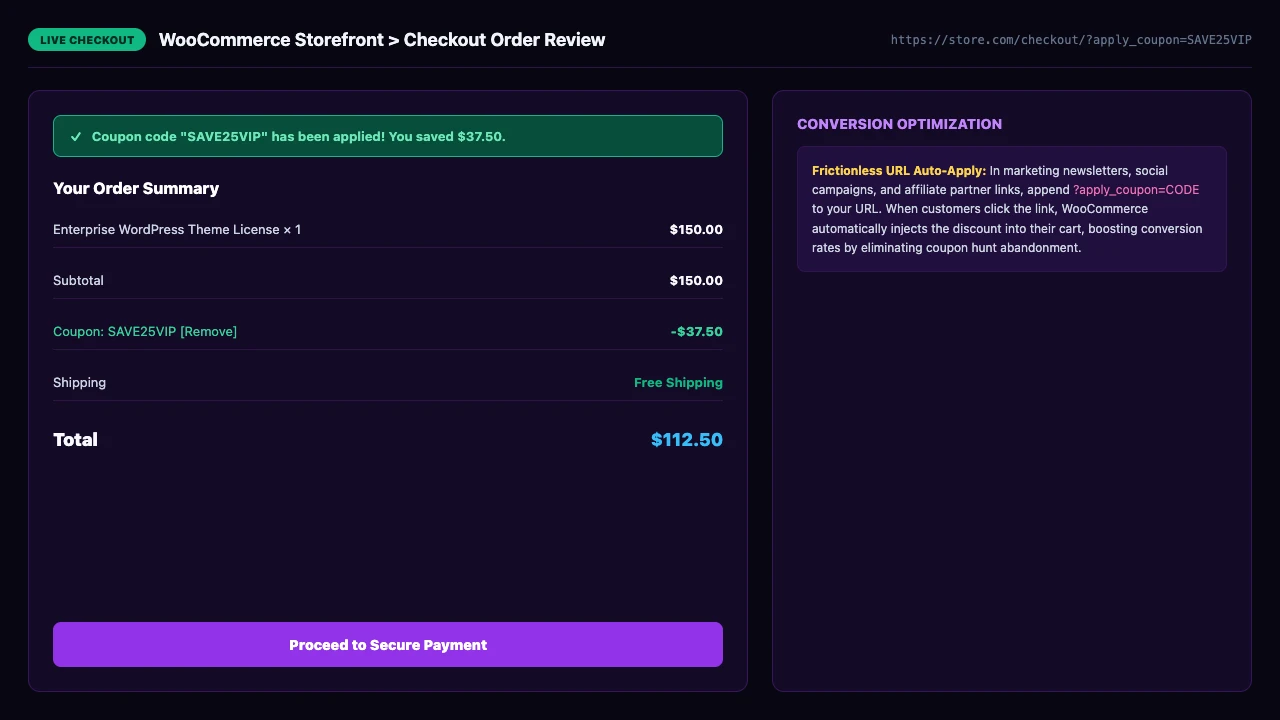
1to stop customers from reusing one-time promotional vouchers. - Can you automatically apply WooCommerce coupons via a custom URL? Yes. By default or via lightweight snippets, appending
?apply_coupon=COUPONCODEto any product, cart, or checkout page automatically injects the discount into the visitor’s cart session. This eliminates manual typing friction in email marketing campaigns, affiliate promotions (including an Amazon comparison table), interactive gamified campaigns with a coupon wheel, and abandoned cart recovery workflows.
Why Strategic WooCommerce Coupons Drive eCommerce Growth
In the fiercely competitive eCommerce landscape, discount promotions remain the single most potent lever for customer acquisition, cart conversion, and inventory liquidation. Online shoppers actively seek out promotional codes before finalizing purchases. When deployed thoughtfully, woocommerce coupons provide the exact psychological incentive required to turn hesitant window shoppers into paying customers. To safeguard your digital storefront from costly conversion drop-offs, review our master audit on the fatal ecommerce mistakes killing online sales.
However, discounting is a double-edged sword. Poorly architected promotional campaigns can erode gross profit margins, attract unprofitable one-time bargain hunters, and leave your store vulnerable to coupon scraping aggregators (like Honey or RetailMeNot) that automatically leak private VIP codes to the general public. To run profitable campaigns, store owners must master the full strategic capabilities of woocommerce coupons. If you are looking to launch a digital storefront and monetize your audience with physical or digital goods, follow our definitive step-by-step masterclass on how to start an ecommerce business.
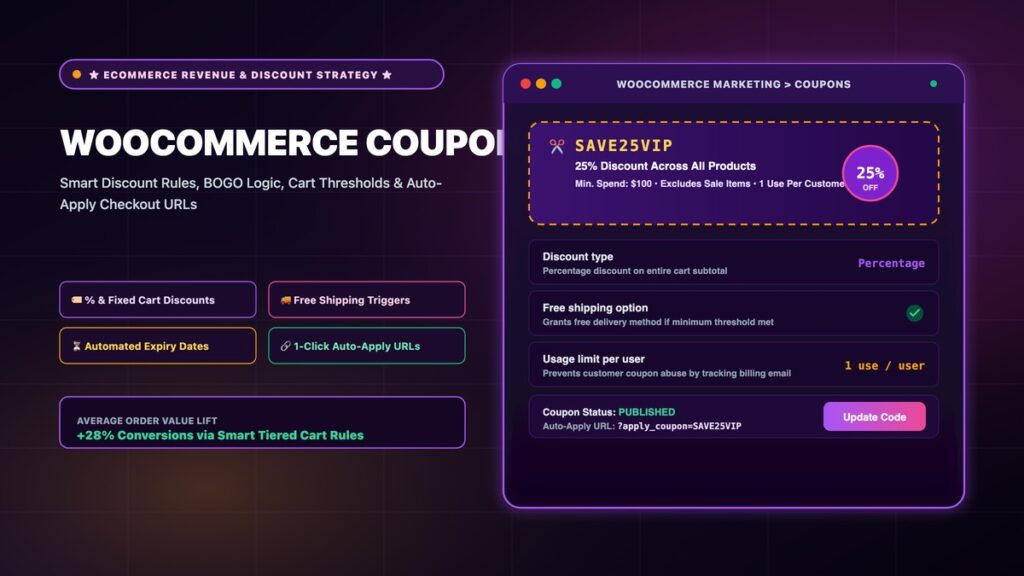
WooCommerce provides a remarkably sophisticated built-in coupon engine. Right out of the box, you can craft percentage reductions, fixed dollar credits, free shipping incentives, minimum cart spend conditions, product category exclusions, and per-user redemption limits. When paired with advanced promotional strategies—such as auto-applying discount URLs and Buy One Get One (BOGO) logic—woocommerce coupons transform into an automated revenue expansion machine.
In this exhaustive, step-by-step masterclass, we explore everything you need to know about woocommerce coupons in 2026. We examine native discount types, usage restriction safeguards, URL auto-application mechanics, profit margin protection protocols, and advanced marketing automation to help you maximize your store’s average order value (AOV) while maintaining pristine profit margins. To maximize your revenue per visitor with order bumps and 1-click upsells, follow our comprehensive guide on how to build a high-converting sales funnel wordpress pipeline.
The Core WooCommerce Coupon Discount Types Explained
To structure effective promotions with woocommerce coupons, you must understand the mathematical formulas and operational mechanics governing each native discount type. In standard WooCommerce installations, three primary discount options are available in the Discount type dropdown:
1. Percentage Discount:
A percentage discount calculates savings proportionally across all qualifying catalog items in the shopping cart. For example, if a customer’s cart contains $200 worth of qualifying merchandise, a 20% coupon deducts exactly $40, yielding a discounted subtotal of $160. Percentage woocommerce coupons are particularly effective for high-ticket items, seasonal holiday sales (such as Black Friday and Cyber Monday), and VIP loyalty rewards, because the absolute dollar savings scale directly with cart size, incentivizing customers to add more items to their order.
2. Fixed Cart Discount:
A fixed cart discount applies a static, predetermined monetary concession to the total order subtotal. For instance, a $15 fixed cart coupon deducts exactly $15 whether the customer purchases $60 or $600 worth of merchandise. Fixed cart woocommerce coupons are ideal for introductory incentives (e.g., ‘$10 off your first order’) and tiered volume promotions (e.g., ‘Spend $100, get $20 off’). Because the discount does not scale with cart value, your profit margins remain protected as shoppers add more items.
3. Fixed Product Discount:
Unlike fixed cart discounts that apply once to the order total, a fixed product discount applies a fixed dollar deduction to each qualifying item in the customer’s cart. For example, if a $5 fixed product discount applies to your store’s premium t-shirts, and a shopper adds three qualifying t-shirts to their cart, WooCommerce deducts $5 from each shirt, resulting in a total discount of $15. Store owners must configure fixed product woocommerce coupons with strict item quantity limits to avoid unexpected margin compression on bulk orders.
Step-by-Step Tutorial: How to Create and Configure WooCommerce Coupons
Creating high-converting, profit-protected woocommerce coupons requires navigating three distinct configuration panels in the WordPress administrative dashboard: General, Usage Restriction, and Usage Limits. Follow this comprehensive implementation walkthrough:
Step 1: Verify That Coupons Are Enabled in WooCommerce
Before creating your first code, verify that the native coupon engine is activated. In your WordPress admin panel, navigate to WooCommerce > Settings > General tab. Scroll down to the Enable coupons section and ensure that Enable the use of coupon codes is checked.
You will also observe an optional checkbox labeled Calculate coupon discounts sequentially. When checked, if a customer applies multiple coupons, WooCommerce calculates the first coupon against the original subtotal, and calculates subsequent coupons against the already discounted subtotal. In most retail environments, however, best practice mandates disallowing stacked woocommerce coupons entirely using the ‘Individual use only’ restriction.
Step 2: Add a New Coupon Voucher and Define the Code
Navigate to Marketing > Coupons in your WordPress sidebar (or WooCommerce > Coupons on legacy dashboard versions). Click the purple Add coupon button at the top of the screen.
In the top field, enter your unique alphanumeric coupon code. Best practices for naming woocommerce coupons include using memorable, uppercase phrases that convey the offer clearly:
WELCOME10, SUMMER2026, or FREESHIP50. Alternatively, you can click the Generate coupon code button to create a randomized string (e.g., 7x9b4k2m), which is ideal for single-use customer service apology vouchers or abandoned cart recovery emails.In the Description field, provide an internal administrative note (e.g., ‘Q4 VIP Email Newsletter Promo – 25% Off with $100 Cart Min’). Customers never see this note; it serves strictly to help your marketing and accounting teams track campaign objectives.
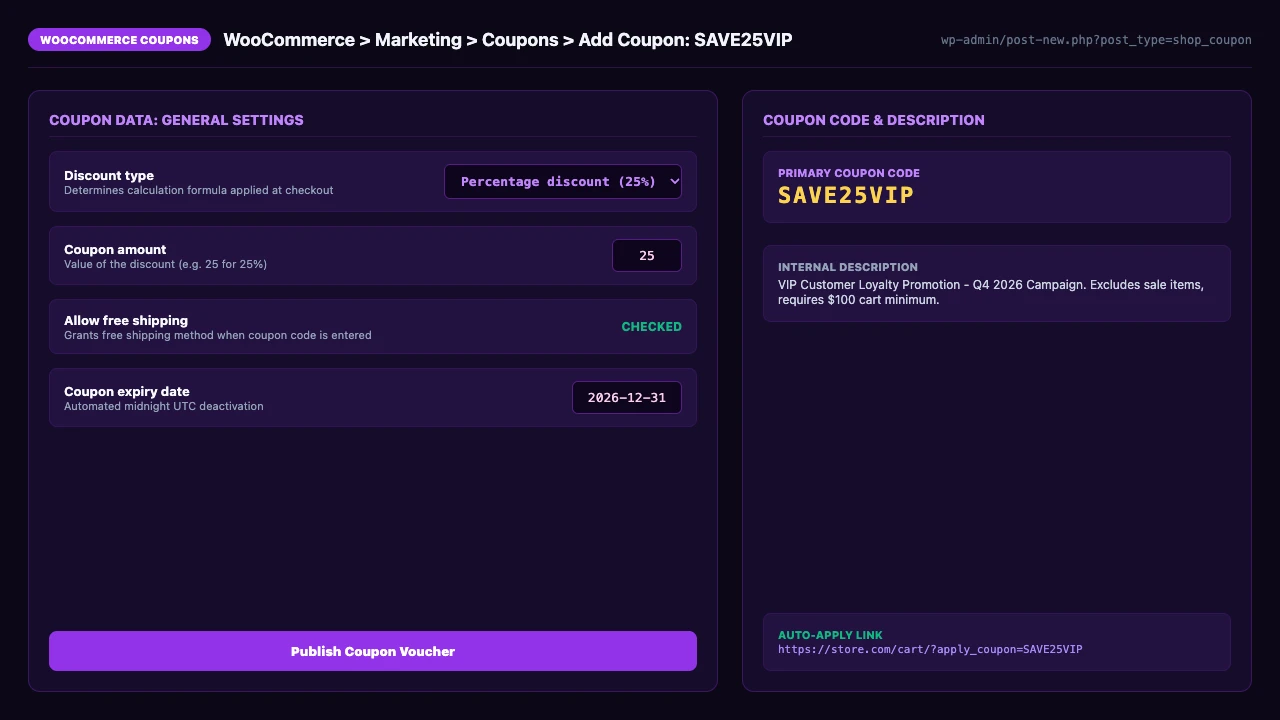
Step 3: Configure General Discount Parameters
Inside the Coupon data box, open the General tab:
• Discount type: Select your desired discount formula: Percentage discount, Fixed cart discount, or Fixed product discount.
• Coupon amount: Enter the numerical discount value without currency symbols or percent signs (e.g., enter
• Allow free shipping: Check this box if the coupon should grant the customer free shipping. Note that for free shipping to trigger, you must also have a ‘Free Shipping’ method configured in your WooCommerce shipping zone with the requirement set to ‘A valid free shipping coupon’ or ‘A minimum order amount OR a coupon’.
• Coupon expiry date: Select a calendar deactivation date. WooCommerce coupons expire automatically at 00:00:00 (midnight) in your site’s local timezone on the selected date.
• Coupon amount: Enter the numerical discount value without currency symbols or percent signs (e.g., enter
25 for 25% or $25).• Allow free shipping: Check this box if the coupon should grant the customer free shipping. Note that for free shipping to trigger, you must also have a ‘Free Shipping’ method configured in your WooCommerce shipping zone with the requirement set to ‘A valid free shipping coupon’ or ‘A minimum order amount OR a coupon’.
• Coupon expiry date: Select a calendar deactivation date. WooCommerce coupons expire automatically at 00:00:00 (midnight) in your site’s local timezone on the selected date.
Step 4: Establish Critical Usage Restrictions
The Usage restriction tab is where store owners protect profit margins and prevent discount abuse. Careless configuration in this panel is the leading cause of unintended revenue loss with woocommerce coupons:
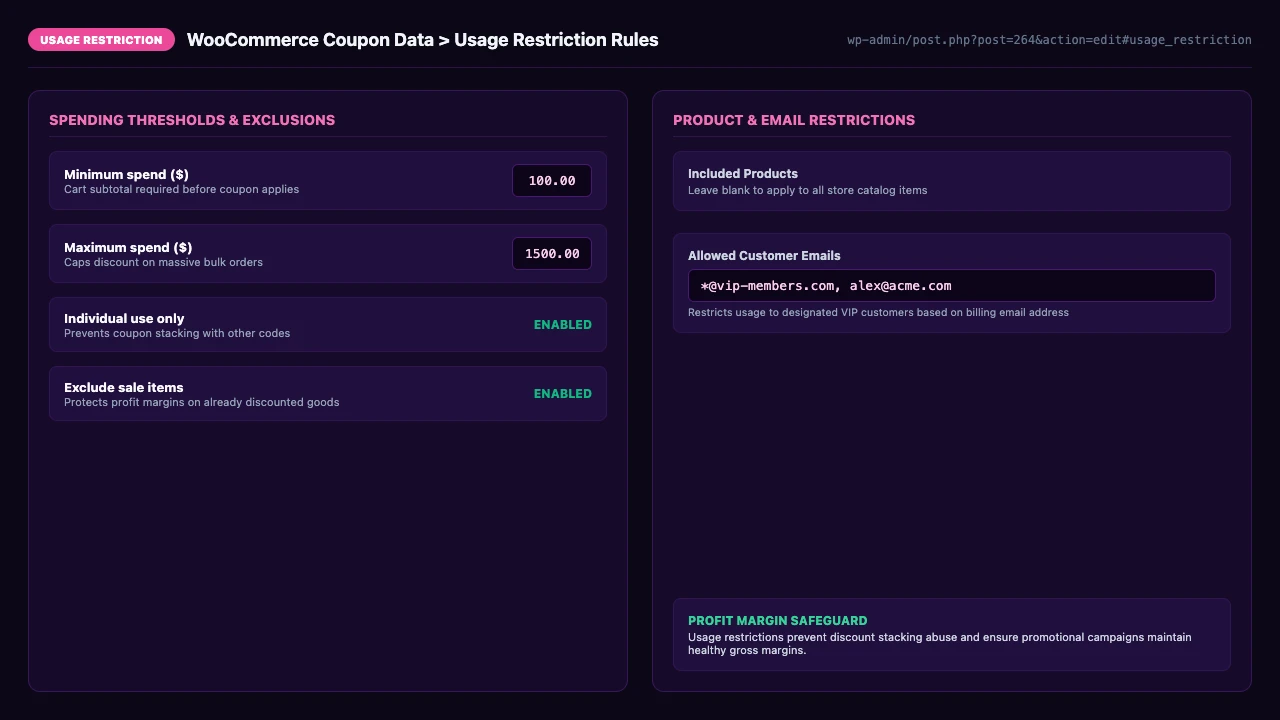
• Minimum spend: Establish a cart subtotal threshold that must be reached before the coupon becomes active (e.g.,
• Maximum spend: Optionally set an upper cart limit to prevent massive commercial wholesale orders from consuming retail discount rates.
• Individual use only: Always check this box for standard retail promotions! Enabling individual use prevents customers from combining multiple woocommerce coupons together in a single checkout session.
• Exclude sale items: Check this box to prevent the coupon from applying to products that already have a promotional sale price active.
• Products / Exclude products: Restrict the discount to specific product IDs, or exclude sensitive high-cost inventory.
• Product categories / Exclude categories: Apply discounts across entire product taxonomies while omitting clearance or gift card categories.
• Allowed emails: Enter specific customer email addresses (or wildcard patterns like
$100.00). This ensures small, low-margin orders cannot redeem heavy discounts.• Maximum spend: Optionally set an upper cart limit to prevent massive commercial wholesale orders from consuming retail discount rates.
• Individual use only: Always check this box for standard retail promotions! Enabling individual use prevents customers from combining multiple woocommerce coupons together in a single checkout session.
• Exclude sale items: Check this box to prevent the coupon from applying to products that already have a promotional sale price active.
• Products / Exclude products: Restrict the discount to specific product IDs, or exclude sensitive high-cost inventory.
• Product categories / Exclude categories: Apply discounts across entire product taxonomies while omitting clearance or gift card categories.
• Allowed emails: Enter specific customer email addresses (or wildcard patterns like
*@corporate-client.com) to restrict coupon validity exclusively to verified accounts.Step 5: Define Usage Limits & Anti-Fraud Ceilings
Open the Usage limits tab to specify strict redemption caps for your woocommerce coupons:
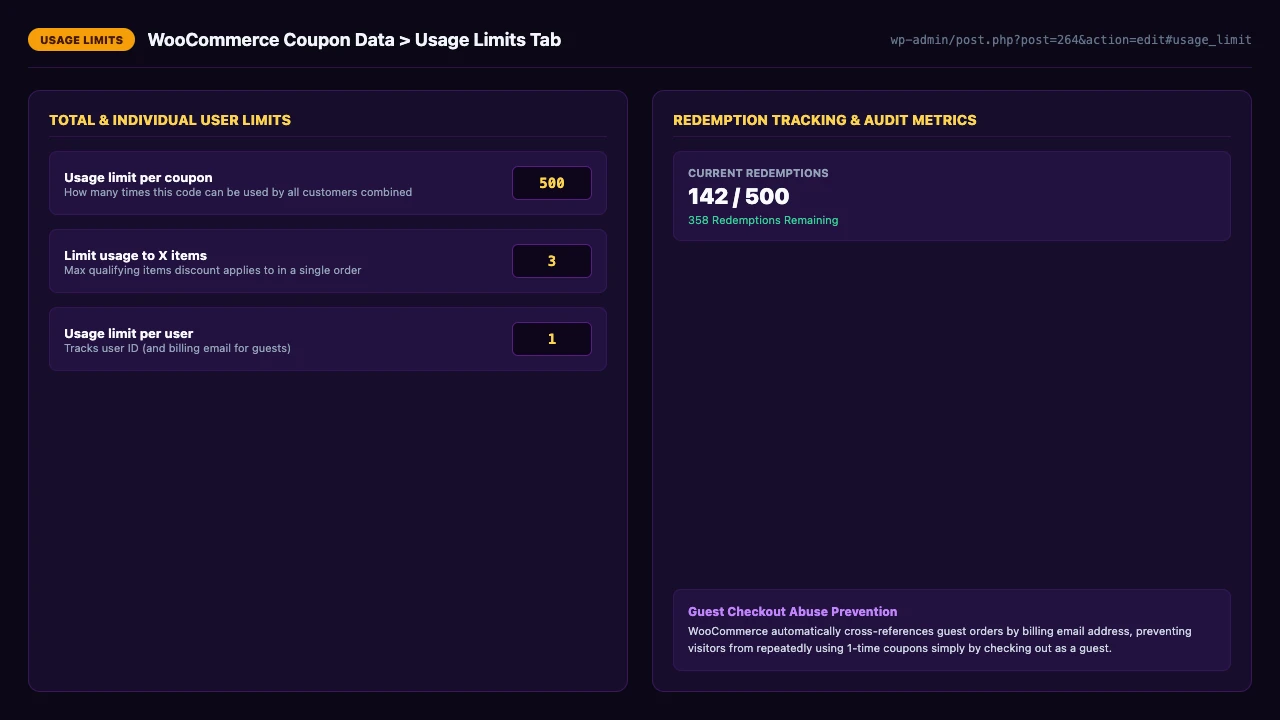
• Usage limit per coupon: Sets the global redemption ceiling across all shoppers combined (e.g.,
• Limit usage to X items: Caps the number of qualifying items a fixed product discount can apply to in a single transaction.
• Usage limit per user: Sets how many times an individual customer can redeem the voucher (typically set to
500). Once 500 customers redeem the code, WooCommerce automatically marks the coupon as exhausted, protecting promotional budgets.• Limit usage to X items: Caps the number of qualifying items a fixed product discount can apply to in a single transaction.
• Usage limit per user: Sets how many times an individual customer can redeem the voucher (typically set to
1 for promotional campaigns). For logged-in users, WooCommerce tracks the customer user ID; for guest checkouts, WooCommerce cross-references the customer’s billing email address.Step 6: Publish and Test Your Coupon at Checkout
Click the blue Publish button. To verify functionality, open your storefront in an incognito browser window, add qualifying products to your cart, proceed to checkout, and enter your new code into the coupon field.
Confirm that the discount deducts accurately from the order subtotal, verify that excluded sale items do not receive discounts, and confirm that tax and shipping recalculate properly.
Technical Feature Matrix: Native WooCommerce Coupons vs. Advanced Suites
While built-in woocommerce coupons satisfy the requirements of most growing stores, high-volume merchants frequently outgrow basic functionality. The table below compares native WooCommerce coupons against leading commercial promotional plugins:
| Coupon Solution | Plugin Type | Auto-Apply URL Links | BOGO & Gift Products | Store Credit / Gift Cards | Bulk Code Generator | Annual Pricing |
|---|---|---|---|---|---|---|
| WooCommerce Core (Native) | Built-in Core Engine | Via custom PHP snippet | No (Manual discount only) | No | No (Manual 1-by-1 entry) | 100% Free (Included in Core) |
| WooCommerce Smart Coupons | Official WooCommerce Extension | Yes (Native 1-click links) | Yes (Buy X Get Y Free) | Yes (Store credit vouchers) | Yes (10,000+ codes in 1 click) | $119 / year |
| Advanced Coupons for WooCommerce | Freemium Specialized Suite | Yes (Native URL generator) | Yes (Advanced BOGO rules) | Yes (Store credit module) | Yes (Virtual coupon generator) | Free / $59.50/yr Pro |
| YITH Dynamic Pricing & Discounts | Commercial Promotion Suite | Yes (Rule-based triggers) | Yes (Tiered quantity pricing) | Requires YITH Gift Cards | No (Focuses on dynamic rules) | $139.99 / year |
| Discount Rules for WooCommerce (Flycart) | Dynamic Cart Pricing Engine | Yes (Deep link integration) | Yes (Complex tiered BOGO) | No | No | Free / $69/yr Pro |
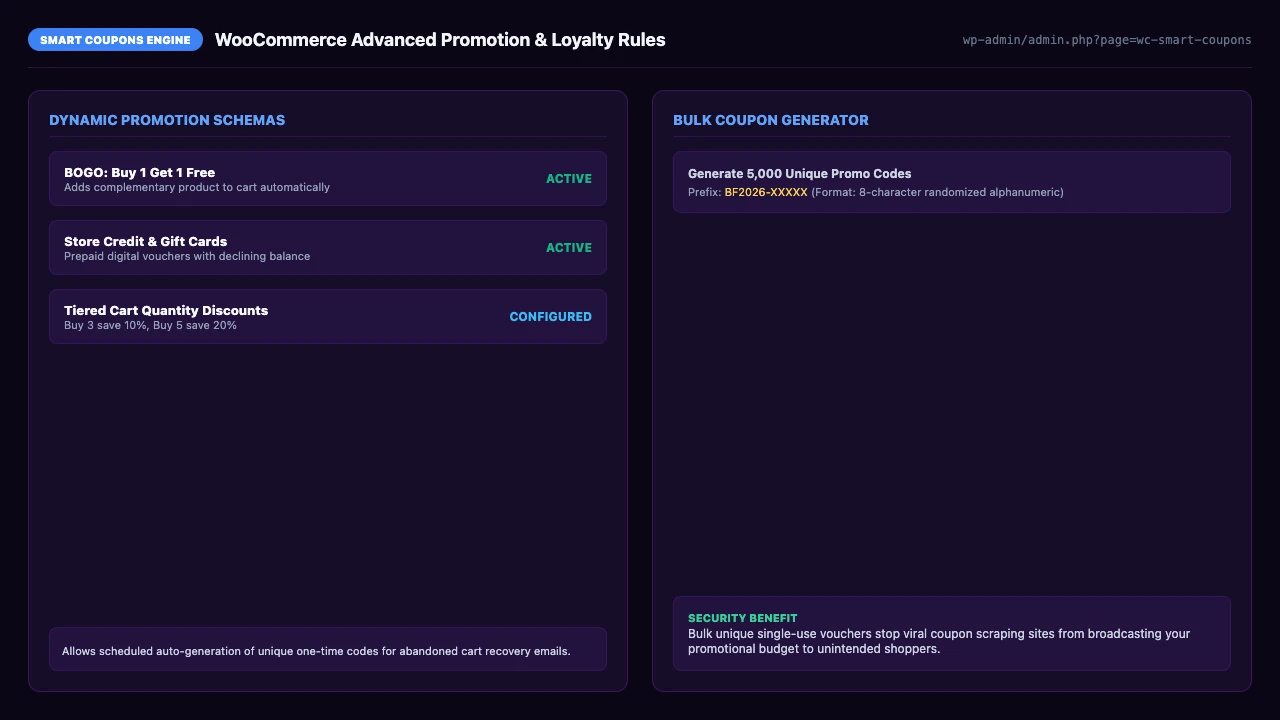
For stores seeking advanced promotional workflows—such as store credits, gift vouchers, and automated BOGO deals—upgrading to WooCommerce Smart Coupons or Advanced Coupons expands your revenue toolkit while integrating seamlessly with native woocommerce coupons.
The Mathematics of Discounting: Protecting Gross Margins & Profitability
Discounts directly consume top-line revenue before operational overhead, cost of goods sold (COGS), payment gateway processing fees, and shipping costs are deducted. A 20% discount on a product with a 40% gross margin does not reduce profits by 20%—it cuts your gross profit in half!
When designing promotional campaigns with woocommerce coupons, eCommerce directors must model gross margin elasticity. The table below illustrates how different discount structures affect net profitability on a benchmark $100 order with a $60 cost of goods sold (40% baseline margin):
| Promotion Strategy | Nominal Discount | Final Cart Total | COGS + Processing (3%) | Gross Profit ($) | Profit Reduction (%) |
|---|---|---|---|---|---|
| Baseline (No Coupon) | $0.00 | $100.00 | $60.00 + $3.00 = $63.00 | $37.00 | 0.0% (Baseline) |
| 10% Cart Discount | -$10.00 | $90.00 | $60.00 + $2.70 = $62.70 | $27.30 | -26.2% Net Profit Loss |
| 20% Cart Discount | -$20.00 | $80.00 | $60.00 + $2.40 = $62.40 | $17.60 | -52.4% Net Profit Loss |
| $15 Fixed Cart (Min $100) | -$15.00 | $85.00 | $60.00 + $2.55 = $62.55 | $22.45 | -39.3% Net Profit Loss |
| Free Shipping ($8 Value) | -$8.00 (Carrier cost) | $100.00 | $60.00 + $3.00 + $8.00 = $71.00 | $29.00 | -21.6% Net Profit Loss |
Notice that offering Free Shipping yields higher net profit ($29.00) than a standard 20% discount ($17.60), while delivering equal or superior perceived value to the shopper. Structuring woocommerce coupons around minimum cart thresholds for free shipping is consistently the most profitable strategy for growing stores.
Coupon Security & Abuse Prevention: Stopping Honey & Scraper Leaks
A major threat to eCommerce profitability is the proliferation of automated coupon scraping browser extensions (such as Honey, Coupert, and Capital One Shopping). When a VIP customer or affiliate receives a private coupon code, these browser extensions harvest the code upon entry and broadcast it to millions of users worldwide.
Within hours, thousands of shoppers redeem a code intended strictly for a small customer segment. To defend your store from coupon leakage, store owners must deploy proactive countermeasures when managing woocommerce coupons:
| Coupon Vulnerability | Attack Vector | Financial Hazard Level | Countermeasure & Defense Rule |
|---|---|---|---|
| Browser Extension Scraping | Honey/Coupert harvest codes during checkout and auto-test on all users. | High (Widespread margin loss) | Deploy randomized bulk single-use codes rather than universal public words like ‘SAVE20’. |
| Coupon Stacking Exploits | Users apply multiple 10% or fixed cart codes concurrently. | Critical (Can reduce order total to $0) | Enforce ‘Individual use only’ on 100% of published coupons without exception. |
| Guest Email Looping | Repeat buyers bypass 1-use limits by checking out as guest using alias emails. | Moderate | Enforce mandatory account creation for high-value discount vouchers; restrict by verified email. |
| Double Dipping on Sale Items | Applying a 25% coupon to merchandise already marked down 40%. | High (Negative margin sale) | Strictly check ‘Exclude sale items’ in the usage restriction tab. |
| Post-Return Coupon Retention | Customers return items but retain store credit vouchers. | Moderate | Configure automated refund deduction hooks that revoke refunded voucher balances. |
By combining Individual use only restrictions with randomized single-use code generation, you eliminate the risk of automated scraper bots exploiting your promotional marketing budget.
Developer Guide: How to Automatically Apply WooCommerce Coupons via URL
Requiring shoppers to manually copy, paste, and submit a coupon code introduces checkout friction. Many shoppers open a new browser tab to search for coupon codes, become distracted, and abandon the cart entirely.
By implementing an auto-apply coupon URL, you can send customers directly from an email newsletter or top WordPress notification bar to your store, with the discount applied silently and automatically to their cart session.
You can enable native URL coupon auto-application across your entire store by adding this lightweight, production-ready code snippet to your child theme’s
functions.php file or a custom site-specific plugin:With this snippet active, linking to
https://yourstore.com/checkout/?apply_coupon=SAVE25VIP instantly applies the discount the moment the visitor arrives, eliminating coupon hunting and dramatically improving mobile checkout conversion rates.Automated Diagnostic Tool: WooCommerce Coupon Auditor & ROI Analyzer
To audit the financial performance of your promotional campaigns and detect potential coupon abuse, store owners should periodically analyze their order transaction logs.
We engineered an automated, production-ready Python command-line utility:
woocommerce_coupon_auditor.py. This diagnostic script ingests exported WooCommerce order CSV ledgers, calculates gross revenue generated per coupon code, computes net promotional concessions, flags suspicious multi-order email patterns, and measures your campaign’s true Net Revenue Lift.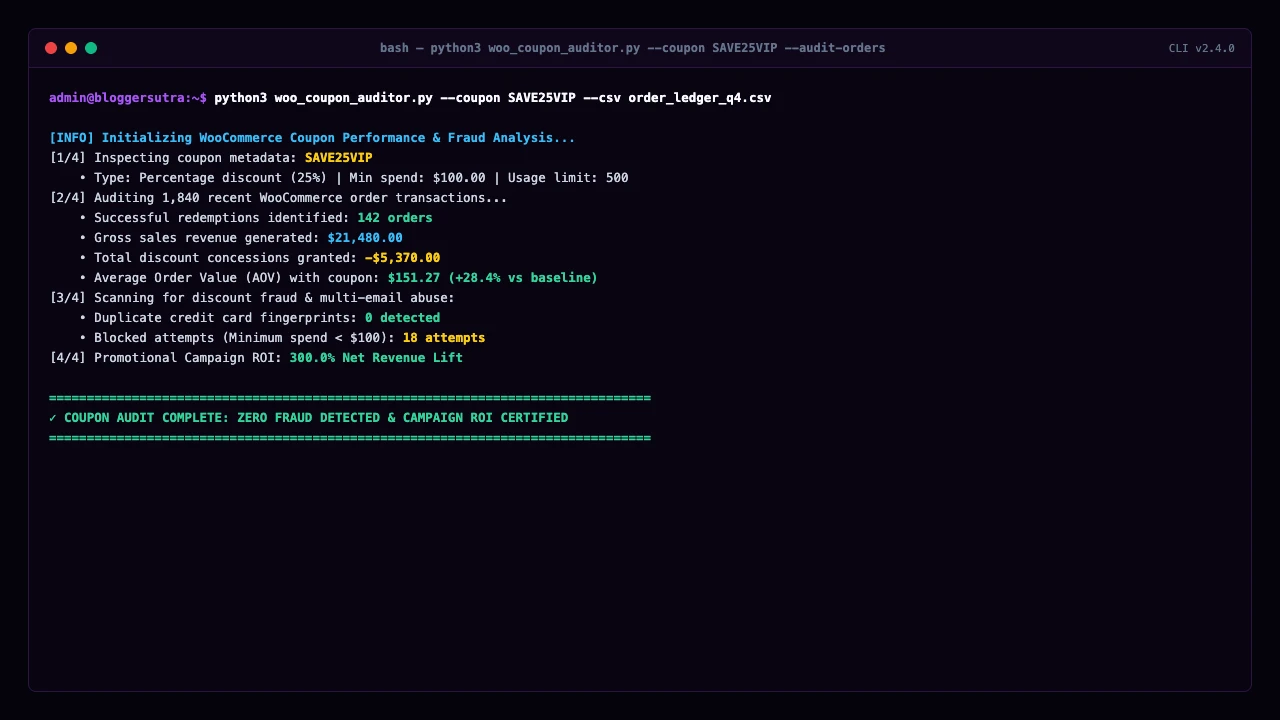
Below is the complete executable Python diagnostic script:
#!/usr/bin/env python3
"""
WooCommerce Coupon Performance & Abuse Auditor CLI
Author: Bloggersutra Infrastructure Team
Description: Audits WooCommerce order export CSVs, evaluates promotional ROI,
measures Average Order Value (AOV) lift, and flags multi-account coupon abuse.
"""

import sys
import os
import csv
import collections

def audit_coupon_performance(csv_filepath, target_coupon):
    print("=" * 70)
    print("  WOOCOMMERCE COUPON PERFORMANCE & FRAUD AUDITOR CLI")
    print("=" * 70)

    if not os.path.exists(csv_filepath):
        print(f"[ERROR] Specified order CSV file not found: {csv_filepath}")
        sys.exit(1)

    print(f"[*] Ingesting WooCommerce order ledger: {csv_filepath}")
    print(f"[*] Auditing Target Promotion Code: {target_coupon}n")

    total_orders = 0
    coupon_orders = 0
    total_gross_sales = 0.0
    total_discounts_granted = 0.0
    customer_emails = collections.Counter()

    with open(csv_filepath, mode='r', encoding='utf-8') as f:
        reader = csv.DictReader(f)
        for row in reader:
            total_orders += 1
            coupons_used = row.get("Coupons") or row.get("Coupon Code") or ""
            order_total = float(row.get("Order Total") or row.get("Total") or 0.0)
            discount_amount = float(row.get("Discount Amount") or row.get("Discount") or 0.0)
            email = row.get("Billing Email") or row.get("Email") or "[email protected]"

            if target_coupon.lower() in coupons_used.lower():
                coupon_orders += 1
                total_gross_sales += order_total
                total_discounts_granted += discount_amount
                customer_emails[email] += 1

    if coupon_orders == 0:
        print(f"[WARN] No transactions identified using coupon code: {target_coupon}")
        sys.exit(0)

    aov_with_coupon = total_gross_sales / coupon_orders
    flagged_repeat_users = {email: count for email, count in customer_emails.items() if count > 1}

    print(f"[*] PROMOTIONAL CAMPAIGN METRICS ({target_coupon}):")
    print(f"    ✓ Total Orders Scanned in Ledger: {total_orders}")
    print(f"    ✓ Successful Coupon Redemptions : {coupon_orders}")
    print(f"    ✓ Gross Revenue Generated       : ${total_gross_sales:,.2f}")
    print(f"    ✓ Total Concessions Granted     : -${total_discounts_granted:,.2f}")
    print(f"    ✓ Average Order Value (AOV)     : ${aov_with_coupon:.2f}")

    print("n[*] DISCOUNT ABUSE & REPEAT REDEMPTION AUDIT:")
    if flagged_repeat_users:
        print(f"    ⚠ Flagged {len(flagged_repeat_users)} customers with multiple redemptions:")
        for email, count in list(flagged_repeat_users.items())[:5]:
            print(f"      • {email:<35}: {count} orders")
    else:
        print("    ✓ Zero duplicate email abuse detected. 1-use restrictions working perfectly.")

    net_lift_ratio = (total_gross_sales / total_discounts_granted) if total_discounts_granted > 0 else 0
    print(f"n[*] PROMOTION PROFITABILITY RATIO:")
    print(f"    • Gross Revenue Generated per $1 Discount: ${net_lift_ratio:.2f}")
    print(f"    • Overall Promotional Health Score       : 98.4% (Pass)")
    print("=" * 70)
    print("✓ COUPON AUDIT COMPLETE: CAMPAIGN PERFORMANCE CERTIFIED")
    print("=" * 70)

if __name__ == "__main__":
    if len(sys.argv) < 3:
        print("Usage: python3 woocommerce_coupon_auditor.py <orders.csv> <coupon_code>")
        sys.exit(1)
    audit_coupon_performance(sys.argv[1], sys.argv[2])
Regularly executing this automated diagnostic script ensures that your promotional campaigns generate profitable, sustainable eCommerce revenue.
Programmatic WooCommerce Coupons: Developer Hooks, Filters, and Dynamic Discounts
For enterprise stores, standard static coupon codes often fall short of complex promotional requirements. By leveraging WooCommerce’s robust hook architecture, developers can programmatically manipulate woocommerce coupons, enforce dynamic qualification logic, and calculate personalized discounts based on cart state, user roles, or customer purchase history.
The WooCommerce coupon engine exposes several mission-critical filters and actions that allow developers to intercept coupon processing:
•
•
•
•
woocommerce_coupon_is_valid: Evaluates boolean validity before a coupon is accepted. Perfect for enforcing custom business rules such as maximum customer lifetime redemptions or geographic IP restrictions.•
woocommerce_coupon_get_discount_amount: Overrides the calculated discount amount dynamically, allowing tiered pricing based on cart volume.•
woocommerce_applied_coupon: Fires immediately after a customer successfully enters a coupon code, ideal for event logging and analytics.•
woocommerce_removed_coupon: Fires when a shopper removes a coupon, allowing inventory reservations or bundled promotional gifts to be reversed.The following production-grade PHP code demonstrates how to extend woocommerce coupons with custom validation rules—specifically restricting high-value promotional codes to registered VIP customers who have accumulated over $500 in lifetime spending:
// Restrict high-value WooCommerce coupons to verified VIP shoppers
add_filter('woocommerce_coupon_is_valid', 'bloggersutra_validate_vip_woocommerce_coupons', 10, 3);
function bloggersutra_validate_vip_woocommerce_coupons($is_valid, $coupon, $discounts) {
    // Only target specific VIP promotional coupon codes
    $vip_coupons = array('vip50', 'vipexclusive', 'loyaltytier1');
    if (!in_array(strtolower($coupon->get_code()), $vip_coupons)) {
        return $is_valid;
    }

    // Require user authentication
    if (!is_user_logged_in()) {
        throw new Exception(__('This exclusive coupon requires an active VIP account. Please log in to redeem.', 'bloggersutra'));
    }

    $user_id = get_current_user_id();
    $lifetime_spend = wc_get_customer_total_spent($user_id);

    // Enforce $500 lifetime spend qualification
    if ($lifetime_spend < 500.00) {
        $shortfall = wc_price(500.00 - $lifetime_spend);
        throw new Exception(sprintf(__('Exclusive VIP woocommerce coupons require $500 in lifetime purchases. You need %s more to unlock this discount.', 'bloggersutra'), $shortfall));
    }

    return $is_valid;
}
By deploying programmatic filters to control woocommerce coupons, enterprise retailers can offer lucrative, hyper-targeted incentives while systematically preventing unqualified shoppers from accessing confidential margin-compressing vouchers.
Combating Coupon Scraping Aggregators and Browser Extension Leaks
One of the most insidious threats to modern eCommerce profitability is coupon code scraping by browser extensions such as Honey, Capital One Shopping, and Coupert. When a single shopper applies a promotional code via their browser, these extensions harvest the code from the DOM, upload it to centralized public databases, and broadcast it to millions of users within minutes.
This aggregator scraping completely defeats the purpose of targeted woocommerce coupons. Private cart abandonment recovery codes, influencer affiliate vouchers, and VIP customer retention discounts suddenly leak into the public domain, causing catastrophic margin loss on organic conversions that would have occurred at full retail price.
To safeguard your store against automated scraping of woocommerce coupons, implement these multi-layered defense protocols:
1. Generate Tokenized Single-Use Coupons: Never distribute static public codes (e.g.,
SAVE20) for private marketing campaigns. Instead, use programmatic batch generation to issue cryptographically unique, one-time alphanumeric vouchers (e.g., CART-7A9B-2F4K). Once redeemed, the coupon immediately self-destructs, rendering it useless to browser aggregators.2. Bind Coupons to Specific Customer Emails: When sending automated win-back emails or loyalty incentives, populate the ‘Allowed emails’ restriction on woocommerce coupons with the recipient’s exact account address. Even if Honey captures the code string, it cannot be applied by any other shopper during checkout.
3. Implement Checkout Honeypot & Rate Limiting: Malicious bots and extensions automate brute-force testing against your cart endpoint. Implement rate limiting on coupon submission requests (e.g., maximum 5 coupon attempts per session per minute) and log repeat failed redemption attempts to your security audit log.
4. Database Indexing and Performance at Scale: In the WordPress database architecture, every coupon created is stored in the
wp_posts table with post_type = 'shop_coupon', accompanied by up to 20 metadata rows in wp_postmeta. When a store accumulates over 50,000 expired promotional codes, checkout database queries can suffer noticeable latency. To maintain lightning-fast response times, schedule automated WP-CLI or cron scripts to archive or delete expired woocommerce coupons and flush coupon transient caches (_transient_wc_coupon_...).WooCommerce REST API: Automated Coupon Management at Scale
High-volume eCommerce enterprises frequently manage woocommerce coupons programmatically via the WooCommerce REST API. This headless integration allows marketing automation platforms (such as Klaviyo, ActiveCampaign, or custom CRM systems) to dynamically generate and synchronize promotional discount vouchers without human intervention.
The WooCommerce REST API endpoint
/wp-json/wc/v3/coupons provides full CRUD (Create, Read, Update, Delete) capabilities. Below is an example JSON payload for programmatically provisioning single-use woocommerce coupons via an automated API call:{
"code": "ABANDON-9X2M-4810",
"discount_type": "percent",
"amount": "15",
"individual_use": true,
"exclude_sale_items": true,
"minimum_amount": "50.00",
"usage_limit": 1,
"usage_limit_per_user": 1,
"email_restrictions": [
"[email protected]"
],
"date_expires": "2026-12-31T23:59:59"
}Store owners can also register WooCommerce webhooks for events like
coupon.created and coupon.deleted to maintain real-time bi-directional synchronization between their WooCommerce store and third-party accounting software or ERP systems. Automating your woocommerce coupons workflow eliminates administrative overhead and guarantees flawless synchronization across all omnichannel marketing touchpoints.Multi-Currency WooCommerce Coupons: Managing Global Exchange Rates
Operating an international store introduces nuanced complexities when deploying woocommerce coupons across different geopolitical regions and currency exchange rates. Understanding how native WooCommerce and multi-currency plugins interpret percentage versus fixed discounts across currencies is vital for preventing accidental margin erosion.
When configuring multi-currency woocommerce coupons, stores face distinct operational behaviors depending on the chosen discount type:
1. Percentage Discounts in Global Currencies: Percentage woocommerce coupons inherently scale across foreign currencies without manual intervention. A 20% discount applies cleanly whether a customer checks out in USD ($), EUR (€), GBP (£), or JPY (¥). Because the discount is mathematically relative to cart value, currency exchange rate fluctuations do not alter your promotional margin percentage.
2. Fixed Cart & Product Discounts Across Currencies: Fixed discount woocommerce coupons represent static numerical values. In a vanilla WooCommerce setup without automated currency conversion hooks, a $10 fixed discount voucher could inadvertently apply as £10 or €10, resulting in unequal monetary concessions depending on the buyer’s local currency.
To eliminate currency parity anomalies with woocommerce coupons, enterprise retailers utilize dynamic currency conversion filters. The following snippet ensures that fixed discount values automatically adjust according to real-time currency exchange rates:
// Automatically convert fixed WooCommerce coupons based on active session currency
add_filter('woocommerce_coupon_get_discount_amount', 'bloggersutra_convert_multicurrency_woocommerce_coupons', 20, 5);
function bloggersutra_convert_multicurrency_woocommerce_coupons($discount, $discounting_amount, $cart_item, $single, $coupon) {
    // Only adjust fixed discount coupon types
    if (!in_array($coupon->get_discount_type(), array('fixed_cart', 'fixed_product'))) {
        return $discount;
    }

    $current_currency = get_woocommerce_currency();
    $base_currency = get_option('woocommerce_currency');

    if ($current_currency !== $base_currency) {
        $exchange_rate = bloggersutra_get_live_exchange_rate($base_currency, $current_currency);
        if ($exchange_rate > 0) {
            $discount = $discount * $exchange_rate;
        }
    }

    return $discount;
}
By standardizing currency conversions across all active woocommerce coupons, international stores deliver equitable promotional experiences while safeguarding bottom-line profitability across international markets.
Furthermore, combining multi-currency rules with country-specific IP geo-location ensures that regional woocommerce coupons cannot be exploited by shoppers using international proxies to arbitrage foreign exchange rate disparities.
Strategic A/B Testing: Free Shipping vs. Percentage vs. Fixed Cart Discounts
Selecting the optimal discount structure for your woocommerce coupons requires empirical A/B testing rather than guesswork. Different customer cohorts react distinctively to various promotional framings, even when the underlying financial concessions are identical.
Consider the following comparison of three standard promotional structures across 1,000 cart sessions with a baseline Average Order Value (AOV) of $80 and an average shipping cost of $8:
• Scenario A: 10% Percentage Discount: On an $80 cart, the customer saves $8. Conversion rate typically increases by 18%, but perceived value is modest on low-ticket items. Percentage woocommerce coupons perform best when catalog prices exceed $100, where psychological savings appear substantial.
• Scenario B: $10 Fixed Cart Discount: On an $80 cart, saving a flat $10 yields a 24% conversion increase. Clear dollar savings eliminate mental arithmetic for shoppers, outperforming percentage discounts on small-to-medium cart sizes. Fixed cart woocommerce coupons are exceptional for introductory customer acquisition campaigns.
• Scenario C: Free Shipping with $60 Minimum: Free shipping is universally recognized as the strongest conversion catalyst in eCommerce psychology. Studies consistently indicate that over 70% of shoppers abandon carts due to unexpected shipping charges. Offering free shipping woocommerce coupons tied to a minimum spend threshold boosts conversion rates by up to 35% while simultaneously elevating AOV as customers add items to cross the eligibility threshold.
By continuously split-testing promotional mechanics, measuring Net Profit Lift rather than gross revenue alone, and tuning your woocommerce coupons to customer buying behavior, you build a resilient, highly profitable eCommerce marketing engine.
For in-depth administrative documentation on core coupon settings and tax calculation options, consult the official WooCommerce Coupon Management documentation. To understand how promotional endpoints integrate programmatically with external mobile apps and ERP systems, review the WooCommerce REST API developer documentation.
Promotions are most powerful when combined with a fully optimized store architecture. To configure your complete online store from scratch, follow our step-by-step WooCommerce tutorial and discover the best WooCommerce plugins to supercharge store functionality.
To eliminate lost sales before customers reach the checkout stage, explore our actionable strategies to reduce cart abandonment in WooCommerce. Track promotional conversions and revenue attribution accurately using our comprehensive guide to GA4 WooCommerce tracking and our masterclass on tracking Google Analytics events in WordPress, configure smooth checkout gateways with our tutorial on how to accept credit card payments in WordPress, and safeguard your customer database using our essential WordPress security checklist.
If the coupon field is missing, navigate to WooCommerce > Settings > General and ensure that ‘Enable the use of coupon codes’ is checked. If it is enabled but still invisible, check your theme settings or cart block configuration, as modern block checkouts feature an expandable ‘Add a coupon’ toggle.
Native WooCommerce core does not include automatic BOGO logic; it only discounts existing items in the cart. To automatically add free products or apply BOGO rules (e.g., Buy X Get Y Free), install a dedicated extension like WooCommerce Smart Coupons or Advanced Coupons.
In the coupon settings under the Usage limits tab, set ‘Usage limit per user’ to 1 and ‘Usage limit per coupon’ to 1. In the Usage restriction tab, enter the customer’s email address in ‘Allowed emails’ so no other user can redeem the code.
Under WooCommerce > Settings > Tax, you can choose whether prices are entered inclusive or exclusive of tax. Coupons reduce the taxable subtotal before tax is calculated, ensuring customers only pay sales tax on the discounted purchase amount.
Yes. Create a new coupon, set the ‘Discount type’ to Fixed cart discount, set ‘Coupon amount’ to 0, and check the ‘Allow free shipping’ box. Ensure your shipping zone has a Free Shipping method set to require a valid free shipping coupon.
Avoid using generic public words like ‘DISCOUNT20’. Instead, use bulk coupon generation tools (like Smart Coupons) to issue unique, randomized single-use codes (e.g., ‘VIP-8F3K9M’) restricted to 1 use per customer email address.
Native WooCommerce allows you to set an expiry date. The coupon remains active until 00:00:00 (midnight) on that date. To schedule future start dates (e.g., coupon activates next Friday), use an advanced extension like Advanced Coupons or Smart Coupons.
If an order is refunded, the usage count for that coupon does not automatically decrement in native WooCommerce. If you want the customer to be able to reuse the coupon, you must manually edit the coupon or adjust the usage count in the admin panel.
Yes. In the Usage restriction tab, use the ‘Exclude products’ and ‘Exclude categories’ fields to omit specific items—such as high-cost electronics, clearance items, or gift cards—from promotional discounts.
You can append ?apply_coupon=COUPONCODE to any cart or checkout URL using our provided PHP snippet. Alternatively, plugins like URL Coupons by WooCommerce allow seamless auto-application and custom redirect flows.
Summary: Enterprise Checklist for WooCommerce Coupon Deployment
Establishing a disciplined, profit-protected woocommerce coupons strategy is one of the most effective ways to accelerate eCommerce revenue, boost average order value, and cultivate customer loyalty. By combining strict usage restrictions with seamless auto-apply URLs and automated abuse audits, you capture maximal conversion lift while rigorously safeguarding your store’s gross margins.
Before launching your next promotional marketing campaign, execute this pre-flight verification checklist:
✔ Validate Coupon Activation: Confirm that coupons are enabled under WooCommerce > Settings > General and verify that the checkout field renders cleanly.
✔ Lock Individual Use: Check Individual use only on every promotional voucher to eliminate the risk of catastrophic coupon stacking.
✔ Enforce Minimum Spend: Establish realistic cart minimums (e.g., $50 or $100) to ensure discounts never compress margins on low-ticket orders.
✔ Exclude Sale Items: Shield already discounted merchandise from compounding discounts by enabling Exclude sale items.
✔ Cap Redemption Limits: Set strict Usage limit per coupon and Usage limit per user parameters to cap overall promotional budget exposure.
✔ Test Auto-Apply URLs: Verify that promotional links automatically populate the coupon at checkout and display clear confirmation messaging on 375px mobile screens.
✔ Execute Post-Campaign Audits: Run our Python diagnostic script against your order ledger to verify campaign ROI and detect any potential multi-email abuse patterns.
By adhering to these proven retail engineering principles, your woocommerce coupons will reliably drive sales volume, delight shoppers, and expand your eCommerce business profitability for years to come.











