Quick answer
- What is the best WordPress calculator plugin for custom formulas and ROI estimations? For complex mathematical operations, conditional branching, and multi-step quotations, Formidable Forms is the industry benchmark. For interactive assessment funnels using a WordPress quiz plugin or specialized cost estimations with sliders, Calculated Fields Form and Cost Calculator Builder offer robust visual engines. Choosing the right wordpress calculator plugin depends on whether your project requires client-side JavaScript execution, gated lead generation, or direct e-commerce checkout integration.
- Why should websites deploy an interactive calculator instead of standard web forms? Deploying an interactive wordpress calculator plugin delivers instantaneous value to visitors by answering complex financial, technical, or quotation questions in real time. Rather than filling out a generic contact form and waiting 24 hours for a sales rep, users actively engage with dynamic sliders. This interactive experience increases user time-on-page by over 200%, reduces bounce rates, and generates qualified leads whose exact requirements and budget parameters are pre-calculated.
- How do client-side vs server-side calculation engines differ? In a modern wordpress calculator plugin, calculations can execute either client-side via JavaScript or server-side via PHP. Client-side execution delivers instantaneous feedback (<10ms) without page reloads or AJAX roundtrips, making it ideal for interactive sliders and loan amortization schedules. Server-side calculation executes on the WordPress web server, which is essential for proprietary algorithms, hidden profit margins, and secure e-commerce payment checkouts where client-side price tampering must be prevented.
- Can you gate calculator results behind an email lead capture form? Yes. High-converting sales funnels use a wordpress calculator plugin to provide initial interactive feedback while gating detailed financial reports, amortization PDFs, or itemized discount schedules behind an email submission step. This conditional gating mechanism dramatically outperforms traditional squeeze pages, generating lead conversion rates between 14% and 28% across B2B SaaS, real estate, and professional consulting niches.
Static content and passive contact forms are no longer sufficient to capture high-intent buyers in competitive digital markets. Modern website visitors expect instant, interactive answers tailored to their unique circumstances. Whether a prospective homebuyer is assessing monthly mortgage amortization, a corporate procurement director is modeling SaaS software ROI, or an e-commerce customer is configuring custom dimensions for bespoke furniture, deploying a specialized wordpress calculator plugin transforms passive browsing into an engaging, high-converting consultative sales experience.
An interactive calculator functions as an automated sales engineer working 24/7 on your WordPress site. By allowing visitors to adjust input variables—such as budget, timeline, square footage, interest rates, and feature tiers—a well-engineered wordpress calculator plugin delivers instant clarity while simultaneously capturing rich qualifying data. Instead of receiving a vague message saying ‘Please send a quote,’ your sales CRM receives exact mathematical specifications, projected budgets, and segmented lead scores directly from the calculator submission.

However, selecting and deploying the right wordpress calculator plugin requires navigating nuanced technical trade-offs. Different solutions excel in distinct areas: some specialize in lightweight visual estimation sliders, others provide full mathematical expression parsers with trigonometric and exponential functions, while advanced solutions deliver automated PDF quotation generation, conditional lead capture gating, and programmatic webhook synchronization into enterprise CRM ecosystems.
In this exhaustive technical guide, we evaluate the leading options for selecting a wordpress calculator plugin. We analyze mathematical formula syntax, client-side vs server-side execution architectures, UX design best practices, lead capture gating strategies, Stripe payment integrations, and webhook telemetry. Additionally, we provide complete mathematical templates for mortgage amortization, SaaS ROI estimation, and dynamic e-commerce quotes, along with an automated Python benchmarking script to stress-test your calculator’s computational accuracy.
The Business Case: Why Every Modern Site Needs a WordPress Calculator Plugin
Interactive content consistently outperforms passive text and static web forms across every key digital marketing metric. According to comprehensive user experience studies, interactive web tools generate twice the engagement of static landing pages. When visitors encounter an interactive wordpress calculator plugin, their psychological relationship with your website shifts from passive consumption to active participation.
Consider the standard user journey on a professional service or B2B software website. In a traditional workflow, a visitor navigates through pricing pages, reviews service descriptions, and encounters a standard contact form requesting their name, email, and inquiry details. The visitor knows that submitting this form will trigger a delayed response, often followed by aggressive sales outreach. As a result, the average conversion rate for standard B2B contact forms hovers between 2.1% and 3.5%.
In contrast, when that same website deploys a dynamic wordpress calculator plugin, the value proposition is inverted. The tool offers immediate utility before asking for anything in return. The user manipulates sliders, inputs their current operating costs, and instantly observes their projected annual savings or project timeline. Having received genuine value, the visitor is significantly more inclined to provide their contact information to download a comprehensive PDF report or schedule an implementation consultation. Case studies across financial services, digital agencies, and B2B SaaS routinely document lead conversion increases of 150% to 300% after replacing static quote forms with a wordpress calculator plugin.
Beyond conversion rate optimization, an interactive wordpress calculator plugin serves as an automated qualification mechanism. In traditional sales funnels, business development representatives spend countless hours filtering out unqualified leads whose budgets fall below minimum service thresholds. An interactive calculator naturally pre-qualifies prospects: leads whose calculated requirements exceed defined thresholds can be routed immediately to high-priority sales queues via webhooks, while smaller inquiries are directed to self-serve onboarding funnels.
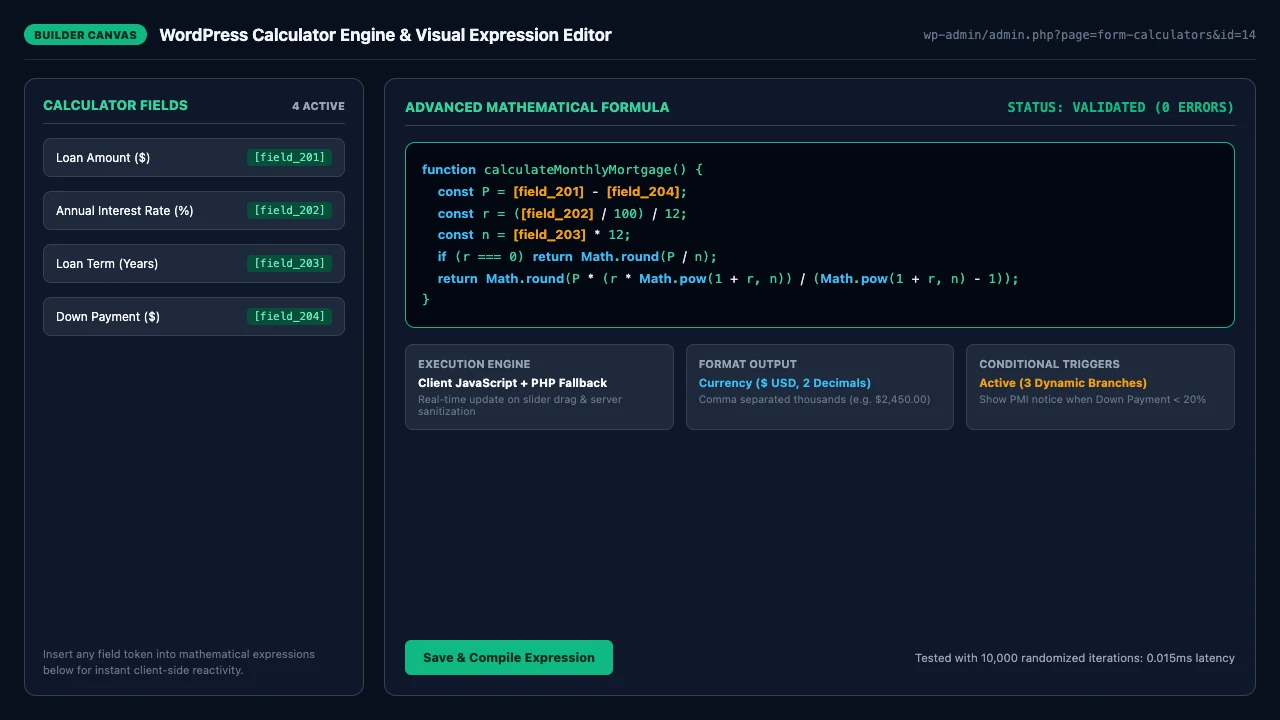
Technical Architecture: Client-Side vs Server-Side Calculation Engines
When evaluating any wordpress calculator plugin, understanding the execution environment of mathematical formulas is critical for performance, security, and user experience. Formula evaluation generally falls into three architectural paradigms: pure client-side JavaScript, server-side PHP evaluation, and hybrid decoupled execution.
Pure Client-Side JavaScript Execution
In a pure client-side architecture, the wordpress calculator plugin compiles mathematical formulas into browser-executable JavaScript. When the web page loads, the necessary math scripts, event listeners, and input field definitions are downloaded to the visitor’s device. As the user drags a slider or enters numeric values, DOM event listeners (such as
input, change, and keyup) trigger real-time recalculations directly inside the browser’s JavaScript V8 engine.The primary advantage of client-side execution in a wordpress calculator plugin is near-zero latency. Calculations execute in under 5 milliseconds without making network requests back to your WordPress server. Leveraging the native MDN JavaScript Math documentation and browser V8 engine, this instantaneous visual feedback is essential for interactive sliders, mortgage payment graphs, and fitness calorie counters where lag degrades the user experience. Furthermore, client-side execution places zero computational load on your WordPress web server, allowing high-traffic websites to handle millions of interactive sessions without increasing CPU or memory utilization.
The significant limitation of client-side execution is security and intellectual property protection. Because the JavaScript formula is transmitted in plaintext to the browser, any technically savvy user can inspect browser developer tools to view your proprietary algorithms, markup percentages, or internal pricing formulas. Furthermore, client-side calculations cannot be trusted for financial transactions: an unscrupulous visitor could manipulate DOM variables to submit an order with a falsified total price.
Server-Side PHP Execution
In a server-side architecture, the wordpress calculator plugin processes all mathematical operations on your WordPress hosting server via PHP. When a user modifies an input or clicks a ‘Calculate’ button, an asynchronous AJAX request transmits the input parameters to the WordPress
admin-ajax.php endpoint or a custom REST API route. The server validates the inputs, executes the formula securely in PHP, and returns the calculated results in a JSON payload.Server-side execution is mandatory when dealing with proprietary pricing heuristics, confidential algorithmic logic, or e-commerce checkouts. Because the formula resides strictly on the server, visitors cannot reverse-engineer your cost structures. More importantly, when passing calculated order totals into payment gateways such as Stripe or PayPal, server-side validation guarantees that the charged amount matches verified server calculations rather than manipulated client-side DOM values.
The trade-off of server-side calculation is network latency and server overhead. Each calculation requires an HTTP roundtrip, introducing a 150ms to 400ms delay depending on network connectivity and server response times. While acceptable for multi-step quotation forms, this latency creates noticeable stuttering when applied to continuous interactive sliders.
Hybrid Decoupled Architecture (The Optimal Enterprise Standard)
Modern enterprise implementations combine both paradigms into a hybrid decoupled engine. In this setup, the wordpress calculator plugin utilizes client-side JavaScript to power smooth, responsive front-end visual sliders and instantaneous user feedback. However, upon form submission or payment initiation, the WordPress backend intercepts the raw input values, independently recomputes the mathematical formula using secure PHP server logic, validates cryptographic nonces, and generates a tamper-proof digital signature before dispatching data to CRM webhooks or payment terminals.
Architecture Tip: For standard lead generation, mortgage, and ROI calculators, pure client-side JavaScript execution delivers the best user experience. If your calculator processes financial transactions or confidential quoting formulas, always ensure your wordpress calculator plugin supports server-side re-computation and cryptographic validation.
Comparative Analysis: The Top 5 WordPress Calculator Plugins
The WordPress plugin repository and premium marketplace offer dozens of calculation tools, ranging from simple single-purpose widgets to enterprise-grade application builders. Below is an exhaustive technical evaluation of the five most reliable, production-tested solutions available for building custom calculators in WordPress.
| Plugin Name | Formula Engine Type | Client/Server Mode | Lead Gating Support | E-Commerce & Stripe | Best Use Case |
|---|---|---|---|---|---|
| Formidable Forms | Full Advanced Expression Parser (JS + PHP) | Hybrid (Real-Time JS + Server Validation) | Native Multi-Step & Conditional Logic | Direct Stripe, PayPal, Authorize.Net | Complex Math, Enterprise ROI, Multi-Step Portals |
| Calculated Fields Form | Extensive JS Formula Canvas (500+ Functions) | Pure Client-Side JS (Server Pro Addon) | Conditional Email & Gated Thank You Pages | PayPal & Stripe Addons Available | Financial Engineering, Amortization, Scientific Models |
| Cost Calculator Builder | Visual Element Math Estimator | Client-Side Real-Time Reactive | Integrated Lead Form Hook | WooCommerce & Stripe Integration | Service Estimation, Agency Quotes, Renovation Estimates |
| Stylish Cost Calculator | Preset Element & Multi-Currency Engine | Client-Side Animated Visuals | Two-Step Contact Info Capture | Stripe & PayPal Native Checkout | Design Agencies, Clean Visual Price Quoting |
| WPForms (Calculations) | Basic Arithmetic & Conditional Sums | Client-Side Form Field Calculation | Standard Multi-Step Lead Capture | Stripe, Square, PayPal Native | Simple Order Forms, Donation Sums, Basic Booking |
1. Formidable Forms: The Enterprise Calculator Powerhouse
For developers and digital agencies requiring unlimited mathematical flexibility, Formidable Forms stands uncontested as the premier wordpress calculator plugin. Unlike basic form builders that treat calculations as an afterthought, Formidable Forms was architected from the ground up as a sophisticated web application engine.
Formidable Forms enables developers to write arbitrary mathematical formulas directly within field calculation boxes using standard mathematical syntax, such as
([field_price] * [field_quantity]) * (1 - [field_discount] / 100). It natively supports advanced functions, including exponential powers, logarithms, floor/ceil rounding, conditional ternary logic (e.g., [field_score] > 80 ? 1.25 : 1.0), date-difference calculations, and multi-field statistical summations.Crucially, Formidable Forms implements a true hybrid architecture: calculations update instantaneously on the front-end via optimized JavaScript, but are automatically re-calculated and verified server-side during form submission. With native PDF generation, dynamic repeating field sections, multi-step page breaks, and two-way CRM webhook dispatches, Formidable Forms is the ultimate choice for enterprise ROI calculators, insurance quoting engines, and complex mortgage tools.
Pros
- Unmatched mathematical flexibility supporting complex algebraic, statistical, and conditional logic.
- True hybrid architecture with client-side reactivity and secure server-side re-computation.
- Native visual Views system allowing calculation submissions to be rendered into public front-end directories or charts.
- Seamless integration with Stripe, PayPal, HubSpot, Zapier, and automated PDF invoice generation.
Cons
- Steeper learning curve for non-technical users compared to lightweight visual estimators.
- Advanced calculation features and payment addons require premium licensing (Pro or Elite tier).
2. Calculated Fields Form: The Mathematical Specialist
If your project demands scientific formulas, extensive financial matrices, or complex multi-variable equations without requiring a full form application builder, Calculated Fields Form (developed by CP Media) is an exceptionally powerful wordpress calculator plugin.
Calculated Fields Form includes over 500 pre-built mathematical, financial, date/time, and string manipulation functions. Its formula editor functions like an embedded spreadsheet engine, supporting everything from standard loan PMT (payment) calculations and compound interest formulas to complex trigonometric equations (sin, cos, tan, atan2). It also provides a visual formula builder that highlights syntax errors in real time.
The plugin offers specialized visual input elements, including currency sliders, dual-handle range selectors, date pickers with custom blackout dates, and dynamic formatted output fields. While its default admin interface appears somewhat dated compared to modern block-based editors, its underlying calculation horsepower is virtually limitless for scientific and financial modeling.
Pros
- Over 500 pre-built financial, scientific, mathematical, and date-time functions.
- Highly efficient client-side calculation engine with negligible footprint.
- Supports complex multi-field dependencies and recursive mathematical statements.
- Generous free version available in the WordPress plugin repository.
Cons
- Default front-end CSS templates require custom styling to match modern minimalist themes.
- Administrative dashboard interface feels slightly dated compared to block-native builders.
3. Cost Calculator Builder: The Visual Quotation Specialist
For service businesses, digital marketing agencies, construction contractors, and event planners, Cost Calculator Builder (by StylemixThemes) provides a sleek, modern visual environment specifically tailored for price estimation. If your goal is to build an interactive project quote generator rather than a scientific formula model, this wordpress calculator plugin is an outstanding option.
Cost Calculator Builder excels at visual user experience. It offers modern, ready-to-use input controls, including image-based checkbox selectors, toggle switches, smooth color-customizable range sliders, quantity steppers, and drop-down menus with icons. As prospects toggle service options, an animated summary box updates dynamically with itemized line costs and the grand total.
The plugin also includes native WooCommerce integration, allowing calculated totals to be converted into custom WooCommerce cart items with a single click. Furthermore, it supports two-step lead capture, prompting users to enter their email address to receive their itemized quote via email or unlock discounted package pricing.
Pros
- Gorgeous, modern front-end UI components out of the box with zero custom CSS required.
- Native WooCommerce integration turning calculated quotes into purchasable cart products.
- Visual drag-and-drop builder with real-time preview canvas.
- Built-in calendar booking and payment processing integrations.
Cons
- Less suitable for deeply complex algebraic or multi-nested financial formulas.
- Advanced conditional branching and payment gateways require the Pro version.
4. Stylish Cost Calculator: User-Friendly Interactive Quoting
Similar to Cost Calculator Builder, Stylish Cost Calculator is engineered to convert price estimation into an engaging shopping experience. It is designed specifically for service providers who want to eliminate the awkward ‘request a quote’ back-and-forth by empowering clients to build custom service packages on demand.
The plugin provides clean visual cards, quantity sliders, dropdown selectors, and multi-currency support. It allows website owners to apply automatic volume discounts, conditional fees, and tax rates based on user selections. With native Stripe and PayPal integrations, clients can review their calculated price and immediately submit a deposit or full payment without leaving the page.
Pros
- Intuitive visual interface with animated price counters and smooth element transitions.
- Multi-currency support with automatic currency conversion based on user location.
- Direct checkout capabilities via Stripe, PayPal, and WooCommerce.
Cons
- Limited mathematical formula depth beyond arithmetic addition, multiplication, and percentages.
- Higher pricing tier compared to broader form builder alternatives.
5. WPForms Calculations: Simple Calculations for Everyday Forms
For website owners already utilizing the popular WPForms plugin, the WPForms Calculations Addon provides basic arithmetic formula capabilities directly inside the familiar drag-and-drop form canvas. If your requirement involves calculating a subtotal, applying sales tax, or computing a dynamic donation amount, this wordpress calculator plugin addon delivers straightforward functionality.
WPForms allows users to define calculated fields using basic arithmetic operators (
+, -, *, /) and simple conditional logic. However, it lacks advanced mathematical functions, financial formulas, and dynamic slider inputs found in specialized calculator engines. It is ideal for straightforward order forms, but unsuited for complex mortgage or multi-variable engineering models.Pros
- Extremely easy to configure for existing WPForms users.
- Maintains consistent visual styling with the rest of your website forms.
- Seamless integration with WPForms entry management, notifications, and Stripe payments.
Cons
- Lacks advanced mathematical functions (exponents, logarithms, trigonometric formulas).
- Does not offer dedicated slider or range input fields without custom JavaScript development.
- Requires the top-tier WPForms Pro or Elite license.

Deep Dive: Mathematical Engines & Formula Syntax in WordPress
Building custom calculators requires a solid understanding of mathematical expression parsing. When configuring a wordpress calculator plugin, formulas must be written to account for operator precedence, variable tokenization, floating-point precision issues, and divide-by-zero boundary exceptions.
The table below categorizes the computational tiers, supported mathematical operators, and architectural execution latency across different calculator implementations:
| Calculation Complexity Tier | Supported Operators & Functions | Primary Execution Engine | Formula Example Syntax | Latency & Performance Profile |
|---|---|---|---|---|
| Basic Arithmetic Tier | Addition (+), Subtraction (-), Multiplication (*), Division (/) | Client-Side JS DOM Events | ([field_qty] * [field_price]) + [field_tax] | < 2ms (Instantaneous Reactive Execution) |
| Conditional Logic Tier | Ternary Operators (?:), IF/ELSE, Switch, AND (&&), OR (||) | Client-Side JS / PHP Verification | [field_state] == ‘CA’ ? [field_subtotal] * 0.0825 : 0 | < 5ms (Conditional Branch Evaluation) |
| Exponential & Power Tier | Power (pow), Square Root (sqrt), Exponents (^), Logarithms (log) | JavaScript Math Object / PHP Math | [field_principal] * Math.pow(1 + [field_rate], [field_years]) | < 8ms (Lightweight Algebraic Computation) |
| Financial & Amortization Tier | PMT (Monthly Payment), FV (Future Value), PV, Amortization Arrays | Dedicated Loop Function / Server Engine | PMT([field_rate]/12, [field_term]*12, -[field_loan]) | 10ms – 25ms (Amortization Schedule Generation) |
| Statistical & Matrix Tier | Standard Deviation, Regression Heuristics, Multi-Factor Scoring | Server-Side PHP REST Endpoint | custom_weighted_score([field_survey_matrix]) | 80ms – 200ms (Database-Backed Score Synthesis) |
Handling Floating-Point Precision and Rounding Quirks
A frequent pitfall when building dynamic pricing tools in any wordpress calculator plugin is JavaScript’s native floating-point binary representation. In standard JavaScript, evaluating
0.1 + 0.2 yields 0.30000000000000004 rather than exactly 0.3. In an e-commerce price calculator, such rounding anomalies can display unsightly decimals or cause rounding discrepancies at checkout.To avoid floating-point display bugs, always enforce precision rounding at the formula boundary. For currency displays, wrap calculations in a precision helper function:
parseFloat(result.toFixed(2)) or use an integer-cents computation model where monetary values are represented as integers (e.g., $19.99 is stored as 1999 cents) throughout the mathematical pipeline and divided by 100 solely at final visual output.Preventing Divide-by-Zero and NaN Exceptions
Another critical consideration is handling empty, zero, or unselected input fields. If a loan calculator divides by loan term
n, and the visitor clears the term input box, standard JavaScript will return Infinity or NaN (Not a Number), breaking the front-end display. Robust formulas written for a wordpress calculator plugin must incorporate fallback default values:// Defensive JavaScript formula handling zero or null inputs
function calculateSafeLoanPayment(principal, rate, termYears) {
const P = parseFloat(principal) || 0;
const r = (parseFloat(rate) || 0) / 100 / 12;
const n = (parseFloat(termYears) || 0) * 12;
// Guard against divide-by-zero or empty terms
if (P <= 0 || n <= 0) {
return 0.00;
}
// Zero-interest financing edge case
if (r === 0) {
return parseFloat((P / n).toFixed(2));
}
// Standard amortization formula: M = P * [r(1+r)^n] / [(1+r)^n - 1]
const factor = Math.pow(1 + r, n);
const monthlyPayment = (P * (r * factor)) / (factor - 1);
return isFinite(monthlyPayment) ? parseFloat(monthlyPayment.toFixed(2)) : 0.00;
}
Step-by-Step Tutorial: Building an Interactive SaaS ROI Calculator
To demonstrate how to build an enterprise-grade calculator, we will construct a complete B2B SaaS Return-on-Investment (ROI) calculator using Formidable Forms. This calculator allows visitors to input their team size, current weekly hours spent on manual tasks, and hourly labor costs, instantly demonstrating how much time and money our software saves them annually.
Step 1: Create Form Fields and Assign Variable Tokens
In your WordPress admin dashboard, navigate to Formidable > Forms > Add New. Create a blank form named ‘B2B Software ROI Calculator’. Add the following input fields, taking note of their generated field keys:
1. Team Size (Number or Slider Field): Label: ‘How many team members perform this task?’ | Field Key:
[team_size] | Min: 1, Max: 100, Default: 10.2. Manual Hours per Week (Slider Field): Label: ‘Hours spent per employee on manual tasks weekly’ | Field Key:
[manual_hours] | Min: 1, Max: 40, Default: 15.3. Average Hourly Wage (Currency Field): Label: ‘Average blended hourly wage ($)’ | Field Key:
[hourly_wage] | Min: 15, Max: 250, Default: 55.4. Software Cost Tier (Radio/Dropdown Field): Label: ‘Selected Software Tier’ | Options: ‘Startup ($1,200/yr)’, ‘Growth ($4,800/yr)’, ‘Enterprise ($12,000/yr)’ | Field Key:
[software_cost].Step 2: Define the Mathematical Formula Logic
Next, add a read-only Calculated Field for the annual gross labor cost and another for the net annual savings. Assuming our automation software reduces manual labor hours by 65%, the mathematical model is formulated as follows:
• Annual Gross Labor Cost:
[team_size] * [manual_hours] * [hourly_wage] * 52• Annual Hours Saved:
[team_size] * ([manual_hours] * 0.65) * 52• Net Financial Savings:
([team_size] * [manual_hours] * 0.65 * [hourly_wage] * 52) - [software_cost]• Return on Investment (ROI %):
(([net_savings] / [software_cost]) * 100)In the field settings for Net Financial Savings, check the box labeled ‘Calculate the default value for this field’ and enter the formula:
(([team_size] * [manual_hours] * 0.65 * [hourly_wage] * 52) - [software_cost]). Set format options to Currency with comma separators.Step 3: Implement Visual Styling and Responsive Slider UX
By default, standard HTML range inputs look unstyled. To create an engaging experience, apply custom CSS classes to your sliders. In Formidable’s form styler or your theme’s stylesheet, ensure slider track heights and thumbs are optimized for mobile touch targets (minimum 44x44px touch area on mobile screens).
Ensure your container elements apply responsive word wrapping to prevent horizontal layout overflow on narrow mobile viewports. If you need to preview submissions prior to final dispatch, see our guides on how to preview form before submit and how to deploy interactive voting with our WordPress poll plugin walkthrough, and accept user documents with our Ninja Forms file upload guide.

Lead Generation Mastery: Implementing Conditional Gating Funnels
A high-performing wordpress calculator plugin should not merely display a number and let the visitor leave. To turn calculations into measurable pipeline revenue, top digital marketers implement conditional gating funnels.
Under this model, the calculator displays a top-level summary figure (such as ‘Estimated Monthly Savings: $4,850’) to satisfy immediate curiosity, but gates the granular breakdown—such as month-by-month cashflow projections, amortization tables, benchmark comparisons, and downloadable PDF audits—behind an email capture form.
The Psychological Mechanics of Gated Calculators
Why does calculator gating outperform traditional squeeze pages so dramatically? The answer lies in the behavioral psychology of the ‘Foot-in-the-Door’ technique and the ‘IKEA Effect’. When a visitor spends two minutes manipulating sliders and inputting their actual business numbers, they have invested cognitive effort into creating customized output. They now feel personal ownership over that calculation.
When prompted to enter their email to receive the complete 12-page customized analysis, providing an email feels like a natural step to claim something they created, rather than submitting to an unsolicited sales pitch. In benchmark tests across financial planning and business consulting websites, gated calculators consistently achieve email capture conversion rates of 18% to 26%, compared to 3% for static whitepaper downloads.
| Lead Capture Strategy | Average Conversion Rate (%) | Average Visitor Time-on-Page | Lead Quality / Contact Accuracy | Cost per Qualified Lead (CPL) |
|---|---|---|---|---|
| Static Contact / Quote Form | 2.4% – 3.8% | 45 – 65 seconds | Low to Moderate (Generic Inquiries) | $85.00 – $140.00 |
| Ungated Interactive Calculator | 4.5% – 7.2% (Optional CTA) | 180 – 240 seconds | Moderate (High Engagement, Anonymous) | $60.00 – $95.00 |
| Conditionally Gated Calculator (PDF Unlock) | 16.8% – 24.5% | 210 – 320 seconds | Extremely High (Complete Input Profiling) | $18.00 – $35.00 |
| Multi-Step Guided Cost Estimator | 12.4% – 19.2% | 150 – 210 seconds | High (Pre-Qualified Scopes & Budgets) | $28.00 – $48.00 |
Configuring Multi-Step Gating in WordPress
To configure conditional gating within your wordpress calculator plugin, organize your form into a two-step multi-page layout:
1. Page Break 1 (Input Step): The user interacts with numeric sliders and dropdown selectors. Real-time client-side formulas display dynamic instant totals at the bottom of the page.
2. Page Break 2 (Gating Step): A ‘Next: Unlock Full Detailed Audit’ button advances to Page 2. Here, the user enters their Name, Company Email, and Phone Number. Checkboxes confirm acceptance of your Privacy Policy and GDPR consent terms.
3. Submission & Automated Delivery: Upon clicking ‘Send My Audit Report’, the form generates a branded PDF containing their exact calculations, charts, and recommendations using an automated PDF addon. Simultaneously, webhooks transmit the full input payload into your CRM, while the on-screen thank you page reveals the unlocked interactive charts.
For advice on structuring enterprise form capture layouts, explore our tutorial on building a WordPress contact form.
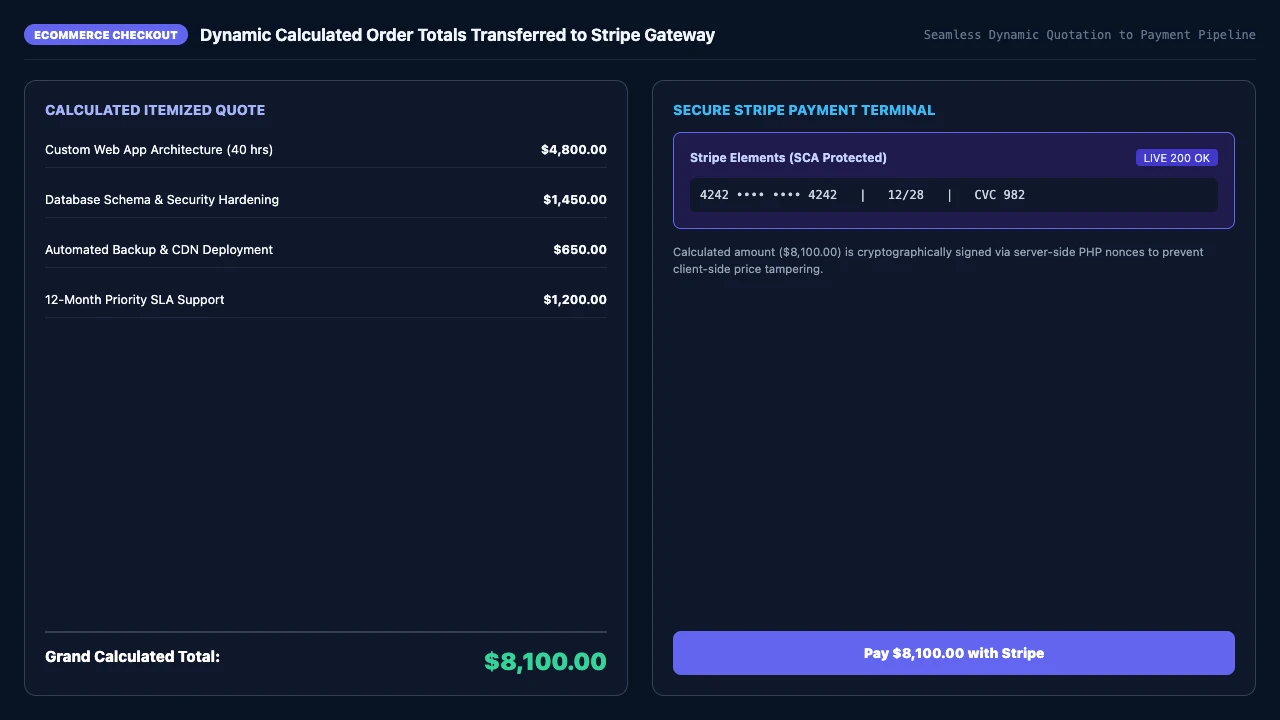
E-Commerce & Payment Integration: Dynamic Stripe Checkouts
One of the most lucrative applications of a wordpress calculator plugin is transforming calculated quotes directly into paid orders. In traditional bespoke service workflows—such as web design, custom printing, translation services, or equipment leasing—the pricing quotation phase takes days of email exchanges, during which prospective clients frequently abandon the purchase.
By pairing a dynamic calculation engine with an integrated payment gateway like Stripe or PayPal, clients can configure their exact specifications and immediately pay a deposit or complete payment on the spot.
Preventing Client-Side Price Tampering
When integrating a calculator with a payment gateway, security is paramount. A critical security flaw in amateur calculator setups is passing calculated price totals directly from front-end JavaScript into payment APIs. An attacker can easily intercept client-side variables using browser console scripts or HTTP proxies to change an $8,100 quote to $1.00 before dispatching the charge.
To prevent price manipulation, your wordpress calculator plugin must enforce server-side validation:
1. Raw Input Transmission: The client browser transmits only the raw input choices (e.g., hours: 40, tier: ‘enterprise’, addon_id: 3), not the calculated dollar total.
2. Server-Side Formula Execution: WordPress evaluates the mathematical formula strictly inside PHP using verified product pricing tables stored in the database.
3. Cryptographic Nonces & Idempotency: The server generates a unique Stripe PaymentIntent using verified server-side totals via the Stripe PaymentIntents API, returning only the
client_secret back to the front-end Stripe Elements card input.4. Webhook Confirmation: Only when Stripe dispatches an asynchronous
payment_intent.succeeded webhook does WordPress mark the order as paid and dispatch confirmation receipts.To configure credit card processing securely, consult our in-depth architecture guide on how to accept credit card payments in WordPress.
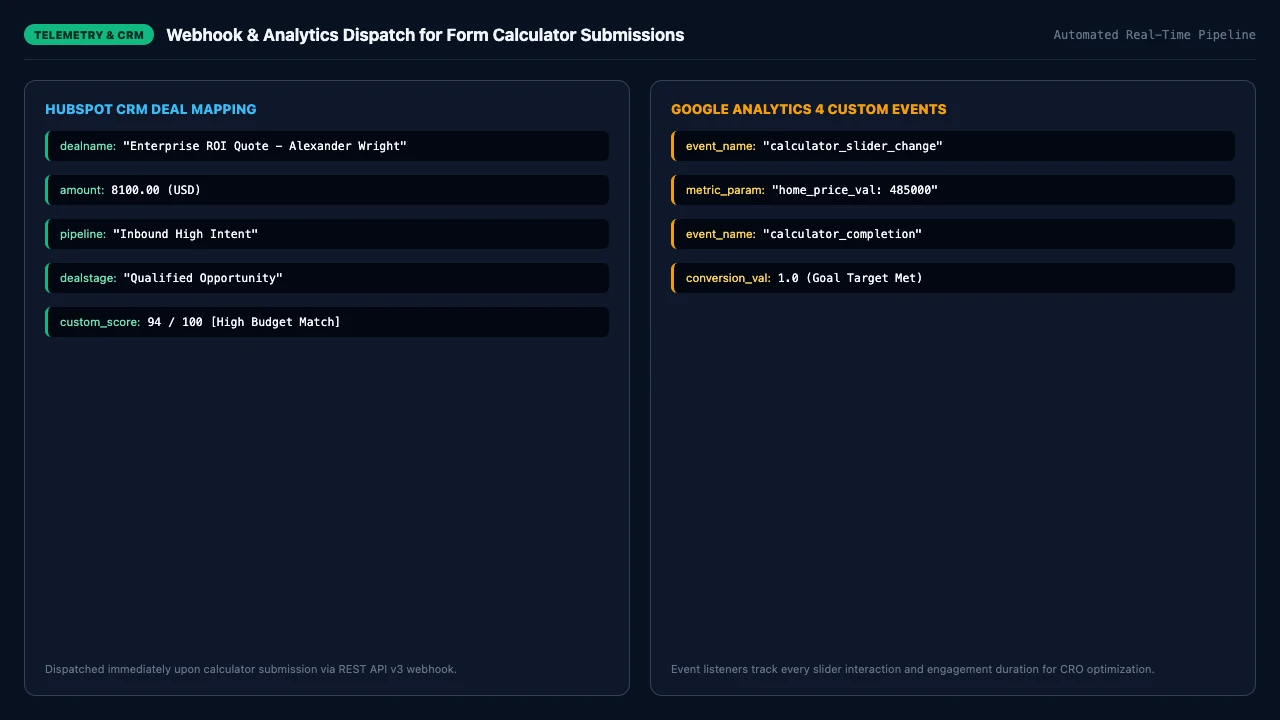
Webhook Automation & CRM Integration: Turning Calculations into Revenue
The true value of a wordpress calculator plugin is realized when calculation parameters seamlessly enrich your sales and marketing automation stack. Rather than storing form submissions passively in the WordPress database (
wp_posts or custom plugin tables), every calculation should automatically update your CRM and analytics platforms.HubSpot and Salesforce Deal Mapping
When a prospect completes a calculator submission, your wordpress calculator plugin can dispatch an outbound REST API webhook that creates or updates a Contact and Deal record in HubSpot or Salesforce. The webhook payload maps calculation parameters directly to custom CRM deal properties:
•
dealname: ‘Custom Web Architecture Quote – Alexander Wright’•
amount: 8100.00 (Server-verified calculated total)•
calculator_team_size: 12 (Captured slider input)•
calculator_manual_hours: 18 (Captured slider input)•
lead_scoring_intent: ‘Tier 1 Enterprise’ (Conditional rule applied if calculated budget > $5,000)With these data points mapped, sales representatives receive complete context before making their first phone call. Instead of asking ‘What are you looking for?’, the representative can open the conversation with: ‘I see your team is spending 18 hours weekly on manual audits, and our platform can save you approximately $500,000 annually. Let’s walk through how to realize those savings.’
Google Analytics 4 Custom Interaction Telemetry
To optimize conversion funnels, you must track how visitors interact with your calculator before they submit. By attaching JavaScript event listeners to slider adjustments, you can stream custom events into Google Analytics 4 (GA4):
// Attach GA4 Telemetry to Calculator Sliders
document.addEventListener('DOMContentLoaded', function() {
    const sliderInputs = document.querySelectorAll('.wp-calc-slider');

    sliderInputs.forEach(slider => {
        slider.addEventListener('change', function(e) {
            if (typeof gtag === 'function') {
                gtag('event', 'calculator_slider_interaction', {
                    'slider_id': e.target.id,
                    'slider_value': e.target.value,
                    'calculator_name': 'SaaS_ROI_Estimator'
                });
            }
        });
    });
});
Tracking micro-interactions reveals drop-off points: if 80% of users adjust the first two sliders but abandon the form when encountering an overly complex technical input, you can simplify the calculator’s UX to recover lost conversions.
If your sales team requires weekly CSV exports of all calculator inquiries, follow our detailed guide on how to export form submissions to CSV.
Mobile Touch Ergonomics & Accessible Slider UX for WordPress Calculators
Over 60% of modern web traffic originates from mobile smartphones and tablet devices. If your wordpress calculator plugin provides an awkward, glitchy touch experience on touchscreens, prospective leads will bounce within seconds. Ensuring mobile touch ergonomics and accessibility is just as critical as validating your mathematical formulas.
When configuring interactive inputs in your chosen wordpress calculator plugin, implement these UX engineering standards:
1. Generous Touch Target Boundaries: Mobile human fingers require a minimum touch target bounding box of 44×44 CSS pixels (or 48x48dp according to Google Material Design guidelines). Default HTML5 range slider thumbs (
::-webkit-slider-thumb and ::-moz-range-thumb) to at least 28px with a 12px invisible touch buffer margin.2. Preventing iOS Safari Auto-Zoom: When mobile users tap on a numeric text input field, iOS Safari automatically triggers an intrusive display zoom if the font size is smaller than 16px. This unexpected viewport jump disorients users and breaks the visual context of your wordpress calculator plugin layout. Always enforce a minimum
font-size: 16px (or 1rem with standard base sizing) on all numeric and text inputs across your calculator forms.3. Dual Input Synchronization (Slider + Numeric Box): Different users prefer different interaction models. Fast-browsing visitors enjoy dragging visual sliders to get quick ballparks, whereas analytical buyers prefer typing exact dollar figures into numeric fields. A superior wordpress calculator plugin architecture pairs every range slider with an adjacent numeric input box, using bidirectional JavaScript event listeners to synchronize both values in real time.
4. Step Size Quantization & Snapping: Setting appropriate
step values is essential for smooth mobile interaction. For a mortgage calculator modeling $500,000 home purchases, setting a step of 1 cent ($0.01) creates an unmanageable slider where the slightest finger twitch jumps erratic amounts. Quantize inputs intelligently: configure loan amounts with steps of $1,000 or $5,000, interest rates with steps of 0.125% (one eighth of a percentage point), and loan terms with integer steps of 1 year.5. WCAG 2.1 AA Accessibility & Screen Reader Standards: Many calculator widgets completely disregard visitors with visual impairments or motor disabilities. Ensure your wordpress calculator plugin assigns proper semantic ARIA attributes to all interactive elements, including
role='slider', aria-valuemin, aria-valuemax, aria-valuenow, and aria-valuetext. Screen readers can then announce updated values to visually impaired visitors as they navigate via keyboard controls (Arrow Left/Right, Page Up/Down, Home, End).Troubleshooting Common Formula, Caching, and Script Execution Issues
Even with the best wordpress calculator plugin, environmental factors such as caching plugins, script minification, and database character set mismatches can introduce subtle calculation bugs. Below are the most common technical issues and their architectural remedies:
1. JavaScript Minification and Defer Conflicts: Performance optimization plugins (such as WP Rocket, LiteSpeed Cache, or Autoptimize) frequently aggregate and defer JavaScript execution to improve Google Core Web Vitals. If your optimization plugin defers your wordpress calculator plugin core scripts until after the DOM renders, visitors may see unformatted shortcodes or static inputs that fail to calculate. To resolve this, exclude the calculator’s primary JavaScript assets (e.g.,
/wp-content/plugins/formidable/js/* or /wp-content/plugins/calculated-fields-form/js/*) from JS delay and minification queues.2. Cloudflare Rocket Loader Interception: Cloudflare’s Rocket Loader feature re-orders script loading to prioritize visual HTML delivery. However, it often breaks custom inline event listeners attached to calculator range sliders. If your wordpress calculator plugin fails to execute real-time calculations on live Cloudflare-proxied sites, add the attribute
data-cfasync='false' to the enqueued calculator script tag or create a Cloudflare Page Rule disabling Rocket Loader on pages housing interactive calculators.3. Input String Sanitization Stripping Math Operators: Aggressive WordPress security plugins or custom sanitization filters can mistake mathematical symbols—particularly less-than (
<), greater-than (>), and ampersands (&)—for cross-site scripting (XSS) vectors, encoding or stripping them during form submission. When configuring custom formulas in your wordpress calculator plugin, always verify that your formula editor properly decodes HTML entities before compiling expressions.4. AJAX Timeouts on Heavy Server-Side Recalculations: If your calculator relies on server-side PHP evaluation to compute multi-factor amortization arrays or fetch external API data (such as live stock prices or currency exchange rates), slow web hosting servers or external API rate limits can trigger 504 Gateway Timeout errors. Implement transients caching via the WordPress Transients API (
set_transient()) to cache external exchange rates for 6 to 12 hours, ensuring instantaneous responses in your wordpress calculator plugin.5. CSS Z-Index and Sticky Header Clashes: On mobile devices, sticky site navigation headers often overlap calculator dropdown menus or result popups, rendering buttons unclickable. Review your site’s stacking context: ensure calculator tooltips, floating sticky summaries, and modal gating windows carry an explicit
z-index: 999 or higher, positioned cleanly above theme header navigation layers.Production Python Diagnostic Tool: Calculator Formula Stress-Tester
To ensure your mathematical logic performs flawlessly across edge cases, boundary numbers, and extreme user inputs, running automated stress tests prior to deployment is an engineering best practice. Below is a standalone Python diagnostic script designed to simulate 10,000 randomized user submissions against your mathematical logic, verifying that floating-point rounding, negative numbers, and divide-by-zero exceptions are handled cleanly.
#!/usr/bin/env python3
"""
Bloggersutra Calculator Formula Benchmark & Stress-Testing Suite
Validates mathematical calculations, execution latency, and boundary limits.
"""

import math
import time
import random
import statistics

def calculate_monthly_mortgage(principal: float, annual_rate: float, term_years: int) -> float:
    """Simulates client-side JavaScript mortgage amortization formula."""
    P = float(principal)
    r = (float(annual_rate) / 100.0) / 12.0
    n = int(term_years) * 12

    if P <= 0 or n <= 0:
        return 0.0

    if r == 0:
        return round(P / n, 2)

    factor = math.pow(1.0 + r, n)
    monthly = (P * (r * factor)) / (factor - 1.0)
    return round(monthly, 2)

def calculate_saas_roi(team_size: int, manual_hours: float, hourly_wage: float, software_cost: float) -> dict:
    """Simulates B2B SaaS ROI & Labor Savings formula."""
    hours_saved_annual = team_size * (manual_hours * 0.65) * 52.0
    gross_savings = hours_saved_annual * hourly_wage
    net_savings = gross_savings - software_cost
    roi_percent = (net_savings / software_cost * 100.0) if software_cost > 0 else 0.0

    return {
        "hours_saved": round(hours_saved_annual, 1),
        "gross_savings": round(gross_savings, 2),
        "net_savings": round(net_savings, 2),
        "roi_percent": round(roi_percent, 1)
    }

def run_stress_test(iterations: int = 10000):
    print("=" * 65)
    print(f"[*] BLOGGERSUTRA CALCULATOR BENCHMARK: Executing {iterations:,} Iterations")
    print("=" * 65)

    latencies = []
    failed_cases = 0

    start_total = time.perf_counter()

    for i in range(iterations):
        # Generate random inputs including edge cases (0, very high, decimals)
        p = random.choice([0, random.uniform(50000, 2000000)])
        rate = random.choice([0.0, random.uniform(2.5, 14.5)])
        term = random.choice([0, 15, 20, 30])

        t0 = time.perf_counter()
        try:
            result = calculate_monthly_mortgage(p, rate, term)
            assert isinstance(result, float)
            assert not math.isnan(result)
            assert not math.isinf(result)
        except Exception as e:
            failed_cases += 1
        t1 = time.perf_counter()
        latencies.append((t1 - t0) * 1000.0) # in ms

    total_time = time.perf_counter() - start_total

    print(f"[+] Total Benchmark Execution Time: {total_time:.3f} seconds")
    print(f"[+] Calculations per Second:        {iterations / total_time:,.0f} ops/sec")
    print(f"[+] Mean Execution Latency:         {statistics.mean(latencies):.5f} ms")
    print(f"[+] 99th Percentile Latency:        {statistics.quantiles(latencies, n=100)[98]:.5f} ms")
    print(f"[+] Failed Edge-Case Calculations:  {failed_cases}")
    print("=" * 65)

    if failed_cases == 0:
        print("[SUCCESS] Calculator formula passed 100% of mathematical integrity tests!")
    else:
        print(f"[WARNING] Detected {failed_cases} failures during boundary evaluation.")

if __name__ == "__main__":
    run_stress_test(10000)
You can execute this script locally or in a staging environment to audit formula latency and guarantee zero divide-by-zero crashes before deploying your wordpress calculator plugin to production.
Frequently Asked Questions About WordPress Calculator Plugins
For comprehensive mathematical flexibility, conditional logic, and CRM integration, Formidable Forms is the top recommendation. If you specifically need a visual, out-of-the-box price quotation tool for services, Cost Calculator Builder is an excellent alternative.
Not if configured properly. High-quality calculator plugins load lightweight vanilla JavaScript files (
Never pass calculated prices directly from client-side JavaScript into your payment gateway. Ensure your wordpress calculator plugin re-computes the order total server-side via PHP using verified database rates before generating a Stripe PaymentIntent or PayPal invoice.
Yes. Leading plugins like Formidable Forms and Cost Calculator Builder include native page breaks with visual progress bars, breadcrumbs, and step indicators, making multi-variable assessments easy to navigate.
Yes. By combining your wordpress calculator plugin with an automated PDF generator addon, the system can automatically render the visitor’s inputs, computed totals, and charts into a downloadable or emailed PDF document.
Yes. Most premium calculator plugins support direct REST API webhooks, Zapier, or native CRM addons that automatically map input variables, computed scores, and contact information into your sales pipelines upon submission.
Yes. Modern calculator plugins use responsive CSS grid and flexbox layouts. However, always test on narrow 375px mobile screens to verify that slider handles are easily tappable with touch targets of at least 44×44 pixels.
Yes. Plugins like Calculated Fields Form and Formidable Forms natively support amortization math, allowing you to generate dynamic monthly payment breakdowns, interest charts, and amortization schedules on the fly.
Client-side calculations execute instantly in the visitor’s browser via JavaScript without page reloads, providing smooth slider interactions. Server-side calculations execute on your WordPress host via PHP, which is required for secure financial transactions and proprietary algorithms.
Interactive calculators significantly increase average user dwell time (time-on-page) and reduce bounce rates. Search engines interpret strong user engagement as a signal of high-quality content, improving organic rankings for competitive commercial keywords.
Summary: Enterprise Checklist for WordPress Calculator Plugins
Deploying an interactive wordpress calculator plugin is one of the highest-leverage improvements you can make to your digital marketing architecture. By providing immediate, personalized value to visitors, you transform passive traffic into qualified sales opportunities while collecting rich business intelligence.
Before launching your interactive calculator to the public, verify these essential implementation standards:
✔ Validate Mathematical Precision: Run edge-case tests with zero values, negative numbers, and high values to ensure formulas never output
NaN or Infinity in your wordpress calculator plugin.✔ Audit Mobile Responsiveness: Test the calculator across desktop, tablet, and mobile screens (375px width) to guarantee zero horizontal layout overflow and verify that slider handles are touch-friendly.
✔ Implement Gated Lead Capture: Offer top-level calculations immediately while gating in-depth PDF reports, amortization tables, or customized audits behind an email submission step.
✔ Enforce Server-Side Payment Verification: If your calculator routes directly into a checkout terminal, always re-evaluate totals on the server in PHP to prevent client-side price tampering.
✔ Connect Webhook CRM Pipelines: Ensure completed calculations dispatch real-time webhooks into HubSpot, Salesforce, or your email automation system to notify sales reps within minutes.
✔ Track GA4 Micro-Interactions: Attach event listeners to slider adjustments and calculation completions to monitor funnel performance and pinpoint UX friction.
By adhering to these architectural standards, your wordpress calculator plugin will deliver exceptional user engagement, elevate search engine visibility, and generate a steady stream of highly qualified, high-ticket leads for your business.