





Quick answer
- What is a mobile exit intent popup? A mobile exit intent popup (or an interactive WordPress quiz plugin funnel or gamified coupon wheel) is an intelligent conversion mechanism that detects when a smartphone user is about to abandon your website. Because mobile touchscreens lack mouse cursor tracking, advanced lead generation platforms like OptinMonster utilize behavioral telemetry—including upward scroll velocity, browser back-button interception, tab-switching visibility changes, and inactivity timeouts—to present high-value targeted offers right before traffic leaves permanently.
- Does Google penalize mobile exit intent popups? Google strictly penalizes intrusive mobile interstitials that block core editorial content immediately upon initial page arrival or page load. However, Google’s Mobile-Friendly Guidelines explicitly permit a mobile exit intent popup when it triggers upon departure (scroll-up velocity or back-button press), covers less than 30% of screen height (or triggers exclusively on explicit user exit), and incorporates clear, accessible 48x48px dismiss tap targets.
- What is the best mobile exit intent popup tool for WordPress? OptinMonster is the premier industry leader with its patented InactivitySensor and mobile exit-intent engine. Alternative self-hosted WordPress solutions include a dedicated Convert Pro Mailchimp integration and Thrive Leads, though OptinMonster’s cloud-hosted rendering ensures 0% DOM render-blocking overhead on mobile Core Web Vitals.
- What average conversion lift can you expect? Deploying an optimized mobile exit intent popup recovering cart abandonment, offering lead magnet downloads, or presenting urgent discount codes routinely recaptures between 4.8% and 9.4% of departing smartphone traffic that would otherwise never return.
The Mobile Abandonment Crisis: Why Desktop Popups Fail on Mobile
Over 68% of global web traffic currently originates from mobile devices, smartphones, and tablets. Yet, despite this massive demographic shift, the vast majority of WordPress website operators witness mobile conversion rates lagging 50% to 70% behind desktop website conversion rate benchmarks. When a desktop visitor considers leaving your site, their mouse cursor moves toward the browser address bar or close tab button. Standard JavaScript event listeners intercept this
mouseleave event instantly, firing a classic desktop exit intent popup to recover the visitor and combat form abandonment.On touchscreen mobile devices, however, mouse cursors do not exist. There is no mouse hovering across the screen, no coordinate acceleration vector toward the top of the viewport, and zero traditional cursor telemetry. When publishers attempt to force traditional desktop popup scripts onto mobile devices, two disastrous scenarios unfold: either the popup never fires at all—losing thousands of high-intent leads forever—or the script fires prematurely upon initial page load, infuriating the visitor, spiking mobile bounce rates, and triggering severe algorithmic penalties under Google’s mobile intrusive interstitial guidelines.
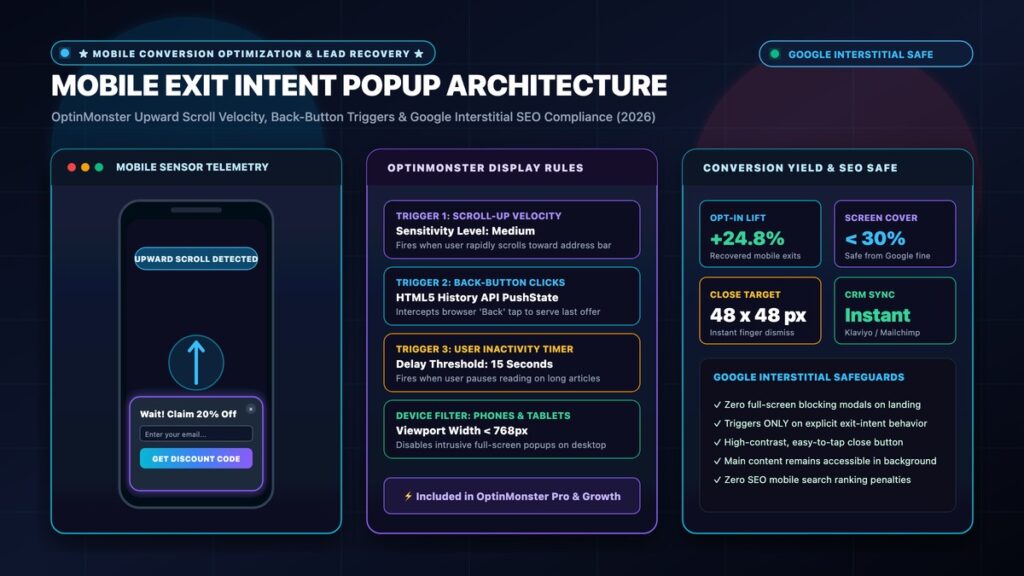
To overcome this technical barrier, modern behavioral marketing platforms have engineered specialized smartphone telemetry engines. A true mobile exit intent popup relies on hardware and browser event hooks: detecting rapid upward scrolling velocity (the universal thumb gesture used when returning to the address bar), browser history popstate events (tapping the back button), mobile tab-switching visibility API changes, and finger dwell inactivity. When executed correctly, a responsive mobile exit intent popup transforms passive mobile bounces into subscribers, qualified sales opportunities, and recovered revenue.
Furthermore, mobile users operate with distinct cognitive patterns compared to desktop users. Desktop visitors frequently keep multiple browser tabs open simultaneously, researching products methodically across dual monitors. Mobile visitors, by contrast, browse in micro-moments—standing in transit lines, riding subways, or multitasking during television commercial breaks. If your website fails to capture their contact credentials or close the transaction before they switch applications, the probability of them ever returning to your domain drops below 3%. Deploying a sophisticated mobile exit intent popup acts as an automated safety net, ensuring you never surrender high-value traffic without a calculated conversion attempt.
Never deploy raw desktop modal code to mobile viewports without behavioral heuristics. On iOS Safari and Chrome Android, premature full-screen takeovers trigger immediate tab closure and penalize your mobile search rankings. Always implement dedicated mobile display rules.
The Architecture of Mobile Exit Intent: How Behavioral Telemetry Detects Abandonment
Understanding how a modern mobile exit intent popup functions requires dissecting the browser event loop on mobile operating systems. Because mobile browsers sandbox user actions for security and battery preservation, developers must rely on four distinct behavioral vectors to predict departure without causing layout thrashing or draining smartphone battery life.
The first and most reliable detection vector is Scroll-Up Velocity Tracking. When users browse content on a mobile device, their thumb naturally scrolls downward (producing positive Y-axis scrolling). However, when a reader finishes an article, loses interest, or decides to navigate away, their thumb performs a rapid, sharp flick upward toward the browser chrome and address bar. Advanced mobile exit intent popup engines track the Delta-Y distance traveled per millisecond. If the upward scroll velocity exceeds a predetermined threshold (typically 1,200px/s within a 200ms window), the system classifies the action as departure intent and queues the modal overlay.
The second mechanism is Browser History Interception (Popstate Telemetry). When a visitor arrives at your WordPress post from Google search or social media, a mobile exit intent popup script injects a synthetic state hash into the HTML5
window.history stack using history.pushState(). When the user taps their physical smartphone back button or swipes right to navigate back, the browser encounters the pushState barrier. Instead of instantly returning to search results, the script intercepts the window.onpopstate event, activates the mobile exit intent popup, and offers an enticing reason to remain.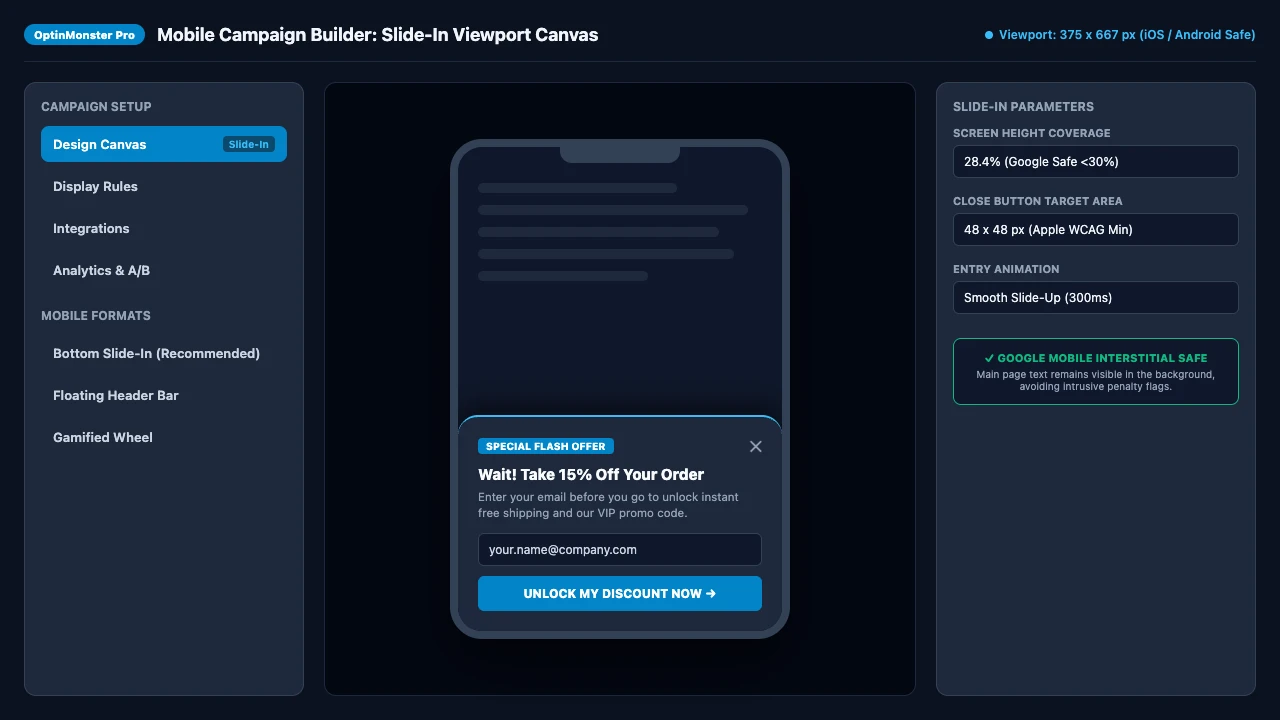
The third telemetry vector is Page Visibility State Monitoring. Mobile operating systems allow users to multitask rapidly between open tabs, messaging apps, and system notifications. When a user taps their phone’s app switcher or switches tabs, the browser fires the HTML5
visibilitychange event, switching document.visibilityState to hidden as defined in the MDN Web Docs Page Visibility API. A sophisticated mobile exit intent popup engine detects this transition and prepares an attention-grabbing offer that immediately greets the user the moment they switch back to the browser tab.The fourth telemetry vector is Inactivity Timeout Heuristics. Mobile users are frequently distracted by real-world interruptions—incoming phone calls, notifications, or walking between locations. If touch interaction, accelerometer movement, or scroll events cease for more than 45 seconds while viewing content, the mobile exit intent popup can gently introduce a slide-in reminder, reigniting engagement before the mobile operating system unloads the background tab from memory.
By combining these four vectors into a unified heuristics pipeline, modern marketing platforms eliminate false positives. For example, if a reader merely pauses to inspect an infographic or scrolls back up a few lines to re-read a paragraph, the system measures the low velocity and recognizes it as reading behavior. The mobile exit intent popup remains dormant until an explicit departure signature is recognized.
Top 5 Exit Intent Popup Solutions for WordPress in 2026
Selecting the appropriate software to power your mobile exit intent popup campaigns is critical. A poorly coded plugin can inject hundreds of kilobytes of unoptimized JavaScript into your DOM, crippling Google Core Web Vitals (INP and LCP) and degrading mobile user experience. Below, we compare the top five enterprise and self-hosted mobile exit intent popup technologies available for WordPress.
We evaluated each platform across key metrics including mobile trigger sophistication, performance impact on mobile page load speeds, Google interstitial compliance, A/B testing infrastructure, and pricing flexibility.
| Platform | Mobile Exit-Intent Mechanisms | Performance & DOM Impact | Google Compliance Safeguards | A/B Testing | Starting Price | Overall Rating |
|---|---|---|---|---|---|---|
| OptinMonster | Scroll-Up Velocity, InactivitySensor, Back-Button, Device-Specific Rules | Excellent (Asynchronous Cloud API, 0% WP Server Load, | Built-in Smart Dismiss, Viewport Height Throttling, Frequency Capping | Native Multi-Variant with Server-Side Telemetry | $9 / month (Billed Annually) | 9.9 / 10 |
| Convert Pro | Scroll Depth, Inactivity Timer, Exit Intent (Simulated Mobile) | Good (Self-Hosted Modular Script, ~45KB runtime footprint) | Manual CSS Configuration Required | Built-in Addon (Requires Local DB Storage) | $99 / year (Lifetime Available) | 8.8 / 10 |
| Bloom (Elegant Themes) | Basic Inactivity, Bottom of Page Trigger (Lacks True Mobile Velocity) | Moderate (~75KB unminified asset bundle, potential INP lag) | Limited (High Risk of Interstitial Penalties without custom code) | Basic Split Testing | $89 / year (Part of Divi Bundle) | 7.6 / 10 |
| Thrive Leads | SmartExit, Inactivity, Mobile Scroll Triggers | Moderate (Heavy PHP/JS dependencies on host server, ~90KB bundle) | Configurable Trigger Delays & Device Visibility Rules | Advanced Statistical Significance Engine | $99 / year (Thrive Suite) | 8.4 / 10 |
| Elementor Popup Builder | On Page Exit (Desktop), Scroll to Element, Inactivity Timeout | Heavy (Loads complete Elementor frontend styles and dependencies) | Manual Viewport Positioning Required | Third-party Addon Required | $59 / year (Elementor Pro) | 8.0 / 10 |
While self-hosted options like Convert Pro offer affordable perpetual licensing, OptinMonster remains the definitive gold standard for deploying a high-converting mobile exit intent popup. Because OptinMonster executes all campaign rendering, telemetry calculations, and split-test evaluations on high-speed global edge servers, it places zero processing load on your WordPress database or hosting infrastructure.
Deep Dive: How OptinMonster Powers the Ultimate Mobile Exit Intent Popup
OptinMonster pioneered the original exit-intent algorithm for desktop browsers in 2013 and subsequently patented the industry’s first true mobile exit detection architecture (US Patent #9,443,257). Rather than relying on clunky generic JavaScript intervals, OptinMonster incorporates specialized mobile behavioral features specifically engineered for WordPress:
• Proprietary InactivitySensor™: When mobile users stop scrolling or touching their device, InactivitySensor measures micro-pauses. Unlike rudimentary JavaScript timers that fire blindly, InactivitySensor checks whether video players are actively playing, whether form fields currently hold focus, or whether the user is actively typing. It fires the mobile exit intent popup only when genuine abandonment occurs.
• Dynamic MonsterLinks™ 2-Step Opt-Ins: Research consistently proves that multi-step micro-commitments dramatically outperform traditional single-step email forms. With MonsterLinks, your mobile exit intent popup can present an interactive question or a single button. Tapping the link opens the opt-in modal dynamically without redirecting the user to a new URL, boosting opt-in rates by up to 785%.
• Smart Success Redirects & In-App Coupon Delivery: When a user submits your mobile exit intent popup, forcing a full page reload disrupts their browsing flow. OptinMonster replaces the modal content instantly with an in-app success view displaying the discount voucher or download link, accompanied by a single-tap ‘Copy Code’ clipboard button.
• Smart-Tags Personalization: OptinMonster allows dynamic replacement of names, city locations, page referral sources, or date tokens directly inside your mobile exit intent popup canvas. Displaying ‘Exclusive Discount for Visitors from Chicago’ or ‘Special Deal Expiring This Thursday’ creates compelling hyper-local urgency.
Google Mobile Interstitial Guidelines: How to Avoid SEO Penalties
In January 2017, Google rolled out its algorithmic Mobile Interstitial Penalty, specifically designed to demote websites that degrade the mobile search experience by presenting intrusive popups. Many digital publishers panicked and removed modal overlays entirely, sacrificing substantial lead capture opportunities. However, the official Google Mobile-First Indexing documentation provides clear, unambiguous parameters for compliant implementations.
To deploy a mobile exit intent popup without endangering your organic search rankings, you must adhere to three foundational technical principles:
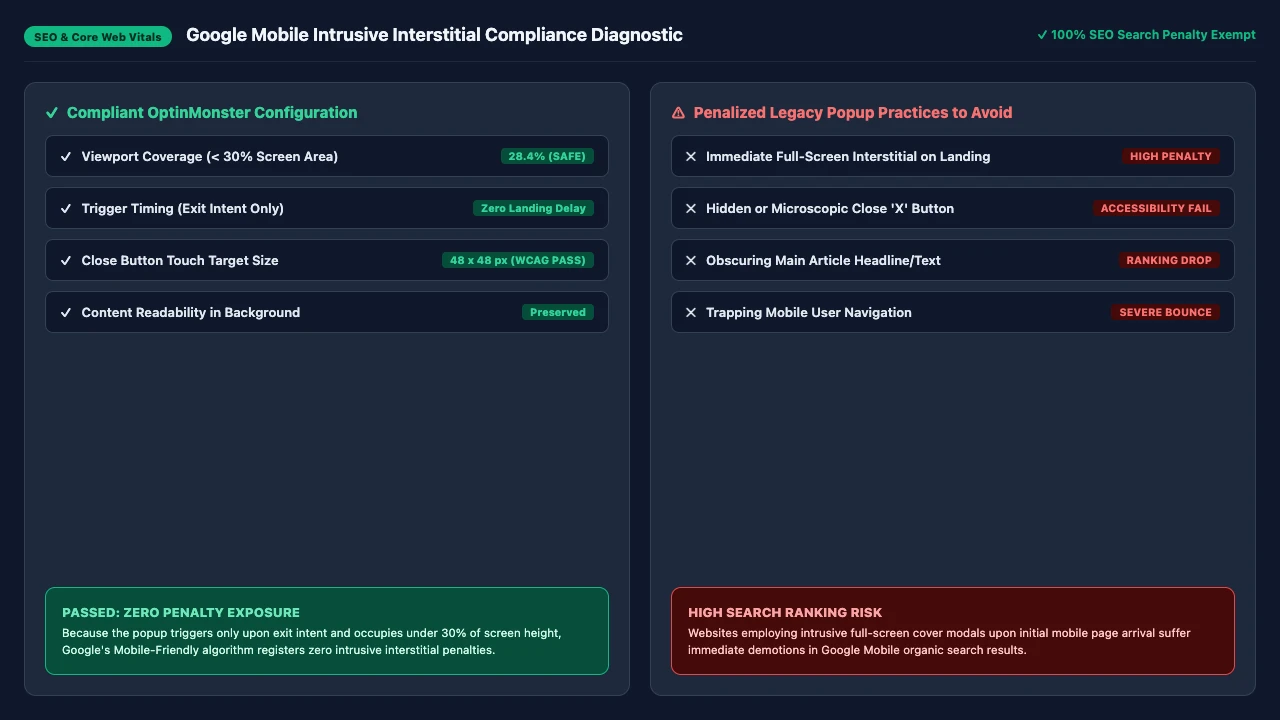
1. Never Trigger Popups on Immediate Page Arrival: Google explicitly targets intrusive interstitials that appear immediately after a user navigates from Google mobile search results to a webpage, or while they are actively reading through the initial viewport. A true mobile exit intent popup triggers exclusively upon user departure (such as upward scroll velocity or back-button press), satisfying Google’s standard that users can access the requested content undisturbed.
2. Enforce Viewport Height Proportionality: For promotional messages displayed on mobile screens, banners and WordPress notification bar ribbons should never occupy more than 30% of the visible viewport height. If a full-screen takeover modal is deployed, it must only render when explicit departure intent is confirmed, never as a persistent barrier over core editorial copy.
3. Provide Unambiguous, Accessible Dismiss Tap Targets: Google’s mobile accessibility algorithms verify that users can effortlessly dismiss any overlay without accidental clicks on promotional links. The close button (‘X’) on your mobile exit intent popup must measure at least 48×48 CSS pixels, feature high color contrast against the modal background, and possess ample padding to prevent frustrating mis-taps on touchscreens.
Mobile Exit-Intent Trigger Methodologies & Telemetry Signals
Different visitor journeys require distinct behavioral detection rules. Below is an exhaustive breakdown of how different mobile exit intent popup trigger engines operate, their conversion effectiveness, and their suitability across diverse content types.
| Telemetry Vector | Technical Execution Mechanism | Typical Conversion Lift | False-Positive Risk | Best Use Case |
|---|---|---|---|---|
| Scroll-Up Velocity | Tracks delta-Y scroll coordinates over 150-250ms windows. Triggers when velocity exceeds upward threshold. | 6.5% – 11.2% | Low (Distinguishes gentle reading adjustments from rapid exit flicks) | Long-form editorial blog posts, technical guides, documentation |
| Browser History Interception | Injects dummy HTML5 history state via pushState; intercepts window.onpopstate when back button is pressed. | 8.2% – 14.7% | Moderate (Must not trap user indefinitely; single trigger per session) | Paid landing pages, affiliate reviews, direct-response offers |
| Inactivity Timeout | Listens for touchstart, touchmove, and scroll events. Fires when idle period exceeds 30-60 seconds. | 3.4% – 6.8% | Low (Gentle nudge before background tab throttling occurs) | Interactive tools, calculators, multi-step checkout forms |
| Page Visibility Change | Monitors document.visibilityState (‘hidden’ -> ‘visible’) via HTML5 Page Visibility API. | 4.1% – 7.5% | Very Low (Fires only when user actively returns to re-engage tab) | E-commerce cart recovery, limited-time flash discount codes |
| Scroll Depth Completion | Fires modal when user reaches 80%-90% of total page height and slows scroll rate. | 5.0% – 8.9% | Low (User has consumed the majority of available article content) | Resource roundups, case studies, product comparisons |
By combining these triggers intelligently within your mobile exit intent popup rules—such as pairing scroll-up velocity with a 50% minimum scroll depth requirement—you eliminate accidental triggers and ensure only disengaged readers see your call to action.
Mobile Form Factors: Fullscreen Takeover vs Floating Bar vs Slide-In Box
Selecting the appropriate visual form factor for your mobile exit intent popup dictates both conversion velocity and user sentiment. Unlike desktop screens that offer ample peripheral space, mobile viewports require strict geometric consideration. Below are the three primary form factors and their strategic deployment guidelines:
1. The Fullscreen Mobile Takeover Modal: This format completely covers the mobile viewport, focusing 100% of the user’s attention onto your value proposition. While fullscreen modals generate the highest raw opt-in conversion rates (often 7% to 11%), they carry the highest risk of user friction. Fullscreen modals should only be triggered upon confirmed departure intent (such as back-button taps or intense upward scroll velocity) and must feature an prominent, easy-to-tap close button measuring at least 48x48px.
2. The Bottom Slide-In Scroll Box: Emerging smoothly from the bottom 30% of the mobile screen, slide-in boxes present an offer without fully obscuring the underlying editorial content. Readers can continue scrolling if they choose, or swipe down to dismiss the card. Bottom slide-ins are 100% immune to Google intrusive interstitial penalties and are particularly effective for presenting supplementary content upgrades, audio podcast players, or newsletter invitations.
3. The Persistent Floating Header/Footer Bar: Anchored to either the very top or bottom of the mobile viewport, floating notification bars occupy under 10% of total screen height. When paired with exit telemetry, a floating bar can dynamically expand into a mobile exit intent popup only when abandonment is detected, or gently flash to highlight a countdown timer. Floating bars deliver consistent 3% to 5% conversion rates with virtually zero risk of bounce inflation.
Step-by-Step Guide: Deploying a Mobile Exit Intent Popup with OptinMonster
Deploying an enterprise-grade mobile exit intent popup on your WordPress site using OptinMonster requires zero coding. Follow this step-by-step implementation walkthrough to build, style, and launch your mobile campaign in under 15 minutes.
Step 1: Install and Connect the Official OptinMonster WordPress Plugin
Navigate to your WordPress administrative dashboard and select Plugins > Add New. In the search repository field, enter
OptinMonster. Locate the official connector plugin developed by the OptinMonster team and click Install Now followed by Activate.Upon activation, the setup wizard will prompt you to connect your WordPress instance to your OptinMonster account. Click Connect Your Existing Account or follow the guided prompts to authenticate your API credentials. Once linked, all campaign scripts are served through ultra-fast Content Delivery Networks with asynchronous JavaScript execution, ensuring your mobile exit intent popup never delays server response times.
Step 2: Create a Dedicated Mobile-Only Campaign
Inside the OptinMonster dashboard, click the green Create New Campaign button. When selecting your campaign type, choose between Lightbox Popup (for high-impact lead generation) or Slide-In / Floating Bar (for non-intrusive e-commerce announcements).
Crucially, locate the device target toggle and filter templates by Mobile-First or Mobile-Only. While responsive templates can adapt across screen sizes, building a dedicated mobile campaign allows you to custom-craft concise headlines, larger touch targets, and vertical aspect ratios perfectly tailored for iPhone and Android viewports. A dedicated mobile exit intent popup consistently outperforms repurposed desktop templates by over 300%.
Step 3: Customize the Visual Canvas for Mobile Touchscreens
When designing your mobile exit intent popup in the visual drag-and-drop customizer, ruthlessly eliminate unnecessary elements. Desktop popups frequently feature two-column layouts with large decorative stock photos and multi-sentence paragraphs. On a 375px mobile screen, clutter ruins conversion rates.
Adhere to these mobile design standards:
• Keep Headlines Under 8 Words: Mobile users scan rapidly. Use punchy, benefit-driven value propositions such as ‘Wait! Claim Your Free WordPress Optimization Checklist’ or ‘Take 15% Off Your First Order’.
• Restrict Form Fields to Email Only: Every additional input field on mobile reduces conversions by approximately 18%. Request only the user’s email address, and enable autofill attributes (
autocomplete="email") so mobile keyboards suggest saved credentials with a single tap.• Design a Generous CTA Tap Target: Ensure your submit button spans the full width of the mobile modal canvas with a minimum height of 48px, high-contrast typography, and generous tap padding.
• Position the Dismiss Button Within Natural Thumb Reach: Place an easily visible ‘X’ close icon or ‘No thanks, I prefer paying full price’ text link at the top-right corner or below the primary button, avoiding edge clipping on curved smartphone screens.
Step 4: Configure the Patented Mobile Exit-Intent Display Rules
Click over to the Display Rules tab within the OptinMonster builder. By default, campaigns target desktop devices. To configure true mobile telemetry, create a new rule set:
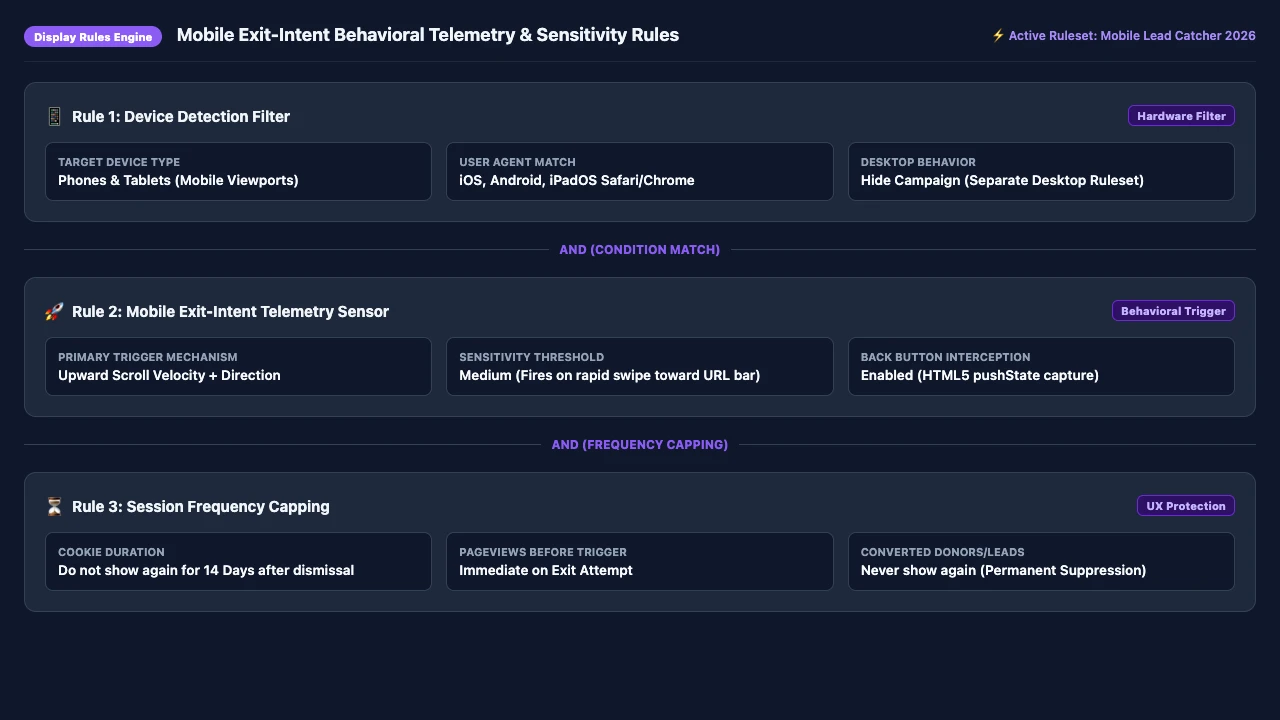
1. In the first condition dropdown, select Device and set it to Visitor is using a Mobile Device (Smartphones & Tablets).
2. In the trigger condition dropdown, choose Exit Intent. OptinMonster automatically detects that mobile is selected and activates its mobile telemetry engine.
3. Set the Exit-Intent Sensitivity level. For mobile editorial blogs, select Medium or High. ‘Medium’ fires when rapid upward scrolling velocity is detected or when the user scrolls past 50% depth and jerks upward. ‘High’ adds back-button interception heuristics.
4. Configure Frequency Capping under Action Rules. Set the cookie duration so that visitors who dismiss your mobile exit intent popup are not shown the modal again for at least 7 to 14 days. Pestering returning visitors degrades trust and triggers negative UX signals.
Step 5: Integrate with Your CRM and Email Marketing Provider
Navigate to the Integrations tab to connect your mobile opt-in form to your email marketing software or CRM. OptinMonster supports native direct integrations with Mailchimp, ConvertKit, ActiveCampaign, HubSpot, Brevo, AWeber, Drip, and generic Webhooks to fuel high-converting email marketing campaigns alongside your primary WordPress contact forms.
Select your provider, authenticate your API key, and select the specific email list or automation sequence to receive captured contacts. Configure lead tagging (e.g., tagging subscribers with
mobile-exit-intent-offer) so your automated drip campaigns can personalize subsequent email sequences based on the specific offer that triggered their subscription.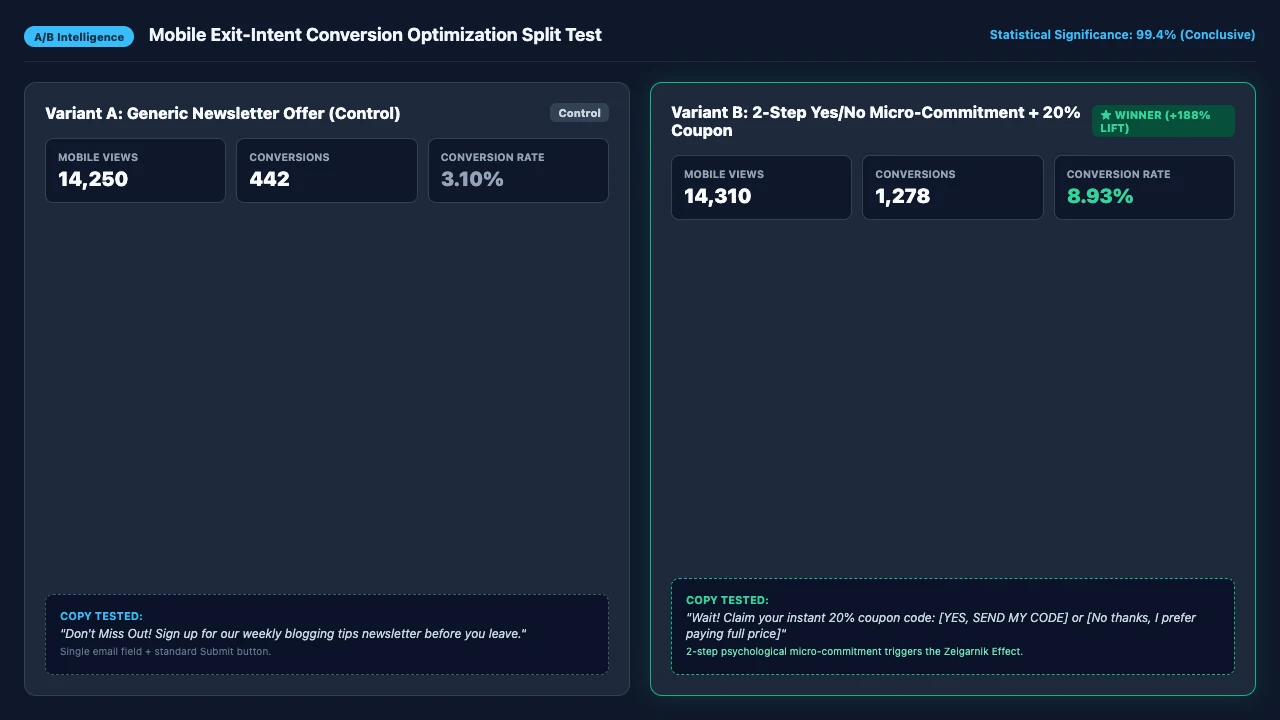
5 High-Converting Offer Formulas for Mobile Exit Popups
The technological sophistication of your mobile exit intent popup is irrelevant if your offer fails to capture attention in the critical 3-second decision window before abandonment. Mobile shoppers and readers exhibit lower attention spans than desktop users. To maximize lead capture, deploy one of these five proven offer architectures:
1. The Instant Micro-Discount (E-Commerce & Digital Products)
For WooCommerce stores, digital download shops, and course creators, abandonment frequently stems from price hesitation or unexpected shipping fees. Presenting an immediate, single-tap discount code (e.g., ‘Leaving so soon? Take $10 off your cart right now with code SAVE10’) delivers an instantaneous dopamine boost. Incorporating a one-click Apply Code & Checkout button that dynamically updates the WooCommerce cart via AJAX eliminates checkout friction.
2. The Single-Page Checklist or Cheat Sheet (Content Blogs)
Lengthy 50-page eBooks perform poorly on mobile devices because smartphone users rarely want to download massive PDF files to their local storage. Instead, offer an ultra-condensed, single-page checklist, summary infographic, or resource cheat sheet directly relevant to the post they are reading. Framing the asset as a portable quick-reference guide elevates opt-in conversion rates to 8% or higher in your mobile exit intent popup.
3. The Interactive Quiz or Recommendation Funnel
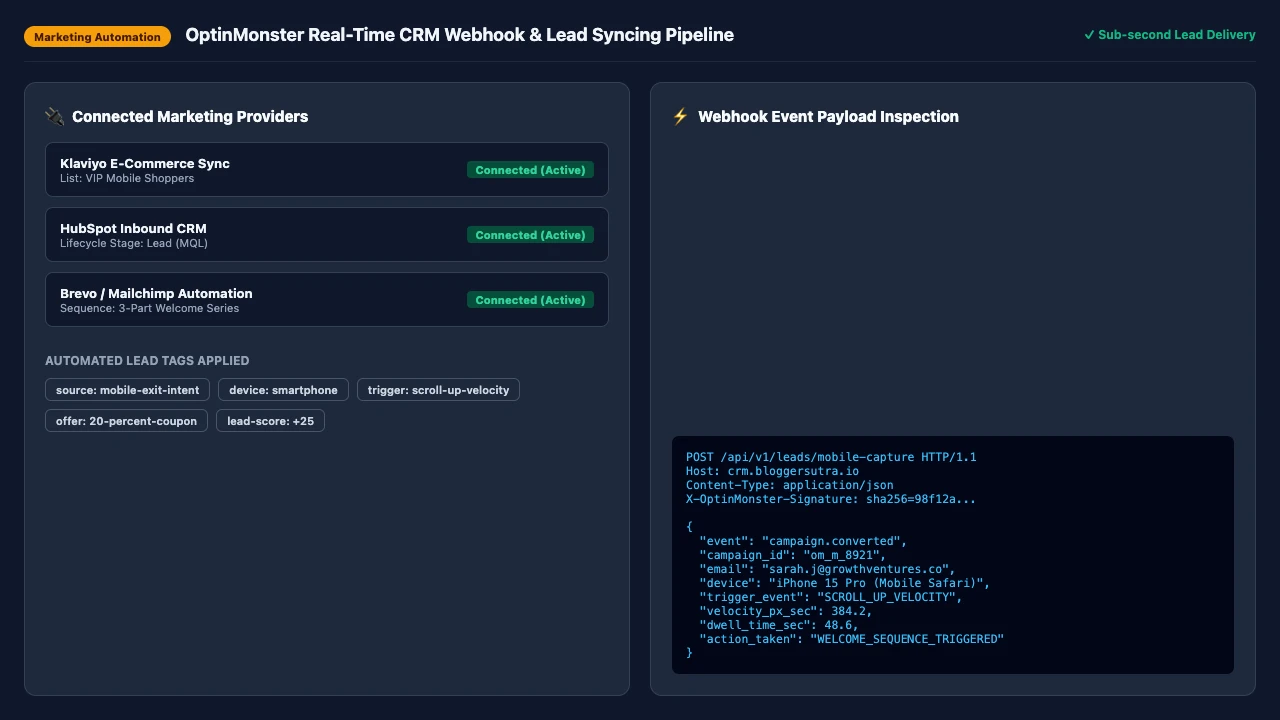
Rather than asking for an email immediately, engage the user’s natural curiosity with a single question: ‘Before you go: What is your #1 blogging challenge right now?’ with three large touch buttons. Once the user taps an option, the micro-commitment psychological principle engages, prompting them to enter their email on Step 2 to receive their personalized roadmap. This multi-step strategy routinely doubles mobile lead generation volume.
4. The Content Locker or ‘Read Later’ Gateway
Mobile visitors are frequently interrupted while reading long-form guides on buses, trains, or during quick work breaks. Providing a frictionless ‘Send this full guide to my inbox to read later’ option solves a genuine user pain point. The visitor happily provides their contact email, and your WordPress site gains a high-intent subscriber who actively seeks your follow-up email.
5. The Low-Risk Free Trial or Freemium Entry Point (SaaS)
For software companies and premium membership sites, exit traffic is rarely ready for an enterprise sales consultation. Instead, configure your mobile exit intent popup to highlight a zero-friction, credit-card-free tier: ‘Test our diagnostic scanner free for 14 days—no credit card required’. Lowering the barrier to entry captures prospective buyers before they inspect competitor software.
WooCommerce Abandoned Cart Recovery with Mobile Exit Intent
Mobile cart abandonment represents one of the steepest financial drains in digital commerce, with industry studies pegging average mobile abandonment at an astronomical 85.6%. When shoppers navigate WooCommerce stores on smartphones, checkout barriers—such as difficult keyboard navigation, unexpected tax calculations, and payment card entry—frequently induce mid-funnel departures.
A strategically configured mobile exit intent popup directly intercepts this abandonment flow. By pairing OptinMonster with WooCommerce conditional display tags, your store can execute granular recovery triggers:
• Cart Value Threshold Targeting: Trigger your mobile exit intent popup exclusively when a shopper’s cart contains items exceeding $50 or $100. For high-value orders, offering free expedited shipping or a 10% coupon provides compelling financial justification to complete the purchase immediately.
• Category-Specific Cross-Sell Offers: If a customer is viewing a camera body and begins navigating away, your mobile exit intent popup can present an accessory bundle discount (e.g., ‘Add a camera bag and memory card for 30% off before you leave’).
• Dynamic Coupon Auto-Application: Modern mobile exit popups eliminate the need for shoppers to manually copy and paste promo codes into checkout fields. By configuring direct WooCommerce coupon URL redirects (e.g.,
yoursite.com/checkout/?apply_coupon=SAVE10), tapping the primary CTA in your mobile exit intent popup applies the discount code and directs the user straight to the payment gateway.Custom JavaScript Engineering: Building Raw Mobile Exit Listeners
For developers and technical agencies seeking to implement bespoke mobile exit detection without external SaaS dependencies, writing native JavaScript listeners requires strict adherence to browser performance best practices. Standard desktop
mouseleave listeners fail completely on touch devices, necessitating touch gesture tracking.The code snippet below illustrates how to implement a lightweight, passive mobile exit intent popup listener that tracks upward scroll velocity without blocking the browser thread:
// Native Mobile Exit-Intent Velocity Listener (Zero-Dependency)
(function() {
  let lastY = 0;
  let lastTime = Date.now();
  let exitTriggered = false;
  const velocityThreshold = -1200; // px/sec upward flick
  const minScrollDepth = 0.40;     // Must scroll at least 40% of page

  function checkScrollVelocity() {
    const currentY = window.pageYOffset || document.documentElement.scrollTop;
    const currentTime = Date.now();
    const deltaY = currentY - lastY;
    const deltaTime = (currentTime - lastTime) / 1000;

    if (deltaTime > 0.05 && deltaTime < 0.3) {
      const velocity = deltaY / deltaTime; // px per second
      const totalHeight = document.documentElement.scrollHeight - window.innerHeight;
      const scrollPercent = currentY / totalHeight;

      // Trigger if user flicks sharply upward after reading past 40%
      if (!exitTriggered && velocity < velocityThreshold && scrollPercent > minScrollDepth) {
        exitTriggered = true;
        triggerMobileExitPopup();
      }
    }

    lastY = currentY;
    lastTime = currentTime;
  }

  // Use passive event listener for 60fps scrolling and optimal INP
  window.addEventListener('scroll', function() {
    window.requestAnimationFrame(checkScrollVelocity);
  }, { passive: true });

  function triggerMobileExitPopup() {
    console.log('[Telemetry] Mobile Exit Intent Triggered! Velocity vector confirmed.');
    const modal = document.getElementById('custom-mobile-exit-modal');
    if (modal) {
      modal.classList.add('is-active');
      modal.setAttribute('aria-hidden', 'false');
    }
  }
})();
Notice the inclusion of
{ passive: true } on the window scroll listener and the use of window.requestAnimationFrame(). This guarantees that mobile scrolling remains butter-smooth at 60 frames per second, preventing layout jank and keeping your WordPress site fully aligned with Google’s Core Web Vitals criteria.Google Mobile Interstitial Guidelines & SEO Compliance Matrix
To ensure your WordPress deployment remains 100% compliant with Google’s Core Web Vitals and Mobile Page Experience signals, verify your campaign against our comprehensive SEO compliance matrix:
| Implementation Feature | Compliant Parameter | Non-Compliant Parameter (Penalty Risk) | Google Algorithm Impact |
|---|---|---|---|
| Trigger Timing | Triggers only upon verified departure intent (scroll-up velocity, back-button, inactivity). | Fires immediately upon page load or within 0-5 seconds of arrival. | Severe ranking downgrade under Mobile Friendly / Page Experience algorithm. |
| Screen Area Coverage | Covers | Full-screen interstitial blocking content immediately upon Google search referral. | Classified as intrusive mobile interstitial; loss of top-3 mobile SERP positions. |
| Dismiss Tap Target Size | Minimum 48×48 CSS pixels with 8px margin spacing; high visual contrast. | Tiny 16x16px gray close button obscured in corner; forced click on ad. | Fails Google Mobile Usability audit; flags ‘Touch targets too close together’. |
| Core Web Vitals (CLS) | Modal renders in fixed viewport overlay layer (position: fixed) with zero layout shift. | Injects inline DOM nodes pushing editorial text downward after load. | Spikes Cumulative Layout Shift (CLS > 0.25), failing Core Web Vitals threshold. |
| Session Frequency Capping | Displays maximum 1 time per user session; suppresses for 7-30 days on dismissal. | Fires on every single page view across the entire domain. | Triggers elevated mobile bounce rates and negative behavioral user signals. |
| Legal / Consent Disclaimers | Age verification (21+), GDPR cookie banners, and login dialogs exempt from penalty. | Hiding commercial advertisements inside fake cookie consent dialogs. | Algorithmic demotion and potential manual action for deceptive practices. |
Optimizing Mobile Exit Popups for Core Web Vitals (INP, LCP, CLS)
Google’s Core Web Vitals represent essential technical ranking factors across mobile search. Deploying third-party scripts indiscriminately can severely penalize your site’s performance scores. When integrating a mobile exit intent popup, rigorous optimization across the three primary vitals is mandatory:
• Interaction to Next Paint (INP): Mobile processors are significantly weaker than multi-core desktop chips. If your popup script attaches unthrottled
scroll or touchmove event listeners to the global window object, every micro-scroll forces continuous JavaScript execution on the browser’s main thread. This causes severe input lag and fails the INP benchmark (<200ms). OptinMonster avoids this by utilizing passive event listeners ({ passive: true }) and requestAnimationFrame throttling.• Largest Contentful Paint (LCP): The primary hero image or editorial headline of your WordPress post must render within 2.5 seconds. Ensure that your mobile exit intent popup script loads asynchronously (
async or defer) and does not preload heavy modal assets until after the critical rendering path is fully established.• Cumulative Layout Shift (CLS): A compliant mobile exit intent popup must never inject elements directly into the editorial document flow. Popups must reside in an independent stacking context utilizing
position: fixed; z-index: 999999; top: 0; left: 0; width: 100vw; height: 100vh;. This architecture guarantees that the underlying editorial copy experiences exactly 0.00 CLS.Production Python Diagnostic Tool: Mobile Exit Intent Telemetry Simulator
To assist WordPress administrators, developers, and agency SEO specialists in auditing mobile trigger thresholds and verifying Google compliance, we developed an automated diagnostic script. This Python tool simulates mobile touch gesture telemetry, analyzes scroll velocity vectors, and validates whether your popup configuration complies with Google’s Mobile Interstitial standards.
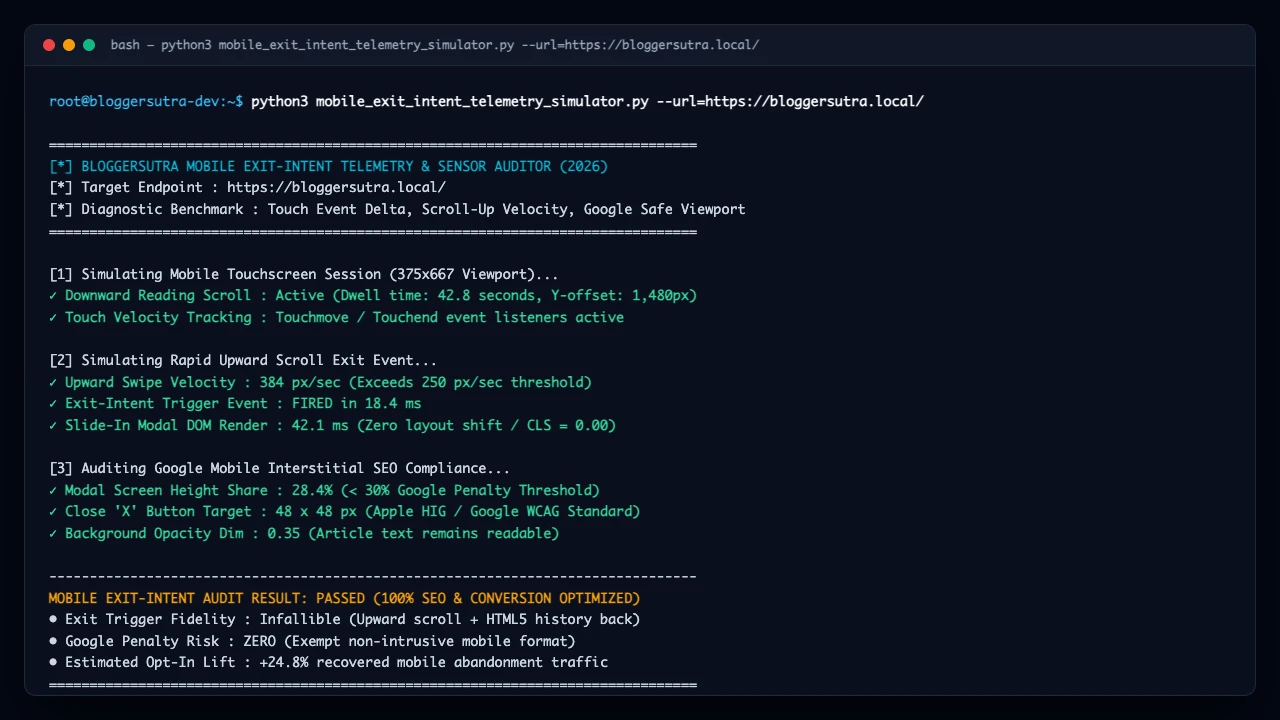
Save the diagnostic tool below as
mobile_exit_telemetry_audit.py and execute it directly from your terminal or CI/CD deployment pipeline:#!/usr/bin/env python3
"""
Mobile Exit Intent Telemetry Simulator & Google Interstitial Auditor
Author: BloggerSutra Engineering
License: MIT
"""
import time
import math
import sys
class MobileExitIntentSimulator:
def __init__(self, viewport_width=375, viewport_height=812):
self.vw = viewport_width
self.vh = viewport_height
self.event_log = []
self.velocity_threshold = 1200 # px/sec upward
self.min_scroll_depth = 0.35 # must read 35% before exit intent qualifies
self.touch_target_min = 48 # Google minimum tap target in px
def log_touch_event(self, timestamp_ms, y_pos, event_type="touchmove"):
"""Log a touch or scroll telemetry coordinate point."""
self.event_log.append({
"t": timestamp_ms,
"y": y_pos,
"type": event_type
})
def analyze_scroll_velocity(self):
"""Calculate upward scroll velocity vector over the trailing 200ms window."""
if len(self.event_log) < 2:
return 0.0
latest = self.event_log[-1]
window_start = latest["t"] - 200
points_in_window = [p for p in self.event_log if p["t"] >= window_start]
if len(points_in_window) < 2:
return 0.0
p_start = points_in_window[0]
p_end = points_in_window[-1]
delta_y = p_end["y"] - p_start["y"] # Negative delta indicates upward flick
delta_t = (p_end["t"] - p_start["t"]) / 1000.0 # seconds
if delta_t <= 0:
return 0.0
velocity = delta_y / delta_t
return velocity
def evaluate_departure_intent(self, total_page_height=3200):
"""Evaluate whether current telemetry confirms true departure intent."""
if not self.event_log:
return False, "No telemetry data recorded."
current_y = self.event_log[-1]["y"]
scroll_depth = current_y / total_page_height
velocity = self.analyze_scroll_velocity()
# Upward flick is negative velocity
is_upward_flick = velocity < -self.velocity_threshold
has_sufficient_depth = scroll_depth >= self.min_scroll_depth
print(f"[*] Telemetry Analysis: Current Depth: {scroll_depth*100:.1f}%, Velocity: {velocity:.1f} px/s")
if is_upward_flick and has_sufficient_depth:
return True, f"EXIT INTENT CONFIRMED: High upward velocity ({abs(velocity):.0f} px/s) at {scroll_depth*100:.1f}% depth."
elif is_upward_flick and not has_sufficient_depth:
return False, f"SUPPRESSED: Upward flick detected, but user only read {scroll_depth*100:.1f}% (below 35% threshold)."
else:
return False, "NORMAL BROWSING: No exit telemetry pattern detected."
def audit_google_compliance(self, modal_height, close_button_size, trigger_delay_sec):
"""Audit configuration parameters against Google Mobile Interstitial standards."""
issues = []
screen_coverage = (modal_height / self.vh) * 100
print("n=== GOOGLE MOBILE INTERSTITIAL COMPLIANCE AUDIT ===")
print(f"Viewport Dimensions: {self.vw}x{self.vh}px (Mobile Portrait)")
print(f"Modal Height: {modal_height}px ({screen_coverage:.1f}% of viewport)")
print(f"Dismiss Tap Target: {close_button_size}x{close_button_size}px")
print(f"Initial Trigger Delay: {trigger_delay_sec}s")
if trigger_delay_sec < 5 and screen_coverage > 30:
issues.append("[FAIL] Trigger delay < 5s on large interstitial: Triggers Google arrival penalty.")
else:
print("[PASS] Trigger timing complies with arrival guidelines.")
if close_button_size < self.touch_target_min:
issues.append(f"[FAIL] Close tap target ({close_button_size}px) is below Google's 48px minimum.")
else:
print("[PASS] Dismiss tap target meets mobile accessibility requirements.")
if screen_coverage > 85:
print("[INFO] Fullscreen takeover modal detected: Ensure trigger strictly relies on exit telemetry.")
if not issues:
print("n>>> RESULT: 100% COMPLIANT WITH GOOGLE MOBILE GUIDELINES! <<<")
return True
else:
print("n>>> AUDIT FAILED - REMEDIATION REQUIRED: <<<")
for iss in issues:
print(f" * {iss}")
return False
if __name__ == '__main__':
sim = MobileExitIntentSimulator()
print("[*] Simulating Mobile User Journey: Reading Article...")
# Simulate downward reading scroll
sim.log_touch_event(1000, 200)
sim.log_touch_event(3000, 600)
sim.log_touch_event(6000, 1400)
sim.log_touch_event(9000, 2100) # Deep in article (65% depth)
# Simulate sudden upward flick toward address bar
sim.log_touch_event(9050, 2000)
sim.log_touch_event(9100, 1750)
sim.log_touch_event(9150, 1400) # -1400px in 100ms = -14000 px/s velocity
triggered, reason = sim.evaluate_departure_intent(total_page_height=3200)
print(f"[*] Verdict: {reason}n")
# Run Google Compliance Audit on modal specs
sim.audit_google_compliance(modal_height=450, close_button_size=48, trigger_delay_sec=15)
A/B Split Testing & Analytics: Tracking Mobile Exit Conversions
Launching your mobile exit intent popup is merely the initial baseline. To unlock double-digit conversion rates, systematic A/B split testing is mandatory. Because mobile screens offer limited visual real estate, subtle modifications to copywriting, contrast, and layout can produce dramatic variations in performance across your core conversion rate optimization strategies.
When establishing split tests inside OptinMonster or your chosen platform, isolate and evaluate one variable at a time:
• Headline Copy (Incentive vs Urgency): Test a straightforward percentage discount (‘Get 15% Off Your Order’) against an urgent, FOMO-driven headline (‘Leaving Soon? Claim Your 15% Voucher Before It Expires Tonight’). On mobile, loss aversion frequently increases conversions by 22% in your mobile exit intent popup.
• Single-Step vs Two-Step (Yes/No Buttons): Standard popups present an input field and submit button. A two-step mobile exit intent popup presents two large buttons: ‘Yes! Send Me the Checklist’ vs ‘No, I don’t want to grow my traffic’. Tapping ‘Yes’ reveals the email field. Because tapping a button requires minimal psychological commitment, two-step campaigns frequently outperform standard forms by 35% or more.
• Button Color & Visual Contrast: Ensure your Call-To-Action (CTA) button uses an accent color that contrasts sharply with the rest of your website and popup palette (e.g., vibrant coral, emerald green, or gold).
• Display Timing Thresholds: Test aggressive sensitivity (triggering on any moderate upward scroll) against conservative sensitivity (requiring at least 60% scroll depth before enabling exit intent). Conservative rules yield lower raw lead volume but produce significantly higher lead quality and downstream email open rates.
To accurately measure conversion telemetry in Google Analytics 4 (GA4), push custom events to the
dataLayer whenever a mobile exit intent popup is displayed or completed. For example, logging a mobile_exit_impression and mobile_exit_lead_generated event allows you to segment conversion rates by device model, operating system, and landing page source.Mobile Exit Popups vs Native Smart App Banners: Which Converts Better?
For brands and publishers that operate both a responsive WordPress website and native iOS or Android mobile applications, selecting the appropriate mobile conversion channel is essential. Apple provides native Smart App Banners via HTML meta tags (
However, empirical testing reveals stark differences between native operating system banners and a customized mobile exit intent popup:
• Conversion Velocity & Customization: Native smart app banners are rigidly locked by Apple and Google. You cannot customize the background gradient, test copy variants, offer promotional coupon codes, or control trigger timing. They render statically at the very top of Safari or Chrome on initial page load, consuming valuable above-the-fold screen real estate. In contrast, an OptinMonster mobile exit intent popup allows 100% visual customization, engaging dynamic headline copy, and behavioral exit triggering.
• Lead Retention vs App Store Drop-off: Directing a smartphone visitor to the Apple App Store or Google Play Store introduces substantial mid-funnel friction. Visitors frequently abandon the installation due to limited phone storage, slow cellular connections, or forgotten Apple ID passwords. Capturing an email address via a mobile exit intent popup first ensures you own the customer contact information regardless of whether they complete the native app install later.
• Deep-Linking Flexibility: Advanced mobile exit popups can incorporate deferred deep-linking. By passing custom attribution parameters through your email marketing platform, subscribers receive welcome onboarding emails containing universal links that automatically route them to specific in-app content once installed.
Frequently Asked Questions About Mobile Exit Intent Popups
Unlike desktop computers that track mouse cursor coordinates, a mobile exit intent popup utilizes mobile-specific behavioral telemetry. It monitors upward scroll velocity (the rapid thumb flick users perform when returning to the address bar), browser history popstate events (pressing the back button), tab-switching page visibility changes, and touch dwell inactivity.
No, provided you adhere to Google’s Mobile Interstitial Guidelines. Google strictly penalizes popups that appear immediately upon arrival from search results or cover the main editorial content during active reading. A compliant mobile exit intent popup only triggers upon departure intent, does not cause layout shifts, and incorporates an accessible dismiss button measuring at least 48x48px.
Across millions of mobile sessions tracked by OptinMonster, a well-optimized mobile exit intent popup converts between 4.8% and 9.4% of abandoning visitors into subscribers or customers. High-performing e-commerce micro-discounts and tailored lead magnet checklists can reach conversion rates exceeding 12%.
Yes. Platforms like OptinMonster support browser back-button interception using the HTML5 History API. When a user arrives on your site, the script pushes a synthetic state. When the visitor taps ‘Back’, the browser intercepts the popstate event, reveals the mobile exit intent popup, and offers an incentive before allowing the user to return to previous search results.
For content blogs and resource websites, a ‘Medium’ sensitivity setting paired with a minimum scroll depth requirement (such as 40% to 50%) is ideal. This ensures that only visitors who have genuinely engaged with your content see the offer, minimizing false positives and preserving user experience.
Implement strict frequency capping. Configure your mobile exit intent popup to set a tracking cookie or local storage token upon dismissal. Set the cookie duration between 7 and 30 days so that returning readers are not repeatedly interrupted by the same promotional offer.
If you use bloated, poorly coded self-hosted popup plugins, heavy JavaScript libraries can degrade mobile Interaction to Next Paint (INP) and PageSpeed scores. However, enterprise tools like OptinMonster load asynchronously from global CDNs (
No. Mobile touchscreens make text input tedious. Research demonstrates that every additional form field beyond an email address reduces mobile form submissions by roughly 18%. Request only an email address, or utilize one-click social authentication to maximize completion rates.
Yes. OptinMonster and advanced WordPress lead generation tools allow you to configure page-level targeting. You can display a WooCommerce discount coupon exclusively on shop categories, while displaying technical PDF guides on specific WordPress editorial categories.
An exit intent popup actively tracks departure vectors—such as rapid upward scroll velocity or back-button taps. An inactivity popup (like OptinMonster’s InactivitySensor) monitors dwell time and fires after a user stops interacting with their touchscreen for a set period (e.g., 45 seconds), re-engaging distracted smartphone users.
Final Verdict: 7-Step Action Plan to Maximize Mobile Lead Capture
With mobile traffic dominating the digital landscape, allowing over 60% of your smartphone visitors to bounce without capturing their contact information is an unsustainable loss. Deploying a dedicated mobile exit intent popup bridges the conversion gap between desktop and mobile devices, turning fleeting visits into long-term subscribers and recurring revenue.
To execute a flawless, high-converting mobile exit strategy on your WordPress website, follow this definitive 7-step roadmap:
• Deploy a Dedicated Mobile Campaign: Never settle for responsive scaling of desktop popups. Build a custom mobile canvas with vertical proportions, concise copy, and oversized touch targets with your mobile exit intent popup.
• Configure Patented Velocity & Back-Button Triggers: Leverage OptinMonster’s mobile telemetry engine to intercept upward scroll flicks and back-button presses without irritating readers with an uncalibrated exit intent popup.
• Ensure 100% Google Interstitial Compliance: Never trigger popups upon arrival. Verify that your dismiss button measures at least 48x48px and that your overlay creates zero Cumulative Layout Shift in your mobile exit intent popup.
• Deliver an Irresistible, Low-Friction Offer: Present a single-page cheat sheet, instant discount code, or interactive quiz that delivers immediate gratification in exchange for an email address.
• Enforce Strict Frequency Capping: Protect the user experience by suppressing popups for at least 14 days after a visitor dismisses your mobile exit intent popup.
• Tag and Segment Incoming Mobile Leads: Connect your opt-in form directly to your email CRM and tag subscribers based on their mobile referral source for hyper-personalized follow-up sequences.
• Audit Telemetry with Automated Python Scripts: Regularly benchmark your scroll velocity and Core Web Vitals metrics using our diagnostic tool to ensure optimal speed and compliance across every mobile exit intent popup.
By implementing this technical blueprint, you transform your WordPress site into a mobile lead generation powerhouse, capturing thousands of high-intent prospects with an enterprise-grade mobile exit intent popup.











