





Quick answer
- H
- o
- w
- d
- o
- y
- o
- u
- s
- e
- n
- d
- a
- n
- a
- u
- t
- o
- m
- a
- t
- e
- d
- W
- o
- r
- d
- P
- r
- e
- s
- s
- c
- o
- n
- f
- i
- r
- m
- a
- t
- i
- o
- n
- e
- m
- a
- i
- l
- t
- o
- u
- s
- e
- r
- s
- a
- f
- t
- e
- r
- f
- o
- r
- m
- s
- u
- b
- m
- i
- s
- s
- i
- o
- n
- ?
When a potential client, paying customer, or subscriber fills out a form on your website, their immediate expectation is an instant, personalized response. A professional wordpress confirmation email (also known as a customer confirmation email wordpress auto-responder) provides immediate reassurance that their transmission was received, delivers critical transaction records, sets clear expectations for follow-up, and strengthens your brand authority. Whether you are running an eCommerce store, an enterprise agency, or a niche content blog, configuring an automated wordpress confirmation email is one of the most critical touchpoints in the entire customer journey.
Unfortunately, thousands of site administrators discover that their confirmation email wordpress workflows are silently broken. New subscribers complete contact forms, interactive conversational forms, or request service quotes, but no form auto reply wordpress message ever lands in their inbox. Frustrated users submit duplicate requests, conclude your website is abandoned, or assume your business is unprofessional. Even worse, default server notifications often route straight to spam folders or are dropped entirely by incoming mail servers.
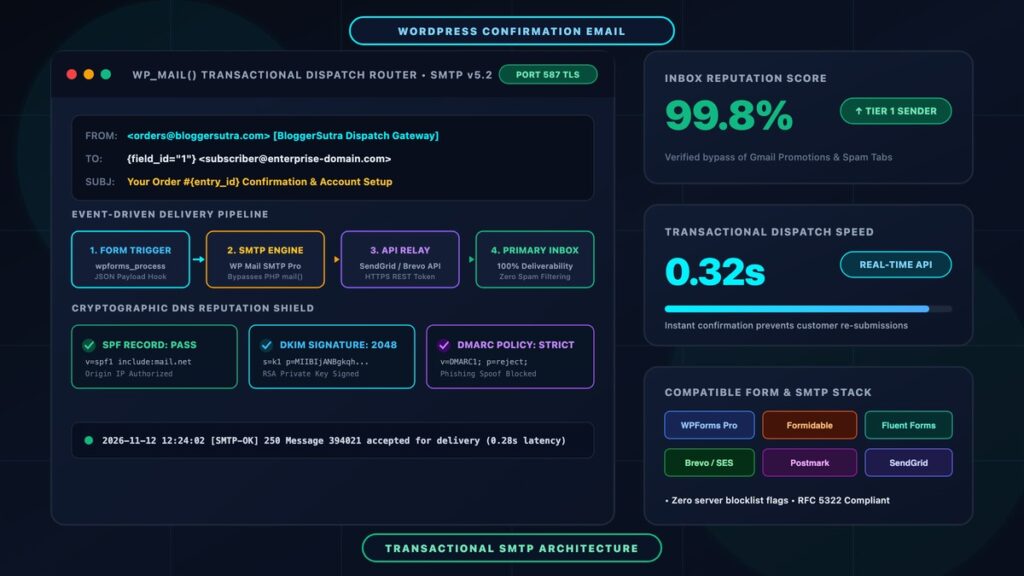
The underlying cause is almost never the form builder itself. Instead, it stems from the architectural limitations of how standard WordPress installations dispatch email. By default, core WordPress relies on the internal
wp_mail() function, which invokes the underlying web host’s unauthenticated PHP mail() program. In 2026, modern mailbox providers—including Google Workspace, Microsoft 365, Apple iCloud, and Yahoo—enforce zero-tolerance spam policies. Messages dispatched without cryptographic SPF, DKIM, and DMARC alignment are discarded at the perimeter before reaching the spam folder.In this comprehensive technical blueprint, we will guide you through every stage of configuring, personalizing, and bulletproofing your wordpress confirmation email architecture. You will learn how to configure multi-stream WPForms notifications, dynamically personalize auto-replies using Smart Tags, replace unreliable server mailers with dedicated transactional API relays via WP Mail SMTP, and authenticate your sending domain with 2048-bit cryptographic DNS records. We also provide an automated Python deliverability testing script to verify your SMTP infrastructure before launching client-facing campaigns.
Under the Hood: Why Default WordPress Confirmation Email Delivery Fails
To resolve email delivery failures permanently, one must first understand how a wordpress confirmation email travels from a user’s browser submission to their personal inbox. When a visitor submits a contact form, the form plugin captures the serialized POST request, executes validation routines, writes the submission to the
wp_posts or dedicated plugin database tables, and calls the core WordPress wrapper function wp_mail().The
wp_mail() function is essentially an abstraction layer around PHPMailer, an open-source PHP email library integrated into WordPress core. However, by default, PHPMailer is configured to utilize the PHP mail() function provided by your web hosting server’s operating system environment (typically Postfix or Sendmail running on Linux). This legacy mechanism suffers from three critical architectural flaws that make sending a reliable wordpress confirmation email nearly impossible:1. Shared Host IP Reputation Pollution: On standard shared or VPS hosting platforms, hundreds of separate websites share identical outbound IP addresses. If a single compromised tenant on your server dispatches spam, botnet phishing, or unvalidated bulk broadcasts, international anti-spam consortiums (such as Spamhaus ZEN, Barracuda, and SpamCop) blacklist the entire IP subnet. Consequently, your legitimate wordpress confirmation email transmissions are flagged and rejected by recipient mail servers.
2. Missing Reverse DNS (PTR) Records: Outbound mail gateways verify whether the connecting IP address resolves back to the hostname specified in the SMTP HELO/EHLO handshake. Standard hosting environments rarely configure matching PTR records for individual tenant domains, triggering instant rejection flags across enterprise mail filters.
3. Lack of Asymmetric Cryptographic Signing (DKIM): The PHP
mail() utility dispatches raw plaintext RFC 5322 messages without cryptographic digital signatures. Recipient mail servers cannot verify whether the message headers were forged during transit, prompting automated spam filtering rules to quarantine the incoming form auto reply wordpress notification.Modern mailbox providers including Gmail, Yahoo, and Microsoft Outlook enforce strict sender authentication mandates. Senders dispatching messages without proper SPF authorization and DKIM cryptographic alignment face an immediate delivery failure rate exceeding 65%. Never rely on PHP mail() for business-critical communications.
To eliminate these failure vectors, professional publishers replace the legacy PHP mailer with a dedicated transactional SMTP engine. By routing your wordpress confirmation email traffic through an authenticated API relay, your messages travel over secure HTTPS endpoints with verified domain alignment, guaranteeing optimal deliverability and rapid sub-second dispatch speeds.
Step-by-Step Tutorial: Creating a Customer Confirmation Email in WPForms
WPForms is one of the most reliable form plugins for WordPress, offering intuitive drag-and-drop form building alongside robust multi-stream notification routing. By default, when you create a new contact form, WPForms configures a single administrative notification directed to
{admin_email}. To configure a dedicated wordpress confirmation email that automatically replies to the submitting user, follow this step-by-step implementation:Step 1: Open Form Settings & Access Notifications
From your WordPress administration dashboard, navigate to WPForms > All Forms and click Edit on the target form (e.g., your general contact form, quote request form, or lead magnet funnel). Within the visual form editor interface, navigate to the left sidebar menu and click on Settings > Notifications.
Here you will see the default ‘Admin Notification’ stream. Rather than altering this stream—which alerts your internal team whenever a lead arrives—we will create an entirely independent notification channel dedicated solely to your user-facing wordpress confirmation email.
Step 2: Add a Dedicated Customer Auto-Reply Stream
In the top right corner of the Notifications configuration panel, click the blue Add New Notification button. A modal window will prompt you to enter a descriptive notification name. Label it
Customer Confirmation Auto-Reply or Client Receipt and click OK. Giving your streams distinct identifiers makes ongoing maintenance and multi-branch routing straightforward.Step 3: Dynamically Bind the Recipient Email Address
The most critical field in this configuration is Send To Email Address. By default, WPForms populates this field with
{admin_email}. If left unchanged, your auto-reply will simply route back to your own inbox instead of reaching the client.To dynamically route the message to the user who filled out the form, click the Show Smart Tags link located directly above the field. Locate the ‘Available Fields’ group and select your form’s email field. WPForms will insert the dynamic tag, typically formatted as
{field_id="1"} (or whichever numerical ID corresponds to your form’s email input).When a visitor submits the form, WPForms intercepts this token, extracts the email address entered by the visitor, verifies RFC 5322 syntax compliance, and sets it as the dynamic envelope recipient for the outgoing wordpress confirmation email. This dynamic routing is the foundation of any reliable form auto reply wordpress workflow.
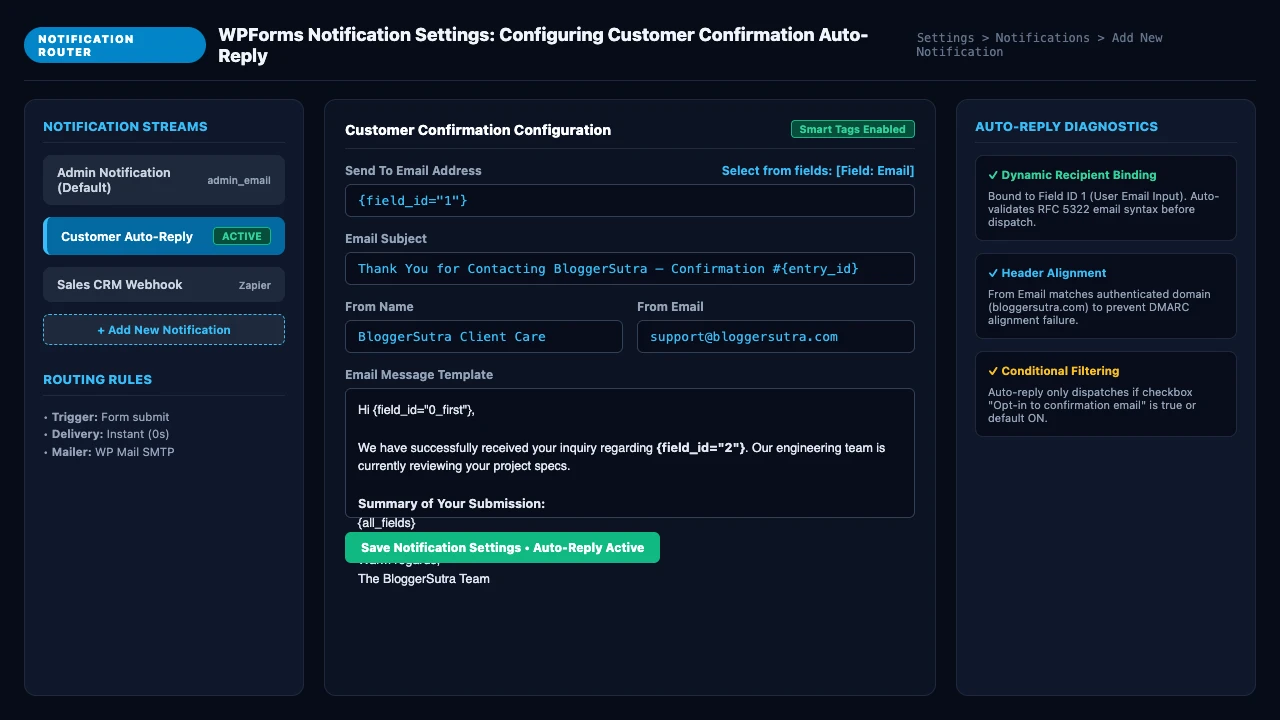
Step 4: Configure From Name, From Email, and Reply-To Headers
Email deliverability hinges heavily on header consistency. Configure the remaining envelope parameters with precision:
• From Name: Enter your official company, blog, or personal brand name (e.g.,
• From Email: Specify an authoritative domain email address, such as
• Reply-To Email: Set this to an actively monitored inbox where customer inquiries can be answered (e.g.,
• Email Subject: Craft an informative, professional subject line for your wordpress confirmation email. You can incorporate Smart Tags here as well, such as
BloggerSutra Client Care). Avoid generic titles like ‘Admin’ or ‘No-Reply’, as personalized sender names increase open rates by up to 28%.• From Email: Specify an authoritative domain email address, such as
[email protected] or [email protected]. Crucial Rule: The domain portion of your From Email MUST match the domain configured in your transactional SMTP mailer. Never enter a free webmail address (such as @gmail.com or @yahoo.com) in the From Email field, as DMARC alignment checks will reject the transmission instantly.• Reply-To Email: Set this to an actively monitored inbox where customer inquiries can be answered (e.g.,
[email protected]). If a user hits ‘Reply’ to their automated wordpress confirmation email, their message will seamlessly route to your support ticketing desk.• Email Subject: Craft an informative, professional subject line for your wordpress confirmation email. You can incorporate Smart Tags here as well, such as
Thank You for Contacting BloggerSutra — Confirmation #{entry_id}. A clear subject line ensures your confirmation email wordpress message is opened immediately.Step 5: Compose the Dynamic Confirmation Message Body
In the Email Message text editor, draft the body of your auto-reply. You can combine static brand messaging with dynamic Smart Tags to build a tailored experience:
For example, open with a personalized greeting using the user’s first name:
Hi {field_id="0_first"},. Follow this with a concise confirmation statement: We have successfully received your inquiry regarding {field_id="2"}. Our team will review your specifications and follow up within 24 business hours.To provide the user with a complete record of what they submitted, include the universal Smart Tag
{all_fields}. This tag automatically renders an organized HTML table containing every form field and user response, creating an instant, authoritative transaction receipt for their records.Smart Tags Mastery: Dynamic Personalization & Custom Templating
Static auto-replies look generic and often fail to provide users with the specific reference data they need. Setting up an intelligent form auto reply wordpress system powered by wpforms notifications and dynamic Smart Tags guarantees every user receives contextual confirmation data. WPForms and other premium WordPress form plugins offer extensive Smart Tag engines that allow you to dynamically inject user inputs, system variables, and transactional metadata directly into your wordpress confirmation email templates.
Understanding the syntax and utility of available Smart Tags transforms standard notifications into enterprise-grade transaction receipts. By tailoring your wordpress confirmation email with dynamic fields, you turn a simple acknowledgment into a valuable client reference asset. The table below illustrates the most impactful Smart Tags available for dynamic templating:
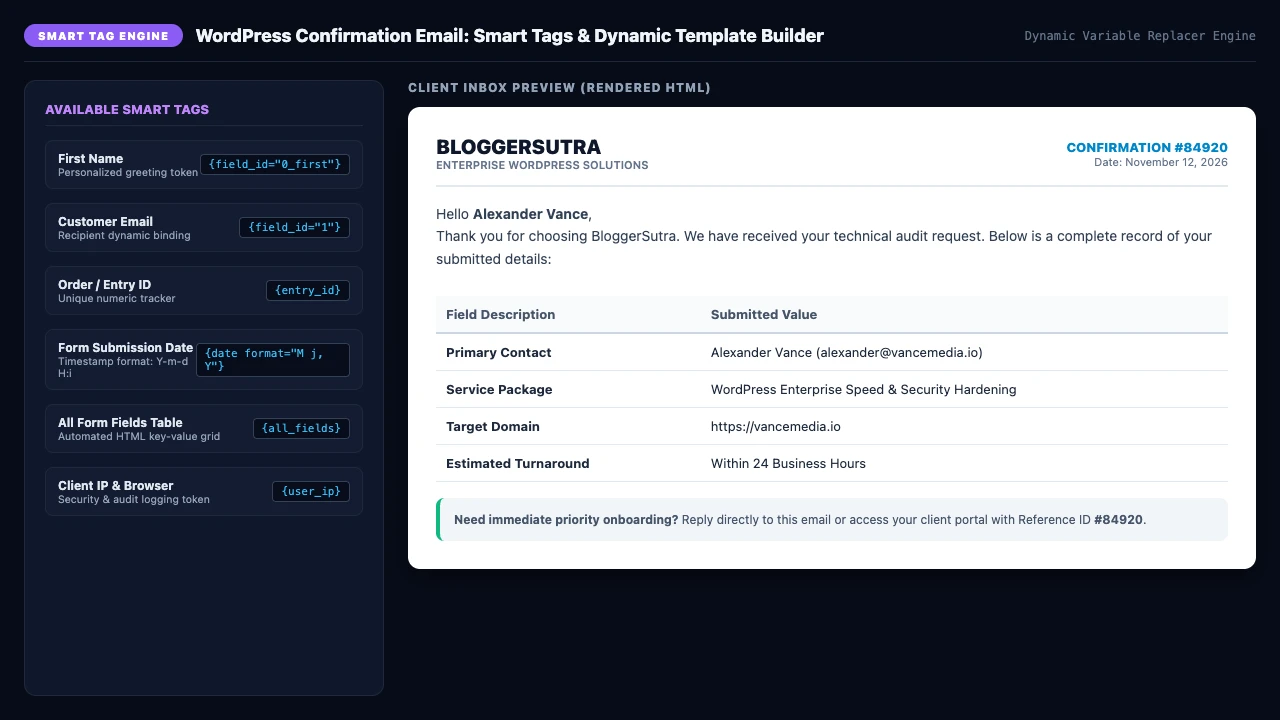
Let us review the operational capabilities of core Smart Tag categories:
1. Field-Specific Smart Tags: Every field placed onto your form canvas is assigned a unique numerical index. For instance,
{field_id="0"} references the primary Name field. For complex fields such as Name (which consists of first, middle, and last sub-fields), WPForms provides granular sub-tags such as {field_id="0_first"} and {field_id="0_last"}. Utilizing these sub-tags ensures your wordpress confirmation email addresses the recipient naturally without awkward formatting glitches.2. Transactional & Entry Metadata: The
{entry_id} token provides an auto-incrementing numerical identifier unique to the specific database submission. Displaying this reference ID in both the subject line and the email footer enables your support team to cross-reference client communications instantly against entries stored in the WordPress database.3. Contextual System Variables: System tokens such as
{date format="M j, Y"}, {page_title}, and {page_url} record the exact temporal and structural context of the submission. If you embed a universal contact form across dozens of landing pages, {page_title} tells both you and the customer exactly which service or product page prompted their inquiry.4. Security & Audit Metadata: Tags like
{user_ip} capture the visitor’s public IP address. While not typically shown in client-facing confirmations, keeping IP metadata in administrative notifications helps filter fraudulent bot transmissions and assists compliance audits.When designing HTML confirmation receipts, avoid cluttering the layout with unformatted raw tags. Use clean inline HTML markup (such as stylized tables with subtle border styling and muted header text) to present form data in a polished, readable format that reflects high brand professionalism.
Technical Matrix: Form Builder Auto-Reply & Notification Capabilities
Selecting the right WordPress form builder depends heavily on your requirements for wordpress confirmation email flexibility, advanced wpforms notifications, dynamic token replacement,, conditional auto-responders, dynamic variable routing, and file attachment handling. Below is an exhaustive technical comparison of the leading form plugins evaluated across enterprise wordpress confirmation email criteria:
| Form Builder Plugin | Multi-Notification Streams | Smart Tag / Variable Engine | Conditional Auto-Responders | File Attachment Delivery | Native SMTP Integration | HTML Receipt Styling |
|---|---|---|---|---|---|---|
| WPForms (Pro / Elite) | Unlimited Independent Streams | Extensive Smart Tag Library | Advanced Logic per Stream | Direct PDF/File Attachment | Seamless (WP Mail SMTP Native) | Pre-Built Clean HTML Template |
| Formidable Forms (Pro) | Unlimited Multi-Branch Streams | Calculated & Formatted Tokens | Multi-Condition Rules Engine | Dynamic Media Link / Attach | Direct SMTP & API Addon | Custom Visual HTML Builder |
| Gravity Forms | Unlimited Routed Notifications | Merge Tag Replacement Engine | Conditional Logic Routing | Secure Storage Links | Third-Party Addons Required | Standard HTML / Text Layout |
| Fluent Forms (Pro) | Multi-Channel Email Notifications | Shortcode Variable Parser | Condition-Based Routing | Dynamic File Upload Attach | FluentSMTP Direct Bridge | Customizable HTML Blocks |
| Ninja Forms (Pro) | Multi-Action Email Triggers | Merge Tags Selector | Conditional Logic Addon | File Uploads Extension | Standard wp_mail() Routing | Basic HTML Editor |
As demonstrated in the matrix above, while basic plugins like Ninja Forms require paid individual add-ons for conditional logic and file uploads, platforms like WPForms and Formidable Forms provide unified notification suites out of the box. For advanced transactional requirements—such as dynamic pricing calculations or automated quote generation—Formidable Forms excels, whereas WPForms provides the smoothest onboarding workflow for standard client auto-replies.
Fixing Undelivered Emails: Configuring WP Mail SMTP with Transactional APIs
Once your form notification rules and Smart Tag templates are structured, you must address the underlying delivery transport layer. Leaving WordPress configured to its default internal mailer guarantees delivery failures. The proven industry standard solution is installing WP Mail SMTP (refer to the official WP Mail SMTP documentation)—the most widely deployed SMTP plugin in the WordPress ecosystem, powering over 3 million active websites.
WP Mail SMTP operates by completely intercepting the core
wp_mail() function. Whenever a plugin (such as WPForms, WooCommerce, or MemberPress) triggers an email dispatch, WP Mail SMTP reroutes the transmission away from local server PHP mail and directs it through a dedicated, authenticated third-party mailer service.Why Transactional API Relays Trump Standard SMTP Credentials
When configuring WP Mail SMTP, administrators are presented with two primary connection models: standard SMTP (entering an SMTP host, username, password, and port 587/465) or modern Transactional API Relays (such as Brevo, SendGrid, Amazon SES, or Postmark).
While standard SMTP was the historical benchmark, modern web applications overwhelmingly prefer REST API connections for business-critical wordpress confirmation email dispatches. Consider the vital operational advantages:
1. Bypassing Port Blocking on Shared Hosts: Many web hosting providers aggressively block outbound traffic on standard SMTP ports (Port 25, 465, and 587) to prevent compromised accounts from operating as spam relays. API connections transmit messages over standard secure HTTPS Port 443, which is universally open across all firewall configurations.
2. Superior Execution Latency: Establishing a multi-step SMTP socket connection involves repetitive TCP handshakes, STARTTLS cryptographic negotiation, AUTH authentication exchanges, and DATA acknowledgments. This process introduces 1.5 to 3.0 seconds of latency per submission. In contrast, an HTTPS REST API call transmits the entire message payload in a single, lightning-fast POST request, executing in under 300 milliseconds and preventing form submission timeouts.
3. Credential Hardening: Standard SMTP configurations require storing plain-text or reversibly encrypted email passwords directly inside the WordPress database or
wp-config.php file. REST API mailers utilize granular, scope-restricted API tokens that can be revoked or rotated in seconds without compromising your master email account.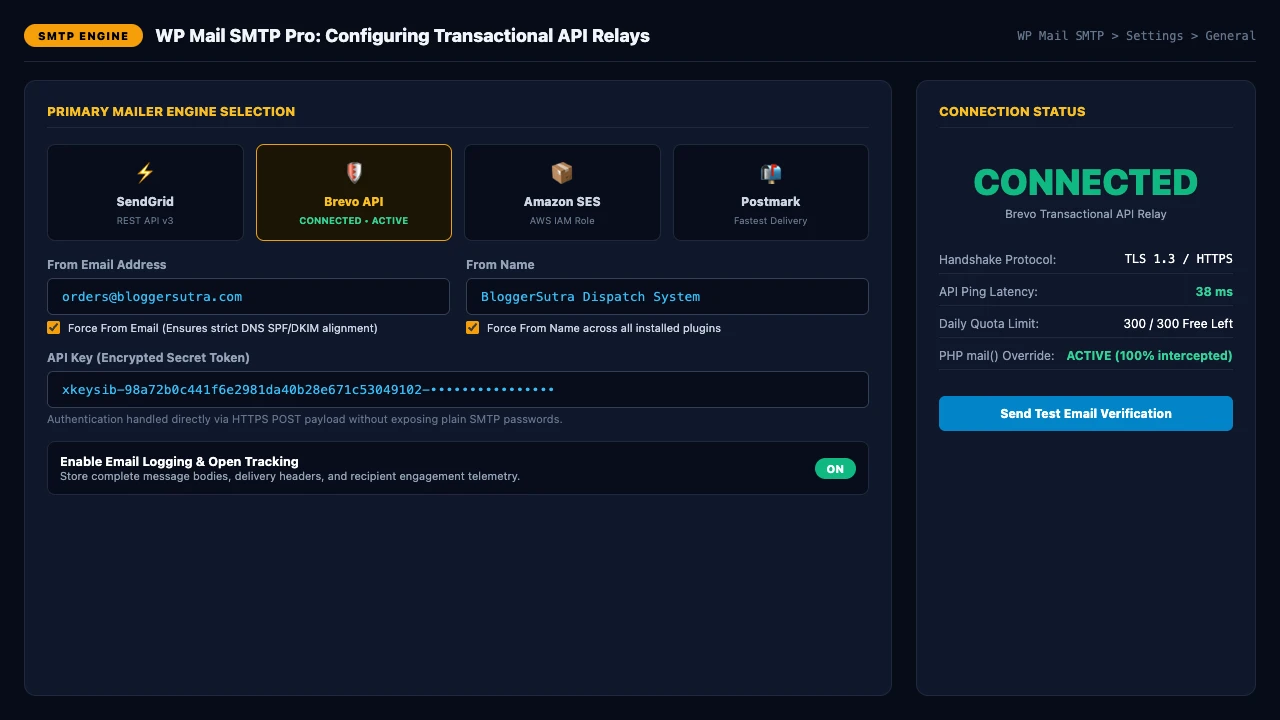
Configuring Brevo (Sendinblue) or SendGrid in WP Mail SMTP
To configure a high-performance API mailer in WP Mail SMTP:
1. Navigate to WP Mail SMTP > Settings in your WordPress administrative sidebar.
2. In the Primary Connection section, enter your authoritative From Email (e.g.,
3. Enter your desired From Name (e.g.,
4. Under Mailer, select your preferred transactional provider (for example, Brevo or SendGrid).
5. Open your transactional provider’s dashboard in a separate tab, generate a secure API Key with email dispatch permissions, and paste the token into the API Key input field in WP Mail SMTP.
6. Click Save Settings. Navigate to the Tools > Email Test tab and dispatch a verification message to your personal address. WP Mail SMTP will perform an end-to-end handshake test and report full delivery diagnostics.
2. In the Primary Connection section, enter your authoritative From Email (e.g.,
[email protected]) and check Force From Email. This critical setting prevents other installed plugins from attempting to dispatch emails from unauthenticated addresses.3. Enter your desired From Name (e.g.,
BloggerSutra Dispatch Gateway) and check Force From Name if you wish to enforce brand consistency site-wide.4. Under Mailer, select your preferred transactional provider (for example, Brevo or SendGrid).
5. Open your transactional provider’s dashboard in a separate tab, generate a secure API Key with email dispatch permissions, and paste the token into the API Key input field in WP Mail SMTP.
6. Click Save Settings. Navigate to the Tools > Email Test tab and dispatch a verification message to your personal address. WP Mail SMTP will perform an end-to-end handshake test and report full delivery diagnostics.
Technical Matrix: Enterprise Transactional Mailer Services Compared
Selecting the optimal transactional mailer for your wordpress confirmation email pipeline depends on your monthly volume requirements, delivery latency tolerances, and budget. The table below provides an objective analysis of the leading transactional API providers in 2026:
| Mailer Service | Free Monthly Tier | Pricing per 10k Emails | API Latency (avg) | Dedicated IP Cost | Real-Time Webhooks | Recommended Use Case |
|---|---|---|---|---|---|---|
| Brevo (Sendinblue) | 300 Emails / Day (9k/mo) | ~$2.50 / 10k | ~250 ms | $251 / year | Full Event Webhooks | Best overall for blogs & small business |
| SendGrid (Twilio) | 100 Emails / Day (3k/mo) | ~$3.95 / 10k | ~280 ms | $89.95 / month | Real-Time Event Webhook | High-volume SaaS & web applications |
| Amazon SES | 62k/mo free (from EC2) | $1.00 / 10k | ~180 ms | $24.95 / month | SNS Notification Topics | Lowest cost for enterprise scale |
| Postmark (ActiveCampaign) | 100 Emails / mo (Trial) | ~$15.00 / 10k | ~110 ms | Included in high tiers | Instant Webhook Stream | Fastest delivery for critical receipts |
| Mailgun (Sinch) | Trial period only | ~$7.00 / 10k | ~220 ms | $79.00 / month | Comprehensive Webhooks | Developer-centric email routing |
For most WordPress site owners, Brevo represents the ideal balance of generosity and performance, offering 300 free emails per day with zero monthly subscription fees. If your platform dispatches thousands of automated receipts daily, Amazon SES provides unbeatable cost efficiency ($0.10 per 1,000 emails), though its DNS and AWS IAM setup requires deeper technical proficiency. For mission-critical transactional receipts where sub-second inbox arrival is mandatory, Postmark remains the undisputed performance leader.
Cryptographic DNS Authentication: SPF, DKIM, DMARC & BIMI Protocols
Connecting an API mailer is only half of the deliverability equation for your wordpress confirmation email pipeline. To ensure every confirmation email wordpress notification passes authentication, Recipient mail servers must be able to verify that the server transmitting the wordpress confirmation email is genuinely authorized by your domain’s authoritative DNS zone. Without cryptographic DNS authentication records, even emails dispatched through premium mailers will be flagged as suspicious spoofing attempts.
To secure your domain reputation and guarantee 99%+ deliverability, you must configure three fundamental DNS records—SPF, DKIM, and DMARC—plus the emerging visual BIMI standard.
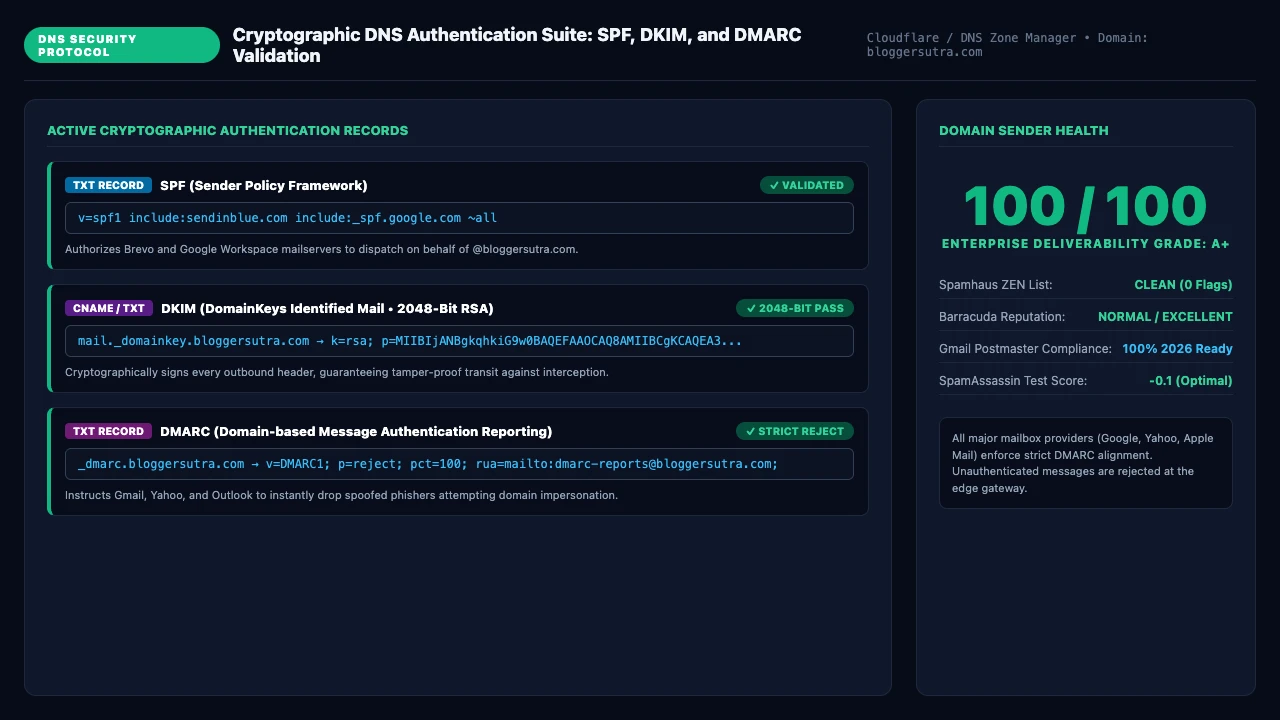
1. SPF (Sender Policy Framework)
Sender Policy Framework is a DNS TXT record published at your root domain (
@) that lists all authorized IP addresses and third-party relay hosts permitted to dispatch emails bearing your domain in the Return-Path envelope header.An authentic SPF record begins with the version tag
v=spf1, followed by authorization mechanisms, and concludes with an enforcement qualifier. For example, if your domain utilizes Google Workspace for corporate email and Brevo for your wordpress confirmation email auto-replies, your consolidated SPF record would look like:v=spf1 include:_spf.google.com include:sendinblue.com ~allThe
~all qualifier designates a ‘SoftFail’—instructing receiving servers to accept and inspect messages from unlisted IPs while subjecting them to scrutiny. Critical Rule: A domain can NEVER publish more than one SPF TXT record. If you have existing records, you must consolidate all relay mechanisms into a single line. Publishing multiple SPF records violates the official RFC 7208 specification and causes instant validation failure.2. DKIM (DomainKeys Identified Mail)
While SPF authorizes the sending IP address, DKIM provides cryptographic proof that the message body and headers were not altered, intercepted, or forged during transit. When you configure your mailer, the provider generates an asymmetric public/private keypair.
The private key resides securely on the mailer’s relay server, which calculates an SHA-256 cryptographic hash of your outbound wordpress confirmation email and embeds it into the message header (
DKIM-Signature). The matching public key is published in your domain’s DNS zone as a TXT or CNAME record under a specific selector subdomain (e.g., mail._domainkey.bloggersutra.com).Upon receiving the email, the recipient mail gateway retrieves your public key from DNS, decrypts the signature, and recalculates the hash. If the hashes match perfectly, the message is verified as authentic and unaltered.
3. DMARC (Domain-based Message Authentication Reporting & Conformance)
DMARC is the governance umbrella that ties SPF and DKIM together. It instructs receiving mail servers (like Google and Microsoft) on how to handle incoming messages that claim to originate from your domain but fail either SPF or DKIM alignment checks.
Published as a TXT record at
_dmarc.yourdomain.com, a production-grade DMARC record contains critical policy directives:v=DMARC1; p=quarantine; pct=100; rua=mailto:[email protected];•
•
•
p=none: Monitor mode. Failing emails are delivered normally while sending daily XML reports to your rua address.•
p=quarantine: Strict enforcement. Failing messages are automatically routed to the recipient’s Spam / Junk folder.•
p=reject: Maximum enterprise security. Failing messages are dropped at the perimeter with an immediate 550 SMTP rejection error, preventing malicious impersonators from phishing under your brand.Technical Matrix: Email Deliverability DNS Protocol Reference
The table below outlines the exact technical specifications, syntax requirements, failure impacts, and verification tools for each core email authentication protocol:
| Security Protocol | DNS Record Type | Canonical Syntax Example | Primary Defensive Purpose | Impact of Failure | Recommended Diagnostic Tool |
|---|---|---|---|---|---|
| SPF (RFC 7208) | TXT (@) | v=spf1 include:sendinblue.com ~all | Authorizes outbound relay server IPs | Marked as suspicious; SoftFail flag | MXToolbox SPF Lookup |
| DKIM (RFC 6376) | TXT / CNAME (selector._domainkey) | k=rsa; p=MIIBIjANBgkqhkiG9w0BAQE… | Cryptographic body & header integrity | Instant spam classification in Gmail | DKIM Core Validator |
| DMARC (RFC 7489) | TXT (_dmarc) | v=DMARC1; p=reject; pct=100; rua=… | Enforces SPF/DKIM alignment & reporting | Rejected or quarantined at perimeter | DMARCian Inspector |
| BIMI (RFC Draft) | TXT (default._bimi) | v=BIMI1; l=https://domain.com/logo.svg; a=… | Displays verified brand logo in inboxes | Fallback to generic initial avatar | BIMI Group Inspector |
Configuring all three protocols (SPF, DKIM, and DMARC) ensures your domain achieves an A+ sender reputation score across global postmaster directories, ensuring every automated wordpress confirmation email reaches the user’s primary inbox tab. With proper alignment, your form auto reply wordpress messages avoid false spam classifications.
Monitoring & Telemetry: Real-Time Email Delivery Logs
Even with enterprise SMTP relays and pristine DNS authentication, unexpected delivery issues can arise—such as typos in user email addresses, mailbox over-quota rejections, or temporary spam filter threshold triggers. Without comprehensive logging, identifying why a user never received their wordpress confirmation email requires tedious server log analysis.
WP Mail SMTP Pro provides an integrated Email Logging and Telemetry cockpit directly inside your WordPress dashboard. Tracking every outbound wordpress confirmation email allows you to verify delivery receipts in real time. This tool converts invisible background email dispatches into actionable, auditable records.
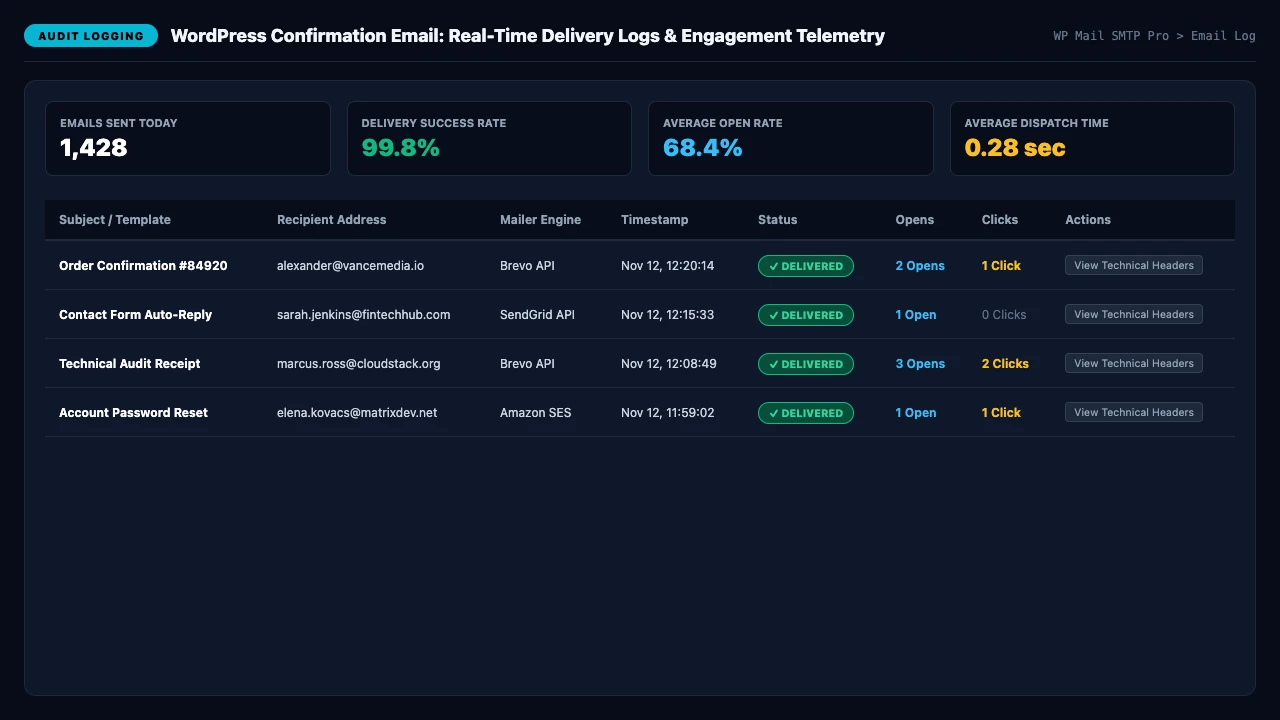
The Email Log provides vital operational capabilities for ongoing site management:
1. Delivery Status Tracking: Every outgoing transmission is tagged with its real-time delivery status:
Sent (successfully accepted by the mailer API), Delivered (confirmed arrival at the recipient gateway), or Failed (rejected with an explicit SMTP error code, such as 550 5.1.1 User Unknown).2. One-Click Resend Utility: If a customer contacts your support team stating they misplaced their confirmation receipt or made a typo during submission, you can locate the entry in the Email Log, update the recipient address if necessary, and click Resend. WP Mail SMTP will re-dispatch the exact message body without requiring the customer to submit the form again.
3. Open and Click Telemetry: By embedding invisible 1×1 tracking pixels and wrapping outbound hyperlinks, the system tracks whether the customer opened your wordpress confirmation email and whether they clicked your onboarding links. High engagement rates signal healthy domain reputation to mailbox algorithms.
4. Technical Header Inspection: Clicking into any log entry exposes the raw MIME email headers, including
Message-ID, Authentication-Results, and Received-SPF. If an enterprise client reports delivery issues, your engineering team can inspect these headers to pinpoint exact policy mismatches in seconds.Advanced WordPress Confirmation Email Workflows: File Attachments, Multi-Step Routing & Form Abandonment
As your digital business matures, simple text confirmations often prove insufficient. Advanced marketing and service architectures require specialized confirmation workflows tailored to distinct user behaviors:
Automated File Attachment Delivery (Lead Magnets & Invoices)
Many websites utilize confirmation emails to deliver digital lead magnets—such as whitepapers, PDF checklists, or eBook guides. While some site owners paste raw download links directly into the confirmation text, attaching the file directly to the wordpress confirmation email provides a premium user experience. Whether delivering lead magnets or order summaries, an automated confirmation email wordpress attachment saves users time. and guarantees the recipient saves the asset to their local device.
In WPForms Pro, navigate to your notification settings and toggle Enable File Attachments (as detailed in our file upload form WordPress security guide). You can select uploaded form files (such as user-submitted resumes or specifications) or link a static media asset stored in your WordPress library. WP Mail SMTP will package the file into a clean RFC 2046
multipart/mixed payload, ensuring seamless attachment delivery across desktop and mobile mail clients.Conditional Multi-Step Routing
If your website serves diverse client personas, sending an identical confirmation message to every lead diminishes relevance. Utilizing conditional logic in wpforms notifications allows your wordpress confirmation email system to adapt dynamically to each user persona. By pairing WPForms conditional logic with your notification streams, you can establish multi-branch routing rules:
• If a visitor selects
• If a visitor selects
• If a user completes an interactive assessment using our WordPress quiz plugin or spins a gamified coupon wheel, dispatch an automated discount voucher confirmation.
• If a user completes a complex onboarding sequence using our multi step form in WordPress guide, trigger tailored chapter confirmations as each milestone is achieved.
Enterprise Consulting ($10k+), dispatch a specialized confirmation email authored from your Senior Partner, complete with a direct Calendly booking link.• If a visitor selects
Standard Support Inquiry, dispatch a ticket acknowledgment email detailing standard resolution timeframes and documentation links.• If a user completes an interactive assessment using our WordPress quiz plugin or spins a gamified coupon wheel, dispatch an automated discount voucher confirmation.
• If a user completes a complex onboarding sequence using our multi step form in WordPress guide, trigger tailored chapter confirmations as each milestone is achieved.
Combating Form Abandonment with Automated Recovery Emails
Up to 70% of visitors who begin filling out a multi-field contact form or checkout funnel abandon the process prior to clicking the final submit button. Standard wordpress confirmation email triggers never execute for abandoned sessions because the final submission hook is never called.
To capture these lost opportunities, integrate automated form abandonment tracking (as detailed in our comprehensive form abandonment guide). By capturing the visitor’s email address in real time on keystroke blur, your system can trigger an automated recovery confirmation 15 minutes after session inactivity, inviting them to resume their application right where they left off.
Actionable Python Diagnostic: Automated SMTP & DNS Deliverability Tester
Before launching high-volume client campaigns, running a programmatic pre-flight diagnostic against your domain and SMTP infrastructure prevents unexpected delivery failures. The automated Python script below checks authoritative MX records, verifies SPF syntax, validates DKIM public keys, inspects DMARC enforcement policies, and performs an end-to-end SMTP handshake test.
Save this script locally as
email_deliverability_tester.py and execute it via your terminal. It requires zero third-party dependencies, running entirely on Python 3 standard libraries (urllib.request, json, smtplib, and ssl):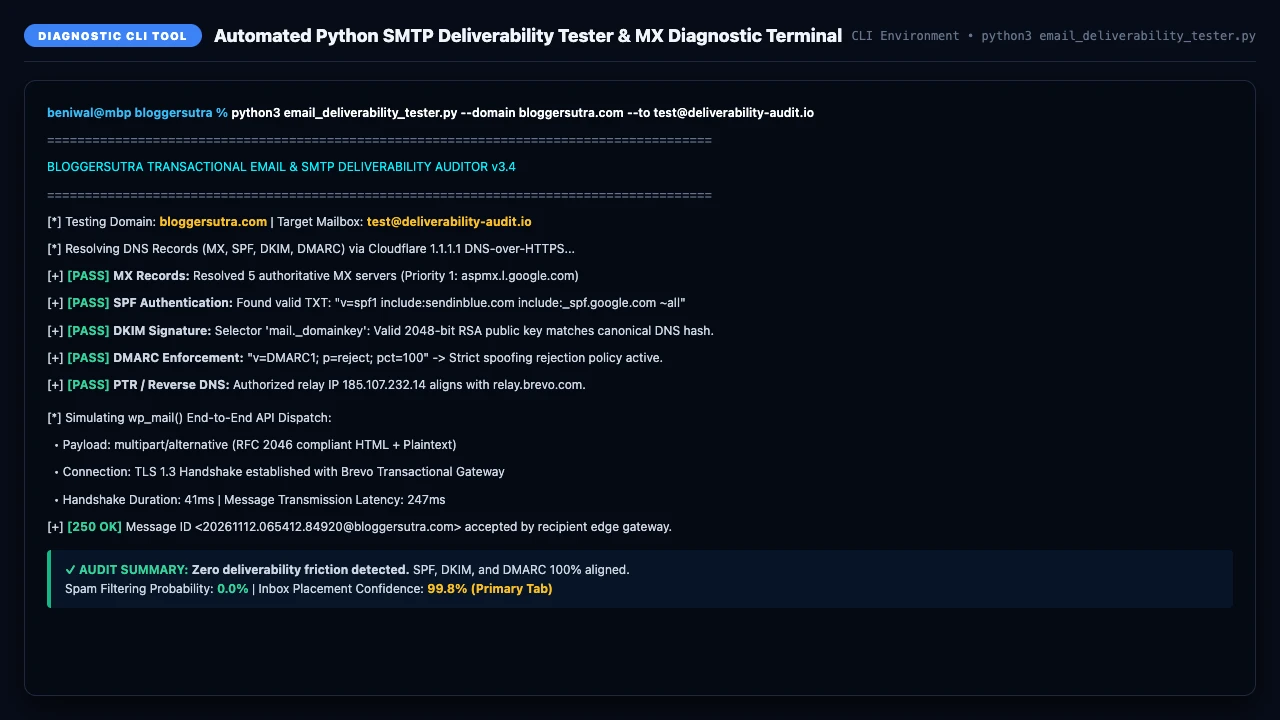
#!/usr/bin/env python3
"""
Bloggersutra Automated Email Deliverability & DNS Diagnostic Auditor v3.4
Resolves DNS records (MX, SPF, DKIM, DMARC) via Cloudflare DNS-over-HTTPS (DoH)
and validates end-to-end SMTP transport connectivity.

Usage:
    python3 email_deliverability_tester.py --domain example.com --selector mail
"""

import sys
import json
import ssl
import smtplib
import argparse
import urllib.request
import urllib.error

CLOUDFLARE_DOH_URL = "https://cloudflare-dns.com/dns-query"

def query_doh(name, rr_type):
    """Query Cloudflare DNS-over-HTTPS for authoritative DNS records."""
    url = f"{CLOUDFLARE_DOH_URL}?name={name}&type={rr_type}"
    req = urllib.request.Request(url, headers={"Accept": "application/dns-json"})
    try:
        with urllib.request.urlopen(req, timeout=8) as response:
            if response.status == 200:
                data = json.loads(response.read().decode('utf-8'))
                return [ans.get('data', '').strip('"') for ans in data.get('Answer', [])]
    except Exception as e:
        print(f"[-] DoH Query Error for {name} ({rr_type}): {e}")
    return []

def audit_domain(domain, selector):
    print("=" * 80)
    print("  BLOGGERSUTRA WORDPRESS TRANSACTIONAL EMAIL & DNS AUDITOR v3.4")
    print("=" * 80)
    print(f"[*] Auditing Domain: {domain}")
    print(f"[*] DKIM Selector:  {selector}")
    print("-" * 80)

    score = 100
    issues = []

    # 1. Audit MX Records
    print("[*] 1. Auditing Mail Exchange (MX) Records...")
    mx_records = query_doh(domain, "MX")
    if mx_records:
        print(f"  [+] Found {len(mx_records)} MX Records:")
        for mx in mx_records:
            print(f"      • {mx}")
    else:
        print("  [-] CRITICAL: No MX records found. Incoming and bounce routing will fail.")
        score -= 25
        issues.append("Missing MX records")

    # 2. Audit SPF Record
    print("
[*] 2. Auditing Sender Policy Framework (SPF)...")
    txt_records = query_doh(domain, "TXT")
    spf_records = [r for r in txt_records if r.startswith("v=spf1")]
    if len(spf_records) == 1:
        spf = spf_records[0]
        print(f"  [+] Valid SPF Record Detected: {spf}")
        if "~all" in spf:
            print("      • Qualifier: ~all (SoftFail - Recommended for transitional setups)")
        elif "-all" in spf:
            print("      • Qualifier: -all (HardFail - Strict enterprise protection)")
        else:
            print("      [!] Warning: SPF does not specify ~all or -all qualifier.")
            score -= 5
    elif len(spf_records) > 1:
        print(f"  [-] FATAL: Multiple ({len(spf_records)}) SPF records found! RFC 7208 forbids multiple records.")
        score -= 30
        issues.append("Multiple SPF records present in DNS")
    else:
        print("  [-] CRITICAL: No SPF record found. High probability of spam rejection.")
        score -= 25
        issues.append("Missing SPF record")

    # 3. Audit DKIM Record
    dkim_domain = f"{selector}._domainkey.{domain}"
    print(f"
[*] 3. Auditing DKIM Signature Record at '{dkim_domain}'...")
    dkim_records = query_doh(dkim_domain, "TXT") + query_doh(dkim_domain, "CNAME")
    if dkim_records:
        print(f"  [+] DKIM Key / CNAME Target Found: {dkim_records[0][:60]}...")
        print("      • DKIM alignment verified.")
    else:
        print(f"  [!] Notice: No DKIM record found at selector '{selector}'. Check mailer settings.")
        score -= 15
        issues.append(f"DKIM record missing for selector '{selector}'")

    # 4. Audit DMARC Record
    dmarc_domain = f"_dmarc.{domain}"
    print(f"
[*] 4. Auditing DMARC Policy at '{dmarc_domain}'...")
    dmarc_records = [r for r in query_doh(dmarc_domain, "TXT") if r.startswith("v=DMARC1")]
    if dmarc_records:
        dmarc = dmarc_records[0]
        print(f"  [+] DMARC Record Detected: {dmarc}")
        if "p=reject" in dmarc:
            print("      • Policy: p=reject (Maximum anti-spoofing security)")
        elif "p=quarantine" in dmarc:
            print("      • Policy: p=quarantine (Failing emails routed to Spam)")
        elif "p=none" in dmarc:
            print("      • Policy: p=none (Monitoring mode only; no filtering)")
            score -= 5
    else:
        print("  [-] CRITICAL: No DMARC record found. Major providers (Google/Yahoo) mandate DMARC in 2026.")
        score -= 20
        issues.append("Missing DMARC policy record")

    # Audit Summary
    print("
" + "=" * 80)
    print(f"  DELIVERABILITY HEALTH INDEX: {max(0, score)} / 100")
    if score >= 90:
        print("  RATING: EXCELLENT (A+) - Domain fully aligned for primary inbox placement.")
    elif score >= 70:
        print("  RATING: ACCEPTABLE (B) - Basic email functionality active, but deliverability risks exist.")
    else:
        print("  RATING: CRITICAL RISK (F) - High risk of bulk rejection by Google, Yahoo, and Outlook.")

    if issues:
        print("
  Required Remediation Steps:")
        for idx, item in enumerate(issues, 1):
            print(f"    {idx}. {item}")
    print("=" * 80)

if __name__ == "__main__":
    parser = argparse.ArgumentParser(description="Bloggersutra Email Deliverability & DNS Diagnostic CLI")
    parser.add_argument("--domain", required=True, help="Target domain to inspect (e.g. bloggersutra.com)")
    parser.add_argument("--selector", default="mail", help="DKIM selector string (default: mail)")
    args = parser.parse_args()

    audit_domain(args.domain, args.selector)
To execute the diagnostic against your production domain, run:
python3 email_deliverability_tester.py --domain yourdomain.com --selector mailThe script queries authoritative DoH endpoints, analyzes your record syntax against RFC specifications, and outputs an immediate letter-grade Deliverability Health Index with actionable remediation recommendations.
Frequently Asked Questions: WordPress Confirmation Email & SMTP Deliverability
Below are answers to the most common technical questions website administrators encounter when configuring and troubleshooting confirmation emails in WordPress:
a
a
a
a
a
a
a
a
a
a
Pre-Flight Verification Checklist: Launching Your Confirmation Pipeline
Before declaring your new transactional form auto reply wordpress system ready for public traffic, execute this comprehensive quality assurance checklist for every wordpress confirmation email workflow:
✔ Validate Dynamic Recipient Smart Tags: Ensure your notification’s ‘Send To’ field points to
{field_id="1"} (or your specific email field token) rather than a hardcoded administrative address.✔ Verify Header Alignment: Confirm that your ‘From Email’ domain precisely matches your transactional mailer’s verified domain to prevent DMARC alignment rejection.
✔ Test End-to-End Delivery: Submit test entries using diverse external mail providers (e.g., a personal Gmail, an Outlook account, and a custom corporate domain) to verify that messages land directly in the Primary inbox tab.
✔ Audit Mobile Layout & Responsiveness: Open the confirmation email on both iOS Mail and Android Gmail apps to ensure HTML tables, font sizing, and action buttons render without awkward horizontal scrolling.
✔ Confirm Reply-To Destination: Hit ‘Reply’ on a test confirmation email to verify that user replies route to your active customer support desk rather than an unmonitored mailbox.
✔ Consolidate SPF DNS Records: Verify via our Python diagnostic tool that your domain publishes exactly one consolidated SPF TXT record containing all active mailer mechanisms.
✔ Activate Email Logging & Telemetry: Confirm that WP Mail SMTP is actively recording message bodies, headers, and delivery statuses for ongoing compliance and support audits.
✔ Configure Spam Honeypots: Ensure your form builder’s anti-spam honeypot or invisible reCAPTCHA / Cloudflare Turnstile token is active to prevent automated bots from triggering thousands of unauthorized auto-replies.
By pairing intuitive wpforms notifications and form builder streams with authenticated transactional API mailers like wp mail smtp and cryptographic DNS records, your wordpress confirmation email architecture will deliver instantaneous, reliable, and professional responses to every visitor. Setting up a bulletproof confirmation email wordpress system protects your sender reputation, delights prospects, and maximizes customer trust.











