





- The Fastest Path to Launch: To start a professional blog in 2026, register a custom domain and reliable web hosting (and learn how to connect domain to hosting) (see how to choose web hosting) through Hostinger ($2.49/mo) or Bluehost ($2.99/mo). Both include a free domain for year one, 1-click self-hosted WordPress installation, and free Let’s Encrypt SSL certificates.
- Realistic Year 1 Cost: Starting a self-hosted WordPress blog costs between $35 and $65 for your entire first year. You do not need expensive commercial themes (learn how to choose a WordPress theme and how to install a WordPress theme) or plugins; free tools like Astra, Rank Math, and WPForms handle every essential requirement (explore our curated directory of the best blogging tools).
- Platform Recommendation: Choose self-hosted WordPress.org over closed platforms like WordPress.com, Wix, Medium, or Substack. WordPress.org gives you 100% legal ownership of your content, files, database, and ad revenue with zero platform risk or arbitrary account bans.
- Timeline to Monetization (learn how to display ads in specific posts): Most focused blogs publish their first 30 quality posts within 90 days, discovering how to increase page views to multiply initial search traffic and product comparison website revenue, AdSense approval, and high-yield AdSense alternatives (as detailed in our guide on how to make money blogging) between months 3 and 6, scaling to sustainable four-figure monthly income within 12 to 18 months.
- Key First-Year Priority: Build your email subscriber list from Day 1 (using a first-time comment redirect onboarding flow) using a free newsletter provider (such as MailerLite) to ensure you own your direct audience relationship independent of search algorithm shifts.
- Primary Keyword: how to start a blog
- Recommended Platform: Self-Hosted WordPress.org (Free, Open-Source)
- Recommended Hosting: Hostinger Premium ($2.49/mo) or Bluehost Basic ($2.99/mo)
- Realistic Year 1 Budget: $35 – $65 total (Domain + Hosting + Free Themes & Plugins)
- Technical Barrier: Zero coding required; 100% visual point-and-click setup
- Time to Launch: 45 to 60 minutes for initial installation and foundational configuration
- Core Lightweight Themes: Astra, Kadence, GeneratePress (All free versions available)
- Essential Free Plugins: Rank Math (SEO), LiteSpeed Cache / WP Rocket, WPForms (Contact), UpdraftPlus (Backups)
- Target Content Length: 1,500 – 3,500 words per cornerstone informational article
- Average Time to Revenue: 3 to 6 months for initial affiliate commissions; 12+ months for full-time income
Why Start a Blog in 2026? Navigating the Modern Search Era
- Complete Digital Asset Ownership: Publishing on third-party channels like Instagram, TikTok, YouTube (rather than owning your own video website with WordPress), or LinkedIn leaves you subject to algorithmic volatility, shadowbans, and policy changes. A self-hosted WordPress blog is an independent property you own 100%—including your database, files, design, and direct reader relationships.
- Evergreen Compound Traffic: Social media posts have a shelf life measured in minutes or hours. Mastering how to write a blog post ensures that each article acts as an evergreen digital asset. Once you discover how to increase blog traffic for free, your content attracts qualified organic search traffic, newsletter subscribers, and affiliate sales around the clock for years.
- Superior Monetization Margins: Unlike video creators who rely on platform ad revenue-share cuts or influencers locked into fluctuating sponsorships, bloggers can deploy diverse monetization models—high-ticket affiliate programs, private display ad networks, digital products, consulting, and memberships.
- Low Financial Barrier to Entry: Starting an offline business or physical e-commerce store requires thousands of dollars in inventory, commercial leases, and logistics. A self-hosted blog costs under $40 for your entire first year, offering an asymmetric risk-to-reward ratio unmatched by virtually any other business model.
Step 1: Choose Your Blog Niche (Passionate, Profitable & AI-Proof)
- 1. Personal Interest & Curiosity: You do not need to be a world-renowned academic on Day 1, but you must have a genuine passion or willingness to immerse yourself in the subject. You will write dozens of in-depth articles over the next 12 to 24 months; learning how to improve writing skills early prevents creator burnout and accelerates growth.
- 2. Commercial Intent & Monetization: Are individuals, businesses, or hobbyists actively spending money in this space? Are there relevant software tools, physical products, online courses, or premium services with established affiliate programs? An audience with disposable income or commercial purchase intent is vital for sustainable monetization.
- 3. Search Demand & Targetable Long-Tail Queries: Are people actively querying Google for solutions, tutorials, and comparisons in this space? Can you carve out specific sub-niches where existing competition is weak, generic, or outdated?
| High-Value Niche | Specific Sub-Niche Examples | Primary Monetization Channels | Competition Level |
|---|---|---|---|
| Personal Finance & Wealth | Budgeting for freelancers, FIRE movement, index investing, tax strategies | Affiliate banking apps, credit card partners, financial courses | High (Requires strong author credentials) |
| Technology & Web Software | WordPress tutorials, AI workflow automation, SaaS reviews, remote work tools | High-commission software affiliates, display ads, private consulting | Medium-High (High demand, lucrative bounties) |
| Health, Fitness & Nutrition | Home gym equipment, low-carb meal prep, marathon training for beginners | Supplement affiliate programs, physical gear reviews, digital fitness plans | High (Focus on personal transformation & data) |
| Food, Cooking & Recipes | Sourdough baking, gluten-free family dinners, budget meal planning | Ad networks (Mediavine/Raptive), kitchenware affiliates, digital cookbooks | Medium (High search volume, image/video driven) |
| Travel & Digital Nomadism | Solo female travel, budget backpacking Southeast Asia, RV living setups | Booking.com affiliates, travel insurance, luggage gear reviews | Medium (Visual storytelling & actionable logistics) |
| Hobbies & Crafting | Urban gardening, woodworking, home audio setups, mechanical keyboards | Amazon Associates, boutique specialty tools, sponsorship integrations | Low-Medium (Deeply passionate, loyal audiences) |
Step 2: Pick the Best Blogging Platform (Why WordPress.org Wins)
- WordPress.org (Self-Hosted): The free, open-source software powering over 43% of the web. You install it on your own web hosting account (such as Hostinger or Bluehost). You retain absolute ownership over your files, database, design themes, plugins, and ad revenue. This is the platform used by professional bloggers and digital publishers.
- WordPress.com (Hosted Service): A commercial hosting service owned by Automattic. While offering a limited free tier, you cannot install custom themes or plugins unless you upgrade to business plans costing $25+ per month (see our detailed breakdown of WordPress.com vs WordPress.org). Furthermore, lower tiers display mandatory platform ads that you do not profit from.
| Platform | Pricing Model | True Content Ownership | Custom Plugins & Themes | Monetization Freedom | Best Use Case |
|---|---|---|---|---|---|
| WordPress.org (Self-Hosted) | Free software ($2.49–$2.99/mo hosting) | 100% Full Ownership (Database & Files) | Full access (60,000+ free plugins) | Unrestricted (Ads, Affiliates, Courses, Stores) | Serious bloggers & digital businesses |
| WordPress.com (Hosted) | Free tier; $4–$45/mo paid plans | Restricted (Tied to Automattic TOS) | Only on Creator/Business plans ($25+/mo) | Heavily restricted on lower tiers | Casual hobbyists with zero technical interest |
| Medium | Free to write; $5/mo reader paywall | Zero ownership (Rented audience) | None (Rigid proprietary template) | Medium Partner Program only (Pennies/read) | Thought leadership & opinion essays |
| Substack | Free setup; 10% cut of paid subscriptions | Good (Exportable email list) | None (Strict newsletter template) | Paid subscriptions & newsletter sponsorships | Paid email newsletters & journalists |
| Wix | $17 – $36/mo paid subscriptions | Proprietary locked ecosystem | Limited proprietary app market | Allowed on paid plans (High transaction fees) | Simple local brick-and-mortar brochure sites |
Step 3: Register Your Domain Name and Web Hosting
- Domain Name: Your unique address on the web (e.g.,
bloggersutra.comoryourname.com). It is what visitors type into their browser address bar to reach your site. - Web Hosting: The physical server space where all your blog’s files, free stock photos, database records, and stylesheets reside. When someone visits your domain, your host serves those files to their browser.
How to Pick a Memorable Domain Name
- Stick With .com: While alternative extensions exist (.tech, .co, .io),
.comremains the most trusted, intuitive, and widely remembered Top-Level Domain (TLD). When readers recall your brand name, they instinctively append .com. - Keep It Short and Brandable: Aim for 2 to 3 words under 15 characters total. Avoid hyphens, numbers, or double letters (such as
best-tech-hub4u.com), which look untrustworthy and cause typos when shared verbally. - Leave Room for Expansion: Do not make your name overly narrow. For example, naming your site
bestnikerunningshoes.comrestricts your growth if you later want to review other footwear brands or broader fitness apparel. A brandable name likestridehq.comgives you unlimited freedom. - Check Trademark & Social Handles: Before finalizing your domain purchase, run a quick search on the US Patent and Trademark Office (USPTO) database and verify availability across major social platforms using tools like Namechk.
Selecting Your Web Host: Hostinger vs. Bluehost
| Feature / Specification | Hostinger (Premium Plan) | Bluehost (Basic Plan) |
|---|---|---|
| Introductory Price | $2.49/mo (48-month term) or $2.99/mo (12-month) | $2.99/mo (12-month or 36-month term) |
| Renewal Pricing | $7.99/mo | $9.99 – $11.99/mo |
| Free Domain Name | Yes, 1st year included free (.com, .net, etc.) | Yes, 1st year included free (.com, .net, etc.) |
| Web Server Architecture | LiteSpeed Enterprise Web Server (Built-in LSCache) | Apache / NGINX optimized caching |
| Storage & Websites | 100 GB NVMe Storage, Up to 100 Websites | 10 GB NVMe Storage, Up to 10 Websites |
| Free SSL & Email | Unlimited Free Let’s Encrypt SSL, Free Business Email | Free Let’s Encrypt SSL, Email addon available |
| Control Panel | Custom hPanel (Modern, clean, intuitive) | Custom WordPress cPanel Account Dashboard |
| Customer Support | 24/7 Live Chat & Ticketing (Fast response) | 24/7 Phone Support & Live Chat |
| Money-Back Guarantee | 30-Day Full Refund Guarantee | 30-Day Full Refund Guarantee |
| Sign-up Link | Get Hostinger Deal ($2.49/mo) | Get Bluehost Deal ($2.99/mo) |
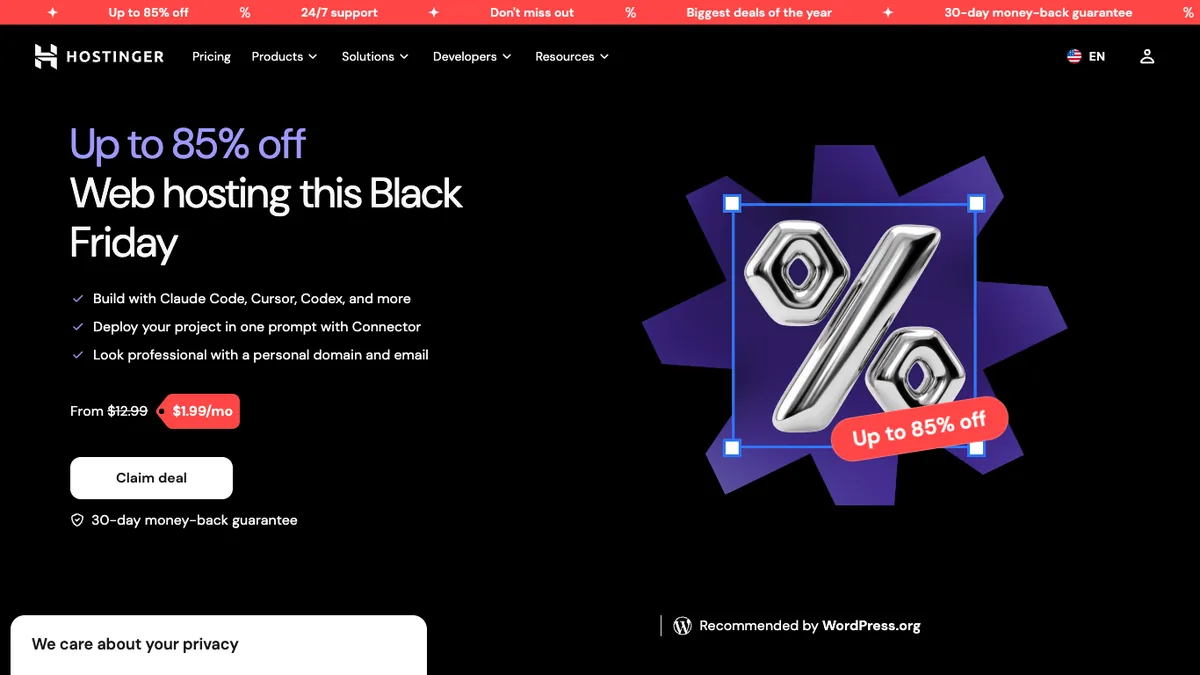
- 1. Visit Hostinger.com and click “Claim Deal” on the Premium Web Hosting plan.
- 2. Choose your billing cycle. Opting for the 48-month term locks in the ultra-low $2.49/month rate and includes 3 additional months free, protecting against renewal hikes. Alternatively, the 12-month term is available for $2.99/month.
- 3. Create your account with your email address, select your payment method (Credit Card, PayPal, Google Pay, or Crypto), and complete checkout.
- 4. During onboarding, select “Claim a Free Domain,” type your chosen
.comname, and click search to register it instantly at zero charge.
Step 4: Install WordPress and Configure Crucial Admin Settings
yourdomain.com/wp-admin/ in your browser and logging in with your credentials.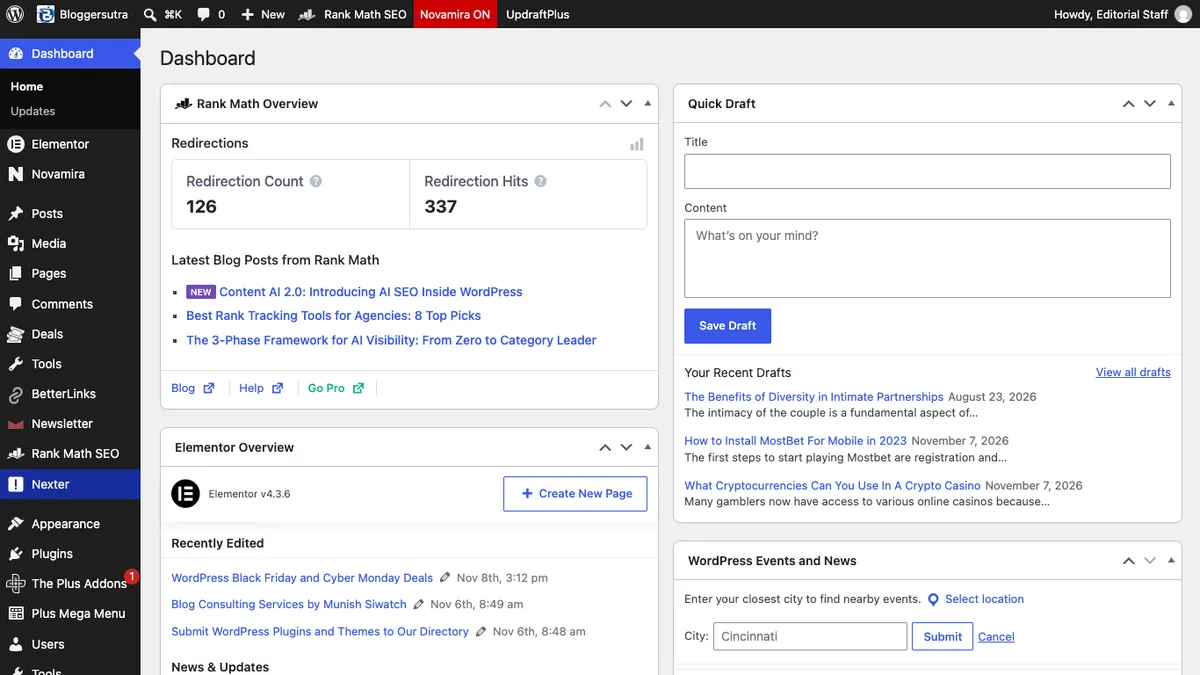
1. Set Search-Friendly WordPress Permalinks (Crucial for SEO)
yourdomain.com/?p=123. This is terrible for readers and search engines. To fix this:- Navigate to Settings → Permalinks in your WordPress dashboard.
- Under “Permalink structure,” select Post name (generating clean URLs like
yourdomain.com/sample-post/). - Click Save Changes. This ensures target keywords appear directly in your URLs.
2. Update Site Title, Tagline, and Timezone
- Site Title: Enter your official blog name (e.g., Bloggersutra).
- Tagline: Write a concise 4-to-8-word description explaining your topic (e.g., Actionable Blogging, SEO & Web Hosting Guides). Avoid generic default slogans like “Just another WordPress site.”
- WordPress Address & Site Address: Ensure both URLs start with
https://(verifying your SSL encryption is active). - Timezone: Select your local city or UTC offset so scheduled posts publish at the correct local hour.
3. Configure Discussion and Comment Moderation
- Check: “Comment author must have a previously approved comment.” This guarantees no spam link appears on your site without manual review.
- Uncheck: “Allow link notifications from other blogs (pingbacks and trackbacks).” Pingbacks are an obsolete feature exploited by scrapers.
4. Clean Up Default Placeholder Content
- Go to Posts → All Posts, hover over “Hello World!” and click Trash.
- Go to Pages → All Pages, and delete the default “Sample Page.” (Keep the “Privacy Policy” draft for Step 7).
- Go to Plugins → Installed Plugins, then deactivate and delete unneeded bundled plugins like “Hello Dolly.”
Step 5: Select a Fast, Lightweight Theme (Astra & Kadence)
- Lightweight Footprint: The base theme should add fewer than 50 KB of resources to your page load. Avoid multi-purpose themes that rely on heavy shortcode builders.
- Native Block Editor Compatibility: Choose a theme built to integrate with the modern Gutenberg Block Editor, eliminating the need for slow third-party drag-and-drop builders.
- Flawless Mobile Responsiveness: Over 65% of web traffic originates from mobile devices. Your theme must adapt cleanly to tablet and smartphone screens with touch-friendly navigation.
- Accessibility and Schema Markup: Look for themes that include clean semantic HTML5 markup and built-in microdata schema to help search engines parse your site hierarchy.
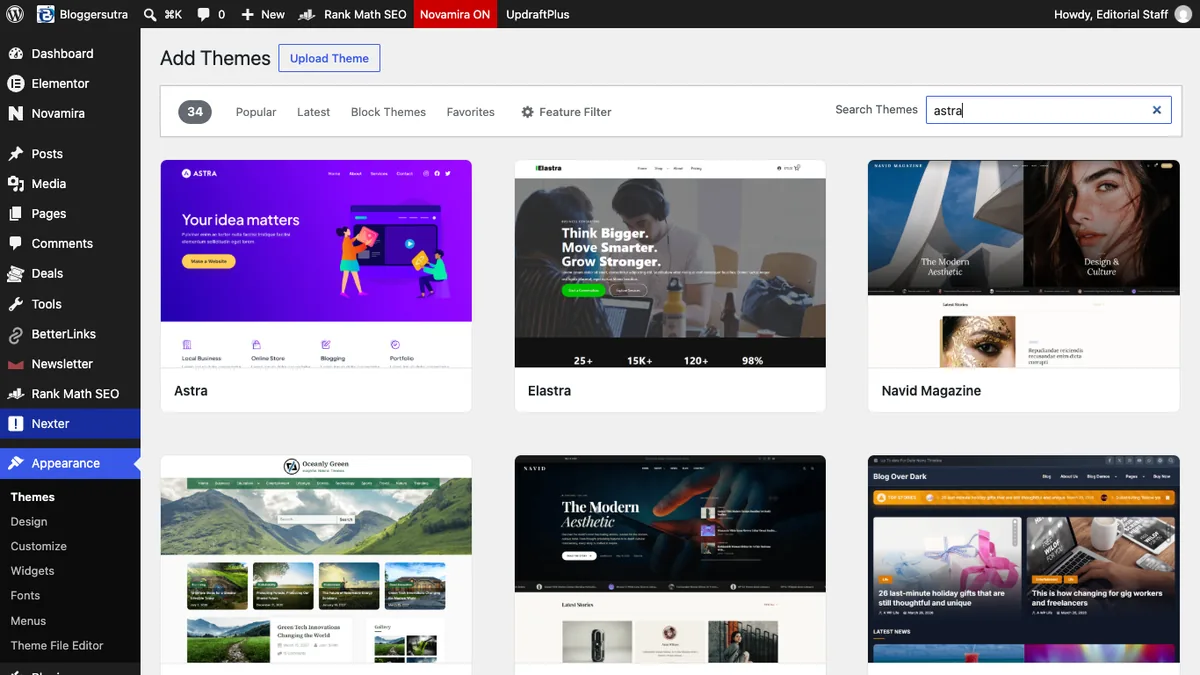
The Top 3 Lightweight Themes for Bloggers
- 1. Astra Theme (Recommended): With over 1.6 million active installations and a 5-star rating, Astra is the gold standard for lightweight WordPress themes. It weighs under 50 KB on the front end, loads in less than 0.5 seconds, and offers dozens of one-click starter templates tailored for bloggers. (Explore our complete roundup of the best WordPress themes).
- 2. Kadence Theme: Kadence is a modern, ultra-fast theme featuring an intuitive drag-and-drop header and footer builder, global color palettes, and deep integration with Kadence Blocks.
- 3. GeneratePress: Engineered with a relentless focus on clean code, GeneratePress adds less than 10 KB to a page. It is a favorite among professional SEOs who demand pristine codebase efficiency.
Step 6: Install Essential WordPress Plugins (SEO, Security & Speed)
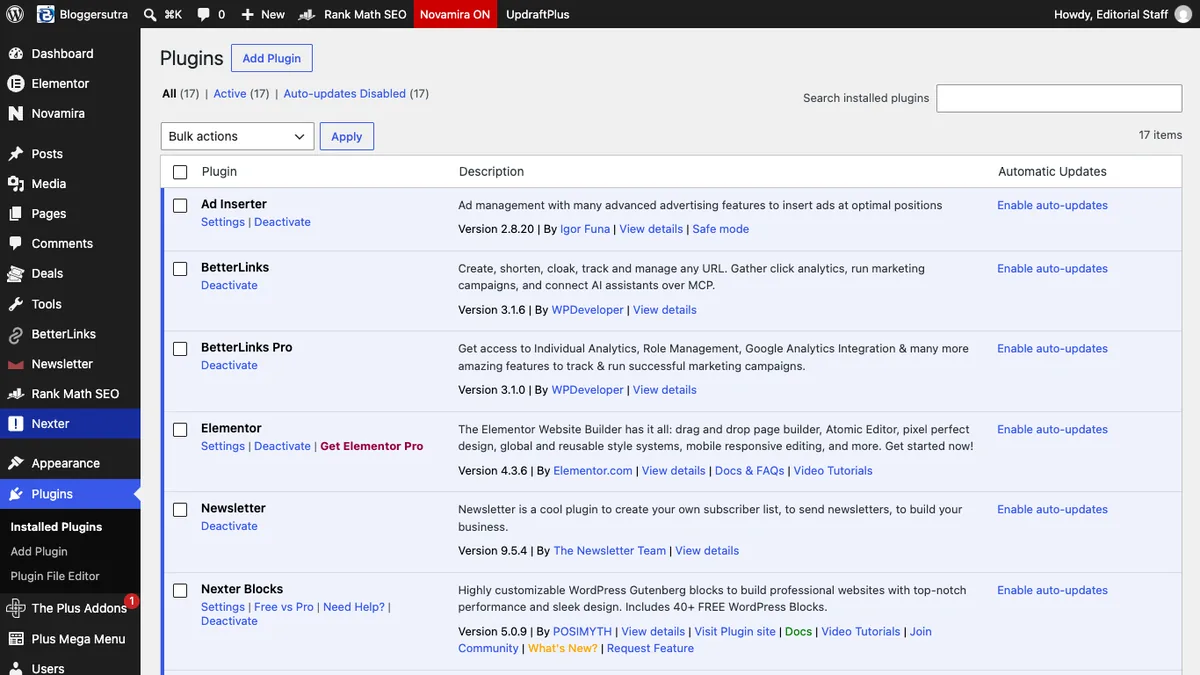
1. Search Engine Optimization (SEO): Rank Math
2. Performance & Speed Optimization: LiteSpeed Cache or WP Rocket
3. Contact Form Builder: WPForms
4. Automated Cloud Backups: UpdraftPlus
5. Site Security & Hardening: Wordfence or Solid Security
Step 7: Create Crucial Legal & Structural Pages
- 1. About Page (/about/): Your About page is often the second most visited page on a new blog. Introduce yourself, explain your personal background and hands-on experience in the niche, outline the specific problems your blog solves, and include a clear headshot or team photo to build authentic human connection.
- 2. Contact Page (/contact/): Make it effortless for readers, prospective sponsors, freelance clients, and PR agencies to reach you. Embed your WPForms contact form alongside social profile links and expected response times (e.g., “We reply within 24 to 48 hours”).
- 3. Privacy Policy (/privacy-policy/): A legal requirement under global data protection regulations (including GDPR, CCPA, and CalOPPA). This document discloses what information your site collects (cookies, analytics tracking, newsletter emails, ad pixels) and how that data is stored. WordPress provides a built-in privacy policy template under Settings → Privacy.
- 4. Terms of Service (/terms/): Outlines the legal rules for using your website, disclaims liability for third-party external links, and protects your original intellectual property and copyrighted media.
- 5. Affiliate Disclosure & Editorial Policy (/disclosure/): If you plan to earn income through affiliate recommendations, the US Federal Trade Commission (FTC) legally requires clear and conspicuous disclosures. Explain transparently that you may earn a small referral commission at no additional cost to the reader, and state clearly that your editorial reviews remain completely unbiased.
Step 8: Write and Publish Your First High-Impact Blog Post
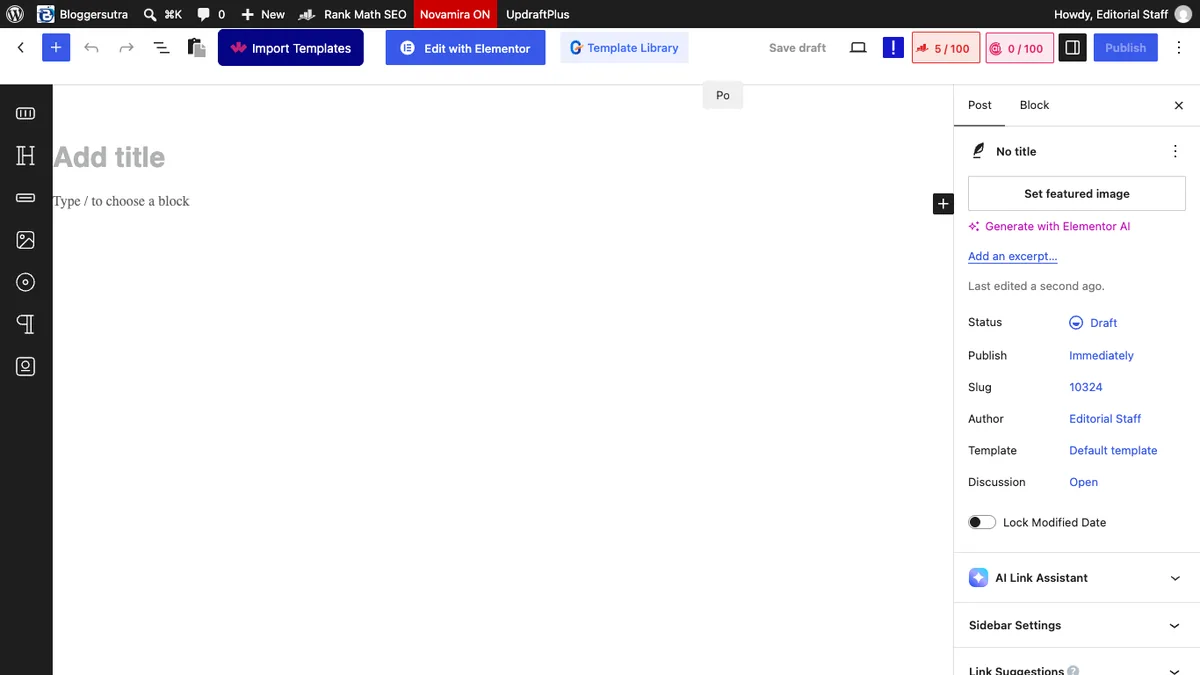
The Anatomy of a High-Ranking Blog Post
- Captivating, Keyword-Rich H1 Title: Craft a headline that clearly states your primary target keyword while teasing the core benefit (e.g., “How to Start a Blog in 2026: The Ultimate Step-by-Step Beginner’s Guide”). Aim for 50 to 60 characters so it displays cleanly in search snippets.
- Engaging Hook & Direct Answer: Hook the reader within the first two sentences. Acknowledge their problem, explain why your guide provides the solution, and deliver a concise “Quick Answer” or executive summary box before diving into background explanations.
- Clear Hierarchical Subheadings (H2, H3, H4): Break your article into bite-sized, logical sections. Web visitors scan content before reading; descriptive subheadings help readers quickly find the exact information they need.
- Visual Media & Custom Illustrations: Incorporate high-resolution screenshots, infographics, comparison tables, and callout boxes every 300 to 400 words to break up text fatigue and illustrate complex concepts visually.
- Actionable Step-by-Step Instructions: Provide concrete, unambiguous steps. Instead of telling readers to “optimize images,” specify the exact tools (TinyPNG, Squoosh), target dimensions (1200px wide), and optimal file formats (WebP under 100 KB).
- Originality & Plagiarism Verification: Never copy content from competitors or rely on unfiltered AI regurgitation. Always audit your finished drafts using trusted tools; explore our curated guide on the best plagiarism checkers for bloggers.
Publishing Your Post in WordPress
- Assign a Category: Group your post into a relevant topical category (e.g., “Blogging Tips” or “WordPress Tutorials”). Avoid leaving posts in the default “Uncategorized” bucket.
- Set a Featured Image: Upload a branded 1200×675 pixel featured image representing your post in archive feeds and social media sharing cards.
- Customize URL Slug: Ensure your permalink slug is short and includes your exact primary keyword (e.g.,
how-to-start-a-blog). - Complete Rank Math Snippet: Craft a compelling meta description (140 to 160 characters) that encourages clicks from search result pages.
- Hit Publish: Click the blue Publish button at the top right of the editor. Your first post is live on the internet! (Next, discover verified blog submission sites to syndicate your content safely).
Step 9: Launch Your Email List from Day One
How to Set Up Your Email Capture Funnel
- 1. Choose a Creator-Focused Email Provider: Start with a modern email marketing platform that offers generous free tiers for beginners. MailerLite offers a free plan for up to 1,000 subscribers and 12,000 monthly emails with intuitive visual automation builders. Kit (formerly ConvertKit) is another industry standard designed specifically for professional creators.
- 2. Create an Irresistible Lead Magnet: Offer a high-value, free digital incentive in exchange for an email address: a downloadable 1-page PDF checklist, an Excel budgeting spreadsheet, an exclusive 5-day email crash course, or a curated resource toolkit.
- 3. Embed Strategic Opt-in Forms: Place attractive sign-up forms in high-converting website locations: within post content after key tutorial steps, in a sticky sidebar widget, in your site footer, and on a dedicated landing page.
Step 10: Monetize Your Blog (5 Proven Revenue Streams)
1. Affiliate Marketing (Highest ROI for Beginners)
2. Display Advertising Networks
- Journey by Mediavine: Accessible once you reach 10,000 monthly sessions, offering substantially higher RPMs ($15 to $30+) through header bidding technology.
- Mediavine / Raptive: Premium tier networks requiring 50,000 to 100,000 monthly sessions, delivering $30 to $60+ RPMs for high-intent traffic.
3. Digital Products (E-books, Templates & Courses)
4. Freelance Services & Private Consulting
5. Sponsored Content & Brand Partnerships
The Real Cost of Starting a Blog in 2026: Transparent Year 1 Budget
| Expense Category | Essential Beginner Setup (Year 1) | Optional Premium Upgrade | Our Recommendation |
|---|---|---|---|
| Domain Name (.com) | $0 (Free 1st year with Hostinger/Bluehost) | $12 – $15/year (Namecheap/Porkbun) | Claim free domain bundled with hosting |
| Web Hosting | $29.88 – $35.88/year ($2.49–$2.99/mo) | $120 – $240/year (Managed VPS) | Start with Hostinger Premium or Bluehost |
| SSL Certificate | $0 (Included free Let’s Encrypt) | $50 – $100/year (Wildcard commercial) | Free Let’s Encrypt is 100% sufficient |
| WordPress Theme | $0 (Astra / Kadence free versions) | $59 – $79/year (Astra Pro / Kadence Pro) | Use free Astra theme until profitable |
| SEO Plugin | $0 (Rank Math free version) | $59/year (Rank Math Pro / AIOSEO) | Rank Math free includes all core essentials |
| Email Marketing | $0 (MailerLite free up to 1,000 subs) | $29/month (ConvertKit Creator plan) | Begin with MailerLite free tier |
| Contact Forms | $0 (WPForms Lite) | $49/year (WPForms Pro) | WPForms Lite handles all standard forms |
| Backup Solution | $0 (UpdraftPlus free + Google Drive) | $70/year (VaultPress / Jetpack Backup) | UpdraftPlus free to personal cloud |
| TOTAL YEAR 1 COST | $29.88 – $35.88 TOTAL | $400 – $800+ / year | Keep Year 1 budget lean and focused |
The 90-Day New Blog Launch Roadmap: From Day 0 to Consistent Traffic
| Phase & Timeline | Primary Focus Area | Key Deliverables & Action Items | Milestone Target |
|---|---|---|---|
| Month 1 (Days 1–30) | Foundational Setup & Core Architecture | Register domain & hosting; install WordPress; configure Astra theme; install Rank Math & WPForms; create About, Contact, and Privacy pages; verify site in Google Search Console | Live, fast website with 5 published cornerstone articles |
| Month 2 (Days 31–60) | Content Production & Topical Authority | Perform long-tail keyword research; publish 10 comprehensive tutorial articles (1,500–2,500 words each); set up MailerLite email capture funnel with free lead magnet; establish internal linking mesh | 15 total published articles; first organic search impressions in GSC |
| Month 3 (Days 61–90) | Optimization, Outreach & Monetization | Publish 10 additional posts (reaching 25 total); apply to beginner affiliate networks (Impact, ShareASale, Amazon); set up social distribution; audit site speed via Google PageSpeed Insights | 25–30 published articles; initial search clicks; first affiliate commissions |
Frequently Asked Questions (FAQs) About Starting a Blog
Final Verdict: Your Journey Begins Today
To establish lasting domain authority and audience trust through your publication, explore our comprehensive masterclass on brand building with blogging.
For brokerages and agents looking to build high-converting property search portals with interactive maps, explore our comprehensive benchmark of real estate WordPress themes.
Looking to launch your own peer-to-peer micro-job portal with automated escrow payments and multi-tier service pricing? Check out our complete guide to selecting the best Fiverr clone WordPress theme.
Are you a creator or filmmaker looking to showcase your video portfolio with fullscreen video headers and fast Core Web Vitals? Check out our curated benchmark of the best WordPress video themes.
Ready to build a modern, high-converting web presence with zero coding? Follow our complete step-by-step masterclass on how to design a website using WordPress.
For innovative ways to monetize your new digital venture with automation, check out our tutorial on how to make money using AI.













Hello Sir,
After reading this article, I am of the opinion that this blog post makes it easy to learn blogging and affiliate marketing. This blog post is in-depth also it is easy to understand.
Sir, I’m a bit confused about the keyword research. Can you recommend any tool for keyword research?
I think every content creator should read this article.
It’s a full value-pack article!
Thanks Again!
Hi, Thanks for your valuable comments. If you are a beginner then you can try initially with ubbsersuggest or Keyword surfer chrome plugin. But if you are looking to get into an advanced level with multiple features then you should go with SEMRush.
You can go through our in-depth SEMRush review for better decisions.
Hiii nice article keep going.
Thanks